让用户的对话历史永不丢失,即使断网、刷新页面、关掉浏览器,回来还能接着聊
你有没有遇到过这种情况:正在跟 AI 助手讨论一个复杂问题,聊了三十多轮,突然网络断了,页面一刷新,所有对话都没了?用户骂娘,你背锅。
传统聊天应用依赖后端存储,但智能体的对话往往很长、很频繁,每次切换会话都从后端拉取几十条消息,延迟高、流量大、体验差。如果能把这些对话存在用户的浏览器里,离线可用、秒开切换、还能减少后端压力,岂不美哉?
这就是 IndexedDB 的价值。
2026 年的今天,IndexedDB 已经非常成熟。几乎所有现代浏览器都支持,而且封装库(如 Dexie.js)让操作变得跟 MongoDB 一样简单。这篇文章,我会带你一步步在智能体前端中集成 IndexedDB,实现对话记录的本地存储、同步、离线可用。包含完整的代码、架构图和最佳实践。
一、为什么需要 IndexedDB,而不是 localStorage?
你可能用过 localStorage 存一些简单数据,但它有几个致命的限制:
- 容量小:通常只有 5-10MB,存几十条对话就爆了。
- 同步 API:会阻塞 UI 线程,大数据量时页面卡死。
- 只能存字符串 :结构化数据需要
JSON.stringify,读取再parse,效率低。 - 无法索引和查询:想"查询昨天所有的对话"做不到。
IndexedDB 是浏览器内置的 NoSQL 数据库:
- 容量大:通常 50MB 起步,甚至可以申请几百 MB。
- 异步 API:不阻塞 UI,适合存储大量数据。
- 支持索引:可以按时间、会话 ID 高效查询。
- 事务支持:保证数据一致性。
对于智能体前端,用户的对话历史可能积累到几百甚至上千条,每条消息又可能很长(AI 生成的报告动辄几千字)。IndexedDB 是唯一正确的选择。
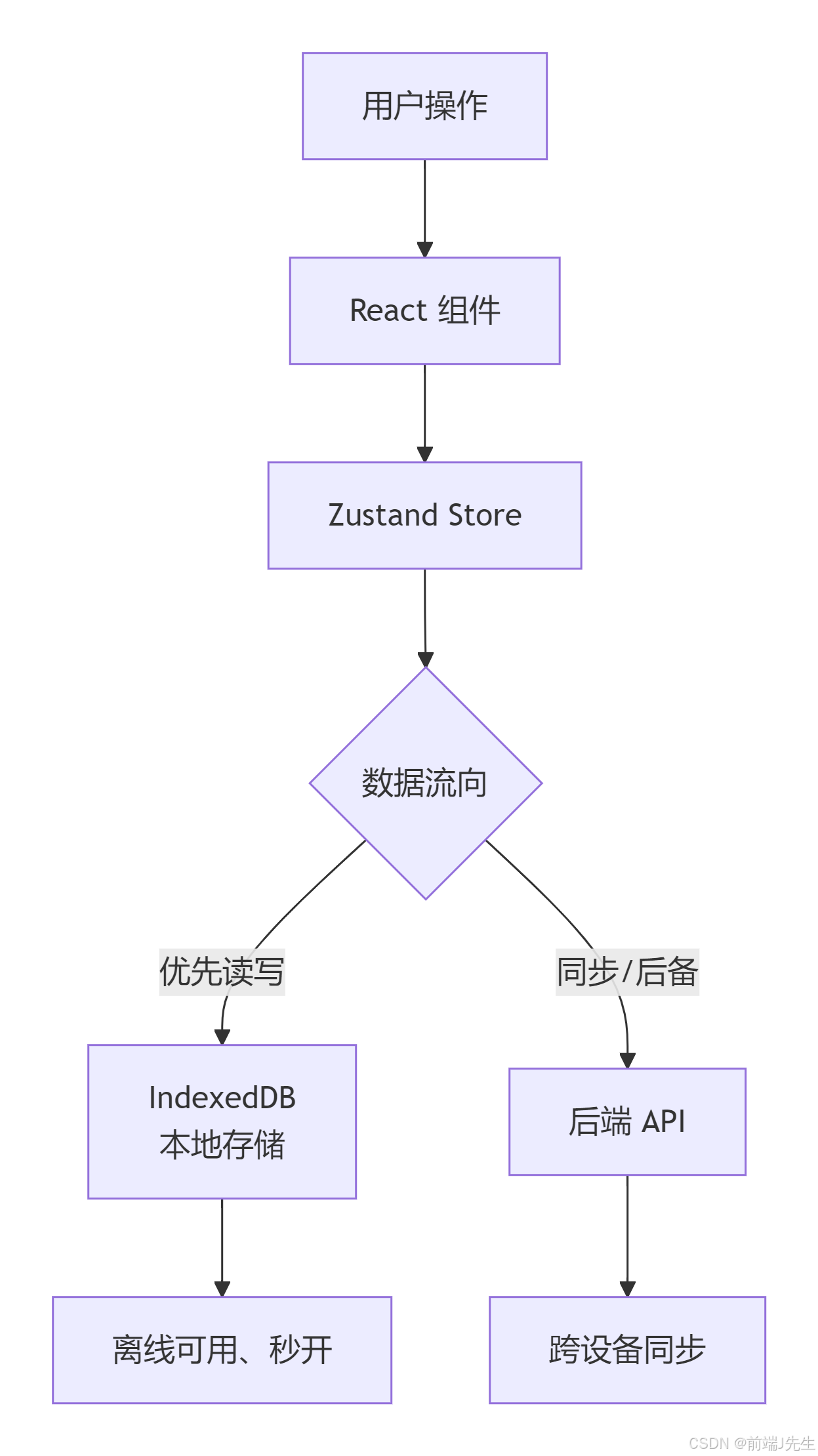
下面是 IndexedDB 在前端存储架构中的位置:
二、Dexie.js:让 IndexedDB 变得简单
原生 IndexedDB API 非常繁琐(需要打开数据库、创建事务、处理游标...)。Dexie.js 是一个封装库,提供了类似 MongoDB 的语法,TypeScript 支持完美。
bash
npm install dexie定义数据库 schema:
typescript
// lib/db.ts
import Dexie, { Table } from 'dexie';

export interface DBConversation {
  id: string;
  title: string;
  createdAt: number;
  updatedAt: number;
  messageCount: number;
  lastMessage?: string;
}

export interface DBMessage {
  id: string;
  conversationId: string;
  role: 'user' | 'assistant';
  content: string;
  timestamp: number;
  attachments?: any[]; // 可扩展
}

class AgentDatabase extends Dexie {
  conversations!: Table<DBConversation, string>;
  messages!: Table<DBMessage, string>;

  constructor() {
    super('AgentDB');
    this.version(1).stores({
      conversations: 'id, updatedAt, createdAt',
      messages: 'id, conversationId, timestamp',
    });
  }
}

export const db = new AgentDatabase();
三、封装 IndexedDB 操作服务
为了方便在 Zustand store 中调用,我们封装一个服务层:
typescript
// services/conversationService.ts
import { db } from '@/lib/db';
import { DBConversation, DBMessage } from '@/lib/db';

export const conversationService = {
  // 获取所有会话(按更新时间倒序)
  async getAllConversations(): Promise<DBConversation[]> {
    return await db.conversations.orderBy('updatedAt').reverse().toArray();
  },

  // 创建新会话
  async createConversation(conversation: DBConversation): Promise<void> {
    await db.conversations.add(conversation);
  },

  // 获取会话的所有消息
  async getMessages(conversationId: string): Promise<DBMessage[]> {
    return await db.messages.where('conversationId').equals(conversationId).sortBy('timestamp');
  },

  // 添加单条消息
  async addMessage(message: DBMessage): Promise<void> {
    await db.messages.add(message);
    // 同时更新会话的 messageCount 和 updatedAt
    await db.conversations.update(message.conversationId, {
      messageCount: (await db.messages.where('conversationId').equals(message.conversationId).count()),
      updatedAt: Date.now(),
      lastMessage: message.content.slice(0, 50),
    });
  },

  // 更新会话标题
  async updateConversationTitle(id: string, title: string): Promise<void> {
    await db.conversations.update(id, { title });
  },

  // 删除会话及其所有消息(事务)
  async deleteConversation(id: string): Promise<void> {
    await db.transaction('rw', db.conversations, db.messages, async () => {
      await db.messages.where('conversationId').equals(id).delete();
      await db.conversations.delete(id);
    });
  },

  // 同步后端数据到本地(合并策略)
  async syncFromBackend(userId: string): Promise<void> {
    const response = await fetch(`/api/conversations?userId=${userId}`);
    const remoteConvs = await response.json();
    for (const conv of remoteConvs) {
      // 如果本地没有或远端更新,则覆盖
      const local = await db.conversations.get(conv.id);
      if (!local || conv.updatedAt > local.updatedAt) {
        await db.conversations.put(conv);
        // 同步消息
        const msgsResp = await fetch(`/api/conversations/${conv.id}/messages`);
        const remoteMsgs = await msgsResp.json();
        await db.messages.bulkPut(remoteMsgs);
      }
    }
  },
};
四、集成到 Zustand Store(优先本地,异步同步)
修改之前的 conversationStore,让它先从 IndexedDB 读取,再后台与后端同步。
typescript
// stores/conversationStore.ts
import { create } from 'zustand';
import { conversationService } from '@/services/conversationService';
import { db } from '@/lib/db';

interface ConversationState {
  conversations: DBConversation[];
  currentConversationId: string | null;
  messages: DBMessage[];
  isLoading: boolean;
  isHydrated: boolean;

  // 初始化:从 IndexedDB 加载
  hydrate: () => Promise<void>;

  // 会话操作(先操作本地,再异步同步到后端)
  createConversation: () => Promise<string>;
  switchConversation: (id: string) => Promise<void>;
  deleteConversation: (id: string) => Promise<void>;
  addMessage: (message: DBMessage) => void;
  updateLastMessage: (content: string) => void;

  // 后台同步
  syncToBackend: () => Promise<void>;
}

export const useConversationStore = create<ConversationState>((set, get) => ({
  conversations: [],
  currentConversationId: null,
  messages: [],
  isLoading: false,
  isHydrated: false,

  hydrate: async () => {
    set({ isLoading: true });
    const convs = await conversationService.getAllConversations();
    // 如果有会话,默认选中最近的一个
    const currentId = convs[0]?.id || null;
    let messages: DBMessage[] = [];
    if (currentId) {
      messages = await conversationService.getMessages(currentId);
    }
    set({
      conversations: convs,
      currentConversationId: currentId,
      messages,
      isLoading: false,
      isHydrated: true,
    });
    // 后台同步远端(不阻塞UI)
    get().syncToBackend();
  },

  createConversation: async () => {
    const newId = crypto.randomUUID();
    const newConv: DBConversation = {
      id: newId,
      title: '新对话',
      createdAt: Date.now(),
      updatedAt: Date.now(),
      messageCount: 0,
    };
    await conversationService.createConversation(newConv);
    set((state) => ({
      conversations: [newConv, ...state.conversations],
      currentConversationId: newId,
      messages: [],
    }));
    // 可选:异步在后端创建
    fetch('/api/conversations', {
      method: 'POST',
      headers: { 'Content-Type': 'application/json' },
      body: JSON.stringify(newConv),
    }).catch(console.error);
    return newId;
  },

  switchConversation: async (id: string) => {
    if (id === get().currentConversationId) return;
    set({ isLoading: true });
    const messages = await conversationService.getMessages(id);
    set({
      currentConversationId: id,
      messages,
      isLoading: false,
    });
  },

  deleteConversation: async (id: string) => {
    await conversationService.deleteConversation(id);
    set((state) => {
      const newConversations = state.conversations.filter(c => c.id !== id);
      let newCurrentId = state.currentConversationId;
      if (state.currentConversationId === id) {
        newCurrentId = newConversations[0]?.id || null;
      }
      return {
        conversations: newConversations,
        currentConversationId: newCurrentId,
        messages: newCurrentId ? state.messages : [],
      };
    });
    if (get().currentConversationId) {
      await get().switchConversation(get().currentConversationId!);
    }
    // 异步通知后端删除
    fetch(`/api/conversations/${id}`, { method: 'DELETE' }).catch(console.error);
  },

  addMessage: (message) => {
    // 添加到本地 IndexedDB
    conversationService.addMessage(message).catch(console.error);
    set((state) => ({
      messages: [...state.messages, message],
    }));
    // 更新会话列表中的最后消息和计数
    set((state) => ({
      conversations: state.conversations.map(conv =>
        conv.id === message.conversationId
          ? {
              ...conv,
              lastMessage: message.content.slice(0, 50),
              updatedAt: Date.now(),
              messageCount: conv.messageCount + 1,
            }
          : conv
      ),
    }));
    // 异步发送到后端(可选)
    fetch(`/api/conversations/${message.conversationId}/messages`, {
      method: 'POST',
      body: JSON.stringify(message),
      headers: { 'Content-Type': 'application/json' },
    }).catch(console.error);
  },

  updateLastMessage: (content) => {
    // 流式输出时更新最后一条 AI 消息
    set((state) => {
      const lastIndex = state.messages.length - 1;
      if (lastIndex < 0) return state;
      const newMessages = [...state.messages];
      newMessages[lastIndex] = { ...newMessages[lastIndex], content };
      return { messages: newMessages };
    });
    // 同时更新 IndexedDB 中对应的消息
    const lastMsg = get().messages[get().messages.length - 1];
    if (lastMsg) {
      db.messages.update(lastMsg.id, { content }).catch(console.error);
    }
  },

  syncToBackend: async () => {
    // 将本地所有未同步的变更推送到后端
    // 这里简化:全量覆盖(实际可用 lastSyncTime 增量)
    const convs = get().conversations;
    for (const conv of convs) {
      await fetch(`/api/conversations/${conv.id}`, {
        method: 'PUT',
        body: JSON.stringify(conv),
        headers: { 'Content-Type': 'application/json' },
      }).catch(console.error);
    }
  },
}));
五、在 App 启动时加载 IndexedDB 数据
修改主 App.tsx,在应用挂载时调用 hydrate:
tsx
// App.tsx
import { useEffect } from 'react';
import { useConversationStore } from './stores/conversationStore';

function App() {
  const hydrate = useConversationStore(state => state.hydrate);
  const isHydrated = useConversationStore(state => state.isHydrated);

  useEffect(() => {
    hydrate();
  }, []);

  if (!isHydrated) {
    return <div className="flex items-center justify-center h-screen">加载会话中...</div>;
  }

  return <ChatInterface />;
}
六、IndexedDB 数据迁移与版本升级
当你的数据结构发生变化(比如给消息增加 attachments 字段),需要升级数据库版本。Dexie 提供了版本升级钩子:
typescript
class AgentDatabase extends Dexie {
  constructor() {
    super('AgentDB');
    this.version(1).stores({
      conversations: 'id, updatedAt, createdAt',
      messages: 'id, conversationId, timestamp',
    });
    this.version(2).stores({
      conversations: 'id, updatedAt, createdAt',
      messages: 'id, conversationId, timestamp, role', // 增加 role 索引
    }).upgrade(async (tx) => {
      // 迁移旧数据:为每条消息补充 role 字段(如果缺失)
      const messages = await tx.table('messages').toArray();
      for (const msg of messages) {
        if (!msg.role) {
          await tx.table('messages').update(msg.id, { role: 'assistant' });
        }
      }
    });
  }
}
七、限制本地存储容量与清理策略
用户可能积累几千条对话,IndexedDB 再大也有限。需要设置自动清理策略:只保留最近 100 条会话,或清理 30 天前的会话。
typescript
// services/cleanupService.ts
import { db } from '@/lib/db';

export async function cleanOldConversations(daysToKeep = 30, maxConversations = 200) {
  const cutoff = Date.now() - daysToKeep * 24 * 3600 * 1000;
  const oldConvs = await db.conversations.where('updatedAt').below(cutoff).toArray();
  for (const conv of oldConvs) {
    await db.transaction('rw', db.conversations, db.messages, async () => {
      await db.messages.where('conversationId').equals(conv.id).delete();
      await db.conversations.delete(conv.id);
    });
  }
  const allConvs = await db.conversations.orderBy('updatedAt').reverse().toArray();
  if (allConvs.length > maxConversations) {
    const toDelete = allConvs.slice(maxConversations);
    for (const conv of toDelete) {
      // 同上删除
    }
  }
}
八、离线模式支持(可选)
结合 Service Worker,你甚至可以做到完全离线使用。用户断网时,所有对话仍可正常聊天(消息存在 IndexedDB),恢复网络后再自动同步到后端。
typescript
// 在 addMessage 中检测 navigator.onLine
if (!navigator.onLine) {
  // 标记消息为"待同步"
  message.syncStatus = 'pending';
}
九、性能优化与注意事项
- 批量操作 :导入大量历史数据时使用
bulkPut,比逐条add快一个数量级。 - 索引选择 :在
messages表中对conversationId和timestamp建立复合索引,加快查询。 - 限制消息内容长度:如果 AI 回答特别长(几十万 token),考虑分块存储或提醒用户。
- 清除 IndexedDB:提供"清除所有数据"按钮,方便用户重置。
- 隐私注意:IndexedDB 数据只存在于当前浏览器,用户换设备无法访问。提示用户登录后云端备份。
十、完整架构图
下面是结合 IndexedDB 的会话管理最终架构:
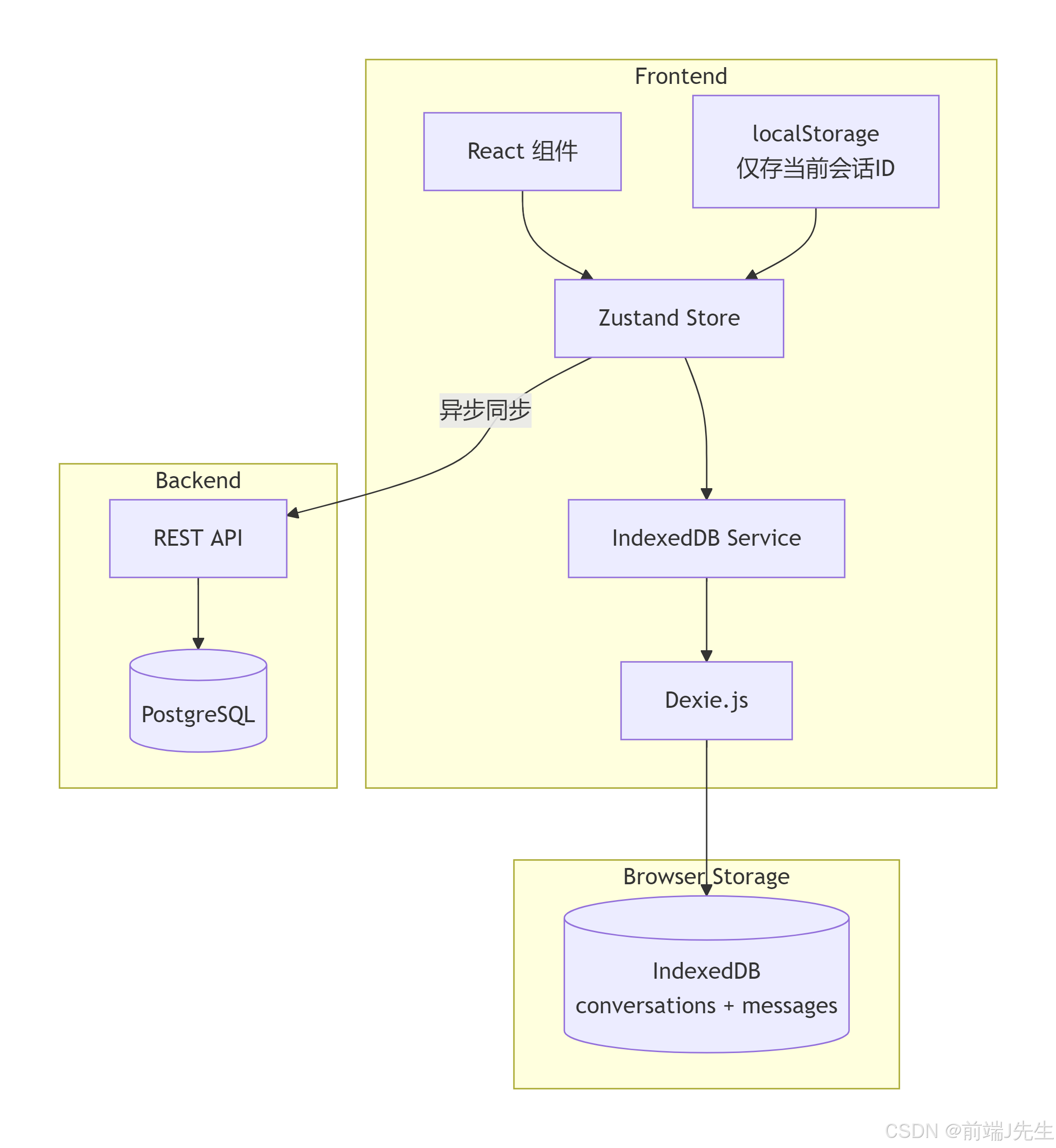
用户每次操作(新建会话、发送消息、删除会话)都先更新 IndexedDB,立即响应用户(乐观更新)。同时,后台异步将变更推送到后端,实现多端同步和备份。App 启动时从 IndexedDB 加载,速度快到用户感觉不到网络延迟。
写在最后
使用 IndexedDB 存储对话记录,最大的价值不是"技术有多酷",而是让用户在任何时候打开页面,对话都安然无恙地躺在那里。即便断网,也能继续跟 AI 交流。这种离线优先的体验,在移动端和弱网环境下尤其宝贵。