-
可以通过以下代码下载并加载模型,以
facebook/opt-6.7b为例:pythonfrom transformers import AutoModelForCausalLM, AutoTokenizer tokenizer = AutoTokenizer.from_pretrained('facebook/opt-6.7b', cache_dir='your_loaded_path') model = AutoModelForCausalLM.from_pretrained('facebook/opt-6.7b', cache_dir='your_loaded_path', device_map='your_device', load_in_8bit=True) -
如果出现以下报错,则说明是网络连接问题:无法连接到 Hugging Face 的服务器
pythonOSError: We couldn't connect to 'https://huggingface.co' to load this file, couldn't find it in the cached files and it looks like facebook/opt-6.7b is not the path to a directory containing a file named config.json. Checkout your internet connection or see how to run the library in offline mode at 'https://huggingface.co/docs/transformers/installation#offline-mode'.解决方法:只需要设置 HF mirror 就可以修复HF的网络连接问题,在终端输入以下命令
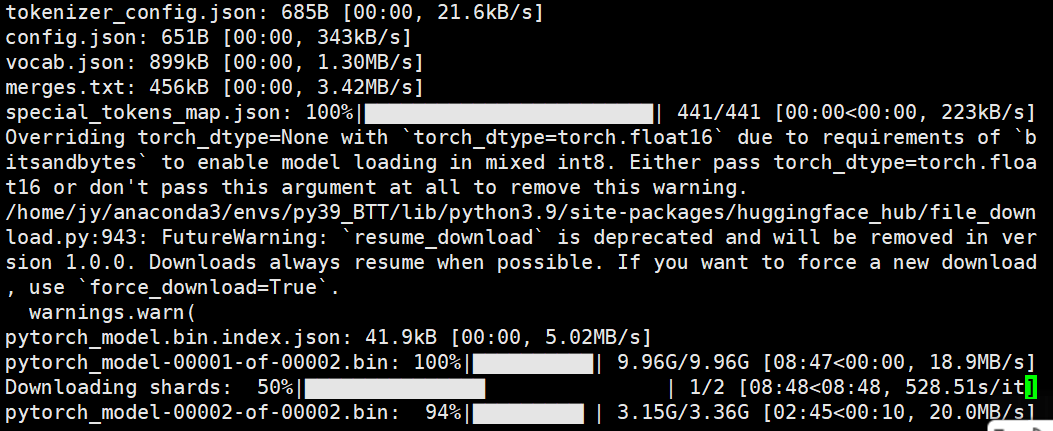
pythonexport HF_ENDPOINT=https://hf-mirror.com成功开始下载:
-
如果仅需要下载模型,且安装了 Hugging Face CLI 工具,可以使用以下命令简单快捷地下载模型ckpt到本地:
pythonhuggingface-cli download facebook/opt-6.7b --cache-dir [/本地路径] # Shell huggingface-cli download --repo-type dataset --token [你的token] --resume-download [数据集名称] --cache-dir [/本地路径] --local-dir-use-symlinks False
使用.py脚本下载并加载开源大模型LLMs
Jurio.2026-05-22 13:37
相关推荐
DeeGLMath3 小时前
optimtool最新版研究梯度优化坐吃山猪3 小时前
Python-Hermite基函数运维开发王义杰3 小时前
用 AI 编程做角色视频:Unreal、Unity 和浏览器方案怎么选?海带紫菜菠萝汤3 小时前
MemT 1.0 开源:128K 历史装进 40 MiB,记忆从外挂搬进模型里一枕槐安4873 小时前
Rerank 重排实测:BGE、Cohere、Jina 选型与 RAG 效果提升的工程账空~自由3 小时前
Python 正则 . * ? .* .*? (.*?) 通俗讲解Web3&Basketball3 小时前
DeepSeek V4.1 Flash 实测:Token 砍半、Search API 跑通墨子夕3 小时前
设计模式——Java × Python 双语言精讲 · 23 个经典模式 + 现代演进(第一篇)Linux实战笔记3 小时前
凌晨 3 点接口超时,排查发现 asyncio 协程里混用了同步 requests 库weixin_BYSJ19873 小时前
【计算机毕设】房屋租赁系统02647