Paging 3 分页加载架构全解析:从数据源到 UI 的完整链路
一句话收益 :彻底理解 Paging 3 的三层架构与响应式数据流,从此不再为"加载更多"写重复代码,也不再踩 DiffCallback 和状态管理的坑。
适用版本 :Paging 3(androidx.paging:paging-*:3.1+)、Kotlin 1.8+、Android API 21+
阅读时长:约 20 分钟
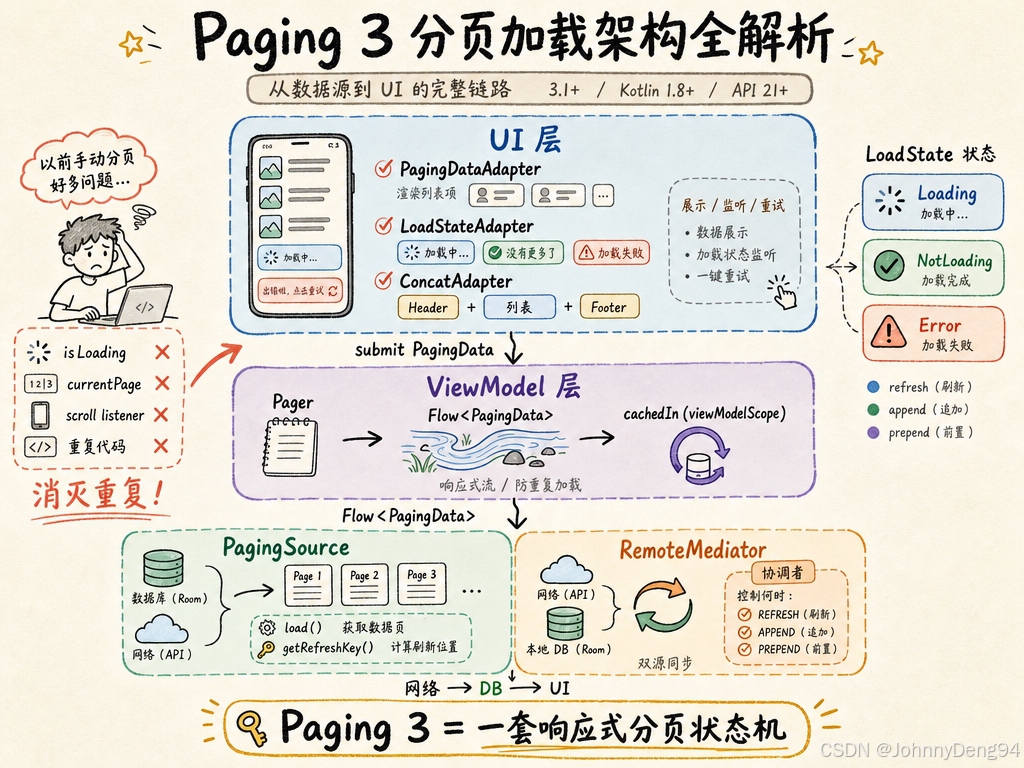
场景切入:你是不是还在手写这些?
你刚接手一个列表页需求:滚动到底部触发加载、下拉刷新、网络失败重试、同时还要从 Room 读缓存。你大概率会写出一堆 isLoading 标志位、手动管理 currentPage、RecyclerView.addOnScrollListener 里判断 lastVisibleItemPosition......
每个项目都重复一遍,出 bug 的方式还各不一样。
Paging 3 正是为了消灭这一切重复代码而生的。它把"分页"这件事抽象成了一套标准架构,让你只需要告诉框架"怎么加载数据",剩下的事情框架替你做。
一、Paging 3 三层架构总览
┌──────────────────────────────────────────────────────────┐
│                    UI 层(Fragment/Activity)              │
│  PagingDataAdapter ← LoadStateAdapter ← ConcatAdapter   │
└────────────────────────┬─────────────────────────────────┘
                         │ submit PagingData<T>
┌────────────────────────▼─────────────────────────────────┐
│                  ViewModel 层                             │
│     Pager(...).flow / cachedIn(viewModelScope)           │
└────────────────────────┬─────────────────────────────────┘
                         │ Flow<PagingData<T>>
┌────────────────────────▼─────────────────────────────────┐
│               Repository / Data 层                        │
│  PagingSource<Key, Value>  ←→  RemoteMediator<Key, Value>│
│  (纯网络 / Room 等本地存储)    (网络 + 本地双源同步)   │
└──────────────────────────────────────────────────────────┘
三层各司其职:
- Data 层 :
PagingSource负责单一数据源加载(网络或 DB),RemoteMediator负责多源协同(网络 → DB → UI)。 - ViewModel 层 :
Pager+Flow把数据源包装成响应式流,cachedIn避免旋转屏幕重新加载。 - UI 层 :
PagingDataAdapter自带DiffCallback,异步计算 diff;LoadStateAdapter展示加载/错误态。
二、PagingSource:单一数据源的标准写法
PagingSource<Key, Value> 是最核心的抽象,你只需要实现两个方法:
kotlin
class ArticlePagingSource(
    private val api: ArticleApi,
    private val query: String
) : PagingSource<Int, Article>() {

    // 关键方法1:加载数据
    override suspend fun load(params: LoadParams<Int>): LoadResult<Int, Article> {
        // params.key 为 null 表示第一页
        val page = params.key ?: 1
        // params.loadSize:本次需要加载多少条(初次加载通常是 pageSize * initialLoadSizeFactor)
        return try {
            val response = api.getArticles(query = query, page = page, size = params.loadSize)
            LoadResult.Page(
                data = response.articles,
                prevKey = if (page == 1) null else page - 1, // 第一页没有上一页
                nextKey = if (response.articles.isEmpty()) null else page + 1
            )
        } catch (e: Exception) {
            LoadResult.Error(e) // 框架会把这个错误传到 LoadState
        }
    }

    // 关键方法2:刷新时的起始 key(下拉刷新/配置变更时从哪页重新加载)
    override fun getRefreshKey(state: PagingState<Int, Article>): Int? {
        // anchorPosition 是当前可见区域中间的 item index
        return state.anchorPosition?.let { anchorPosition ->
            state.closestPageToPosition(anchorPosition)?.prevKey?.plus(1)
                ?: state.closestPageToPosition(anchorPosition)?.nextKey?.minus(1)
        }
    }
}
错误写法 → 问题 → 正确写法:
kotlin
// ❌ 错误:在 load() 里吞掉异常,返回空列表
override suspend fun load(params: LoadParams<Int>): LoadResult<Int, Article> {
    return try {
        // ...
        LoadResult.Page(data = emptyList(), prevKey = null, nextKey = null)
    } catch (e: Exception) {
        LoadResult.Page(data = emptyList(), prevKey = null, nextKey = null) // 错误!
    }
}
// 问题:UI 层拿不到错误状态,无法展示"重试"按钮,用户以为是空列表
// ✅ 正确:返回 LoadResult.Error(e),让框架统一处理错误状态
三、Pager 与 Flow:ViewModel 层的配置
kotlin
class ArticleViewModel(private val repo: ArticleRepository) : ViewModel() {

    private val currentQuery = MutableStateFlow("android")

    // flatMapLatest:query 变化时自动取消旧的分页流,创建新的
    val pagingData: Flow<PagingData<Article>> = currentQuery
        .flatMapLatest { query ->
            Pager(
                config = PagingConfig(
                    pageSize = 20,           // 每次加载的数量
                    initialLoadSize = 40,    // 第一次加载的数量(默认 pageSize * 3)
                    prefetchDistance = 5,    // 距末尾还有 5 个 item 时触发预加载
                    enablePlaceholders = false // 关闭占位符(开启需要知道总数)
                ),
                pagingSourceFactory = { ArticlePagingSource(repo.api, query) }
            ).flow
        }
        .cachedIn(viewModelScope) // 关键:缓存在 ViewModel 作用域,屏幕旋转不重新加载
}
cachedIn 的作用原理:
Flow<PagingData> 原始流
       │
       ▼
  cachedIn(scope)
       │  内部创建 SharedFlow,replay=1
       │  每次 collect 复用最近一次 PagingData
       ▼
Fragment/Activity collect → 屏幕旋转重新 collect → 立刻收到缓存的 PagingData,无需重新请求网络
错误写法 → 问题 → 正确写法:
kotlin
// ❌ 错误:在 Fragment 里直接创建 Pager
class ArticleFragment : Fragment() {
    private val pager = Pager(...).flow // 每次 Fragment 重建都会重新创建,屏幕旋转重新加载
}
// ✅ 正确:在 ViewModel 中创建并 cachedIn,Fragment 只负责 collect
四、PagingDataAdapter:UI 层的正确用法
kotlin
class ArticleAdapter : PagingDataAdapter<Article, ArticleViewHolder>(DIFF_CALLBACK) {

    override fun onCreateViewHolder(parent: ViewGroup, viewType: Int): ArticleViewHolder {
        // ...
    }

    override fun onBindViewHolder(holder: ArticleViewHolder, position: Int) {
        // getItem(position) 可能返回 null(开启 placeholder 时)
        val item = getItem(position) ?: return
        holder.bind(item)
    }

    companion object {
        private val DIFF_CALLBACK = object : DiffUtil.ItemCallback<Article>() {
            override fun areItemsTheSame(old: Article, new: Article) = old.id == new.id
            override fun areContentsTheSame(old: Article, new: Article) = old == new
        }
    }
}
在 Fragment 中收集并提交数据:
kotlin
class ArticleFragment : Fragment() {
    private val viewModel: ArticleViewModel by viewModels()
    private val adapter = ArticleAdapter()

    override fun onViewCreated(view: View, savedInstanceState: Bundle?) {
        super.onViewCreated(view, savedInstanceState)

        recyclerView.adapter = adapter

        // ✅ 使用 lifecycleScope + repeatOnLifecycle,在后台时暂停收集
        viewLifecycleOwner.lifecycleScope.launch {
            viewLifecycleOwner.lifecycle.repeatOnLifecycle(Lifecycle.State.STARTED) {
                viewModel.pagingData.collectLatest { pagingData ->
                    adapter.submitData(pagingData) // 挂起函数,会阻塞直到新数据到来
                }
            }
        }
    }
}
五、LoadState:统一管理加载状态
Paging 3 把所有状态都封装在 LoadState 中,不再需要手动维护 loading/error 变量:
LoadStates
├── refresh: LoadState   ← 刷新(首次加载 / 下拉刷新)
├── prepend: LoadState   ← 向前加载(往上滚动追加)
└── append: LoadState    ← 向后加载(往下滚动追加)

LoadState 的三种子类:
├── Loading           ← 正在加载
├── NotLoading(endOfPaginationReached: Boolean)  ← 加载完成(endOfPaginationReached 表示到达末尾)
└── Error(throwable: Throwable)                  ← 加载失败
使用 LoadStateAdapter 在列表头尾展示加载状态:
kotlin
// 1. 实现 LoadStateAdapter
class LoadingStateAdapter(
    private val retry: () -> Unit
) : LoadStateAdapter<LoadingStateAdapter.LoadStateViewHolder>() {

    override fun onCreateViewHolder(parent: ViewGroup, loadState: LoadState) =
        LoadStateViewHolder(ItemLoadStateBinding.inflate(..., parent, false), retry)

    override fun onBindViewHolder(holder: LoadStateViewHolder, loadState: LoadState) {
        holder.bind(loadState)
    }

    class LoadStateViewHolder(
        private val binding: ItemLoadStateBinding,
        retry: () -> Unit
    ) : RecyclerView.ViewHolder(binding.root) {

        init {
            binding.retryButton.setOnClickListener { retry() }
        }

        fun bind(loadState: LoadState) {
            binding.progressBar.isVisible = loadState is LoadState.Loading
            binding.retryButton.isVisible = loadState is LoadState.Error
            binding.errorMsg.isVisible = loadState is LoadState.Error
            if (loadState is LoadState.Error) {
                binding.errorMsg.text = loadState.error.message
            }
        }
    }
}

// 2. 用 ConcatAdapter 组合主列表 + 头尾状态
recyclerView.adapter = adapter.withLoadStateFooter(
    footer = LoadingStateAdapter { adapter.retry() }
)

// 3. 监听刷新状态控制顶部 ProgressBar
viewLifecycleOwner.lifecycleScope.launch {
    repeatOnLifecycle(Lifecycle.State.STARTED) {
        adapter.loadStateFlow.collect { loadStates ->
            swipeRefreshLayout.isRefreshing = loadStates.refresh is LoadState.Loading
        }
    }
}
六、RemoteMediator:网络 + 数据库双源同步
当你需要"先展示缓存、后台刷新网络"的体验时,使用 RemoteMediator:
                    ┌─────────────┐
  UI 层 ◄── Room ◄──┤ RemoteMediator ◄── Network
                    │  (协调者)  │
                    └─────────────┘
          ↑                    ↑
     PagingSource          load() 触发时机:
   (从 Room 读数据)      REFRESH / PREPEND / APPEND
kotlin
@OptIn(ExperimentalPagingApi::class)
class ArticleRemoteMediator(
    private val api: ArticleApi,
    private val db: AppDatabase
) : RemoteMediator<Int, Article>() {

    override suspend fun initialize(): InitializeAction {
        // 决定启动时是否强制刷新(可以根据缓存时效判断)
        return if (db.articleDao().count() == 0) {
            InitializeAction.LAUNCH_INITIAL_REFRESH
        } else {
            InitializeAction.SKIP_INITIAL_REFRESH
        }
    }

    override suspend fun load(
        loadType: LoadType, // REFRESH / PREPEND / APPEND
        state: PagingState<Int, Article>
    ): MediatorResult {
        return try {
            val page = when (loadType) {
                LoadType.REFRESH -> 1
                LoadType.PREPEND -> return MediatorResult.Success(endOfPaginationReached = true)
                LoadType.APPEND -> {
                    // 从 DB 查上次加载的最后一页的页码
                    val lastItem = state.lastItemOrNull()
                        ?: return MediatorResult.Success(endOfPaginationReached = true)
                    db.remoteKeyDao().getKey(lastItem.id)?.nextKey
                        ?: return MediatorResult.Success(endOfPaginationReached = true)
                }
            }
            val response = api.getArticles(page = page, size = state.config.pageSize)
            db.withTransaction {
                if (loadType == LoadType.REFRESH) {
                    db.articleDao().clearAll() // 刷新时清空旧数据
                    db.remoteKeyDao().clearAll()
                }
                db.remoteKeyDao().insertAll(response.articles.map {
                    RemoteKey(articleId = it.id, nextKey = if (response.hasMore) page + 1 else null)
                })
                db.articleDao().insertAll(response.articles)
            }
            MediatorResult.Success(endOfPaginationReached = !response.hasMore)
        } catch (e: Exception) {
            MediatorResult.Error(e)
        }
    }
}配合使用时,Pager 需同时指定 remoteMediator 和从 Room 读数据的 pagingSourceFactory:
kotlin
Pager(
    config = PagingConfig(pageSize = 20),
    remoteMediator = ArticleRemoteMediator(api, db),
    pagingSourceFactory = { db.articleDao().pagingSource() } // Room 自动生成
).flow.cachedIn(viewModelScope)
七、最佳实践
1. 总是使用 cachedIn(viewModelScope)
做法:在 ViewModel 的 Flow<PagingData> 上调用 cachedIn(viewModelScope)。
原因:Paging 3 的 Flow 默认是冷流,每次 collect 都会重新触发 PagingSource。屏幕旋转后 Fragment 重建,若没有 cachedIn 会重新加载第一页。
对比:不用 cachedIn → 旋转屏幕后列表回到第一条、触发不必要的网络请求。
2. getRefreshKey 必须正确实现
做法:基于 state.anchorPosition + closestPageToPosition 计算刷新起始 key。
原因:这决定了配置变更(旋转/语言切换)后列表从哪里恢复,若返回 null 则永远从第一页重载。
对比:始终返回 null → 旋转屏幕后列表跳回第一页,体验极差。
3. 用 repeatOnLifecycle(STARTED) 收集 PagingData
做法:在 lifecycleScope.launch { repeatOnLifecycle(STARTED) { collect... } } 中收集。
原因:App 进入后台时暂停收集,避免无效的 UI 更新;回到前台时自动恢复。
对比:用 lifecycleScope.launch { collect... } → 后台仍持续收到数据,造成资源浪费甚至崩溃。
4. 用 collectLatest 而非 collect 收集 PagingData
做法:adapter.submitData 外层用 collectLatest。
原因:submitData 是挂起函数,collectLatest 在新数据到来时会取消旧的收集,防止多次 submitData 并发。
对比:用 collect → query 变化触发新的 PagingData 时,旧的 submitData 不会被取消,可能造成数据错乱。
5. RemoteMediator 中的数据库写入必须在事务中完成
做法:使用 db.withTransaction { ... } 包裹清空 + 写入操作。
原因:若写入过程崩溃,部分写入的数据会导致 Room 的 PagingSource 拿到不一致的数据集。
对比:不用事务 → 网络抖动或进程被杀时,本地缓存出现"空洞",展示异常数据。
八、常见坑点
坑1:submitData 之后调用 scrollToPosition(0) 但列表没有滚到顶
-
现象:刷新后调用
scrollToPosition(0),列表停留在原位或有偏移。 -
原因:
submitData是挂起函数,内部 diff 计算完成后才会更新 RecyclerView,scrollToPosition在 diff 未完成时调用无效。 -
复现:提交新数据后立即调用
scrollToPosition(0)。 -
解决:监听
adapter.loadStateFlow,在refresh is NotLoading时滚动:kotlinlaunch { adapter.loadStateFlow .distinctUntilChangedBy { it.refresh } .filter { it.refresh is LoadState.NotLoading } .collect { recyclerView.scrollToPosition(0) } }
坑2:PagingSource.invalidate() 调用后数据没有刷新
- 现象:数据库更新后调用
invalidate(),列表不更新。 - 原因:Room 自动生成的
PagingSource会在 DB 变更时自动 invalidate;若手动实现PagingSource,需要确保pagingSourceFactory每次都返回新实例,而不是复用同一个对象。 - 复现:
pagingSourceFactory = { mySingletonPagingSource }→ invalidate 后框架调用同一个失效对象,不重新加载。 - 解决:
pagingSourceFactory = { ArticlePagingSource(api, query) }每次构造新实例。
坑3:enablePlaceholders = true 但不知道总数,导致 IndexOutOfBoundsException
- 现象:开启 placeholder 后 RecyclerView 崩溃或展示空白 item。
- 原因:开启 placeholder 需要在
LoadResult.Page中指定itemsBefore和itemsAfter,框架据此预留空位;若不指定默认 0,但 Adapter 按照总数渲染会出现 OOB。 - 复现:
enablePlaceholders = true+ 不设置itemsBefore/itemsAfter+ 使用getItem(position)不判空。 - 解决:API 不返回总数时一律
enablePlaceholders = false;若开启,必须正确设置itemsBefore/itemsAfter并在onBindViewHolder中处理nullitem(显示 Skeleton)。
坑4:多个 Fragment 共享同一 ViewModel 的 PagingData 出现数据错乱
- 现象:两个 Tab 共用同一个 ViewModel,切换 Tab 时列表数据互相干扰。
- 原因:
cachedIn的 SharedFlow 是单播/多播流,多个collectLatest同时收集同一PagingData时,submitData的内部 differ 状态会被共享和覆盖。 - 复现:两个 Fragment 同时 collect 同一个
pagingDataflow 并各自 submit。 - 解决:每个 Fragment 使用独立的 ViewModel 实例(
by viewModels()而非by activityViewModels()),或为每个 Tab 提供不同的 Flow。
九、总结
- 三层架构 :
PagingSource/RemoteMediator处理数据,Pager+Flow连接 ViewModel,PagingDataAdapter+LoadStateAdapter负责展示。 cachedIn是必选项:防止配置变更重新加载,代价极低,不用没理由。LoadState统一状态 :抛弃手写isLoading变量,用框架的refresh/append/prepend三态驱动 UI。RemoteMediator适用于离线优先:网络 → 写 DB → Room PagingSource 读,UI 永远只消费 DB。- 核心结论:Paging 3 本质上是一套响应式分页状态机,一旦理解数据流向(Source → Flow → Adapter),所有 API 的设计都顺理成章。
参考资料
- 官方分页指南:https://developer.android.com/topic/libraries/architecture/paging/v3-overview
- PagingSource API 文档:https://developer.android.com/reference/kotlin/androidx/paging/PagingSource
- RemoteMediator 完整示例(GitHub Repository 示例):https://developer.android.com/topic/libraries/architecture/paging/v3-network-db
- AOSP 源码关键路径:
frameworks/support/paging/paging-runtime/src/main/java/androidx/paging/PagingDataAdapter.ktframeworks/support/paging/paging-common/src/main/kotlin/androidx/paging/PagingSource.ktframeworks/support/paging/paging-common/src/main/kotlin/androidx/paging/Pager.kt