天翼云服务器VNC与RDP失联排查过程
系统 : Windows Server 2019 数据中心版(简体中文)64 位 vGPU GRID 13.2 专用
规格 : g7.4xlarge.4 | GPU: NVIDIA A10 |
时间 : 2026年5月7日 ~ 2026年5月21日
最终状态: ✅ 已解决事件等级:P3
事件问题:公网暴露3389端口、云防火墙未交付、系统数据盘未挂载。
一、事件概述
1.1 起因
5-7日有同事离职后更改了操作系统登录密码,备份数据库,最后一次登录服务器。次日发现无法远程登录服务器,但业务系统正常运行。
1.2 问题影响
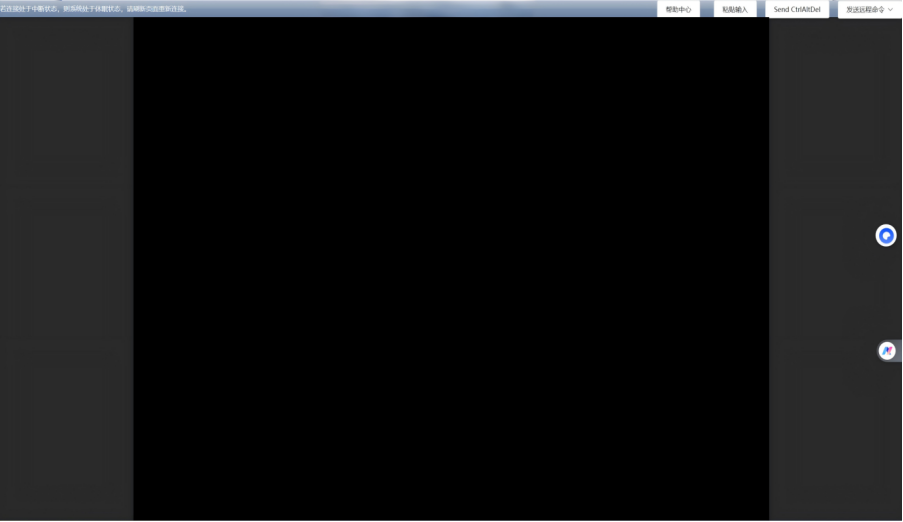
- vGPU 主机,天翼云控制台 VNC 远程登录呈黑屏状态,无法使用(天翼云vGPU主机特性,非故障)
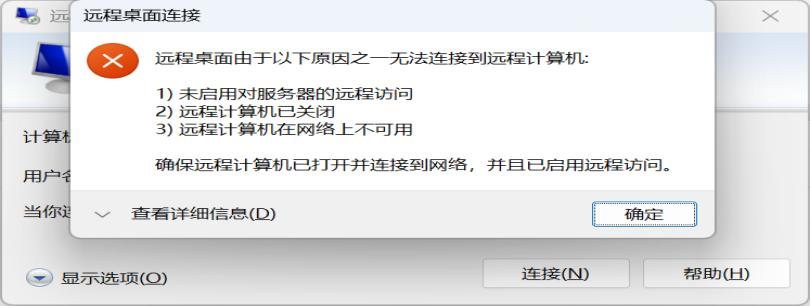
- mstsc 远程无法访问
- 服务器完全失联,无法管理
1.3 初步排查
| 操作 | 结果 |
|---|---|
| 重启和强制重启 | ❌ 无效 |
| 检查安全组端口和地址 | ❌ 无效 |
| Telnet 服务器IP:3389 | ❌ 无法连接 |
| 登录云内网服务器通过内网访问 | ❌ 无法连接 |
| Ping 服务器 | ✅ 可以通讯 |
| 业务服务 | ✅ 正常运行 |
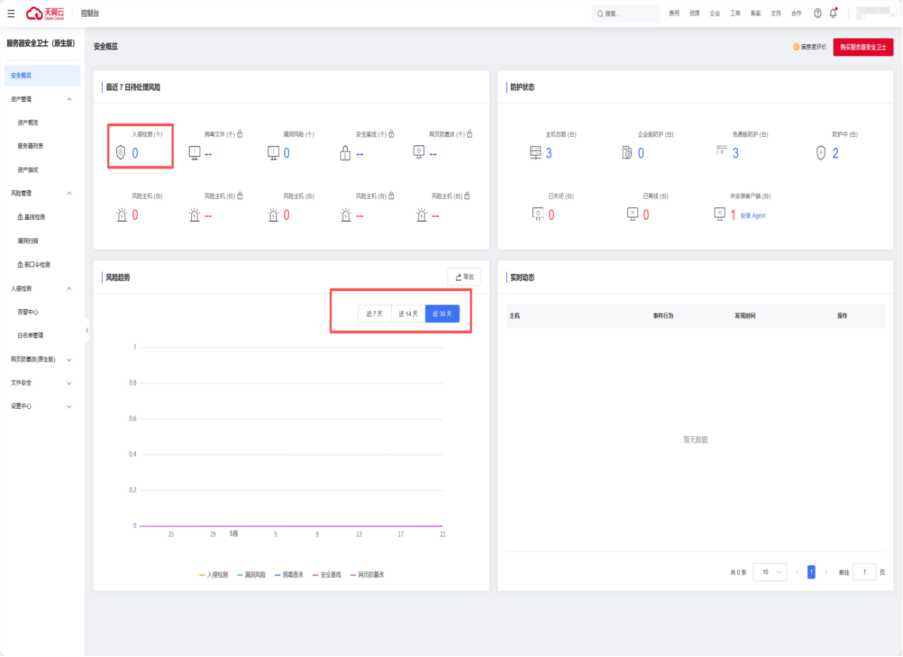
| 检查服务器安全卫士 | ✅ 正常无告警 |
2.1 RDP 远程桌面诊断
1.4 天翼云客服反馈
多次反馈后天翼云答复:需要备份数据重构系统。Windows 没有救援通道(Linux 有),提工单联系天翼云客服与研发,最终答复一致。拒绝方案,考虑安全隐患开始备份磁盘和主机。
二、排查过程
2.1 RDP 远程桌面诊断
利用天翼云后台云运维助手,创建 PowerShell 脚本在服务器中执行检查。
2.1.1 生成检测脚本
python
检测脚本命令:import json, base64
d = {
"title": "RDP全方位诊断报告",
"summary": "检测结果汇总",
"details": "详细检测结果",
"pass": "通过",
"fail": "失败",
"warn": "警告",
"info": "信息",
"computer": "计算机",
"user": "用户",
"fixTitle": "修复建议",
"explainTitle": "检查项说明",
"cat_Service": "服务",
"cat_Port": "端口",
"cat_Registry": "注册表",
"cat_Firewall": "防火墙",
"cat_Perm": "权限",
"cat_Network": "网络",
"cat_EventLog": "事件日志",
"cat_Listener": "RDP监听器",
"cat_Security": "安全设置",
"cat_Session": "会话",
"svc_running": "运行中",
"svc_notrun": "未运行",
"svc_starttype": "启动类型",
"port_listening": "监听中",
"port_notlisten": "未监听",
"reg_allowed": "RDP已允许(值为0)",
"reg_denied": "RDP被禁用(值为1)",
"reg_cannotread": "无法读取注册表",
"nla_enabled": "已启用",
"nla_disabled": "已关闭(不强制NLA)",
"fw_enabled": "已启用",
"fw_disabled": "已禁用",
"fw_norule": "未找到规则",
"fw_manual": "需检查云平台安全组",
"perm_admin": "管理员权限",
"perm_notadmin": "非管理员",
"perm_needgroup": "需要Remote Desktop Users组成员",
"evt_noerr": "近期无RDP异常",
"evt_skipped": "跳过",
"port_default": "默认3389",
"port_custom": "自定义端口",
"port_value": "端口号",
"listener_ok": "RDP监听器正常",
"listener_missing": "RDP监听器丢失",
"max_unlimited": "无限制",
"max_limited": "最大会话数",
"credssp_noconfig": "未配置(默认值0)",
"credssp_warn": "已配置(可能影响旧客户端)",
"credssp_value": "AllowEncryptionOracle值",
"sessions_current": "当前登录会话",
"group_ok": "在Remote Desktop Users组中",
"group_not": "不在Remote Desktop Users组中",
"fix_svc_title": "启用TermService:",
"fix_svc_m1": "方法1: 服务管理→Remote Desktop Services→启动",
"fix_svc_m2": "方法2: PowerShell命令:",
"fix_svc_cmd1": "Set-Service TermService -StartupType Automatic",
"fix_svc_cmd2": "Start-Service TermService",
"fix_rdp_title": "启用RDP连接:",
"fix_rdp_m1": "方法1: 系统属性→远程→允许远程桌面连接",
"fix_rdp_m2": "方法2: PowerShell命令:",
"fix_rdp_cmd": "Set-ItemProperty -Path 'HKLM:\\SYSTEM\\CurrentControlSet\\Control\\Terminal Server' -Name fDenyTSConnections -Value 0",
"fix_port_title": "端口配置:",
"fix_port_1": "RDP端口不是3389,连接时需指定端口mstsc /v:IP:端口",
"fix_port_2": "或注册表改回3389后重启服务",
"fix_fw_title": "防火墙规则:",
"fix_fw_m1": "启用RDP防火墙规则:",
"fix_fw_m2": "netsh advfirewall firewall set rule group=remote desktop new enable=yes",
"fix_nla_title": "NLA配置:",
"fix_nla_m1": "部分客户端需启用NLA,PowerShell:",
"fix_nla_m2": "Set-ItemProperty -Path 'HKLM:\\SYSTEM\\CurrentControlSet\\Control\\Terminal Server\\WinStations\\RDP-Tcp' -Name UserAuthentication -Value 1",
"fix_nla_cmd": "Set-ItemProperty -Path 'HKLM:\\SYSTEM\\CurrentControlSet\\Control\\Terminal Server\\WinStations\\RDP-Tcp' -Name UserAuthentication -Value 1",
"fix_listener_title": "修复RDP监听器:",
"fix_listener_m1": "重启TermService: Restart-Service TermService",
"fix_listener_m2": "如仍无效,检查注册表RDP-Tcp配置是否完整",
"fix_session_title": "会话数问题:",
"fix_session_m1": "用logoff命令注销空闲会话或重启服务器",
"fix_credssp_title": "CredSSP配置:",
"fix_credssp_m1": "客户端修改组策略:计算机配置→管理模板→系统→凭据分配→加密Oracle修正→启用并设为易受攻击",
"fix_credssp_m2": "或服务器端新建注册表项:",
"fix_credssp_m3": "reg add HKLM\\SOFTWARE\\Microsoft\\Windows\\CurrentVersion\\Policies\\System\\CredSSP\\Parameters /v AllowEncryptionOracle /t REG_DWORD /d 2",
"col_check": "检查项",
"col_explain": "说明",
"explain_svc": "Remote Desktop Services服务是否运行",
"explain_port": "3389端口是否在监听",
"explain_deny": "fDenyTSConnections值(0=允许,1=禁用)",
"explain_nla": "Network Level Authentication",
"explain_fw": "防火墙是否放行了RDP",
"explain_perm": "当前用户远程桌面权限",
"explain_evt": "最近RDP事件日志",
"explain_listener": "RDP-Tcp监听器状态(qwinsta)",
"explain_credssp": "CredSSP加密Oracle保护",
"explain_session": "当前服务器会话数与限制",
"status_Pass": "通过",
"status_Fail": "失败",
"status_Warning": "警告",
"status_Info": "信息",
"feishu_title": "[这里用群机器人的安全关键字] RDP全维度诊断报告"
}
b64 = base64.b64encode(json.dumps(d, ensure_ascii=False).encode('utf-8')).decode('ascii')
script = f'''# RDP v8 - Full Dimension Diagnostic
# ASCII-only (Base64 Chinese) - works on any encoding
$ReportPath = Join-Path $env:USERPROFILE 'Desktop\\RDP_Report_v8.html'
$FeishuWebhook = '这里填写群机器人的api地址'
$ErrorActionPreference = 'SilentlyContinue'
$script:results = [System.Collections.ArrayList]::new()
$script:errList = [System.Collections.ArrayList]::new()
$script:warnList = [System.Collections.ArrayList]::new()
$script:passList = [System.Collections.ArrayList]::new()
# Decode Chinese text from Base64
$b64 = '{b64}'
$T = [System.Text.Encoding]::UTF8.GetString([System.Convert]::FromBase64String($b64)) | ConvertFrom-Json
# Construct keyword via Unicode codepoints (no Base64 dependency)
$kw = [char]0x3010 + [char]0x5143 + [char]0x7D20 + [char]0x9A71 + [char]0x52A8 + [char]0x3011
# Helper
function Check {{ param($Cat,$Name,$Status,$MsgCN,$DetailCN='')
[void]$script:results.Add([PSCustomObject]@{{Category=$Cat;Test=$Name;Status=$Status;MessageCN=$MsgCN;DetailCN=$DetailCN;Time=(Get-Date).ToString('HH:mm:ss')}})
switch($Status){{\'Pass\'{{[void]$script:passList.Add("$Name : $MsgCN")}}\'Fail\'{{[void]$script:errList.Add("$Name : $MsgCN")}}\'Warning\'{{[void]$script:warnList.Add("$Name : $MsgCN")}}}} }}
Write-Host '[1/11] Service...' -ForegroundColor Cyan -NoNewline
$svc=Get-Service 'TermService' -EA SilentlyContinue
if($svc -and $svc.Status -eq 'Running'){{Check Service TermService Pass $T.svc_running "$($T.svc_starttype): $($svc.StartType)";Write-Host ' OK' -ForegroundColor Green}}
else{{Check Service TermService Fail "$($T.svc_notrun) ($($svc.Status))";Write-Host ' FAIL' -ForegroundColor Red}}
Write-Host '[2/11] Port 3389...' -ForegroundColor Cyan -NoNewline
$net=netstat -an|Select-String ':3389.*LISTENING'
if($net){{Check Port TCP3389 Pass $T.port_listening;Write-Host ' OK' -ForegroundColor Green}}else{{Check Port TCP3389 Fail $T.port_notlisten;Write-Host ' FAIL' -ForegroundColor Red}}
Write-Host '[3/11] RDP PortNumber...' -ForegroundColor Cyan -NoNewline
$rport=(Get-ItemProperty 'HKLM:\\SYSTEM\\CurrentControlSet\\Control\\Terminal Server\\WinStations\\RDP-Tcp' -Name PortNumber -EA SilentlyContinue).PortNumber
if(-not $rport){{$rport=3389}}
if($rport -eq 3389){{Check Registry PortNumber Pass "$($T.port_default) ($rport)";Write-Host ' OK' -ForegroundColor Green}}
else{{Check Registry PortNumber Warning "$($T.port_custom): $rport $($T.port_fix)";Write-Host " CUSTOM:$rport" -ForegroundColor Yellow}}
Write-Host '[4/11] Registry...' -ForegroundColor Cyan -NoNewline
$deny=(Get-ItemProperty 'HKLM:\\SYSTEM\\CurrentControlSet\\Control\\Terminal Server' -Name fDenyTSConnections -EA SilentlyContinue).fDenyTSConnections
if($deny -eq 0){{Check Registry fDenyTSConnections Pass $T.reg_allowed}}elseif($deny -eq 1){{Check Registry fDenyTSConnections Fail $T.reg_denied}}else{{Check Registry fDenyTSConnections Warning $T.reg_cannotread}}
$nla=(Get-ItemProperty 'HKLM:\\SYSTEM\\CurrentControlSet\\Control\\Terminal Server\\WinStations\\RDP-Tcp' -Name UserAuthentication -EA SilentlyContinue).UserAuthentication
if($nla -eq 1){{Check Registry NLA Pass $T.nla_enabled}}elseif($nla -eq 0){{Check Registry NLA Warning $T.nla_disabled}}
Write-Host ' OK' -ForegroundColor Green
Write-Host '[5/11] Firewall...' -ForegroundColor Cyan -NoNewline
$fw=netsh advfirewall firewall show rule name="Remote Desktop - User Mode (TCP-In)" 2>$null
if($fw -match 'Enabled:\\s*Yes'){{Check Firewall RDPRule Pass $T.fw_enabled}}elseif($fw -match 'Enabled:\\s*No'){{Check Firewall RDPRule Fail $T.fw_disabled}}else{{Check Firewall RDPRule Warning $T.fw_norule $T.fw_manual}}
Write-Host ' OK' -ForegroundColor Green
Write-Host '[6/11] Permission...' -ForegroundColor Cyan -NoNewline
$isAdm=[Security.Principal.WindowsPrincipal][Security.Principal.WindowsIdentity]::GetCurrent()
if($isAdm.IsInRole([Security.Principal.WindowsBuiltInRole]::Administrator)){{Check Perm Admin Pass $T.perm_admin}}else{{Check Perm Admin Info $T.perm_notadmin $T.perm_needgroup}}
# Check Remote Desktop Users group
$rdpGroup = net localgroup "Remote Desktop Users" 2>$null
if($rdpGroup -match $env:USERNAME){{Check Perm RDGroup Pass $T.group_ok}}else{{Check Perm RDGroup Info $T.group_not}}
Write-Host ' OK' -ForegroundColor Green
Write-Host '[7/11] Network...' -ForegroundColor Cyan -NoNewline
$ipc=ipconfig|Select-String 'IPv4'
if($ipc){{$ipStr=($ipc -replace '.*:\\s*','' -replace '\\s.*',''|Select-Object -First 1);Check Network IP Info $ipStr}}
Write-Host ' OK' -ForegroundColor Green
Write-Host '[8/11] RDP Listener...' -ForegroundColor Cyan -NoNewline
$qw=qwinsta /server:localhost 2>$null
if($qw -match '(?i)rdp-tcp'){{Check Listener Listener Pass $T.listener_ok;Write-Host ' OK' -ForegroundColor Green}}
else{{Check Listener Listener Fail $T.listener_missing;Write-Host ' MISSING' -ForegroundColor Red}}
Write-Host '[9/11] Sessions...' -ForegroundColor Cyan -NoNewline
$sess=query user 2>$null;$sessCount=0
if($sess){{$sessCount=($sess|Select-Object -Skip 1|Measure-Object).Count}}
Check Session Sessions Info "$($T.sessions_current): $sessCount"
$max=(Get-ItemProperty 'HKLM:\\SYSTEM\\CurrentControlSet\\Control\\Terminal Server\\WinStations\\RDP-Tcp' -Name MaxInstanceCount -EA SilentlyContinue).MaxInstanceCount
if(-not $max -or $max -eq 4294967295){{Check Session MaxInstances Pass $T.max_unlimited}}else{{Check Session MaxInstances Info "$($T.max_limited): $max"}}
Write-Host ' OK' -ForegroundColor Green
Write-Host '[10/11] CredSSP...' -ForegroundColor Cyan -NoNewline
$cred=Get-ItemProperty 'HKLM:\\SOFTWARE\\Microsoft\\Windows\\CurrentVersion\\Policies\\System\\CredSSP\\Parameters' -Name AllowEncryptionOracle -EA SilentlyContinue
if(-not $cred -or -not $cred.AllowEncryptionOracle){{Check Security CredSSP Pass $T.credssp_noconfig}}
elseif($cred.AllowEncryptionOracle -eq 2){{Check Security CredSSP Warning "$($T.credssp_warn): $($cred.AllowEncryptionOracle)"}}
else{{Check Security CredSSP Info "$($T.credssp_value): $($cred.AllowEncryptionOracle)"}}
Write-Host ' OK' -ForegroundColor Green
Write-Host '[11/11] EventLog...' -ForegroundColor Cyan -NoNewline
try{{$evts=Get-WinEvent -LogName Microsoft-Windows-TerminalServices-LocalSessionManager/Operational -MaxEvents 3 -EA SilentlyContinue
if($evts){{foreach($e in $evts){{$lv=if($e.Level-le3){{\'Warning\'}}{{\'Info\'}};Check EventLog "ID$($e.Id)" $lv "$($e.TimeCreated)"}}}}else{{Check EventLog Recent Pass $T.evt_noerr}}}}catch{{Check EventLog Check Info $T.evt_skipped}}
Write-Host ' OK' -ForegroundColor Green
# --- Build Report ---
$cName=$env:COMPUTERNAME;if(-not $cName){{$cName=(hostname.exe 2>$null).ToString().Trim()}};if(-not $cName){{$cName='N/A'}}
$uName=$env:USERNAME;if(-not $uName){{$uName='N/A'}}
$tStr=(Get-Date).ToString('yyyy-MM-dd HH:mm:ss')
$pCount=$script:passList.Count;$eCount=$script:errList.Count;$wCount=$script:warnList.Count
$iCount=($script:results|Where-Object{{$_.Status -eq 'Info'}}).Count
$catKeys=@{Service='cat_Service';Port='cat_Port';Registry='cat_Registry';Firewall='cat_Firewall';Perm='cat_Perm';Network='cat_Network';EventLog='cat_EventLog';Listener='cat_Listener';Security='cat_Security';Session='cat_Session'}
$statusKeys=@{Pass='status_Pass';Fail='status_Fail';Warning='status_Warning';Info='status_Info'}
function GetCatCN($c){{$k=$catKeys[$c];if($k){{return $T.$k}}else{{return $c}}}}
function GetStatusCN($s){{$k=$statusKeys[$s];if($k){{return $T.$k}}else{{return $s}}}}
$sb=[System.Text.StringBuilder]::new()
[void]$sb.AppendLine("<!DOCTYPE html><html><head><meta charset='UTF-8'><title>RDPv8</title><style>")
[void]$sb.AppendLine("body{{font-family:'Microsoft YaHei',Arial;margin:20px;background:#f5f5f5}}.c{{max-width:1000px;margin:auto;background:#fff;padding:25px;border-radius:8px}}")
[void]$sb.AppendLine("h1{{color:#2c3e50;border-bottom:3px solid #3498db}}.g{{display:flex;gap:15px;margin:20px 0;flex-wrap:wrap}}")
[void]$sb.AppendLine(".bx{{flex:1;min-width:130px;padding:15px;text-align:center;border-radius:8px}}")
[void]$sb.AppendLine(".bp{{background:#d4edda}}.bf{{background:#f8d7da}}.bw{{background:#fff3cd}}.bi{{background:#d1ecf1}}")
[void]$sb.AppendLine(".it{{margin:8px;padding:12px 15px;border-left:4px solid #ccc;background:#f8f9fa;font-size:.9em}}")
[void]$sb.AppendLine(".it.Pass{{border-left-color:#28a745}}.it.Fail{{border-left-color:#dc3545}}.it.Warning{{border-left-color:#ffc107}}.it.Info{{border-left-color:#17a2b8}}")
[void]$sb.AppendLine(".fx{{background:#e7f3ff;padding:18px;border-radius:8px;margin-top:25px}}pre{{background:#f8f9fa;padding:10px;border-radius:4px;white-space:pre-wrap}}")
[void]$sb.AppendLine("table{{width:100%;border-collapse:collapse}}th,td{{padding:8px;border:1px solid #ddd}}th{{background:#e9ecef}}</style></head><body>")
[void]$sb.Append("<div class=c><h1>$($T.title)</h1><div style=color:#6c757d;font-size:.9em;text-align:right>$tStr|$($T.computer):$cName|$($T.user):$uName</div>")
[void]$sb.Append("<h2>$($T.summary)</h2><div class=g><div class=bx bp><h3>$($T.pass)</h3><p style=font-size:2em>$pCount</p></div><div class=bx bf><h3>$($T.fail)</h3><p style=font-size:2em>$eCount</p></div><div class=bx bw><h3>$($T.warn)</h3><p style=font-size:2em>$wCount</p></div><div class=bx bi><h3>$($T.info)</h3><p style=font-size:2em>$iCount</p></div></div>")
[void]$sb.Append("<h2>$($T.details)</h2>")
$prev=''
foreach($r in $script:results){{
$catCN=GetCatCN $r.Category;$sLabel=GetStatusCN $r.Status
if($r.Category -ne $prev){{[void]$sb.Append("<div style=font-weight:bold;color:#495057;margin-top:18px;border-bottom:1px solid #ddd>$catCN</div>");$prev=$r.Category}}
[void]$sb.Append("<div class=it $($r.Status)><strong>$($r.Test)</strong><span style=float:right;color:#6c757d>[$sLabel] $($r.Time)</span><br>$($r.MessageCN)")
if($r.DetailCN){{[void]$sb.Append("<br><small style=color:#6c757d>$($r.DetailCN)</small>")}}[void]$sb.Append('</div>')}}
if($eCount -gt 0 -or $wCount -gt 0){{[void]$sb.Append("<div class=fx><h2>$($T.fixTitle)</h2><ol>")
foreach($e in $script:errList){{
if($e -match 'TermService'){{[void]$sb.Append("<li><pre>$($T.fix_svc_title)`n $($T.fix_svc_m1)`n $($T.fix_svc_m2)`n $($T.fix_svc_cmd1)`n $($T.fix_svc_cmd2)</pre></li>")}}
if($e -match 'fDenyTSConnections'){{[void]$sb.Append("<li><pre>$($T.fix_rdp_title)`n $($T.fix_rdp_m1)`n $($T.fix_rdp_m2)`n $($T.fix_rdp_cmd)</pre></li>")}}
if($e -match 'listener|missing'){{[void]$sb.Append("<li><pre>$($T.fix_listener_title)`n $($T.fix_listener_m1)`n $($T.fix_listener_m2)</pre></li>")}}}}
foreach($w in $script:warnList){{
if($w -match 'NLA'){{[void]$sb.Append("<li><pre>$($T.fix_nla_title)`n $($T.fix_nla_m1)`n $($T.fix_nla_cmd)</pre></li>")}}
if($w -match 'PortNumber|端口'){{[void]$sb.Append("<li><pre>$($T.fix_port_title)`n $($T.fix_port_1)`n $($T.fix_port_2)</pre></li>")}}
if($w -match 'RDP|Firewall|norule'){{[void]$sb.Append("<li><pre>$($T.fix_fw_title)`n $($T.fix_fw_m1)`n $($T.fix_fw_m2)</pre></li>")}}
if($w -match 'CredSSP|AllowEncryptionOracle'){{[void]$sb.Append("<li><pre>$($T.fix_credssp_title)`n $($T.fix_credssp_m1)`n$($T.fix_credssp_m3)</pre></li>")}}}}
[void]$sb.Append('</ol></div>')}}
[void]$sb.Append("<div style=margin-top:20px;padding:15px;background:#f8f9fa;border-radius:8px><h3>$($T.explainTitle)</h3><table><tr><th>$($T.col_check)</th><th>$($T.col_explain)</th></tr>")
[void]$sb.Append("<tr><td>Service</td><td>$($T.explain_svc)</td></tr><tr><td>Port 3389</td><td>$($T.explain_port)</td></tr>")
[void]$sb.Append("<tr><td>PortNumber</td><td>$($T.explain_port)</td></tr><tr><td>fDenyTS</td><td>$($T.explain_deny)</td></tr><tr><td>NLA</td><td>$($T.explain_nla)</td></tr>")
[void]$sb.Append("<tr><td>RDPRule</td><td>$($T.explain_fw)</td></tr><tr><td>Admin</td><td>$($T.explain_perm)</td></tr><tr><td>RDP Listener</td><td>$($T.explain_listener)</td></tr>")
[void]$sb.Append("<tr><td>CredSSP</td><td>$($T.explain_credssp)</td></tr><tr><td>Sessions</td><td>$($T.explain_session)</td></tr><tr><td>EventLog</td><td>$($T.explain_evt)</td></tr></table></div></div></body></html>")
$utf8Bom=[System.Text.UTF8Encoding]::new($true)
[System.IO.File]::WriteAllText($ReportPath,$sb.ToString(),$utf8Bom)
Write-Host "Report: $ReportPath" -ForegroundColor Green
# --- Send to Feishu ---
$elements=[System.Collections.ArrayList]::new()
[void]$elements.Add(@{{tag='div';text=@{{tag='lark_md';content="$kw $($T.title)"}}}})
[void]$elements.Add(@{{tag='hr'}})
$sumText="**$($T.computer):** $cName **$($T.user):** $uName`n**$($T.pass):** $pCount **$($T.fail):** $eCount **$($T.warn):** $wCount **$($T.info):** $iCount"
[void]$elements.Add(@{{tag='div';text=@{{tag='lark_md';content=$sumText}}}})
[void]$elements.Add(@{{tag='hr'}})
foreach($r in $script:results){{
$emoji=switch($r.Status){{\'Pass\'{{\'<font color=\\\'\\\'green\\\'\\\'>✅</font>\'}}\'Fail\'{{\'<font color=\\\'\\\'red\\\'\\\'>❌</font>\'}}\'Warning\'{{\'<font color=\\\'\\\'orange\\\'\\\'>⚠️</font>\'}}\'Info\'{{\'<font color=\\\'\\\'blue\\\'\\\'>ℹ️</font>\'}}default{{\'\'}}}}
$sLabel=GetStatusCN $r.Status
$lt="$emoji **$($r.Test)** [$sLabel]`n$($r.MessageCN)"
if($r.DetailCN){{$lt+="`n<font color=grey>$($r.DetailCN)</font>"}}
[void]$elements.Add(@{{tag='div';text=@{{tag='lark_md';content=$lt}}}})}}
if($eCount -gt 0 -or $wCount -gt 0){{[void]$elements.Add(@{{tag='hr'}})
$ft="**$($T.fixTitle)**`n";$fi=1
foreach($e in $script:errList){{
if($e -match 'TermService'){{$ft+="`n$fi. $($T.fix_svc_title)`n $($T.fix_svc_m1)`n $($T.fix_svc_m2)";$fi++}}
if($e -match 'fDenyTSConnections'){{$ft+="`n$fi. $($T.fix_rdp_title)`n $($T.fix_rdp_m1)`n $($T.fix_rdp_m2)";$fi++}}
if($e -match 'listener|missing'){{$ft+="`n$fi. $($T.fix_listener_title)`n $($T.fix_listener_m1)";$fi++}}}}
foreach($w in $script:warnList){{
if($w -match 'NLA'){{$ft+="`n$fi. $($T.fix_nla_title)`n $($T.fix_nla_m1)";$fi++}}
if($w -match 'PortNumber|端口'){{$ft+="`n$fi. $($T.fix_port_title)`n $($T.fix_port_1)";$fi++}}
if($w -match 'RDP|Firewall|norule'){{$ft+="`n$fi. $($T.fix_fw_title)`n $($T.fix_fw_m1)";$fi++}}
if($w -match 'CredSSP|AllowEncryptionOracle'){{$ft+="`n$fi. $($T.fix_credssp_title)`n $($T.fix_credssp_m1)";$fi++}}}}
[void]$elements.Add(@{{tag='div';text=@{{tag='lark_md';content=$ft}}}})}}
$card=@{{msg_type='interactive';card=@{{header=@{{title=@{{tag='plain_text';content="$kw $($T.title)"}};template='blue'}};elements=$elements}}}}
$body=$card|ConvertTo-Json -Depth 10
try{{Invoke-RestMethod -Uri $FeishuWebhook -Method Post -Body ([System.Text.Encoding]::UTF8.GetBytes($body)) -ContentType 'application/json'
Write-Host 'Sent to Feishu!' -ForegroundColor Green}}catch{{Write-Host "Feishu error: $($_.Exception.Message)" -ForegroundColor Yellow}}
Write-Host ''
Write-Host "===== $($T.pass):$pCount | $($T.fail):$eCount | $($T.warn):$wCount | $($T.info):$iCount =====" -ForegroundColor $(if($eCount -gt 0){{\'Red\'}}elseif($wCount -gt 0){{\'Yellow\'}}else{{\'Green\'}})
'''
with open('C:\\Users\\administrator\\desktop\\check_rdp_v8.ps1', 'w', encoding='utf-8') as f:
f.write(script)
print('v8 script generated successfully')
print(f'Base64 length: {len(b64)} chars')2.1.2 诊断结论
| 检查项 | 结果 |
|---|---|
| TermService 服务 | ✅ 运行中 |
| 3389 端口 | ✅ 监听中 |
| fDenyTSConnections | ✅ 已启用(值为0) |
| NLA | ⚠️ 已关闭(不影响连接) |
| Windows 防火墙 | 🔴 已关闭 |
| 管理员权限 | ✅ 是 |
| RDP 监听器 | ✅ 正常 |
| CredSSP | ✅ 未配置(默认安全) |
2.2 重启远程服务
powershell
Restart-Service TermService -Force2.3 网络抓包分析(3389端口)
使用 pktmon 对 3389 端口进行抓包,发现有入站流量,没有出站的流量。
抓包命令
powershell
Write-Host "Step 1: Remove old filters"
pktmon filter remove

Write-Host "Step 2: Add filter for port 3389"
pktmon filter add -p 3389

Write-Host "Step 3: Start packet capture (20 seconds)"
Write-Host "Now try to connect to 3389 from your local machine!"
pktmon start --capture --pkt-size 0 --comp nics -m real-time

Start-Sleep -Seconds 20

Write-Host "Step 4: Stop capture"
pktmon stop

Write-Host "Step 5: Show counters"
pktmon counters

Write-Host "Script finished"
抓包输出(关键数据)
数据包计数器,数据包捕获
捕获类型: 3389端口数据包
监视的组件: 网络适配器
数据包筛选器:
------------------------------------


{
  "finishTime": "2026-05-17 18:57:05",
  "invokedID": "4472f285-3f2e-4d56-b8be-613656024618",
  "timeout": 600,
  "workingDirectory": "C:/Windows/System32/",
  "instanceType": "CA_VM",
  "invokeStatus": "Success",
  "commandName": "抓包3389",
  "invokeTime": 151,
  "createTime": "2026-05-17 18:54:34",
  "commandType": "PowerShell",
  "commandDescription": null,
  "execUser": "system",
  "invokeInstances": [
    {
      "updatedTime": "2026-05-17 18:57:05",
      "invokedID": "4472f285-3f2e-4d56-b8be-613656024618",
      "invocationStatus": "Success",
      "instanceID": "80fe8369-fb24-ec2e-3081-810c2d569901",
      "output": "无法与 PktMon 驱动程序通信。设备不识别此命令。\r\r\n数据包监视器没有运行。\r\n\nStep 1: Remove old filters\n已删除所有筛选器。\r\nStep 2: Add filter for port 3389\n已添加筛选器。\r\nStep 3: Start packet capture (20 seconds)\nNow try to connect to 3389 from your local machine!\n收集的数据:\r\n    数据包计数器,数据包捕获\r\n\r\n捕获类型:\r\n    所有数据包\r\n\r\n监视的组件:\r\n    网络适配器\r\n\r\n数据包筛选器:\r\n     # 名称        端口 \r\n     - --        -- \r\n     1 <empty> 3389 \r\n正在处理...\r\n\r\n18:54:39.529127500 PktGroupId 1970324836974596,PktNumber 1,出现 1,方向 Rx ,类型 以太网 ,组件 10,边缘 1,筛选器 1,OriginalSize 66,LoggedSize 66 \r\n\tFA-16-3E-DD-3B-2E > FA-16-3E-7B-10-01, ethertype IPv4 (0x0800), length 66: 60.176.58.25.64817 > 10.0.0.4.3389: Flags [S], seq 3538626510, win 65535, options [mss 1440,nop,wscale 8,nop,nop,sackOK], length 0\r\n18:54:43.540295800 PktGroupId 1970324836974597,PktNumber 1,出现 1,方向 Rx ,类型 以太网 ,组件 10,边缘 1,筛选器 1,OriginalSize 66,LoggedSize 66 \r\n\tFA-16-3E-DD-3B-2E > FA-16-3E-7B-10-01, ethertype IPv4 (0x0800), length 66: 60.176.58.25.64817 > 10.0.0.4.3389: Flags [S], seq 3538626510, win 65535, options [mss 1440,nop,wscale 8,nop,nop,sackOK], length 0\r\n18:54:51.543619600 PktGroupId 1970324836974598,PktNumber 1,出现 1,方向 Rx ,类型 以太网 ,组件 10,边缘 1,筛选器 1,OriginalSize 66,LoggedSize 66 \r\n\tFA-16-3E-DD-3B-2E > FA-16-3E-7B-10-01, ethertype IPv4 (0x0800), length 66: 60.176.58.25.64817 > 10.0.0.4.3389: Flags [S], seq 3538626510, win 65535, options [mss 1440,nop,wscale 8,nop,nop,sackOK], length 0\r\n18:54:54.419195400 PktGroupId 1,PktNumber 1,出现 1,方向 Rx ,类型 以太网 ,组件 10,边缘 1,筛选器 1,OriginalSize 66,LoggedSize 66 \r\n\tFA-16-3E-DD-3B-2E > FA-16-3E-7B-10-01, ethertype IPv4 (0x0800), length 66: 60.176.58.25.64829 > 10.0.0.4.3389: Flags [S], seq 2041450153, win 65535, options [mss 1440,nop,wscale 8,nop,nop,sackOK], length 0\r\n18:54:55.423858900 PktGroupId 2,PktNumber 1,出现 1,方向 Rx ,类型 以太网 ,组件 10,边缘 1,筛选器 1,OriginalSize 66,LoggedSize 66 \r\n\tFA-16-3E-DD-3B-2E > FA-16-3E-7B-10-01, ethertype IPv4 (0x0800), length 66: 60.176.58.25.64829 > 10.0.0.4.3389: Flags [S], seq 2041450153, win 65535, options [mss 1440,nop,wscale 8,nop,nop,sackOK], length 0\r\n18:54:57.432928100 PktGroupId 3,PktNumber 1,出现 1,方向 Rx ,类型 以太网 ,组件 10,边缘 1,筛选器 1,OriginalSize 66,LoggedSize 66 \r\n\tFA-16-3E-DD-3B-2E > FA-16-3E-7B-10-01, ethertype IPv4 (0x0800), length 66: 60.176.58.25.64829 > 10.0.0.4.3389: Flags [S], seq 2041450153, win 65535, options [mss 1440,nop,wscale 8,nop,nop,sackOK], length 0\r\n18:55:01.448850200 PktGroupId 4,PktNumber 1,出现 1,方向 Rx ,类型 以太网 ,组件 10,边缘 1,筛选器 1,OriginalSize 66,LoggedSize 66 \r\n\tFA-16-3E-DD-3B-2E > FA-16-3E-7B-10-01, ethertype IPv4 (0x0800), length 66: 60.176.58.25.64829 > 10.0.0.4.3389: Flags [S], seq 2041450153, win 65535, options [mss 1440,nop,wscale 8,nop,nop,sackOK], length 0\r\n18:55:05.411269000 PktGroupId 562949953421318,PktNumber 1,出现 1,方向 Rx ,类型 以太网 ,组件 10,边缘 1,筛选器 1,OriginalSize 66,LoggedSize 66 \r\n\tFA-16-3E-DD-3B-2E > FA-16-3E-7B-10-01, ethertype IPv4 (0x0800), length 66: 45.227.254.151.56894 > 10.0.0.4.3389: Flags [SEW], seq 605508832, win 8192, options [mss 1460,nop,wscale 8,nop,nop,sackOK], length 0\r\n18:55:08.406139700 PktGroupId 562949953421319,PktNumber 1,出现 1,方向 Rx ,类型 以太网 ,组件 10,边缘 1,筛选器 1,OriginalSize 66,LoggedSize 66 \r\n\tFA-16-3E-DD-3B-2E > FA-16-3E-7B-10-01, ethertype IPv4 (0x0800), length 66: 45.227.254.151.56894 > 10.0.0.4.3389: Flags [SEW], seq 605508832, win 8192, options [mss 1460,nop,wscale 8,nop,nop,sackOK], length 0\r\n18:55:09.456485500 PktGroupId 5,PktNumber 1,出现 1,方向 Rx ,类型 以太网 ,组件 10,边缘 1,筛选器 1,OriginalSize 66,LoggedSize 66 \r\n\tFA-16-3E-DD-3B-2E > FA-16-3E-7B-10-01, ethertype IPv4 (0x0800), length 66: 60.176.58.25.64829 > 10.0.0.4.3389: Flags [S], seq 2041450153, win 65535, options [mss 1440,nop,wscale 8,nop,nop,sackOK], length 0\r\n18:55:11.406161000 PktGroupId 1125899906842630,PktNumber 1,出现 1,方向 Rx ,类型 以太网 ,组件 10,边缘 1,筛选器 1,OriginalSize 66,LoggedSize 66 \r\n\tFA-16-3E-DD-3B-2E > FA-16-3E-7B-10-01, ethertype IPv4 (0x0800), length 66: 45.227.254.151.36773 > 10.0.0.4.3389: Flags [SEW], seq 3637045539, win 8192, options [mss 1460,nop,wscale 8,nop,nop,sackOK], length 0\r\n18:55:14.405076700 PktGroupId 1125899906842631,PktNumber 1,出现 1,方向 Rx ,类型 以太网 ,组件 10,边缘 1,筛选器 1,OriginalSize 66,LoggedSize 66 \r\n\tFA-16-3E-DD-3B-2E > FA-16-3E-7B-10-01, ethertype IPv4 (0x0800), length 66: 45.227.254.151.36773 > 10.0.0.4.3389: Flags [SEW], seq 3637045539, win 8192, options [mss 1460,nop,wscale 8,nop,nop,sackOK], length 0\r\n18:55:15.049670400 PktGroupId 1125899906842632,PktNumber 1,出现 1,方向 Rx ,类型 以太网 ,组件 10,边缘 1,筛选器 1,OriginalSize 66,LoggedSize 66 \r\n\tFA-16-3E-DD-3B-2E > FA-16-3E-7B-10-01, ethertype IPv4 (0x0800), length 66: 60.176.58.25.64861 > 10.0.0.4.3389: Flags [S], seq 879654189, win 65535, options [mss 1440,nop,wscale 8,nop,nop,sackOK], length 0\r\n18:55:16.064907200 PktGroupId 1125899906842633,PktNumber 1,出现 1,方向 Rx ,类型 以太网 ,组件 10,边缘 1,筛选器 1,OriginalSize 66,LoggedSize 66 \r\n\tFA-16-3E-DD-3B-2E > FA-16-3E-7B-10-01, ethertype IPv4 (0x0800), length 66: 60.176.58.25.64861 > 10.0.0.4.3389: Flags [S], seq 879654189, win 65535, options [mss 1440,nop,wscale 8,nop,nop,sackOK], length 0\r\n18:55:17.403134500 PktGroupId 1970324836974599,PktNumber 1,出现 1,方向 Rx ,类型 以太网 ,组件 10,边缘 1,筛选器 1,OriginalSize 66,LoggedSize 66 \r\n\tFA-16-3E-DD-3B-2E > FA-16-3E-7B-10-01, ethertype IPv4 (0x0800), length 66: 45.227.254.151.15732 > 10.0.0.4.3389: Flags [SEW], seq 719782392, win 8192, options [mss 1460,nop,wscale 8,nop,nop,sackOK], length 0\r\n18:55:18.066540900 PktGroupId 1125899906842634,PktNumber 1,出现 1,方向 Rx ,类型 以太网 ,组件 10,边缘 1,筛选器 1,OriginalSize 66,LoggedSize 66 \r\n\tFA-16-3E-DD-3B-2E > FA-16-3E-7B-10-01, ethertype IPv4 (0x0800), length 66: 60.176.58.25.64861 > 10.0.0.4.3389: Flags [S], seq 879654189, win 65535, options [mss 1440,nop,wscale 8,nop,nop,sackOK], length 0\r\n18:55:20.419394600 PktGroupId 1970324836974600,PktNumber 1,出现 1,方向 Rx ,类型 以太网 ,组件 10,边缘 1,筛选器 1,OriginalSize 66,LoggedSize 66 \r\n\tFA-16-3E-DD-3B-2E > FA-16-3E-7B-10-01, ethertype IPv4 (0x0800), length 66: 45.227.254.151.15732 > 10.0.0.4.3389: Flags [SEW], seq 719782392, win 8192, options [mss 1460,nop,wscale 8,nop,nop,sackOK], length 0\r\n18:55:22.070609700 PktGroupId 1125899906842635,PktNumber 1,出现 1,方向 Rx ,类型 以太网 ,组件 10,边缘 1,筛选器 1,OriginalSize 66,LoggedSize 66 \r\n\tFA-16-3E-DD-3B-2E > FA-16-3E-7B-10-01, ethertype IPv4 (0x0800), length 66: 60.176.58.25.64861 > 10.0.0.4.3389: Flags [S], seq 879654189, win 65535, options [mss 1440,nop,wscale 8,nop,nop,sackOK], length 0\r\n18:55:30.078356000 PktGroupId 1125899906842636,PktNumber 1,出现 1,方向 Rx ,类型 以太网 ,组件 10,边缘 1,筛选器 1,OriginalSize 66,LoggedSize 66 \r\n\tFA-16-3E-DD-3B-2E > FA-16-3E-7B-10-01, ethertype IPv4 (0x0800), length 66: 60.176.58.25.64861 > 10.0.0.4.3389: Flags [S], seq 879654189, win 65535, options [mss 1440,nop,wscale 8,nop,nop,sackOK], length 0\r\n18:56:02.882009000 PktGroupId 1688849860263937,PktNumber 1,出现 1,方向 Rx ,类型 以太网 ,组件 10,边缘 1,筛选器 1,OriginalSize 66,LoggedSize 66 \r\n\tFA-16-3E-DD-3B-2E > FA-16-3E-7B-10-01, ethertype IPv4 (0x0800), length 66: 102.211.29.115.62681 > 10.0.0.4.3389: Flags [SEW], seq 3923973138, win 62720, options [mss 8960,nop,wscale 8,nop,nop,sackOK], length 0\r\n18:56:03.892039800 PktGroupId 1688849860263938,PktNumber 1,出现 1,方向 Rx ,类型 以太网 ,组件 10,边缘 1,筛选器 1,OriginalSize 66,LoggedSize 66 \r\n\tFA-16-3E-DD-3B-2E > FA-16-3E-7B-10-01, ethertype IPv4 (0x0800), length 66: 102.211.29.115.62681 > 10.0.0.4.3389: Flags [SEW], seq 3923973138, win 62720, options [mss 8960,nop,wscale 8,nop,nop,sackOK], length 0\r\n18:56:04.143290000 PktGroupId 6,PktNumber 1,出现 1,方向 Rx ,类型 以太网 ,组件 10,边缘 1,筛选器 1,OriginalSize 60,LoggedSize 60 \r\n\tFA-16-3E-DD-3B-2E > FA-16-3E-7B-10-01, ethertype IPv4 (0x0800), length 60: 79.124.62.230.50301 > 10.0.0.4.3389: Flags [S], seq 1188942114, win 1025, options [mss 1460], length 0\r\n18:56:05.891014000 PktGroupId 1688849860263939,PktNumber 1,出现 1,方向 Rx ,类型 以太网 ,组件 10,边缘 1,筛选器 1,OriginalSize 66,LoggedSize 66 \r\n\tFA-16-3E-DD-3B-2E > FA-16-3E-7B-10-01, ethertype IPv4 (0x0800), length 66: 102.211.29.115.62681 > 10.0.0.4.3389: Flags [S], seq 3923973138, win 62720, options [mss 8960,nop,wscale 8,nop,nop,sackOK], length 0\r\nStep 4: Stop capture\nStep 5: Show counters\n所有计数器都为 0。\r\nScript finished\n",
      "createdTime": "2026-05-17 18:54:34",
      "invokeTime": 151,
      "errorInfo": "",
      "exitCode": 0
    }
  ],
  "defaultParameter": null,
  "commandContent": "Write-Host \"Step 1: Remove old filters\"\npktmon filter remove\n\nWrite-Host \"Step 2: Add filter for port 3389\"\npktmon filter add -p 3389\n\nWrite-Host \"Step 3: Start packet capture (20 seconds)\"\nWrite-Host \"Now try to connect to 3389 from your local machine!\"\npktmon start --capture --pkt-size 0 --comp nics -m real-time\n\nStart-Sleep -Seconds 20\n\nWrite-Host \"Step 4: Stop capture\"\npktmon stop\n\nWrite-Host \"Step 5: Show counters\"\npktmon counters\n\nWrite-Host \"Script finished\"",
  "enabledParameter": false,
  "commandID": "72590e17-f4ec-4a3b-8df4-20440c0e6845",
  "status_text": "命令执行成功",
  "status_icon": "success",
  "invokeTime_unit": "151s"
}
抓到的入站数据包:
60.176.58.25.64817 > 10.0.0.4.3389--- SYN 请求(来自用户本地IP)45.227.254.151 > 10.0.0.4.3389--- SYN 请求(巴西扫描器)102.211.29.115 > 10.0.0.4.3389--- SYN 请求(非洲扫描器)79.124.62.230 > 10.0.0.4.3389--- SYN 请求(欧洲扫描器)
关键发现: 数据包只有 R x(接收),没有 T x(发送)。服务器收到了 SYN 但未回复 SYN-ACK。
2.4 云平台排查
云服务器出入公网均受限,怀疑天翼云底层安全组/VPC策略限制,联系天翼云客服。拉会沟通涉及:
- 天翼云研发侧
- 天翼云底层侧
- 天翼云安全侧
抓网卡数据包,同样发现:有入的包,没有出的包。会议最终解决办法还是需要重构系统。

进一步抓包新增服务的端口,发现数据包出入都有 → 判断为服务器内部远程桌面服务问题,系统正常运行。
2.5 远程工具安装尝试
通过命令静默安装第三方远程工具:
| 工具 | 结果 | 说明 |
|---|---|---|
| ToDesk 企业版 | ⚠️ 安装成功但无法使用 | 无法绑定部署码 |
| RustDesk | ⚠️ 安装成功但无法使用 | 网络受限下载超时 |
| AnyDesk | ⚠️ 安装成功但无法使用 | 连接不成功 |
| TightVNC | ✅ 成功 | 最终解决问题 |
安装 TightVNC服务端
powershell
# 从SourceForge下载(无反爬)
Invoke-WebRequest -Uri "https://sourceforge.net/projects/tightvnc/files/latest/download" -OutFile "$env:TEMP\tightvnc.msi" -UseBasicParsing
# 静默安装
msiexec /i "$env:TEMP\tightvnc.msi" /qn ADDLOCAL=Server SERVER_REGISTER_AS_SERVICE=1 SERVER_ADD_FIREWALL_EXCEPTION=1 /norestart
Start-Sleep -Seconds 5
# 看注册表
Get-ItemProperty 'HKLM:\SOFTWARE\TightVNC\Server' -EA SilentlyContinue | Format-List
查看 VNC 服务状态
powershell
Get-Service tvnserver | Format-List Name, Status
netstat -an | findstr ":5900"
关闭 VNC 认证(临时)
TightVNC 新版(2.7+)不支持安装时传密码参数,因此临时关闭认证:
powershell
Set-ItemProperty 'HKLM:\SOFTWARE\TightVNC\Server' -Name 'UseVncAuthentication' -Value 0
Set-ItemProperty 'HKLM:\SOFTWARE\TightVNC\Server' -Name 'PasswordRequired' -Value 0 -EA SilentlyContinue
Restart-Service tvnserver -Force
Write-Host OK
2.6 安全组配置
天翼云安全组添加 5900 端口的访问权限:
| 授权策略 | 类型 | 协议 | 端口 | 源IP | 名称 |
|---|---|---|---|---|---|
| T允许 | IPV4 | TCP | 5900 | 0.0.0.0/0 | vnc |
2.7 成功登录
安装 TightVNC 客户端,输入公网IP:5900 → ✅ 成功登录到服务器
三、善后与修复
3.1 临时方案
成功登录后,临时安装了向日葵远程工具,设置强登录密码。
3.2 卸载 VNC,关闭安全组。
powershell
Stop-Service tvnserver -Force -ErrorAction SilentlyContinue
Start-Sleep -Seconds 2
& "C:\Program Files\TightVNC\tvnserver.exe" -remove -silent 2>$null
Start-Process msiexec.exe -ArgumentList "/x `"C:\Temp\tightvnc.msi`" /quiet /norestart" -Wait
Remove-Item "C:\Program Files\TightVNC" -Recurse -Force -ErrorAction SilentlyContinue
Remove-Item "C:\Temp\tightvnc.msi" -Force -ErrorAction SilentlyContinue
Remove-NetFirewallRule -DisplayName "TightVNC*" -ErrorAction SilentlyContinue
Write-Host "TightVNC uninstalled"
3.3 RDP 恢复操作
检查远程服务运行正常,关闭服务后再启用,测试 mstsc 可正常远程。
3.4 日志分析 RDP 暴力破解
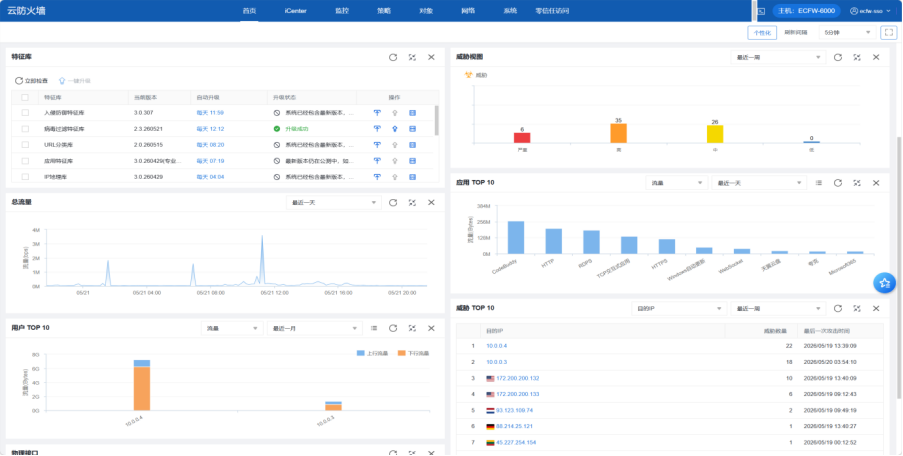
检查远程服务日志,发现大量审核失败内容:
关键发现:
- 5/7 09:56-11:02 遭受RDP暴力破解(1929次/66分钟)
- 攻击后RDP服务中断约2.8天,直到5/10才恢复监听
- 5月7日达到峰值:每分钟231次
- 来源地址:巴西(45.227.254.151)
- 日志中还有其他境外IP(非洲、欧洲等)
3.5 问题排除
| 排除项 | 说明 |
|---|---|
| 安装火绒 | 日志确认存在扫描和爆破行为 |
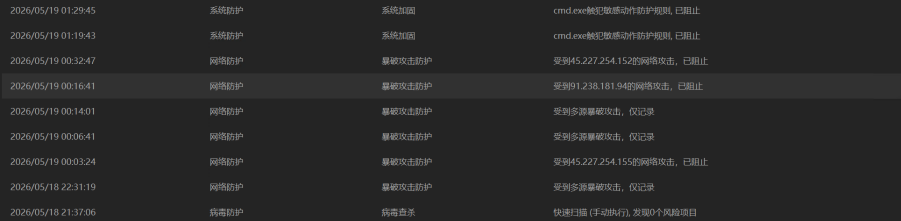
| 登录云原生防火墙 | 配置云原生防火墙,发现威胁数据,IP黑名单和扫描 |
| 分析日志 | 安全日志大量审核失败 |
3.6 安全加固
| 措施 | 说明 |
|---|---|
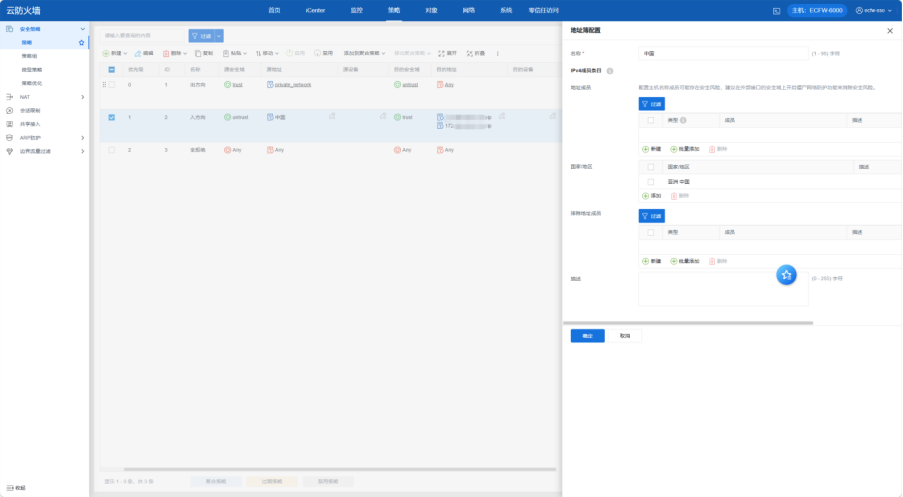
| 配置云原生防火墙 | 安全架构整改:服务器接入云原生防护墙,管控公网流量。增加边缘访问控制策略,禁止境外访问。 |
| 更换RDP端口 | 从3389改为13389。 |
| 挂载硬盘 | 挂载数据盘,设置定时备份,增强备份业务。 |
| 加固RDP策略 | 限制密码次数和指定用户。 |
| 安全组调整 | 增加拒绝入站和出站恶意IP组,端口1-65535。 |
| 增加日志容量 | 将 RemoteConnectionManager 日志大小从默认值提升至 512MB+,避免关键事件被覆盖。 |
| 检查后门 | 检查近期新增用户、端口监听、启动项、计划任务等。 |
| 增加登录检测脚本 | 检查登录用户、IP、时间、事件推送到飞书告警群中。 |
更换端口命令
powershell
Set-ItemProperty -Path 'HKLM:\SYSTEM\CurrentControlSet\Control\Terminal Server\WinStations\RDP-Tcp' -Name PortNumber -Value 13389
Restart-Service -Name "TermService" -Force
账户锁定策略(5次错误锁定30分钟)
cmd
net accounts /lockoutthreshold:5 /lockoutduration:30 /lockoutwindow:30设置RDP空闲超时60分钟
cmd
reg add "HKLM\SOFTWARE\Policies\Microsoft\Windows NT\Terminal Services" /v MaxIdleTime /t REG_DWORD /d 3600000 /freg add "HKLM\SOFTWARE\Policies\Microsoft\Windows NT\Terminal Services" /v fResetBroken /t REG_DWORD /d 1 /f设置RDP加密级别为高
cmd
reg add "HKLM\SOFTWARE\Policies\Microsoft\Windows NT\Terminal Services" /v MinEncryptionLevel /t REG_DWORD /d 3 /f限制只有Administrator才能RDP登录
cmd
net localgroup "Remote Desktop Users"net localgroup "Remote Desktop Users" Administrator /add增加日志存储容量
powershell
wevtutil sl Security /ms:536870912
wevtutil sl Application /ms:268435456
wevtutil sl System /ms:536870912
wevtutil sl "Microsoft-Windows-TerminalServices-RemoteConnectionManager/Operational" /ms:268435456
wevtutil sl "Microsoft-Windows-TerminalServices-LocalSessionManager/Operational" /ms:268435456
wevtutil sl "Microsoft-Windows-RemoteDesktopServices-RdpCoreTS/Operational" /ms:2684
检查后门
powershell
Write-Host "===== 1.本地用户 & 管理员组 =====" -ForegroundColor Cyan; Get-LocalUser | Select-Object Name, Enabled, Description, LastLogon, @{N='Created';E={$_.CreationTime -replace 'T.*'}} | Format-Table -AutoSize; Get-LocalGroupMember Administrators | Format-Table Name, PrincipalSource -AutoSize; Write-Host "`n===== 2.计划任务(非微软) =====" -ForegroundColor Cyan; Get-ScheduledTask | Where-Object { $_.TaskPath -eq '\' -and $_.Author -notmatch 'Microsoft' } | Select-Object TaskName, Author, @{N='Execute';E={$_.Actions.Execute}} | Format-Table -AutoSize; Write-Host "`n===== 3.自启动项 =====" -ForegroundColor Cyan; Get-ItemProperty HKLM:\Software\Microsoft\Windows\CurrentVersion\Run | Format-List; Get-ItemProperty HKCU:\Software\Microsoft\Windows\CurrentVersion\Run | Format-List; Get-ChildItem "$env:APPDATA\Microsoft\Windows\Start Menu\Programs\Startup","C:\ProgramData\Microsoft\Windows\Start Menu\Programs\Startup" -ErrorAction SilentlyContinue | Select-Object FullName | Format-Table -AutoSize; Write-Host "`n===== 4.非系统路径进程 =====" -ForegroundColor Cyan; Get-Process | Where-Object { $_.Path -and $_.Path -notmatch 'Windows|Program Files|ProgramData' } | Select-Object Name, Id, Path | Format-Table -AutoSize; Write-Host "`n===== 5.监听端口 & 外连 =====" -ForegroundColor Cyan; Get-NetTCPConnection -State Listen | Select-Object LocalAddress, LocalPort, @{N='Process';E={(Get-Process -Id $_.OwningProcess -ErrorAction SilentlyContinue).ProcessName}} | Sort-Object LocalPort | Format-Table -AutoSize; Get-NetTCPConnection -State Established | Where-Object { $_.RemoteAddress -notmatch '0\.0\.0\.0|^::$|^127\.' } | Select-Object LocalPort, RemoteAddress, RemotePort, @{N='Process';E={(Get-Process -Id $_.OwningProcess -ErrorAction SilentlyContinue).ProcessName}} | Format-Table -AutoSize; Write-Host "`n===== 6.映像劫持 & Winlogon =====" -ForegroundColor Cyan; Get-ChildItem HKLM:\SOFTWARE\Microsoft\Windows NT\CurrentVersion\Image File Execution Options | ForEach-Object { $d = (Get-ItemProperty $_.PSPath).Debugger; if ($d) { Write-Host "$($_.PSChildName) -> $d" -ForegroundColor Yellow } }; Get-ItemProperty HKLM:\SOFTWARE\Microsoft\Windows NT\CurrentVersion\Winlogon | Select-Object Shell, Userinit, Taskman | Format-List; Write-Host "`n===== 7.近3天System32修改文件 =====" -ForegroundColor Cyan; Get-ChildItem C:\Windows\System32 -Include *.exe,*.dll,*.ps1,*.bat -Recurse -ErrorAction SilentlyContinue | Where-Object { $_.LastWriteTime -gt (Get-Date).AddDays(-3) } | Select-Object FullName, LastWriteTime | Format-Table -AutoSize; Write-Host "`n===== 8.Temp目录 =====" -ForegroundColor Cyan; Get-ChildItem $env:TEMP -Recurse -ErrorAction SilentlyContinue | Select-Object FullName, Length, LastWriteTime | Format-Table -AutoSize增加登录检测脚本,检查远程登录、向日葵、暴力破解、开关机事件,推送到飞书
开启windows审计
powershell
Get-WinEvent -LogName Security -MaxEvents 10 | Where-Object { $_.Id -eq 4624 }检测脚本
powershell
# ================== 配置区 ==================
$webhookUrl = "你的飞书机器人Webhook地址"
$feishuKeyword = "你的飞书机器人安全关键字"
$checkInterval = 20                             # 轮询间隔(秒)

# 向日葵日志目录
$sunLogPath = "$env:APPDATA\Oray\AweSun\log"

# 暴力破解阈值
$failedThreshold = 5
$failedWindowMinutes = 5
$rdpLoginDedupSeconds = 15                      # RDP 登录去重窗口(秒)
# ===========================================

# 日志文件(脚本所在目录下的 MonitorLog.txt)
$logFile = Join-Path $PSScriptRoot "MonitorLog.txt"
function Write-Log {
    param([string]$msg)
    $time = Get-Date -Format "yyyy-MM-dd HH:mm:ss"
    "$time - $msg" | Out-File -Append -FilePath $logFile -Encoding utf8
}

# 脚本启动时间(用于向日葵时间戳过滤)
$script:scriptStartTime = Get-Date

# -------------------- 状态变量初始化 --------------------
# RDP 相关
$lastRdpCheck = Get-Date
$failedAttempts = @{}
$rdpLoginAlertHistory = @{}

# 向日葵相关
$script:sunLogStates = @{}
if (Test-Path $sunLogPath) {
    Get-ChildItem $sunLogPath -Filter "desktop.agent.*.log" | ForEach-Object {
        $lines = Get-Content -Path $_.FullName -ErrorAction SilentlyContinue
        $lastTime = Get-Date -Year 2000
        if ($lines.Count -gt 0) {
            $lastLine = $lines[-1]
            if ($lastLine -match '(\d{4}-\d{2}-\d{2} \d{2}:\d{2}:\d{2}\.\d{3})') {
                $lastTime = [datetime]::ParseExact($Matches[1], 'yyyy-MM-dd HH:mm:ss.fff', $null)
            }
        }
        $script:sunLogStates[$_.FullName] = @{ LastTime = $lastTime }
    }
}

# 开关机相关
$lastPowerCheck = Get-Date

# ================== 通用函数 ==================
function Send-FeishuMessage {
    param([string]$message)
    $fullMessage = "[$feishuKeyword] `n$message"

    $body = @{
        msg_type = "text"
        content  = @{ text = $fullMessage }
    } | ConvertTo-Json -Depth 3

    try {
        $response = Invoke-RestMethod -Uri $webhookUrl -Method Post -Body $body -ContentType "application/json; charset=utf-8"
        Write-Log "飞书消息发送成功 (StatusCode=$($response.StatusCode))"
    } catch {
        Write-Log "飞书发送异常: $_"
    }
}

# ================== 1. RDP 监控函数 ==================
function Monitor-RdpEvents {
    param([datetime]$sinceTime)

    # 监控 4624(登录)、4625(失败)、4779(会话断开)
    $filterXml = @"
<QueryList>
  <Query Id="0" Path="Security">
    <Select Path="Security">*[System[(EventID=4624 or EventID=4625 or EventID=4779)]]</Select>
  </Query>
</QueryList>
"@
    $events = Get-WinEvent -FilterXml $filterXml -ErrorAction SilentlyContinue |
              Where-Object { $_.TimeCreated -ge $sinceTime }

    foreach ($event in $events) {
        $xml = [xml]$event.ToXml()
        $data = $xml.Event.EventData.Data
        $props = @{}
        foreach ($item in $data) { $props[$item.Name] = $item.'#text' }

        $time = $event.TimeCreated
        $timeStr = $time.ToString('yyyy-MM-dd HH:mm:ss')

        # --- 登录成功 (4624) ---
        if ($event.Id -eq 4624) {
            $logonType = $props['LogonType']
            if ($logonType -notin @('3','7','10')) { continue }

            $ip = $props['IpAddress']
            $user = $props['TargetUserName']
            $domain = $props['TargetDomainName']

            # 过滤系统账户和本地地址
            if ($user -match 'SYSTEM|NETWORK SERVICE|LOCAL SERVICE' -or $ip -in @('127.0.0.1','::1','-','')) { continue }

            # 登录去重:同一 IP 在去重窗口内只告警一次
            if ($rdpLoginAlertHistory.ContainsKey($ip)) {
                $lastAlert = $rdpLoginAlertHistory[$ip]
                if (($time - $lastAlert).TotalSeconds -lt $rdpLoginDedupSeconds) {
                    Write-Log "RDP 登录去重:忽略 IP $ip 的重复事件 (类型 $logonType)"
                    continue
                }
            }

            $logonTypeName = @{3='网络登录';7='解锁';10='远程桌面'}[$logonType]
            $msg = @"
🔔 远程桌面登录告警
- 登录时间:$timeStr
- 登录用户:$domain\$user
- 来源 IP:$ip
- 登录类型:$logonTypeName (Type $logonType)
- 主机名:$env:COMPUTERNAME
"@
            Write-Log "RDP 登录成功: $domain\$user from $ip (Type $logonType)"
            Send-FeishuMessage -message $msg
            $rdpLoginAlertHistory[$ip] = $time
        }

        # --- 登录失败 (4625) → 暴力破解检测 ---
        elseif ($event.Id -eq 4625) {
            $logonType = $props['LogonType']
            if ($logonType -notin @('3','7','10')) { continue }

            $ip = $props['IpAddress']
            $user = $props['TargetUserName']
            $domain = $props['TargetDomainName']

            if ($user -match 'SYSTEM|NETWORK SERVICE|LOCAL SERVICE' -or $ip -in @('127.0.0.1','::1','-','')) { continue }

            Write-Log "RDP 登录失败: $domain\$user from $ip (Type $logonType)"

            # 暴力破解计数
            if (-not $failedAttempts.ContainsKey($ip)) {
                $failedAttempts[$ip] = @{ Count = 1; StartTime = $time }
            } else {
                $entry = $failedAttempts[$ip]
                if ($time -lt $entry.StartTime.AddMinutes($failedWindowMinutes)) {
                    $entry.Count++
                } else {
                    $entry.Count = 1
                    $entry.StartTime = $time
                }
            }

            if ($failedAttempts[$ip].Count -ge $failedThreshold) {
                $msg = @"
🚨 暴力破解告警(远程桌面)
- 来源 IP:$ip
- 最近尝试用户:$domain\$user
- 失败次数:$($failedAttempts[$ip].Count) 次(${failedWindowMinutes}分钟内)
- 最近失败时间:$timeStr
- 主机名:$env:COMPUTERNAME
"@
                Write-Log "暴力破解: $ip 失败 $($failedAttempts[$ip].Count) 次"
                Send-FeishuMessage -message $msg
                $failedAttempts.Remove($ip)
            }
        }

        # --- 远程会话断开 (4779) 不再监控 4634,避免本地注销误报 ---
        elseif ($event.Id -eq 4779) {
            $user = $props['TargetUserName']
            if (-not $user) { $user = $props['AccountName'] }
            $domain = $props['TargetDomainName']
            if (-not $domain) { $domain = $props['AccountDomain'] }

            if ($user -match 'SYSTEM|NETWORK SERVICE|LOCAL SERVICE|ANONYMOUS LOGON') { continue }
            if (-not $user) { continue }

            $msg = @"
🔔 远程桌面断开告警
- 事件类型:远程桌面会话断开
- 断开时间:$timeStr
- 用户:$domain\$user
- 主机名:$env:COMPUTERNAME
- 事件 ID:4779
"@
            Write-Log "RDP 断开: $domain\$user (事件 4779)"
            Send-FeishuMessage -message $msg
        }
    }
}

# ================== 2. 向日葵监控函数 ==================
function Process-SunLogLine {
    param([string]$line, [string]$fileName)
    $eventType = $null
    if ($line -match "on_connect ok") {
        $eventType = "远程会话建立"
    } elseif ($line -match "on_disconnect ok") {
        $eventType = "远程会话断开"
    }

    if ($eventType) {
        Write-Log "[向日葵] $eventType -> $line"
        $msg = @"
🔔 向日葵远程控制事件
- 事件类型:$eventType
- 主机名:$env:COMPUTERNAME
- 检测时间:$(Get-Date -Format 'yyyy-MM-dd HH:mm:ss')
- 日志文件:$fileName
- 日志详情:$line
"@
        Send-FeishuMessage -message $msg
    }
}

function Monitor-SunLogin {
    if (-not (Test-Path $sunLogPath)) { return }

    $logFiles = Get-ChildItem -Path $sunLogPath -Filter "desktop.agent.*.log" -ErrorAction SilentlyContinue

    foreach ($file in $logFiles) {
        $fullName = $file.FullName

        # 新文件处理
        if (-not $script:sunLogStates.ContainsKey($fullName)) {
            Write-Log "[向日葵] 发现新文件: $($file.Name)"
            $lines = Get-Content -Path $fullName -ErrorAction SilentlyContinue
            $newLines = @()
            $lastTime = Get-Date -Year 2000
            foreach ($line in $lines) {
                if ($line -match '(\d{4}-\d{2}-\d{2} \d{2}:\d{2}:\d{2}\.\d{3})') {
                    $lineTime = [datetime]::ParseExact($Matches[1], 'yyyy-MM-dd HH:mm:ss.fff', $null)
                    if ($lineTime -ge $script:scriptStartTime) {
                        $newLines += $line
                    }
                    $lastTime = $lineTime
                }
            }
            if ($newLines.Count -gt 0) {
                Write-Log "[向日葵] 新文件新增 $($newLines.Count) 行"
                foreach ($line in $newLines) {
                    Process-SunLogLine -line $line -fileName $file.Name
                }
            }
            $script:sunLogStates[$fullName] = @{ LastTime = $lastTime }
            continue
        }

        # 已知文件更新
        $lines = Get-Content -Path $fullName -Tail 200 -ErrorAction SilentlyContinue
        if (-not $lines) { continue }
        $newLines = @()
        $lastKnownTime = $script:sunLogStates[$fullName].LastTime

        foreach ($line in $lines) {
            if ($line -match '(\d{4}-\d{2}-\d{2} \d{2}:\d{2}:\d{2}\.\d{3})') {
                $lineTime = [datetime]::ParseExact($Matches[1], 'yyyy-MM-dd HH:mm:ss.fff', $null)
                if ($lineTime -ge $script:scriptStartTime -and $lineTime -gt $lastKnownTime) {
                    $newLines += $line
                }
            }
        }

        if ($newLines.Count -gt 0) {
            Write-Log "[向日葵] 文件 $($file.Name) 新增 $($newLines.Count) 行"
            foreach ($line in $newLines) {
                Process-SunLogLine -line $line -fileName $file.Name
            }
            $lastLine = $newLines[-1]
            if ($lastLine -match '(\d{4}-\d{2}-\d{2} \d{2}:\d{2}:\d{2}\.\d{3})') {
                $script:sunLogStates[$fullName].LastTime = [datetime]::ParseExact($Matches[1], 'yyyy-MM-dd HH:mm:ss.fff', $null)
            }
        }
    }
}

# ================== 3. 开关机监控函数 ==================
function Monitor-PowerEvents {
    param([datetime]$sinceTime)

    # 1074: 用户发起关机/重启, 6005: 事件日志启动(开机), 6006: 事件日志停止(正常关机), 6008: 非正常关机
    $filterXml = @"
<QueryList>
  <Query Id="0" Path="System">
    <Select Path="System">*[System[(EventID=1074 or EventID=6005 or EventID=6006 or EventID=6008)]]</Select>
  </Query>
</QueryList>
"@
    $events = Get-WinEvent -FilterXml $filterXml -ErrorAction SilentlyContinue |
              Where-Object { $_.TimeCreated -ge $sinceTime }

    foreach ($event in $events) {
        $time = $event.TimeCreated.ToString('yyyy-MM-dd HH:mm:ss')
        $eventType = ""
        $description = ""
        $user = ""

        switch ($event.Id) {
            6005 {
                $eventType = "开机"
                $description = "事件日志服务已启动,系统已完成开机。"
            }
            1074 {
                $eventType = "关机/重启"
                $xml = [xml]$event.ToXml()
                $user = ($xml.Event.EventData.Data | Where-Object { $_.Name -eq 'param1' }).'#text'
                $reason = ($xml.Event.EventData.Data | Where-Object { $_.Name -eq 'param4' }).'#text'
                $description = if ($reason) { "原因: $reason" } else { "用户或进程发起" }
            }
            6006 {
                $eventType = "正常关机"
                $description = "事件日志服务已停止,系统已正常关机。"
            }
            6008 {
                $eventType = "非正常关机"
                $description = "上一次系统关闭是意外的(可能断电或崩溃)。"
            }
            default { continue }
        }

        if (-not $user) { $user = "SYSTEM" }

        $msg = @"
🔔 系统事件告警 ($eventType)
- 主机名:$env:COMPUTERNAME
- 发生时间:$time
- 执行用户:$user
- 事件 ID:$($event.Id)
- 描述:$description
"@
        Write-Log "开关机事件: $eventType (事件 $($event.Id))"
        Send-FeishuMessage -message $msg
    }
}

# ================== 主循环 ==================
Write-Log "监控脚本启动 (RDP+向日葵+开关机)"
Write-Log "RDP:登录(去重)、断开(4779)、暴力破解"
Write-Log "向日葵:on_connect ok / on_disconnect ok"
Write-Log "开关机:6005(开机) 1074(关机/重启) 6006(正常关机) 6008(非正常关机)"

while ($true) {
    $now = Get-Date

    # 1. RDP 事件
    Monitor-RdpEvents -sinceTime $lastRdpCheck
    $lastRdpCheck = $now

    # 2. 向日葵事件
    Monitor-SunLogin

    # 3. 开关机事件
    Monitor-PowerEvents -sinceTime $lastPowerCheck
    $lastPowerCheck = $now

    Start-Sleep -Seconds $checkInterval
}
创建开机自动动
powershell
$scriptPath = "C:\jiankong\jiankong.ps1" #这是脚本的存储路径
$taskName = "远程登录与开关机监控" #这是名字

$action = New-ScheduledTaskAction -Execute "powershell.exe" -Argument "-WindowStyle Hidden -File `"$scriptPath`""
$trigger = New-ScheduledTaskTrigger -AtLogon
$principal = New-ScheduledTaskPrincipal -UserId "$env:USERDOMAIN\$env:USERNAME" -RunLevel Highest

Register-ScheduledTask -TaskName $taskName -Action $action -Trigger $trigger -Principal $principal -Force
后台运行脚本
powershell
Start-Process powershell -WindowStyle Hidden -ArgumentList "-File `"C:\jiankong\jiankong.ps1`""飞书监控效果
cmd
[****]
🔔 向日葵远程控制事件
- 事件类型:远程会话建立
- 主机名:ECM-E2CB
- 检测时间:2026-05-22 10:43:44
- 日志文件:desktop.agent.20260522-104341.log
- 日志详情:[6104]    2026-05-22 10:43:42.068    - Info  -    [DesktopAgentClient] on_connect ok. sid:1, id:13 precreate:0
[****]
🔔 向日葵远程控制事件
- 事件类型:远程会话断开
- 主机名:ECM-E2CB
- 检测时间:2026-05-22 10:44:56
- 日志文件:desktop.agent.20260522-104341.log
- 日志详情:[6104]    2026-05-22 10:44:49.888    - Info  -    [DesktopAgentClient] on_disconnect ok.
[****]
🔔 远程桌面登录告警
- 登录时间:2026-05-22 10:45:15
- 登录用户:ECM-E2CB\Administrator
- 来源 IP:115.204.110.120
- 登录类型: (Type 3)
- 主机名:ECM-E2CB
[****]
🔔 远程桌面断开告警
- 事件类型:远程桌面会话断开
- 断开时间:2026-05-22 10:47:01
- 用户:ECM-E2CB\Administrator
- 主机名:ECM-E2CB
- 事件 ID:4779
3.7 观察结果
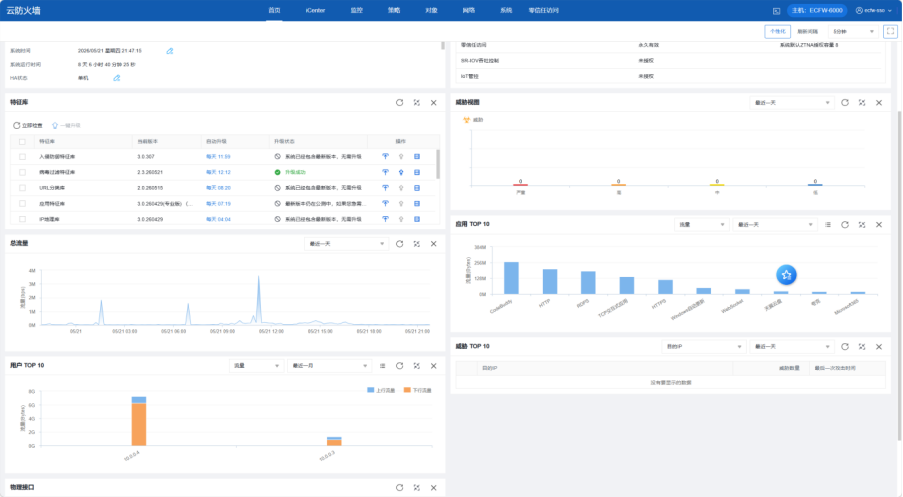
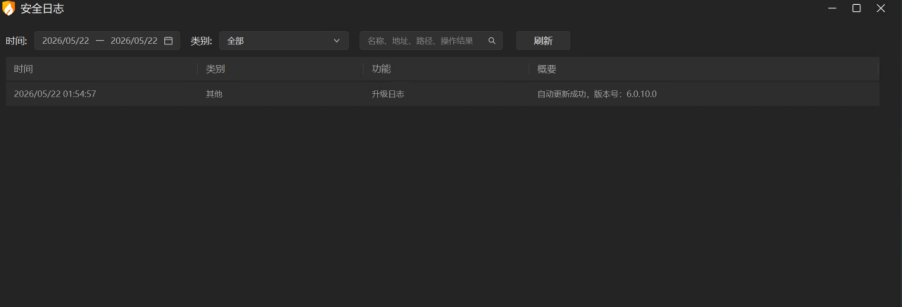
观察2天后,威胁为0。解决方案有效。
四、时间线总结
| 时间 | 事件 |
|---|---|
| 5/7 | 同事离职更改密码,备份服务器数据库,最后一次登录服务器。 |
| 5/8 | 发现无法远程登录 |
| 初期 | 重启、安全组排查、内网访问 → 均无效 |
| 中期 | 天翼云客服要求重构系统,拒绝 |
| 5/17 | RDP 诊断脚本检查 → 服务正常 |
| 5/17 | pktmon 抓包 → 发现只有入站无出站 |
| 5/17-18 | 尝试 ToDesk/RustDesk/AnyDesk → 均失败 |
| 5/18 | 安装 TightVNC + 无安全认证 + 安全组放行 5900 → 成功登入 |
| 5/18 | 安装向日葵(冗余方式)、卸载 VNC |
| 5/18-20 | 恢复 RDP、更换端口、配置防火墙、安装杀毒 |
| 5/21 | 威胁归零,问题解决 |
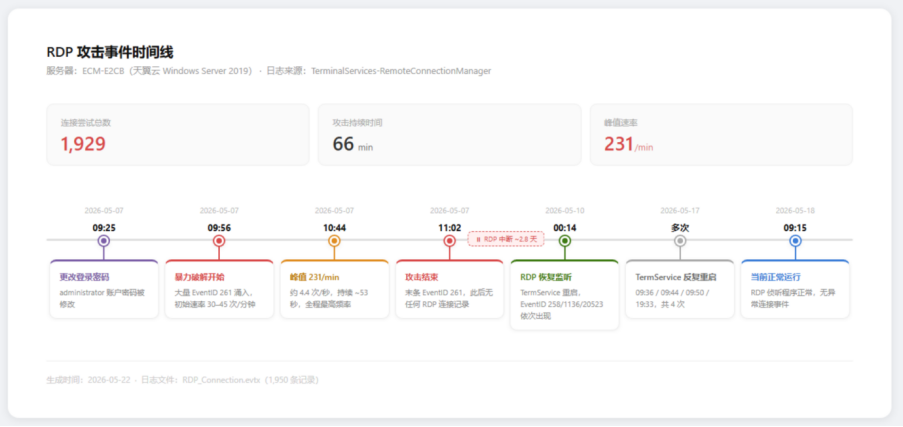
五、根本原因分析
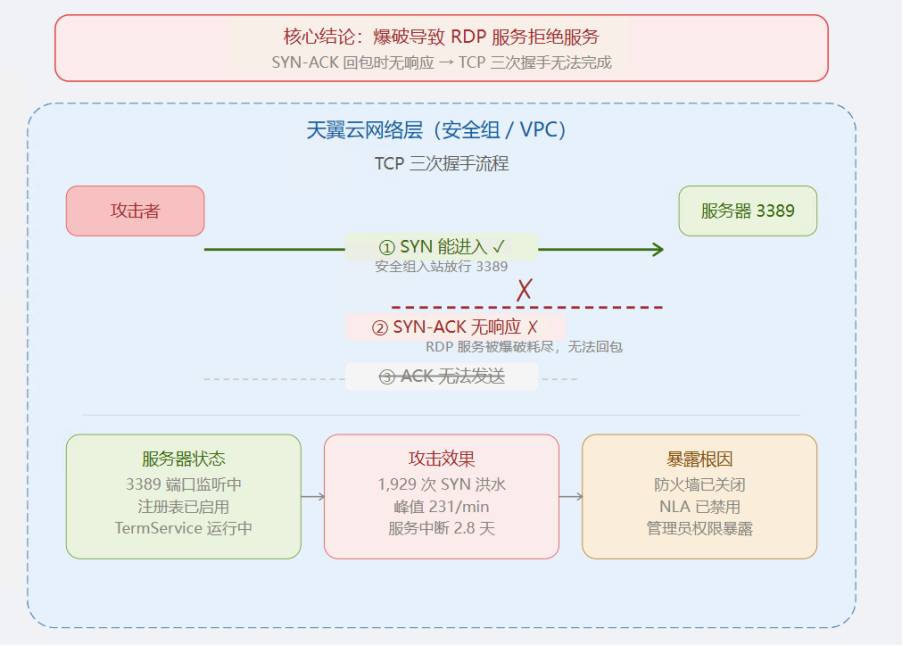
核心结论: RDP服务在 SYN-ACK 回包时无响应,导致 TCP 三次握手无法完成,说明远程服务被爆破导致RDP拒绝服务。
六、附录
6.1 关键命令速查
| 用途 | 命令 |
|---|---|
| 安装TightVNC | msiexec /i tightvnc.msi /qn ADDLOCAL=Server SERVER_REGISTER_AS_SERVICE=1 |
| 关闭VNC认证 | Set-ItemProperty 'HKLM:\SOFTWARE\TightVNC\Server' -Name 'UseVncAuthentication' -Value 0 |
| 更换RDP端口 | Set-ItemProperty -Path 'HKLM:\...\RDP-Tcp' -Name PortNumber -Value 13389 |
| 重启RDP服务 | Restart-Service TermService -Force |
| 抓包3389 | pktmon filter add -p 3389 && pktmon start --capture |
6.2 涉及工具
- 💻 RDP (mstsc)
- 🔧 pktmon(Windows 内置抓包工具)
- 🔧 TightVNC
- 🔧 向日葵远程控制
- 🔧 RustDesk / AnyDesk / ToDesk 企业版
- 🛡 火绒安全软件
- ☁️ 天翼云原生防火墙