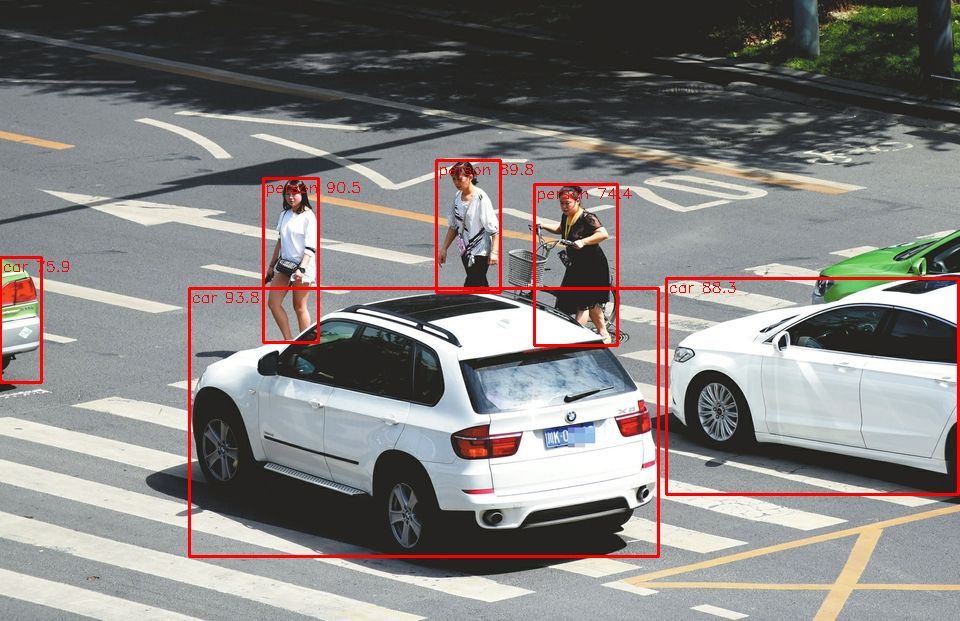
纯属个人意见,用python做开发,对象类型不明确和包冲突的问题很烦人,所以还是想用熟悉的C#去做图像识别。其实用C#做也很简单。
本文只实现使用模型进行检测,所以需要预先准备好已经训练好的模型。我们以官方训练好的模型yolo26n.pt为例。
一、导出ONNX模型
在python中,将.pt模型导出为ONNX格式。
python
from ultralytics import YOLO

model = YOLO("yolo26n.pt")

model.export(format="onnx")
运行上述代码,即可生成一个名为yolo26n.onnx的文件,可在C#中使用。
二、安装环境
在NuGet中安装Microsoft.ML.OnnxRuntime库。
另外,我们对图像的处理使用OpenCV,所以需要安装OpenCVSharp的库:OpenCvSharp4 ,OpenCvSharp4.Extensions ,OpenCvSharp4.runtime.win。
三、图像预处理
YOLO模型的图片输入大小是640*640,所以需要先将图片转为此大小:
C#
int maxEdge = Math.Max(src.Rows, src.Cols);
float ratio = 1.0f * ModelSize / maxEdge;
int newHeight = (int)(src.Rows * ratio);
int newWidth = (int)(src.Cols * ratio);
Mat resize_image = src.Resize(new Size(newWidth, newHeight));
int width = resize_image.Cols;
int height = resize_image.Rows;
if (width != ModelSize || height != ModelSize)
{
    resize_image = resize_image.CopyMakeBorder(0, ModelSize - newHeight, 0, ModelSize - newWidth, BorderTypes.Constant, new Scalar(255, 255, 255));
}
另外,对于RGB颜色图片,YOLO模型处理的颜色顺序是RGB,但OpenCV中存储图片的默认顺序是BGR,两者是反转的,需要先反过来:
C#
Cv2.CvtColor(resize_image, resize_image, ColorConversionCodes.BGR2RGB);然后,我们需要将像素数据进行归一化:
C#
var input_tensor = new DenseTensor<float>(new[] { 1, 3, ModelSize, ModelSize });
for (int y = 0; y < resize_image.Height; y++)
{
    for (int x = 0; x < resize_image.Width; x++)
    {
        input_tensor[0, 0, y, x] = resize_image.At<Vec3b>(y, x)[0] / 255f;
        input_tensor[0, 1, y, x] = resize_image.At<Vec3b>(y, x)[1] / 255f;
        input_tensor[0, 2, y, x] = resize_image.At<Vec3b>(y, x)[2] / 255f;
    }
}
四、导入和运行模型
加载模型:
C#
var OnnxSession = new InferenceSession(modelPath);运行模型,得到结果:
C#
var input_container = new List<NamedOnnxValue>()
{
    NamedOnnxValue.CreateFromTensor(OnnxSession.InputNames[0], input_tensor)
};

var result_infer = OnnxSession.Run(input_container);
var results_onnxvalue = result_infer.ToArray();
var result_tensors = results_onnxvalue[0].AsTensor<float>();
var result_array = result_tensors.ToArray();
五、处理结果数据
yolo26n模型的检测结果是一个三维数组:
第一维对应每张输入图像。输入可以是多张图片,每张图片对应一组二维结果。
第二维是每一组检测结果。默认都是300项,已按置信度由高到低排序,所以发现置信度偏低的项,就可以停止检索了。另外,结果默认已做了非极大值抑制,没有必要再排除可能重复的框。
第三维有6项,分别是x1, y1, x2, y2, confidence, classId。
这里需要说明的是,yolo26n使用COCO数据进行训练,类型定义为:
0: 'person', 1: 'bicycle', 2: 'car', 3: 'motorcycle', 4: 'airplane', 5: 'bus', 6: 'train', 7: 'truck', 8: 'boat', 9: 'traffic light', 10: 'fire hydrant', 11: 'stop sign', 12: 'parking meter', 13: 'bench', 14: 'bird', 15: 'cat', 16: 'dog', 17: 'horse', 18: 'sheep', 19: 'cow', 20: 'elephant', 21: 'bear', 22: 'zebra', 23: 'giraffe', 24: 'backpack', 25: 'umbrella', 26: 'handbag', 27: 'tie', 28: 'suitcase', 29: 'frisbee', 30: 'skis', 31: 'snowboard', 32: 'sports ball', 33: 'kite', 34: 'baseball bat', 35: 'baseball glove', 36: 'skateboard', 37: 'surfboard', 38: 'tennis racket', 39: 'bottle', 40: 'wine glass', 41: 'cup', 42: 'fork', 43: 'knife', 44: 'spoon', 45: 'bowl', 46: 'banana', 47: 'apple', 48: 'sandwich', 49: 'orange', 50: 'broccoli', 51: 'carrot', 52: 'hot dog', 53: 'pizza', 54: 'donut', 55: 'cake', 56: 'chair', 57: 'couch', 58: 'potted plant', 59: 'bed', 60: 'dining table', 61: 'toilet', 62: 'tv', 63: 'laptop', 64: 'mouse', 65: 'remote', 66: 'keyboard', 67: 'cell phone', 68: 'microwave', 69: 'oven', 70: 'toaster', 71: 'sink', 72: 'refrigerator', 73: 'book', 74: 'clock', 75: 'vase', 76: 'scissors', 77: 'teddy bear', 78: 'hair drier', 79: 'toothbrush'下面的代码提取出检测结果,代码中将识别框转回了原图大小。
C#
Dictionary<int, List<Prediction>> predictions = new Dictionary<int, List<Prediction>>();
for (int i = 0; i < result_array.Length; i += 6)
{
    float x1 = result_array[i];
    float y1 = result_array[i + 1];
    float x2 = result_array[i + 2];
    float y2 = result_array[i + 3];
    float score = result_array[i + 4];
    int classId = (int)result_array[i + 5];

    if (score > minScore)
    {
        Prediction p = new Prediction()
        {
            Score = score,
            BBox = new Rect((int)Math.Round(x1 / ratio), (int)Math.Round(y1 / ratio), (int)Math.Round((x2 - x1) / ratio), (int)Math.Round((y2 - y1) / ratio))
        };
        if (predictions.ContainsKey(classId))
        {
            predictions[classId].Add(p);
        }
        else
        {
            predictions.Add(classId, new List<Prediction>() { p });
        }
    }
    else
    {
        break;
    }
}
测试原图:

测试结果: