fan-mf-lib --- Yunfan Module Federation 工具集

背景
fan-mf-lib 是一套基于 Module Federation 的前端微模块解决方案。
核心包 @fan-scripts/fan-mf-runtime 负责在运行时按版本加载远程 React 组件,并内置预加载、卸载、健康检查与事件总线;
@fan-scripts/react-adapter 与 @fan-scripts/vue-adapter 分别面向 React 与 Vue 3 宿主。本仓库为 pnpm monorepo,附带 Bridge、React 18 / Vue 3 宿主等多套可运行示例,适合作为微前端基建学习与工程参考。
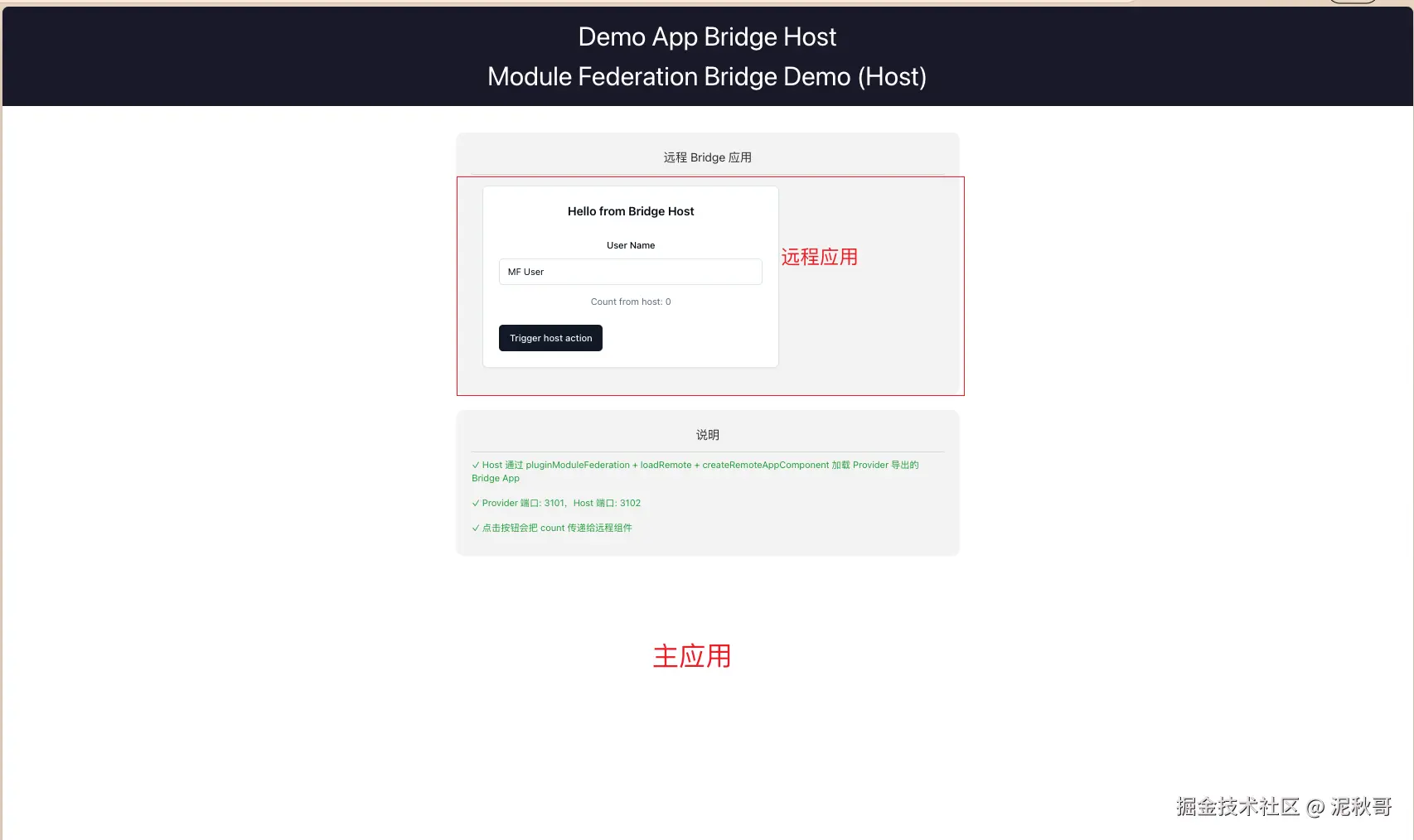
app/demo-app-bridge-host 宿主应用示例、 demo-app-bridge-provider 远程应用示例,本地开发可以启动展示, 线上可以将远程应用发到CDN/npm仓库的方式进行加载
标签 : module-federation · micro-frontend · react · vue3 · typescript · pnpm · rsbuild · remote-components
业务已经有Module Federation微前端方案,为什么还要做 @fan-scripts/fan-mf-runtime 这一层
我们业务里已经在用 Module Federation,但构建时配置和运行时治理往往是两套事。MF 官方更擅长在构建阶段把 Host/Remote 接好;真正上线后,还会遇到:远程包版本怎么选、CDN 挂了怎么办、同一页面要不要跑两个版本的 Remote、实例怎么卸载、怎么预加载------这些如果每个业务自己写,会重复造轮子,而且容易和 MF Runtime 的细节缠在一起。
所以我做了 fan-mf-lib,核心是 @fan-scripts/fan-mf-runtime:在 MF Enhanced Runtime 之上,把「按 npm 包名 + 版本动态拉 remoteEntry」做成统一 API,比如 loadRemoteMultiVersion。
不用这层库,团队常见坑有:
- 版本:写死
remoteEntryURL,发版要改 Host 配置;多团队并行时很难让「同一页面共存 v1/v2」。 - 可用性:只配一个 CDN,源站或 unpkg 抖动就直接白屏,没有自动换源。
- React 共享:Vue 宿主里加载 React Remote,容易出现双 React 或 shared 配错。
- 生命周期:只加载不卸载,路由切换或 Tab 关闭后内存、全局单例、缓存越积越多。
- 体验:没有统一的预加载、健康检查、跨模块事件总线,业务各自实现,难维护。
我的库把这些收成运行时工具链:多版本解析与缓存、多 URL 故障转移、shared 合并、预加载/卸载/健康检查、Bridge 懒加载;再提供 React/Vue 适配层,业务用 Provider、Hooks 接入,而不是直接摸 MF 底层 API
仓库概览
这是一个 pnpm monorepo,包含:
已发布包
| 包名 | 版本 | 说明 |
|---|---|---|
@fan-scripts/fan-mf-runtime |
v1.0.4 | 核心运行时加载工具库 |
@fan-scripts/react-adapter |
v1.0.1 | React 适配层 |
@fan-scripts/vue-adapter |
v1.0.1 | Vue 3 适配层(在 Vue 中加载 React 组件) |
示例应用
| 应用 | 说明 |
|---|---|
demo-bridge-host |
Bridge 模块宿主应用 demo |
demo-bridge-provider |
Bridge 模块远程组件提供者 demo |
test-mf-unpkg |
远程组件示例应用(React) |
host-react18-remote |
React 18 宿主应用示例 |
host-vue3-remote |
Vue 3 宿主应用示例(消费 React 组件) |
特性
- 🚀 运行时动态加载 - 无需重新构建即可加载远程组件
- 📦 多版本支持 - 支持同一包的多个版本同时运行
- 🔄 CDN 故障转移 - 自动在多个 CDN 之间切换,提高可用性
- 💾 智能缓存 - 内置版本缓存机制,减少网络请求
- 🎯 TypeScript 支持 - 完整的类型定义
- ⚛️ React 友好 - 专为 React 组件 Module Federation 设计
- 🔧 可扩展 - 插件系统支持自定义扩展
- 📊 性能优化 - 预加载、卸载、健康检查
- 🔗 事件总线 - 跨模块通信支持
- ✅ 质量保障 - 155+ 单元测试,高覆盖率
- 🌉 Bridge 模块 - 支持懒加载远程组件和预加载
安装
bash
npm install @fan-scripts/fan-mf-runtime
# 或
pnpm add @fan-scripts/fan-mf-runtime
# 或
yarn add @fan-scripts/fan-mf-runtime
快速开始
基本使用
typescript
import { loadRemoteMultiVersion } from '@fan-scripts/fan-mf-runtime';

async function loadRemoteComponent() {
  const { scopeName, mf } = await loadRemoteMultiVersion({
    name: 'my-remote-app',
    pkg: '@myorg/remote-app',
    version: '1.0.0',
  });

  const mod = await mf.loadRemote(`${scopeName}/Button`);
  return mod.default;
}
本地调试
本地开发时,使用 localDebug 配置直接加载本地运行的远程组件服务:
typescript
import { loadRemoteMultiVersion } from '@fan-scripts/fan-mf-runtime';

const { scopeName, mf } = await loadRemoteMultiVersion({
  name: 'my-remote-app',
  pkg: '@myorg/remote-app',
  version: '1.0.0',
  localDebug: {
    enabled: true,
    entry: 'http://localhost:3001/remoteEntry.js',
  },
});

const mod = await mf.loadRemote(`${scopeName}/Button`);
Bridge 模块 - 懒加载远程组件
typescript
import { createLazyComponent, loadRemoteMultiVersion } from '@fan-scripts/fan-mf-runtime';

const RemoteButton = createLazyComponent({
  loader: () => loadRemoteMultiVersion({
    name: 'remote',
    pkg: '@org/remote-pkg',
    version: '1.0.0',
  }).then(({ mf }) => mf.loadRemote('remote/Button')),
  loading: <div>Loading...</div>,
  fallback: ({ error }) => <div>Error: {error.message}</div>,
});

function App() {
  return <RemoteButton variant="primary" />;
}
预加载组件
typescript
import { prefetchComponent } from '@fan-scripts/fan-mf-runtime';

// 预加载远程组件资源
prefetchComponent({
  id: 'remote/Button',
  preloadComponentResource: true,
});
使用 useLazyComponent Hook
typescript
import { useLazyComponent, loadRemoteMultiVersion } from '@fan-scripts/fan-mf-runtime';

function MyComponent() {
  const { loading, error, Component } = useLazyComponent({
    loader: () => loadRemoteMultiVersion({
      name: 'remote',
      pkg: '@org/remote-pkg',
      version: '1.0.0',
    }),
    loading: <div>Loading...</div>,
    fallback: ({ error }) => <div>Error: {error.message}</div>,
  });

  if (loading) return null;
  if (error) return <div>Error: {error.message}</div>;
  if (Component) return <Component />;
  return null;
}
React Adapter 方式
typescript
import { lazyRemote, RemoteModuleProvider } from '@fan-scripts/react-adapter';
import { Suspense } from 'react';

// 方式 1: lazyRemote
const RemoteDashboard = lazyRemote({
  pkg: '@myorg/remote-app',
  version: '^1.0.0',
  moduleName: 'Dashboard',
  scopeName: 'myorg',
});

function App() {
  return (
    <Suspense fallback={<div>Loading...</div>}>
      <RemoteDashboard userId={123} />
    </Suspense>
  );
}

// 方式 2: RemoteModuleProvider
function App() {
  return (
    <RemoteModuleProvider
      pkg="@myorg/remote-app"
      version="^1.0.0"
      moduleName="Dashboard"
      scopeName="myorg"
      loadingFallback={<Spinner />}
      errorFallback={(error, reset) => (
        <div>
          <p>Error: {error.message}</p>
          <button onClick={reset}>Retry</button>
        </div>
      )}
    />
  );
}
Vue Adapter 方式
typescript
import { VueRemoteModuleProvider } from '@fan-scripts/vue-adapter';

export default {
  template: `
    <VueRemoteModuleProvider
      pkg="@myorg/remote-app"
      version="^1.0.0"
      moduleName="Dashboard"
      scopeName="myorg"
    />
  `,
};
Bridge 模块 API
createLazyComponent
创建懒加载远程组件的工厂函数。
typescript
import { createLazyComponent } from '@fan-scripts/fan-mf-runtime';

const LazyComponent = createLazyComponent<T>(options);参数:
| 参数 | 类型 | 必填 | 说明 |
|---|---|---|---|
loader |
() => Promise<T> |
✅ | 加载远程模块的函数 |
loading |
ReactNode |
✅ | 加载中的 UI |
fallback |
(errorInfo) => ReactNode |
✅ | 错误兜底 UI |
export |
string |
❌ | 导出名称,默认 'default' |
delayLoading |
number |
❌ | 延迟显示 loading 的毫秒数 |
dataFetchParams |
unknown |
❌ | 数据获取参数 |
noSSR |
boolean |
❌ | 是否禁用服务端渲染 |
useLazyComponent
用于懒加载远程组件的 React Hook。
typescript
import { useLazyComponent } from '@fan-scripts/fan-mf-runtime';

const { loading, error, Component } = useLazyComponent({
  loader: () => loadRemoteMultiVersion(options),
  loading: <div>Loading...</div>,
  fallback: ({ error }) => <div>Error: {error.message}</div>,
});返回值:
typescript
{
  loading: boolean,      // 是否正在加载
  error: ErrorInfo | null,  // 错误信息
  Component: ComponentType<T> | null  // 加载完成的组件
}
prefetchComponent
预加载远程组件资源。
typescript
import { prefetchComponent } from '@fan-scripts/fan-mf-runtime';

prefetchComponent({
  id: 'remote/Component',
  preloadComponentResource: true,
  dataFetchParams: { userId: 123 },
});
核心 API 文档
loadRemoteMultiVersion
动态加载远程模块,支持多版本和故障转移。
typescript
import { loadRemoteMultiVersion } from '@fan-scripts/fan-mf-runtime';

const { scopeName, mf } = await loadRemoteMultiVersion(options, plugins);参数:
| 参数 | 类型 | 必填 | 默认值 | 说明 |
|---|---|---|---|---|
name |
string |
✅ | - | Module Federation 的名称 |
pkg |
string |
✅ | - | npm 包名 |
version |
string |
❌ | 'latest' |
版本号或 'latest' |
retries |
number |
❌ | 3 |
每个 CDN 的重试次数 |
delay |
number |
❌ | 1000 |
重试间隔(毫秒) |
localFallback |
string |
❌ | - | 本地兜底 URL |
localDebug |
LocalDebugOptions |
❌ | - | 本地调试配置,启用后跳过 CDN 直接使用本地地址 |
cacheTTL |
number |
❌ | 86400000 |
缓存时间(毫秒) |
revalidate |
boolean |
❌ | true |
异步重新验证最新版本 |
shared |
Record<string, any> |
❌ | - | 自定义共享模块配置 |
返回值 : Promise<{ scopeName: string, mf: ModuleFederationInstance }>
MF 实例方法:
typescript
const { scopeName, mf } = await loadRemoteMultiVersion(options);

// 加载暴露的模块
const module = await mf.loadRemote(`${scopeName}/Button`);
const Button = module.default;
事件总线
typescript
import { eventBus } from '@fan-scripts/fan-mf-runtime';

// 订阅事件
const unsubscribe = eventBus.on('user-login', (user, meta) => {
  console.log('User logged in:', user);
  console.log('Event meta:', meta); // { timestamp, source, id }
});

// 发送事件
eventBus.emit('user-login', { id: 1, name: 'John' });

// 只触发一次的订阅
eventBus.once('notification', (msg) => {
  console.log('Received once:', msg);
});

// 取消订阅
unsubscribe();

// 获取事件历史
const history = eventBus.getHistory('user-login');
版本工具
typescript
import {
  checkVersionCompatibility,
  satisfiesVersion,
  parseVersion,
  compareVersions,
  getLatestVersion,
  getStableVersions,
} from '@fan-scripts/fan-mf-runtime';

// 检查版本兼容性
const result = checkVersionCompatibility('18.2.0', '^18.0.0', 'react');
console.log(result.compatible); // true
console.log(result.severity); // 'info' | 'warning' | 'error'

// 版本范围匹配
satisfiesVersion('1.5.0', '^1.0.0'); // true
satisfiesVersion('2.0.0', '~1.2.0'); // false

// 版本比较
compareVersions('2.0.0', '1.0.0'); // > 0
compareVersions('1.0.0', '1.0.0'); // 0
运行示例
Bridge Demo
bash
# 同时启动 Provider 和 Host(推荐)
cd apps/demo-bridge-host
pnpm dev:all

# 或分别启动
# 1. 启动 Provider (端口 3001)
cd apps/demo-bridge-provider
pnpm dev

# 2. 启动 Host (端口 3002)
cd apps/demo-bridge-host
pnpm dev
访问 http://localhost:3002 查看效果
技术栈
- 构建工具: Rslib, Rsbuild, Rspack
- 运行时: @module-federation/enhanced, @module-federation/bridge-react
- 包管理: pnpm (workspace)
- 代码规范: Biome
- 测试框架: Vitest + happy-dom
- 类型检查: TypeScript
- 版本管理: Changesets
最佳实践
1. 版本管理
typescript
// ✅ 推荐:生产环境使用固定版本
await loadRemoteMultiVersion({
  name: 'my-app',
  pkg: '@myorg/remote-app',
  version: '1.2.3',
});

// ⚠️ 注意:使用 latest 时设置合理的 cacheTTL
await loadRemoteMultiVersion({
  name: 'my-app',
  pkg: '@myorg/remote-app',
  version: 'latest',
  cacheTTL: 3600000, // 1 小时
  revalidate: true,
});
2. 预加载优化
typescript
// 在用户可能访问的路由预加载
useEffect(() => {
  prefetchComponent({
    id: 'remote/Dashboard',
    preloadComponentResource: true,
  });
}, []);

// 高优先级立即加载
prefetchComponent({
  id: 'remote/CriticalModule',
  priority: 'high',
});
3. 错误处理
typescript
const MyLazyComponent = createLazyComponent({
  loader: () => loadRemoteMultiVersion(options),
  loading: <Spinner />,
  fallback: ({ error, errorType }) => (
    <ErrorFallback
      error={error}
      type={errorType} // 'LOAD_REMOTE' | 'DATA_FETCH' | 'RENDER'
      onRetry={() => window.location.reload()}
    />
  ),
});
4. 资源清理
typescript
import { unloadRemote } from '@fan-scripts/fan-mf-runtime';

// 组件卸载时清理
useEffect(() => {
  return () => {
    unloadRemote({ name: 'my-app', pkg: '@myorg/remote-app' });
  };
}, []);
5. 本地调试
typescript
// ✅ 推荐:本地开发使用 localDebug 配置
const isDev = process.env.NODE_ENV === 'development';

const { mf } = await loadRemoteMultiVersion({
  name: 'my-app',
  pkg: '@myorg/remote-app',
  version: '1.0.0',
  ...(isDev && {
    localDebug: {
      enabled: true,
      entry: 'http://localhost:3001/remoteEntry.js',
    },
  }),
});

// 或者使用 localFallback 作为兜底(会先尝试 CDN)
const { mf } = await loadRemoteMultiVersion({
  name: 'my-app',
  pkg: '@myorg/remote-app',
  version: '1.0.0',
  localFallback: 'http://localhost:3001/remoteEntry.js',
});
故障排查
加载失败
- 检查 CDN 地址是否可访问
- 查看浏览器控制台的错误信息
- 验证远程组件是否正确构建
- 检查 Module Federation 配置是否匹配
- 确认
remoteEntry.js可访问 - 本地开发时,使用
localDebug配置直接加载本地服务
"React is not defined" 错误
确保库的构建配置正确外部化 React:
typescript
// rslib.config.ts
export default defineConfig({
  tools: {
    rspack: {
      externals: ['react', 'react-dom', 'react/jsx-runtime'],
    },
  },
});
版本冲突
- 确认共享模块的
singleton配置 - 检查 React 版本是否兼容
- 使用不同的
name避免命名冲突
类型错误
- 确认远程组件已发布类型定义
- 检查 TypeScript 配置
- 使用
import type导入类型
相关文档
- fan-mf-runtime 详细文档 - 核心工具库完整 API
- vue-adapter 文档 - Vue 3 适配层使用指南
- react-adapter 文档 - React 适配层使用指南
更新日志
v1.0.4 (fan-mf-runtime)
- 新增 Bridge 模块:
createLazyComponent、useLazyComponent - 新增
prefetchComponent预加载功能 - 新增
createLazyLoadComponentPlugin导出 - 完善错误处理和类型定义
v0.0.12
- 重构:使用 fan-mf-runtime 替换 RemoteModuleCard
- 新增:完整的单元测试覆盖(155+ 测试)
- 新增:健康检查模块
- 新增:事件总线模块
- 新增:版本兼容性检查
许可证
ISC
贡献
欢迎提交 Issue 和 Pull Request!
- Fork 项目
- 创建特性分支 (
git checkout -b feature/AmazingFeature) - 提交更改 (
git commit -m 'Add some AmazingFeature') - 推送到分支 (
git push origin feature/AmazingFeature) - 开启 Pull Request