在 Google Colab 中安裝 PyTorch 2.2.0
前言
為了試跑 Dynamo Overview 中的程式碼,筆者首先在 Google Colab 預設的 Python 3.12.13 + PyTorch 2.11.0+cpu 環境裡執行,但在跑到 How to inspect artifacts generated by Dynamo? 章節的這一行時:
python
guard, code = cache_entry.check_fn, cache_entry.code卻會出現如下錯誤:
AttributeError: 'torch._C._dynamo.eval_frame._CacheEntry' object has no attribute 'check_fn'這是因為自 PyTorch 2.3 版本起,_CacheEntry 已經沒有 check_fn 欄位,取而代之的是 guard_manager 欄位,但兩者功能不同:
check_fn代表「這個 cache entry 的 guard 檢查函式」;它會根據目前 frame 的 locals/globals/tensor metadata 判斷這個 compiled code 能不能重用guard_manager是 guard 管理/描述物件,無法替代check_fn
為了原汁原味地運行教學裡的程式,不得已只好回退到 PyTorch 2.2 版。
安裝
但在 Colab 裡用 Python 3.12 + PyTorch 2.2 跑到以下這一行時:
python
@torchdynamo.optimize(my_compiler)
def toy_example(a, b):
    ...
會出現:
RuntimeError: Python 3.12+ not yet supported for torch.compile這是說在 Python 3.12 下,可以 import torch,但是無法使用 torch.compile。
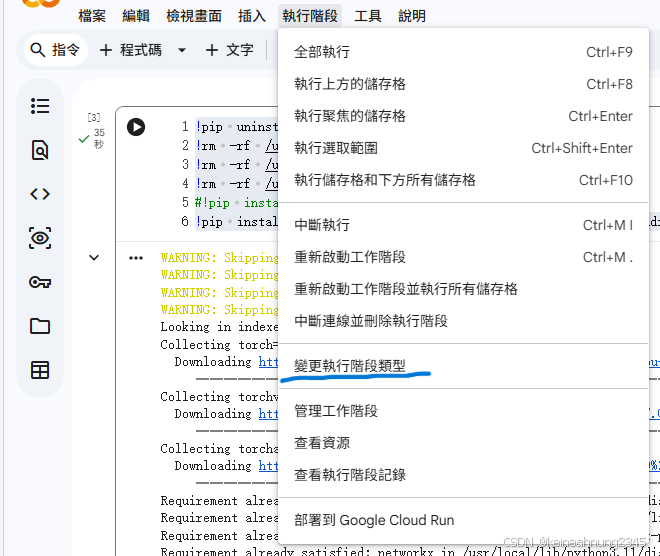
沒辦法只能再回退 Python 版本到 3.11,在 Google Colab 中選取 執行階段:
再選 變更執行階段類型:
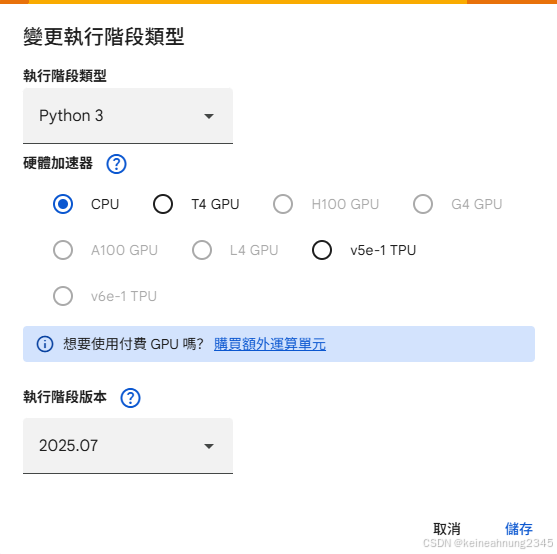
執行階段版本 選 2025.07,參考 Frequently Asked Questions - Past Runtime Versions,這個版本中的 Python 為 3.11.13,PyTorch 則為 2.6.0。
因為 PyTorch 2.6.0 版還是太新了,只能重裝 2.2.0 版。先透過以下指令把之前的 PyTorch 清理乾淨:
shell
!pip uninstall -y torch torchvision torchaudio triton
!rm -rf /usr/local/lib/python3.11/dist-packages/torch*
!rm -rf /usr/local/lib/python3.11/dist-packages/~orch*
!rm -rf /usr/local/lib/python3.11/dist-packages/triton*
安裝 PyTorch:
shell
!pip install torch==2.2.0+cpu torchvision==0.17.0+cpu torchaudio==2.2.0+cpu --index-url https://download.pytorch.org/whl/cpu安裝完成後嘗試 import torch,會出現如下報錯:
A module that was compiled using NumPy 1.x cannot be run in
NumPy 2.1.3 as it may crash. To support both 1.x and 2.x
versions of NumPy, modules must be compiled with NumPy 2.0.
Some module may need to rebuild instead e.g. with 'pybind11>=2.12'.

If you are a user of the module, the easiest solution will be to
downgrade to 'numpy<2' or try to upgrade the affected module.
We expect that some modules will need time to support NumPy 2.
這個因為 PyTorch 2.1/2.2 是用 NumPy 1.x 的介面編譯的,如果搭配 NumPy 2.x 會導致 ABI 不相容的錯誤。
2025.07 裡的 numpy 版本是 2.0.2,得將它降為 1.x 版:
shell
!pip install numpy==1.26.4 --force-reinstall經過如上操作後,教學裡的程式碼終於能正常運行。