在现代大模型应用中,仅靠自然语言生成已经无法满足复杂任务需求。OpenAI 的 Function Calling 机制为模型提供了调用外部工具或函数的能力,让 LLM 不仅能"会说话",还能"动手做事"。本文将带你系统理解 Function Calling 的原理、设计最佳实践以及流式调用,让你能轻松在自己的 Agent 或应用中实现工具调用。
原文链接 :OpenAI Function Calling

【OpenAI Function Calling(工具调用机制)】
文章目录
- [【OpenAI Function Calling(工具调用机制)】](#【OpenAI Function Calling(工具调用机制)】)
-
- 如何定义一个好的function
- function的token消耗
- 处理function调用
- [Tool Choice(控制模型怎么调用 Tool)](#Tool Choice(控制模型怎么调用 Tool))
- [Parallel Tool Calls(并行调用)](#Parallel Tool Calls(并行调用))
- [Strict Mode(严格模式)](#Strict Mode(严格模式))
- [Streaming Function Call](#Streaming Function Call)
- 自定义Tool
定义function
这段JSON本质就是:"把一个 Python 函数,包装成一个 LLM 能理解和调用的 Tool 描述。"
| 场地 | 描述 |
|---|---|
type |
这应该永远是function |
name |
函数名称(例如get_weather) |
description |
关于何时以及如何使用该功能的详细信息 |
parameters |
定义函数输入参数的JSON模式 |
strict |
是否对函数调用强制执行严格模式 |
python
{
  "type": "function",
  "name": "get_weather",
  "description": "Retrieves current weather for the given location.",
  "parameters": {
    "type": "object",
    "properties": {
      "location": {
        "type": "string",
        "description": "City and country e.g. Bogotá, Colombia"
      },
      "units": {
        "type": "string",
        "enum": ["celsius", "fahrenheit"],
        "description": "Units the temperature will be returned in."
      }
    },
    "required": ["location", "units"],
    "additionalProperties": false
  },
  "strict": true
}
tool_search
Tool Search 本质上是一个"工具检索系统"
作用:让 LLM 不需要一开始加载全部 Tool,而是先搜索相关 Tool,再动态加载。
适用于:
- Tool 数量很多
- 大型 Agent 系统
- MCP / 插件生态
- 企业内部工具平台
为什么需要 Tool Search?
如果直接把所有 Tool 都放进 prompt:
text
tools = [1000个工具]会导致:
- token 非常大
- LLM 选择困难
- Tool 调用准确率下降
- 推理性能变差
所以 OpenAI 提供:
text
按需加载 Tool类似:先搜索,再使用
而不是:一次性把所有工具塞给模型
Tool Search 的工作流程
① 用户提问帮我查北京天气
② LLM 发现:
当前只有:tool_search(),没有真正天气工具。
于是 LLM 调用:
json
{
  "tool": "tool_search",
  "arguments": {
    "query": "weather"
  }
}
③ Python 后端执行 tool_search
tool_search 本质通常是:
- Python 程序
- 数据库查询
- 向量检索
- MCP Registry
- embedding similarity search
例如:
python
def tool_search(query):
    return [
        {
            "name": "get_weather",
            "description": "Get current weather"
        }
    ]
④ tool_search 返回 Tool Schema
系统动态把:
json
{
  "name": "get_weather",
  "description": "...",
  "parameters": {...}
}
注入到 LLM 上下文。
现在 LLM 才真正"看到"天气工具。
⑤ LLM 再调用具体 Tool
json
{
  "tool": "get_weather",
  "arguments": {
    "location": "Beijing",
    "units": "celsius"
  }
}
⑥ Python 执行真正函数
python
get_weather("Beijing", "celsius")⑦ Tool结果返回给 LLM
最后生成自然语言回答:北京当前 28°C
- Tool
text
Tool = 模型可以调用的能力- Function Tool
text
Function Tool = Tool 的一种类型本质:
text
Python函数
    ↓
包装成 Tool Schema
    ↓
提供给 LLM 调用- Tool Schema
本质:
text
给 LLM 看的"函数说明书"作用:
- 告诉模型工具叫什么
- 能干什么
- 参数是什么
- 参数类型是什么
- 怎么正确调用
LLM 并不会直接读取 Python 代码。
如何定义一个好的function
-
名字和描述要清晰
-
函数名直观、明确
-
参数描述详细,包括类型、格式
-
输出含义明确
-
-
系统提示指引
-
告诉模型 什么时候用/不该用
-
给模型清晰指令,避免它胡猜
-
-
提供示例和边界情况(可选)
-
用例和特殊情况帮助模型理解
-
但过多例子可能影响推理性能
-
-
软件工程最佳实践
-
避免意外(least surprise):函数直观易懂
-
使用 enum / object 结构 防止非法参数
-
Intern Test:给别人用函数,别人能理解吗?
-
-
减轻模型负担
-
对已知信息不要让模型填参数(如 order_id)
-
把常用函数序列合并(例如 query → mark)
-
-
控制初始可用函数数量
-
建议一轮 <20 个函数
-
对大或少用的函数,用 tool_search 延迟加载
- 不断迭代优化
-
在 Playground 调试 schema
-
必要时微调模型提升 function 调用准确率
function的token消耗
函数其实是写在 system message 里的一段文本
模型把它当作 prompt 读取
所以 函数越多、描述越长,占用的 token 就越多
Token 限制与建议
如果你遇到 token limit(上下文太长):
- 减少一次性加载的函数数量
- 不要一次把 50~100 个函数全塞进上下文
- 尝试 <20 个函数开局
- 缩短函数描述
- 保留关键说明,删掉冗余文本
- 模型仍然能理解用途就够了
- 用 Tool Search 延迟加载
- 大型/不常用函数不放开头
- 当模型需要时再动态加载
额外优化
如果你有很多函数:
- 可以通过 fine-tuning(微调)把函数调用模式固定
- 减少每次 prompt 中重复写的文本,从而减少 token 消耗
处理function调用
python
for tool_call in response.output:
    if tool_call.type != "function_call":
        continue

    name = tool_call.name
    args = json.loads(tool_call.arguments)

    result = call_function(name, args)
    input_messages.append({
        "type": "function_call_output",
        "call_id": tool_call.call_id,
        "output": str(result)
    })
拿到 LLM 想让程序执行的函数 → 调用它 → 把结果封装成规范格式送回 LLM,让模型继续使用结果生成下一步输出
把llm发过来的函数名转换成真正的函数并执行
python
def call_function(name, args):
    if name == "get_weather":
        return get_weather(**args)
    if name == "send_email":
        return send_email(**args)
Tool Choice(控制模型怎么调用 Tool)
-
auto:(默认 )呼叫零、一或多个功能tool_choice: "auto" -
required:至少调用一个Tooltool_choice: "required" -
**强制功能:**只需调用一个具体函数
pythontool_choice: { "type": "function", "name": "get_weather" } -
**允许使用的工具:**将模型可调用的工具限制为 模型可用的工具
pythonallowed_tools: - get_weather - search_docs
Parallel Tool Calls(并行调用)
模型可能一次调用多个 Tool
可以通过设置来防止这种情况,这样可以确保调用的只有一个或零个工具。parallel_tool_calls false
Strict Mode(严格模式)
python
strict=True强制模型严格遵守 schema
避免:
- 参数乱填
- 缺字段
- 类型错误
严格模式的原理是利用我们的结构化输出功能,因此引入了几个要求:
additionalProperties必须对 中的每个对象 都设置为 :false``parameters- 所有字段必须标记为:
properties``required
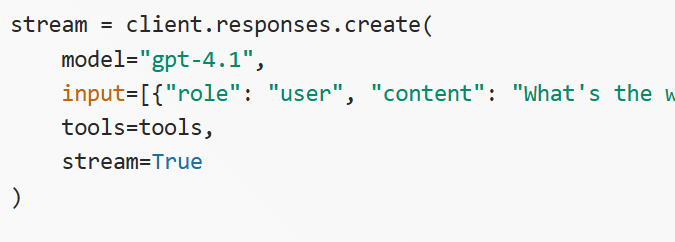
Streaming Function Call
模型在调用函数时,把函数名和参数 JSON 像打字一样分片实时输出,你可以边接收边拼接,最后得到完整可执行的 function_call,而不是一次性返回全部参数。
实现了流式 + 可控 + 可中断 + 可实时展示,而不是一次性黑盒结果
stream true event
自定义Tool
python
from openai import OpenAI

client = OpenAI()

response = client.responses.create(
    model="gpt-5",
    input="Use the code_exec tool to print hello world to the console.",
    tools=[
        {
            "type": "custom",
            "name": "code_exec",
            "description": "Executes arbitrary Python code.",
        }
    ]
)
print(response.output)