文件路径 : src/screens/REPL.tsx
总行数 : 5005 行
核心职责: Claude Code 交互式模式的根组件,管理用户输入、消息展示、API 查询、权限审批等全流程
一、导入阶段(第 1-294 行)
1.1 编译时依赖(第 1 行)
tsx
import { c as _c } from "react/compiler-runtime";React 编译器(React Forget)的运行时。因为文件经过编译,所有组件函数体内都有 _c() 调用用于 memoization。
1.2 构建特性标记(第 3 行)
tsx
import { feature } from 'bun:bundle';Bun 的编译时特性标记系统。feature('VOICE_MODE') 在构建期求值,如果特性关闭,相关代码块在打包时被彻底移除(dead code elimination)。
1.3 条件导入模式(第 96-120 行, 192-199 行, 220-223 行, 271-272 行)
文件中大量使用条件 require() 来实现特性门控:
模式一:基于 feature() 标记
tsx
const useVoiceIntegration = feature('VOICE_MODE')
  ? require('../hooks/useVoiceIntegration.js').useVoiceIntegration
  : () => ({ stripTrailing: () => 0, handleKeyEvent: () => {}, resetAnchor: () => {} });
当 VOICE_MODE 编译为 false 时,打包器直接替换为空函数实现,整个 useVoiceIntegration 模块不会出现在最终产物中。
模式二:基于构建目标
tsx
const useFrustrationDetection = "external" === 'ant'
  ? require('...').useFrustrationDetection
  : () => ({ state: 'closed', handleTranscriptSelect: () => {} });
"external" === 'ant' 在外部构建中编译为 false,Ant 内部构建编译为 true,实现内部功能与开源构建的代码隔离。
条件导入的模块包括:
useVoiceIntegration(第 98 行)--- 语音模式VoiceKeybindingHandler(第 103 行)useFrustrationDetection(第 107 行)--- 用户挫败感检测useAntOrgWarningNotification(第 113 行)--- 组织警告getCoordinatorUserContext(第 115 行)--- 协调器模式proactiveModule(第 194 行)--- AI 主动发起模式useScheduledTasks(第 199 行)AntModelSwitchCallout(第 221 行)--- 模型切换提示WebBrowserPanelModule(第 272 行)
1.4 普通导入(第 4-290 行)
按功能分类:
| 类别 | 模块 | 用途 |
|---|---|---|
| React | react, react/compiler-runtime |
核心 |
| Ink 终端渲染 | ../ink.js (Box, Text, useInput, useStdin...) |
终端 UI 组件 |
| 状态管理 | ../state/AppState.js (useAppState, useSetAppState, useAppStateStore) |
全局应用状态 |
| 消息处理 | ../utils/messages.js (handleMessageFromStream, createUserMessage...) |
消息类型工具 |
| 查询 | ../query.js (query) |
核心 API 查询 |
| 提交流程 | ../utils/handlePromptSubmit.js |
用户输入处理 |
| 命令 | ../commands.js |
斜杠命令系统 |
| 权限 | ../utils/permissions/, ../permission/ |
工具权限审批 |
| 远程模式 | useRemoteSession, useDirectConnect, useSSHSession |
三种远程模式 |
| 通知 | ../context/notifications.js |
通知系统 |
| 分析 | src/services/analytics/index.js |
遥测事件 |
| 键盘 | keybindings/ |
快捷键系统 |
1.5 模块级常量(第 294-305 行)
tsx
const EMPTY_MCP_CLIENTS: MCPServerConnection[] = [];       // 稳定空数组,避免无限重渲染
const HISTORY_STUB = { maybeLoadOlder: (_: ScrollBoxHandle) => {} };  // KAIROS 空操作桩
const RECENT_SCROLL_REPIN_WINDOW_MS = 3000;                // 滚动后 3 秒内不自动回底
二、辅助函数与小组件(第 311-524 行)
2.1 median()(第 311-315 行)
tsx
function median(values: number[]): number {
  const sorted = [...values].sort((a, b) => a - b);
  const mid = Math.floor(sorted.length / 2);
  return sorted.length % 2 === 0
    ? Math.round((sorted[mid - 1]! + sorted[mid]!) / 2)
    : sorted[mid]!;
}
计算中位数。用于计算多轮 API 请求的 P50 TTFT(首 token 时间)和 OTPS(每秒输出 token)。
2.2 TranscriptModeFooter(第 321-362 行)
Transcript(详细聊天记录)模式底栏组件。语音模式。使用 React Compiler _c() 手动 memo。
arduino
显示内容: "Showing detailed transcript · ctrl+o to toggle · ctrl+e to show all"
右侧: 搜索状态 "current/count" 或自定义状态文本
关键特性:
- 使用
useShortcutDisplay获取当前平台的快捷键显示(cmd 或 ctrl) - 全静态内容,通过
_c手动缓存避免重渲染
2.3 TranscriptSearchBar(第 368-472 行)
/ 触发的搜索栏,模仿 less 风格:
tsx
function TranscriptSearchBar({ jumpRef, count, current, onClose, onCancel, setHighlight, initialQuery })实现细节:
- 使用
useSearchInputhook 处理 readline 风格编辑 - 搜索索引预热 (第 413-437 行):在首次打开时调用
jumpRef.current.warmSearchIndex(),如果超过 20ms 则显示 "indexed in Xms" warmDone状态守卫(第 440 行):搜索高亮只在索引预热完成后生效- 渲染为带
/前缀的一行编辑框 + 右侧计数
2.4 AnimatedTerminalTitle(第 484-524 行)
tsx
const TITLE_ANIMATION_FRAMES = ['⠂', '⠐'];
const TITLE_STATIC_PREFIX = '✳';
const TITLE_ANIMATION_INTERVAL_MS = 960;
终端标签页标题动画组件:
- 查询运行时:
✳ ⠂ Claude Code→✳ ⠐ Claude Code960ms 切换 - 空闲时:
✳ Claude Code - 独立组件:960ms tick 只重渲染这个叶子组件,不触发 REPL 主体
三、Props 定义(第 526-570 行)
tsx
export type Props = {
  commands: Command[];
  debug: boolean;
  initialTools: Tool[];
  initialMessages?: MessageType[];
  pendingHookMessages?: Promise<HookResultMessage[]>;
  initialFileHistorySnapshots?: FileHistorySnapshot[];
  initialContentReplacements?: ContentReplacementRecord[];
  initialAgentName?: string;
  initialAgentColor?: AgentColorName;
  mcpClients?: MCPServerConnection[];
  dynamicMcpConfig?: Record<string, ScopedMcpServerConfig>;
  autoConnectIdeFlag?: boolean;
  strictMcpConfig?: boolean;
  systemPrompt?: string;
  appendSystemPrompt?: string;
  onBeforeQuery?: (input: string, newMessages: MessageType[]) => Promise<boolean>;
  onTurnComplete?: (messages: MessageType[]) => void | Promise<void>;
  disabled?: boolean;
  mainThreadAgentDefinition?: AgentDefinition;
  disableSlashCommands?: boolean;
  taskListId?: string;
  remoteSessionConfig?: RemoteSessionConfig;
  directConnectConfig?: DirectConnectConfig;
  sshSession?: SSHSession;
  thinkingConfig: ThinkingConfig;
};
export type Screen = 'prompt' | 'transcript';
关键设计:
- 三模合一 :
remoteSessionConfig/directConnectConfig/sshSession三者互斥,分别对应--remote/claude connect/claude ssh三种模式 - 惰性初始化 :
initialMessages用于会话恢复,pendingHookMessages是 Promise,在首次 API 调用前 await - 会话生命周期回调 :
onBeforeQuery(查询前拦截)、onTurnComplete(每次轮次结束通知)
四、REPL 组件主体(第 572-5004 行)
4.1 组件签名与环境门控(第 572-608 行)
tsx
export function REPL({ commands: initialCommands, debug, initialTools, ... }: Props): React.ReactNode {
  const isRemoteSession = !!remoteSessionConfig;
  const titleDisabled = useMemo(() => isEnvTruthy(process.env.CLAUDE_CODE_DISABLE_TERMINAL_TITLE), []);
  const moreRightEnabled = useMemo(() => "external" === 'ant' && isEnvTruthy(process.env.CLAUDE_MORERIGHT), []);
  const disableVirtualScroll = useMemo(() => isEnvTruthy(process.env.CLAUDE_CODE_DISABLE_VIRTUAL_SCROLL), []);
将环境变量检查提升到 useMemo 中。这些检查原本在渲染路径上每次执行,useMemo 确保只执行一次。
4.2 生命周期日志(第 610-614 行)
tsx
useEffect(() => {
  logForDebugging(`[REPL:mount] REPL mounted, disabled=${disabled}`);
  return () => logForDebugging(`[REPL:unmount] REPL unmounting`);
}, [disabled]);
4.3 AppState 读取(第 616-640 行)
tsx
const mainThreadAgentDefinition = useState(initialMainThreadAgentDefinition);
const toolPermissionContext = useAppState(s => s.toolPermissionContext);
const verbose = useAppState(s => s.verbose);
const queuedCommands = useCommandQueue();
// ... 约 20 个 useAppState 选择器
const setAppState = useSetAppState();
所有全局状态通过 useAppState 的 selector 模式读取,确保只有相关子状态变化时组件才重渲染。
4.4 Agent 会话引导(第 646-671 行)
本地 agent(local_agent)保留会话的反序列化引导逻辑:
tsx
const viewedLocalAgent = viewingAgentTaskId ? tasks[viewingAgentTaskId] : undefined;
const needsBootstrap = isLocalAgentTask(viewedLocalAgent) && viewedLocalAgent.retain && !viewedLocalAgent.diskLoaded;
从 JSONL 文件中读取磁盘持久化的消息,与流式输出的消息做 UUID 去重合并(第 656-657 行),确保消息不重复。
4.5 命令热重载(第 680-684 行)
tsx
const [localCommands, setLocalCommands] = useState(initialCommands);
useSkillsChange(isRemoteSession ? undefined : getProjectRoot(), setLocalCommands);
监听 skill 文件变化,重新加载所有命令(/help 等斜杠命令支持热更新)。
4.6 主动模式订阅(第 687 行)
tsx
const proactiveActive = React.useSyncExternalStore(
  proactiveModule?.subscribeToProactiveChanges ?? PROACTIVE_NO_OP_SUBSCRIBE,
  proactiveModule?.isProactiveActive ?? PROACTIVE_FALSE
);
useSyncExternalStore 是 React 18 的 API,用于订阅外部 store。这里订阅 proactive 模块的状态变化。
4.7 工具与命令合并(第 696-835 行)
工具合并管线:
scss
localTools(useMemo) → getTools(toolPermissionContext)
combinedInitialTools = [...localTools, ...initialTools]
mergedTools = useMergedTools(combinedInitialTools, mcp.tools, toolPermissionContext)
tools = mainThreadAgentDefinition ? resolveAgentTools(...) : mergedTools
命令合并管线:
scss
localCommands(state) → useMergedCommands(plugins) → useMergedCommands(mcp)
commands = disableSlashCommands ? [] : mergedCommands
4.8 查询状态管理(第 838-953 行)
核心状态:
tsx
const queryGuard = React.useRef(new QueryGuard()).current;   // 同步状态机
const isQueryActive = React.useSyncExternalStore(            // 派生状态
  queryGuard.subscribe, queryGuard.getSnapshot
);
const [isExternalLoading, setIsExternalLoadingRaw] = useState(remoteSessionConfig?.hasInitialPrompt ?? false);
const isLoading = isQueryActive || isExternalLoading;        // 最终 loading 标志
QueryGuard 状态机 (来自 ../utils/QueryGuard.js):
css
状态: idle → dispatching → running → idle
方法: reserve() / tryStart() / end() / forceEnd() / cancelReservation()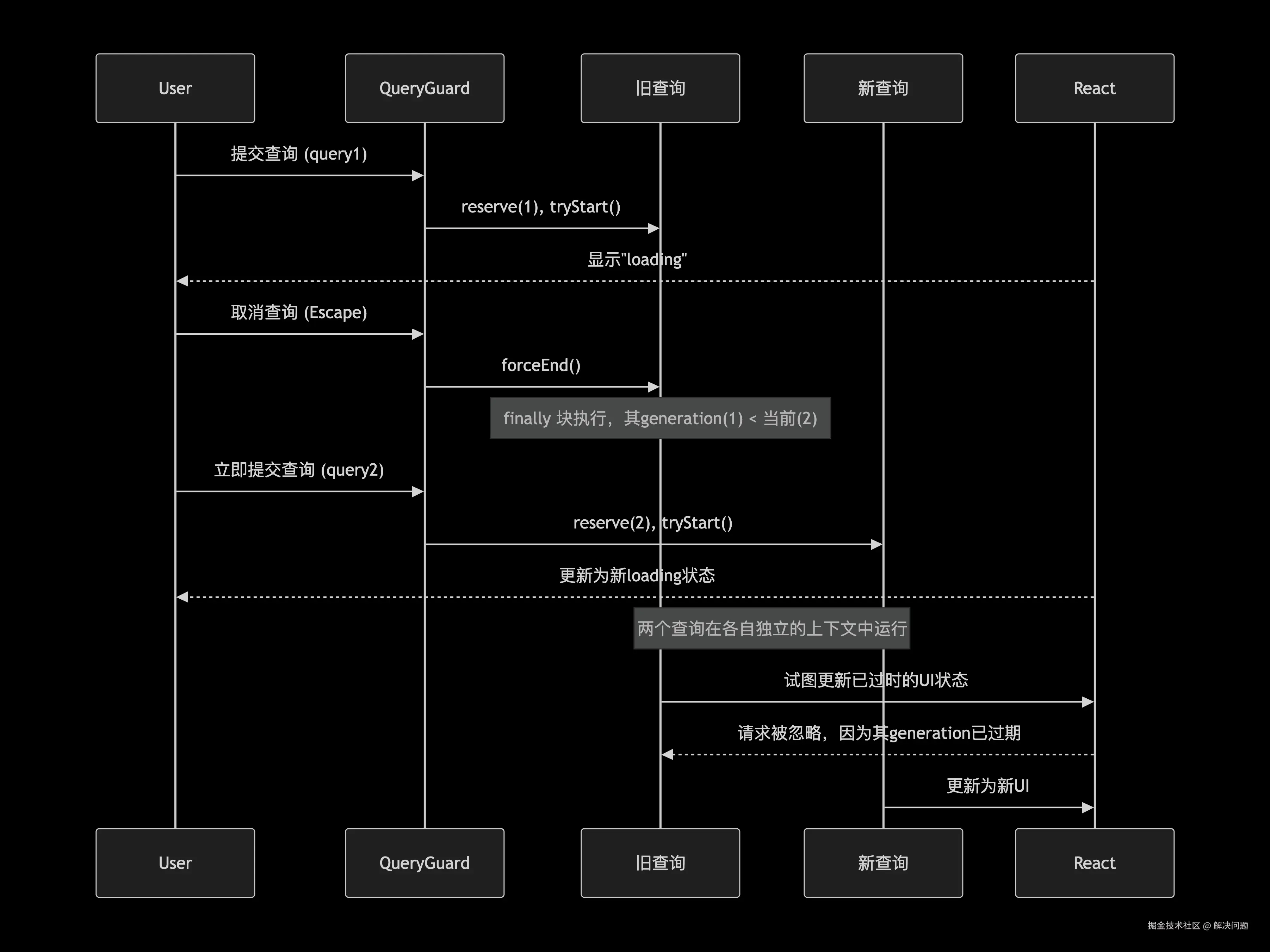
时间跟踪系统(第 931-967 行):
tsx
const loadingStartTimeRef = useRef<number>(0);
const totalPausedMsRef = useRef(0);
const pauseStartTimeRef = useRef<number | null>(null);
三个 ref 配合实现暂停感知的耗时计算。当权限审批对话框弹出时,暂停计时器停止累加,对话框关闭后恢复。
4.9 流式状态(第 849-867 行)
tsx
const [streamingToolUses, setStreamingToolUses] = useState<StreamingToolUse[]>([]);
const [streamingThinking, setStreamingThinking] = useState<StreamingThinking | null>(null);
const streamingText  // 流式文本(字符级增量)
const visibleStreamingText  // 只保留完整行(lastIndexOf('\n') + 1),实现逐行输出
visibleStreamingText 的设计(第 1473 行):截取到最后一个换行符,保证文本逐行显示而不是逐字符跳跃。
4.10 消息状态管理(第 1182-1322 行)
Ref 镜像模式(第 1182-1222 行):
tsx
const [messages, rawSetMessages] = useState<MessageType[]>(initialMessages ?? []);
const messagesRef = useRef(messages);

const setMessages = useCallback((action) => {
  const prev = messagesRef.current;
  const next = typeof action === 'function' ? action(messagesRef.current) : action;
  messagesRef.current = next;    // 同步写入 ref
  // ...placeholder 逻辑
  rawSetMessages(next);          // 触发 React 重渲染
}, []);
这是一个关键设计模式:
- Ref 作为真实数据源,React state 作为渲染投影
- setter 中同步更新 ref,保证所有闭包读到最新值
- 避免
onQuery/onSubmit等回调因messages变化而频繁重建
useDeferredValue(第 1318 行):
tsx
const deferredMessages = useDeferredValue(messages);React 18 并发特性。messages 在流式更新时频繁变化,deferredMessages 以过渡优先级更新,保证输入框保持响应。
4.11 输入状态管理(第 1329-1371 行)
tsx
const [inputValue, setInputValueRaw] = useState(() => consumeEarlyInput());consumeEarlyInput() 消费 REPL 挂载前捕获的早期输入(用户在启动过程中就打字的内容)。
tsx
const setInputValue = useCallback((value: string) => {
  if (trySuggestBgPRIntercept(inputValueRef.current, value)) return;
  if (inputValueRef.current === '' && value !== '' && /* 最近3秒内没有滚动 */) {
    repinScroll();
  }
  inputValueRef.current = value;
  setInputValueRaw(value);
  setIsPromptInputActive(value.trim().length > 0);
}, []);
类型空 → 非空时自动回到底部,但保留 3 秒窗口防止用户在阅读时被拉走。
4.12 提示抑制系统(第 1365-1371 行)
tsx
useEffect(() => {
  if (inputValue.trim().length === 0) return;
  const timer = setTimeout(setIsPromptInputActive, PROMPT_SUPPRESSION_MS, false);
  return () => clearTimeout(timer);
}, [inputValue]);
PROMPT_SUPPRESSION_MS = 1500。用户停止打字 1.5 秒后才弹出打断式对话框,防止意外确认权限。
4.13 远程模式初始化(第 1380-1422 行)
三种远程模式互斥:
tsx
const remoteSession = useRemoteSession({ config: remoteSessionConfig, ... });
const directConnect = useDirectConnect({ config: directConnectConfig, ... });
const sshRemote = useSSHSession({ session: sshSession, ... });
const activeRemote = sshRemote.isRemoteMode ? sshRemote
  : directConnect.isRemoteMode ? directConnect
  : remoteSession;
useRemoteSession --- WebSocket 连接远程 CCR 实例
useDirectConnect --- WebSocket 连接本地 claude server
useSSHSession --- SSH 子进程通信
4.14 防休眠与标签页状态(第 1149-1175 行)
tsx
useEffect(() => {
  if (isLoading && !isWaitingForApproval && !isShowingLocalJSXCommand) {
    startPreventSleep();
    return () => stopPreventSleep();
  }
}, [isLoading, isWaitingForApproval, isShowingLocalJSXCommand]);
Claude 工作时阻止 macOS 进入睡眠。
tsx
const sessionStatus: TabStatusKind = isWaitingForApproval || isShowingLocalJSXCommand
  ? 'waiting'
  : isLoading ? 'busy' : 'idle';
状态通过 useTabStatus 推送到终端标签页侧边栏(OSC 21337 协议)。
4.15 通知系统(第 745-773 行)
一系列 useEffect 风格的自定义 hooks,在特定条件下触发通知:
| Hook | 条件 |
|---|---|
useModelMigrationNotifications |
模型版本迁移 |
useIDEStatusIndicator |
IDE 连接状态 |
useMcpConnectivityStatus |
MCP 服务器连接 |
useRateLimitWarningNotification |
速率限制警告 |
useFastModeNotification |
快速模式 |
useDeprecationWarningNotification |
弃用警告 |
useNpmDeprecationNotification |
npm 弃用 |
| 等等... |
4.16 成本阈值对话框(第 2203-2215 行)
tsx
useEffect(() => {
  const totalCost = getTotalCost();
  if (totalCost >= 5 && !showCostDialog && !haveShownCostDialog) {
    // 显示 $5 成本阈值警告
  }
}, [messages, showCostDialog, haveShownCostDialog]);
当会话成本达到 $5 时弹出确认对话框。使用 haveShownCostDialog 标记确保只弹一次(即使没有控制台计费权限也标记为已显示,防止事件风暴)。
4.17 沙箱网络权限(第 2216-2310 行)
sandboxAskCallback --- 网络访问权限请求的回调,支持三种模式:
- Worker 模式(第 2218-2249 行):通过 mailbox 转发给 leader
- 本地模式(第 2253-2265 行):显示本地权限对话框
- Bridge 模式(第 2270-2308 行):同时转发到远程控制端(claude.ai)
支持竞速解决:本地和远程谁先响应就用谁的结果。
4.18 getFocusedInputDialog()(第 2017-2065 行)
对话框优先级系统,返回值决定当前显示哪个对话框:
markdown
优先级从高到低:
1. isExiting / exitFlow         → 不显示任何对话框
2. isMessageSelectorVisible     → 消息选择器
3. sandboxPermissionRequestQueue → 网络权限(不因打字抑制)
4. toolUseConfirmQueue          → 工具使用审批
5. promptQueue                  → 通用提示框
6. workerSandboxPermissions     → Worker 沙箱权限
7. elicitation.queue            → MCP 提示
8. showingCostDialog            → 成本对话框
9. idleReturnPending            → 空闲返回对话框
...(依次降低优先级)
第 4-8 项受 isPromptInputActive 抑制:用户正在打字时跳过。
4.19 getToolUseContext()(第 2392-2523 行)
构建 ProcessUserInputContext,这是整个查询管线的核心上下文对象,包含:
tsx
return {
  abortController,
  options: {
    commands, tools, debug, verbose, mainLoopModel,
    thinkingConfig, mcpClients, mcpResources,
    dynamicMcpConfig, theme,
    customSystemPrompt, appendSystemPrompt,
    refreshTools  // 闭包内从 store 重新读取工具列表
  },
  getAppState: () => store.getState(),
  setAppState,
  messages, setMessages,
  updateFileHistoryState,
  updateAttributionState,
  openMessageSelector,
  onChangeAPIKey: reverify,
  readFileState,
  setToolJSX,
  addNotification,
  appendSystemMessage,
  sendOSNotification,
  onChangeDynamicMcpConfig,
  // ...更多工具函数
};
关键设计 --- computeTools()(第 2404-2410 行):每次调用时从 store.getState() 重新读取 MCP 工具列表,确保异步连接的 MCP 工具不会因为闭包陈旧而丢失。
4.20 onCancel()(第 2106-2163 行)
ctrl+c / Escape 中断处理器:
tsx
function onCancel() {
  queryGuard.forceEnd();        // 强制结束 query
  // 保留已流式文本(第 2125-2129 行)
  if (streamingText?.trim()) {
    setMessages(prev => [...prev, createAssistantMessage({ content: streamingText })]);
  }
  resetLoadingState();
  // 根据当前对话框类型处理:
  if (focusedInputDialog === 'tool-permission') {
    toolUseConfirmQueue[0]?.onAbort();
    setToolUseConfirmQueue([]);
  } else if (focusedInputDialog === 'prompt') {
    // 拒绝所有 pending prompt
  } else if (activeRemote.isRemoteMode) {
    activeRemote.cancelRequest();
  } else {
    abortController?.abort('user-cancel');
  }
}
4.21 onQueryEvent()(第 2584-2659 行)
消息流事件处理器,是 query() 函数输出端到 setMessages() 的桥梁:
三种消息类型的分发逻辑:
-
CompactBoundary(第 2586-2607 行) --- 上下文压缩边界
- 全屏模式:保留压缩前的消息作为滚动缓存
- 滚动模式:清空(只保留边界后的消息)
- 生成新的
conversationId,重置 Messages 组件的所有 memo 缓存
-
Ephemeral Progress(第 2608-2627 行) --- 短暂进度消息
- 只替换同一 tool call 的最后一条进度消息,避免数组无限膨胀(观察过 13k+ 条)
- 只对
isEphemeralToolProgress类型生效(sleep 进度、bash 进度),不替换 agent/hook/skill 进度
-
普通消息(第 2628-2630 行) --- 直接追加
4.22 onQueryImpl()(第 2661-2853 行)
查询执行的核心实现:
执行流程:
scss
1. 诊断跟踪 → IDE 关闭打开的 diff(第 2665-2672 行)
2. 项目引导标记完成(第 2675 行)
3. 会话标题提取(第 2684-2699 行)
   └─ 首次用户消息 → generateSessionTitle() 调用 Haiku API
4. 斜杠命令工具权限注入(第 2701-2726 行)
5. 非查询命令短路(第 2730-2744 行)
   └─ shouldQuery=false → resetLoadingState,返回
6. 构建 toolUseContext + 计算 tools/mcpClients(第 2746-2755 行)
7. 并加载系统提示 + 用户/系统上下文(第 2768-2772 行)
   └─ checkAndDisableBypassPermissionsIfNeeded()
   └─ getSystemPrompt() + getUserContext() + getSystemContext()
8. 构建最终 systemPrompt(第 2781-2788 行)
9. for await...of query({...})(第 2793-2803 行)
   └─ 逐事件调用 onQueryEvent()
10. Companion 反应触发(第 2804-2809 行)
11. API 指标计算(第 2814-2845 行)
    └─ TTFT / OTPS / Hook 耗时 / Tool 耗时 / Classifier 耗时
12. resetLoadingState()(第 2847 行)关键:for await...of (第 2793 行)。query() 是一个异步生成器函数 ,每次 yield 一个事件,onQueryEvent 处理每个事件(增量渲染流式消息、工具使用、进度更新)。这是整个交互模式的核心事件循环。
4.23 onQuery()(第 2855-3000 行)
onQuery 是 onQueryImpl 的安全包装:
tsx
const onQuery = useCallback(async (...): Promise<void> => {
  // Swarm 活跃状态标记
  const thisGeneration = queryGuard.tryStart();  // 并发守卫
  if (thisGeneration === null) {                 // 已有查询运行中
    // 将输入入队等待
    newMessages.filter(...).forEach(msg => enqueue({ value: msg, mode: 'prompt' }));
    return;
  }
  try {
    // 初始化:重置计时器、追加消息、清空流式状态...
    await onQueryImpl(...);
  } finally {
    if (queryGuard.end(thisGeneration)) {        // 只有本轮结束才执行
      resetLoadingState();
      await mrOnTurnComplete(messagesRef.current, abortController.signal.aborted);
      // 通知 bridge 客户端
      sendBridgeResultRef.current();
      // 添加 turn 耗时消息(>30s 或 token budget 启用时)
      if (turnDurationMs > 30000 || budgetInfo !== undefined) {
        setMessages(prev => [...prev, createTurnDurationMessage(...)]);
      }
    }
  }
}, [...]);并发入队(第 2876-2884 行):如果用户连发两条消息,第二条不会丢失,而是进队列等待。
4.24 onSubmit()(第 3142-3545 行)
用户按回车后的完整处理流程:
scss
第一步:repinScroll() --- 回到底部
第二步:resumeProactive() --- 恢复主动模式
第三步:检查 immediate 命令(第 3161-3281 行)
  ├─ /config, /btw, /sandbox 等
  └─ 如果 query 正在运行且命令标记为 immediate → 直接执行,返回
第四步:远程模式空输入检查(第 3285-3287 行)
第五步:idle-return 检查(第 3292-3310 行)
  └─ 空闲超过阈值 + token 超过阈值 → 弹出空闲返回对话框
第六步:添加到历史记录(第 3316-3326 行)
第七步:输入清除 + placeholder 显示(第 3339-3389 行)
  └─ setUserInputOnProcessing(input) --- 显示"❯ <输入>"占位
第八步:speculation 接受处理(第 3392-3406 行)
第九步:远程模式发送(第 3416-3486 行)
  ├─ 构建消息内容 + 图片附件
  ├─ createUserMessage + setMessages
  └─ activeRemote.sendMessage()
第十步:本地查询(第 3488-3519 行)
  ├─ await awaitPendingHooks()    --- 等待 hook 消息
  └─ await handlePromptSubmit()  --- 核心提交流程
Immediate 命令执行(第 3208-3280 行):
tsx
const executeImmediateCommand = async (): Promise<void> => {
  const mod = await matchingCommand.load();
  const jsx = await mod.call(onDone, context, commandArgs);
  if (jsx && !doneWasCalled) {
    setToolJSX({ jsx, shouldHidePromptInput: false, isLocalJSXCommand: true });
  }
};
通过 isLocalJSXCommand 机制叠加 UI,不影响正在进行的对话。
4.25 onAgentSubmit()(第 3548-3578 行)
在查看 teammate/agent 视角时提交输入:
- 本地 agent:
appendMessageToLocalAgent+queuePendingMessage(运行时)或resumeAgentBackground(空闲时) - 进程内 teammate:
injectUserMessageToTeammate
4.26 resume()(第 1735-1948 行)
会话恢复/分支的完整流程:
scss
1. deserializeMessages()         → 清理未完成的 tool use
2. 协调器模式匹配                 → 切换 Agent 定义
3. executeSessionEndHooks()      → 触发当前会话的结束 hooks
4. processSessionStartHooks()    → 触发新会话的启动 hooks
5. copyPlanForFork/Resume()      → 复制计划文件
6. restoreSessionStateFromLog()  → 恢复文件历史、归属状态
7. restoreAgentFromSession()     → 恢复 Agent 设置
8. computeStandaloneAgentContext → 恢复 agent 名称/颜色
9. 切换会话 ID + 目录            → switchSession()
10. 退出旧 worktree + 进入新 worktree
11. reconstructContentReplacementState → 重建内容替换状态
12. setMessages()                → 设置恢复后的消息
五、对话框系统(第 4060-4893 行)
渲染到 FullscreenLayout 的 bottom 插槽,由 getFocusedInputDialog() 决定当前显示哪个。
| 组件 | 对话框类型 | 触发条件 |
|---|---|---|
PermissionRequest |
'tool-permission' |
Claude 请求使用工具 |
SandboxPermissionRequest |
'sandbox-permission' |
网络访问请求 |
PromptDialog |
'prompt' |
通用提示 |
ElicitationDialog |
'elicitation' |
MCP 服务器询问 |
CostThresholdDialog |
'cost' |
成本超过 $5 |
IdleReturnDialog |
'idle-return' |
长时间空闲后返回 |
WorkerPendingPermission |
--- | Worker 等待 leader 审批 |
IdeOnboardingDialog |
'ide-onboarding' |
IDE 首次设置引导 |
AntModelSwitchCallout |
'model-switch' |
模型版本迁移提示 |
UndercoverAutoCallout |
'undercover-callout' |
自动模式切换 |
EffortCallout |
'effort-callout' |
Effort 模式介绍 |
RemoteCallout |
'remote-callout' |
远程模式提示 |
PluginHintMenu |
'plugin-hint' |
插件推荐 |
LspRecommendationMenu |
'lsp-recommendation' |
LSP 插件推荐 |
DesktopUpsellStartup |
'desktop-upsell' |
桌面应用推广 |
UltraplanChoiceDialog |
'ultraplan-choice' |
超计划选择 |
UltraplanLaunchDialog |
'ultraplan-launch' |
超计划启动 |
六、渲染层(第 4485-5004 行)
6.1 结构树
tsx
<KeybindingSetup>
  <AnimatedTerminalTitle />
  <GlobalKeybindingHandlers />
  <VoiceKeybindingHandler />        {/* 条件编译 */}
  <CommandKeybindingHandlers />
  <ScrollKeybindingHandler />
  <CancelRequestHandler />
  <MCPConnectionManager>            {/* MCP 连接生命周期管理 */}
    <FullscreenLayout>              {/* 全屏布局:scrollable + bottom */}
      {/* scrollable 区域 */}
      <TeammateViewHeader />
      <Messages messages={displayedMessages} ... />
      <UserTextMessage />           {/* 处理中占位符 */}
      <SpinnerWithVerb />           {/* 加载动画 */}
      <BriefIdleStatus />           {/* 空闲状态 */}

      {/* bottom 区域 --- 所有对话框和输入 */}
      <PermissionRequest />
      <SandboxPermissionRequest />
      <PromptDialog />
      <ElicitationDialog />
      <CostThresholdDialog />
      <IdleReturnDialog />
      {/* ...约 20 种对话框... */}
      <PromptInput />               {/* 底部输入框 */}
      <SessionBackgroundHint />
    </FullscreenLayout>
  </MCPConnectionManager>
</KeybindingSetup>
6.2 全屏模式守卫(第 4499-5004 行)
tsx
const mainReturn = <KeybindingSetup>...</KeybindingSetup>;

if (isFullscreenEnvEnabled()) {
  return <AlternateScreen mouseTracking={isMouseTrackingEnabled()}>
    {mainReturn}
  </AlternateScreen>;
}
return mainReturn;- 全屏环境 :包裹
<AlternateScreen>使用备用屏幕缓冲 + 鼠标跟踪 - 滚动模式:直接使用终端原生滚动缓冲
6.3 placeholder 文本(第 4518 行)
tsx
const placeholderText = userInputOnProcessing && !viewedAgentTask
  && displayedMessages.length <= userInputBaselineRef.current
  ? userInputOnProcessing : undefined;
在用户消息真正渲染到消息列表之前,显示 "❯ <用户输入>" 作为占位符。一旦 displayedMessages 增长超过提交时的基准长度,占位符自动消失。
6.4 Companion 精灵(第 4524-4531 行)
tsx
const companionNarrow = transcriptCols < MIN_COLS_FOR_FULL_SPRITE;
const companionVisible = !toolJSX?.shouldHidePromptInput && !focusedInputDialog && !showBashesDialog;
窄终端中 companion 精灵变为单行模式(堆叠在输入上方),宽终端中并排显示。
七、关键设计模式总结
7.1 Ref 镜像模式
scss
React State (渲染触发)  ←──  setMessages()   ──→  messagesRef (同步真实数据源)
                                                    ↑
                                              所有闭包都读 ref
好处:onQuery/onSubmit 等回调不因 messages 变化而重建,避免下游组件大规模重渲染
7.2 QueryGuard 状态机
scss
idle → tryStart() → running → end() → idle
                  ↘  (并发时返回 null,输入入队)
forceEnd() 强制回到 idle(用户取消)
7.3 死代码消除策略
arduino
feature('FLAG')       → 编译时替换为 true/false,false 分支被 tree-shaking 移除
"external" === 'ant'  → 外部构建为 false,内部构建为 true
7.4 对话框优先级 + 打字抑制
ini
getFocusedInputDialog() 输出当前最高优先级的对话框类型
isPromptInputActive = true → 跳过 mid-priority 对话框
用户停止打字 1.5s 后 → isPromptInputActive = false → 对话框弹出
7.5 精确耗时计算
ini
loadingStartTimeRef = Date.now()
  pauseStartTimeRef = Date.now()  ← 权限审批弹窗
  totalPausedMsRef += pause 持续时间
turnDurationMs = Date.now() - loadingStartTimeRef - totalPausedMsRef
八、执行顺序总结
scss
1. 模块加载(import + 条件 require)
2. REPL() 第一次渲染:
   a. useState 初始化所有状态
   b. useMemo 计算派生值
   c. useCallback 创建回调
   d. useEffect 注册副作用(通知、定时器、MCP 连接等)
   e. 渲染 JSX 结构
3. 用户输入 → onSubmit():
   f. 清除输入、显示 placeholder
   g. handlePromptSubmit() → processUserInput()
   h. onQuery() → queryGuard.tryStart()
   i. onQueryImpl() → for await...of query()
   j. query() 逐事件 yield → onQueryEvent() → setMessages()
4. 查询结束 → onQuery finally:
   k. queryGuard.end()
   l. resetLoadingState()
   m. onTurnComplete()
   n. 添加 turn 耗时消息