Function Calling 技术实现:让 AI 与世界交互
前言
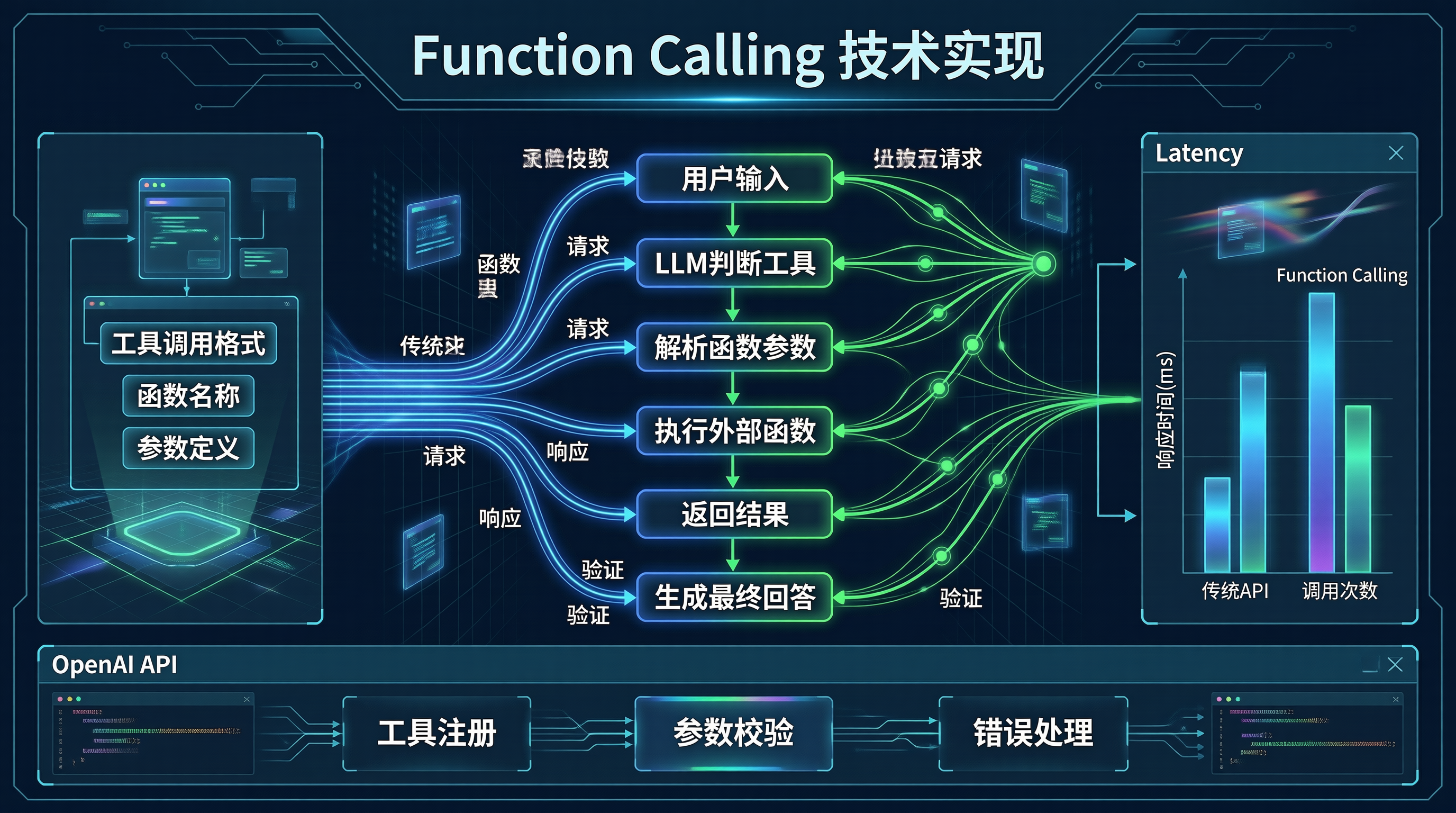
Function Calling(函数调用)是现代 AI Agent 实现的关键技术。它让大模型能够生成结构化的函数调用指令,从而与外部系统交互、执行复杂任务。
OpenAI 在 2023 年 6 月首次引入了 Function Calling 功能,随后各大模型厂商纷纷跟进。今天分享 Function Calling 的原理、实现和最佳实践。
Function Calling 原理
什么是 Function Calling
Function Calling 允许 LLM 生成符合特定格式的输出,而不是自由文本。这个输出可以被程序解析并执行相应的函数:
用户: 北京今天天气怎么样?

LLM 输出(结构化):
{
  "tool_calls": [{
    "function": {
      "name": "get_weather",
      "arguments": {"city": "北京", "unit": "celsius"}
    }
  }]
}

程序执行函数后返回结果 → LLM 生成最终回答
工作流程
1. 用户输入 → 2. LLM 判断需要调用哪些函数 →
3. 解析函数名和参数 → 4. 执行函数 →
5. 返回结果 → 6. LLM 生成最终回答
OpenAI API 实现
基础调用
python
from openai import OpenAI

client = OpenAI()

response = client.chat.completions.create(
    model="gpt-4-turbo",
    messages=[
        {"role": "user", "content": "帮我查一下上海的天气"}
    ],
    tools=[
        {
            "type": "function",
            "function": {
                "name": "get_weather",
                "description": "获取指定城市的天气信息",
                "parameters": {
                    "type": "object",
                    "properties": {
                        "city": {
                            "type": "string",
                            "description": "城市名称"
                        },
                        "unit": {
                            "type": "string",
                            "enum": ["celsius", "fahrenheit"],
                            "description": "温度单位"
                        }
                    },
                    "required": ["city"]
                }
            }
        }
    ],
    tool_choice="auto"  # 自动选择工具,或指定 "none"
)

# 处理响应
if response.choices[0].message.tool_calls:
    for tool_call in response.choices[0].message.tool_calls:
        function_name = tool_call.function.name
        arguments = json.loads(tool_call.function.arguments)
        print(f"调用函数: {function_name}, 参数: {arguments}")
处理工具返回
python
def process_function_calls(messages, tool_calls, tool_results):
    """处理工具调用并继续对话"""

    # 添加模型的消息
    assistant_message = {
        "role": "assistant",
        "content": None,
        "tool_calls": [
            {
                "id": tc.id,
                "function": {
                    "name": tc.function.name,
                    "arguments": tc.function.arguments
                },
                "type": "function"
            }
            for tc in tool_calls
        ]
    }
    messages.append(assistant_message)

    # 添加工具返回结果
    for result in tool_results:
        messages.append({
            "role": "tool",
            "tool_call_id": result["tool_call_id"],
            "content": result["content"]
        })

    # 继续对话
    response = client.chat.completions.create(
        model="gpt-4-turbo",
        messages=messages,
        tools=[...],
        tool_choice="auto"
    )

    return response
完整示例
python
import json
from datetime import datetime

class WeatherTool:
    """天气查询工具"""

    def get_weather(self, city: str, unit: str = "celsius") -> dict:
        """模拟天气查询"""
        # 实际实现调用天气 API
        return {
            "city": city,
            "temperature": 22 if unit == "celsius" else 72,
            "unit": unit,
            "condition": "晴朗",
            "humidity": 65,
            "timestamp": datetime.now().isoformat()
        }

class ChatWithFunctions:
    """支持函数调用的聊天"""

    def __init__(self):
        self.client = OpenAI()
        self.tools = {
            "get_weather": WeatherTool()
        }
        self.tools_schema = self._get_tools_schema()

    def _get_tools_schema(self) -> list:
        return [
            {
                "type": "function",
                "function": {
                    "name": "get_weather",
                    "description": "获取指定城市的当前天气信息",
                    "parameters": {
                        "type": "object",
                        "properties": {
                            "city": {
                                "type": "string",
                                "description": "城市名称,如:北京、上海"
                            },
                            "unit": {
                                "type": "string",
                                "enum": ["celsius", "fahrenheit"],
                                "description": "温度单位"
                            }
                        },
                        "required": ["city"]
                    }
                }
            }
        ]

    def chat(self, user_message: str) -> str:
        messages = [{"role": "user", "content": user_message}]

        while True:
            response = self.client.chat.completions.create(
                model="gpt-4-turbo",
                messages=messages,
                tools=self.tools_schema,
                tool_choice="auto"
            )

            assistant_message = response.choices[0].message

            if not assistant_message.tool_calls:
                # 没有函数调用,直接返回
                return assistant_message.content

            # 添加助手消息
            messages.append({
                "role": "assistant",
                "content": None,
                "tool_calls": [
                    {
                        "id": tc.id,
                        "function": {
                            "name": tc.function.name,
                            "arguments": tc.function.arguments
                        },
                        "type": "function"
                    }
                    for tc in assistant_message.tool_calls
                ]
            })

            # 执行函数并添加结果
            for tool_call in assistant_message.tool_calls:
                func_name = tool_call.function.name
                args = json.loads(tool_call.function.arguments)

                if func_name in self.tools:
                    result = self.tools[func_name].get_weather(**args)
                else:
                    result = {"error": f"Unknown function: {func_name}"}

                messages.append({
                    "role": "tool",
                    "tool_call_id": tool_call.id,
                    "content": json.dumps(result)
                })

# 使用
chat = ChatWithFunctions()
print(chat.chat("北京今天天气怎么样?"))
Anthropic Claude 实现
python
import anthropic

client = anthropic.Anthropic()

def chat_with_tools(messages):
    """Claude 的函数调用实现"""

    response = client.messages.create(
        model="claude-3-opus-20240229",
        max_tokens=1024,
        messages=messages,
        tools=[
            {
                "name": "get_weather",
                "description": "获取城市天气",
                "input_schema": {
                    "type": "object",
                    "properties": {
                        "city": {"type": "string"}
                    }
                }
            }
        ]
    )

    return response
开源模型实现
使用 Transformers
python
from transformers import AutoModelForCausalLM, AutoTokenizer
import torch

class OpenSourceFunctionCalling:
    """开源模型的函数调用"""

    def __init__(self, model_name: str):
        self.tokenizer = AutoTokenizer.from_pretrained(model_name)
        self.model = AutoModelForCausalLM.from_pretrained(
            model_name,
            torch_dtype=torch.float16,
            device_map="auto"
        )

    def chat(self, prompt: str, tools: list) -> dict:
        """生成函数调用"""

        # 构建 prompt
        formatted_prompt = self._format_prompt(prompt, tools)

        inputs = self.tokenizer(
            formatted_prompt,
            return_tensors="pt"
        ).to(self.model.device)

        # 生成
        outputs = self.model.generate(
            **inputs,
            max_length=2048,
            temperature=0.1,
            do_sample=True
        )

        response = self.tokenizer.decode(
            outputs[0][inputs.input_ids.shape[1]:],
            skip_special_tokens=True
        )

        return self._parse_function_call(response)

    def _format_prompt(self, prompt: str, tools: list) -> str:
        """格式化 prompt"""
        tools_desc = json.dumps(tools, indent=2, ensure_ascii=False)

        return f"""你是一个助手,可以使用以下工具:

工具列表:
{tools_desc}

用户问题:{prompt}

请选择合适的工具并生成调用。回答格式:
{{"name": "函数名", "arguments": {{"参数": "值"}}}}
"""
Tool Use 最佳实践
1. 工具描述设计
python
# ❌ 不好:描述模糊
bad_tools = [
    {
        "name": "search",
        "description": "搜索",
        "parameters": {...}
    }
]

# ✅ 好:描述清晰,包含使用场景
good_tools = [
    {
        "name": "search_knowledge_base",
        "description": """在企业内部知识库中搜索相关文档。

        适用场景:
        - 查找技术文档或 API 说明
        - 搜索产品使用指南
        - 查找最佳实践文档

        注意:此工具会返回最相关的 5 篇文档摘要""",
        "parameters": {
            "type": "object",
            "properties": {
                "query": {
                    "type": "string",
                    "description": "搜索查询。建议使用完整的问题或关键词组合以获得更好的结果。例如:'如何使用 REST API 创建用户' 或 'REST API 创建用户'"
                },
                "top_k": {
                    "type": "integer",
                    "description": "返回的文档数量,默认 5",
                    "default": 5
                }
            },
            "required": ["query"]
        }
    }
]
2. 参数验证
python
def validate_and_execute(tool_name: str, args: dict, tools: dict) -> dict:
    """验证并执行工具"""

    tool = tools.get(tool_name)
    if not tool:
        return {"error": f"Unknown tool: {tool_name}"}

    # 验证必需参数
    schema = tool["parameters"]
    for required_param in schema.get("required", []):
        if required_param not in args:
            return {"error": f"Missing required parameter: {required_param}"}

    # 验证参数类型
    for param_name, param_value in args.items():
        if param_name in schema.get("properties", {}):
            expected_type = schema["properties"][param_name].get("type")
            if not isinstance(param_value, eval(expected_type)):
                return {"error": f"Invalid type for {param_name}"}

    # 执行
    return tool["function"](**args)
3. 错误处理
python
class FunctionCallError(Exception):
    """函数调用错误"""
    pass

def execute_with_retry(func, args, max_retries=3):
    """带重试的执行"""
    last_error = None

    for attempt in range(max_retries):
        try:
            return func(**args)
        except Exception as e:
            last_error = e
            if attempt < max_retries - 1:
                time.sleep(1 * (attempt + 1))  # 指数退避

    return {"error": str(last_error)}
高级技巧
并行函数调用
python
def execute_parallel(tool_calls: list, tools: dict) -> list:
    """并行执行多个函数调用"""
    import concurrent.futures

    results = []

    with concurrent.futures.ThreadPoolExecutor() as executor:
        futures = {}

        for call in tool_calls:
            func_name = call.function.name
            args = json.loads(call.function.arguments)

            if func_name in tools:
                future = executor.submit(tools[func_name].execute, **args)
                futures[future] = call.id

        for future in concurrent.futures.as_completed(futures):
            call_id = futures[future]
            try:
                result = future.result()
            except Exception as e:
                result = {"error": str(e)}

            results.append({
                "tool_call_id": call_id,
                "content": json.dumps(result)
            })

    return results
函数选择策略
python
class ToolSelector:
    """智能选择调用哪些函数"""

    def __init__(self, llm):
        self.llm = llm

    def select_tools(self, query: str, available_tools: list) -> list:
        """决定调用哪些函数"""

        prompt = f"""用户问题:{query}

可用工具:
{json.dumps(available_tools, indent=2, ensure_ascii=False)}

请分析问题,决定需要调用哪些工具。
回答格式(JSON数组):
- 如果需要多个工具,按执行顺序列出
- 如果不需要工具,返回空数组 []
- 不要调用不必要的工具

你的选择:"""

        response = self.llm.generate(prompt)

        try:
            selected = json.loads(response)
            return selected if isinstance(selected, list) else []
        except:
            return []
总结
Function Calling 是构建 AI Agent 的核心技术:
- 原理:LLM 输出结构化 JSON,程序解析并执行
- 实现:OpenAI API 直接支持,开源模型需要 prompt engineering
- 工具描述:清晰、具体、包含使用场景
- 参数验证:确保安全性和正确性
- 错误处理:完善的异常处理和重试机制
关键要点:
- 工具描述是核心,要让模型准确理解何时使用
- 始终验证参数,防止注入攻击
- 支持并行调用提升效率
- 完善的错误处理保证系统鲁棒性