以下是基于 anthropics/claude-code 仓库真实代码和架构撰写的技术博客:
Claude Code Agent System & Subagents 深度解析
一、从单 Agent 到多 Agent 编排
Claude Code 最初是一个单 Agent 的终端编码助手。随着版本迭代,它演进为一个完整的多 Agent 编排平台 ,能够在后台并行调度数十乃至数百个 Agent 协同完成复杂任务。 1
这一演进的核心驱动力是:单个 Agent 的上下文窗口是有限的,而复杂任务(如大型代码库重构、全量 PR Review)所需的信息量远超单窗口容量。通过将任务分解并委派给独立的 Subagent,每个 Subagent 拥有自己独立的上下文窗口,从根本上突破了这一瓶颈。
二、整体架构
2.1 层级结构
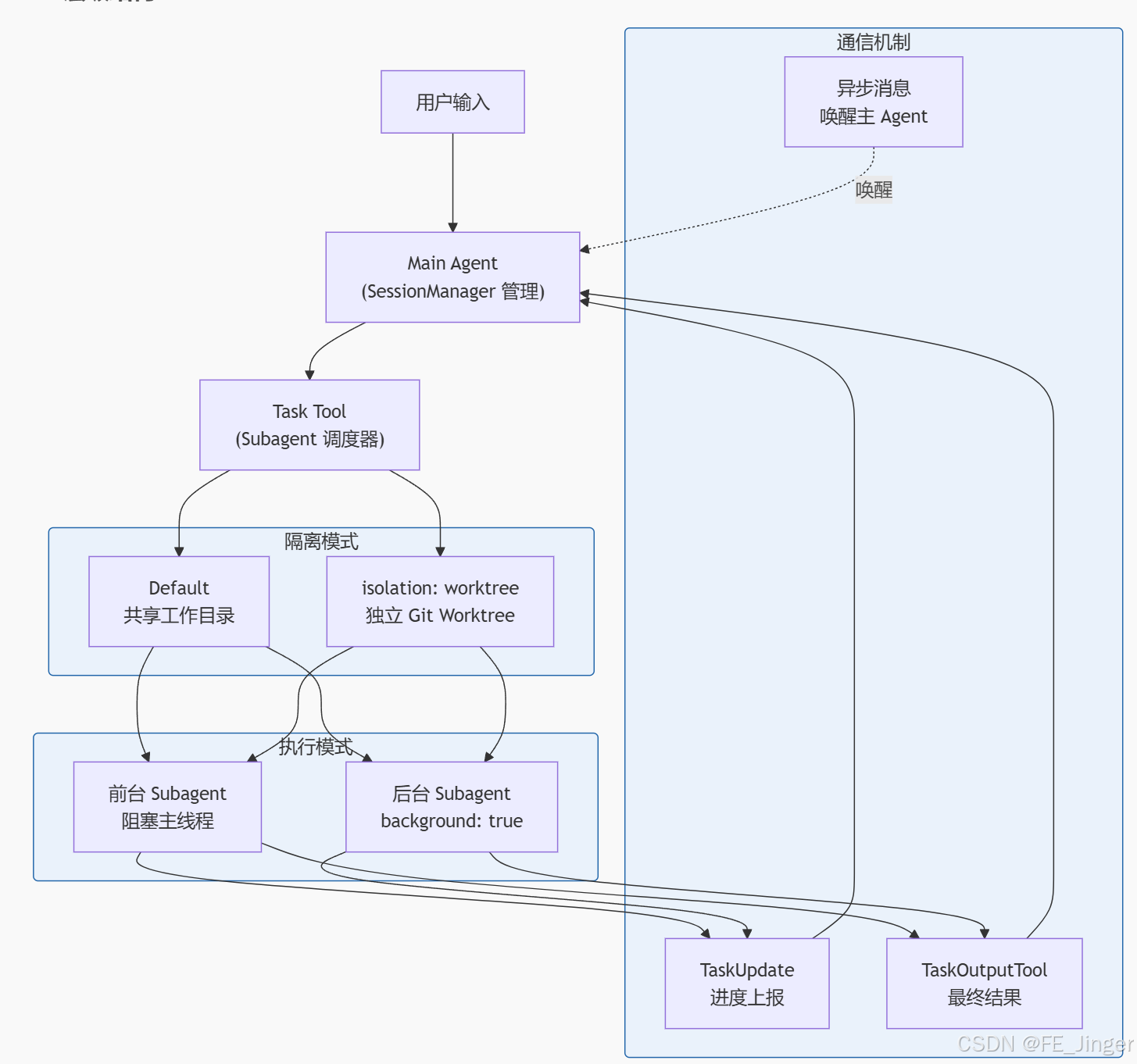
Main Agent 由 SessionManager 管理,负责与用户交互并通过 Task 工具派发子任务。每个 Subagent 拥有完全独立的上下文窗口 ,互不干扰。 2
2.2 三种执行模式对比
| 模式 | 工作目录 | 适用场景 |
|---|---|---|
| Default | 与主 Agent 共享 | 简单并行任务 |
isolation: worktree |
独立 Git Worktree | 需要文件隔离、并行分支操作 |
background: true |
两种模式均可 | 非阻塞长任务 |
三、Agent 定义文件
每个 Subagent 的行为由 .claude/agents/*.md 文件中的 YAML frontmatter 声明式配置。文件可存放于三个作用域:
- 用户级 :
~/.claude/agents/ - 项目级 :
.claude/agents/ - 插件提供 :通过 Plugin 系统分发 3
完整 frontmatter 字段说明:
yaml
---
name: code-explorer          # Agent 标识符(支持 @-mention 调用)
description: 深度分析代码库特性  # 人类可读描述
model: sonnet                # 默认模型(可被 Task 调用时覆盖)
tools: Glob, Grep, LS, Read  # 工具白名单(限制可用工具集)
disallowedTools: Write       # 工具黑名单(显式禁止)
isolation: worktree          # 隔离模式
background: true             # 始终以后台任务运行
memory: project              # 持久记忆范围(user/project/local)
effort: high                 # 推理努力等级
maxTurns: 50                 # 最大对话轮次
mcpServers:                  # 为此 Agent 加载的 MCP 服务器
  - my-server
---
四、Task Tool:Subagent 的调度核心
4.1 调用流程
"TaskOutputTool" "Subagent 实例" "WorktreeCreate Hook" ".claude/agents/*.md" "Task Tool" "Main Agent" "TaskOutputTool" "Subagent 实例" "WorktreeCreate Hook" ".claude/agents/*.md" "Task Tool" "Main Agent" #mermaid-svg-5dKtSMBtn2ic8OzM{font-family:"trebuchet ms",verdana,arial,sans-serif;font-size:16px;fill:#333;}@keyframes edge-animation-frame{from{stroke-dashoffset:0;}}@keyframes dash{to{stroke-dashoffset:0;}}#mermaid-svg-5dKtSMBtn2ic8OzM .edge-animation-slow{stroke-dasharray:9,5!important;stroke-dashoffset:900;animation:dash 50s linear infinite;stroke-linecap:round;}#mermaid-svg-5dKtSMBtn2ic8OzM .edge-animation-fast{stroke-dasharray:9,5!important;stroke-dashoffset:900;animation:dash 20s linear infinite;stroke-linecap:round;}#mermaid-svg-5dKtSMBtn2ic8OzM .error-icon{fill:#552222;}#mermaid-svg-5dKtSMBtn2ic8OzM .error-text{fill:#552222;stroke:#552222;}#mermaid-svg-5dKtSMBtn2ic8OzM .edge-thickness-normal{stroke-width:1px;}#mermaid-svg-5dKtSMBtn2ic8OzM .edge-thickness-thick{stroke-width:3.5px;}#mermaid-svg-5dKtSMBtn2ic8OzM .edge-pattern-solid{stroke-dasharray:0;}#mermaid-svg-5dKtSMBtn2ic8OzM .edge-thickness-invisible{stroke-width:0;fill:none;}#mermaid-svg-5dKtSMBtn2ic8OzM .edge-pattern-dashed{stroke-dasharray:3;}#mermaid-svg-5dKtSMBtn2ic8OzM .edge-pattern-dotted{stroke-dasharray:2;}#mermaid-svg-5dKtSMBtn2ic8OzM .marker{fill:#333333;stroke:#333333;}#mermaid-svg-5dKtSMBtn2ic8OzM .marker.cross{stroke:#333333;}#mermaid-svg-5dKtSMBtn2ic8OzM svg{font-family:"trebuchet ms",verdana,arial,sans-serif;font-size:16px;}#mermaid-svg-5dKtSMBtn2ic8OzM p{margin:0;}#mermaid-svg-5dKtSMBtn2ic8OzM .actor{stroke:hsl(259.6261682243, 59.7765363128%, 87.9019607843%);fill:#ECECFF;}#mermaid-svg-5dKtSMBtn2ic8OzM text.actor>tspan{fill:black;stroke:none;}#mermaid-svg-5dKtSMBtn2ic8OzM .actor-line{stroke:hsl(259.6261682243, 59.7765363128%, 87.9019607843%);}#mermaid-svg-5dKtSMBtn2ic8OzM .innerArc{stroke-width:1.5;stroke-dasharray:none;}#mermaid-svg-5dKtSMBtn2ic8OzM .messageLine0{stroke-width:1.5;stroke-dasharray:none;stroke:#333;}#mermaid-svg-5dKtSMBtn2ic8OzM .messageLine1{stroke-width:1.5;stroke-dasharray:2,2;stroke:#333;}#mermaid-svg-5dKtSMBtn2ic8OzM #arrowhead path{fill:#333;stroke:#333;}#mermaid-svg-5dKtSMBtn2ic8OzM .sequenceNumber{fill:white;}#mermaid-svg-5dKtSMBtn2ic8OzM #sequencenumber{fill:#333;}#mermaid-svg-5dKtSMBtn2ic8OzM #crosshead path{fill:#333;stroke:#333;}#mermaid-svg-5dKtSMBtn2ic8OzM .messageText{fill:#333;stroke:none;}#mermaid-svg-5dKtSMBtn2ic8OzM .labelBox{stroke:hsl(259.6261682243, 59.7765363128%, 87.9019607843%);fill:#ECECFF;}#mermaid-svg-5dKtSMBtn2ic8OzM .labelText,#mermaid-svg-5dKtSMBtn2ic8OzM .labelText>tspan{fill:black;stroke:none;}#mermaid-svg-5dKtSMBtn2ic8OzM .loopText,#mermaid-svg-5dKtSMBtn2ic8OzM .loopText>tspan{fill:black;stroke:none;}#mermaid-svg-5dKtSMBtn2ic8OzM .loopLine{stroke-width:2px;stroke-dasharray:2,2;stroke:hsl(259.6261682243, 59.7765363128%, 87.9019607843%);fill:hsl(259.6261682243, 59.7765363128%, 87.9019607843%);}#mermaid-svg-5dKtSMBtn2ic8OzM .note{stroke:#aaaa33;fill:#fff5ad;}#mermaid-svg-5dKtSMBtn2ic8OzM .noteText,#mermaid-svg-5dKtSMBtn2ic8OzM .noteText>tspan{fill:black;stroke:none;}#mermaid-svg-5dKtSMBtn2ic8OzM .activation0{fill:#f4f4f4;stroke:#666;}#mermaid-svg-5dKtSMBtn2ic8OzM .activation1{fill:#f4f4f4;stroke:#666;}#mermaid-svg-5dKtSMBtn2ic8OzM .activation2{fill:#f4f4f4;stroke:#666;}#mermaid-svg-5dKtSMBtn2ic8OzM .actorPopupMenu{position:absolute;}#mermaid-svg-5dKtSMBtn2ic8OzM .actorPopupMenuPanel{position:absolute;fill:#ECECFF;box-shadow:0px 8px 16px 0px rgba(0,0,0,0.2);filter:drop-shadow(3px 5px 2px rgb(0 0 0 / 0.4));}#mermaid-svg-5dKtSMBtn2ic8OzM .actor-man line{stroke:hsl(259.6261682243, 59.7765363128%, 87.9019607843%);fill:#ECECFF;}#mermaid-svg-5dKtSMBtn2ic8OzM .actor-man circle,#mermaid-svg-5dKtSMBtn2ic8OzM line{stroke:hsl(259.6261682243, 59.7765363128%, 87.9019607843%);fill:#ECECFF;stroke-width:2px;}#mermaid-svg-5dKtSMBtn2ic8OzM :root{--mermaid-font-family:"trebuchet ms",verdana,arial,sans-serif;} alt isolation: worktree loop 进度上报 alt isolation: worktree "tool_use: Task\n{description, agent_type}" "加载 Agent 定义" "frontmatter 配置" "触发 WorktreeCreate" "返回 Worktree 路径" "以配置启动 Subagent" "独立执行任务" "TaskUpdate: {status}" "TaskOutputTool: {result}" "任务完成通知" "触发 WorktreeRemove"
4.2 Task Tool 参数
| 参数 | 说明 |
|---|---|
description |
自然语言任务描述 |
agent_type |
指定 Agent 类型(大小写不敏感,如 "Code Reviewer" → code-reviewer) |
model |
覆盖 Agent 默认模型 |
allowed_tools |
进一步限制工具子集 |
permission_mode |
权限行为覆盖 |
context |
上下文继承模式(如 fork) |
五、Worktree 隔离机制
Worktree 隔离是 Agent System 的关键安全特性,防止并行 Subagent 的文件操作互相干扰。
渲染错误: Mermaid 渲染失败: Lexical error on line 13. Unrecognized text. ...D MainRepo -.共享 .git 对象库.-> WD W ----------------------^
关键特性:
- 使用
--worktree/-w标志启动 Claude 进入隔离 Worktree WorktreeCreateHook 支持type: "http"自定义创建逻辑- Worktree 完成后保持解锁状态,可用
git worktree remove清理 - 30 天后自动清理
.claude/worktrees/下的过期 Worktree 6
六、Subagent 生命周期与 Hooks
Subagent 在整个生命周期中会触发一系列 Hook 事件,供用户自定义行为:
#mermaid-svg-Vq1hS8r4gZ2sr3ry{font-family:"trebuchet ms",verdana,arial,sans-serif;font-size:16px;fill:#333;}@keyframes edge-animation-frame{from{stroke-dashoffset:0;}}@keyframes dash{to{stroke-dashoffset:0;}}#mermaid-svg-Vq1hS8r4gZ2sr3ry .edge-animation-slow{stroke-dasharray:9,5!important;stroke-dashoffset:900;animation:dash 50s linear infinite;stroke-linecap:round;}#mermaid-svg-Vq1hS8r4gZ2sr3ry .edge-animation-fast{stroke-dasharray:9,5!important;stroke-dashoffset:900;animation:dash 20s linear infinite;stroke-linecap:round;}#mermaid-svg-Vq1hS8r4gZ2sr3ry .error-icon{fill:#552222;}#mermaid-svg-Vq1hS8r4gZ2sr3ry .error-text{fill:#552222;stroke:#552222;}#mermaid-svg-Vq1hS8r4gZ2sr3ry .edge-thickness-normal{stroke-width:1px;}#mermaid-svg-Vq1hS8r4gZ2sr3ry .edge-thickness-thick{stroke-width:3.5px;}#mermaid-svg-Vq1hS8r4gZ2sr3ry .edge-pattern-solid{stroke-dasharray:0;}#mermaid-svg-Vq1hS8r4gZ2sr3ry .edge-thickness-invisible{stroke-width:0;fill:none;}#mermaid-svg-Vq1hS8r4gZ2sr3ry .edge-pattern-dashed{stroke-dasharray:3;}#mermaid-svg-Vq1hS8r4gZ2sr3ry .edge-pattern-dotted{stroke-dasharray:2;}#mermaid-svg-Vq1hS8r4gZ2sr3ry .marker{fill:#333333;stroke:#333333;}#mermaid-svg-Vq1hS8r4gZ2sr3ry .marker.cross{stroke:#333333;}#mermaid-svg-Vq1hS8r4gZ2sr3ry svg{font-family:"trebuchet ms",verdana,arial,sans-serif;font-size:16px;}#mermaid-svg-Vq1hS8r4gZ2sr3ry p{margin:0;}#mermaid-svg-Vq1hS8r4gZ2sr3ry .label{font-family:"trebuchet ms",verdana,arial,sans-serif;color:#333;}#mermaid-svg-Vq1hS8r4gZ2sr3ry .cluster-label text{fill:#333;}#mermaid-svg-Vq1hS8r4gZ2sr3ry .cluster-label span{color:#333;}#mermaid-svg-Vq1hS8r4gZ2sr3ry .cluster-label span p{background-color:transparent;}#mermaid-svg-Vq1hS8r4gZ2sr3ry .label text,#mermaid-svg-Vq1hS8r4gZ2sr3ry span{fill:#333;color:#333;}#mermaid-svg-Vq1hS8r4gZ2sr3ry .node rect,#mermaid-svg-Vq1hS8r4gZ2sr3ry .node circle,#mermaid-svg-Vq1hS8r4gZ2sr3ry .node ellipse,#mermaid-svg-Vq1hS8r4gZ2sr3ry .node polygon,#mermaid-svg-Vq1hS8r4gZ2sr3ry .node path{fill:#ECECFF;stroke:#9370DB;stroke-width:1px;}#mermaid-svg-Vq1hS8r4gZ2sr3ry .rough-node .label text,#mermaid-svg-Vq1hS8r4gZ2sr3ry .node .label text,#mermaid-svg-Vq1hS8r4gZ2sr3ry .image-shape .label,#mermaid-svg-Vq1hS8r4gZ2sr3ry .icon-shape .label{text-anchor:middle;}#mermaid-svg-Vq1hS8r4gZ2sr3ry .node .katex path{fill:#000;stroke:#000;stroke-width:1px;}#mermaid-svg-Vq1hS8r4gZ2sr3ry .rough-node .label,#mermaid-svg-Vq1hS8r4gZ2sr3ry .node .label,#mermaid-svg-Vq1hS8r4gZ2sr3ry .image-shape .label,#mermaid-svg-Vq1hS8r4gZ2sr3ry .icon-shape .label{text-align:center;}#mermaid-svg-Vq1hS8r4gZ2sr3ry .node.clickable{cursor:pointer;}#mermaid-svg-Vq1hS8r4gZ2sr3ry .root .anchor path{fill:#333333!important;stroke-width:0;stroke:#333333;}#mermaid-svg-Vq1hS8r4gZ2sr3ry .arrowheadPath{fill:#333333;}#mermaid-svg-Vq1hS8r4gZ2sr3ry .edgePath .path{stroke:#333333;stroke-width:2.0px;}#mermaid-svg-Vq1hS8r4gZ2sr3ry .flowchart-link{stroke:#333333;fill:none;}#mermaid-svg-Vq1hS8r4gZ2sr3ry .edgeLabel{background-color:rgba(232,232,232, 0.8);text-align:center;}#mermaid-svg-Vq1hS8r4gZ2sr3ry .edgeLabel p{background-color:rgba(232,232,232, 0.8);}#mermaid-svg-Vq1hS8r4gZ2sr3ry .edgeLabel rect{opacity:0.5;background-color:rgba(232,232,232, 0.8);fill:rgba(232,232,232, 0.8);}#mermaid-svg-Vq1hS8r4gZ2sr3ry .labelBkg{background-color:rgba(232, 232, 232, 0.5);}#mermaid-svg-Vq1hS8r4gZ2sr3ry .cluster rect{fill:#ffffde;stroke:#aaaa33;stroke-width:1px;}#mermaid-svg-Vq1hS8r4gZ2sr3ry .cluster text{fill:#333;}#mermaid-svg-Vq1hS8r4gZ2sr3ry .cluster span{color:#333;}#mermaid-svg-Vq1hS8r4gZ2sr3ry div.mermaidTooltip{position:absolute;text-align:center;max-width:200px;padding:2px;font-family:"trebuchet ms",verdana,arial,sans-serif;font-size:12px;background:hsl(80, 100%, 96.2745098039%);border:1px solid #aaaa33;border-radius:2px;pointer-events:none;z-index:100;}#mermaid-svg-Vq1hS8r4gZ2sr3ry .flowchartTitleText{text-anchor:middle;font-size:18px;fill:#333;}#mermaid-svg-Vq1hS8r4gZ2sr3ry rect.text{fill:none;stroke-width:0;}#mermaid-svg-Vq1hS8r4gZ2sr3ry .icon-shape,#mermaid-svg-Vq1hS8r4gZ2sr3ry .image-shape{background-color:rgba(232,232,232, 0.8);text-align:center;}#mermaid-svg-Vq1hS8r4gZ2sr3ry .icon-shape p,#mermaid-svg-Vq1hS8r4gZ2sr3ry .image-shape p{background-color:rgba(232,232,232, 0.8);padding:2px;}#mermaid-svg-Vq1hS8r4gZ2sr3ry .icon-shape .label rect,#mermaid-svg-Vq1hS8r4gZ2sr3ry .image-shape .label rect{opacity:0.5;background-color:rgba(232,232,232, 0.8);fill:rgba(232,232,232, 0.8);}#mermaid-svg-Vq1hS8r4gZ2sr3ry .label-icon{display:inline-block;height:1em;overflow:visible;vertical-align:-0.125em;}#mermaid-svg-Vq1hS8r4gZ2sr3ry .node .label-icon path{fill:currentColor;stroke:revert;stroke-width:revert;}#mermaid-svg-Vq1hS8r4gZ2sr3ry :root{--mermaid-font-family:"trebuchet ms",verdana,arial,sans-serif;} worktree 模式
worktree 模式
API 错误时
SessionStart
SubagentStart
PreToolUse
PostToolUse
TaskCompleted
SubagentStop
SessionEnd
WorktreeCreate
WorktreeRemove
StopFailure
| Hook 事件 | 触发时机 |
|---|---|
SessionStart |
Subagent 初始化 |
SubagentStart |
Subagent 开始执行 |
WorktreeCreate |
Worktree 创建后 |
PreToolUse |
工具调用前 |
PostToolUse |
工具执行后 |
TeammateIdle |
团队成员等待任务 |
TaskCompleted |
任务完成 |
SubagentStop |
Subagent 停止(含 background_tasks、session_crons 字段) |
StopFailure |
因 API 错误(限流、鉴权等)终止 |
七、后台执行与管理
7.1 后台 Agent 的启动方式
bash
# 方式 1:通过 --bg 标志启动后台会话
claude --bg "重构 src/utils 目录下的所有工具函数"

# 方式 2:在 claude agents 视图中输入 ! 运行 shell 命令作为后台会话
! npm run build

# 方式 3:Agent 定义中声明 background: true(自动后台)
```[8](#0-7)

### 7.2 监控与管理

```bash
# 列出所有后台 Agent
claude agents

# 以 JSON 格式输出(适合脚本集成)
claude agents --json

# 按目录过滤
claude agents --cwd /path/to/project
后台 Agent 的状态包括:Running、Blocked(等待用户输入)、Completed、Working。
7.3 可观测性
每个 Subagent 的 API 请求都携带追踪头:
x-claude-code-agent-idx-claude-code-parent-agent-id
OTEL Span 中包含 agent_id 和 parent_agent_id 属性,后台 Subagent 的 Span 正确嵌套在派发它的 Agent Tool Span 之下,形成完整的分布式追踪链路。
八、实战案例:多 Agent Code Review
以下是 plugins/code-review 插件的真实多 Agent 编排流程,展示了 Agent System 的实际应用:
#mermaid-svg-8RX655imBSccSyRe{font-family:"trebuchet ms",verdana,arial,sans-serif;font-size:16px;fill:#333;}@keyframes edge-animation-frame{from{stroke-dashoffset:0;}}@keyframes dash{to{stroke-dashoffset:0;}}#mermaid-svg-8RX655imBSccSyRe .edge-animation-slow{stroke-dasharray:9,5!important;stroke-dashoffset:900;animation:dash 50s linear infinite;stroke-linecap:round;}#mermaid-svg-8RX655imBSccSyRe .edge-animation-fast{stroke-dasharray:9,5!important;stroke-dashoffset:900;animation:dash 20s linear infinite;stroke-linecap:round;}#mermaid-svg-8RX655imBSccSyRe .error-icon{fill:#552222;}#mermaid-svg-8RX655imBSccSyRe .error-text{fill:#552222;stroke:#552222;}#mermaid-svg-8RX655imBSccSyRe .edge-thickness-normal{stroke-width:1px;}#mermaid-svg-8RX655imBSccSyRe .edge-thickness-thick{stroke-width:3.5px;}#mermaid-svg-8RX655imBSccSyRe .edge-pattern-solid{stroke-dasharray:0;}#mermaid-svg-8RX655imBSccSyRe .edge-thickness-invisible{stroke-width:0;fill:none;}#mermaid-svg-8RX655imBSccSyRe .edge-pattern-dashed{stroke-dasharray:3;}#mermaid-svg-8RX655imBSccSyRe .edge-pattern-dotted{stroke-dasharray:2;}#mermaid-svg-8RX655imBSccSyRe .marker{fill:#333333;stroke:#333333;}#mermaid-svg-8RX655imBSccSyRe .marker.cross{stroke:#333333;}#mermaid-svg-8RX655imBSccSyRe svg{font-family:"trebuchet ms",verdana,arial,sans-serif;font-size:16px;}#mermaid-svg-8RX655imBSccSyRe p{margin:0;}#mermaid-svg-8RX655imBSccSyRe .label{font-family:"trebuchet ms",verdana,arial,sans-serif;color:#333;}#mermaid-svg-8RX655imBSccSyRe .cluster-label text{fill:#333;}#mermaid-svg-8RX655imBSccSyRe .cluster-label span{color:#333;}#mermaid-svg-8RX655imBSccSyRe .cluster-label span p{background-color:transparent;}#mermaid-svg-8RX655imBSccSyRe .label text,#mermaid-svg-8RX655imBSccSyRe span{fill:#333;color:#333;}#mermaid-svg-8RX655imBSccSyRe .node rect,#mermaid-svg-8RX655imBSccSyRe .node circle,#mermaid-svg-8RX655imBSccSyRe .node ellipse,#mermaid-svg-8RX655imBSccSyRe .node polygon,#mermaid-svg-8RX655imBSccSyRe .node path{fill:#ECECFF;stroke:#9370DB;stroke-width:1px;}#mermaid-svg-8RX655imBSccSyRe .rough-node .label text,#mermaid-svg-8RX655imBSccSyRe .node .label text,#mermaid-svg-8RX655imBSccSyRe .image-shape .label,#mermaid-svg-8RX655imBSccSyRe .icon-shape .label{text-anchor:middle;}#mermaid-svg-8RX655imBSccSyRe .node .katex path{fill:#000;stroke:#000;stroke-width:1px;}#mermaid-svg-8RX655imBSccSyRe .rough-node .label,#mermaid-svg-8RX655imBSccSyRe .node .label,#mermaid-svg-8RX655imBSccSyRe .image-shape .label,#mermaid-svg-8RX655imBSccSyRe .icon-shape .label{text-align:center;}#mermaid-svg-8RX655imBSccSyRe .node.clickable{cursor:pointer;}#mermaid-svg-8RX655imBSccSyRe .root .anchor path{fill:#333333!important;stroke-width:0;stroke:#333333;}#mermaid-svg-8RX655imBSccSyRe .arrowheadPath{fill:#333333;}#mermaid-svg-8RX655imBSccSyRe .edgePath .path{stroke:#333333;stroke-width:2.0px;}#mermaid-svg-8RX655imBSccSyRe .flowchart-link{stroke:#333333;fill:none;}#mermaid-svg-8RX655imBSccSyRe .edgeLabel{background-color:rgba(232,232,232, 0.8);text-align:center;}#mermaid-svg-8RX655imBSccSyRe .edgeLabel p{background-color:rgba(232,232,232, 0.8);}#mermaid-svg-8RX655imBSccSyRe .edgeLabel rect{opacity:0.5;background-color:rgba(232,232,232, 0.8);fill:rgba(232,232,232, 0.8);}#mermaid-svg-8RX655imBSccSyRe .labelBkg{background-color:rgba(232, 232, 232, 0.5);}#mermaid-svg-8RX655imBSccSyRe .cluster rect{fill:#ffffde;stroke:#aaaa33;stroke-width:1px;}#mermaid-svg-8RX655imBSccSyRe .cluster text{fill:#333;}#mermaid-svg-8RX655imBSccSyRe .cluster span{color:#333;}#mermaid-svg-8RX655imBSccSyRe div.mermaidTooltip{position:absolute;text-align:center;max-width:200px;padding:2px;font-family:"trebuchet ms",verdana,arial,sans-serif;font-size:12px;background:hsl(80, 100%, 96.2745098039%);border:1px solid #aaaa33;border-radius:2px;pointer-events:none;z-index:100;}#mermaid-svg-8RX655imBSccSyRe .flowchartTitleText{text-anchor:middle;font-size:18px;fill:#333;}#mermaid-svg-8RX655imBSccSyRe rect.text{fill:none;stroke-width:0;}#mermaid-svg-8RX655imBSccSyRe .icon-shape,#mermaid-svg-8RX655imBSccSyRe .image-shape{background-color:rgba(232,232,232, 0.8);text-align:center;}#mermaid-svg-8RX655imBSccSyRe .icon-shape p,#mermaid-svg-8RX655imBSccSyRe .image-shape p{background-color:rgba(232,232,232, 0.8);padding:2px;}#mermaid-svg-8RX655imBSccSyRe .icon-shape .label rect,#mermaid-svg-8RX655imBSccSyRe .image-shape .label rect{opacity:0.5;background-color:rgba(232,232,232, 0.8);fill:rgba(232,232,232, 0.8);}#mermaid-svg-8RX655imBSccSyRe .label-icon{display:inline-block;height:1em;overflow:visible;vertical-align:-0.125em;}#mermaid-svg-8RX655imBSccSyRe .node .label-icon path{fill:currentColor;stroke:revert;stroke-width:revert;}#mermaid-svg-8RX655imBSccSyRe :root{--mermaid-font-family:"trebuchet ms",verdana,arial,sans-serif;} 阶段 3:并行验证(N 个 Agent)
阶段 2:并行 Review(4 个 Agent)
阶段 1:预检(串行)
通过
过滤低置信度
过滤低置信度
过滤低置信度
主 Orchestrator
Haiku Agent
检查 PR 是否需要 Review
Haiku Agent
收集相关 CLAUDE.md 文件路径
Sonnet Agent
生成 PR 变更摘要
Sonnet Agent
CLAUDE.md 合规检查 #1
Sonnet Agent
CLAUDE.md 合规检查 #2
Opus Agent
明显 Bug 扫描
Opus Agent
逻辑/安全问题分析
Opus/Sonnet Agent
验证 Issue #1
Opus/Sonnet Agent
验证 Issue #2
...
设计亮点:
- 不同阶段选用不同模型(Haiku 做轻量预检,Opus 做深度分析),兼顾成本与质量
- 两轮过滤(并行 Review + 独立验证)大幅降低误报率
- 置信度阈值(默认 80 分)可配置
九、Dynamic Workflows:大规模 Agent 编排
v2.1.154 引入的 Dynamic Workflows 是 Agent System 的最新演进,允许 Claude 自主编排数十至数百个后台 Agent 完成超大规模任务。
bash
# 触发动态工作流(在提示词中提及 "workflow" 关键词)
"创建一个 workflow 来重构整个项目的错误处理逻辑"

# 查看工作流运行状态
/workflows
十、上下文与内存管理
10.1 独立上下文窗口
每个 Subagent 维护完全独立的上下文窗口,在达到 98% 容量时自动触发压缩(Compaction)。这意味着:
- 主 Agent 的上下文压力不会传导给 Subagent
- 长时间运行的 Subagent 可以自我管理上下文
10.2 上下文继承
主 Agent 可通过 context: fork 将当前上下文传递给 Subagent,适用于需要继承父会话状态的场景。 12
10.3 持久记忆
Agent 定义中的 memory 字段支持三种持久化范围:
| 范围 | 说明 |
|---|---|
user |
跨项目的用户级记忆 |
project |
项目级记忆(存储在项目目录) |
local |
本地会话级记忆 |
十一、关键配置速查
bash
# 禁用所有后台任务
export CLAUDE_CODE_DISABLE_BACKGROUND_TASKS=1

# 为所有 Subagent 指定默认模型
export CLAUDE_CODE_SUBAGENT_MODEL=claude-sonnet-4-5

# 禁用 1M 上下文窗口
export CLAUDE_CODE_DISABLE_1M_CONTEXT=1

# 设置 Worktree 后台隔离策略(不实用 worktree 时)
# worktree.bgIsolation: "none"  # 在 settings.json 中配置
总结
Claude Code 的 Agent System 通过以下设计实现了从单 Agent 到多 Agent 编排的跨越:
- Task Tool 作为统一的 Subagent 调度接口,支持声明式配置
- Worktree 隔离 保证并行 Agent 的文件操作安全
- 独立上下文窗口 突破单 Agent 的 Token 限制
- 生命周期 Hooks 提供完整的可观测性和自定义扩展点
- Dynamic Workflows 将编排能力扩展到数百 Agent 的规模
这套架构使得 Claude Code 能够处理真实工程场景中的复杂任务,而不仅仅是简单的代码补全。 13
Citations
File: CHANGELOG.md (L45-46)
markdown
- Opus 4.8 is here! Now defaults to high effort · /effort xhigh for your hardest tasks
- Introducing dynamic workflows: ask Claude to create a workflow and it orchestrates work across tens to hundreds of agents in the background, so you can take on larger, more complex tasks. Run `/workflows` to view your runs
File: CHANGELOG.md (L52-52)
markdown
- `claude agents`: type `! <command>` to run a shell command as a background session you can attach to and detach from. Also available as `claude --bg --exec '<command>'`File: CHANGELOG.md (L240-241)
markdown
- Added `claude agents --json` to list live Claude sessions as JSON for scripting (tmux-resurrect, status bars, session pickers)
- Added `agent_id` and `parent_agent_id` attributes to `claude_code.tool` OTEL spans, and fixed trace parenting so background subagent spans nest under the dispatching Agent tool span
File: CHANGELOG.md (L246-246)
markdown
- Stop and SubagentStop hook input now includes `background_tasks` and `session_crons` fieldsFile: CHANGELOG.md (L2201-2201)
markdown
- Improved memory usage in multi-agent sessions by releasing completed subagent task stateFile: CHANGELOG.md (L2257-2257)
markdown
- Added support for `isolation: worktree` in agent definitions, allowing agents to declaratively run in isolated git worktrees.File: CHANGELOG.md (L2279-2281)
markdown
- Subagents support `isolation: "worktree"` for working in a temporary git worktree
- Added Ctrl+F keybinding to kill background agents (two-press confirmation)
- Agent definitions support `background: true` to always run as a background task
File: CHANGELOG.md (L2479-2480)
markdown
- Added support for restricting which sub-agents can be spawned via `Task(agent_type)` syntax in agent "tools" frontmatter
- Added `memory` frontmatter field support for agents, enabling persistent memory with `user`, `project`, or `local` scope
File: CHANGELOG.md (L2528-2528)
markdown
- Added token count, tool uses, and duration metrics to Task tool resultsFile: plugins/feature-dev/agents/code-explorer.md (L1-7)
markdown
---
name: code-explorer
description: Deeply analyzes existing codebase features by tracing execution paths, mapping architecture layers, understanding patterns and abstractions, and documenting dependencies to inform new development
tools: Glob, Grep, LS, Read, NotebookRead, WebFetch, TodoWrite, WebSearch, KillShell, BashOutput
model: sonnet
color: yellow
---
File: plugins/code-review/commands/code-review.md (L14-55)
markdown
1. Launch a haiku agent to check if any of the following are true:
   - The pull request is closed
   - The pull request is a draft
   - The pull request does not need code review (e.g. automated PR, trivial change that is obviously correct)
   - Claude has already commented on this PR (check `gh pr view <PR> --comments` for comments left by claude)

   If any condition is true, stop and do not proceed.

Note: Still review Claude generated PR's.

2. Launch a haiku agent to return a list of file paths (not their contents) for all relevant CLAUDE.md files including:
   - The root CLAUDE.md file, if it exists
   - Any CLAUDE.md files in directories containing files modified by the pull request

3. Launch a sonnet agent to view the pull request and return a summary of the changes

4. Launch 4 agents in parallel to independently review the changes. Each agent should return the list of issues, where each issue includes a description and the reason it was flagged (e.g. "CLAUDE.md adherence", "bug"). The agents should do the following:

   Agents 1 + 2: CLAUDE.md compliance sonnet agents
   Audit changes for CLAUDE.md compliance in parallel. Note: When evaluating CLAUDE.md compliance for a file, you should only consider CLAUDE.md files that share a file path with the file or parents.

   Agent 3: Opus bug agent (parallel subagent with agent 4)
   Scan for obvious bugs. Focus only on the diff itself without reading extra context. Flag only significant bugs; ignore nitpicks and likely false positives. Do not flag issues that you cannot validate without looking at context outside of the git diff.

   Agent 4: Opus bug agent (parallel subagent with agent 3)
   Look for problems that exist in the introduced code. This could be security issues, incorrect logic, etc. Only look for issues that fall within the changed code.

   **CRITICAL: We only want HIGH SIGNAL issues.** Flag issues where:
   - The code will fail to compile or parse (syntax errors, type errors, missing imports, unresolved references)
   - The code will definitely produce wrong results regardless of inputs (clear logic errors)
   - Clear, unambiguous CLAUDE.md violations where you can quote the exact rule being broken

   Do NOT flag:
   - Code style or quality concerns
   - Potential issues that depend on specific inputs or state
   - Subjective suggestions or improvements

   If you are not certain an issue is real, do not flag it. False positives erode trust and waste reviewer time.

   In addition to the above, each subagent should be told the PR title and description. This will help provide context regarding the author's intent.

5. For each issue found in the previous step by agents 3 and 4, launch parallel subagents to validate the issue. These subagents should get the PR title and description along with a description of the issue. The agent's job is to review the issue to validate that the stated issue is truly an issue with high confidence. For example, if an issue such as "variable is not defined" was flagged, the subagent's job would be to validate that is actually true in the code. Another example would be CLAUDE.md issues. The agent should validate that the CLAUDE.md rule that was violated is scoped for this file and is actually violated. Use Opus subagents for bugs and logic issues, and sonnet agents for CLAUDE.md violations.
File: plugins/code-review/README.md (L233-237)
markdown
### Agent architecture
- **2x CLAUDE.md compliance agents**: Redundancy for guideline checks
- **1x bug detector**: Focused on obvious bugs in changes only
- **1x history analyzer**: Context from git blame and history
- **Nx confidence scorers**: One per issue for independent scoring