本次练习的资源可以在Unity中的UI系统------UGUI中找到
本文是基于 B 站 UP 主唐老狮的 UGUI 实战练习,记录了完整的设计思路与思考过程。本次练习脱离课程视频独立完成,内容上会略显零散,如有疏漏或错误,欢迎大家指正。
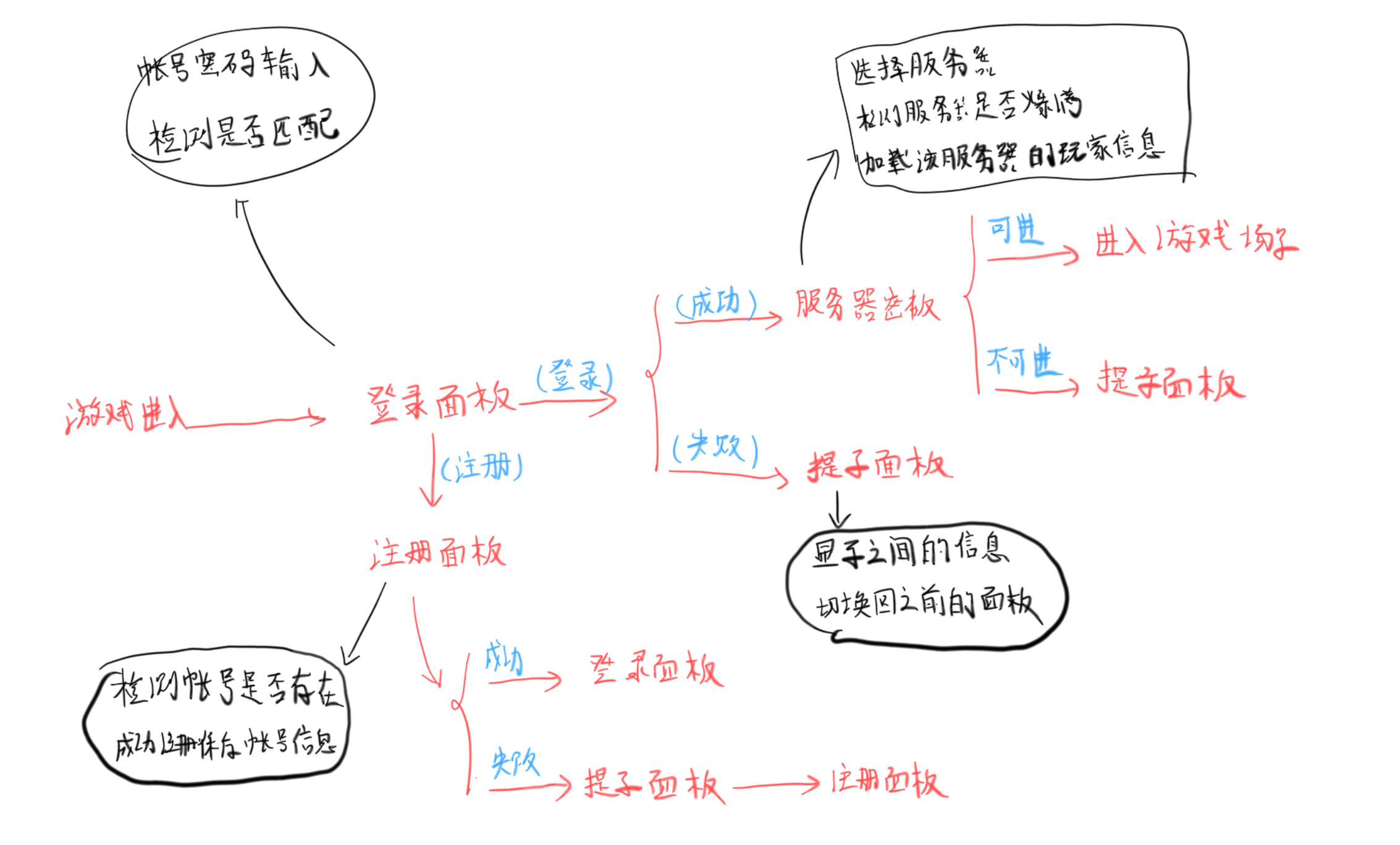
一、目标实现及需求分析
面板切换及对应功能的流程分析
二、实现
2.1 面板基类实现
在实现其他面板前,我们需要实现一个面板的基类,该类需要具有面板的初始化、显示隐藏、淡入淡出等功能,其中淡入淡出是动态变化的所以需要Update实时更新
面板基类设计思路
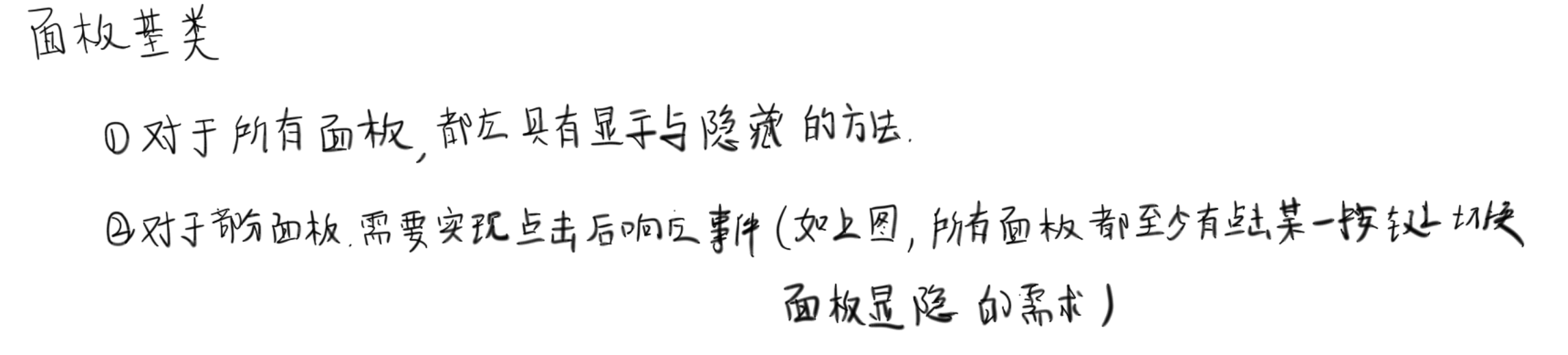
在一开始我的想法是,通过向显示与隐藏方法传入对应的面板,实现通过预制体动态创建UI面板,但是后面发现和老师的不一样,查询后发现,应该尽量保持单一职责的原则,让BasePanel只负责 "自己的显示、隐藏、淡入淡出、初始化",不负责创建自己
using System.Collections;
using System.Collections.Generic;
using Unity.VisualScripting;
using UnityEngine;
using UnityEngine.Events;


/// <summary>
/// 面板积类,需要实现面板的初始化、显示隐藏、淡入淡出
/// </summary>
public abstract class BasePanel : MonoBehaviour
{
    #region 面板积类的成员变量
    private CanvasGroup canvasGroup;    //面板的画布组 => 控制面板的淡入淡出效果
    private bool isShowing; 		//当前是否显示
    public float fadeSpeed = 1f;	//当前画布淡入淡出的速度

    private UnityAction hideCallBack;   //面板成功淡出时执行的方法
    //为什么这样设计?
    //答:通过了解这样UI面板只负责实现自己的显示隐藏,淡入淡出
    //具体的创建销毁则由UI管理器负责,
    #endregion

    #region 进行面板的初始化
    //初始化面版关联的UI控件
    public abstract void Init();
    #endregion

    #region 实现面版的显示与隐藏
    public virtual void ShowMe()
    {
        //面板的显示,显示时需要动态创建对应的UI面版
        isShowing = true;
    }
    public virtual void HideMe(UnityAction callBack)
    {
        //面板的隐藏,隐藏时需要销毁对应的UI面板
        isShowing = false;
        hideCallBack = callBack;
    }
    #endregion

    protected virtual void Awake()
    {
        //获取面板上的Canvas组件,用来实现淡入淡出的效果
        canvasGroup = GetComponent<CanvasGroup>();
        if(canvasGroup == null )
            this.AddComponent<CanvasGroup>();
    }
    protected virtual void Start()
    {
        //对面板进行初始化
        Init();
    }
    protected virtual void Update()
    {
        if (isShowing&&canvasGroup.alpha<1)
        {
            //这时候要实现面板的谈入,透明度设置为0-1之间
            canvasGroup.alpha = Mathf.Clamp01( canvasGroup.alpha + Time.deltaTime * fadeSpeed);
        }
        else if(!isShowing&&canvasGroup.alpha>0)
        {
            //这时候要实现面板的谈出,透明度设置为0-1之间
            canvasGroup.alpha = Mathf.Clamp01(canvasGroup.alpha - Time.deltaTime * fadeSpeed);
            hideCallBack?.Invoke();
        }
    }

}
2.2 UI管理器
UI管理器用来统一控制面板的显隐,以及一开始显示登录面板
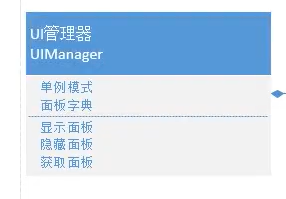
实现思路:
面版字典:这里我一开始没有想到用字典存储当前显示得字典,直到我在写HidePanel逻辑时 发现用字典存储Panel面板,然后通过名字索引比较好,否则这里我使用列表需要查有没有这个面板,然后还要索引出来销毁
显示面板:这里我没有让他返回UI面版,因为我注意到后面有个获取面板得功能,这里我认为不需要返回,如果后面有需求,这里会改。此外,显示面板得实现思路为:获得面板得名字 ------> 拼接面板存储得路径 ------>通过路径加载相应得预设体------>实例化面板------>调用面板得淡入方法,并将其保存到字典中
隐藏面板: 检测是否打开该面板 ------> 面板执行淡出动画 ------> 透明度归 0 后触发回调 ------> 销毁面板对象 ------> 从字典移除
获取面板:检测是否打开该面板 ------> 打开则返回该面板,反之为null
using System;
using System.Collections;
using System.Collections.Generic;
using UnityEngine;

/// <summary>
/// 该脚本为UI管理器,需要实现UI面板的显示,隐藏与获取
/// </summary>
public class UIManager :MonoBehaviour
{
    //该管理器统一管理所有UI面板
    #region 单例模式实现
    private static UIManager instance;
    public static UIManager Instance => instance;
    private void Awake()
    {
        if(instance == null)
            instance = this;
        DontDestroyOnLoad(gameObject);
    }

    public Dictionary<string,BasePanel> nowPanels = new Dictionary<string, BasePanel>();  //该管理器现在显示的UI面板
    #endregion

    #region 面板的显示与隐藏

    //显示UI面板
    public void ShowPanel<T>() where T : BasePanel
    {
        //显示面板前我们需要现创建一个UI面板
        //首先,根据泛型的具体类型,来拼接对应UI面板的路径地址
        //这里不直接得地址了,先得名字,后面检测面板是否开启时使用
        string panelName = typeof(T).Name;
        Debug.Log(panelName);
        if (nowPanels.ContainsKey(panelName))
        {
            //这里检测是否该面板被打开,打开了就不执行后续逻辑
            return;
        }
        //然后,利用该地址创建UI面板
        GameObject panelObj = Resources.Load<GameObject>("UI/Panels/" + panelName);
        if (panelObj == null)
        {
            Debug.Log("加载UI面板预制体失败");
            return;
        }
        //实例化预制体
        GameObject panelInstance = Instantiate(panelObj);
        //从实例化的GameObject上获取脚本组件
        T panel = panelInstance.GetComponent<T>();
        //
        if (panel == null)
        {
            Debug.Log("UI面板实列化失败");
            return;
        }
        //接下来显示该UI面板,并将其添加到显示得字典中
        panel.ShowMe();
        nowPanels.Add(panelName,panel);

    }

    public void HidePanel<T>()
    {
        //首先得到面板得名字,用来索引
        string panelName = typeof(T).Name;
        //这里发现还是用字典存储Panel面板,然后通过名字索引比较好,否则这里我需要查有没有这个面板,然后还要索引出来销毁

        if (nowPanels.ContainsKey(panelName))
        {
            //存在,则进行隐藏
            nowPanels[panelName].HideMe(() =>
            {
                //这里淡出效果结束,需要销毁该对象
                Destroy(nowPanels[panelName].gameObject);
                //并且将字典移除
                nowPanels.Remove(panelName);
            });
        }

    }
    #endregion

    #region 面板获取
    public T GetPanel<T>() where T : BasePanel
    {
        string panelName = typeof(T).Name;
        //检测有没有该面板,有就返回
        if (nowPanels.ContainsKey(panelName))
            return nowPanels[panelName] as T;

        //没有,返回null
        return null;
    }
    #endregion
}
UI管理器问题
第一点,UI面板相关要保持过场景不销毁,这里可以让UI相关得摄像机和EventSystem作为Canvas得子对象
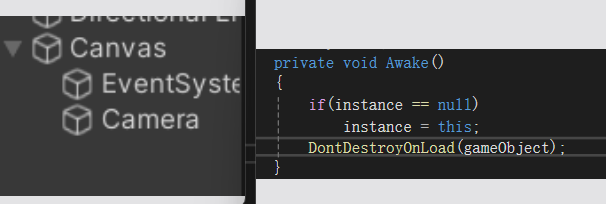
第二点,在测试提示面板得显隐时,发现面板可以被创建出来,但是不渲染,这是因为Canvas是UI控件渲染得核心,详见三大基础控件------Canvas相关,解决方式如下,将创建出的panel实例作为Canvas的子对象

2.3 登录面板
面板绘制
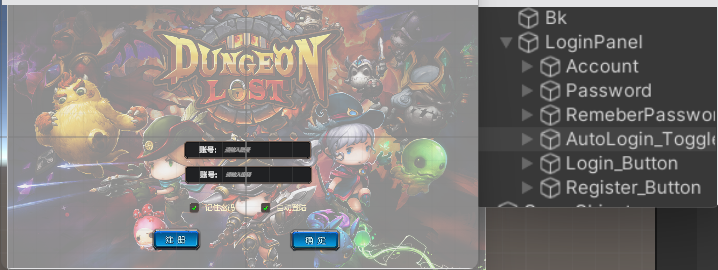
面板设计:包含登录信息、登录管理器和登录面板逻辑三个部分
- 登录信息,是用来进行登录检测和登录面板更新的数据信息,包含当前输入的账户密码、是否记住帐户密码和是否自动登录,与登录管理器配合使用
- 登录管理器,用来检测帐户密码是否匹配,用来注册新帐户,保存登录信息
- 登录面板,登录面板脚本的实现思路如下
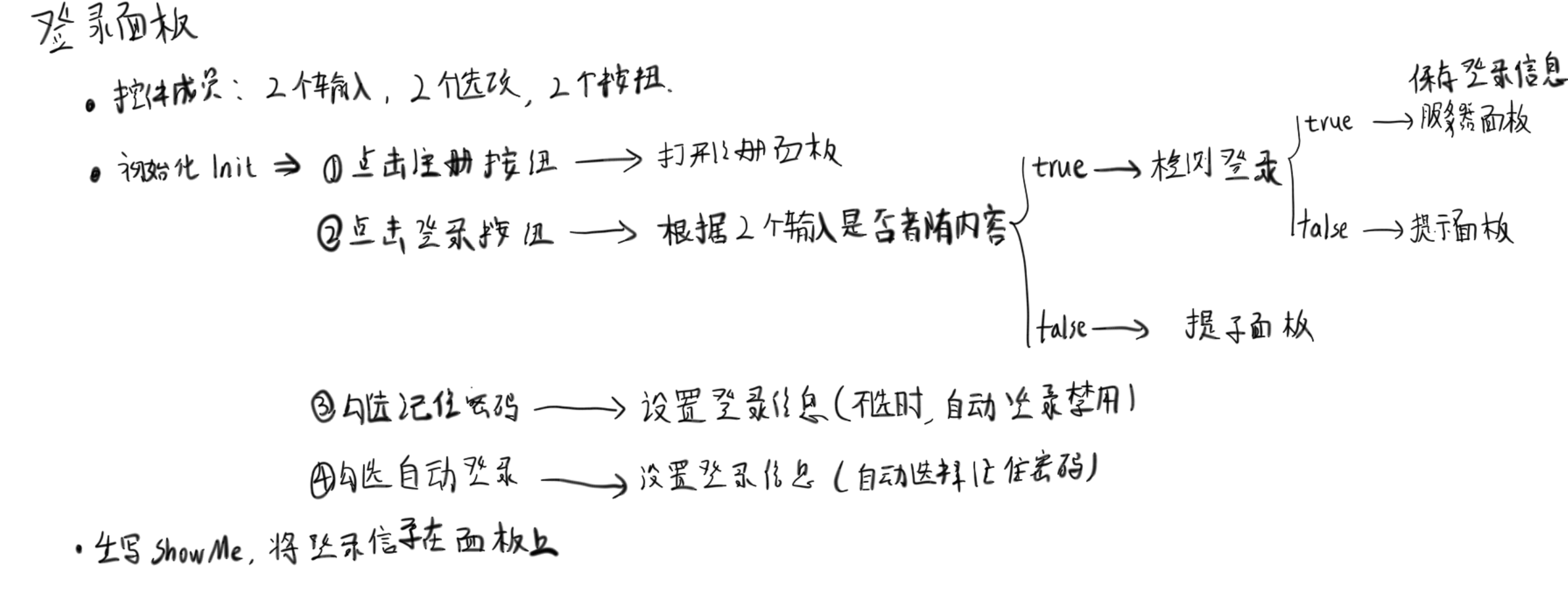
/// <summary>
/// 登录信息,用来进行登录检测和登录面板更新的数据信息,包含当前输入的账户密码、是否记住帐户密码,是否自动登陆
/// </summary>
public class LoginData
{
    public string account = null;  //账号
    public string password = null; //密码
    public bool isRemeberPassword = false;  //是否记住密码
    public bool isAutoLogin = false;    //是否自动登陆
}

using System.Collections;
using System.Collections.Generic;
using UnityEngine;

public class LoginManager
{
    #region 单例实现
    private static LoginManager instance = new();
    public static LoginManager Instance => instance;
    //存储的所有账号及对应密码
    private Dictionary<string,string> saveAccount = new();
    //存储的登陆数据
    public LoginData loginData = new();
    private LoginManager()
    {
        if (instance == null)
            instance = this;
        //加载持久化的账户字典
        saveAccount = JsonMgr.Instance.LoadData<Dictionary<string, string>>("AccountData");
        //用来测试
        saveAccount.Add("Acount123", "123456");
        //加载登陆数据
        loginData = JsonMgr.Instance.LoadData<LoginData>("LoginData");

    }
    #endregion

    //检测账户密码是否匹配
    public bool CheckPassword(string account, string password)
    {
        if (saveAccount.ContainsKey(account))
        {
            //存在该账户
            if (saveAccount[account] == password)
            {
                return true;
            }
            else
            {
                return false;
            }
        }
        return false;
    }

    //注册新账号
    public void RegisterAccount(string account,string password)
    {
        if(saveAccount.ContainsKey(account))
        {
            //该账户名已经存在,唤出提示面板
            return;
        }
        saveAccount.Add(account, password);
        //更新持久化账户字典
        JsonMgr.Instance.SaveData(saveAccount, "SaveAccount");
    }
}

using System.Collections;
using System.Collections.Generic;
using TMPro;
using UnityEngine;
using UnityEngine.UI;

public class LoginPanel : BasePanel
{
    //LoginPanel相关的控件
    public TMP_InputField account_Input;    //账户输入
    public TMP_InputField password_Input;   //密码输入
    public Toggle remeberPassword_Toggle;   //记住密码选项
    public Toggle autoLogin_Toggle;         //自动登陆选项
    public Button resignAccount_Button;     //注册按钮
    public Button loginAccount_Button;      //登陆按钮

    private LoginData nowLoginData = new();
    public override void Init()
    {
        //点击注册按钮,打开注册面板
        resignAccount_Button.onClick.AddListener(() =>
        {
            Debug.Log("点击注册,打开注册面板");
        });
        //点击登陆按钮,进行登陆检测
        loginAccount_Button.onClick.AddListener(() =>
        {
            if(account_Input.text!="" &&password_Input.text!="")
            {
                //账户密码均已输入,检测是否匹配
                if(LoginManager.Instance.CheckPassword(account_Input.text, password_Input.text))
                {
                    //成功匹配,打开服务器面板,并隐藏该面板
                    Debug.Log("成功登陆,打开服务器面板");
                    UIManager.Instance.HidePanel<LoginPanel>();
                    //这里保存登陆数据
                    nowLoginData.account = account_Input.text;
                    nowLoginData.password = password_Input.text;
                    LoginManager.Instance.loginData = nowLoginData;
                    JsonMgr.Instance.SaveData(LoginManager.Instance.loginData, "LoginData");
                }
                else
                {
                    //账户或密码错误,打开提示面板
                    Debug.Log("账户或密码错误,打开提示面板");
                }
            }
            else
            {
                //账户或密码输入不全,打开提示面板
                //测试发现就算不输入也会有默认的提示,不会为null,所以不会触发
                Debug.Log("账户或密码输入不全,打开提示面板");
            }
        });

        remeberPassword_Toggle.onValueChanged.AddListener((isOn) =>
        {
            //不记住密码时,禁止自动登陆
            if (!isOn)
            {
                autoLogin_Toggle.isOn = false;
            }
            nowLoginData.isRemeberPassword = isOn;
        });
        autoLogin_Toggle.onValueChanged.AddListener((isOn) =>
        {
            //勾选自动登陆,则自动勾选记住密码
            if (isOn)
            {
                remeberPassword_Toggle.isOn = isOn;
            }
            nowLoginData.isAutoLogin = isOn;
        });
    }
    public override void ShowMe()
    {
        base.ShowMe();
        //得到登陆信息
        LoginData loginData = LoginManager.Instance.loginData;
        //更新UI
        if (loginData == null)
        {
            Debug.Log("sdasd");
        }
        remeberPassword_Toggle.isOn = loginData.isRemeberPassword;
        autoLogin_Toggle.isOn = loginData.isAutoLogin;
        //是否记住密码
        if(remeberPassword_Toggle.isOn)
        {
            account_Input.text = loginData.account;
            password_Input.text = loginData.password;
        }

    }
}
效果演示:(这里可以看到可以正常触发对应的逻辑,演示只展示登陆成功)

2.4 注册面板
面板绘制:
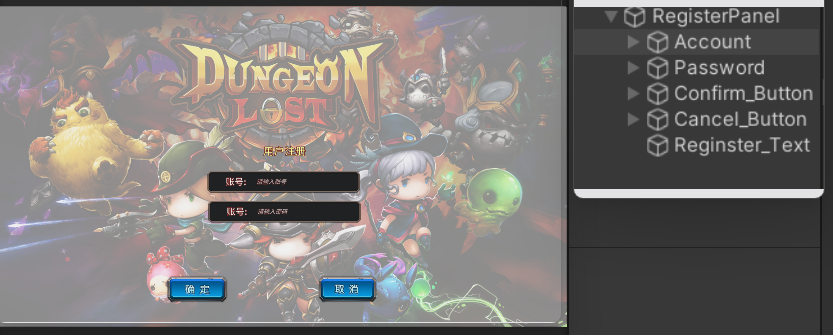
面板设计:用来完成帐户注册,注册时需要检测该账户名是否已经注册
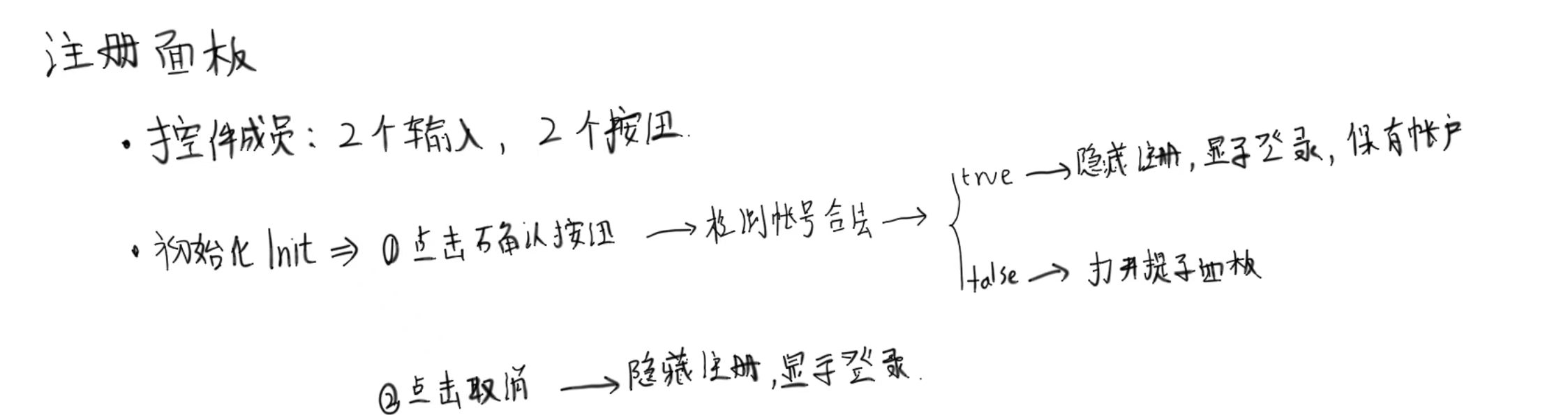
using TMPro;
using UnityEngine;
using UnityEngine.UI;
/// <summary>
/// 注册面板脚本
/// </summary>
public class RegisterPanel : BasePanel
{
    //控件成员
    public TMP_InputField account_Input;    //账户输入
    public TMP_InputField password_Input;   //密码输入
    public Button chickConfirm_Button;  //点击确认按钮
    public Button chickCancel_Button;   //点击取消按钮
    public override void Init()
    {
        //点击确认按钮
        chickConfirm_Button.onClick.AddListener(() =>
        {
            //账号和密码全部输入
            if(account_Input.text!=""&&password_Input.text!="")
            {
                //进行账号注册
                if (LoginManager.Instance.RegisterAccount(account_Input.text, password_Input.text))
                {
                    //成功完成注册,隐藏注册面板
                    UIManager.Instance.HidePanel<RegisterPanel>();
                    UIManager.Instance.ShowPanel<LoginPanel>();

                }
            }
            else
            {
                //账号或密码输入失败,打开提示面板
                Debug.Log(" 账号或密码输入失败,打开提示面板");
                //显示提示面板
                UIManager.Instance.ShowPanel<TipsPanel>();
                //获取到提示面板,更新显示
                TipsPanel tips = UIManager.Instance.canvas.GetComponentInChildren<TipsPanel>();
                tips.ChangeShowInfo("请输入完整的账号或密码");
            }
        });

        chickCancel_Button.onClick.AddListener(() =>
        {
            //点击取消按钮
            UIManager.Instance.HidePanel<RegisterPanel>();
            UIManager.Instance.ShowPanel<LoginPanel>();
        });
    }
}
这里,需要通过登陆管理器完成是否注册和注册账号的监听
//====================【LoginManager修改RegisterAccount方法】========================
//注册新账号,并返回是否完成注册
public bool RegisterAccount(string account,string password)
{
    if(saveAccount.ContainsKey(account))
    {
        //该账户名已经存在,唤出提示面板
        Debug.Log("该账户名已经存在,唤出提示面板");
        return false;
    }
    saveAccount.Add(account, password);
    //更新持久化账户字典
    JsonMgr.Instance.SaveData(saveAccount, "SaveAccount");
    return true;
}


//====================【LoginPanel修改Init中注册按钮监听】========================
//点击注册按钮,打开注册面板
resignAccount_Button.onClick.AddListener(() =>
{
    Debug.Log("点击注册,打开注册面板");
    //隐藏登陆面板,打开注册面板
    UIManager.Instance.HidePanel<LoginPanel>();
    UIManager.Instance.ShowPanel<RegisterPanel>();
});
2.5 提示面板
面板绘制:
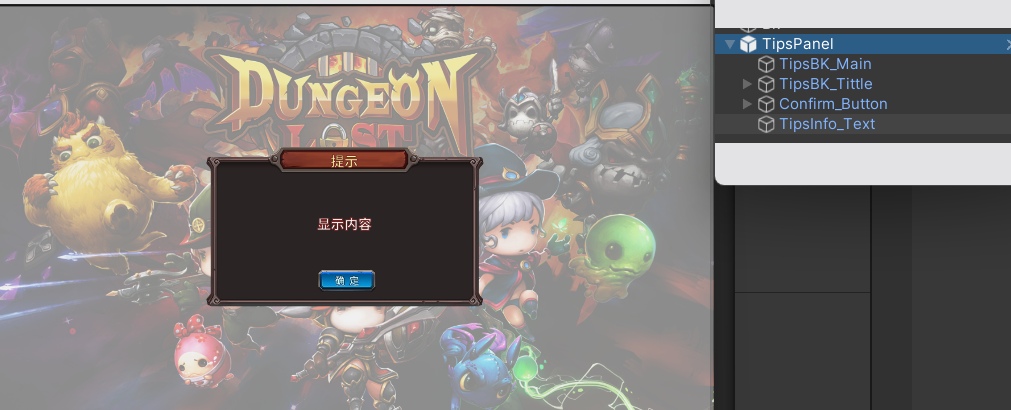
面板设计:用来显示提示信息,提示面板显示时不隐藏原本的面板
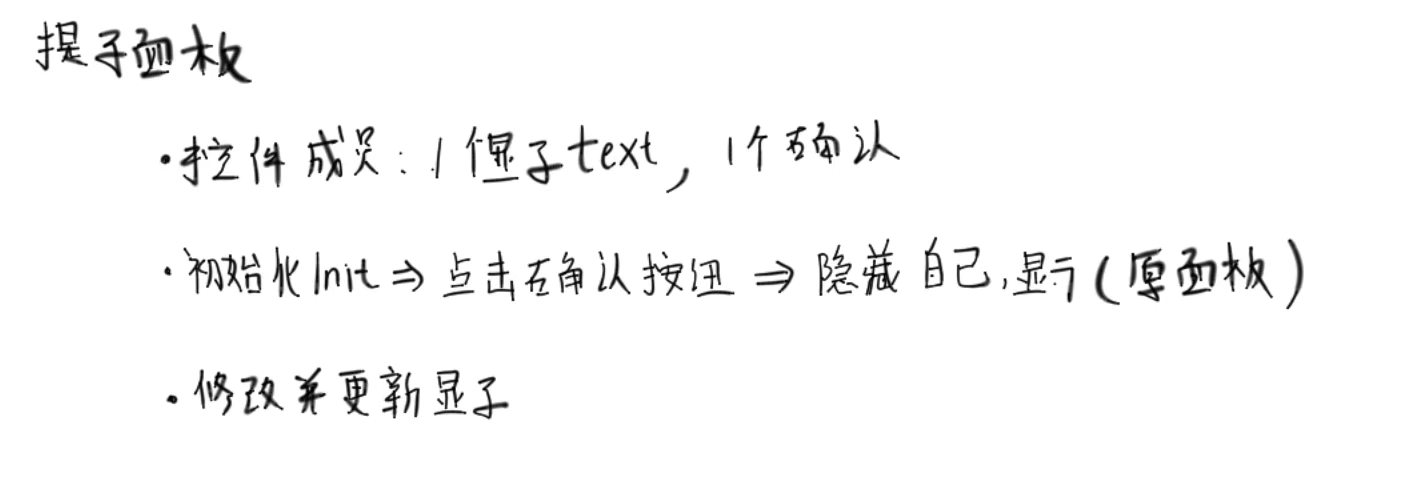
using TMPro;
using UnityEngine.UI;

/// <summary>
/// 提示窗口脚本
/// </summary>
public class TipsPanel : BasePanel
{
    public Button confirmButton;    //确定按钮
    public TMP_Text tipsInfoText;   //提示信息显示
    public override void Init()
    {
        confirmButton.onClick.AddListener(() =>
        {
            //这里直接隐藏自己
            UIManager.Instance.HidePanel<TipsPanel>();
        });
    }
    public void ChangerTipsInfo(string info)
    {
        //改变显示内容
        tipsInfoText.text = info;
    }
}
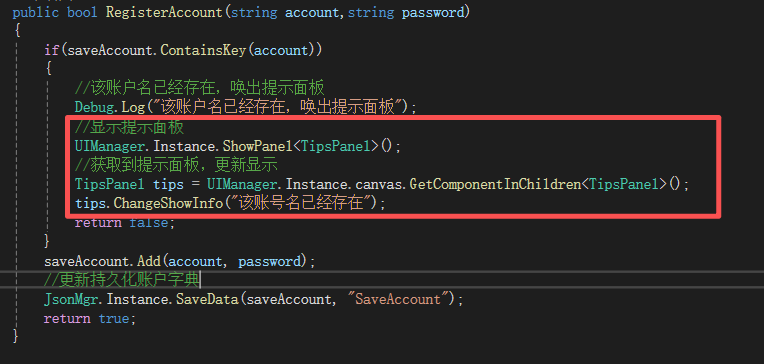
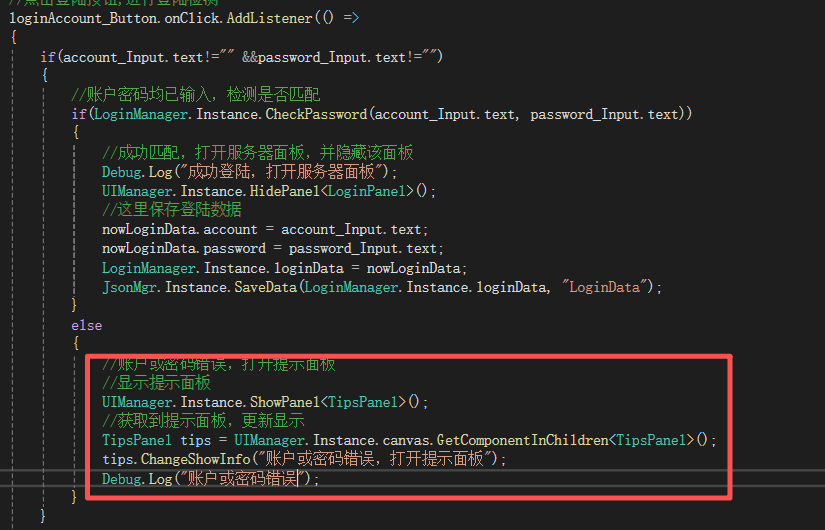
提示面板出现的次数较多,涉及修改的脚本为
=========== =======【LoginManager注册功能】===========================
===========【LoginPanel初始化功能中的登陆检测】============================
【账号密码错误】
【输入信息缺失】
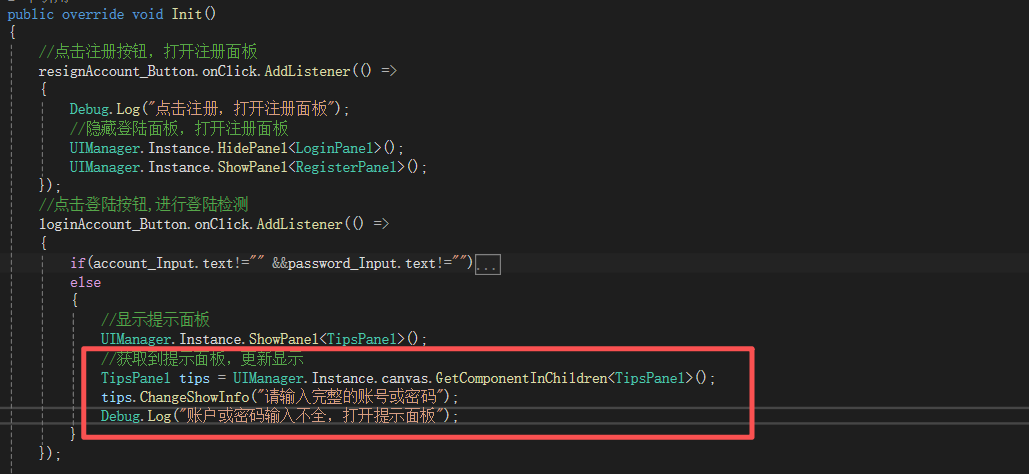
===================【RegisterPanel初始化检测密码输入完整】==================
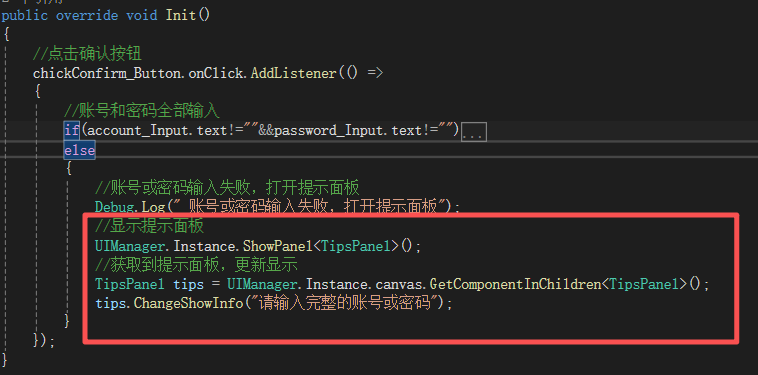
//显示提示面板
UIManager.Instance.ShowPanel<TipsPanel>();
//获取到提示面板,更新显示
TipsPanel tips = UIManager.Instance.canvas.GetComponentInChildren<TipsPanel>();
tips.ChangeShowInfo("显示内容");
截至到这,我已经理解为什么ShowPanel为什么要返回一个Panel了,这里如果是返回的,我就可以直接通过返回的Panel来直接改变显示的内容
这里我发现一个问题,就是我看到我登陆的数据成功完成了持久化,但是注册的账号没有持久化,这里可以看到持久化保存的数据,但是加载上却不可以,原因是命名出现错误
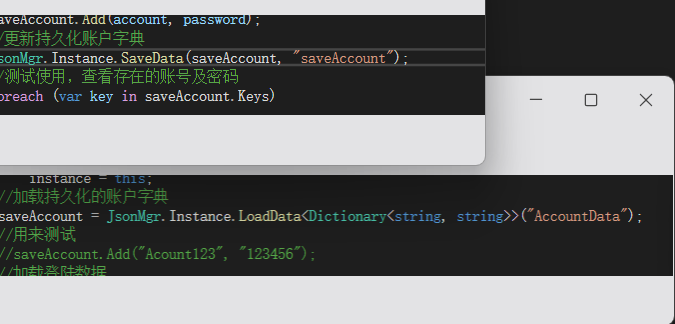
using System.Collections;
using System.Collections.Generic;
using UnityEngine;

public class LoginManager
{
    #region 单例实现
    private static LoginManager instance = new();
    public static LoginManager Instance => instance;
    //存储的所有账号及对应密码
    private Dictionary<string,string> saveAccount = new();
    //存储的登陆数据
    public LoginData loginData = new();
    private LoginManager()
    {
        if (instance == null)
            instance = this;
        //加载持久化的账户字典
        saveAccount = JsonMgr.Instance.LoadData<Dictionary<string, string>>("AccountData");
        //用来测试
        //saveAccount.Add("Acount123", "123456");
        //加载登陆数据
        loginData = JsonMgr.Instance.LoadData<LoginData>("LoginData");


        //测试使用,查看存在的账号及密码
        foreach(var key in saveAccount.Keys)
        {
            Debug.Log($"账号:{key}   密码:{saveAccount[key]}");
        }


    }
    #endregion


    /// <summary>
    /// 检测账户密码是否匹配
    /// </summary>
    /// <param name="account">账号名</param>
    /// <param name="password">密码</param>
    public bool CheckPassword(string account, string password)
    {
        if (saveAccount.ContainsKey(account))
        {
            //存在该账户
            if (saveAccount[account] == password)
            {

                return true;
            }
            else
            {
                return false;
            }
        }
        return false;
    }

    //注册新账号,并返回是否完成注册
    public bool RegisterAccount(string account,string password)
    {
        if(saveAccount.ContainsKey(account))
        {
            //该账户名已经存在,唤出提示面板
            Debug.Log("该账户名已经存在,唤出提示面板");
            //显示提示面板
            UIManager.Instance.ShowPanel<TipsPanel>();
            //获取到提示面板,更新显示
            TipsPanel tips = UIManager.Instance.canvas.GetComponentInChildren<TipsPanel>();
            tips.ChangeShowInfo("该账号名已经存在");
            return false;
        }
        saveAccount.Add(account, password);
        //更新持久化账户字典
        JsonMgr.Instance.SaveData(saveAccount, "AccountData");
        //测试使用,查看存在的账号及密码
        foreach (var key in saveAccount.Keys)
        {
            Debug.Log($"账号:{key}   密码:{saveAccount[key]}");
        }

        return true;
    }
}
2.6 服务器面板
面板绘制
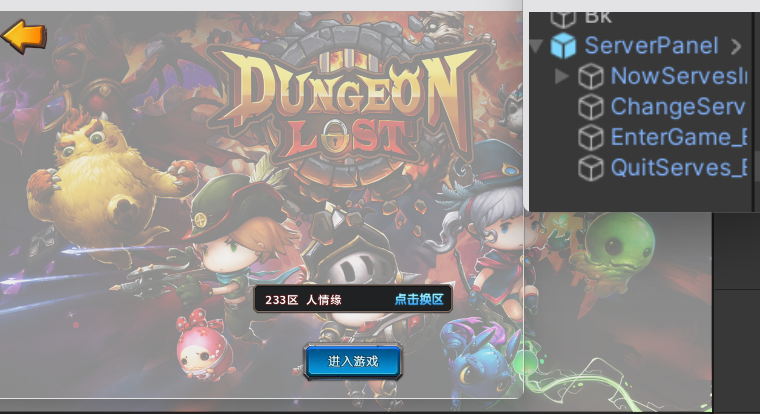
面板设计:
涉及到的控件成员包含,进入游戏按钮,点击换区按钮,退出按钮,以及显示区服信息的文本,此外需要进行Init初始化,此外还需要重写ShowMe方法,用来更新区服信息
进入游戏按钮:点击会进入游戏场景,前提是选择了区服,在没有选择时点击会打开提示面板
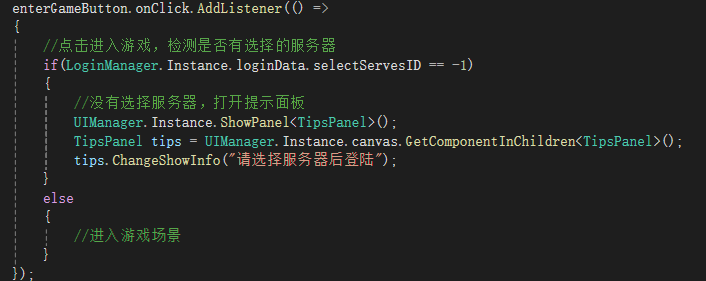
点击换区按钮:点击换区,会隐藏该界面,并打开换区面板
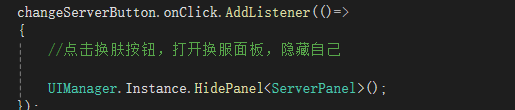
点击退出按钮:隐藏该界面,并打开登陆界面
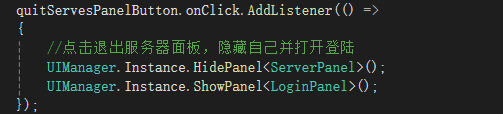
ShowMe方法重写,更新区服信息

using System.Collections;
using System.Collections.Generic;
using TMPro;
using UnityEngine;
using UnityEngine.UI;

public class ServerPanel : BasePanel
{
    //控件成员
    public TMP_Text nowServesInfo;  //当前服务器显示
    public Button changeServerButton;   //换服按钮
    public Button enterGameButton;      //进入游戏按钮
    public Button quitServesPanelButton;//退出服务器面板

    public override void Init()
    {
        enterGameButton.onClick.AddListener(() =>
        {
            //点击进入游戏,检测是否有选择的服务器
            if(LoginManager.Instance.loginData.selectServesID == -1)
            {
                //没有选择服务器,打开提示面板
                UIManager.Instance.ShowPanel<TipsPanel>();
                TipsPanel tips = UIManager.Instance.canvas.GetComponentInChildren<TipsPanel>();
                tips.ChangeShowInfo("请选择服务器后登陆");
            }
            else
            {
                //进入游戏场景
            }
        });
        changeServerButton.onClick.AddListener(()=>
        {
            //点击换肤按钮,打开换服面板,隐藏自己

            UIManager.Instance.HidePanel<ServerPanel>();
        });
        quitServesPanelButton.onClick.AddListener(() =>
        {
            //点击退出服务器面板,隐藏自己并打开登陆
            UIManager.Instance.HidePanel<ServerPanel>();
            UIManager.Instance.ShowPanel<LoginPanel>();
        });
    }

    public override void ShowMe()
    {
        base.ShowMe();
        //更新数据
        LoginData loginData = LoginManager.Instance.loginData;
        nowServesInfo.text = loginData.selectServesID + "区  " + loginData.selectServerName;
    }
}
2.7 换区面板
面板绘制
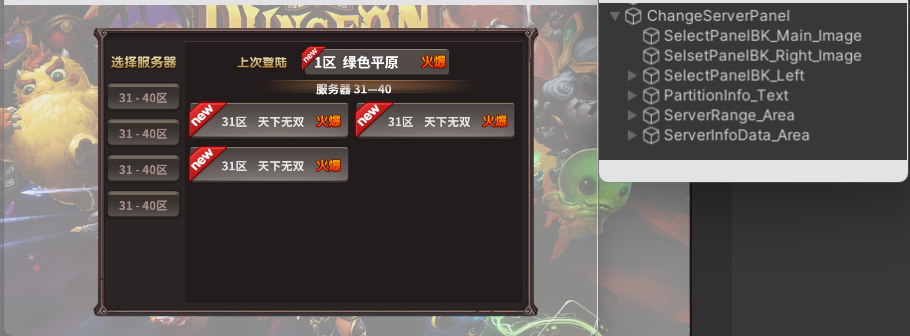
面板设计
第一步:动态创建分区预设体,完成根据加载到的服务器数量进行创建分区
- 分区预设体,根据加载动态创建多个分区按钮
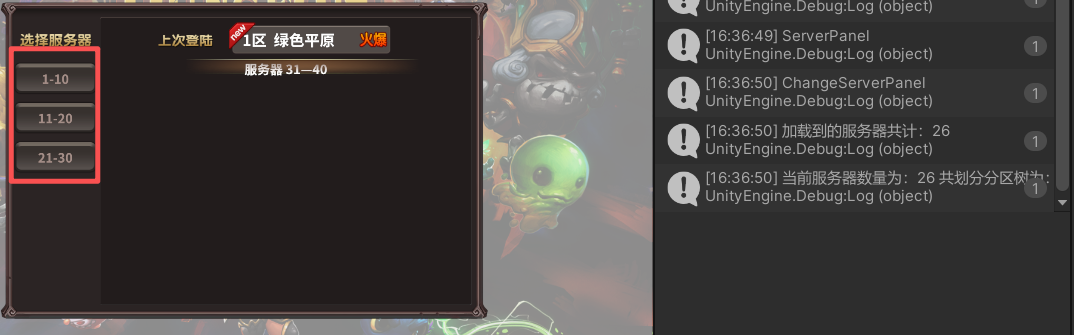
创建思路:根据读取到的Json数据中服务器数量划分分区,并动态创建
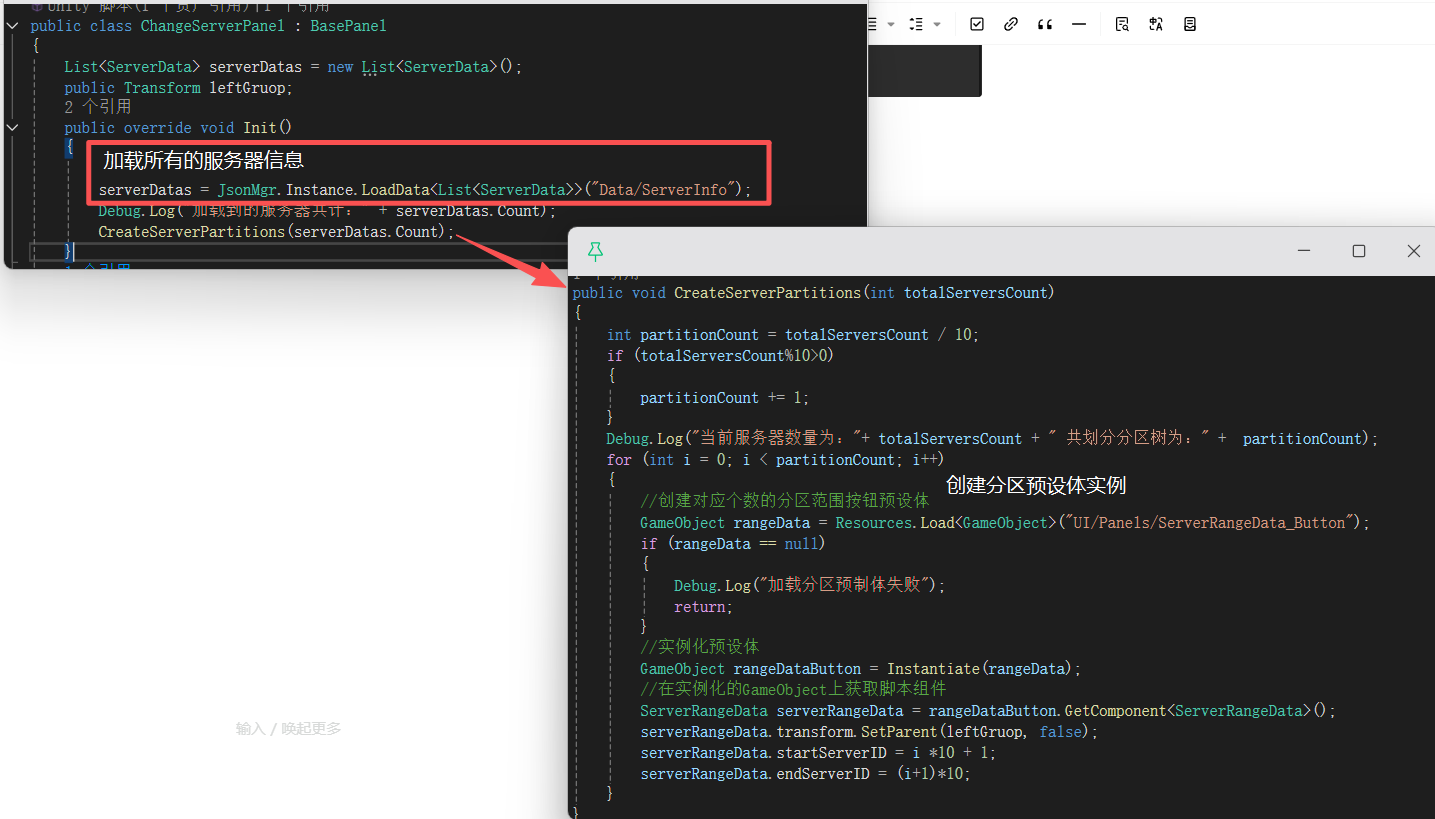
如图所示,动态创建了三个分区,且由于大小适配器组件,实现了分区过多时的自动扩容,前面的0-0是用来演示的0占位
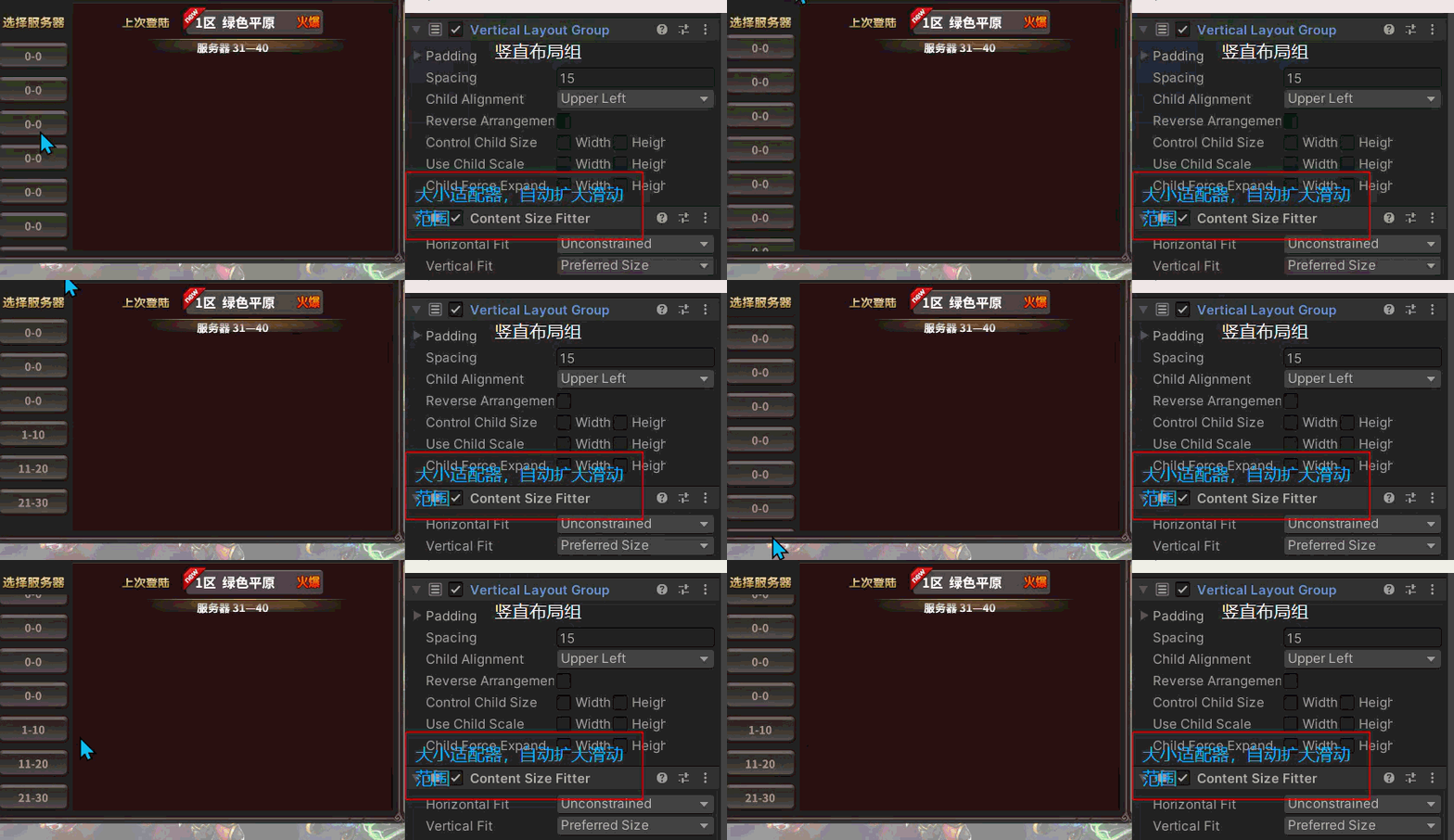
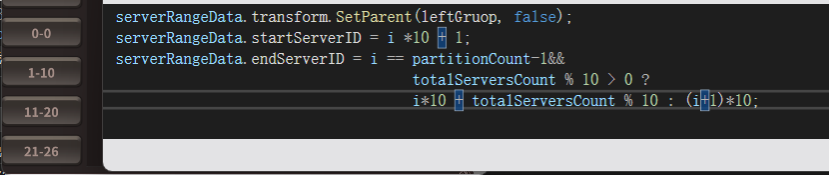
这里不强制10区一个服,剩下的服务器少于10,会将剩余的服务器化为一个分区,解决方法
using System.Collections;
using System.Collections.Generic;
using UnityEngine;

public class ChangeServerPanel : BasePanel
{
    List<ServerData> serverDatas = new List<ServerData>();
    public Transform leftGruop;
    public override void Init()
    {

        serverDatas = JsonMgr.Instance.LoadData<List<ServerData>>("Data/ServerInfo");
        Debug.Log("加载到的服务器共计:" + serverDatas.Count);
        CreateServerPartitions(serverDatas.Count);
    }
    public void CreateServerPartitions(int totalServersCount)
    {
        int partitionCount = totalServersCount / 10;
        if (totalServersCount%10>0)
        {
            partitionCount += 1;
        }
        Debug.Log("当前服务器数量为:"+ totalServersCount + " 共划分分区树为:" +  partitionCount);
        for (int i = 0; i < partitionCount; i++)
        {
            //创建对应个数的分区范围按钮预设体
            GameObject rangeData = Resources.Load<GameObject>("UI/Panels/ServerRangeData_Button");
            if (rangeData == null)
            {
                Debug.Log("加载分区预制体失败");
                return;
            }
            //实例化预设体
            GameObject rangeDataButton = Instantiate(rangeData);
            //在实例化的GameObject上获取脚本组件
            ServerRangeData serverRangeData = rangeDataButton.GetComponent<ServerRangeData>();
            serverRangeData.transform.SetParent(leftGruop, false);
            serverRangeData.startServerID = i *10 + 1;

            //serverRangeData.endServerID = (i+1)*10;
             serverRangeData.startServerID = i *10 + 1;
             serverRangeData.endServerID = i == partitionCount-1&&
                                                totalServersCount % 10 > 0 ?
                                                i*10 + totalServersCount % 10 : (i+1)*10;
        }
    }
}
[System.Serializable]
public class ServerData
{
    public int id;      //服务器编号
    public string name; //服务器名
    public int state; //服务器状态编号
    public bool isNew;  //服务器是否为新服务器

}

using System.Collections;
using System.Collections.Generic;
using TMPro;
using UnityEngine;
using UnityEngine.UI;

public class ServerRangeData : MonoBehaviour
{
    public TMP_Text serverRange;
    public Button nowServerRangeButton;
    public int startServerID;
    public int endServerID;

    private void Start()
    {
        nowServerRangeButton.onClick.AddListener(() =>
        {
            //创建服务器数据
            Debug.Log("创建服务器数据"+ startServerID + " - " + endServerID);

        });
        serverRange.text = startServerID + "-" + endServerID;
    }
}
第二步,根据点击的分区,自动更新对应数量的服务器信息
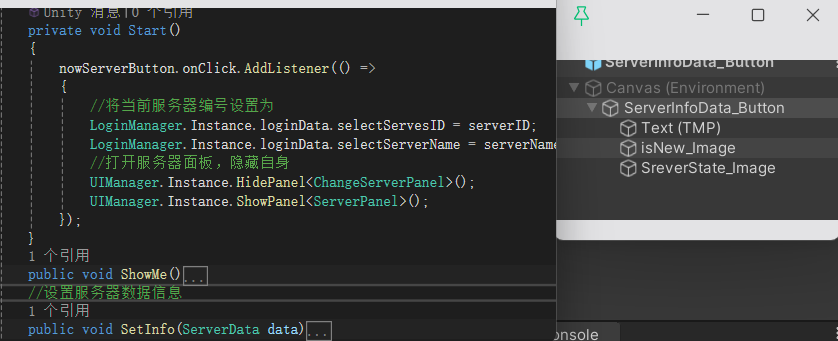
首先是服务器数据预设体,该预设体是分区选择后动态创建的基础,需要实现点击事件监听,更新自身UI,设置自身关联的服务器数据
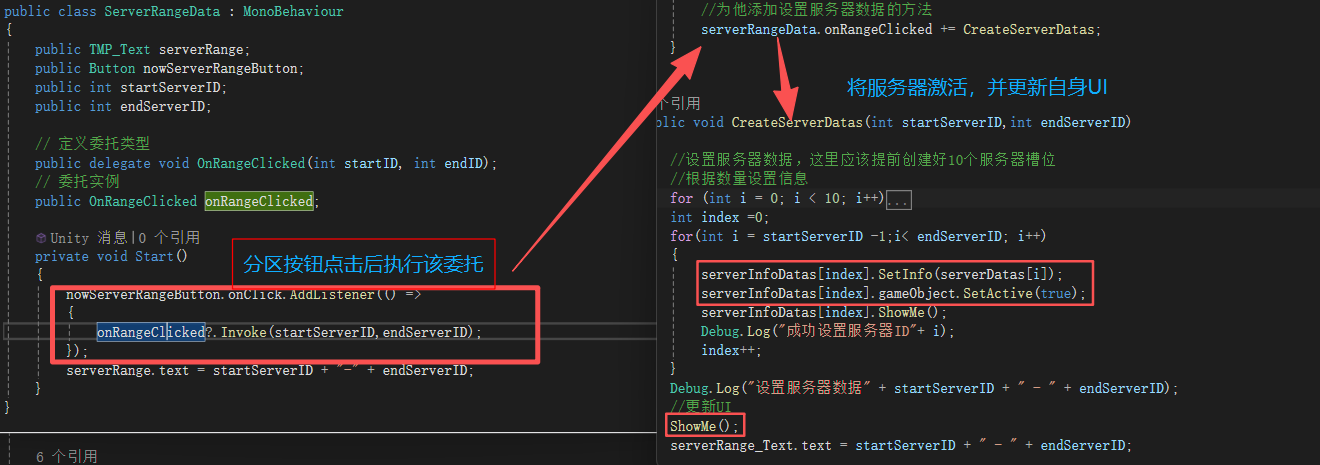
创建思路为:当玩家点击分区按钮,根据分区信息中的范围,将指定数目的预制服务器槽激活,并设置其中的信息
using System.Collections;
using System.Collections.Generic;
using TMPro;
using UnityEngine;

public class ChangeServerPanel : BasePanel
{
    public List<ServerData> serverDatas = new List<ServerData>();
    public Transform leftGruop;
    public Transform rightGruop;
    public List<ServerInfoData> serverInfoDatas = new List<ServerInfoData>();

    public TMP_Text serverRange_Text;
    public TMP_Text serverData_Text;
    public override void Init()
    {
        //进入换服面板,显示当前的选择
        LoginData loginData = LoginManager.Instance.loginData;
        serverData_Text.text = loginData.selectServesID + "区  " + loginData.selectServerName;
        //读取服务器数据
        serverDatas = JsonMgr.Instance.LoadData<List<ServerData>>("Data/ServerInfo");
        Debug.Log("加载到的服务器共计:" + serverDatas.Count);
        //创建分区
        CreateServerPartitions(serverDatas.Count);
    }
    public void CreateServerPartitions(int totalServersCount)
    {
        int partitionCount = totalServersCount / 10;
        if (totalServersCount%10>0)
        {
            partitionCount += 1;
        }
        Debug.Log("当前服务器数量为:"+ totalServersCount + " 共划分分区树为:" +  partitionCount);
        for (int i = 0; i < partitionCount; i++)
        {
            //创建对应个数的分区范围按钮预设体
            GameObject rangeData = Resources.Load<GameObject>("UI/Panels/ServerRangeData_Button");
            if (rangeData == null)
            {
                Debug.Log("加载分区预制体失败");
                return;
            }
            //实例化预设体
            GameObject rangeDataButton = Instantiate(rangeData);
            //在实例化的GameObject上获取脚本组件
            ServerRangeData serverRangeData = rangeDataButton.GetComponent<ServerRangeData>();
            serverRangeData.transform.SetParent(leftGruop, false);
            serverRangeData.startServerID = i *10 + 1;
            serverRangeData.endServerID = i == partitionCount-1&&
                                               totalServersCount % 10 > 0 ?
                                               i*10 + totalServersCount % 10 : (i+1)*10;
            //为他添加设置服务器数据的方法
            serverRangeData.onRangeClicked += CreateServerDatas;
        }
    }

    public void CreateServerDatas(int startServerID,int endServerID)
    {
        //设置服务器数据,这里应该提前创建好10个服务器槽位
        //根据数量设置信息
        for (int i = 0; i < 10; i++)
        {
            serverInfoDatas[i].gameObject.SetActive(false);
        }
        int index =0;
        for(int i = startServerID -1;i< endServerID; i++)
        {
            serverInfoDatas[index].SetInfo(serverDatas[i]);
            serverInfoDatas[index].gameObject.SetActive(true);
            serverInfoDatas[index].ShowMe();
            Debug.Log("成功设置服务器ID"+ i);
            index++;
        }
        Debug.Log("设置服务器数据" + startServerID + " - " + endServerID);
        //更新UI
        ShowMe();
        serverRange_Text.text = startServerID + " - " + endServerID;
    }

    public override void ShowMe()
    {
        base.ShowMe();
        //更新UI方法
        LoginData l = LoginManager.Instance.loginData;
        serverData_Text.text = l.selectServesID + "区  " + l.selectServerName;
    }
}
[System.Serializable]
public class ServerData
{
    public int id;      //服务器编号
    public string name; //服务器名
    public int state; //服务器状态编号
    public bool isNew;  //服务器是否为新服务器

}

using System.Collections;
using System.Collections.Generic;
using TMPro;
using UnityEngine;
using UnityEngine.UI;

public class ServerInfoData : MonoBehaviour
{
    public TMP_Text serverInfo;
    public Button nowServerButton;
    public Image newIcon;   //新服图标
    public Image stateIcon; //服务器状态图标
    private string serverName;
    private int serverID;
    private bool isNew;
    private int stateId;

    private void Start()
    {
        nowServerButton.onClick.AddListener(() =>
        {
            //将当前服务器编号设置为
            LoginManager.Instance.loginData.selectServesID = serverID;
            LoginManager.Instance.loginData.selectServerName = serverName;
            //打开服务器面板,隐藏自身
            UIManager.Instance.HidePanel<ChangeServerPanel>();
            UIManager.Instance.ShowPanel<ServerPanel>();
        });
    }
    public void ShowMe()
    {
        serverInfo.text = serverID + "区  " + serverName;
        if (isNew)
        {
            //是新服,显示图标
            newIcon.gameObject.SetActive(true);
        }
        else
        {
            newIcon.gameObject.SetActive(false);
        }
        stateIcon.sprite = Resources.Load<Sprite>($"UI/Art/State/ui_DL_State_{stateId}");
    }
    //设置服务器数据信息
    public void SetInfo(ServerData data)
    {
        serverName = data.name;
        serverID = data.id;
        isNew = data.isNew;
        stateId = data.state;
    }
}

using System.Collections;
using System.Collections.Generic;
using TMPro;
using UnityEngine;
using UnityEngine.UI;

public class ServerRangeData : MonoBehaviour
{
    public TMP_Text serverRange;
    public Button nowServerRangeButton;
    public int startServerID;
    public int endServerID;

    // 定义委托类型
    public delegate void OnRangeClicked(int startID, int endID);
    // 委托实例
    public OnRangeClicked onRangeClicked;

    private void Start()
    {
        nowServerRangeButton.onClick.AddListener(() =>
        {
            onRangeClicked?.Invoke(startServerID,endServerID);
        });
        serverRange.text = startServerID + "-" + endServerID;
    }
}
三、分析及改善
现在,完整的走一遍账号注册、登陆、选服流程,会发现以下问题(Unity中的UI系统------UGUI关联的资料里Projects中的UGUI_Demo1为没有改善的版本,此外演示过程中没有保留过场景不销毁,且退出按钮也没,所以需要通过Win结束)
问题1,面板丢失或多余
问题1,面板隐藏与显示会冲突,可能会出现同时出现多个面板或没有界面的现象
- 对于面板丢失:
通过测试我发现当我快速切换时很容易触发,所以我认为可能是销毁时间太快的问题,所以进行延迟1秒销毁。
但是我发现延迟销毁后触发概率更大了,而且我观察到当将要销毁的面板还存在时,就打开另一个面板就会触发
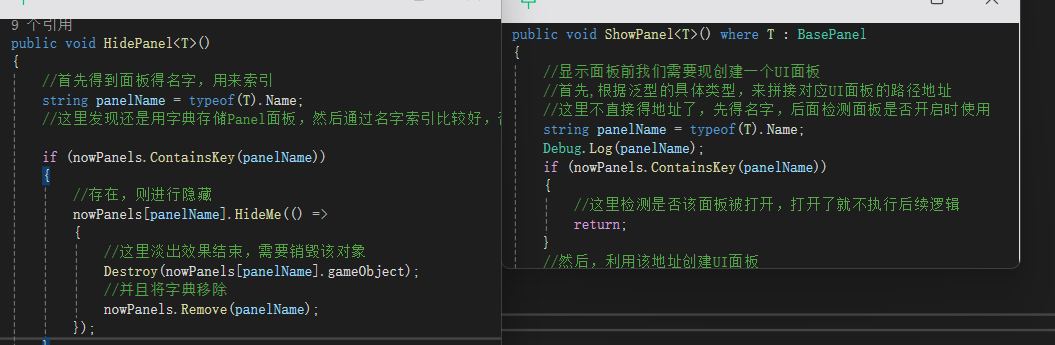
原因:这里我谈出界面,然后延迟销毁,在这期间该面板还在字典中,所以快速切换回来,会发现还存在就不会打开新的面板,而延迟时间结束后,面板销毁,所以界面中就没有面板了
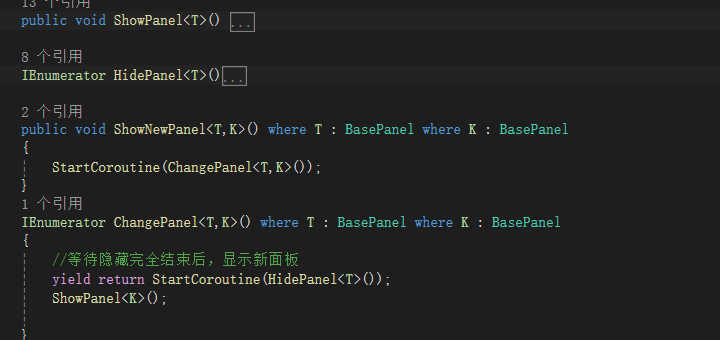
解决方法:引入一个标识,用来检测当前面板是否是淡入淡出界面 或 通过协程,等上一个界面完全隐藏销毁后,再显示新界面,,这里需要将所有的显示隐藏改为ShowNewPanel统一调用
而提示面板可以同时出现,所以这里对提示面板进行以下处理
- 对于存在多个面板
目前只知道是自动登陆的问题,目前先取消自动登陆的功能
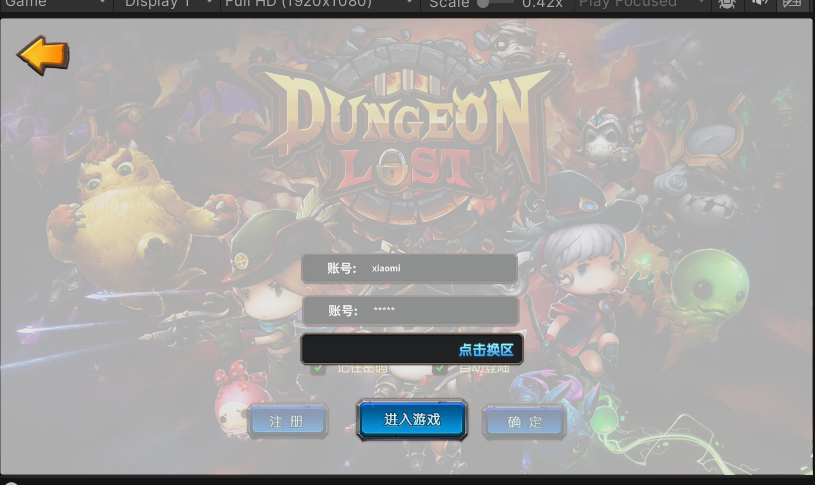
问题2 选择服务器后,下次登陆要自动显示当前选择
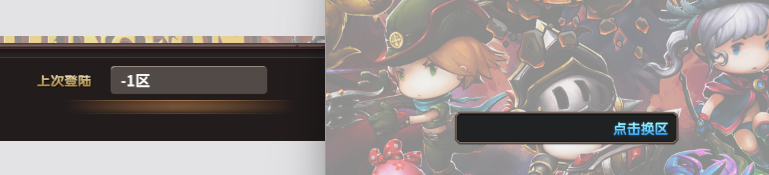
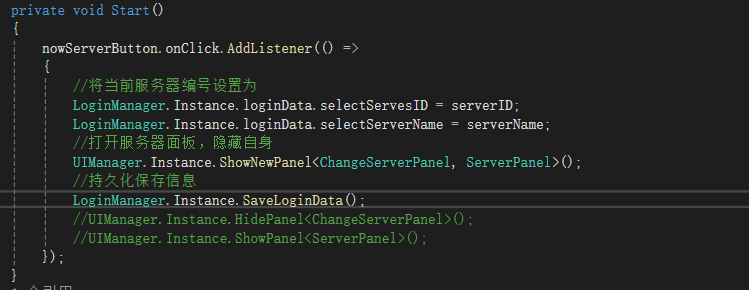
这里发现是没有将服务器数据持久化的原因,又因为点击具体的服务器选择,会更新当前服务器,所以这里再此处持久化登陆信息
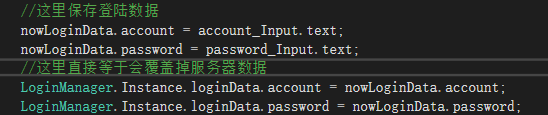
可是我还是发现明明可以读取到信息,但还是没有正确显示,这里我发现了一开始我们是将nowLoginData直接赋值到loginData上,会覆盖掉其中的信息
四、总结
首先,对于一个面板我们需要一个基类,来统一设计所有面板,该基类需要一个初始化面板的方法Init,以及一个显示和隐藏的方法(这两个方法可以让他们将该面板返回出来,方便直接调用其中的方法,比如提示面板就需要经常使用其中的改变显示方法)
using System.Collections;
using System.Collections.Generic;
using Unity.VisualScripting;
using UnityEngine;
using UnityEngine.Events;


/// <summary>
/// 面板积类,需要实现面板的初始化、显示隐藏、淡入淡出
/// </summary>
public abstract class BasePanel : MonoBehaviour
{
    #region 面板积类的成员变量
    private CanvasGroup canvasGroup;    //面板的画布组 => 控制面板的淡入淡出效果
    private bool isShowing; //当前是否显示
    public bool isFade; //当前是否谈出
    public float fadeSpeed = 5f;

    private UnityAction hideCallBack;   //面板成功淡出时执行的方法
    //为什么这样设计?
    //答:通过了解这样UI面板只负责实现自己的显示隐藏,淡入淡出
    //具体的创建销毁则由UI管理器负责,
    #endregion

    #region 进行面板的初始化
    //初始化面版关联的UI控件
    public abstract void Init();
    #endregion

    #region 实现面版的显示与隐藏
    public virtual void ShowMe()
    {
        //面板的显示,显示时需要动态创建对应的UI面版
        isShowing = true;
    }
    public virtual void HideMe(UnityAction callBack)
    {
        //面板的隐藏,隐藏时需要销毁对应的UI面板
        isShowing = false;
        hideCallBack = callBack;
    }
    #endregion

    protected virtual void Awake()
    {
        //获取面板上的Canvas组件,用来实现淡入淡出的效果
        canvasGroup = GetComponent<CanvasGroup>();
        if(canvasGroup == null )
            this.AddComponent<CanvasGroup>();
    }
    protected virtual void Start()
    {
        //对面板进行初始化
        Init();
    }
    protected virtual void Update()
    {
        if (isShowing&&canvasGroup.alpha<1)
        {
            //这时候要实现面板的谈入,透明度设置为0-1之间
            canvasGroup.alpha = Mathf.Clamp01( canvasGroup.alpha + Time.deltaTime * fadeSpeed);
            isFade =true;
            if(canvasGroup.alpha>=1)
            {
                isFade =false;
            }
        }
        else if(!isShowing&&canvasGroup.alpha>0)
        {
            isFade = true;
            //这时候要实现面板的谈出,透明度设置为0-1之间
            canvasGroup.alpha = Mathf.Clamp01(canvasGroup.alpha - Time.deltaTime * fadeSpeed);
            //这里当透明度为零时,就尝试调用
            if(canvasGroup.alpha <= 0 )
            {
                hideCallBack?.Invoke();
                isFade = false;
            }
        }
    }

}
其次,我们需要一个登陆数据管理类,该类需要包含登陆的所有信息(此外最好提供一个保存数据的方法,在每次数据改变时,进行数据持久化)
/// <summary>
/// 登录信息,用来进行登录检测和登录面板更新的数据信息,包含当前输入的账户密码、是否记住帐户密码,是否自动登陆
/// </summary>
public class LoginData
{
    public string account = null;  //账号
    public string password = null; //密码
    public bool isRemeberPassword = false;  //是否记住密码
    public bool isAutoLogin = false;    //是否自动登陆
    public int selectServesID = -1;     //当前选择的服务器编号
    public string selectServerName = "";
}
接下来,我们需要一个登陆数据管理器,来进行一开始数据的读取,此外也需要 检测密码正确 和注册新账号的功能
using System.Collections;
using System.Collections.Generic;
using UnityEngine;

public class LoginManager
{
    #region 单例实现
    private static LoginManager instance = new();
    public static LoginManager Instance => instance;
    //存储的所有账号及对应密码
    private Dictionary<string,string> saveAccount = new();
    //存储的登陆数据
    public LoginData loginData = new();
    //游戏中所有的服务器


    private LoginManager()
    {
        if (instance == null)
            instance = this;
        //加载持久化的账户字典
        saveAccount = JsonMgr.Instance.LoadData<Dictionary<string, string>>("AccountData");
        //用来测试
        //saveAccount.Add("Acount123", "123456");
        //加载登陆数据
        loginData = JsonMgr.Instance.LoadData<LoginData>("LoginData");
        Debug.Log("当前读取到的服务器为" + loginData.selectServesID + "区  " + loginData.selectServerName);


        //测试使用,查看存在的账号及密码
        foreach (var key in saveAccount.Keys)
        {
            Debug.Log($"账号:{key}   密码:{saveAccount[key]}");
        }


    }


    #endregion


    /// <summary>
    /// 检测账户密码是否匹配
    /// </summary>
    /// <param name="account">账号名</param>
    /// <param name="password">密码</param>
    public bool CheckPassword(string account, string password)
    {
        if (saveAccount.ContainsKey(account))
        {
            //存在该账户
            if (saveAccount[account] == password)
            {

                return true;
            }
            else
            {
                return false;
            }
        }
        return false;
    }

    //注册新账号,并返回是否完成注册
    public bool RegisterAccount(string account,string password)
    {
        if(saveAccount.ContainsKey(account))
        {
            //该账户名已经存在,唤出提示面板
            Debug.Log("该账户名已经存在,唤出提示面板");
            //显示提示面板
            UIManager.Instance.ShowPanel<TipsPanel>();
            //获取到提示面板,更新显示
            TipsPanel tips = UIManager.Instance.canvas.GetComponentInChildren<TipsPanel>();
            tips.ChangeShowInfo("该账号名已经存在");
            return false;
        }
        saveAccount.Add(account, password);
        //更新持久化账户字典
        JsonMgr.Instance.SaveData(saveAccount, "AccountData");
        //测试使用,查看存在的账号及密码
        foreach (var key in saveAccount.Keys)
        {
            Debug.Log($"账号:{key}   密码:{saveAccount[key]}");
        }

        return true;
    }

    //存储登录数据相关
    public void SaveLoginData()
    {
        JsonMgr.Instance.SaveData(loginData, "LoginData");
    }
}
然后,就是我们 最为重要的UI面板管理器,他负责面板的显示与隐藏,该方法通过ShowNewPanel来进行统一调度
using System;
using System.Collections;
using System.Collections.Generic;
using UnityEngine;

/// <summary>
/// 该脚本为UI管理器,需要实现UI面板的显示,隐藏与获取
/// </summary>
public class UIManager :MonoBehaviour
{
    //该管理器统一管理所有UI面板
    #region 单例模式实现
    private static UIManager instance;
    public static UIManager Instance => instance;
    private void Awake()
    {
        if(instance == null)
            instance = this;
        //DontDestroyOnLoad(gameObject);
    }

    public Dictionary<string,BasePanel> nowPanels = new Dictionary<string, BasePanel>();  //该管理器现在显示的UI面板
    #endregion

    #region 面板的显示与隐藏
    //面板得Canvas父对象
    public Transform canvas;


    //显示UI面板
    public void ShowPanel<T>() where T : BasePanel
    {
        //显示面板前我们需要现创建一个UI面板
        //首先,根据泛型的具体类型,来拼接对应UI面板的路径地址
        //这里不直接得地址了,先得名字,后面检测面板是否开启时使用
        string panelName = typeof(T).Name;
        Debug.Log(panelName);
        if (nowPanels.ContainsKey(panelName))
        {
            if(nowPanels[panelName].isFade)
            {
                //这里检测是否该面板被打开,打开了就不执行后续逻辑
                return;
            }
        }
        //然后,利用该地址创建UI面板
        GameObject panelObj = Resources.Load<GameObject>("UI/Panels/" + panelName);
        if (panelObj == null)
        {
            Debug.Log("加载UI面板预制体失败");
            return;
        }
        //实例化预制体
        GameObject panelInstance = Instantiate(panelObj);
        //从实例化的GameObject上获取脚本组件
        T panel = panelInstance.GetComponent<T>();

        //问题一,这里实例化得UI面板没有成为Canvas得子对象,所以无法正常渲染
        panel.transform.SetParent(canvas, false);


        //
        if (panel == null)
        {
            Debug.Log("UI面板实列化失败");
            return;
        }
        //接下来显示该UI面板,并将其添加到显示得字典中
        panel.ShowMe();
        if (!nowPanels.ContainsKey(panelName))
        {
            nowPanels.Add(panelName, panel);
        }

    }

    IEnumerator HidePanel<T>()
    {
        //首先得到面板得名字,用来索引
        string panelName = typeof(T).Name;
        //这里发现还是用字典存储Panel面板,然后通过名字索引比较好,否则这里我需要查有没有这个面板,然后还要索引出来销毁

        if (nowPanels.ContainsKey(panelName))
        {
            //存在,则进行隐藏
            nowPanels[panelName].HideMe(() =>
            {
                //这里淡出效果结束,需要销毁该对象
                Destroy(nowPanels[panelName].gameObject);
                //并且将字典移除
                nowPanels.Remove(panelName);
            });
        }
        yield return new WaitForSeconds(1);

    }

    public void ShowNewPanel<T,K>() where T : BasePanel where K : BasePanel
    {
        StartCoroutine(ChangePanel<T,K>());
    }
    IEnumerator ChangePanel<T,K>() where T : BasePanel where K : BasePanel
    {
        //等待隐藏完全结束后,显示新面板
        yield return StartCoroutine(HidePanel<T>());
        ShowPanel<K>();

    }
    #endregion

    #region 面板获取
    public T GetPanel<T>() where T : BasePanel
    {
        string panelName = typeof(T).Name;
        //检测有没有该面板,有就返回
        if (nowPanels.ContainsKey(panelName))
            return nowPanels[panelName] as T;

        //没有,返回null
        return null;
    }
    #endregion

    private void Start()
    {
        ////初始时,且不存在其他面板时打开登陆面板
        if(canvas.GetComponentInChildren<BasePanel>(true) == null)
        {
            UIManager.Instance.ShowPanel<LoginPanel>();
        }
    }
}
最后,就是我们的各个面板,其中较为特殊的是提示面板,该面板显示时不会隐藏原本的面板。另外,换服面板是集成了多个分区按钮和服务器按钮
using System.Collections;
using System.Collections.Generic;
using TMPro;
using UnityEngine;
using UnityEngine.UI;

public class LoginPanel : BasePanel
{
    //LoginPanel相关的控件
    public TMP_InputField account_Input;    //账户输入
    public TMP_InputField password_Input;   //密码输入
    public Toggle remeberPassword_Toggle;   //记住密码选项
    public Toggle autoLogin_Toggle;         //自动登陆选项
    public Button resignAccount_Button;     //注册按钮
    public Button loginAccount_Button;      //登陆按钮

    private LoginData nowLoginData = new();
    public override void Init()
    {
        //点击注册按钮,打开注册面板
        resignAccount_Button.onClick.AddListener(() =>
        {
            Debug.Log("点击注册,打开注册面板");
            //隐藏登陆面板,打开注册面板
            UIManager.Instance.ShowNewPanel<LoginPanel,RegisterPanel>();

            //UIManager.Instance.HidePanel<LoginPanel>();
            //UIManager.Instance.ShowPanel<RegisterPanel>();
        });
        //点击登陆按钮,进行登陆检测
        loginAccount_Button.onClick.AddListener(() =>
        {
            if(account_Input.text!="" &&password_Input.text!="")
            {
                //账户密码均已输入,检测是否匹配
                if(LoginManager.Instance.CheckPassword(account_Input.text, password_Input.text))
                {
                    //成功匹配,打开服务器面板,并隐藏该面板
                    Debug.Log("成功登陆,打开服务器面板");
                    UIManager.Instance.ShowNewPanel<LoginPanel,ServerPanel>();

                    //UIManager.Instance.HidePanel<LoginPanel>();
                    //UIManager.Instance.ShowPanel<ServerPanel>();

                    //这里保存登陆数据
                    nowLoginData.account = account_Input.text;
                    nowLoginData.password = password_Input.text;
                    //这里直接等于会覆盖掉服务器数据
                    LoginManager.Instance.loginData.account = nowLoginData.account;
                    LoginManager.Instance.loginData.password = nowLoginData.password;

                }
                else
                {
                    //账户或密码错误,打开提示面板
                    //显示提示面板
                    UIManager.Instance.ShowPanel<TipsPanel>();
                    //获取到提示面板,更新显示
                    TipsPanel tips = UIManager.Instance.canvas.GetComponentInChildren<TipsPanel>();
                    tips.ChangeShowInfo("账户或密码错误");
                    Debug.Log("账户或密码错误");
                }
            }
            else
            {
                //显示提示面板
                UIManager.Instance.ShowPanel<TipsPanel>();
                //获取到提示面板,更新显示
                TipsPanel tips = UIManager.Instance.canvas.GetComponentInChildren<TipsPanel>();
                tips.ChangeShowInfo("请输入完整的账号或密码");
                Debug.Log("账户或密码输入不全,打开提示面板");
            }
        });

        remeberPassword_Toggle.onValueChanged.AddListener((isOn) =>
        {
            //不记住密码时,禁止自动登陆
            if (!isOn)
            {
                autoLogin_Toggle.isOn = false;
            }
            nowLoginData.isRemeberPassword = isOn;
        });
        autoLogin_Toggle.onValueChanged.AddListener((isOn) =>
        {
            //勾选自动登陆,则自动勾选记住密码
            if (isOn)
            {
                remeberPassword_Toggle.isOn = isOn;
            }
            nowLoginData.isAutoLogin = isOn;
        });
    }
    public override void ShowMe()
    {
        base.ShowMe();
        //得到登陆信息
        LoginData loginData = LoginManager.Instance.loginData;
        //更新UI
        if (loginData == null)
        {
            Debug.Log("sdasd");
        }
        remeberPassword_Toggle.isOn = loginData.isRemeberPassword;
        autoLogin_Toggle.isOn = loginData.isAutoLogin;
        //是否记住密码
        if(remeberPassword_Toggle.isOn)
        {
            account_Input.text = loginData.account;
            password_Input.text = loginData.password;
        }
        //是否自动登陆 且记住密码
        //if(autoLogin_Toggle.isOn && remeberPassword_Toggle.isOn)
        //{
        //    UIManager.Instance.ShowNewPanel<LoginPanel, ServerPanel>();
        //    account_Input.text = loginData.account;
        //    password_Input.text = loginData.password;
        //    remeberPassword_Toggle.isOn = autoLogin_Toggle.isOn;
        //    //自动登陆这一次后,就取消自动登陆
        //    autoLogin_Toggle.isOn = false;
        //    //UIManager.Instance.HidePanel<LoginPanel>();
        //    //UIManager.Instance.ShowPanel<ServerPanel>();

        //}

    }
}

using TMPro;
using UnityEngine;
using UnityEngine.UI;
/// <summary>
/// 注册面板脚本
/// </summary>
public class RegisterPanel : BasePanel
{
    //控件成员
    public TMP_InputField account_Input;    //账户输入
    public TMP_InputField password_Input;   //密码输入
    public Button chickConfirm_Button;  //点击确认按钮
    public Button chickCancel_Button;   //点击取消按钮
    public override void Init()
    {
        //点击确认按钮
        chickConfirm_Button.onClick.AddListener(() =>
        {
            //账号和密码全部输入
            if(account_Input.text!=""&&password_Input.text!="")
            {
                //进行账号注册
                if (LoginManager.Instance.RegisterAccount(account_Input.text, password_Input.text))
                {
                    //成功完成注册,隐藏注册面板
                    UIManager.Instance.ShowNewPanel<RegisterPanel, LoginPanel>();

                    //UIManager.Instance.HidePanel<RegisterPanel>();
                    //UIManager.Instance.ShowPanel<LoginPanel>();

                }
            }
            else
            {
                //账号或密码输入失败,打开提示面板
                Debug.Log(" 账号或密码输入失败,打开提示面板");
                //显示提示面板
                UIManager.Instance.ShowPanel<TipsPanel>();
                //获取到提示面板,更新显示
                TipsPanel tips = UIManager.Instance.canvas.GetComponentInChildren<TipsPanel>();
                tips.ChangeShowInfo("请输入完整的账号或密码");
            }
        });

        chickCancel_Button.onClick.AddListener(() =>
        {
            //点击取消按钮
            UIManager.Instance.ShowNewPanel<RegisterPanel, LoginPanel>();

            //UIManager.Instance.HidePanel<RegisterPanel>();
            //UIManager.Instance.ShowPanel<LoginPanel>();
        });
    }
}

using TMPro;
using UnityEngine.UI;

/// <summary>
/// 提示窗口脚本
/// </summary>
public class TipsPanel : BasePanel
{
    public Button confirmButton;    //确定按钮
    public TMP_Text tipsInfoText;   //提示信息显示
    public override void Init()
    {
        confirmButton.onClick.AddListener(() =>
        {
            //这里直接隐藏自己
            //UIManager.Instance.HidePanel<TipsPanel>();
            HideMe(() =>
            {
                Destroy(gameObject);
                UIManager.Instance.nowPanels.Remove("TipsPanel");
            });
        });
    }

   public void ChangeShowInfo(string info)
    {
        tipsInfoText.text = info;
    }
}

using System.Collections;
using System.Collections.Generic;
using TMPro;
using UnityEngine;
using UnityEngine.SceneManagement;
using UnityEngine.UI;

public class ServerPanel : BasePanel
{
    //控件成员
    public TMP_Text nowServesInfo;  //当前服务器显示
    public Button changeServerButton;   //换服按钮
    public Button enterGameButton;      //进入游戏按钮
    public Button quitServesPanelButton;//退出服务器面板

    public override void Init()
    {
        //初始化,加载上次登陆的显示信息
        ShowMe();

        enterGameButton.onClick.AddListener(() =>
        {
            //点击进入游戏,检测是否有选择的服务器
            if(LoginManager.Instance.loginData.selectServesID == -1)
            {
                //没有选择服务器,打开提示面板
                UIManager.Instance.ShowPanel<TipsPanel>();
                TipsPanel tips = UIManager.Instance.canvas.GetComponentInChildren<TipsPanel>();
                tips.ChangeShowInfo("请选择服务器后登陆");
            }
            else
            {
                //进入游戏场景
                SceneManager.LoadScene("TextScene");
            }
        });
        changeServerButton.onClick.AddListener(()=>
        {
            //点击换肤按钮,打开换服面板,隐藏自己
            UIManager.Instance.ShowNewPanel<ServerPanel,ChangeServerPanel>();
            //UIManager.Instance.HidePanel<ServerPanel>();
            //UIManager.Instance.ShowPanel<ChangeServerPanel>();

        });
        quitServesPanelButton.onClick.AddListener(() =>
        {
            //点击退出服务器面板,隐藏自己并打开登陆
            UIManager.Instance.ShowNewPanel<ServerPanel, LoginPanel>();
            //UIManager.Instance.HidePanel<ServerPanel>();
            //UIManager.Instance.ShowPanel<LoginPanel>();
        });
    }

    public override void ShowMe()
    {
        base.ShowMe();
        //更新数据
        LoginData loginData = LoginManager.Instance.loginData;
        Debug.Log("当前读取到的服务器为" + loginData.selectServesID + "区  " + loginData.selectServerName);
        if (loginData.selectServesID == -1)
        {
            nowServesInfo.text = "";
            return;
        }
        nowServesInfo.text = loginData.selectServesID + "区  " + loginData.selectServerName;
    }
}
换区面板包含 分区范围数据、服务器数据、分区面板三部分
using TMPro;
using UnityEngine;
using UnityEngine.UI;

public class ServerRangeData : MonoBehaviour
{
    public TMP_Text serverRange;
    public Button nowServerRangeButton;
    public int startServerID;
    public int endServerID;

    // 定义委托类型
    public delegate void OnRangeClicked(int startID, int endID);
    // 委托实例
    public OnRangeClicked onRangeClicked;

    private void Start()
    {
        nowServerRangeButton.onClick.AddListener(() =>
        {
            onRangeClicked?.Invoke(startServerID,endServerID);
        });
        serverRange.text = startServerID + "-" + endServerID;
    }
}

using System.Collections;
using System.Collections.Generic;
using TMPro;
using UnityEngine;
using UnityEngine.UI;

public class ServerInfoData : MonoBehaviour
{
    public TMP_Text serverInfo;
    public Button nowServerButton;
    public Image newIcon;   //新服图标
    public Image stateIcon; //服务器状态图标
    private string serverName;
    private int serverID;
    private bool isNew;
    private int stateId;

    private void Start()
    {
        nowServerButton.onClick.AddListener(() =>
        {
            //将当前服务器编号设置为
            LoginManager.Instance.loginData.selectServesID = serverID;
            LoginManager.Instance.loginData.selectServerName = serverName;
            //打开服务器面板,隐藏自身
            UIManager.Instance.ShowNewPanel<ChangeServerPanel, ServerPanel>();
            //持久化保存信息
            LoginManager.Instance.SaveLoginData();
            //UIManager.Instance.HidePanel<ChangeServerPanel>();
            //UIManager.Instance.ShowPanel<ServerPanel>();
        });
    }
    public void ShowMe()
    {
        serverInfo.text = serverID + "区  " + serverName;
        if (isNew)
        {
            //是新服,显示图标
            newIcon.gameObject.SetActive(true);
        }
        else
        {
            newIcon.gameObject.SetActive(false);
        }
        stateIcon.sprite = Resources.Load<Sprite>($"UI/Art/State/ui_DL_State_{stateId}");
    }
    //设置服务器数据信息
    public void SetInfo(ServerData data)
    {
        serverName = data.name;
        serverID = data.id;
        isNew = data.isNew;
        stateId = data.state;
    }
}

using System.Collections;
using System.Collections.Generic;
using TMPro;
using UnityEngine;

public class ChangeServerPanel : BasePanel
{
    public List<ServerData> serverDatas = new List<ServerData>();
    public Transform leftGruop;
    public Transform rightGruop;
    public List<ServerInfoData> serverInfoDatas = new List<ServerInfoData>();

    public TMP_Text serverRange_Text;
    public TMP_Text serverData_Text;
    public override void Init()
    {
        //进入换服面板,显示当前的选择
        LoginData loginData = LoginManager.Instance.loginData;
        serverData_Text.text = loginData.selectServesID + "区  " + loginData.selectServerName;
        //读取服务器数据
        serverDatas = JsonMgr.Instance.LoadData<List<ServerData>>("Data/ServerInfo");
        Debug.Log("加载到的服务器共计:" + serverDatas.Count);
        //创建分区
        CreateServerPartitions(serverDatas.Count);
    }
    public void CreateServerPartitions(int totalServersCount)
    {
        int partitionCount = totalServersCount / 10;
        if (totalServersCount%10>0)
        {
            partitionCount += 1;
        }
        Debug.Log("当前服务器数量为:"+ totalServersCount + " 共划分分区树为:" +  partitionCount);
        for (int i = 0; i < partitionCount; i++)
        {
            //创建对应个数的分区范围按钮预设体
            GameObject rangeData = Resources.Load<GameObject>("UI/Panels/ServerRangeData_Button");
            if (rangeData == null)
            {
                Debug.Log("加载分区预制体失败");
                return;
            }
            //实例化预设体
            GameObject rangeDataButton = Instantiate(rangeData);
            //在实例化的GameObject上获取脚本组件
            ServerRangeData serverRangeData = rangeDataButton.GetComponent<ServerRangeData>();
            serverRangeData.transform.SetParent(leftGruop, false);
            serverRangeData.startServerID = i *10 + 1;
            serverRangeData.endServerID = i == partitionCount-1&&
                                               totalServersCount % 10 > 0 ?
                                               i*10 + totalServersCount % 10 : (i+1)*10;
            //为他添加设置服务器数据的方法
            serverRangeData.onRangeClicked += CreateServerDatas;
        }
    }

    public void CreateServerDatas(int startServerID,int endServerID)
    {
        //设置服务器数据,这里应该提前创建好10个服务器槽位
        //根据数量设置信息
        for (int i = 0; i < 10; i++)
        {
            serverInfoDatas[i].gameObject.SetActive(false);
        }
        int index =0;
        for(int i = startServerID -1;i< endServerID; i++)
        {
            serverInfoDatas[index].SetInfo(serverDatas[i]);
            serverInfoDatas[index].gameObject.SetActive(true);
            serverInfoDatas[index].ShowMe();
            Debug.Log("成功设置服务器ID"+ i);
            index++;
        }
        Debug.Log("设置服务器数据" + startServerID + " - " + endServerID);
        //更新UI
        ShowMe();
        serverRange_Text.text = startServerID + " - " + endServerID;
    }

    public override void ShowMe()
    {
        base.ShowMe();
        //更新UI方法
        LoginData l = LoginManager.Instance.loginData;
        serverData_Text.text = l.selectServesID + "区  " + l.selectServerName;
    }
}
[System.Serializable]
public class ServerData
{
    public int id;      //服务器编号
    public string name; //服务器名
    public int state; //服务器状态编号
    public bool isNew;  //服务器是否为新服务器

}