一、RAG 是什么------为什么光靠 Prompt 不够
1.1模型的知识边界,就是 RAG 的起点
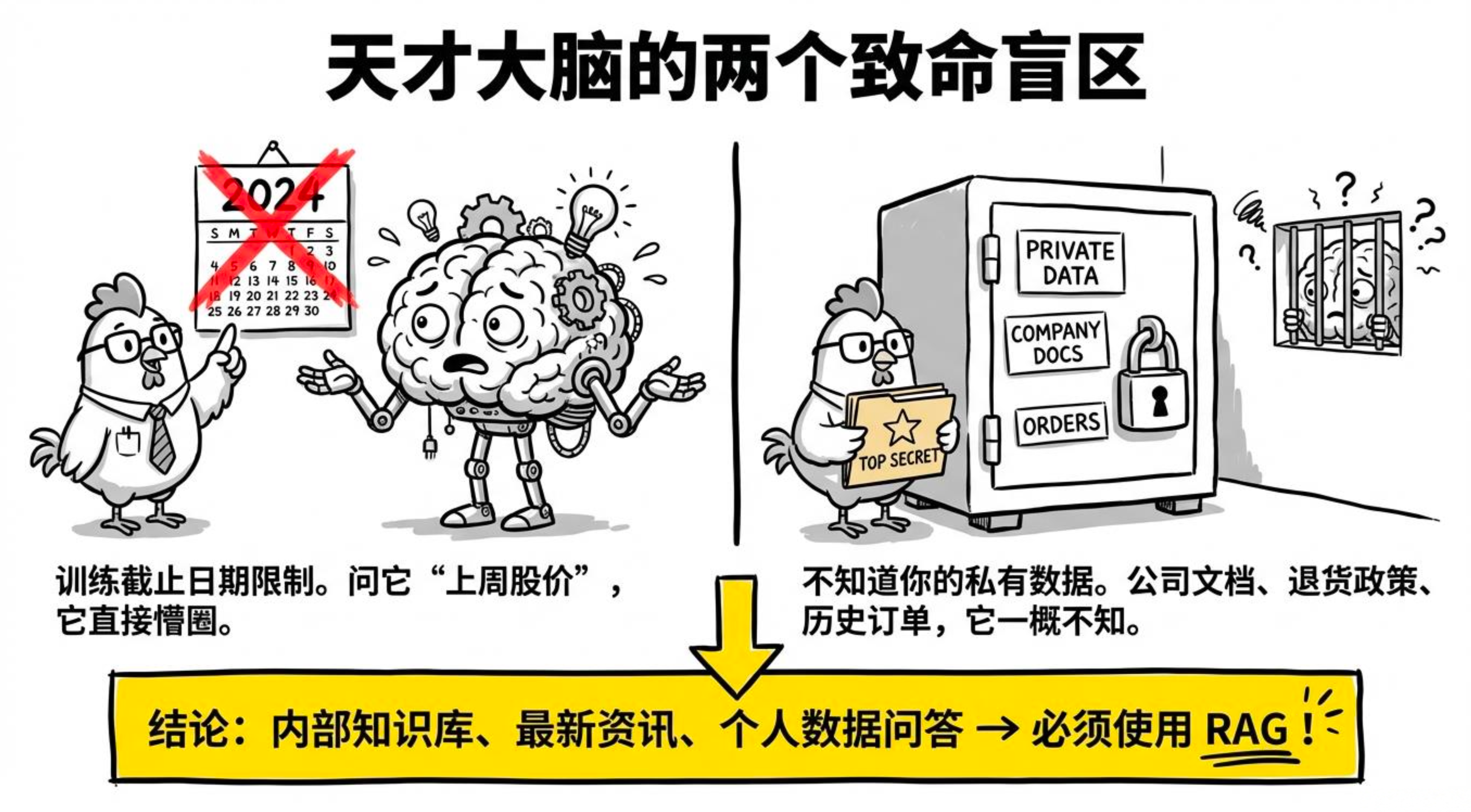
任何大模型都有两个硬伤,不解决就没法直接回答很多真实问题:
-
训练截止日期
模型的知识来自训练数据,训练完成那一刻知识就凝固了。问它"上周的股价是多少",答不了;问它"最新政策有什么变化",也答不了。
-
不知道你的私有数据
公司内部文档、产品手册、历史订单......模型一概不知。问它"我们产品的退货政策是什么",要么胡说八道,要么坦然说不知道。
所以,只要你的场景涉及内部知识库问答、最新资讯问答、基于用户个人数据问答,就得靠 RAG 来补上这块短板。
1.2为什么不直接把所有文档塞进 Prompt?
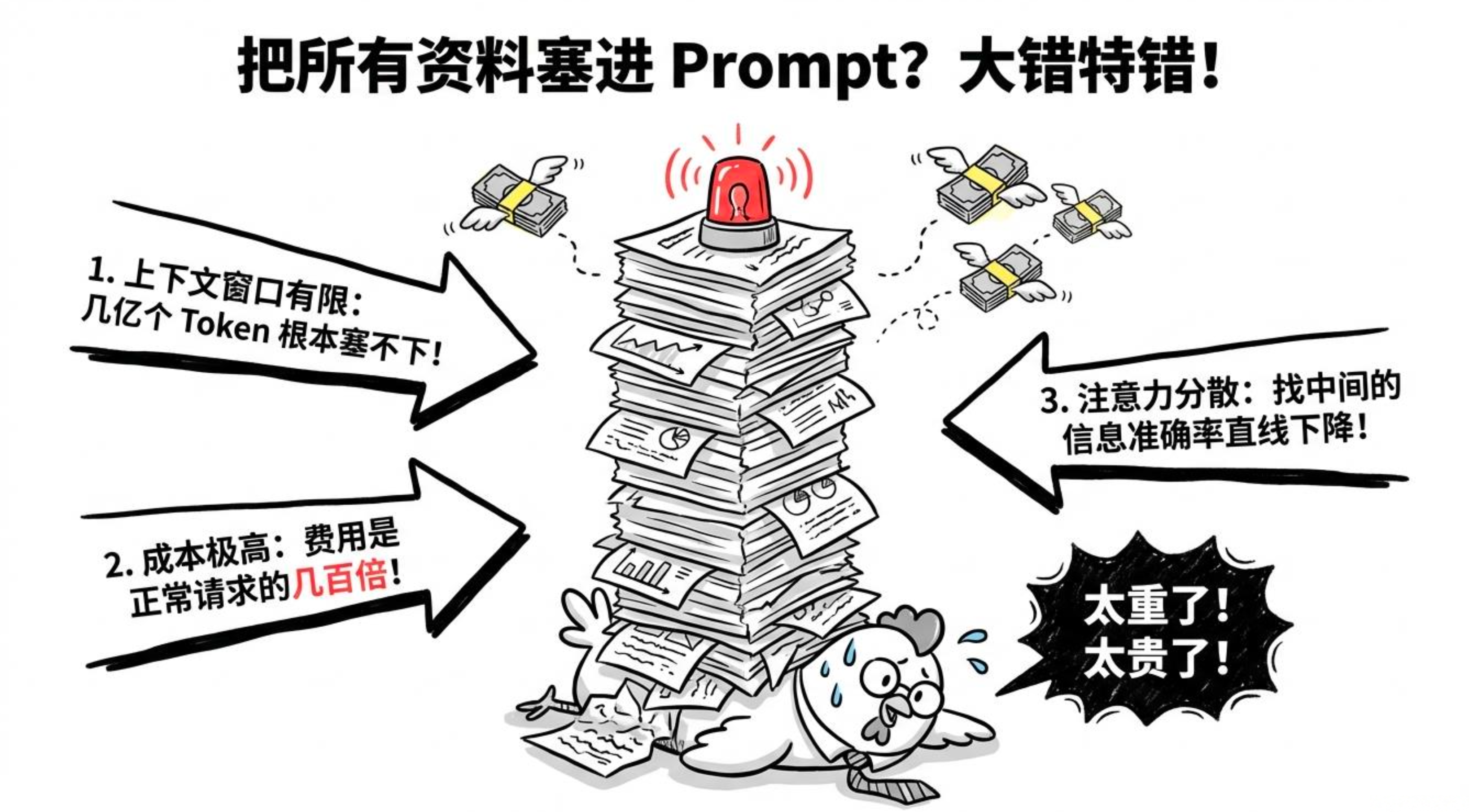
有同学会问:"我把整本产品手册扔进 System Prompt,不就完事了?"
可以,但问题很多:
-
上下文窗口有限
就算现在模型支持 100 万 Token,一个企业的知识库可能有几千份文档、几亿 Token,根本塞不下。
-
成本爆炸
每次请求都带上全部文档,Token 消耗是正常请求的几百倍,烧钱不说,响应速度也拖慢。
-
效果未必好
超长上下文时模型的注意力会分散,中间部分的信息准确率往往低于开头和结尾,大而全不一定有用。
RAG 的做法就很聪明:只检索与问题最相关的几段文档,把这几个"精华片段"塞进 Prompt。信息量骤降,精度和成本都得到控制。
1.3RAG 的完整流程:离线入库 + 在线检索
RAG 分两个阶段,像图书馆一样,先上书架,再找书。
1.3.1阶段一:文档入库(离线,一次性)
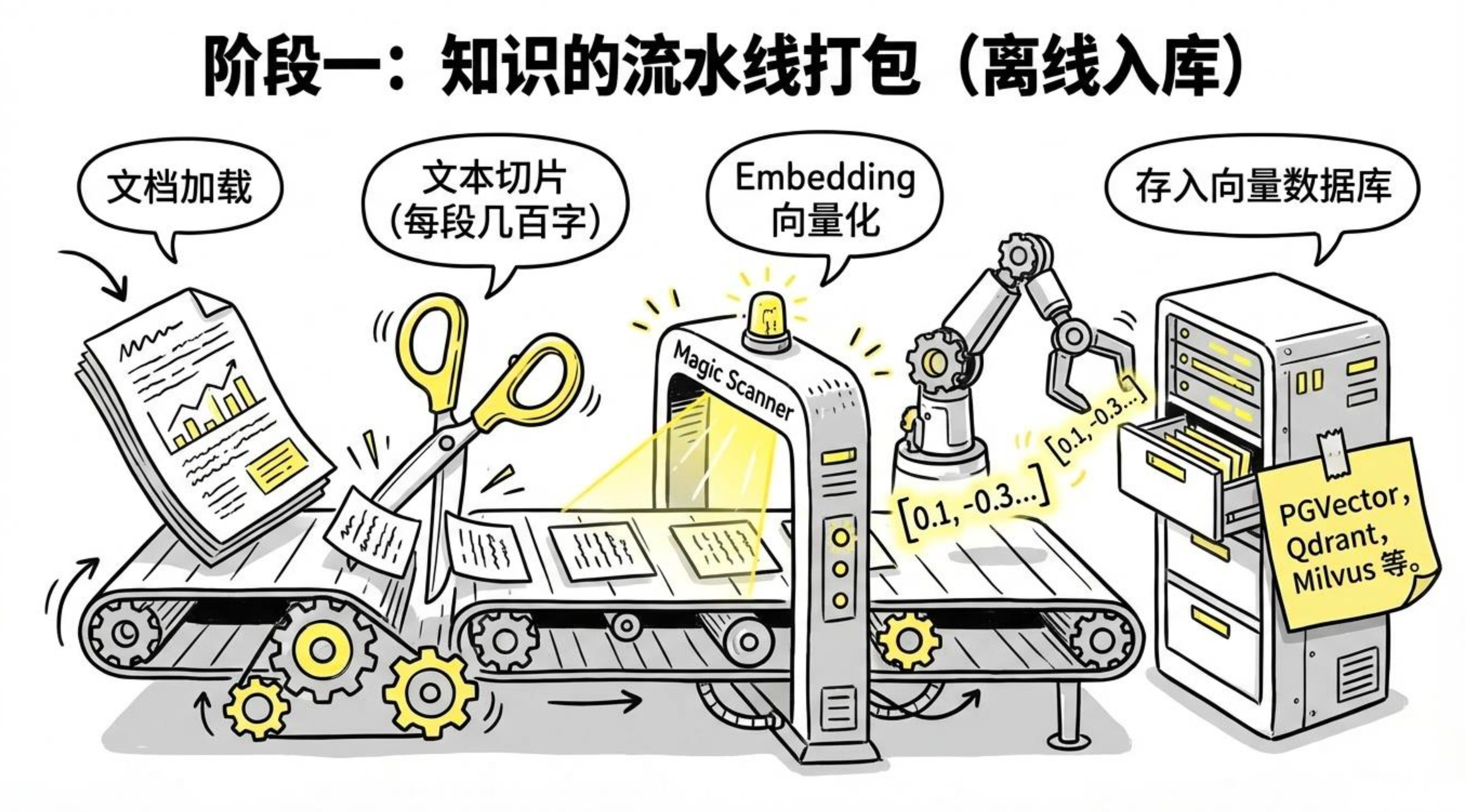
原始文档(PDF/Word/网页/数据库)
    ↓ 文档加载
文本内容
    ↓ 文本切片(Chunking)
若干段落(每段几百字)
    ↓ Embedding(向量化)
若干向量(浮点数数组)
    ↓ 存入向量数据库
向量数据库(PGVector / Qdrant / Milvus)
1.3.2阶段二:问答检索(在线,每次问答)
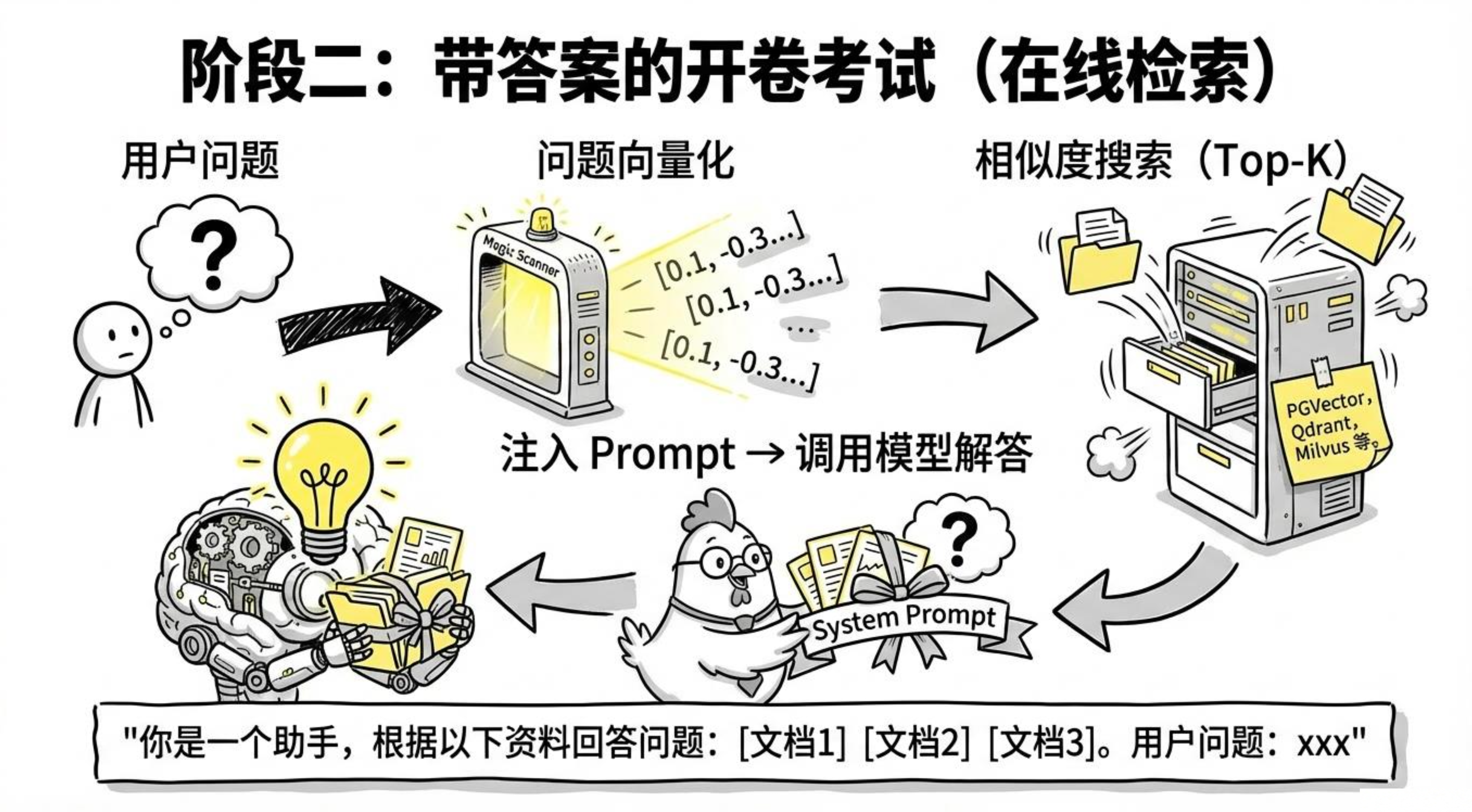
用户问题
    ↓ Embedding(向量化)
问题向量
    ↓ 在向量数据库里做相似度搜索
最相关的 K 段文档(Top-K 召回)
    ↓ 注入 Prompt
【系统提示】
你是一个助手,根据以下资料回答问题:
[文档段落1]
[文档段落2]
[文档段落3]

【用户问题】
xxx

    ↓ 调用模型
模型回答
整个过程环环相扣,离线阶段做好数据准备,在线阶段就能毫秒级完成检索与增强。
1.4为什么向量相似度就能找到相关内容?
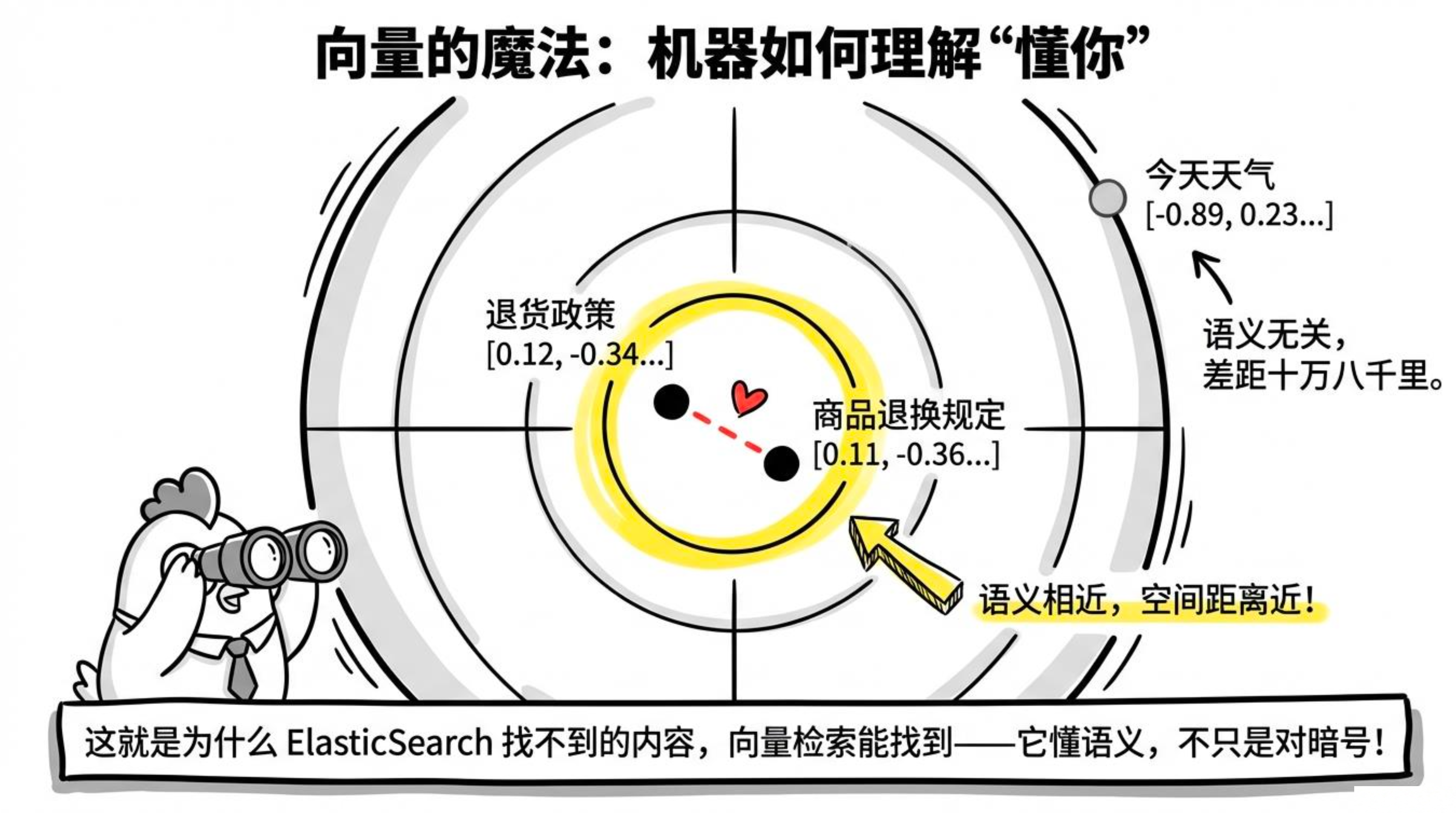
这是 Embedding 的魔法。在模块一我们讲过,Embedding 把文字转换成向量,语义相似的文字,它们的向量在空间里靠得很近。
比如:
"退货政策"      → [0.12, -0.34, 0.78, ...]
"商品退换规定"   → [0.11, -0.36, 0.75, ...]   ← 语义相近,向量接近
"今天天气"       → [-0.89, 0.23, -0.45, ...]  ← 语义无关,距离很远
当用户问"退货要几天?",问题向量会自然靠近"退货政策"的向量,系统就能精准地把退货政策相关的文档片段抓出来。
这也是为什么向量检索能搞定很多关键词检索搞不定的场景:关键词没重合但语义接近的内容,它能召回来。
1.5 Spring AI 里的 RAG 全家桶
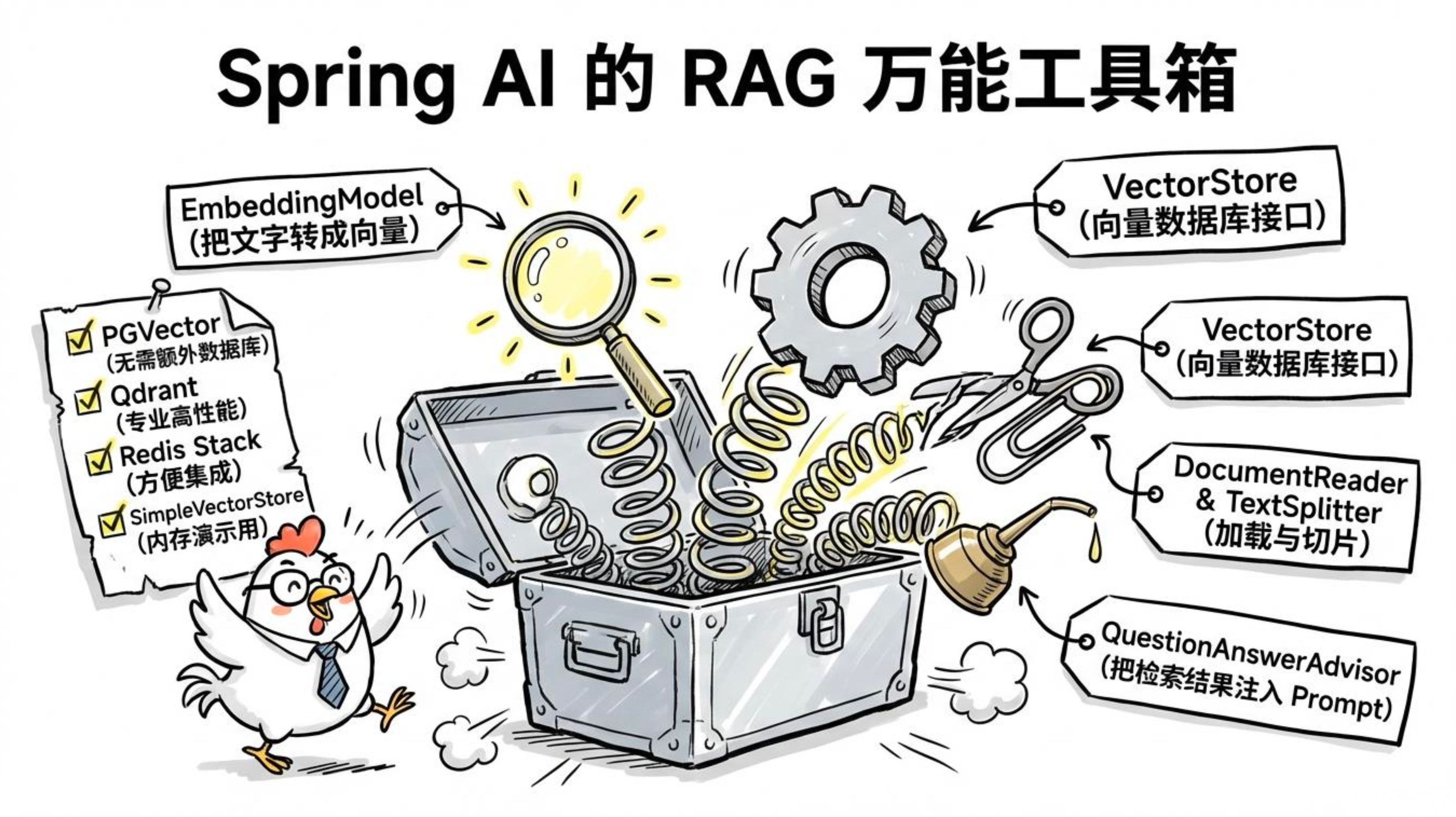
Spring AI 已经把 RAG 需要的零件全封装好了:
-
EmbeddingModel:把文字变成向量
-
VectorStore:向量数据库抽象接口
-
DocumentReader:加载各种格式的文档
-
TextSplitter:文档切片策略
-
QuestionAnswerAdvisor:RAG Advisor,自动完成检索并把结果注入 Prompt
支持的向量数据库也很丰富:
| 向量数据库 | Spring AI 支持 | 特点 |
|---|---|---|
| PGVector | ✅ | PostgreSQL 扩展,无需额外数据库 |
| Qdrant | ✅ | 专业向量库,性能好 |
| Milvus | ✅ | 适合大规模场景 |
| Redis Stack | ✅ | 已有 Redis 时方便集成 |
| Chroma | ✅ | 开发调试方便 |
| SimpleVectorStore(内存) | ✅ | 演示/测试用,不持久化 |
1.6一个最简单的 RAG Demo,先感受一下
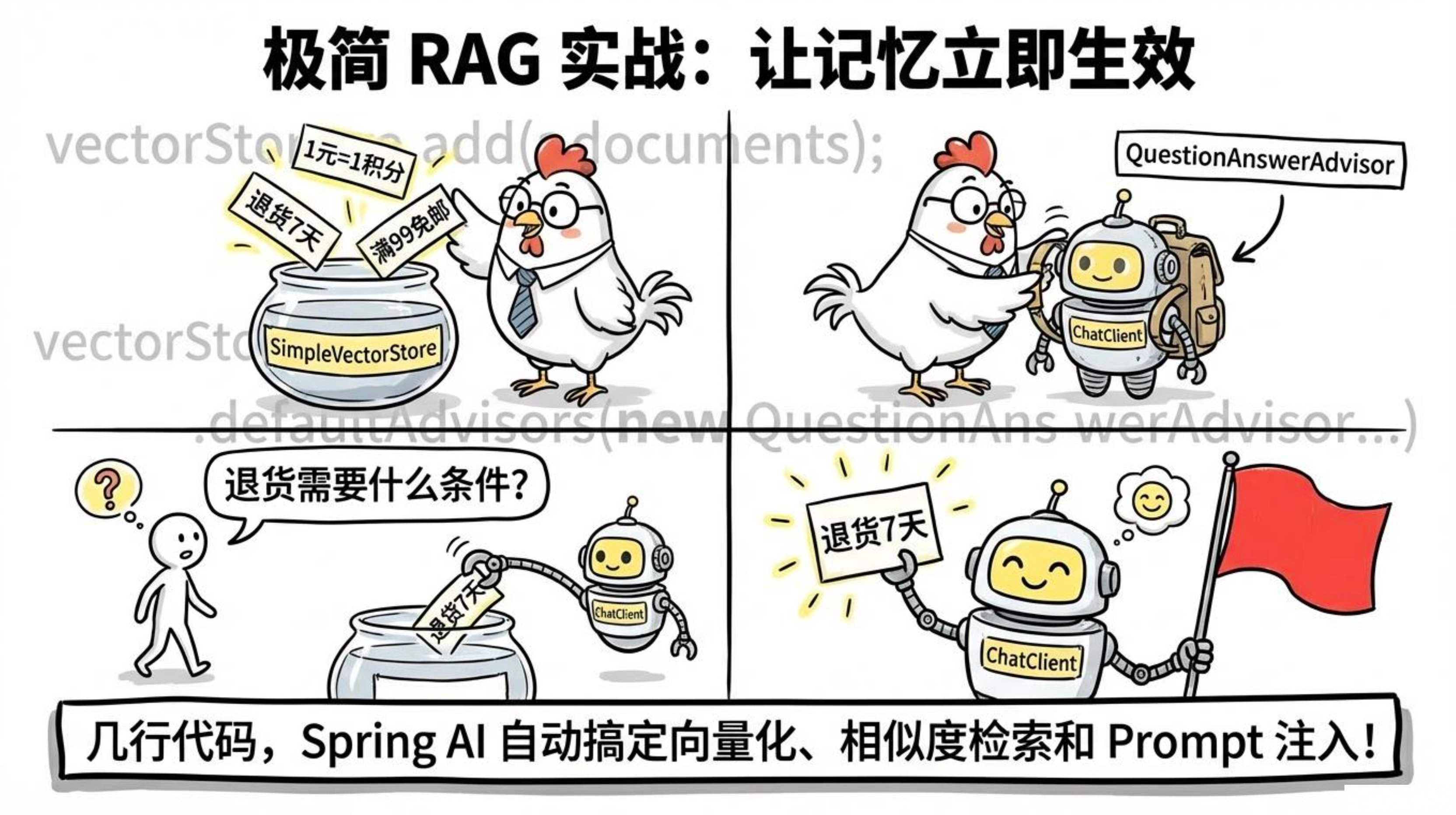
先来个最小可跑的例子,用内存向量库,几分钟就能看到效果。
Spring AI 1.1.x 中 QuestionAnswerAdvisor 独立成了 spring-ai-advisors-vector-store 模块,需要在 pom.xml 里引入:
<dependency>
    <groupId>org.springframework.ai</groupId>
    <artifactId>spring-ai-advisors-vector-store</artifactId>
</dependency>
Demo 代码如下:
(其中的VectorStore直接引用也可以,因为SpringAI已经帮我们装配好了)
package com.jichi.springaialibaba.controller;

import com.alibaba.cloud.ai.dashscope.chat.DashScopeChatModel;
import com.alibaba.cloud.ai.dashscope.embedding.DashScopeEmbeddingModel;
import org.springframework.ai.chat.client.ChatClient;
import org.springframework.ai.chat.client.advisor.vectorstore.QuestionAnswerAdvisor;
import org.springframework.ai.document.Document;
import org.springframework.ai.vectorstore.SimpleVectorStore;
import org.springframework.ai.vectorstore.VectorStore;
import org.springframework.web.bind.annotation.*;

import java.util.List;

@RestController
@RequestMapping("/api/rag-demo")
public class SimpleRagController {

    private final VectorStore vectorStore;
    private final ChatClient chatClient;

    public SimpleRagController(DashScopeEmbeddingModel embeddingModel,
                                DashScopeChatModel chatModel) {
        // 初始化内存向量库并写入三条演示文档
        this.vectorStore = SimpleVectorStore.builder(embeddingModel).build();
        this.vectorStore.add(List.of(
                new Document("公司退货政策:购买后 7 天内可无理由退货,商品需保持原包装。"),
                new Document("会员积分规则:每消费 1 元积累 1 积分,积分可用于兑换优惠券。"),
                new Document("配送说明:满 99 元免运费,普通快递 1-3 个工作日到达。")
        ));

        this.chatClient = ChatClient.builder(chatModel)
                .defaultAdvisors(QuestionAnswerAdvisor.builder(this.vectorStore).build())
                .build();
    }

    @GetMapping
    public String ask(@RequestParam String question) {
        return chatClient.prompt()
                .user(question)
                .call()
                .content();
    }
}
跑起来后,试试效果:
curl "http://localhost:8080/api/rag-demo?question=退货需要什么条件"
# 返回:根据公司退货政策,购买后 7 天内可无理由退货,商品需保持原包装。

curl "http://localhost:8080/api/rag-demo?question=积分怎么用"
# 返回:每消费 1 元积累 1 积分,积分可用于兑换优惠券。

curl "http://localhost:8080/api/rag-demo?question=运费多少"
# 返回:满 99 元免运费,普通快递 1-3 个工作日到达。
就这几行代码,Spring AI 背后悄悄帮你做了:文本向量化、相似度检索、检索结果拼进 Prompt。这种开箱即用的体验,让 RAG 从概念一步跨进工程。
二、文档向量化---EmbeddingModel + 向量存储
2.1先备齐家伙:依赖与向量库
这节需要三类依赖:向量数据库驱动、文档读取器、Embedding 模型。Embedding 通常已经在 DashScope starter 里,我们只需额外加 PGVector 和文档读取器。
<!-- PGVector 向量数据库 -->
<dependency>
    <groupId>org.springframework.ai</groupId>
    <artifactId>spring-ai-starter-vector-store-pgvector</artifactId>
    <version>1.1.2</version>
</dependency>
<!-- PDF 文档读取 -->
<dependency>
    <groupId>org.springframework.ai</groupId>
    <artifactId>spring-ai-pdf-document-reader</artifactId>
    <version>1.1.2</version>
</dependency>
<!-- Tika 读取 Word/Excel/HTML 等格式 -->
<dependency>
    <groupId>org.springframework.ai</groupId>
    <artifactId>spring-ai-tika-document-reader</artifactId>
    <version>1.1.2</version>
</dependency>
2.2 PGVector 环境搭建(可忽略)
用 Docker 一键启动 PGVector 环境:
docker run -d \
  --name pgvector \
  -e POSTGRES_DB=vectordb \
  -e POSTGRES_USER=postgres \
  -e POSTGRES_PASSWORD=postgres \
  -p 5432:5432 \
  -v pgvector_data:/var/lib/postgresql/data \
  pgvector/pgvector:pg16
停止与重启:
docker stop pgvector
docker start pgvector
application.yml 配置,尤其注意向量维度要写对:
spring:
  autoconfigure:
    exclude:
      - org.springframework.ai.model.openai.autoconfigure.OpenAiEmbeddingAutoConfiguration
  datasource:
    url: jdbc:postgresql://localhost:5432/vectordb
    username: postgres
    password: postgres
  ai:
    dashscope:
      api-key: ${DASHSCOPE_API_KEY}
      embedding:
        options:
          model: text-embedding-v3   # 通义 Embedding 模型
    vectorstore:
      pgvector:
        initialize-schema: true          # 首次启动自动建表,之后关掉
        index-type: HNSW                 # HNSW 索引,查询快
        distance-type: COSINE_DISTANCE   # 余弦相似度
        dimensions: 1024                 # text-embedding-v3 的向量维度是 1024,别填错
⚠️ dimensions 填错会直接导致向量插入失败,而且报错信息很隐蔽,排查起来想哭。一定要和 Embedding 模型的输出维度一致。
2.3文档加载:把各种格式"读"成文本
Spring AI 提供了统一接口来加载不同格式,一个 Reader 对应一种场景。
package com.jichi.springaialibaba.service;

import org.springframework.ai.document.Document;
import org.springframework.ai.reader.TextReader;
import org.springframework.ai.reader.pdf.PagePdfDocumentReader;
import org.springframework.ai.reader.pdf.ParagraphPdfDocumentReader;
import org.springframework.ai.reader.tika.TikaDocumentReader;
import org.springframework.core.io.ClassPathResource;
import org.springframework.core.io.FileSystemResource;
import org.springframework.stereotype.Service;

import java.util.List;

@Service
public class DocumentLoaderService {

    // PDF 按页读(每页一个 Document,适合内容按页划分的文档)
    public List<Document> loadPdfByPage(String classpathFile) {
        return new PagePdfDocumentReader(new ClassPathResource(classpathFile)).get();
    }

    // PDF 连续读(不按页,适合跨页的长段落)
    public List<Document> loadPdfByParagraph(String classpathFile) {
        return new ParagraphPdfDocumentReader(new ClassPathResource(classpathFile)).get();
    }

    // Word/Excel/HTML/TXT 等------用 Apache Tika,基本什么格式都能解
    public List<Document> loadWithTika(String absolutePath) {
        return new TikaDocumentReader(new FileSystemResource(absolutePath)).get();
    }

    // 纯文本
    public List<Document> loadText(String classpathFile) {
        return new TextReader(new ClassPathResource(classpathFile)).get();
    }
}
写个 Controller 测试一下加载效果:
package com.jichi.springaialibaba.controller;

import com.jichi.springaialibaba.service.DocumentLoaderService;
import org.springframework.ai.document.Document;
import org.springframework.web.bind.annotation.*;

import java.util.List;
import java.util.Map;

@RestController
@RequestMapping("/api/loader")
public class DocumentLoaderController {

    private final DocumentLoaderService loaderService;

    public DocumentLoaderController(DocumentLoaderService loaderService) {
        this.loaderService = loaderService;
    }

    // 测试 PDF 按页加载,返回段落数量和第一段预览
    @GetMapping("/pdf")
    public Map<String, Object> loadPdf(@RequestParam String filename) {
        List<Document> docs = loaderService.loadPdfByPage(filename);
        return Map.of(
                "count", docs.size(),
                "first", docs.isEmpty() ? "" : docs.get(0).getText().substring(0, Math.min(200, docs.get(0).getText().length()))
        );
    }

    // 测试纯文本加载
    @GetMapping("/text")
    public Map<String, Object> loadText(@RequestParam String filename) {
        List<Document> docs = loaderService.loadText(filename);
        return Map.of(
                "count", docs.size(),
                "content", docs.isEmpty() ? "" : docs.get(0).getText()
        );
    }
}
2.4文档切片(Chunking)
Embedding 模型有输入长度限制,而且段落太长语义混杂,检索精度会下降。切片的目标是把长文档切成一个个语义相对完整的小段。
2.4.1方案一:TokenTextSplitter(强烈推荐)
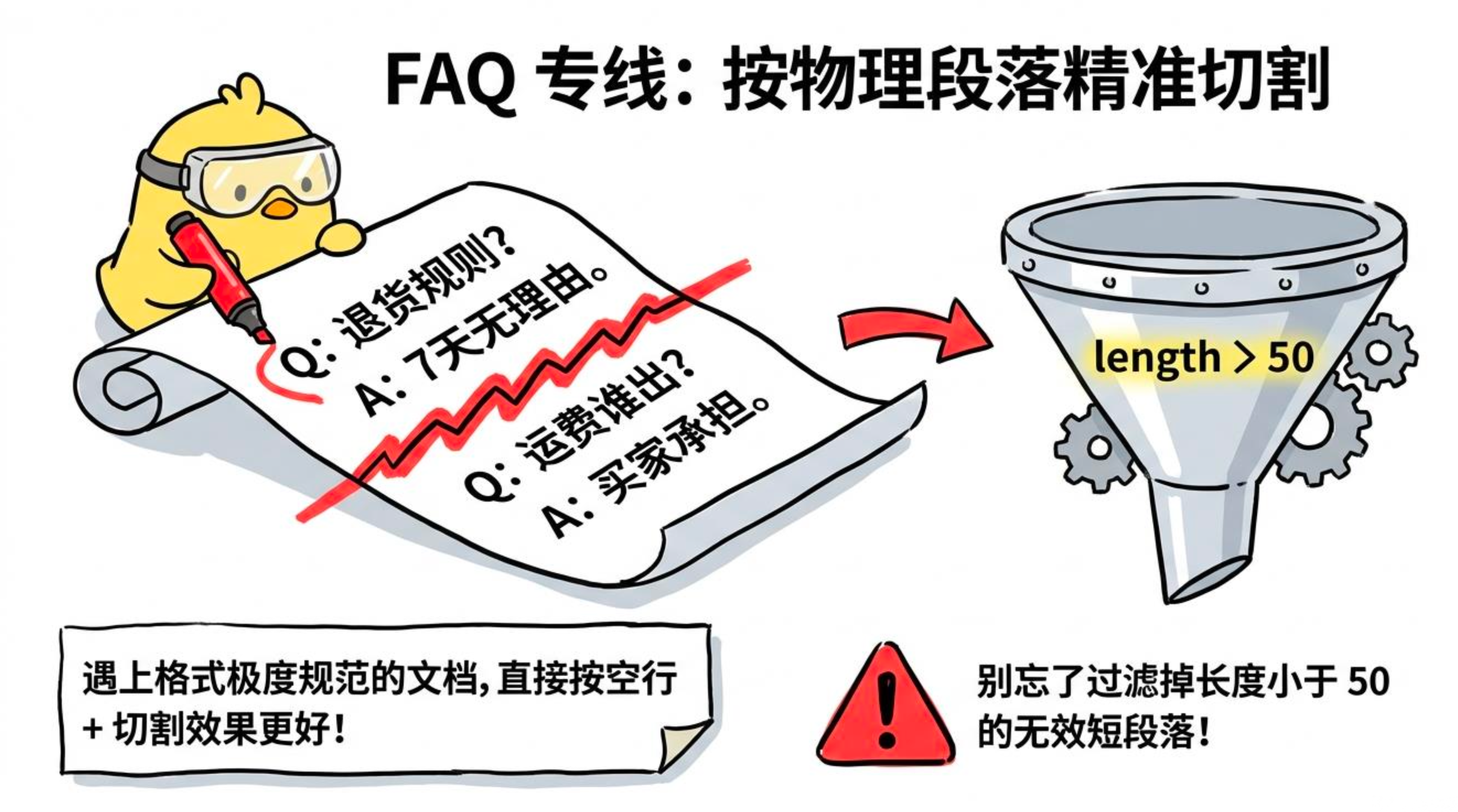
按 Token 数切,比按字数切更准确------中英混排时字数统计不靠谱。FAQ/Q&A 类内容也可以按段落切,每个问答自成一体:
package com.jichi.springaialibaba.service;

import org.springframework.ai.document.Document;
import org.springframework.ai.transformer.splitter.TokenTextSplitter;
import org.springframework.stereotype.Service;

import java.util.ArrayList;
import java.util.List;

@Service
public class ChunkingDemoService {

    // 按 Token 数切(推荐,中英混排更准确)
    public List<Document> splitByToken(List<Document> docs) {
        TokenTextSplitter splitter = new TokenTextSplitter(
                512,   // 每段最大 Token 数,鸡哥经验值,可根据效果调整
                100,   // 相邻段的重叠 Token 数,保证语义不断层
                5,     // 最短段落 Token 数,太短的直接过滤
                10000, // 最长段落 Token 数上限
                true   // 保留原始段落元数据
        );
        return splitter.apply(docs);
    }

    // 按空行段落切(适合 FAQ/Q&A 类,每个问答自成一体)
    public List<Document> splitByParagraph(List<Document> docs) {
        List<Document> result = new ArrayList<>();
        for (Document doc : docs) {
            for (String paragraph : doc.getText().split("\n\n+")) {
                if (paragraph.trim().length() > 50) {
                    result.add(new Document(paragraph.trim(), doc.getMetadata()));
                }
            }
        }
        return result;
    }
}
配套 Controller:
package com.jichi.springaialibaba.controller;

import com.jichi.springaialibaba.service.ChunkingDemoService;
import com.jichi.springaialibaba.service.DocumentLoaderService;
import org.springframework.ai.document.Document;
import org.springframework.web.bind.annotation.*;

import java.util.List;
import java.util.Map;

@RestController
@RequestMapping("/api/chunk")
public class ChunkingDemoController {

    private final DocumentLoaderService loaderService;
    private final ChunkingDemoService chunkingService;

    public ChunkingDemoController(DocumentLoaderService loaderService,
                                  ChunkingDemoService chunkingService) {
        this.loaderService = loaderService;
        this.chunkingService = chunkingService;
    }

    // 加载 PDF 并按 Token 切片,返回切片数量和第一段预览
    @GetMapping("/pdf")
    public Map<String, Object> chunkPdf(@RequestParam String filename) {
        List<Document> docs = loaderService.loadPdfByPage(filename);
        List<Document> chunks = chunkingService.splitByToken(docs);
        return Map.of(
                "rawCount", docs.size(),
                "chunkCount", chunks.size(),
                "firstChunk", chunks.isEmpty() ? "" : chunks.get(0).getText().substring(0, Math.min(200, chunks.get(0).getText().length()))
        );
    }

    // 加载文本并按段落切片
    @GetMapping("/text")
    public Map<String, Object> chunkText(@RequestParam String filename) {
        List<Document> docs = loaderService.loadText(filename);
        List<Document> chunks = chunkingService.splitByParagraph(docs);
        return Map.of(
                "chunkCount", chunks.size(),
                "firstChunk", chunks.isEmpty() ? "" : chunks.get(0).getText()
        );
    }
}
重叠(overlap)为什么重要
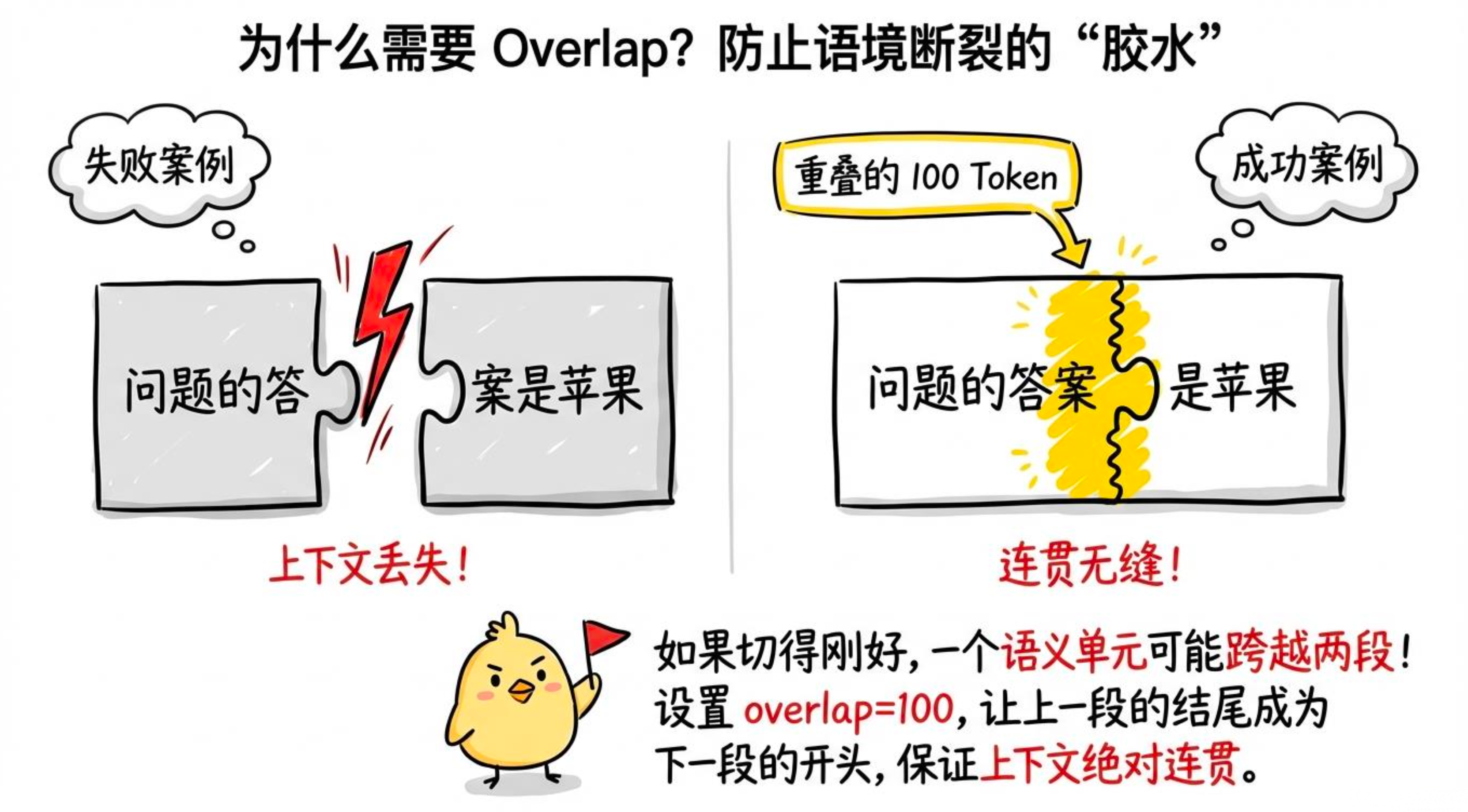
假设一段话刚好跨越了两个切片的边界,没有重叠时两边都不完整,检索出来模型读了也懵。设置 overlap=100 后,上一段的最后 100 个 Token 会出现在下一段的开头------这 100 个 Token 的信息冗余是值得的,能保证语义不断层。
2.4.2自定义切片:按段落
FAQ 文档、Q&A 类内容已集成在 ChunkingDemoService.splitByParagraph() 方法中,见上方代码。
2.5给文档段落添加 Metadata
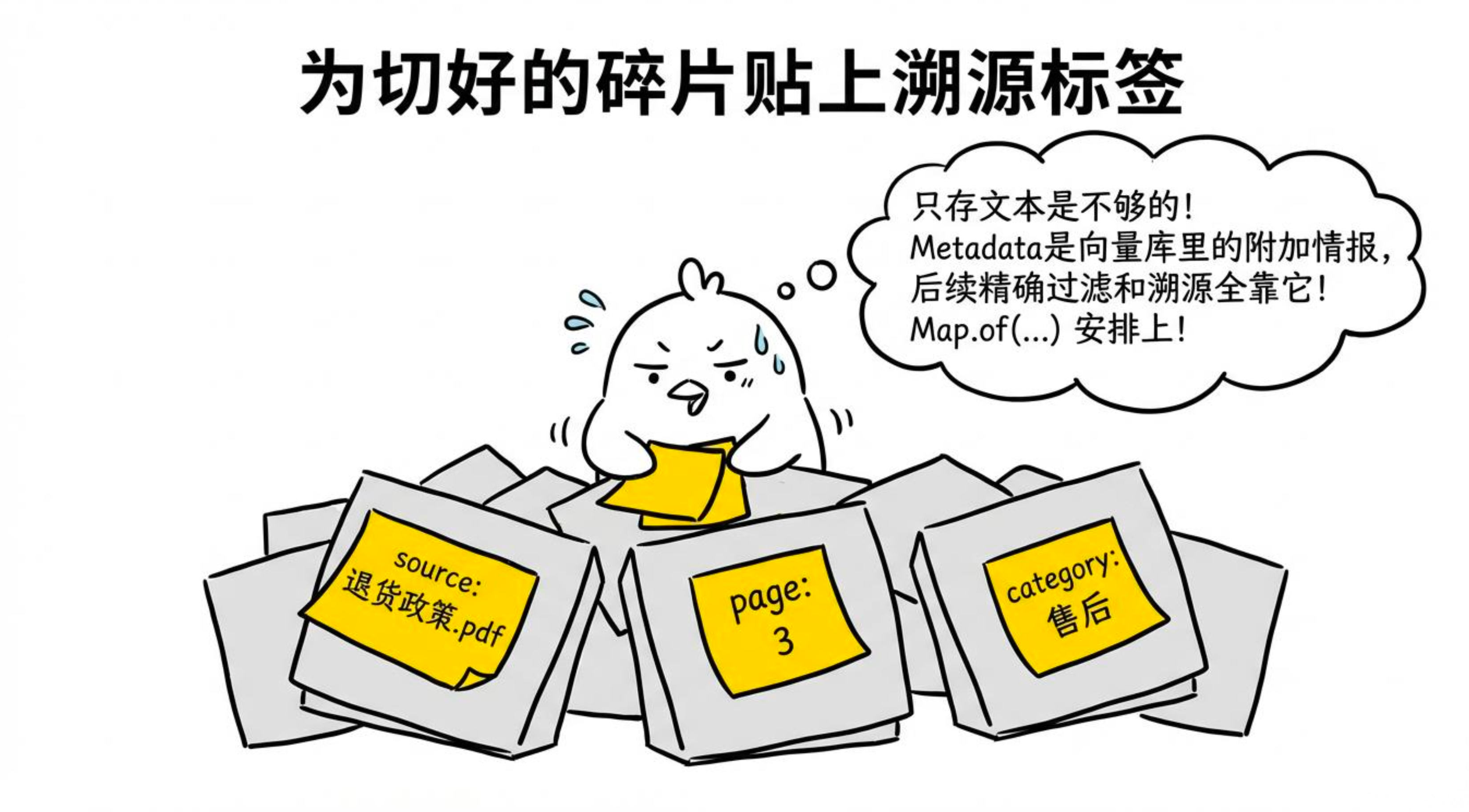
很多人图省事不加 Metadata,结果上线后检索到了内容却不知道来自哪个文件、哪一页,也没办法按分类过滤。Metadata 是 RAG 可运维性的基础。
它主要有两个用途:
-
溯源:回答时告诉用户"这段来自《售后政策.pdf》第3页"。
-
过滤:检索时只查"售后政策"分类,不把营销文案混进来。
Metadata 在 DocumentIngestionService.ingestPdf() 里自动添加在后面。下面演示手动创建带元数据的文档并入库:
package com.jichi.springaialibaba.controller;

import org.springframework.ai.document.Document;
import org.springframework.ai.vectorstore.VectorStore;
import org.springframework.web.bind.annotation.*;

import java.util.List;
import java.util.Map;

@RestController
@RequestMapping("/api/metadata")
public class MetadataDemoController {

    private final VectorStore vectorStore;

    public MetadataDemoController(VectorStore vectorStore) {
        this.vectorStore = vectorStore;
    }

    // 手动写入一条带元数据的文档,演示 metadata 的结构
    @PostMapping("/add")
    public Map<String, Object> addWithMetadata() {
        Document doc = new Document(
                "购买后 7 天内可无理由退货,商品需保持原包装。",
                Map.of(
                        "source",     "退货政策.pdf",
                        "page",       "3",
                        "category",   "售后政策",
                        "updated_at", "2024-01-01",
                        "doc_id",     "policy-001"
                )
        );
        vectorStore.add(List.of(doc));
        return Map.of("status", "写入成功", "docId", "policy-001");
    }
}
2.6入库 Service
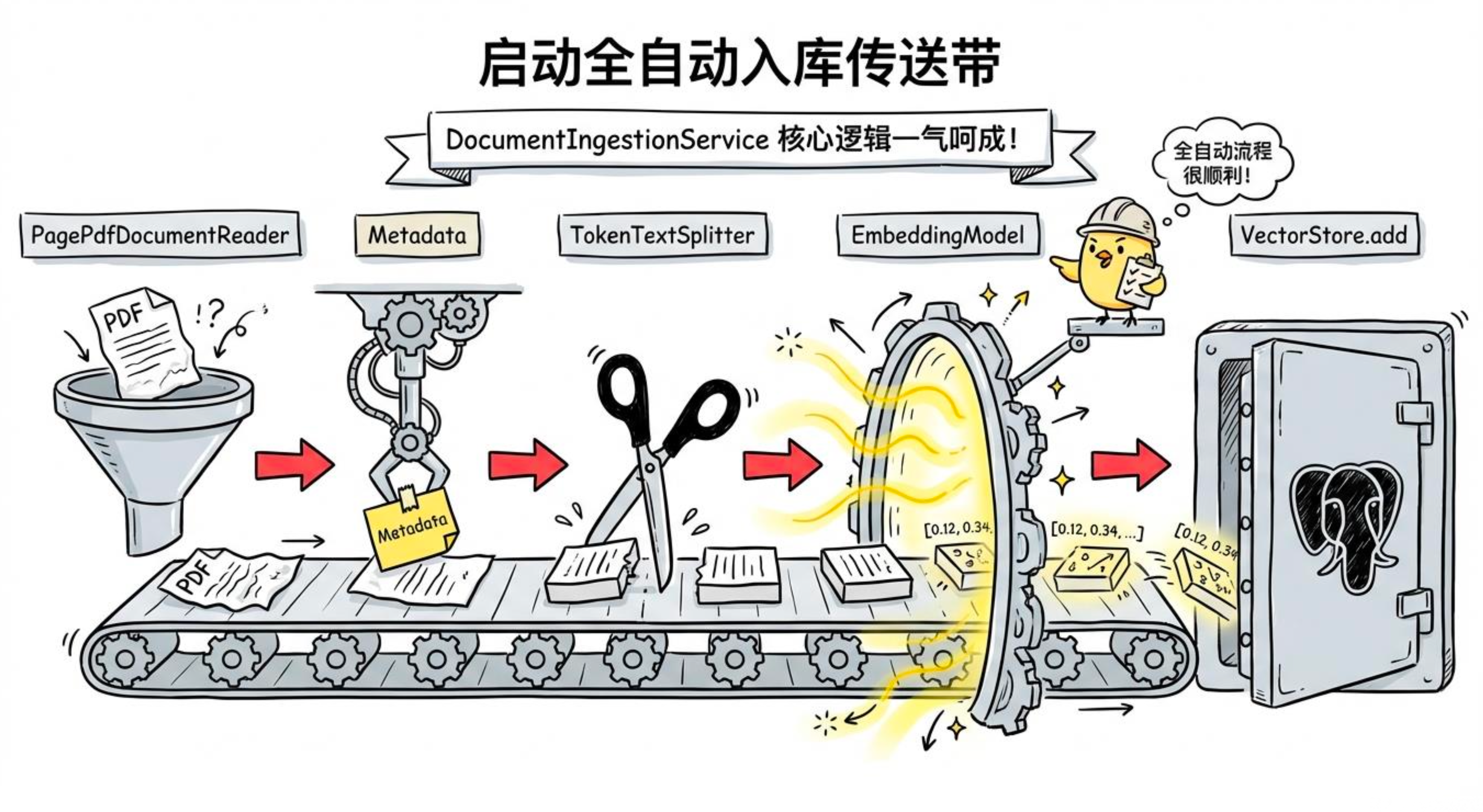
把加载、切片、写入向量库封装成 Service,Controller 调这个:
package com.jichi.springaialibaba.service;

import org.springframework.ai.document.Document;
import org.springframework.ai.reader.pdf.PagePdfDocumentReader;
import org.springframework.ai.transformer.splitter.TokenTextSplitter;
import org.springframework.ai.vectorstore.VectorStore;
import org.springframework.core.io.Resource;
import org.springframework.stereotype.Service;

import java.util.List;
import java.util.Map;

@Service
public class DocumentIngestionService {

    // DashScope Embedding API 单批上限是 10 条,超过会报 400
    private static final int BATCH_SIZE = 10;

    private final VectorStore vectorStore;
    private final TokenTextSplitter splitter;

    public DocumentIngestionService(VectorStore vectorStore) {
        this.vectorStore = vectorStore;
        this.splitter = new TokenTextSplitter(512, 100, 5, 10000, true);
    }

    /**
     * 加载 PDF、切片、向量化、写入向量库,返回入库的 chunk 数量
     */
    public int ingestPdf(String filename, String category, Resource resource) {
        PagePdfDocumentReader reader = new PagePdfDocumentReader(resource);
        List<Document> rawDocs = reader.get();

        rawDocs.forEach(doc -> {
            doc.getMetadata().put("source", filename);
            doc.getMetadata().put("category", category);
            doc.getMetadata().put("ingested_at", java.time.LocalDate.now().toString());
        });

        List<Document> chunks = splitter.apply(rawDocs);
        // 分批写入,每批最多 10 条,避免触发 DashScope 的 batch size 限制
        batchAdd(chunks);

        return chunks.size();
    }

    /**
     * 从文本内容创建文档并入库
     */
    public void ingestText(String content, Map<String, Object> metadata) {
        Document doc = new Document(content, metadata);
        List<Document> chunks = splitter.apply(List.of(doc));
        batchAdd(chunks);
    }

    private void batchAdd(List<Document> docs) {
        for (int i = 0; i < docs.size(); i += BATCH_SIZE) {
            List<Document> batch = docs.subList(i, Math.min(i + BATCH_SIZE, docs.size()));
            vectorStore.add(batch);
        }
    }
}
2.7接口:文档上传 + 检索验证
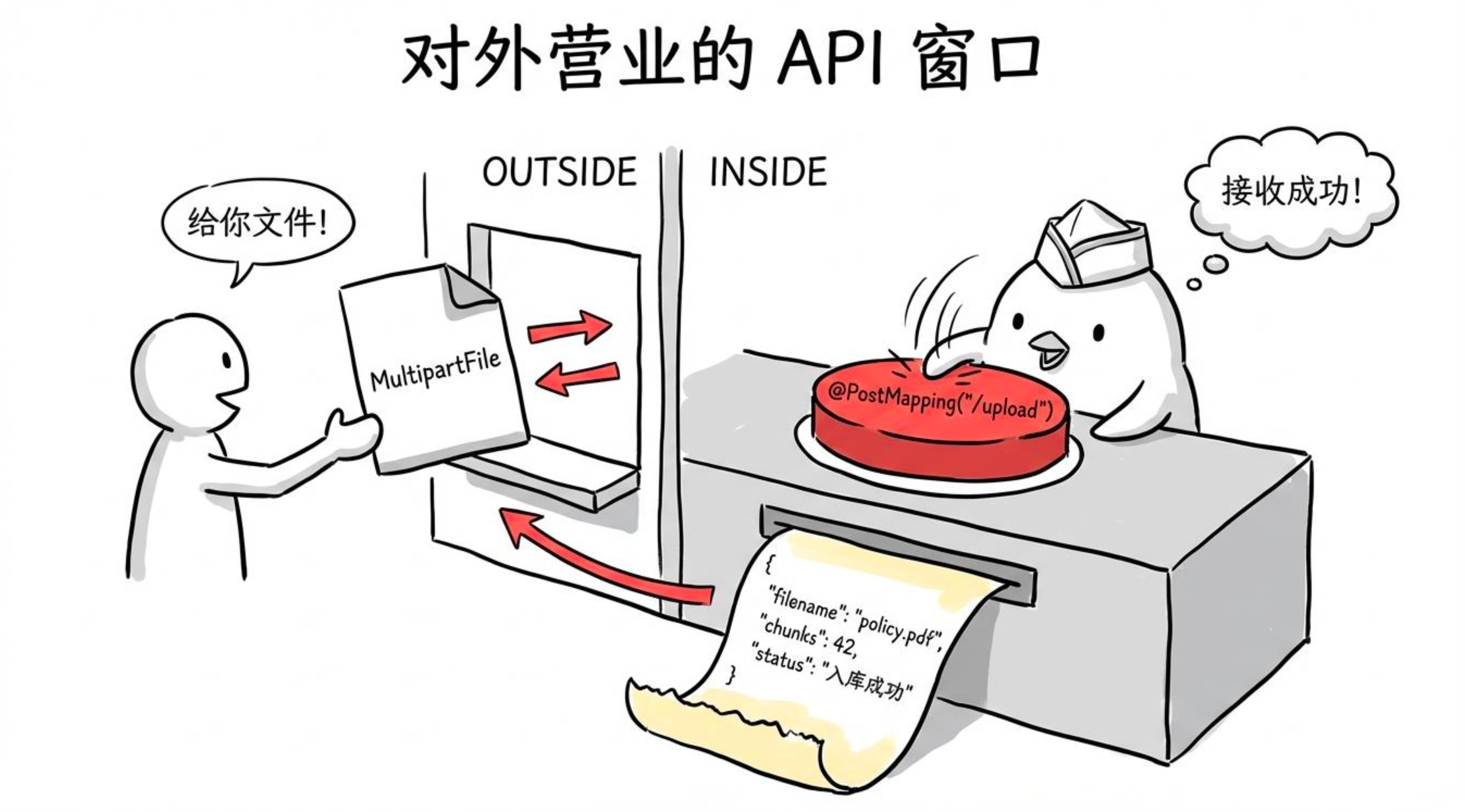
Service 写好了,Controller 一并给出。入库完别急着接问答,先用 /search 接口验一下------检索结果对,问答才可能对:
package com.jichi.springaialibaba.controller;

import com.jichi.springaialibaba.service.DocumentIngestionService;
import org.springframework.ai.document.Document;
import org.springframework.ai.vectorstore.SearchRequest;
import org.springframework.ai.vectorstore.VectorStore;
import org.springframework.core.io.FileSystemResource;
import org.springframework.web.bind.annotation.*;
import org.springframework.web.multipart.MultipartFile;

import java.nio.file.Files;
import java.nio.file.Path;
import java.util.List;
import java.util.Map;

@RestController
@RequestMapping("/api/knowledge")
public class KnowledgeBaseController {

    private final DocumentIngestionService ingestionService;
    private final VectorStore vectorStore;

    public KnowledgeBaseController(DocumentIngestionService ingestionService,
                                   VectorStore vectorStore) {
        this.ingestionService = ingestionService;
        this.vectorStore = vectorStore;
    }

    @PostMapping("/upload")
    public Map<String, Object> uploadDocument(
            @RequestParam("file") MultipartFile file,
            @RequestParam(defaultValue = "通用") String category) throws Exception {

        String filename = file.getOriginalFilename();
        // MultipartFile 不支持随机访问,PDF 解析器需要可寻址的文件,先存临时文件
        Path tempFile = Files.createTempFile("upload-", ".pdf");
        file.transferTo(tempFile);

        int chunks = ingestionService.ingestPdf(filename, category, new FileSystemResource(tempFile));
        Files.deleteIfExists(tempFile);

        return Map.of(
                "filename", filename,
                "category", category,
                "chunks", chunks,
                "status", "入库成功"
        );
    }

    @PostMapping("/text")
    public Map<String, Object> uploadText(@RequestBody TextDocRequest request) {
        ingestionService.ingestText(request.content(), Map.of(
                "source", request.title(),
                "category", request.category()
        ));
        return Map.of("status", "入库成功");
    }

    @GetMapping("/search")
    public List<Map<String, Object>> search(
            @RequestParam String query,
            @RequestParam(defaultValue = "3") int topK) {

        List<Document> results = vectorStore.similaritySearch(
                SearchRequest.builder()
                        .query(query)
                        .topK(topK)
                        .similarityThreshold(0.6)
                        .build()
        );

        return results.stream()
                .map(doc -> Map.of(
                        "content",  doc.getText(),
                        "source",   doc.getMetadata().getOrDefault("source", "unknown"),
                        "category", doc.getMetadata().getOrDefault("category", "unknown")
                ))
                .toList();
    }

    record TextDocRequest(String title, String category, String content) {}
}

# 上传 PDF(文件在本地路径)
curl -X POST "http://localhost:8080/api/knowledge/upload?category=员工手册" \
  -F "file=@policy.pdf"
# 返回:{"filename":"policy.pdf","category":"员工手册","chunks":23,"status":"入库成功"}

# 上传纯文本
curl -X POST "http://localhost:8080/api/knowledge/text" \
  -H "Content-Type: application/json" \
  -d '{"title":"加薪政策","category":"员工手册","content":"一年加30%..."}'

# 检索验证(先上传再搜,看检索结果是否准确)
curl "http://localhost:8080/api/knowledge/search?query=薪酬政策&topK=3"
检索结果里能看到退货政策的相关段落,说明入库成功,下一节就可以接问答了。如果检索结果不对,先回头查切片策略和 Metadata 设置,别急着上问答------问答的上限由检索决定。
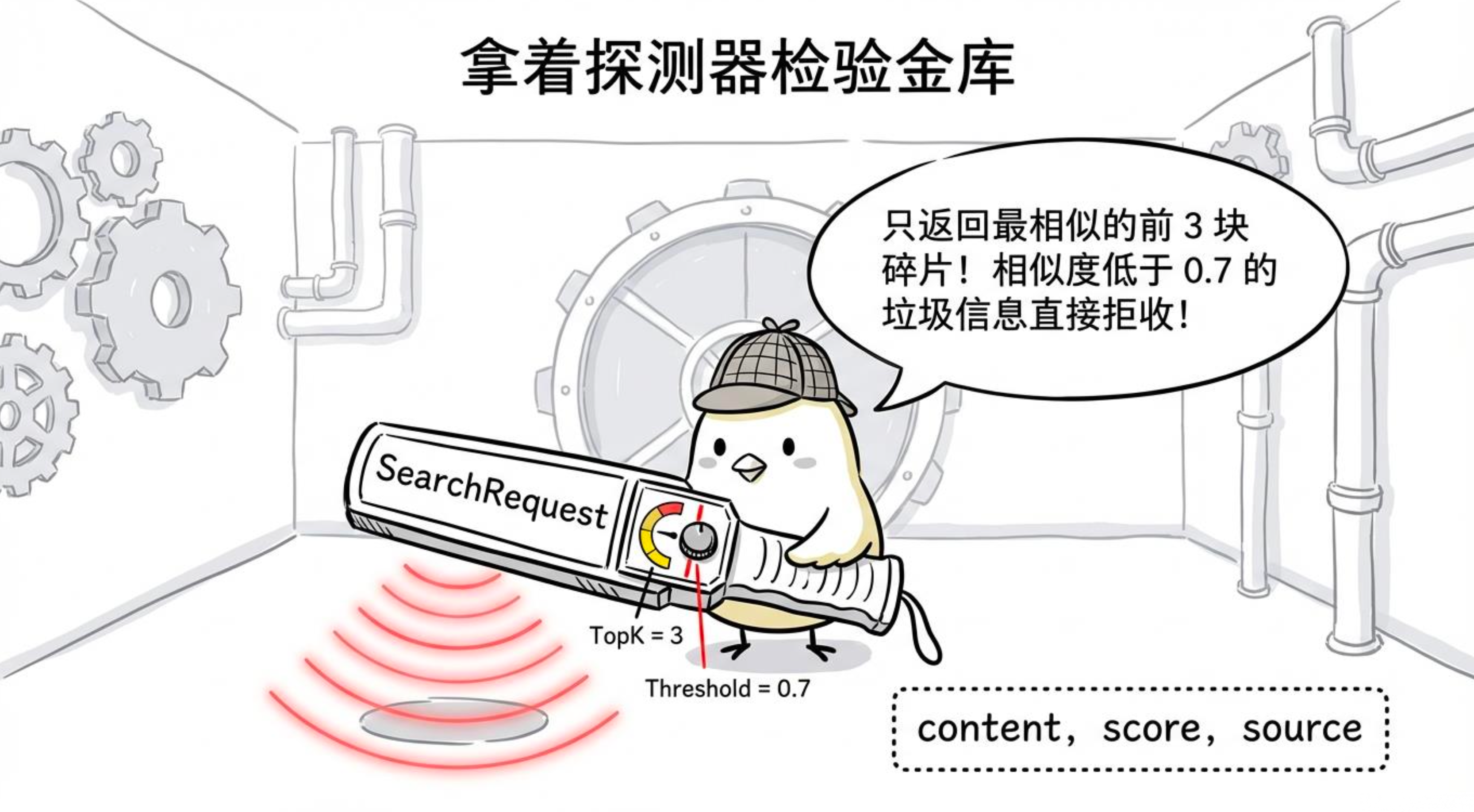
三、检索增强问答
3.1QuestionAnswerAdvisor:一个 Advisor 就是一套 RAG 引擎
还记得前面聊过的 Advisor 机制吗?Spring AI 的 QuestionAnswerAdvisor 就是专门干这件事的。它会在每次调用模型之前,悄无声息地完成四件事:
-
把用户问题转成向量
-
在向量库里检索 Top-K 相关文档
-
把检索结果注入 Prompt 的上下文
-
带着这些上下文去真正调用模型
你几乎不需要写一行检索逻辑,挂上去就完事。唯一要注意的是,Spring AI 1.1.x 中它被单独拆到了 spring-ai-advisors-vector-store 模块,依赖别忘了加(上节已引入):
<dependency>
    <groupId>org.springframework.ai</groupId>
    <artifactId>spring-ai-advisors-vector-store</artifactId>
    <version>1.1.2</version>
</dependency>
先把带着 RAG 能力的 ChatClient 配置出来:
package com.jichi.springaialibaba.config;

import com.alibaba.cloud.ai.dashscope.chat.DashScopeChatModel;
import org.springframework.ai.chat.client.ChatClient;
import org.springframework.ai.chat.client.advisor.vectorstore.QuestionAnswerAdvisor;
import org.springframework.ai.vectorstore.SearchRequest;
import org.springframework.ai.vectorstore.VectorStore;
import org.springframework.context.annotation.Bean;
import org.springframework.context.annotation.Configuration;

@Configuration
public class RagChatConfig {

    @Bean
    public ChatClient ragChatClient(DashScopeChatModel chatModel, VectorStore vectorStore) {
        return ChatClient.builder(chatModel)
                .defaultSystem("""
                        你是一个企业知识库助手。
                        根据提供的参考资料回答用户问题。
                        如果参考资料中没有相关信息,明确告知用户"我在知识库中没有找到相关信息",不要编造。
                        回答时可以引用来源文件名。
                        """)
                .defaultAdvisors(
                        QuestionAnswerAdvisor.builder(vectorStore)
                                .searchRequest(SearchRequest.builder()
                                        .topK(5)                   // 检索 5 条相关文档
                                        .similarityThreshold(0.6)  // 相似度低于 0.6 的不要
                                        .build())
                                .build()
                )
                .build();
    }
}
配置好了,Controller 里直接注入用:
@RestController
@RequestMapping("/api/qa")
public class KnowledgeQAController {

    private final ChatClient ragChatClient;

    public KnowledgeQAController(@Qualifier("ragChatClient") ChatClient ragChatClient) {
        this.ragChatClient = ragChatClient;
    }

    @GetMapping
    public String ask(@RequestParam String question) {
        return ragChatClient.prompt()
                .user(question)
                .call()
                .content();
    }
}
3.2分类过滤:只搜该搜的地方
实际项目里,知识库通常是多分类的:"售后政策"、"员工手册"、"产品说明"混在一起。如果用户问薪资问题,却从"产品说明"里搜出一堆无关内容,回答必然稀烂。更严重的是,权限不隔离,普通员工可能搜到不该看的薪酬文档。
用元数据过滤就能解决。我们在入库时已经把 category 写进了 metadata,检索时加个过滤条件即可。FilterExpressionBuilder 让这件事变得很简单:
package com.jichi.springaialibaba.controller;

import org.springframework.ai.chat.client.ChatClient;
import org.springframework.ai.chat.client.advisor.vectorstore.QuestionAnswerAdvisor;
import org.springframework.ai.vectorstore.filter.FilterExpressionBuilder;
import org.springframework.beans.factory.annotation.Qualifier;
import org.springframework.web.bind.annotation.*;

@RestController
@RequestMapping("/api/qa")
public class KnowledgeQAController {

    private final ChatClient ragChatClient;

    public KnowledgeQAController(@Qualifier("ragChatClient") ChatClient ragChatClient) {
        this.ragChatClient = ragChatClient;
    }

    @GetMapping
    public String ask(@RequestParam String question) {
        return ragChatClient.prompt()
                .user(question)
                .call()
                .content();
    }

    // 只在指定分类里检索,适合多租户或权限控制场景
    @GetMapping("/category")
    public String askWithCategory(
            @RequestParam String question,
            @RequestParam String category) {

        FilterExpressionBuilder fb = new FilterExpressionBuilder();
        var filter = fb.eq("category", category).build();

        return ragChatClient.prompt()
                .user(question)
                .advisors(a -> a.param(
                        QuestionAnswerAdvisor.FILTER_EXPRESSION, filter.toString()))
                .call()
                .content();
    }
}
请求时指定 category,检索结果就会精准限定在该分类下,既提高了准确性,又天然实现了简易的权限隔离。
3.3完整服务封装:入库 + 问答 + 记忆一体化
前面的控制器只适合简单问答,真实项目里往往需要支持多轮对话 、入库和问答在同一个服务中。简单封装一个 KnowledgeBaseService,把上传文档、单次问答、多轮对话、检索调试全塞进去。
package com.jichi.springaialibaba.service;

import com.alibaba.cloud.ai.dashscope.chat.DashScopeChatModel;
import org.springframework.ai.chat.client.ChatClient;
import org.springframework.ai.chat.client.advisor.MessageChatMemoryAdvisor;
import org.springframework.ai.chat.client.advisor.vectorstore.QuestionAnswerAdvisor;
import org.springframework.ai.chat.memory.ChatMemory;
import org.springframework.ai.chat.memory.InMemoryChatMemoryRepository;
import org.springframework.ai.chat.memory.MessageWindowChatMemory;
import org.springframework.ai.document.Document;
import org.springframework.ai.reader.pdf.PagePdfDocumentReader;
import org.springframework.ai.transformer.splitter.TokenTextSplitter;
import org.springframework.ai.vectorstore.SearchRequest;
import org.springframework.ai.vectorstore.VectorStore;
import org.springframework.core.io.Resource;
import org.springframework.stereotype.Service;

import java.util.List;

@Service
public class KnowledgeBaseService {

    private static final int BATCH_SIZE = 10;

    private final VectorStore vectorStore;
    private final ChatClient chatClient;
    private final TokenTextSplitter splitter;

    public KnowledgeBaseService(VectorStore vectorStore, DashScopeChatModel chatModel) {
        this.vectorStore = vectorStore;
        this.splitter = new TokenTextSplitter(512, 100, 5, 10000, true);

        // RAG + 多轮对话记忆,两个 Advisor 叠加
        this.chatClient = ChatClient.builder(chatModel)
                .defaultSystem("""
                        你是一个企业知识库助手,基于提供的参考资料回答问题。
                        规则:
                        1. 只根据参考资料中的信息回答,不要编造
                        2. 如果资料中没有相关信息,直接说"我在知识库中没有找到相关信息"
                        3. 回答时可以引用来源(如:根据《xxx文档》)
                        """)
                .defaultAdvisors(
                        QuestionAnswerAdvisor.builder(vectorStore)
                                .searchRequest(SearchRequest.builder().topK(5).similarityThreshold(0.6).build())
                                .build(),
                        MessageChatMemoryAdvisor.builder(
                        MessageWindowChatMemory.builder()
                                .chatMemoryRepository(new InMemoryChatMemoryRepository())
                                .build()
                ).build()
                )
                .build();
    }

    public record IngestResult(String filename, String category, int chunks) {}

    public record SearchResult(String content, String source, String category) {}

    /**
     * 上传并入库文档,分批写入避免 DashScope batch size 限制
     */
    public IngestResult ingestDocument(String filename, String category, Resource resource) {
        PagePdfDocumentReader reader = new PagePdfDocumentReader(resource);
        List<Document> rawDocs = reader.get();

        rawDocs.forEach(doc -> {
            doc.getMetadata().put("source", filename);
            doc.getMetadata().put("category", category);
        });

        List<Document> chunks = splitter.apply(rawDocs);
        for (int i = 0; i < chunks.size(); i += BATCH_SIZE) {
            vectorStore.add(chunks.subList(i, Math.min(i + BATCH_SIZE, chunks.size())));
        }

        return new IngestResult(filename, category, chunks.size());
    }

    /**
     * 带会话 ID 的问答,支持多轮对话
     */
    public String ask(String question, String conversationId) {
        return chatClient.prompt()
                .user(question)
                .advisors(a -> a.param(
                        ChatMemory.CONVERSATION_ID,
                        conversationId))
                .call()
                .content();
    }

    /**
     * 不带历史的单次问答
     */
    public String askOnce(String question) {
        return chatClient.prompt()
                .user(question)
                .call()
                .content();
    }

    /**
     * 查看检索结果(调试用)
     */
    public List<SearchResult> search(String query, int topK) {
        return vectorStore.similaritySearch(
                SearchRequest.builder().query(query).topK(topK).build()
        ).stream()
                .map(doc -> new SearchResult(
                        doc.getText(),
                        (String) doc.getMetadata().getOrDefault("source", "unknown"),
                        (String) doc.getMetadata().getOrDefault("category", "unknown")
                ))
                .toList();
    }
}
这里叠加了两个 Advisor:QuestionAnswerAdvisor 负责 RAG,MessageChatMemoryAdvisor 负责记住上下文。同一个 conversationId 就能让对话持续下去。
对应的 Controller:
package com.jichi.springaialibaba.controller;

import com.jichi.springaialibaba.service.KnowledgeBaseService;
import org.springframework.core.io.FileSystemResource;
import org.springframework.web.bind.annotation.*;
import org.springframework.web.multipart.MultipartFile;

import java.nio.file.Files;
import java.nio.file.Path;
import java.util.List;

@RestController
@RequestMapping("/api/knowledge-base")
public class KnowledgeBaseController {

    private final KnowledgeBaseService knowledgeBaseService;

    public KnowledgeBaseController(KnowledgeBaseService knowledgeBaseService) {
        this.knowledgeBaseService = knowledgeBaseService;
    }

    @PostMapping("/upload")
    public KnowledgeBaseService.IngestResult upload(
            @RequestParam("file") MultipartFile file,
            @RequestParam(defaultValue = "通用") String category) throws Exception {

        Path tempFile = Files.createTempFile("upload-", ".pdf");
        file.transferTo(tempFile);
        try {
            return knowledgeBaseService.ingestDocument(
                    file.getOriginalFilename(), category,
                    new FileSystemResource(tempFile));
        } finally {
            Files.deleteIfExists(tempFile);
        }
    }

    @PostMapping("/chat")
    public String chat(@RequestBody ChatRequest request) {
        return knowledgeBaseService.ask(request.question(), request.conversationId());
    }

    @GetMapping("/ask")
    public String ask(@RequestParam String question) {
        return knowledgeBaseService.askOnce(question);
    }

    @GetMapping("/search")
    public List<KnowledgeBaseService.SearchResult> search(
            @RequestParam String query,
            @RequestParam(defaultValue = "3") int topK) {
        return knowledgeBaseService.search(query, topK);
    }

    record ChatRequest(String conversationId, String question) {}
}
3.4效果调优:RAG 不准?按这个顺序排查
RAG 上线后最常见的问题就是"回答不准"。老实说,没有一招鲜的银弹,但有清晰的排查思路。
第一步:先查检索质量
用 /search 接口看检索回来的文档是否靠谱。如果搜出来的东西压根不沾边,那问题在检索端,不是模型端。调整方向:
-
调低
similarityThreshold(比如从 0.7 降到 0.5),让更多候选文档进来 -
增加
topK,给模型多一点参考资料 -
检查切片策略,切片太短语义不全,太长又杂了多个主题,都会拖累检索精度
第二步:检查文档质量
检索结果看起来是对的,但模型回答还是偏,往往是文档本身描述模糊,或者 System Prompt 约束不够。鸡哥见过最多的坑就是原始文档写得含糊其辞,这时候优化 Prompt 也救不了,得回去梳理源文档。
第三步:问题改写(Query Rewriting)------性价比最高的优化
用户经常用口语提问:"我买的东西想退掉怎么搞"。直接拿这种大白话去检索,向量相似度可能很低。更好的做法是先用模型把问题改写成规范表述,再送给 RAG 检索。
@RestController
@RequestMapping("/api/knowledge-base")
public class EnhancedQAController {

    private final KnowledgeBaseService knowledgeBaseService;

    // ...

    @GetMapping("/ask-enhanced")
    public String askEnhanced(@RequestParam String question) {
        // 改写问题
        String rewrittenQuestion = knowledgeBaseService.askOnce(
                "将以下问题改写成更规范、适合文档检索的表述,只输出改写后的问题,不要解释:" + question);
        // 用改写后的问题做 RAG 问答
        return knowledgeBaseService.askOnce(rewrittenQuestion);
    }
}
四、整体总结
- 架构链路:原始文档 → 加载 → 切片 → 元数据 → 向量化入库 → 用户提问 → 语义检索 → 增强 Prompt → 模型回答。
- 核心依赖:Embedding 模型、向量数据库、Spring AI 文档读取器、RAG 适配器。
- 落地重点:切片策略、向量维度匹配、分批入库、元数据设计、检索前置验证。
- 问题定位 :RAG 回答异常优先排查检索环节,再依次优化文档、提示词、用户问题。