
📚 个人主页: ByteWizard
※ 专栏目录: 《C语言》
⭐ 春风得意马蹄疾,一日看尽长安花
📚 ByteWizard 的简介:

目录
- [1. 为什么要有动态内存分配](#1. 为什么要有动态内存分配)
- [2. malloc 和 free](#2. malloc 和 free)
-
- [2.1 malloc](#2.1 malloc)
- [2.2 free](#2.2 free)
- [3. calloc 和 realloc](#3. calloc 和 realloc)
-
- [3.1 calloc](#3.1 calloc)
- [3.2 realloc](#3.2 realloc)
- [4. 常见的动态内存的错误](#4. 常见的动态内存的错误)
-
- [4.1 对NULL指针的解引用操作](#4.1 对NULL指针的解引用操作)
- [4.2 对动态开辟空间的越界访问](#4.2 对动态开辟空间的越界访问)
- [4.3 对非动态开辟内存使用free释放](#4.3 对非动态开辟内存使用free释放)
- [4.4 使用free释放一块动态开辟内存的一部分](#4.4 使用free释放一块动态开辟内存的一部分)
- [4.5 对同一块内存多次释放](#4.5 对同一块内存多次释放)
- [4.6 动态开辟内存忘记释放(内存泄漏)](#4.6 动态开辟内存忘记释放(内存泄漏))
- [5. 动态内存经典笔试题分析](#5. 动态内存经典笔试题分析)
-
- [5.1 题目1](#5.1 题目1)
- [5.2 题目2](#5.2 题目2)
- [5.3 题目3](#5.3 题目3)
- [5.4 题目4](#5.4 题目4)
- [6. 柔性数组](#6. 柔性数组)
-
- [6.1 柔性数组的特点](#6.1 柔性数组的特点)
- [6.2 柔性数组的使用](#6.2 柔性数组的使用)
- [6.3 柔性数组的优势](#6.3 柔性数组的优势)
- 7.总结C/C++中程序内存区域的划分

1. 为什么要有动态内存分配
我们已经掌握的内存开辟方式有:
c
int val = 20;
int arr[10] = {0}; | 代码 | 含义 |
|---|---|
int val = 20; |
创建一个整型变量,系统在栈区分配 4 个字节 |
char arr[10] = {0}; |
创建一个长度为 10 的字符数组,在栈区分配连续空间 |
上述开辟内存有两个主要特点:
| 特点 | 说明 |
|---|---|
| 空间大小固定 | 变量或数组的大小在定义时就确定了 |
| 数组长度不能随意改变 | 数组一旦创建,长度就不能在程序运行过程中调整 |
有时候,我们在写代码的时候不知道需要多少空间,只有在程序运行时才能确定。
例如:
- 用户输入多少个数据不确定; 用户输入多少个数据不确定; 用户输入多少个数据不确定;
- 文件有多少个内容不确定; 文件有多少个内容不确定; 文件有多少个内容不确定;
- 链表、树、图等数据结构需要动态创建节点; 链表、树、图等数据结构需要动态创建节点; 链表、树、图等数据结构需要动态创建节点;
- 程序运行过程中可能需要扩容或释放空间。 程序运行过程中可能需要扩容或释放空间。 程序运行过程中可能需要扩容或释放空间。
这时候,固定的内存开辟方式就不够灵活。这时候就引入了动态内存分配 ,动态内存分配允许程序在运行时:
| 功能 | 说明 |
|---|---|
| 按需申请空间 | 需要多少空间,就申请多少空间 |
| 手动释放空间 | 用完后可以释放,避免浪费 |
| 提高程序灵活性 | 适合处理大小不确定的数据 |
| 支持复杂数据结构 | 链表、二叉树、图等结构通常依赖动态内存 |
总结:动态内存分配的本质,就是让程序在运行时根据实际需求申请和释放内存空间,从而解决固定数组大小不够灵活的问题。
2. malloc 和 free
2.1 malloc
| 项目 | 说明 |
|---|---|
| 函数名称 | malloc |
| 所属头文件 | #include <stdlib.h> |
| 函数原型 | void* malloc(size_t size); |
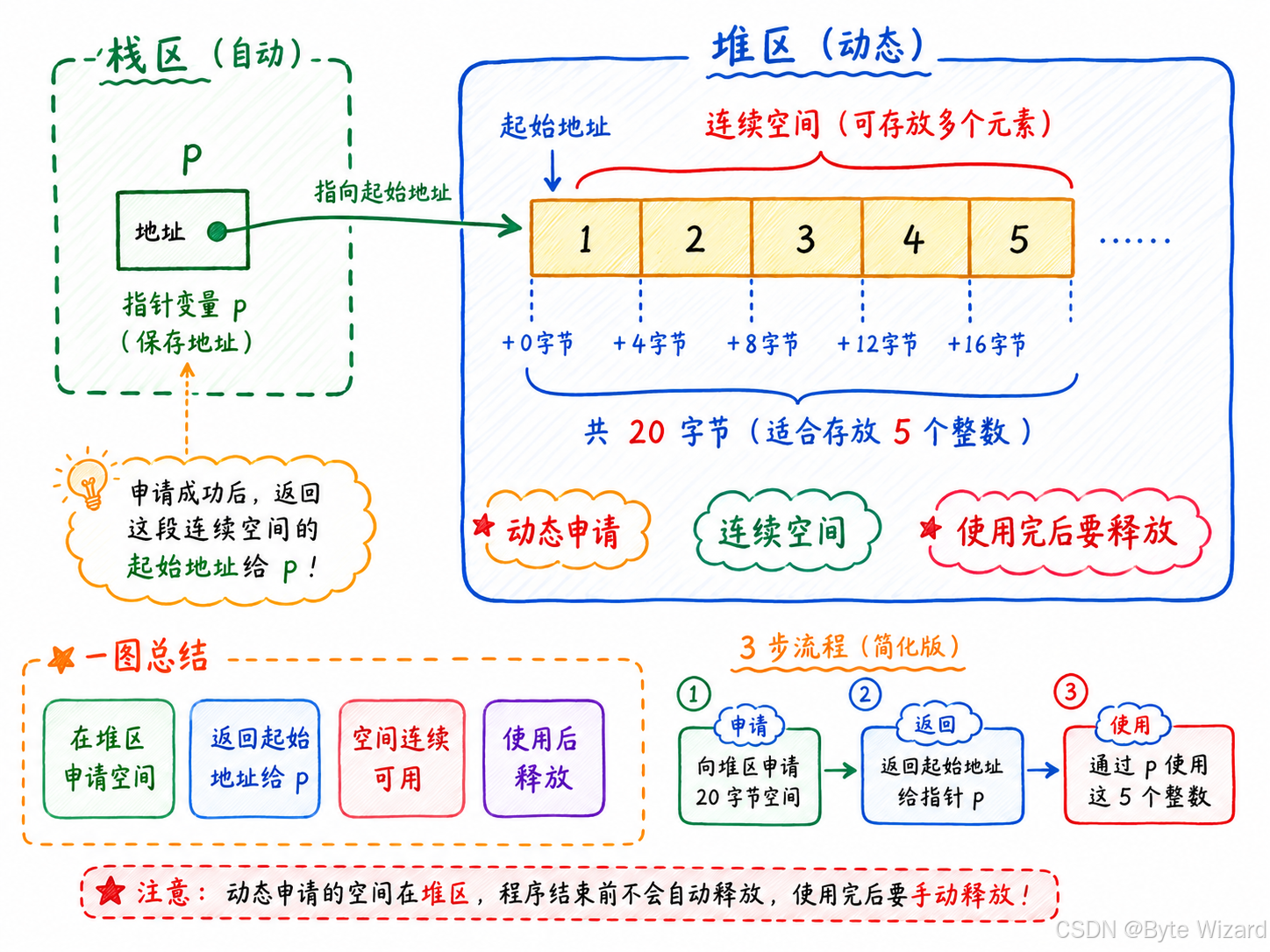
| 主要功能 | 向内存的堆区 申请一块连续可用的空间 |
参数 size |
表示要申请的内存大小,单位是字节 |
| 返回值类型 | void*,表示返回的是一块内存空间的起始地址 |
| 申请成功 | 返回所申请空间的起始地址 |
| 申请失败 | 返回 NULL,所以使用前必须判断是否为空 |
void* 的含义 |
malloc 不知道用户要申请什么类型的数据空间,使用时需要强制类型转换 |
| 注意事项 | 使用完动态申请的空间后 ,需要用 free() 释放 |
| 特殊情况 | 如果 size 为 0,结果不确定,取决于具体编译器,不建议这样使用 |
下面我要举例的代码中用到了perror函数,相关知识点:字符函数与字符串函数
c
#define _CRT_SECURE_NO_WARNINGS
#include <stdio.h>
#include <stdlib.h> // 使用 malloc 和 free 需要包含该头文件

int main()
{
	//int arr[10] = { 0 }; 在栈区开辟空间
	int* p = (int*)malloc(20); //在堆区上开辟空间
	if (p == NULL)
	{
		perror("use malloc"); //打印对应的错误信息
		return 1;
	}

	//使用空间
	for (int i = 0; i < 5; i++)
	{
		*(p + i) = i + 1;
	}
	for (int i = 0; i < 5; i++)
		printf("%d ", p[i]);
	printf("\n");
	return 0;
}
2.2 free
| 项目 | 说明 |
|---|---|
| 函数名称 | free |
| 所属头文件 | #include <stdlib.h> |
| 函数原型 | void free(void* ptr); |
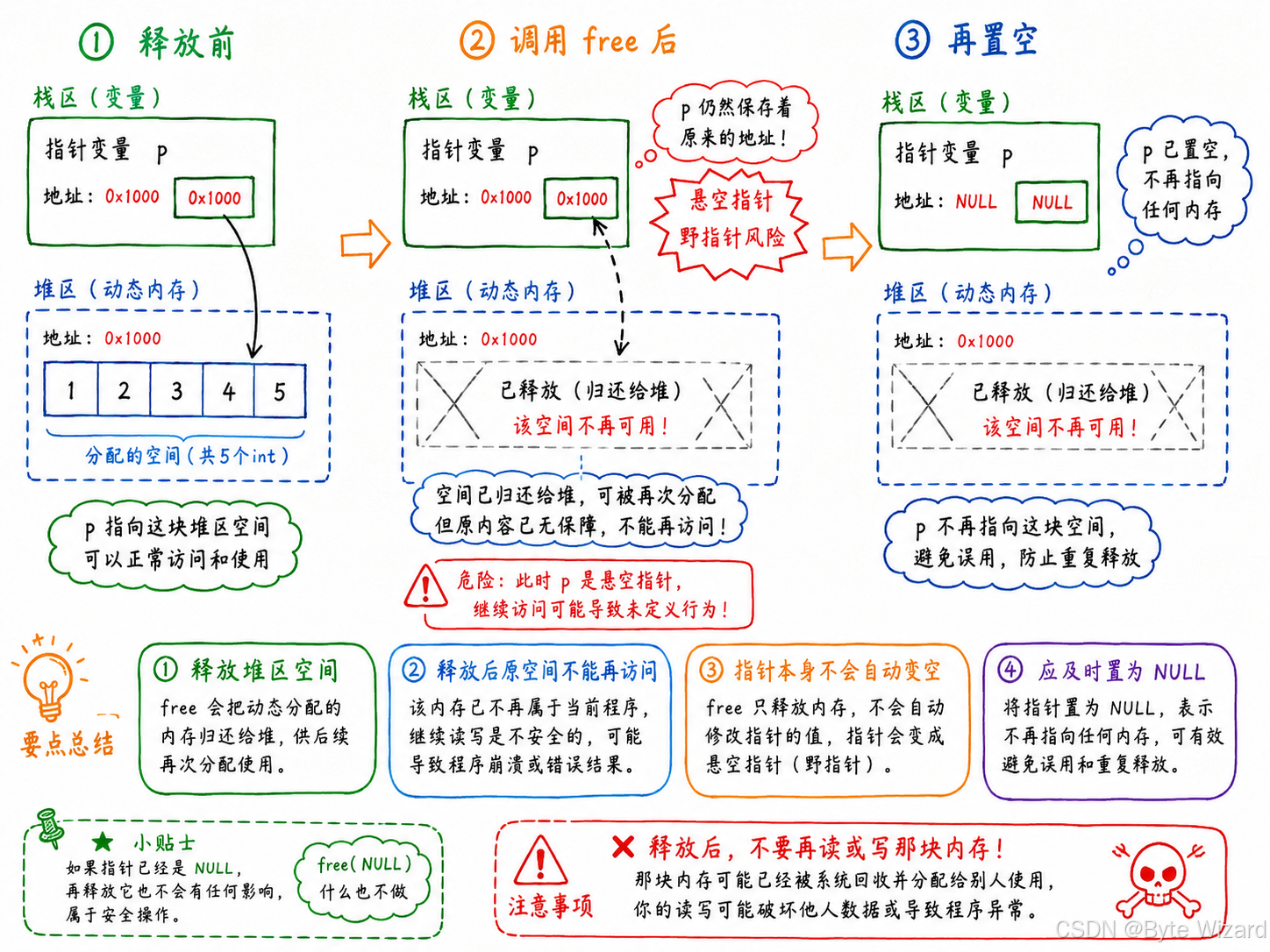
| 主要功能 | 释放动态申请的内存空间,专门是用来做动态内存的释放和回收的 |
参数 ptr |
指向需要释放的动态内存空间的指针 |
| 返回值 | 无返回值,返回类型是 void |
| 使用场景 | 通常用于释放 malloc、calloc、realloc 申请的空间 |
ptr 为有效地址 |
释放该指针指向的动态内存空间 |
ptr 为 NULL |
什么也不做,程序不会出错 |
ptr 不是动态内存地址 |
行为未定义,可能导致程序崩溃 |
| 注意事项 | 同一块内存不能重复释放 |
| 良好习惯 | free(ptr); 后建议执行 ptr = NULL; |
举一个例子:
c
#define _CRT_SECURE_NO_WARNINGS
#include <stdio.h>
#include <stdlib.h> // 使用 malloc 和 free 需要包含该头文件

int main()
{
	//int arr[10] = { 0 }; 在栈区开辟空间
	int* p = (int*)malloc(20); //在堆区上开辟空间
	if (p == NULL)
	{
		perror("use malloc"); //打印对应的错误信息
		return 1;
	}

	//使用空间
	for (int i = 0; i < 5; i++)
	{
		*(p + i) = i + 1;
	}
	for (int i = 0; i < 5; i++)
		printf("%d ", p[i]);
	printf("\n");

	//使用完空间后记得释放内存
	free(p);
	p = NULL; //释放完之后,记得置为空

	return 0;
}
3. calloc 和 realloc
3.1 calloc
| 项目 | 说明 |
|---|---|
| 函数名称 | calloc |
| 所属头文件 | #include <stdlib.h> |
| 函数原型 | void* calloc(size_t num, size_t size); |
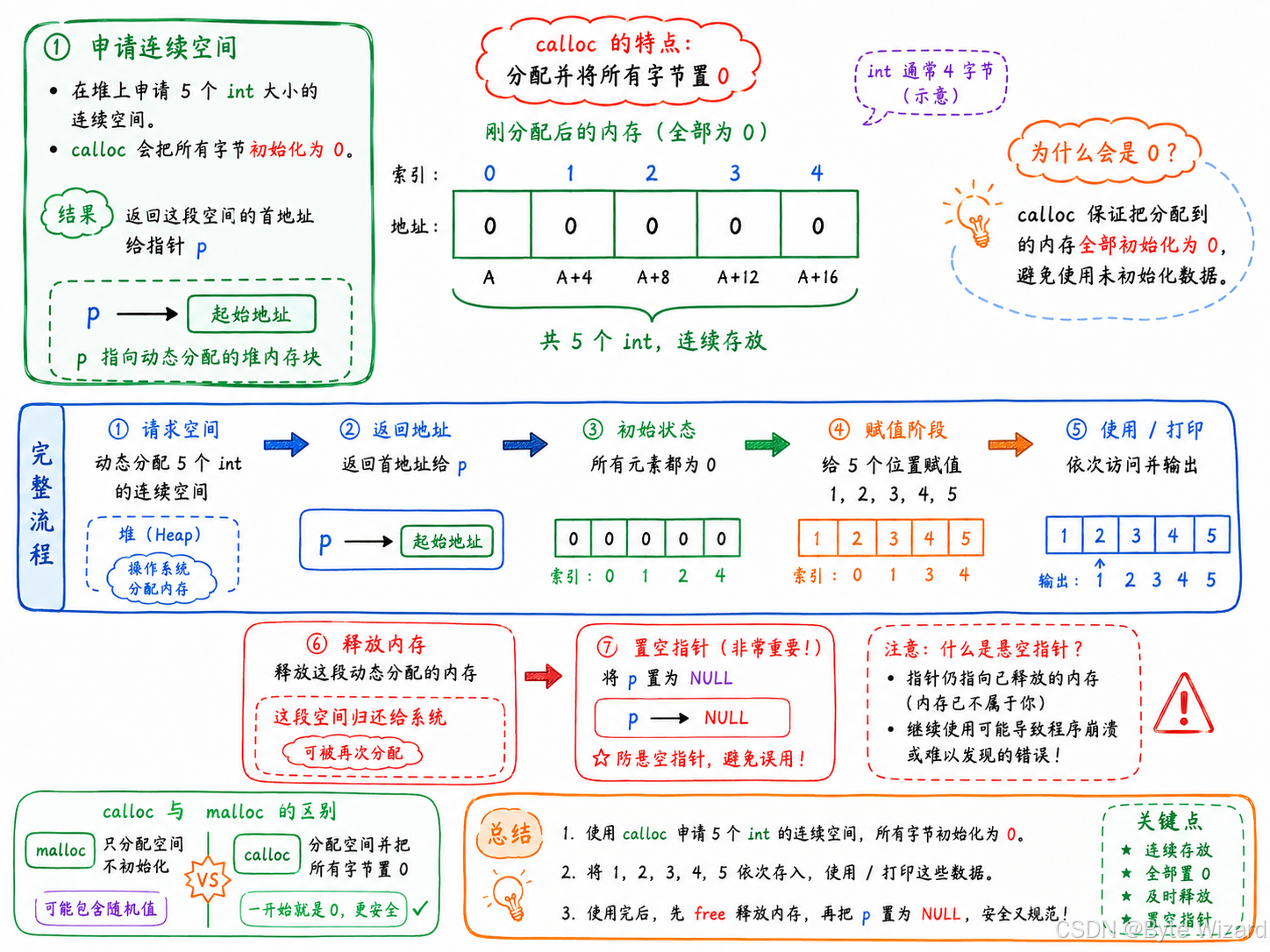
| 主要功能 | 在堆区 动态申请一块连续空间,并把空间中的每个字节初始化为 0 |
参数 num |
表示要申请的元素个数 |
参数 size |
表示每个元素的大小 ,单位是字节 |
| 实际申请大小 | num * size 字节 |
| 返回值类型 | void*,表示返回申请空间的起始地址,如果不是起始地址,就会出问题 |
| 申请成功 | 返回动态内存空间的起始地址,如果不是起始地址,就会出问题 |
| 申请失败 | 返回 NULL |
| 初始化特点 | 申请到的空间会被自动初始化为全 0 |
| 使用场景 | 适合申请数组空间,并希望初始值全部为 0 的情况 |
| 注意事项 | 使用完后需要用 free() 释放空间 |
举一个例子:
c
#include <stdio.h>
#include <stdlib.h> // 使用 calloc 和 free 需要包含该头文件

int main()
{
    // 在堆区申请 5 个 int 大小的连续空间,并初始化为 0
    int* p = (int*)calloc(5, sizeof(int));

    // 判断内存是否申请成功
    if (p == NULL)
    {
        perror("use calloc"); // 打印内存申请失败的错误信息
        return 1;
    }

    // 给动态申请的空间赋值
    for (int i = 0; i < 5; i++)
    {
        *(p + i) = i + 1;
    }

    // 打印动态数组中的数据
    for (int i = 0; i < 5; i++)
        printf("%d ", p[i]);

    // 使用完后释放动态内存
    free(p);

    // 将 p 置空,防止悬空指针
    p = NULL;
	return 0;
}
3.2 realloc
realloc函数的出现让动态内存管理更加灵活。
像我们之前申请的动态内存空间:
| 情况 | 说明 |
|---|---|
| 空间太小 | 原来申请的内存不够用,需要扩大 |
| 空间太大 | 原来申请的内存用不完,需要缩小 |
这时候就可以使用realloc函数对已经申请的内存空间进行调整,realloc 可以根据实际需要,对已经申请的堆区空间进行扩容或缩小。
| 项目 | 说明 |
|---|---|
| 函数名称 | realloc |
| 所属头文件 | #include <stdlib.h> |
| 函数原型 | void* realloc(void* ptr, size_t size); |
| 主要功能 | 调整已经动态申请的内存空间大小 |
参数 ptr |
指向来动态内存空间的地址(起始地址) |
参数 size |
调整后的新空间大小,单位是字节 |
| 返回值类型 | void*,表示调整后空间的起始地址(有两种情况) |
| 调整成功 | 返回调整后内存空间的起始地址 |
| 调整失败 | 返回 NULL,原来的空间不会被释放 |
举一个例子:
c
#define _CRT_SECURE_NO_WARNINGS
#include <stdio.h>
#include <stdlib.h>

int main()
{
    int* p = (int*)calloc(5, sizeof(int));

    if (p == NULL)
    {
        perror("calloc");
        return 1;
    }

    // 使用空间
    int i = 0;
    for (i = 0; i < 5; i++)
    {
        p[i] = i + 1;
    }

    // 希望空间能放 10 个整型
    int* ptr = (int*)realloc(p, 10 * sizeof(int));

    if (ptr == NULL)
    {
        perror("realloc");
        free(p); //如果 realloc 失败,原来的 p 还没有释放,会造成内存泄漏,所以要内存释放
        p = NULL;
        return 1;
    }
    else
    {
        p = ptr;       // 继续使用 p 来维护空间
        ptr = NULL;
    }

    // 继续使用后 5 个空间
    for (i = 5; i < 10; i++)
    {
        p[i] = i + 1;
    }

    // 打印数据
    for (i = 0; i < 10; i++)
    {
        printf("%d ", p[i]);
    }

    // 释放空间
    free(p);
    p = NULL;

    return 0;
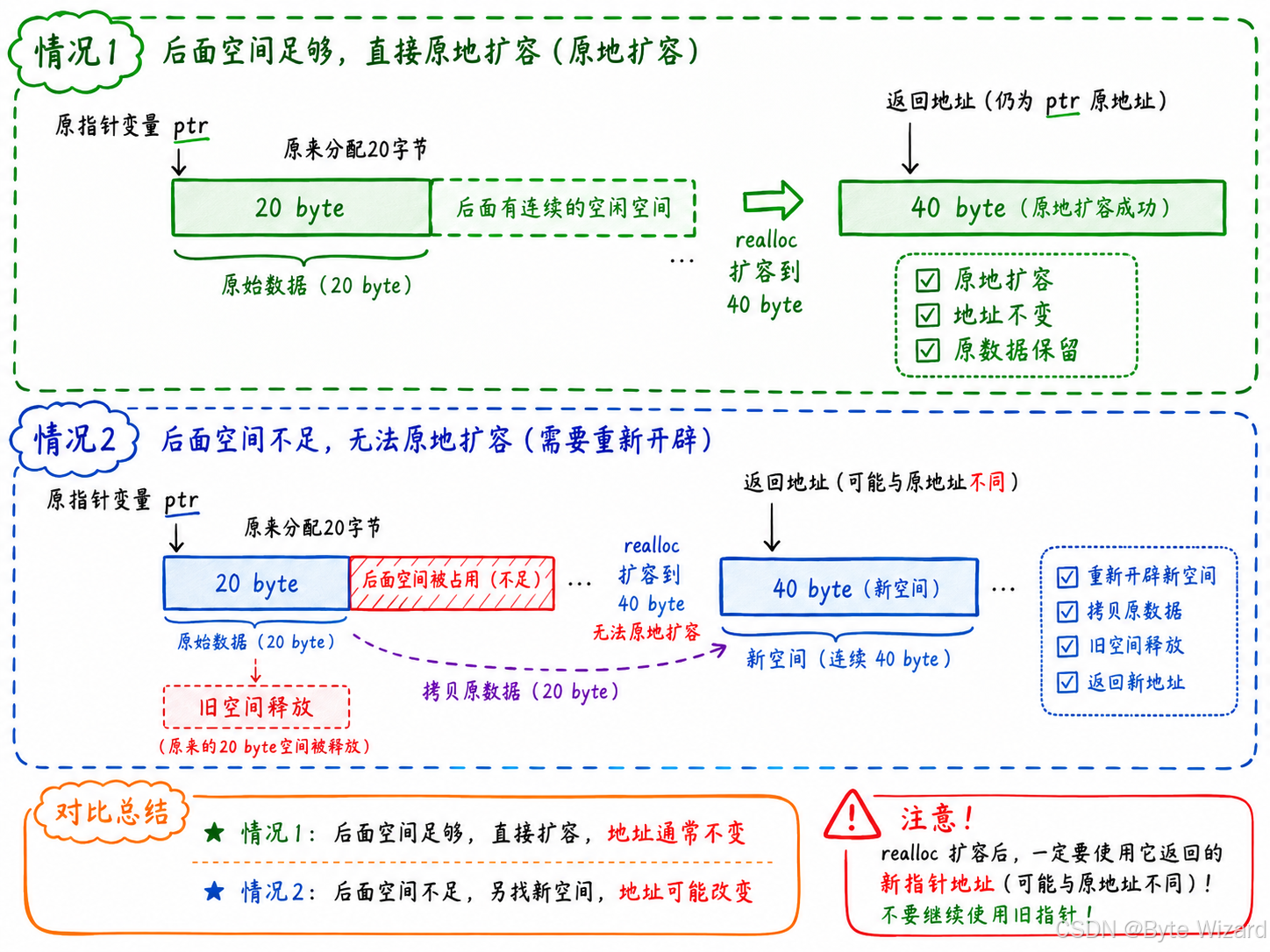
}接下来,我要来介绍realloc函数在已经的申请内存空间中进行调整可能会出现的两种情况:
| 情况 | 说明 | 返回结果 | 原数据是否保留 |
|---|---|---|---|
| 情况1:原空间后面有足够空间 | 如果原来内存块后面还有连续可用空间,系统会直接在原空间后面追加空间 | 返回原来的内存地址 | 原数据不变 |
| 情况2:原空间后面没有足够空间 | 如果原空间后面没有足够连续空间,系统会在堆区重新找一块更大的连续空间 ,把原数据拷贝过去 ,再释放原空间 | 返回新的内存地址 | 原数据会被复制到新空间中 |
4. 常见的动态内存的错误
4.1 对NULL指针的解引用操作
c
void test()
{
	int* p = (int*)malloc(INT_MAX / 4);
	*p = 20; //如果p的值是NULL,就会有问题
	free(p);
}
4.2 对动态开辟空间的越界访问
c
void test()
{
	int i = 0;
	int* p = (int*)malloc(10 * sizeof(int));
	if (NULL == p)
	{
		exit(EXIT_FAILURE);
	}
	for (i = 0; i <= 10; i++) //循环11次
	{
		*(p + i) = i; //当i == 10 时,越界访问了
	}
	free(p);
}
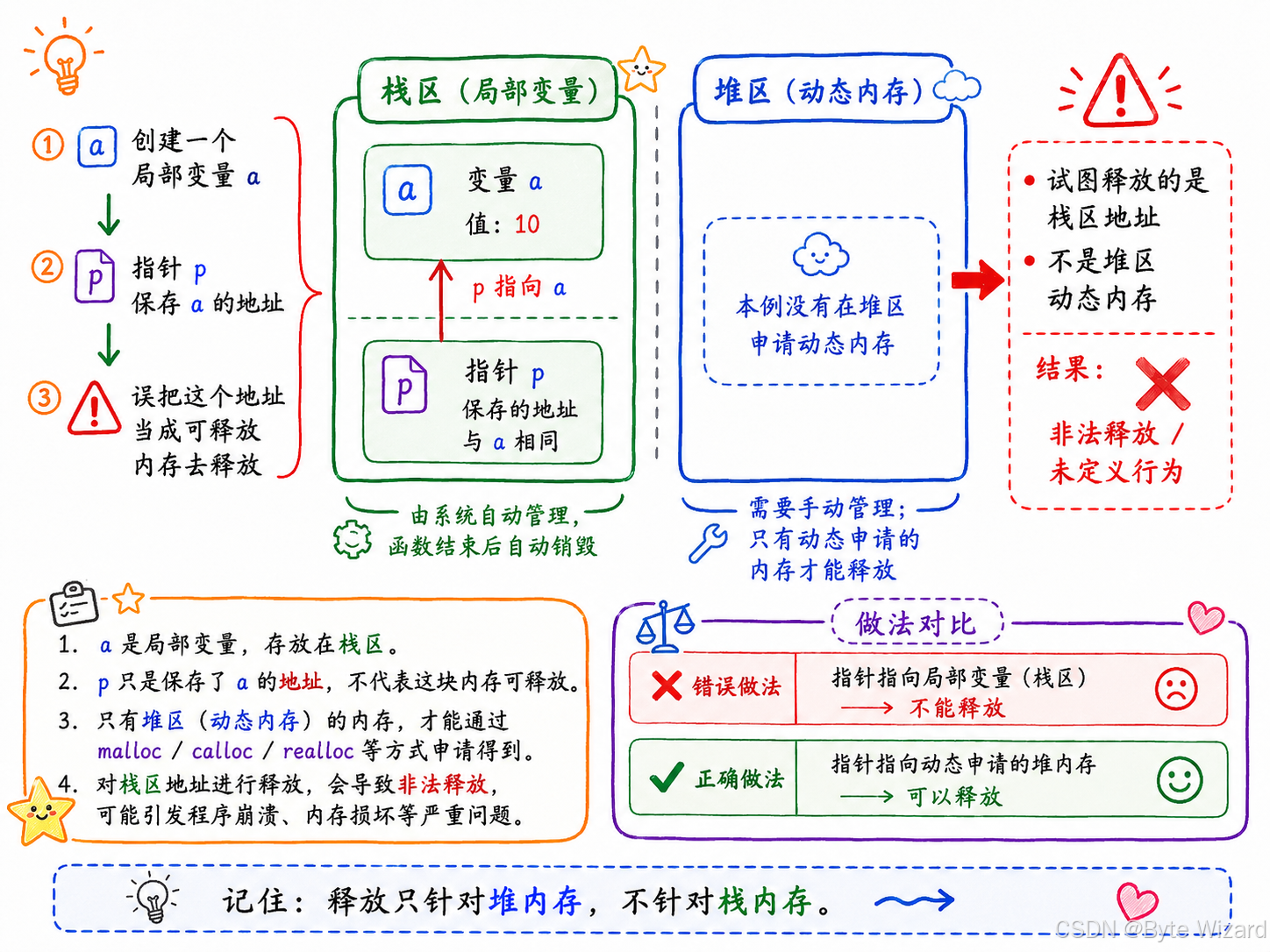
4.3 对非动态开辟内存使用free释放
c
void test()
{
	int a = 10;
	int* p = &a;
	free(p); //err
}

int main()
{
	test();
	return 0;
}
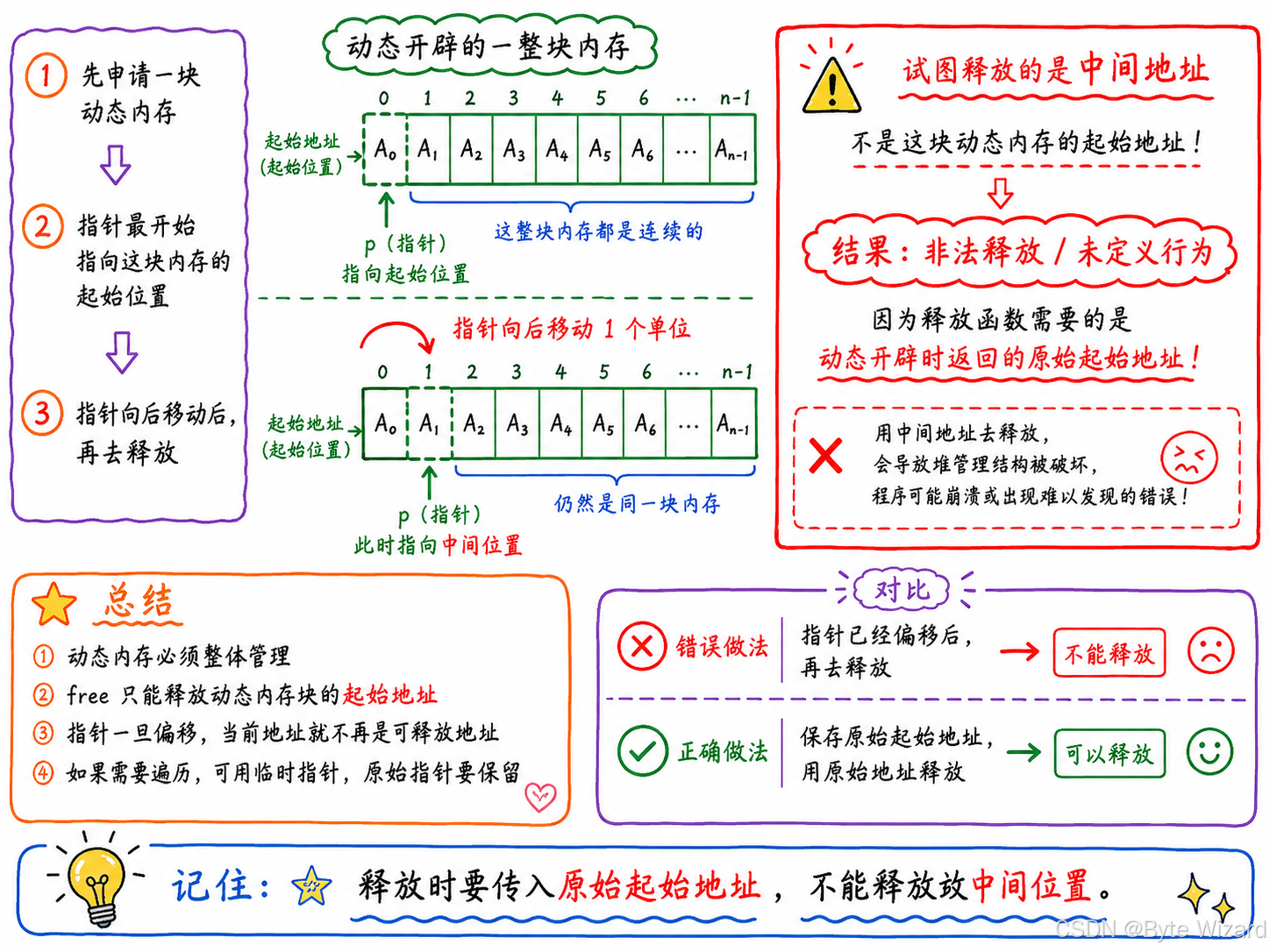
4.4 使用free释放一块动态开辟内存的一部分
c
void test()
{
	int* p = (int*)malloc(100);
	p++; //p不在指向动态内存的起始位置
	free(p);
}
画图演示:
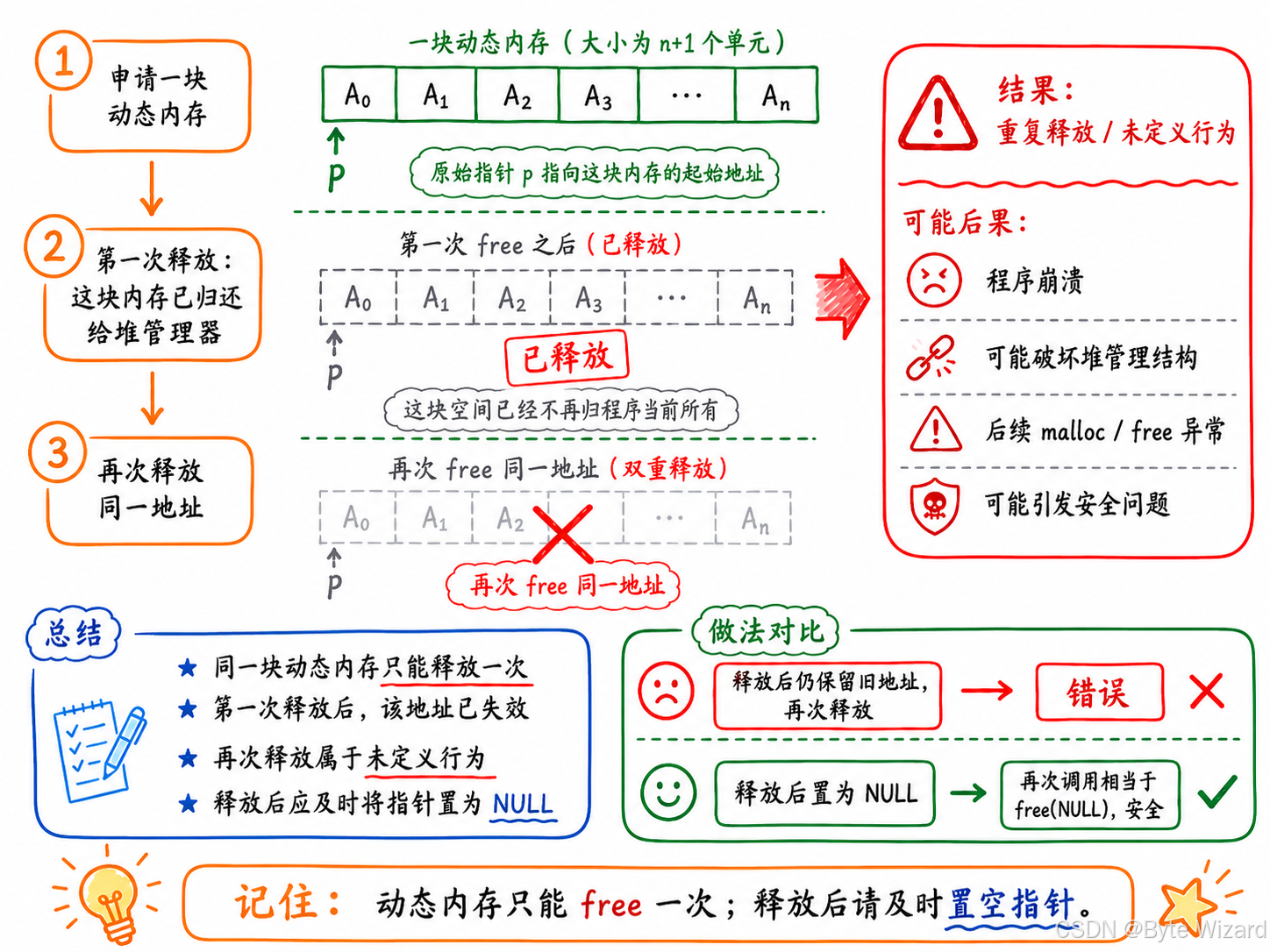
4.5 对同一块内存多次释放
c
void test()
{
	int* p = (int*)malloc(100);
	free(p);
	free(p);//重复释放
}
4.6 动态开辟内存忘记释放(内存泄漏)
c
void test()
{
	int* p = (int*)malloc(100);
	if (NULL != p)
	{
		*p = 20;
	}
}
int main()
{
	test();
	while (1);
	return 0;
}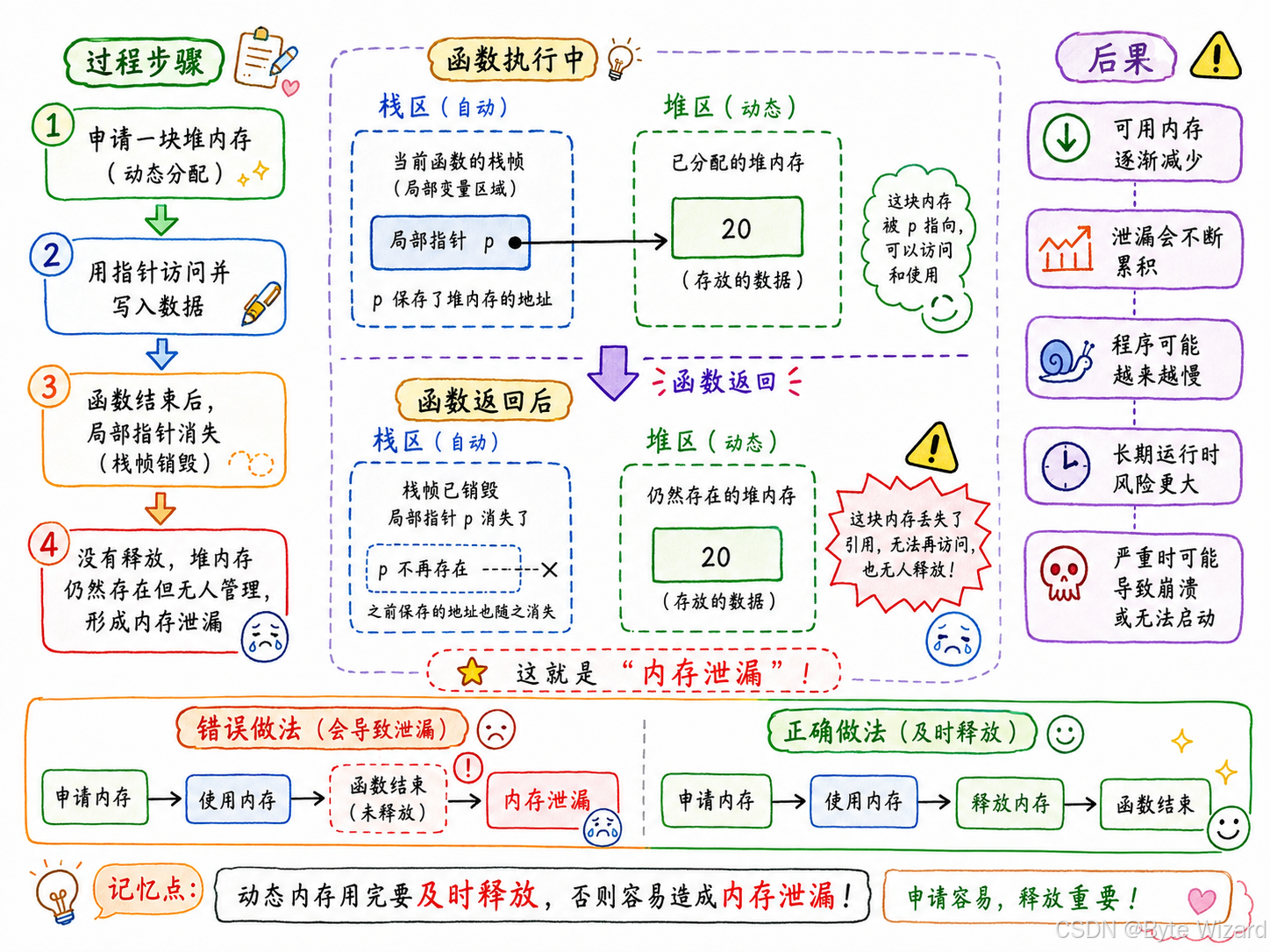
忘记释放不再使用的动态开辟的内存空间会造成内存泄漏。
记住:动态内存不用时一定要 f r e e 释放。 记住:动态内存不用时一定要 free 释放。 记住:动态内存不用时一定要free释放。
5. 动态内存经典笔试题分析
5.1 题目1
这道题用到了strcpy函数的相关知识点,相关链接:字符函数与字符串函数。
这道题也涉及到了作用域与生命周期 相关的知识点,相关链接:C语言函数,在 8.3 8.3 8.3static 和 extern中讲到了。
c
#include <stdio.h>
#include <stdlib.h>
void GetMemory(char* p)
{
	p = (char*)malloc(100);
}
void Test(void)
{
	char* str = NULL;
	GetMemory(str);
	strcpy(str, "hello world");
	printf(str);
}
int main()
{
	Test();
	return 0;
}
请问运⾏Test函数会有什么样的结果?
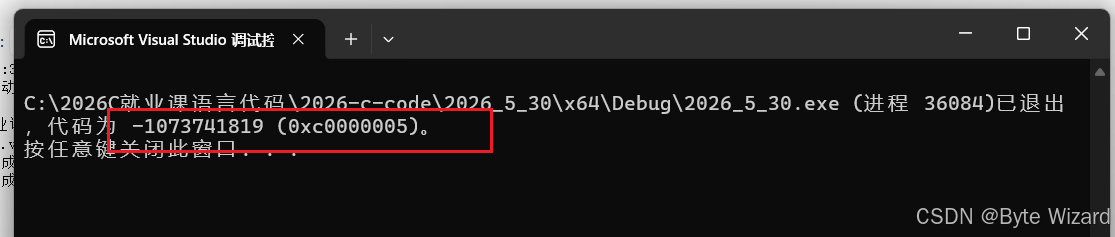
程序崩溃了。
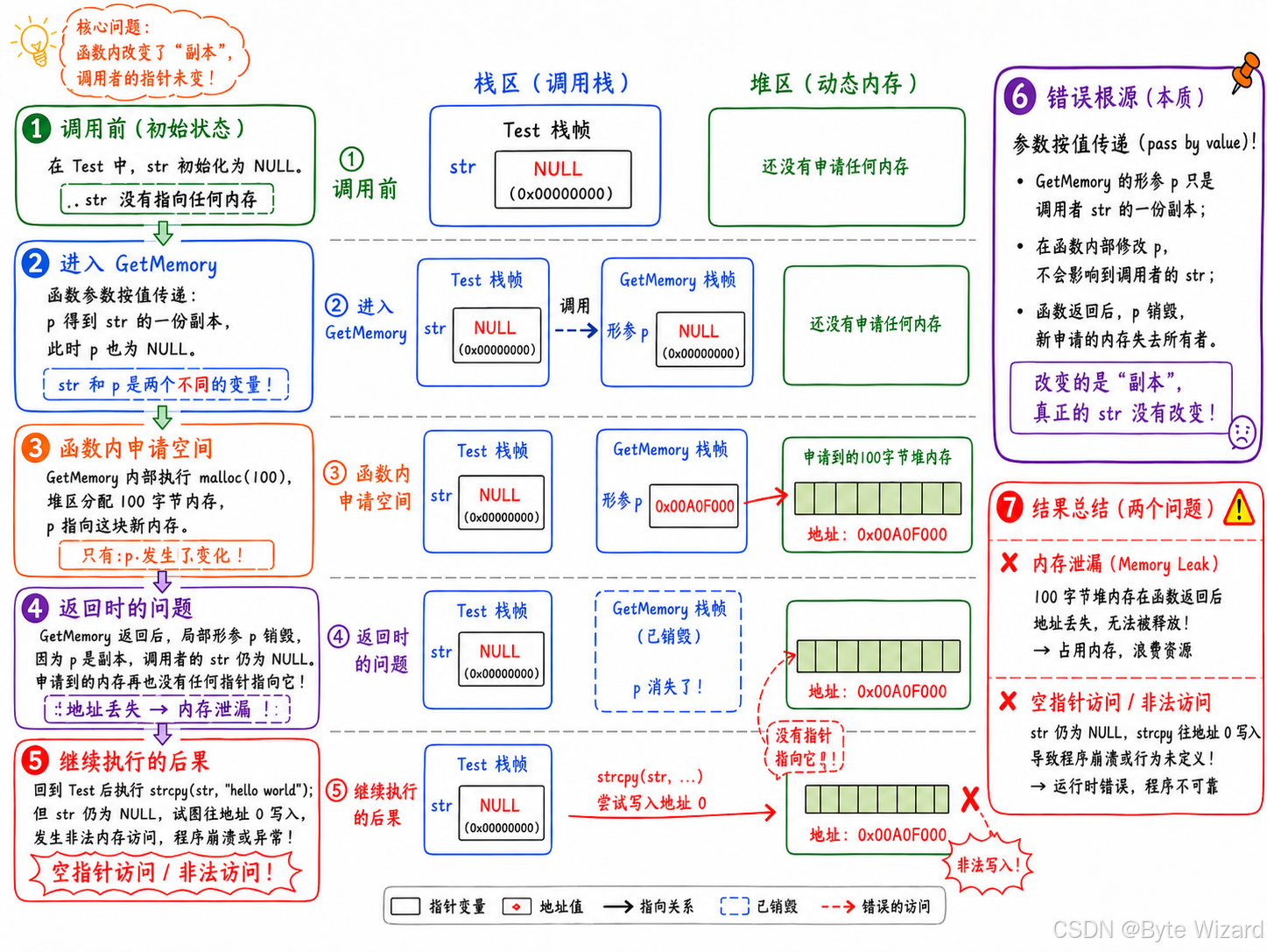
解决方式有两种:
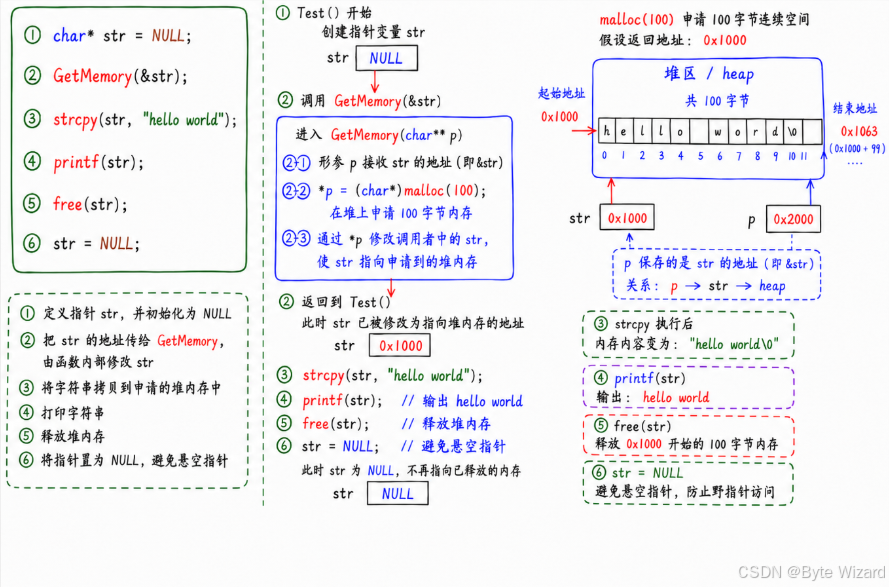
第一种:二级指针的方式
c
#include <stdio.h>
#include <stdlib.h>
#include <string.h>
void GetMemory(char** p)
{
	*p = (char*)malloc(100); // 通过二级指针修改 str,使 str 指向堆区空间
}
void Test(void)
{
	char* str = NULL;
	GetMemory(&str);
	strcpy(str, "hello world");
	printf(str);

	free(str); //用完内存后记得释放
	str = NULL;
}
int main()
{
	Test();
	return 0;
}
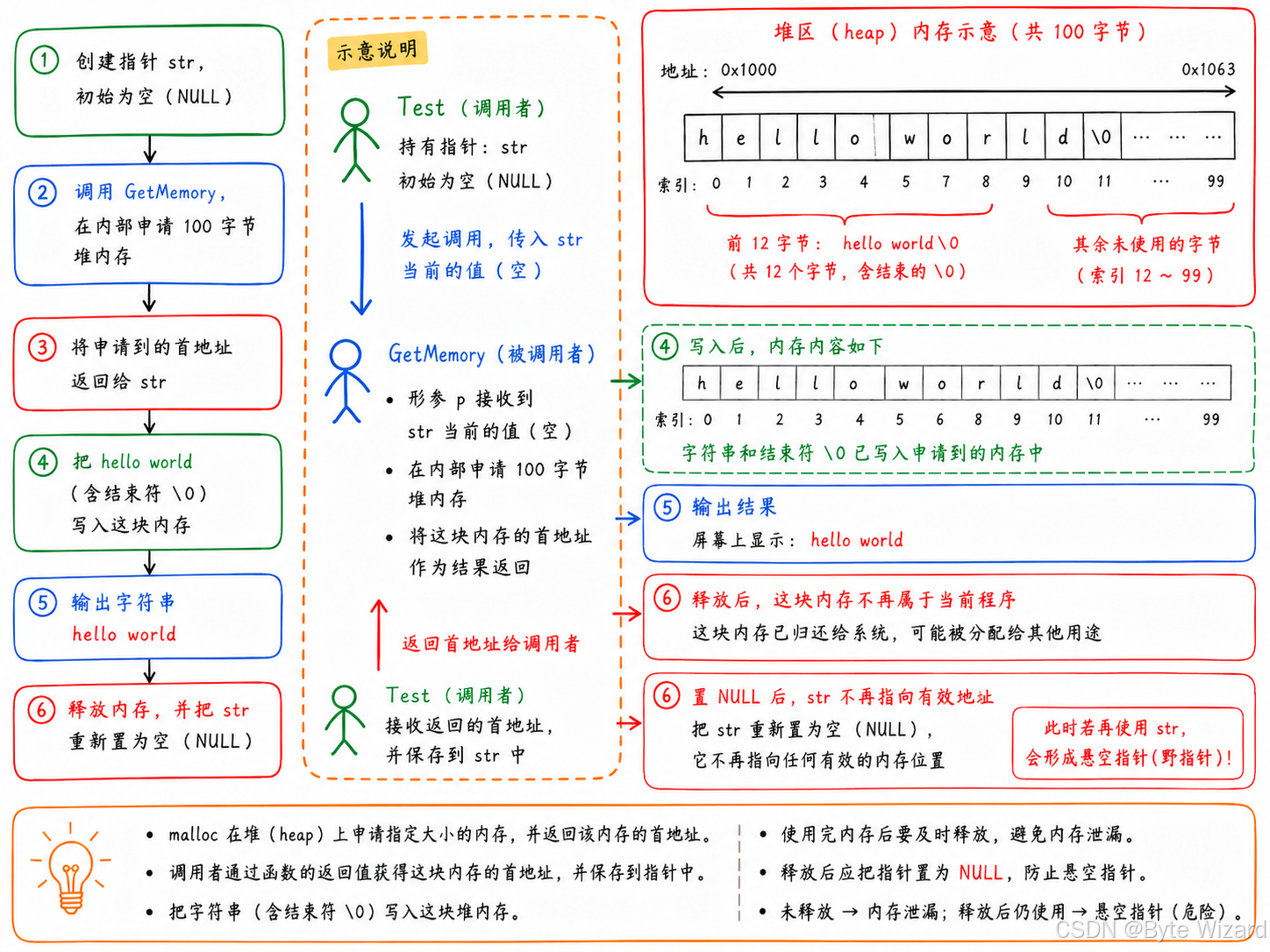
第二种:返回地址的方式
c
#include <stdio.h>
#include <stdlib.h>
#include <string.h>
char*  GetMemory(char* p)
{
	p = (char*)malloc(100);
	return p; //返回申请到的地址
}
void Test(void)
{
	char* str = NULL;
	str = GetMemory(str);
	strcpy(str, "hello world");
	printf(str);

	free(str); //用完内存后记得释放
	str = NULL;
}
int main()
{
	Test();
	return 0;
}
5.2 题目2
c
#include <stdio.h>
#include <stdlib.h>
char* GetMemory(void)
{
	char p[] = "hello world";
	return p;
}
void Test(void)
{
	char* str = NULL;
	str = GetMemory();
	printf(str);
}
int main()
{
	Test();
	return 0;
}
请问运⾏Test函数会有什么样的结果?
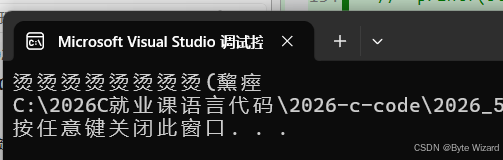
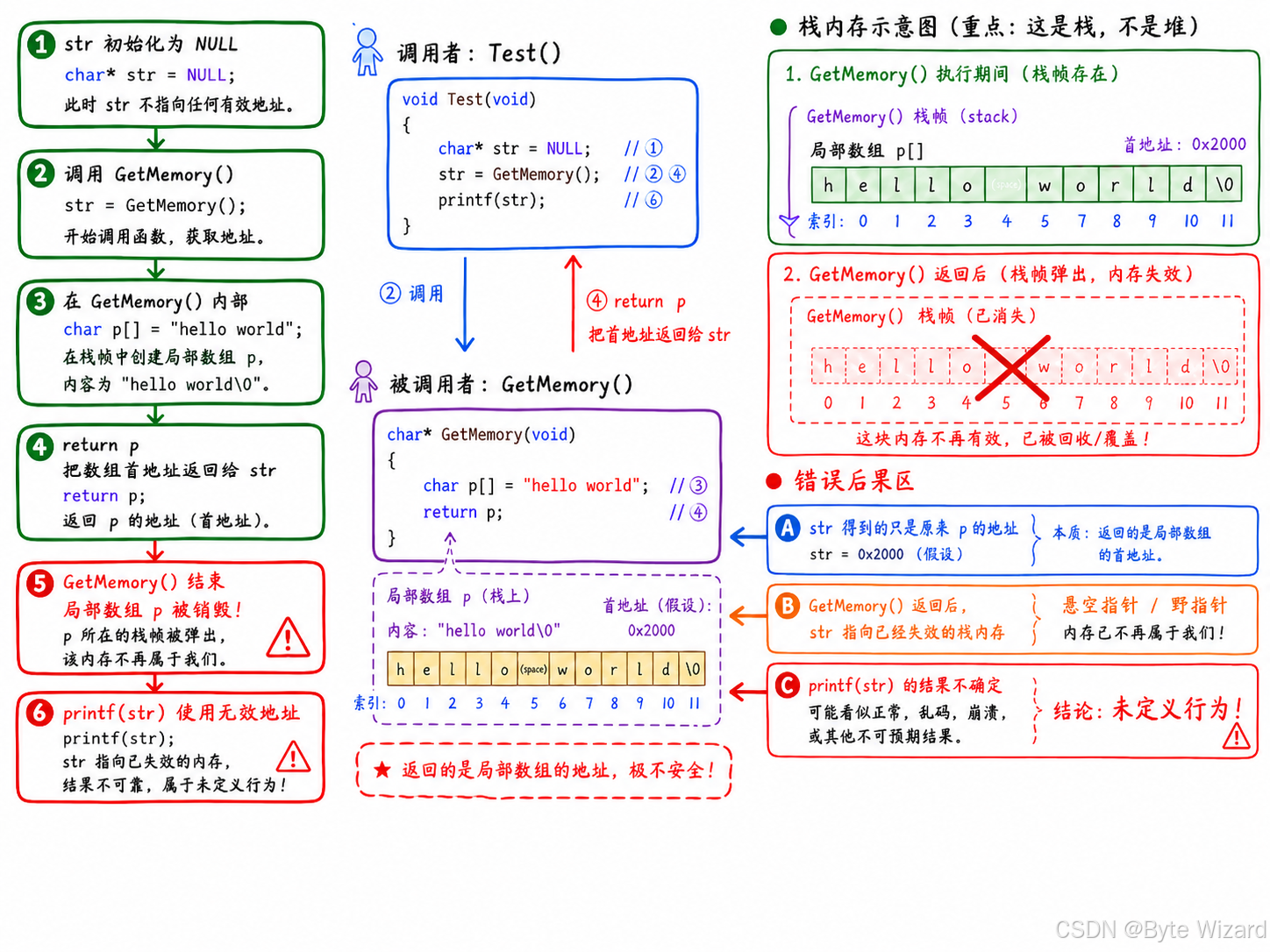
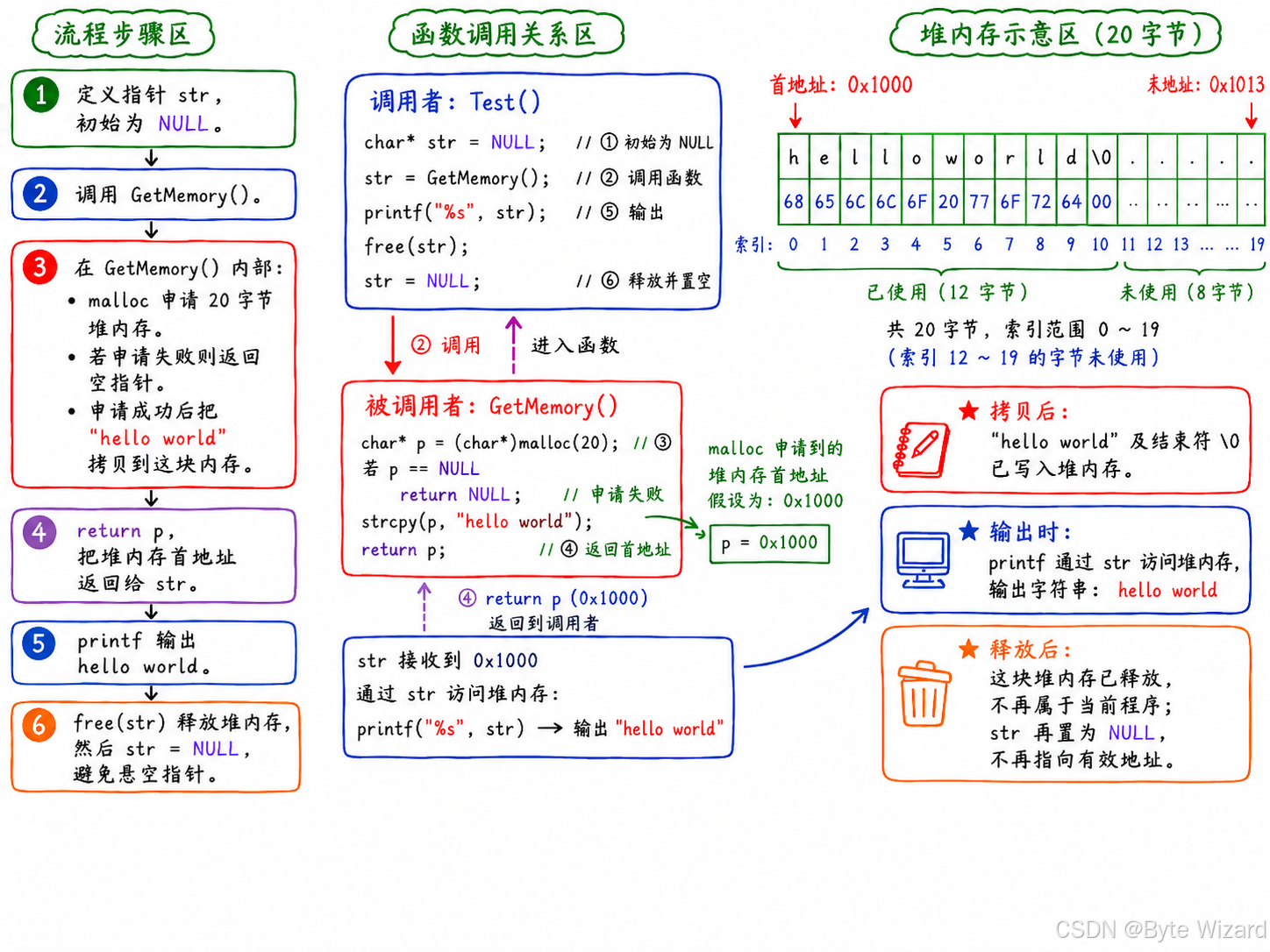
解决方式有两种:
方法一:使用static关键字
由于要用到static关键字,相关知识链接:C语言函数
c
#include <stdio.h>
#include <stdlib.h>

char* GetMemory(void)
{
	static char p[] = "hello world"; // static 局部数组,具有静态存储期,函数返回后仍然有效
	return p;
}
void Test(void)
{
	char* str = NULL;
	str = GetMemory();
	printf(str);
}
int main()
{
	Test();
	return 0;
}
方法二:使用动态内存分配
c
#include <stdio.h>
#include <stdlib.h>
#include <string.h>

char* GetMemory(void)
{
	char* p = (char*)malloc(20); //使用动态内存分配来解决问题
	if (p == NULL)
	{
		perror("use malloc");
		return 1;
	}
	strcpy(p, "hello world");

	return p;
}
void Test(void)
{
	char* str = NULL;
	str = GetMemory();

	if (str == NULL)
	{
		perror("use malloc");
		return 1;
	}
	printf(str);
	free(str);
	str = NULL;

}
int main()
{
	Test();
	return 0;
}
5.3 题目3
c
#include <stdio.h>
#include <stdlib.h>
#include <string.h>

void GetMemory(char** p, int num)
{
	*p = (char*)malloc(num);
}
void Test(void)
{
	char* str = NULL;
	GetMemory(&str, 100);
	strcpy(str, "hello");
	printf(str);
}
int main()
{
	Test();
	return 0;
}
请问运⾏Test函数会有什么样的结果?
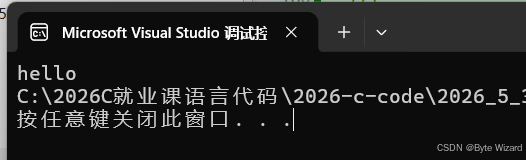
这一题跟第一题中修改的第一种方法很类似,运用了二级指针 ,所以输出正确,但是也有问题,问题在于没有释放内存,存在内存泄漏。
修改之后的代码:
c
#include <stdio.h>
#include <stdlib.h>
#include <string.h>

char* GetMemory(char** p, int num)
{
	*p = (char*)malloc(num);
	return *p;
}
void Test(void)
{
	char* str = NULL;
	str = GetMemory(&str, 100);

	if (str == NULL)
	{
		perror("use malloc");
		return;
	}

	//使用内存
	strcpy(str, "hello");
	printf(str);

	//释放内存
	free(str);
	str = NULL;

}
int main()
{
	Test();
	return 0;
}
5.4 题目4
c
#include <stdio.h>
#include <stdlib.h>
void Test(void)
{
	char* str = (char*)malloc(100);
	strcpy(str, "hello");
	free(str);
	if (str != NULL)
	{
		strcpy(str, "world");
		printf(str);
	}
}
int main()
{
	Test();
	return 0;
}
请问运⾏Test函数会有什么样的结果?
在VS2026上的结果:
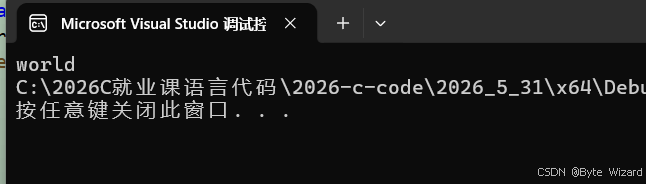
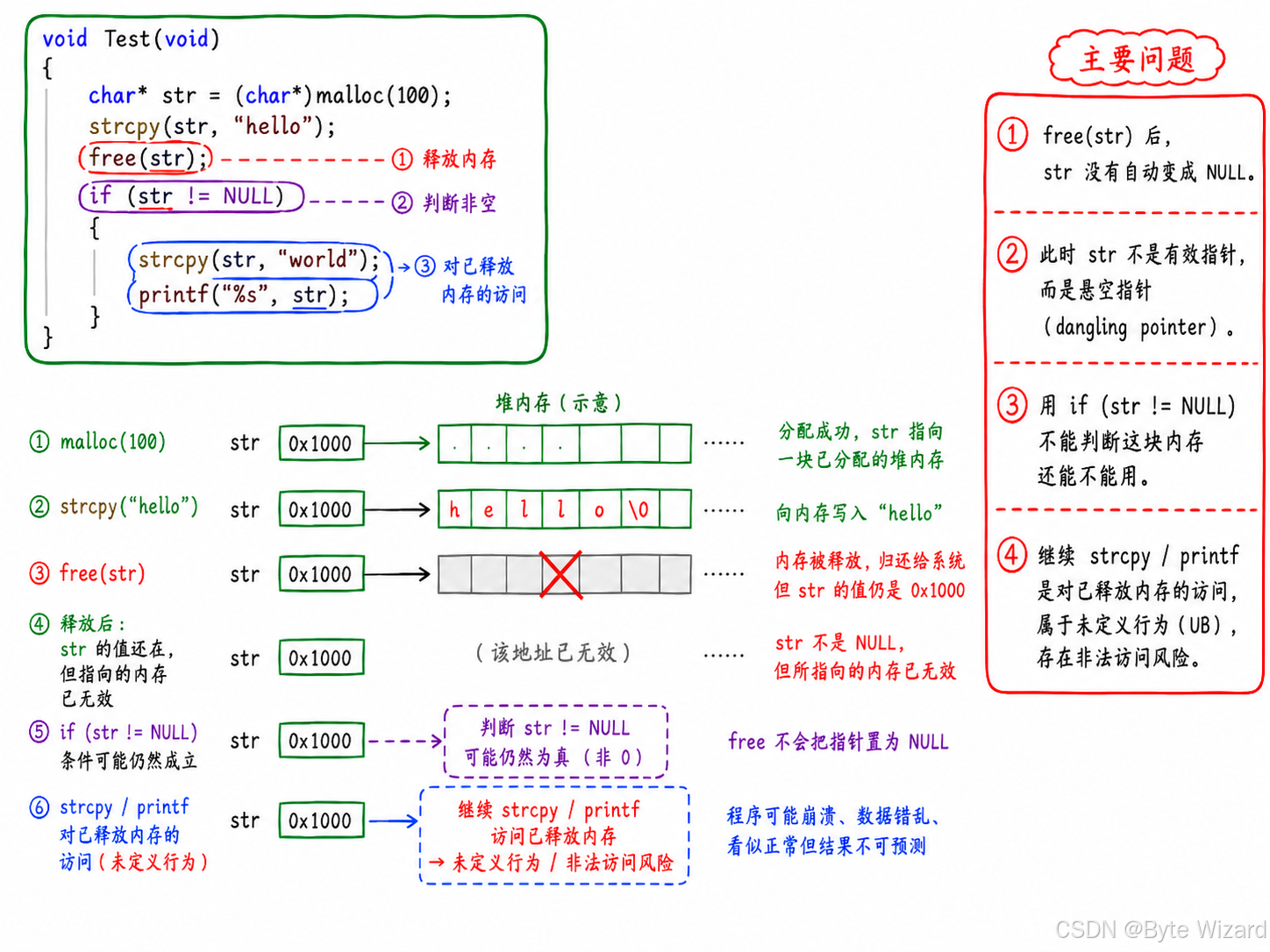
修改之后的代码:
c
#include <stdio.h>
#include <stdlib.h>
void Test(void)
{
	char* str = (char*)malloc(100);
	strcpy(str, "hello");
	free(str);
	str = NULL; //释放动态开辟的内存后,要及时置空
	if (str != NULL)
	{
		strcpy(str, "world");
		printf(str);
	}
}
int main()
{
	Test();
	return 0;
}
6. 柔性数组
在C99中,柔性数组就是:结构体的最后一个成员是一个没有指定大小的数组。
在代码中是这样体现的:
c
struct Node
{
	int a;
	int arr[]; //柔性数组成员
};
6.1 柔性数组的特点
| 特点 | 说明 |
|---|---|
| 必须放在结构体最后 | 柔性数组只能作为最后一个成员 |
| 数组大小不写 | 例如 char name[]; |
| 本身不占固定空间 | sizeof(struct Student) 不包含 name 的实际空间 |
| 空间需要手动申请 | 一般配合 malloc 使用 |
注意:含有柔性数组成员的结构体,不能只按结构体本身的大小分配内存,而要用malloc额外多分配一份空间给柔性数组成员使用。
例如:
c
#include <stdio.h>

struct Test
{
	int n; //至少包含一个成员
	int arr[]; //柔性数组
};

int main()
{
	printf("%zu\n", sizeof(struct Test)); //4
	return 0;
}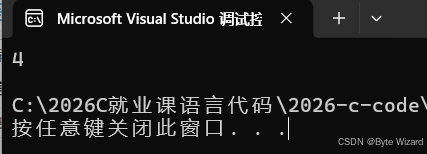
运行结果说明,运行结果说明:sizeof(struct Test) 只计算结构体固定成员的大小,不包含柔性数组成员实际需要的元素空间。
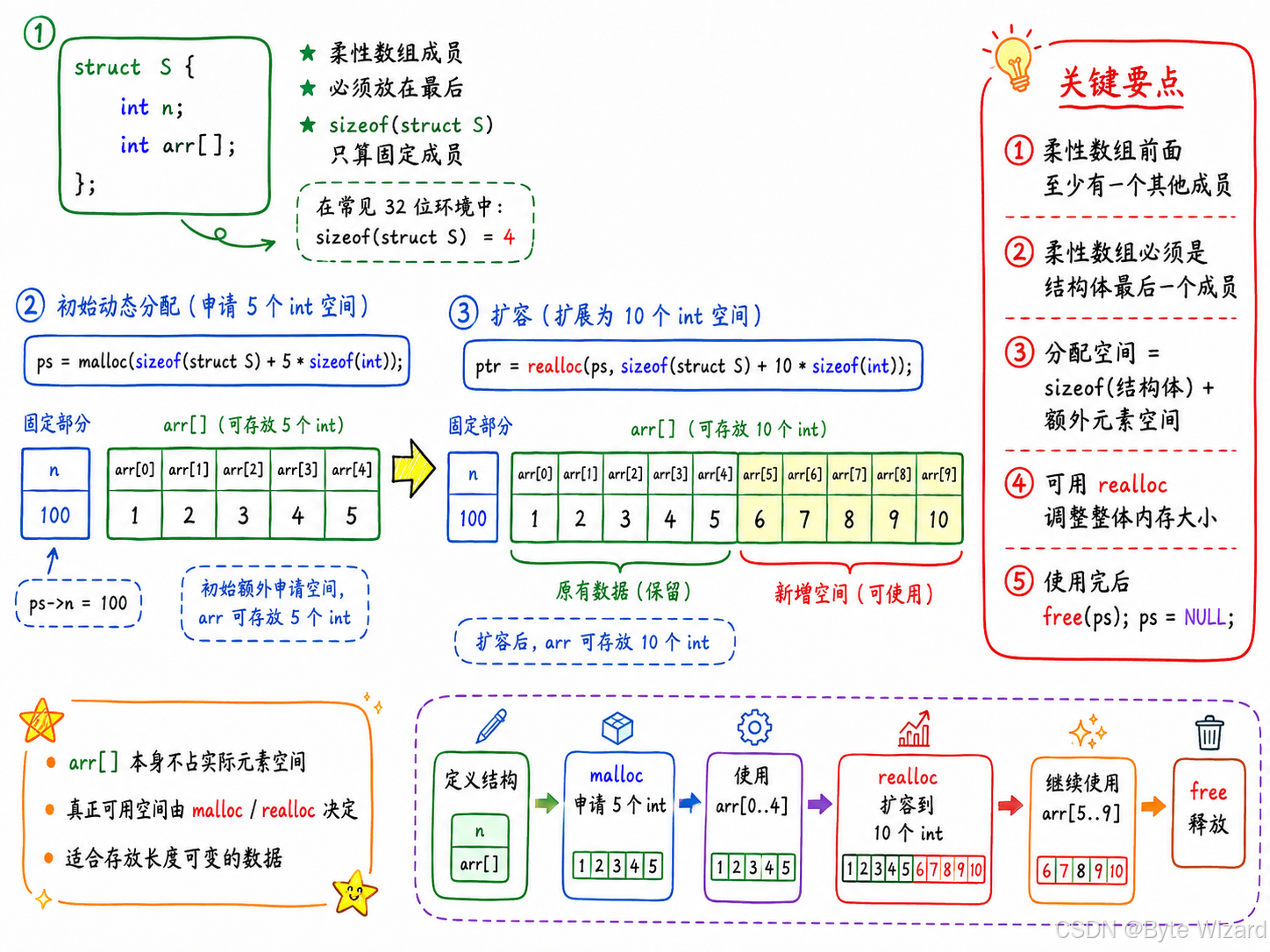
6.2 柔性数组的使用
c
#include <stdio.h>
#include <stdlib.h>

struct S
{
	int n;
	int arr[];// 柔性数组成员,初始申请额外空间存放 5 个 int,后续可通过 realloc 扩容
};

int main()
{
	struct S* ps = (struct S*)malloc(sizeof(struct S) + 5 * sizeof(int)); //24

	if (ps == NULL)
	{
		perror("use malloc");
		return 1;
	}

	//使用内存
	ps->n = 100;
	for (int i = 0; i < 5; i++)
	{
		ps->arr[i] = i + 1;
	}

	struct S* ptr = (struct S*)realloc(ps, sizeof(struct S) + 10 * sizeof(int)); // 重新调整整块动态内存,使柔性数组 arr 可以存放 10 个 int

	if (ptr == NULL)
	{
		perror("realloc");
		free(ps); //ps内存要及时得到释放
		ps = NULL;
		return 1;
	}
	else
	{
		ps = ptr;
		ptr = NULL;
		for (int i = 5; i < 10; i++)
		{
			ps->arr[i] = i + 1;
		}
	}

	for (int i = 0; i < 10; i++)
		printf("%d ", ps->arr[i]);

	//释放内存
	free(ps);
	ps = NULL;
	return 0;
}
6.3 柔性数组的优势
上述的S结构也可以设计为下面的结构:
c
#include <stdio.h>
#include <stdlib.h>

struct S
{
	int n;
	int* arr;
};

int main()
{
	struct S* ps = (struct S*)malloc(sizeof(struct S));
	if (ps == NULL)
	{
		perror("use malloc");
		return 1;
	}
	//
	ps->n = 100;
	int*ptr = (int*)malloc(5 * sizeof(int));
	if (ptr != NULL)
	{
		ps->arr = ptr;
	}
	else
	{
		perror("malloc");
		return 1;
	}
	//
	int i = 0;
	for (i = 0; i < 5; i++)
	{
		ps->arr[i] = i + 1;
	}
	//扩容
	struct S* ptr2 = (struct S*)realloc(ps->arr, 10 * sizeof(int));
	if (ptr2 == NULL)
	{
		perror("realloc");
		return 1;
	}
	else
	{
		ps->arr = ptr2;
		ptr2 = NULL;
		for (i = 5; i < 10; i++)
		{
			ps->arr[i] = i + 1;
		}
	}

	//释放
	free(ps->arr);
	ps->arr = NULL;

	free(ps);
	ps = NULL;

	return 0;
}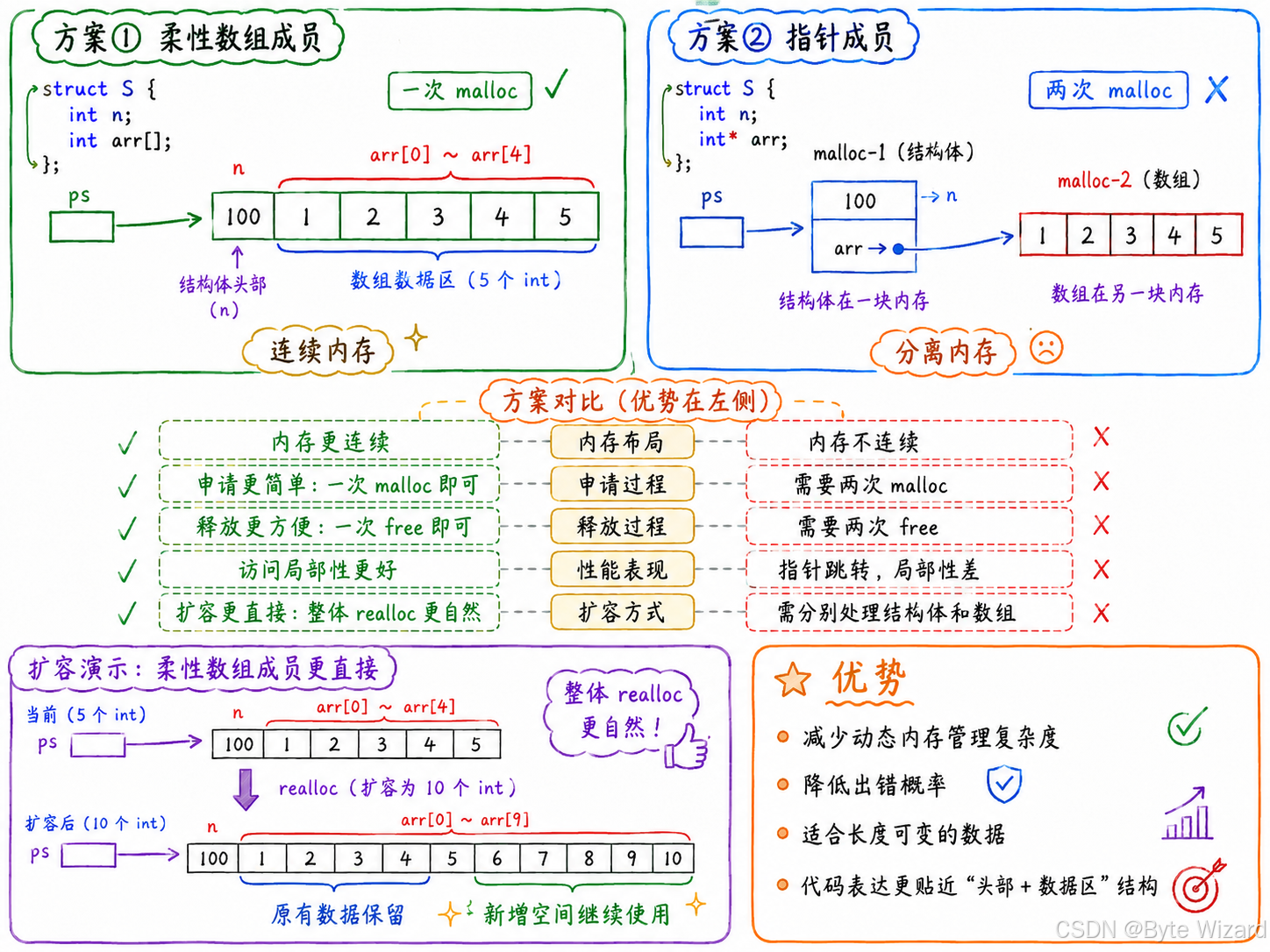
对比柔性数组 和指针成员这两种方案:
| 对比点 | 柔性数组方案 | 指针成员方案 |
|---|---|---|
| 内存块数量 | 一块内存 | 两块内存 |
| 释放方式 | free(ps) 一次即可 |
需要 free(ps->arr) 和 free(ps) |
| 出错风险 | 较低 | 更容易忘记释放数组 |
| 内存连续性 | 结构体和数组连续 | 结构体和数组分离 |
| 释放顺序 | 简单 | 顺序要注意 |
在指针方案方案 中内存的释放顺序必须要先释放ps -> arr(因为 ps->arr 是数组那块动态内存的地址),在释放结构体,反过来写属于未定义行为。
7.总结C/C++中程序内存区域的划分
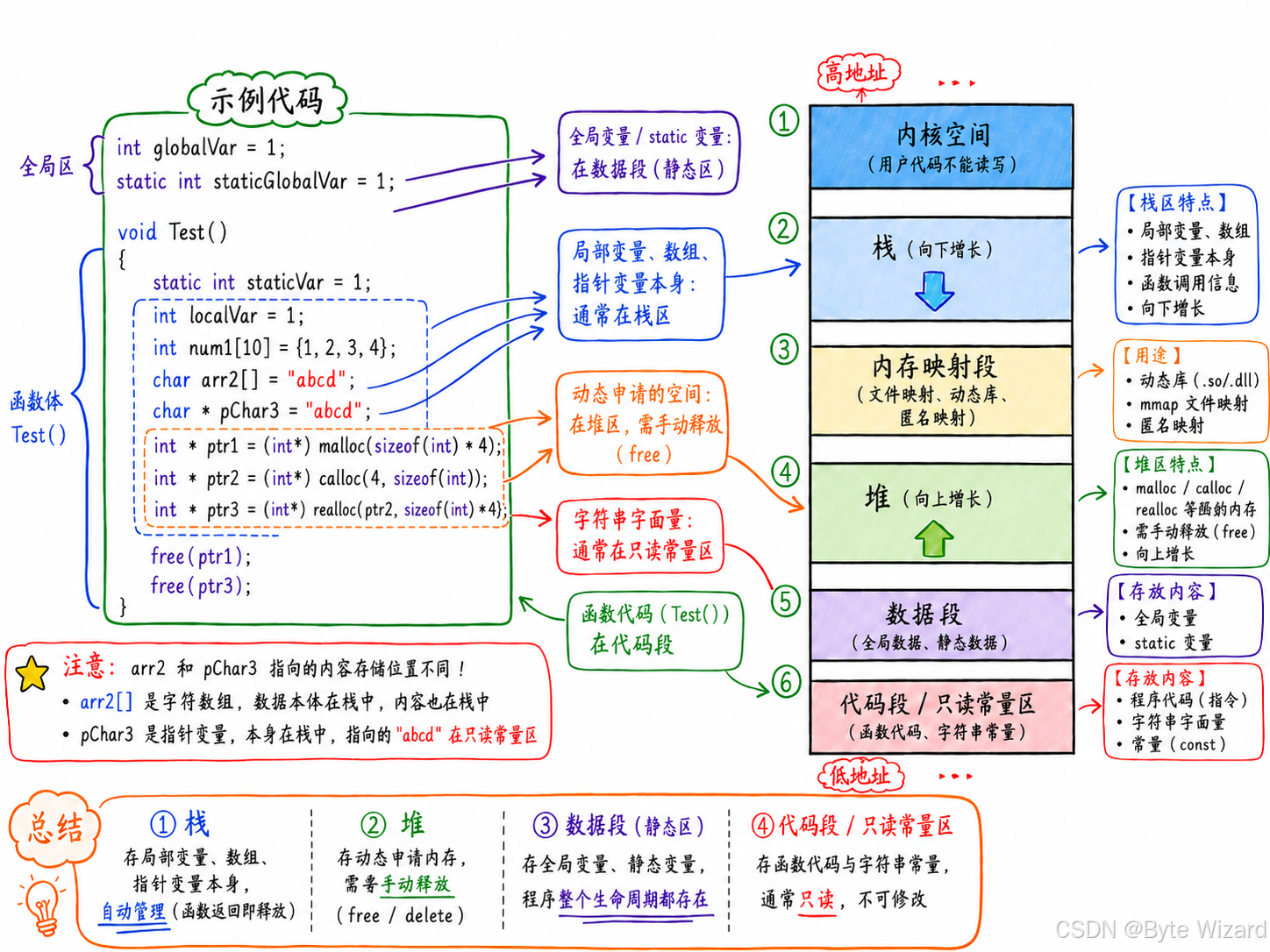
C/C++ 程序运行时,内存通常可以划分为以下几个区域:
| 内存区域 | 存放内容 | 特点 | 生命周期 |
|---|---|---|---|
| 栈区 | 局部变量、函数参数、返回地址、临时数据 | 栈内存分配运算内置于处理器的指令集中,效率很⾼,但是分配的内存容量有限 | 函数调用开始创建,函数结束释放 |
| 堆区 | malloc/free、new/delete 动态申请的内存 |
由程序员手动管理,空间较大,但容易出现内存泄漏。若程序员不释放,程序结束时可能由OS(操作系统)回收。 | 从申请开始,到手动释放结束 |
| 数据段 / 静态区 | 全局变量、静态变量 | 程序运行期间一直存在 | 程序开始时创建,程序结束时释放 |
| 代码段 | 程序的机器指令,即函数代码 | 通常是只读的,防止程序代码被修改 | 程序运行期间一直存在 |
| 常量区 | 字符串常量、const 修饰的全局常量等 |
通常只读,不允许修改 | 程序运行期间一直存在 |
例如:
c
int g = 10;              // 全局变量:数据段

int main()
{
    int a = 5;           // 局部变量:栈区

    static int b = 20;   // 静态变量:数据段/静态区

    int* p = new int;    // p 本身在栈区,new 出来的 int 在堆区

    const char* s = "hi"; // 字符串常量 "hi" 通常在常量区
}