完整源码 :ImageEditor 基于 HarmonyOS 5.0+,实现图片编辑器的马赛克画笔功能。本篇聚焦纹理马赛克方案,采用策略模式设计,便于扩展更多绘制工具。
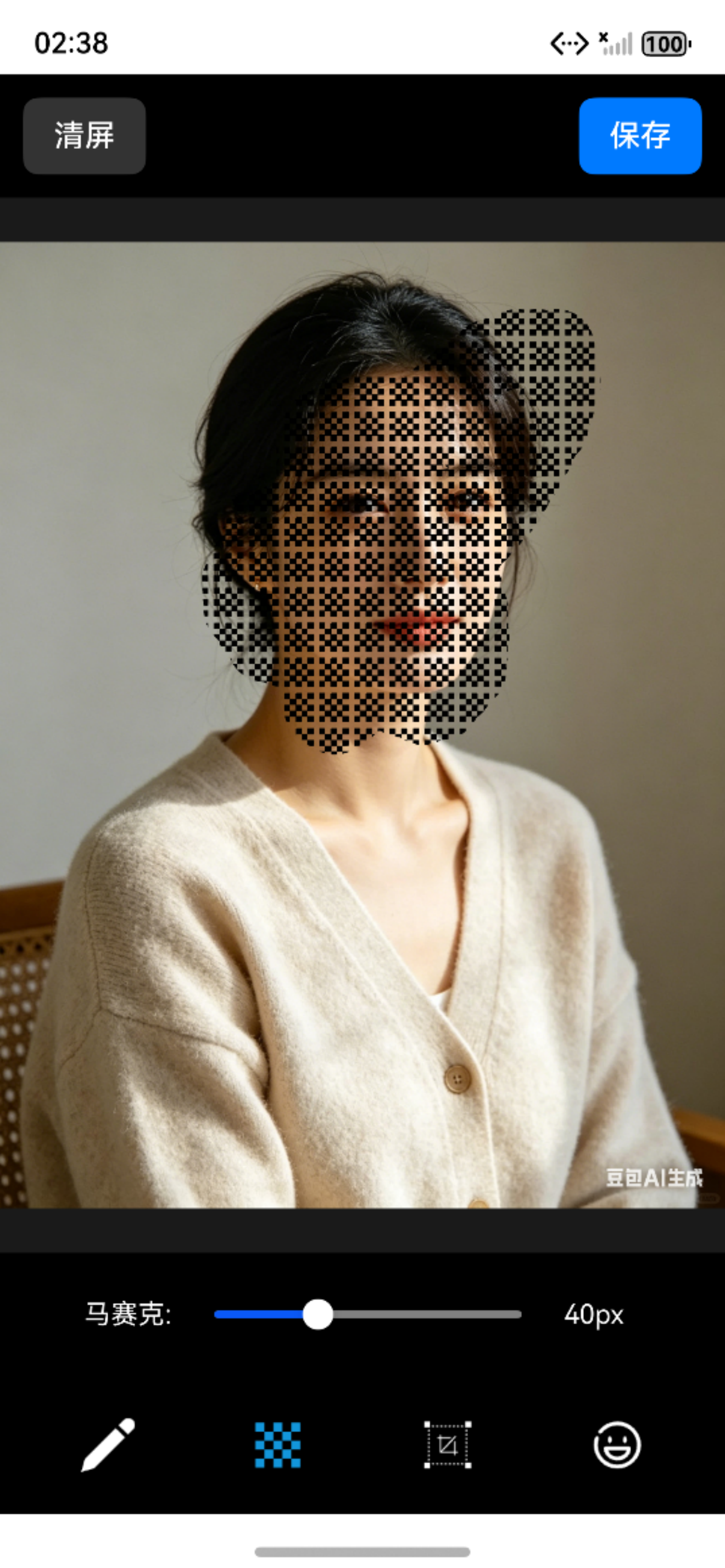
一、效果演示
示例中纹理背景透明导致遮挡效果不佳,更换不透明纹理即可解决。
二、方案选型
马赛克画笔用于遮盖图片中的敏感信息(人脸、车牌、文字等)。常见实现有两种:
| 对比项 | 纹理马赛克(本文) | 像素马赛克 |
|---|---|---|
| 实现原理 | 预置纹理图片重复填充 | 实时计算像素块平均色 |
| 性能表现 | 满帧流畅 | 同步大量计算卡顿 |
| CPU占用 | 极低 | 高 |
| 实现复杂度 | 简单 | 复杂 |
| 效果真实度 | 取决于纹理设计 | 强 |
本文选择纹理马赛克方案,用极致性能换取流畅的涂抹体验。像素马赛克独立分享解决卡顿问题。
注意 :纹理马赛克的原理是给图片"贴瓷砖"进行遮挡,纹理图片不能是透明背景 ,否则
createPattern平铺后会穿透。资源文件放置:
resources/rawfile/mosaic.png
三、架构设计
3.1 整体架构
┌─────────────────────────────────────────────────────────────┐
│                       UI 层 (Index.ets)                      │
│                      Canvas + 手势处理                        │
└─────────────────────────────┬───────────────────────────────┘
                              │
                              ▼
┌─────────────────────────────────────────────────────────────┐
│                   管理层 (CanvasManager)                     │
│              策略注册、工具切换、画布渲染                       │
└─────────────────────────────┬───────────────────────────────┘
                              │
                              ▼
┌─────────────────────────────────────────────────────────────┐
│                   策略层 (IDrawingStrategy)                  │
│      ┌──────────────┐  ┌──────────────┐                     │
│      │  Mosaic      │  │  Draw        │                     │
│      │  Strategy    │  │  Strategy    │                     │
│      └──────────────┘  └──────────────┘                     │
└─────────────────────────────────────────────────────────────┘
3.2 目录结构
ImageEditor/
├── pages/
│   └── Index.ets                          // 主界面
├── drawing/
│   ├── IDrawingStrategy.ets               // 绘制策略接口
│   ├── MosaicStrategy.ets                 // 马赛克实现(本篇)
│   └── DrawStrategy.ets                   // 涂鸦实现
├── manager/
│   └── CanvasManager.ets                  // 画布管理器
├── components/
│   └── DrawToolBar.ets                    // 工具栏组件
├── model/
│   ├── DrawPoint.ets                      // 坐标点类型
│   ├── DrawConfig.ets                     // 涂鸦配置类型
│   └── ToolButtonProps.ets                // 按钮属性类型
└── utils/
    └── ImageHelper.ets                    // 图片选择与保存
3.3 模块职责
| 模块 | 职责 |
|---|---|
| Index | 主页面,协调各模块,处理手势 |
| CanvasManager | 管理画布、策略调度、图片加载与渲染 |
| MosaicStrategy | 马赛克绘制核心逻辑 |
| DrawToolBar | 工具栏UI,工具切换,参数调节 |
| ImageHelper | 相册选图、图片保存 |
四、核心实现
4.1 策略接口
javascript
export interface IDrawingStrategy {
  setContext(ctx: CanvasRenderingContext2D): void;
  startDraw(x: number, y: number): void;
  updateDraw(x: number, y: number): void;
  endDraw(): void;
  clear(): void;
}
4.2 马赛克实现
javascript
import { IDrawingStrategy } from './IDrawingStrategy';
import { DrawPoint } from '../model/DrawPoint';
import { common } from '@kit.AbilityKit';
import { image } from '@kit.ImageKit';

export class MosaicStrategy implements IDrawingStrategy {
  private ctx: CanvasRenderingContext2D | null = null;
  private points: DrawPoint[] = [];
  private brushSize: number = 40;
  private mosaicPattern: CanvasPattern | null = null;
  private context: common.Context;

  constructor(context: common.Context) {
    this.context = context;
  }

  async setContext(ctx: CanvasRenderingContext2D): Promise<void> {
    this.ctx = ctx;
    await this.loadMosaicTexture();
  }
  // 加载马赛克纹理图片
  private async loadMosaicTexture(): Promise<void> {
    if (!this.ctx) return;

    const resourceMgr = this.context.resourceManager;
    const imageBuffer = await resourceMgr.getRawFileContent('mosaic.png');
    const imageSource = image.createImageSource(imageBuffer.buffer);
    const pixelMap = await imageSource.createPixelMap();
    const imageBitmap = new ImageBitmap(pixelMap);

    this.mosaicPattern = this.ctx.createPattern(imageBitmap, 'repeat');
  }

  startDraw(x: number, y: number): void {
    if (!this.ctx || !this.mosaicPattern) return;

    this.points = [{ x, y }];
    this.drawMosaicAtPoint(x, y);
  }

  updateDraw(x: number, y: number): void {
    if (!this.ctx || !this.mosaicPattern || this.points.length === 0) return;

    const lastPoint = this.points[this.points.length - 1];
    this.points.push({ x, y });
    // 两点之间插值,确保连续绘制
    const distance = Math.hypot(x - lastPoint.x, y - lastPoint.y);
    const steps = Math.max(Math.ceil(distance / (this.brushSize / 3)), 1);

    for (let i = 1; i <= steps; i++) {
      const t = i / steps;
      const ix = lastPoint.x + (x - lastPoint.x) * t;
      const iy = lastPoint.y + (y - lastPoint.y) * t;
      this.drawMosaicAtPoint(ix, iy);
    }
  }
  // 圆形笔刷绘制马赛克
  private drawMosaicAtPoint(centerX: number, centerY: number): void {
    if (!this.ctx || !this.mosaicPattern) return;

    this.ctx.save();
    this.ctx.beginPath();
    this.ctx.arc(centerX, centerY, this.brushSize / 2, 0, Math.PI * 2);
    this.ctx.fillStyle = this.mosaicPattern;
    this.ctx.fill();
    this.ctx.restore();
  }

  endDraw(): void {
    this.points = [];
  }

  clear(): void {
    this.points = [];
  }

  setBrushSize(size: number): void {
    this.brushSize = Math.max(20, Math.min(100, size));
  }

  setMosaicIntensity(intensity: number): void {
    // 强度参数可用于调整笔刷大小
    this.brushSize = intensity * 2;
  }
}代码说明:
loadMosaicTexture():从 rawfile 加载纹理图片,创建重复图案drawMosaicAtPoint():圆形笔刷,用纹理填充updateDraw():通过插值保证连续绘制,防止滑动过快出现断点
4.3 画布管理器
javascript
import { IDrawingStrategy } from '../drawing/IDrawingStrategy';
import { image } from '@kit.ImageKit';
import { CanvasDimensions } from '../model/CanvasDimensions';

export class CanvasManager {
  private ctx: CanvasRenderingContext2D;
  private strategies: Map<string, IDrawingStrategy> = new Map();
  private currentStrategy: IDrawingStrategy | null = null;
  private currentImage: image.PixelMap | null = null;
  private dimensions: CanvasDimensions | null = null;

  constructor(ctx: CanvasRenderingContext2D) {
    this.ctx = ctx;
  }
  // 注册绘制策略
  registerStrategy(toolType: string, strategy: IDrawingStrategy): void {
    strategy.setContext(this.ctx);
    this.strategies.set(toolType, strategy);
  }
  // 切换工具
  setCurrentTool(toolType: string): void {
    this.currentStrategy = this.strategies.get(toolType) || null;
  }

  startDraw(x: number, y: number): void {
    this.currentStrategy?.startDraw(x, y);
  }

  updateDraw(x: number, y: number): void {
    this.currentStrategy?.updateDraw(x, y);
  }

  endDraw(): void {
    this.currentStrategy?.endDraw();
  }
  // 加载并居中显示图片
  async loadImage(pixelMap: image.PixelMap): Promise<void> {
    this.currentImage = pixelMap;
    await this.renderImage();
  }

  private async renderImage(): Promise<void> {
    if (!this.currentImage) return;

    const info = await this.currentImage.getImageInfo();
    const canvasWidth = this.ctx.width;
    const canvasHeight = this.ctx.height;

    const ratio = Math.min(canvasWidth / info.size.width, canvasHeight / info.size.height);
    const displayWidth = info.size.width * ratio;
    const displayHeight = info.size.height * ratio;
    const offsetX = (canvasWidth - displayWidth) / 2;
    const offsetY = (canvasHeight - displayHeight) / 2;

    this.dimensions = {
      width: canvasWidth,
      height: canvasHeight,
      imgWidth: info.size.width,
      imgHeight: info.size.height,
      displayWidth,
      displayHeight,
      offsetX,
      offsetY
    };

    this.ctx.clearRect(0, 0, canvasWidth, canvasHeight);
    this.ctx.drawImage(this.currentImage, offsetX, offsetY, displayWidth, displayHeight);
  }
  // 清空绘制,恢复原图
  clearCanvas(): void {
    if (this.dimensions && this.currentImage) {
      this.ctx.clearRect(0, 0, this.dimensions.width, this.dimensions.height);
      this.ctx.drawImage(
        this.currentImage,
        this.dimensions.offsetX,
        this.dimensions.offsetY,
        this.dimensions.displayWidth,
        this.dimensions.displayHeight
      );
    }

    this.strategies.forEach(strategy => strategy.clear());
  }

  getDimensions(): CanvasDimensions | null {
    return this.dimensions;
  }
}代码说明:
registerStrategy():注册不同工具的绘制策略setCurrentTool():切换当前激活的工具renderImage():计算图片居中位置并渲染
4.4 工具栏组件
javascript
import { promptAction } from "@kit.ArkUI";
import { DrawToolType } from '../model/ToolButtonProps';
import { ToolButtonProps } from '../model/ToolButtonProps';

@Component
export struct DrawToolBar {
  @Link currentTool: DrawToolType;
  @Link penColor: string;
  @Link penSize: number;
  @Prop showDrawTools: boolean = false;
  onToolChange?: (tool: DrawToolType) => void;
  onConfigChange?: () => void;

  build() {
    Column() {
      // 涂鸦工具设置栏
      if (this.showDrawTools && this.currentTool === 'draw') {
        this.buildDrawToolsPanel()
      }

      // 马赛克工具设置栏
      if (this.currentTool === 'mosaic') {
        this.buildMosaicToolsPanel()
      }

      // 工具按钮栏
      Row({ space: 16 }) {
        this.buildToolButton({
          toolType: 'draw',
          normalImg: 'pen',
          activeImg: 'pen_active',
          onClick: () => this.onToolChange?.('draw')
        })

        this.buildToolButton({
          toolType: 'mosaic',
          normalImg: 'mosaic',
          activeImg: 'mosaic_active',
          onClick: () => this.onToolChange?.('mosaic')
        })

        this.buildToolButton({
          toolType: 'crop',
          normalImg: 'cut',
          activeImg: 'cut_active',
          onClick: () => {
            this.onToolChange?.('crop');
            promptAction.showToast({ message: '裁剪功能开发中' });
          }
        })

        this.buildToolButton({
          toolType: 'emoji',
          normalImg: 'emoji',
          activeImg: 'emoji_active',
          onClick: () => {
            this.onToolChange?.('emoji');
            promptAction.showToast({ message: '表情功能开发中' });
          }
        })
      }
      .padding(12)
      .width('100%')
      .justifyContent(FlexAlign.SpaceAround)
      .backgroundColor('rgba(0,0,0,0.7)')
    }
    .width('100%')
  }

  @Builder
  buildDrawToolsPanel() {
    Column() {
      Row({ space: 12 }) {
        Text('颜色:')
          .fontColor('#fff')
          .fontSize(14)

        ForEach(['#ff0000', '#00ff00', '#0000ff', '#ffff00', '#ffffff', '#ff00ff', '#00ffff'], (color: string) => {
          Circle()
            .width(30)
            .height(30)
            .fill(color)
            .stroke(this.penColor === color ? '#fff' : 'transparent')
            .strokeWidth(3)
            .onClick(() => {
              this.penColor = color;
              this.onConfigChange?.();
            })
        })
      }
      .padding({ left: 12, right: 12, top: 8, bottom: 8 })
      .width('100%')
      .justifyContent(FlexAlign.Start)

      Row({ space: 12 }) {
        Text('笔刷:')
          .fontColor('#fff')
          .fontSize(14)

        Slider({ value: this.penSize, min: 2, max: 20, step: 1 })
          .width(180)
          .trackColor(Color.Gray)
          .onChange((v: number) => {
            this.penSize = v;
            this.onConfigChange?.();
          })

        Text(`${Math.round(this.penSize)}px`)
          .fontColor('#fff')
          .fontSize(14)
          .width(40)
      }
      .padding({ left: 12, right: 12, top: 8, bottom: 8 })
      .width('100%')
      .justifyContent(FlexAlign.Start)
    }
    .backgroundColor('rgba(0,0,0,0.8)')
    .width('100%')
  }

  @Builder
  buildMosaicToolsPanel() {
    Row({ space: 12 }) {
      Text('马赛克:')
        .fontColor('#fff')
        .fontSize(14)

      Slider({ value: this.penSize, min: 20, max: 80, step: 5 })
        .width(180)
        .trackColor(Color.Gray)
        .onChange((v: number) => {
          this.penSize = v;
          this.onConfigChange?.();
        })

      Text(`${Math.round(this.penSize)}px`)
        .fontColor('#fff')
        .fontSize(14)
        .width(40)
    }
    .padding(12)
    .width('100%')
    .justifyContent(FlexAlign.Center)
    .backgroundColor('rgba(0,0,0,0.8)')
  }

  @Builder
  buildToolButton(props: ToolButtonProps) {
    Button({ stateEffect: false }) {
      if (this.currentTool === props.toolType) {
        Image($r(`app.media.${props.activeImg}`))
          .width(28)
          .height(28)
          .objectFit(ImageFit.Contain)
      } else {
        Image($r(`app.media.${props.normalImg}`))
          .width(28)
          .height(28)
          .objectFit(ImageFit.Contain)
      }
    }
    .width(48)
    .height(48)
    .backgroundColor(Color.Transparent)
    .onClick(props.onClick)
  }
}
4.5 主界面注册与手势
javascript
import { ImageHelper } from '../utils/ImageHelper';
import promptAction from '@ohos.promptAction';
import { image } from '@kit.ImageKit';
import { common } from '@kit.AbilityKit';
import { componentSnapshot } from '@kit.ArkUI';
import { CanvasManager } from '../manager/CanvasManager';
import { DrawStrategy } from '../drawing/DrawStrategy';
import { MosaicStrategy } from '../drawing/MosaicStrategy';
import { DrawToolType } from '../model/ToolButtonProps';
import { DrawConfig } from '../model/DrawConfig';
import { DrawToolBar } from '../components/DrawToolBar';

@Entry
@Component
struct Index {
  @State currentImage: image.PixelMap | null = null;
  @State currentTool: DrawToolType = 'mosaic';
  @State penColor: string = '#ff0000';
  @State penSize: number = 40;
  @State showDrawTools: boolean = false;

  private settings: RenderingContextSettings = new RenderingContextSettings(true);
  private ctx: CanvasRenderingContext2D = new CanvasRenderingContext2D(this.settings);
  private context = getContext(this) as common.Context;
  private canvasManager: CanvasManager | null = null;
  private drawStrategy: DrawStrategy | null = null;
  private mosaicStrategy: MosaicStrategy | null = null;
  private readonly SNAPSHOT_ID: string = 'editor_canvas';

  aboutToAppear() {
    this.initStrategies();
  }

  private initStrategies() {
    const drawConfig: DrawConfig = {
      color: this.penColor,
      size: this.penSize > 20 ? 8 : this.penSize
    };

    this.drawStrategy = new DrawStrategy(drawConfig);
    this.mosaicStrategy = new MosaicStrategy(this.context);
  }

  private onCanvasReady() {
    if (!this.currentImage) return;

    this.canvasManager = new CanvasManager(this.ctx);
    this.canvasManager.registerStrategy('draw', this.drawStrategy!);
    this.canvasManager.registerStrategy('mosaic', this.mosaicStrategy!);
    this.canvasManager.setCurrentTool(this.currentTool);
    this.canvasManager.loadImage(this.currentImage);

    // 初始化马赛克配置
    if (this.mosaicStrategy) {
      this.mosaicStrategy.setBrushSize(this.penSize);
    }
  }

  private onToolChange(tool: DrawToolType) {
    this.currentTool = tool;
    this.showDrawTools = tool === 'draw';
    this.canvasManager?.setCurrentTool(tool);

    // 根据工具调整笔刷大小
    if (tool === 'mosaic') {
      if (this.penSize < 20) {
        this.penSize = 40;
        this.onConfigurationChange();
      }
    } else if (tool === 'draw') {
      if (this.penSize > 20) {
        this.penSize = 8;
        this.onConfigurationChange();
      }
    }
  }

  private onConfigurationChange() {
    // 更新涂鸦配置
    if (this.drawStrategy) {
      this.drawStrategy.updateConfig({
        color: this.penColor,
        size: this.penSize > 20 ? 8 : this.penSize
      });
    }

    // 更新马赛克配置
    if (this.mosaicStrategy) {
      this.mosaicStrategy.setBrushSize(this.penSize);
    }
  }

  private async onSelectImage() {
    const pixelMap = await ImageHelper.pickImage();
    if (pixelMap) {
      this.currentImage = pixelMap;
      if (this.canvasManager) {
        await this.canvasManager.loadImage(pixelMap);
      }
    } else {
      promptAction.showToast({ message: "未选择图片" });
    }
  }

  private clearCanvas() {
    this.canvasManager?.clearCanvas();
  }

  private async saveCanvas() {
    const snapshot = await this.capture();
    if (snapshot) {
      const success = await ImageHelper.saveToAlbum(snapshot, this.context);
      promptAction.showToast({ message: success ? "保存成功" : "保存失败" });
    }
  }

  private async capture(): Promise<image.PixelMap | null> {
    return new Promise((resolve) => {
      componentSnapshot.get(this.SNAPSHOT_ID, (err, pixmap) => {
        if (err) {
          console.error('截图失败:', err);
          resolve(null);
        } else {
          resolve(pixmap);
        }
      });
    });
  }

  private onGestureStart(e: GestureEvent) {
    const x = e.fingerList[0].localX;
    const y = e.fingerList[0].localY;
    this.canvasManager?.startDraw(x, y);
  }

  private onGestureUpdate(e: GestureEvent) {
    const x = e.fingerList[0].localX;
    const y = e.fingerList[0].localY;
    this.canvasManager?.updateDraw(x, y);
  }

  private onGestureEnd() {
    this.canvasManager?.endDraw();
  }

  build() {
    Column() {
      // 顶部工具栏
      if (this.currentImage) {
        Row({ space: 16 }) {
          Button('清屏')
            .backgroundColor('#333')
            .fontColor(Color.White)
            .borderRadius(8)
            .height(40)
            .padding({ left: 16, right: 16 })
            .onClick(() => this.clearCanvas())

          Button('保存')
            .backgroundColor('#007aff')
            .fontColor(Color.White)
            .borderRadius(8)
            .height(40)
            .padding({ left: 16, right: 16 })
            .onClick(() => this.saveCanvas())
        }
        .width('100%')
        .padding(12)
        .backgroundColor('rgba(0,0,0,0.6)')
        .justifyContent(FlexAlign.SpaceBetween)
      }

      // 无图片状态
      if (!this.currentImage) {
        Column({ space: 20 }) {
          Text('✨ 图片编辑器 ✨')
            .fontSize(24)
            .fontWeight(FontWeight.Bold)
            .fontColor('#fff')

          Text('选择图片开始编辑')
            .fontSize(16)
            .fontColor('#aaa')

          Button('选择图片')
            .width(180)
            .height(50)
            .backgroundColor('#007aff')
            .borderRadius(25)
            .fontSize(16)
            .fontWeight(FontWeight.Medium)
            .onClick(() => this.onSelectImage())
        }
        .width('100%')
        .layoutWeight(1)
        .justifyContent(FlexAlign.Center)
      }

      // Canvas画布
      if (this.currentImage) {
        Canvas(this.ctx)
          .width('100%')
          .layoutWeight(1)
          .id(this.SNAPSHOT_ID)
          .backgroundColor('#1a1a1a')
          .onReady(() => {
            this.onCanvasReady()
          })
          .gesture(
            PanGesture({ fingers: 1, distance: 1 })
              .onActionStart((e) => {
                this.onGestureStart(e)
              })
              .onActionUpdate((e) => {
                this.onGestureUpdate(e)
              })
              .onActionEnd(() => {
                this.onGestureEnd()
              })
          )
      }

      // 底部工具栏
      if (this.currentImage) {
        DrawToolBar({
          currentTool: $currentTool,
          penColor: $penColor,
          penSize: $penSize,
          showDrawTools: this.showDrawTools,
          onToolChange: (tool: DrawToolType) => {
            this.onToolChange(tool)
          },
          onConfigChange: () => {
            this.onConfigurationChange()
          }
        })
      }
    }
    .backgroundColor('#000000')
    .width('100%')
    .height('100%')
  }
}
五、关键技术点
5.1 圆形笔刷
javascript
this.ctx.beginPath();
this.ctx.arc(centerX, centerY, radius, 0, Math.PI * 2);
this.ctx.fill();
圆形笔刷比方形笔刷涂抹边缘更自然。
5.2 连续绘制插值
手指滑动时 onActionUpdate 触发频率有限(约 60fps),两点距离过大时会断开。通过插值补充中间点:
javascript
const steps = Math.max(Math.ceil(distance / (this.brushSize / 3)), 1);
for (let i = 1; i <= steps; i++) {
  const t = i / steps;
  const ix = lastPoint.x + (x - lastPoint.x) * t;
  const iy = lastPoint.y + (y - lastPoint.y) * t;
  this.drawMosaicAtPoint(ix, iy);
}
5.3 策略模式扩展
新增工具只需三步:
javascript
// 1. 实现接口
export class NewStrategy implements IDrawingStrategy { /* ... */ }

// 2. 注册
canvasManager.registerStrategy('newTool', new NewStrategy());

// 3. 工具栏添加按钮
this.buildToolButton('newTool', 'icon', 'icon_active', () => this.onToolChange?.('newTool'))
六、总结
架构设计优势:
- 策略模式:各工具独立实现,互不干扰
- 单一职责:CanvasManager 负责调度,Strategy 负责绘制
- 开闭原则:新增工具无需修改现有代码
纹理马赛克的核心优势:
- 无需像素计算,性能极佳
- 实现简单,代码量少
- 纹理可自由替换,风格多变
纹理要求:
- 需要无缝拼接的图片
- 不能是透明背景
- 建议尺寸 40-60px
后续可扩展:
- 涂鸦画笔(颜色选择、笔刷大小)
- 像素马赛克(真正的像素化效果)
- 裁剪功能
- 表情贴纸
如果觉得本文对你有帮助,请点赞、收藏、转发,谢谢!