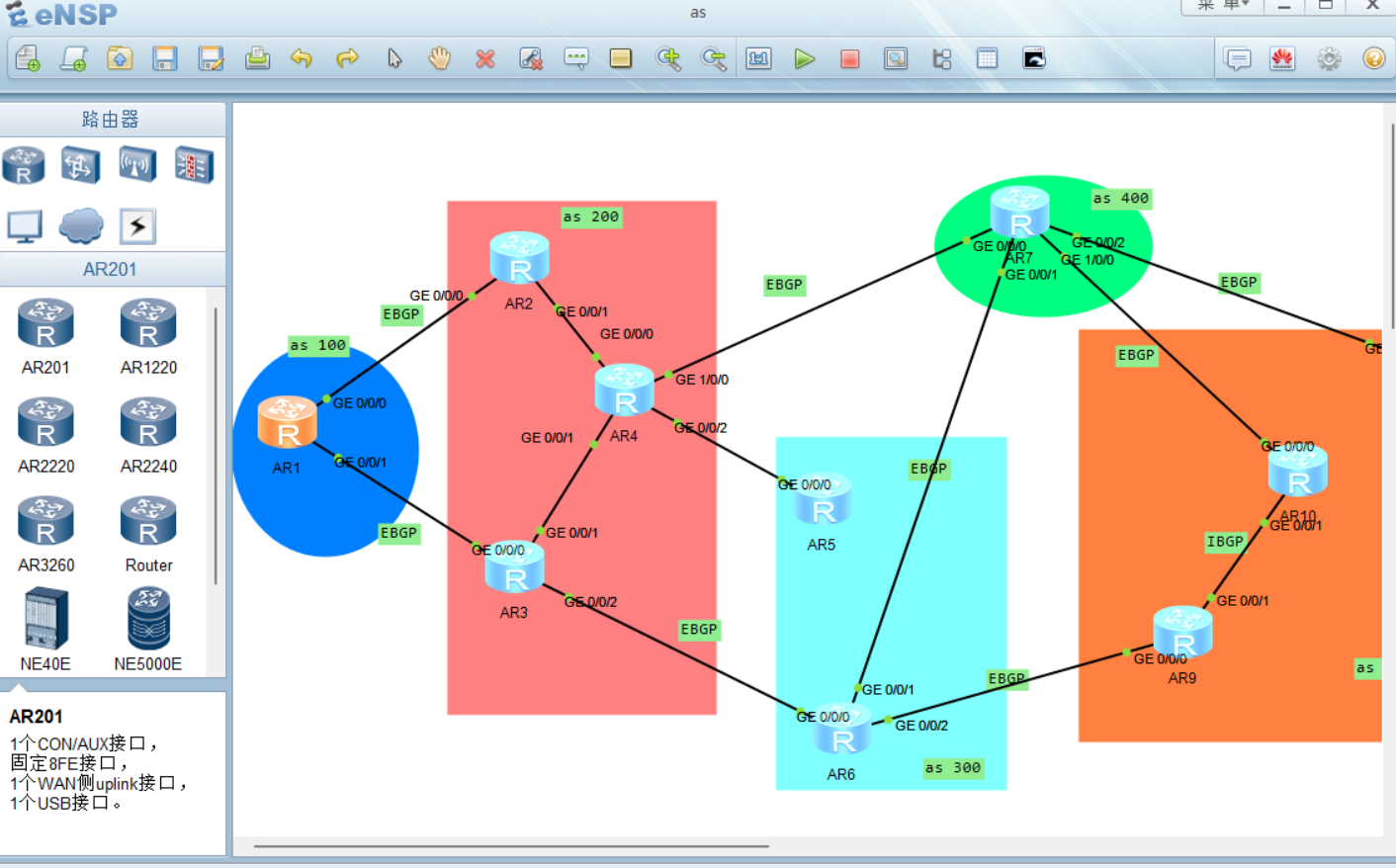
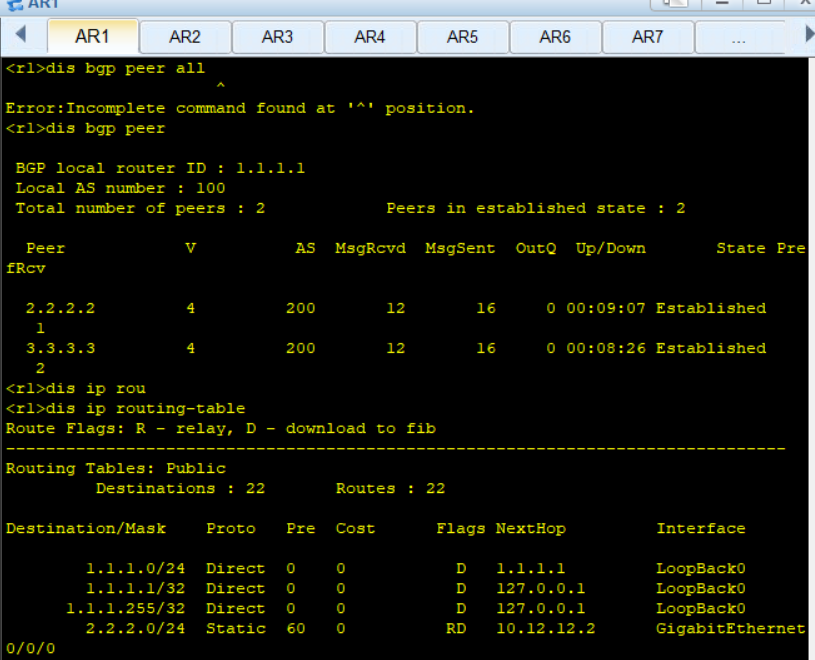

r1
[r1]
Jun  1 2026 19:19:03-08:00 r1 %%01IFPDT/4/IF_STATE(l)[0]:Interface GigabitEthern
et0/0/1 has turned into UP state.
[r1]int l 0
[r1-LoopBack0]ip a 1.1.1.1 24
[r1-LoopBack0]int l 1
[r1-LoopBack1]ip a 192.168.1.1 24
[r1-LoopBack1]q
[r1]int g 0/0/0
[r1-GigabitEthernet0/0/0]ip a 10.12.12.1 24
Jun  1 2026 19:22:05-08:00 r1 %%01IFNET/4/LINK_STATE(l)[1]:The line protocol IP
on the interface GigabitEthernet0/0/0 has entered the UP state.
[r1-GigabitEthernet0/0/0]int g 0/0/1
[r1-GigabitEthernet0/0/1]ip a 10.13.13.1 24
Jun  1 2026 19:22:24-08:00 r1 %%01IFNET/4/LINK_STATE(l)[2]:The line protocol IP
on the interface GigabitEthernet0/0/1 has entered the UP state.
[r1-GigabitEthernet0/0/1]q
[r1]ip route-st
[r1]
[r1]

  Please check whether system data has been changed, and save data in time

  Configuration console time out, please press any key to log on

<r1>sys
Enter system view, return user view with Ctrl+Z.
[r1]ip route-s
[r1]ip route-static 2.2.2.2 24 10.12.12.2
Info: The destination address and mask of the configured static route mismatched
, and the static route 2.2.2.0/24 was generated.
[r1]ip route-static 2.2.2.2 32 10.12.12.2
[r1]ip route-static 3.3.3.3 32 10.13.13.3
[r1]bgp 100
[r1-bgp]ro
[r1-bgp]route-id 1.1.1.1
        ^
Error: Unrecognized command found at '^' position.
[r1-bgp]router-i
[r1-bgp]router-id
                  ^
Error:Incomplete command found at '^' position.
[r1-bgp]rout
[r1-bgp]router-id 1.1.1.1
[r1-bgp]peer 2.2.2.2 as-n
[r1-bgp]peer 2.2.2.2 as-number 200
[r1-bgp]peer 2.2.2.2 conn
[r1-bgp]peer 2.2.2.2 connect-interface l
[r1-bgp]peer 2.2.2.2 connect-interface LoopBack 0
[r1-bgp]peer 2.2.2.2 e
[r1-bgp]peer 2.2.2.2 ebgp-max-hop
[r1-bgp]peer 3.3.3.3 as-n
[r1-bgp]peer 3.3.3.3 as-number 200
[r1-bgp]peer 3.3.3.3 con
[r1-bgp]peer 3.3.3.3 connect-interface l
[r1-bgp]peer 3.3.3.3 connect-interface LoopBack 0
[r1-bgp]peer 3.3.3.3 e
[r1-bgp]peer 3.3.3.3 ebgp-max-hop 2
[r1-bgp]peer 2.2.2.2 ebgp-max-hop 2
[r1-bgp]ip
[r1-bgp]ipv4-f
[r1-bgp]ipv4-family unic
[r1-bgp]ipv4-family unicast
[r1-bgp-af-ipv4]network 192.168.1.0 24
r2
[r2]int l 0
[r2-LoopBack0]ip a 2.2.2.2 24
[r2-LoopBack0]int l 1
[r2-LoopBack1]ip a 10.12.12.2 24
[r2-LoopBack1]int l 1
[r2-LoopBack1]ip a 10.24.24.2 24
[r2-LoopBack1]undo ip a 10.24.24.2 24
[r2-LoopBack1]ip a 192.168.2.1 24
[r2-LoopBack1]int g 0/0/0
[r2-GigabitEthernet0/0/0]ip a 10.12.12.2 24
Jun  1 2026 19:27:27-08:00 r2 %%01IFNET/4/LINK_STATE(l)[0]:The line protocol IP
on the interface GigabitEthernet0/0/0 has entered the UP state.
[r2-GigabitEthernet0/0/0]int g 0/0/2
[r2-GigabitEthernet0/0/2]ip a 10.24.24.2 24
[r2-GigabitEthernet0/0/2]

  Please check whether system data has been changed, and save data in time

  Configuration console time out, please press any key to log on

<r2>sys
Enter system view, return user view with Ctrl+Z.
[r2]ip route-static 1.1.1.1 255.255.255.255 10.12.12.1
[r2]ip route-static 3.3.3.3 255.255.255.255 10.24.24.4
[r2]ip route-static 4.4.4.4 255.255.255.255 10.24.24.4
[r2]bgp 200
[r2-bgp] router-id 2.2.2.2
[r2-bgp] peer 1.1.1.1 as-number 100
[r2-bgp] peer 1.1.1.1 connect-interface LoopBack0
[r2-bgp] peer 1.1.1.1 ebgp-max-hop 2
[r2-bgp] peer 3.3.3.3 as-number 200
[r2-bgp] peer 3.3.3.3 connect-interface LoopBack0
[r2-bgp] peer 4.4.4.4 as-number 200
[r2-bgp] peer 4.4.4.4 connect-interface LoopBack0
[r2-bgp]ipv4-family unicast
[r2-bgp-af-ipv4]  network 192.168.2.0 255.255.255.0
r3
[s3]int l 0
[s3-LoopBack0]ip a 3.3.3.3 24
[s3-LoopBack0]int l 1
[s3-LoopBack1]ip a 192.168.3.1 24
[s3-LoopBack1]int g 0/0/0
[s3-GigabitEthernet0/0/0]ip a 10.13.13.3 24
Jun  1 2026 19:28:42-08:00 s3 %%01IFNET/4/LINK_STATE(l)[0]:The line protocol IP
on the interface GigabitEthernet0/0/0 has entered the UP state.
[s3-GigabitEthernet0/0/0]int g 0/0/1
[s3-GigabitEthernet0/0/1]ip a 10.34.34.3 24
Jun  1 2026 19:29:04-08:00 s3 %%01IFNET/4/LINK_STATE(l)[1]:The line protocol IP
on the interface GigabitEthernet0/0/1 has entered the UP state.
[s3-GigabitEthernet0/0/1]

  Please check whether system data has been changed, and save data in time

  Configuration console time out, please press any key to log on

<s3>sys
Enter system view, return user view with Ctrl+Z.
[s3]ip route-static 1.1.1.1 255.255.255.255 10.13.13.1
[s3]ip route-static 2.2.2.2 255.255.255.255 10.34.34.4
[s3]ip route-static 4.4.4.4 255.255.255.255 10.34.34.4
[s3]bgp 200
[s3-bgp] router-id 3.3.3.3
[s3-bgp] peer 1.1.1.1 as-number 100
[s3-bgp] peer 1.1.1.1 connect-interface LoopBack0
[s3-bgp] peer 1.1.1.1 ebgp-max-hop 2
[s3-bgp] peer 2.2.2.2 as-number 200
[s3-bgp] peer 2.2.2.2 connect-interface LoopBack0
[s3-bgp] peer 4.4.4.4 as-number 200
[s3-bgp] peer 4.4.4.4 connect-interface LoopBack0
[s3-bgp]ipv4-family unicast
[s3-bgp-af-ipv4]  network 192.168.3.0 255.255.255.0
r4
[r4]int l 0
[r4-LoopBack0]ip a 4.4.4.4 24
[r4-LoopBack0]int l 1
[r4-LoopBack1]ip a 192.168.4.1 24
[r4-LoopBack1]int g 0/0/0
[r4-GigabitEthernet0/0/0]ip a 10.24.24.4 24
Jun  1 2026 19:30:48-08:00 r4 %%01IFNET/4/LINK_STATE(l)[0]:The line protocol IP
on the interface GigabitEthernet0/0/0 has entered the UP state.
[r4-GigabitEthernet0/0/0]int g 0/0/1
[r4-GigabitEthernet0/0/1]ip a 10.34.34.4 24
Jun  1 2026 19:31:11-08:00 r4 %%01IFNET/4/LINK_STATE(l)[1]:The line protocol IP
on the interface GigabitEthernet0/0/1 has entered the UP state.
[r4-GigabitEthernet0/0/1]int g 0/0/2
[r4-GigabitEthernet0/0/2]ip a 10.45.45.4 24
[r4-GigabitEthernet0/0/2]
Jun  1 2026 19:31:29-08:00 r4 %%01IFNET/4/LINK_STATE(l)[2]:The line protocol IP
on the interface GigabitEthernet0/0/2 has entered the UP state.
[r4-GigabitEthernet0/0/2]int g 1/0/0
[r4-GigabitEthernet1/0/0]ip a 10.47.47.4 24
[r4-GigabitEthernet1/0/0]
Jun  1 2026 19:31:52-08:00 r4 %%01IFNET/4/LINK_STATE(l)[3]:The line protocol IP
on the interface GigabitEthernet1/0/0 has entered the UP state.
[r4-GigabitEthernet1/0/0]

  Please check whether system data has been changed, and save data in time

  Configuration console time out, please press any key to log on

<r4>sys
Enter system view, return user view with Ctrl+Z.
[r4]ip route-static 2.2.2.2 255.255.255.255 10.24.24.2
[r4]ip route-static 3.3.3.3 255.255.255.255 10.34.34.3
[r4]ip route-static 5.5.5.5 255.255.255.255 10.45.45.5
[r4]ip route-static 7.7.7.7 255.255.255.255 10.47.47.7
[r4]bgp 200
[r4-bgp] router-id 4.4.4.4
[r4-bgp] peer 2.2.2.2 as-number 200
[r4-bgp] peer 2.2.2.2 connect-interface LoopBack0
[r4-bgp] peer 3.3.3.3 as-number 200
[r4-bgp] peer 3.3.3.3 connect-interface LoopBack0
[r4-bgp] peer 5.5.5.5 as-number 300
[r4-bgp] peer 5.5.5.5 connect-interface LoopBack0
[r4-bgp] peer 5.5.5.5 ebgp-max-hop 2
[r4-bgp] peer 7.7.7.7 as-number 400
[r4-bgp] peer 7.7.7.7 connect-interface LoopBack0
[r4-bgp] peer 7.7.7.7 ebgp-max-hop 2
[r4-bgp]ipv4-family unicast
[r4-bgp-af-ipv4]  network 192.168.4.0 255.255.255.0
r5
[r5]int l 0
[r5-LoopBack0]ip a 5.5.5.5 24
[r5-LoopBack0]int l 1
[r5-LoopBack1]ip a 192.168.5.1 24
[r5-LoopBack1]int g 0/0/0
[r5-GigabitEthernet0/0/0]ip a 10.45.45.5 24
Jun  1 2026 19:33:04-08:00 r5 %%01IFNET/4/LINK_STATE(l)[0]:The line protocol IP
on the interface GigabitEthernet0/0/0 has entered the UP state.
[r5-GigabitEthernet0/0/0]int g 0/0/1
[r5-GigabitEthernet0/0/1]ip a 10.56.56.5 24
[r5-GigabitEthernet0/0/1]int g 0/0/2
[r5-GigabitEthernet0/0/2]ip a 10.57.57.5 24
[r5-GigabitEthernet0/0/2]

  Please check whether system data has been changed, and save data in time

  Configuration console time out, please press any key to log on

<r5>sys
Enter system view, return user view with Ctrl+Z.
[r5]ip route-static 4.4.4.4 255.255.255.255 10.45.45.4
[r5]ip route-static 6.6.6.6 255.255.255.255 10.56.56.6
[r5]ip route-static 7.7.7.7 255.255.255.255 10.57.57.7
[r5]bgp 300
[r5-bgp] router-id 5.5.5.5
[r5-bgp] peer 4.4.4.4 as-number 200
[r5-bgp] peer 4.4.4.4 connect-interface LoopBack0
[r5-bgp] peer 4.4.4.4 ebgp-max-hop 2
[r5-bgp] peer 6.6.6.6 as-number 300
[r5-bgp] peer 6.6.6.6 connect-interface LoopBack0
[r5-bgp] peer 7.7.7.7 as-number 400
[r5-bgp] peer 7.7.7.7 connect-interface LoopBack0
[r5-bgp] peer 7.7.7.7 ebgp-max-hop 2
[r5-bgp]ipv4-family unicast
[r5-bgp-af-ipv4]  network 192.168.5.0 255.255.255.0
r6
[r6]int l 0
[r6-LoopBack0]ip a 6.6.6.6 24
[r6-LoopBack0]int l 1
[r6-LoopBack1]ipa 192.168.6.1 24
              ^
Error: Unrecognized command found at '^' position.
[r6-LoopBack1]ip a 192.168.6.1 24
[r6-LoopBack1]int g 0/0/0
[r6-GigabitEthernet0/0/0]ip a 10.56.56.6 24
[r6-GigabitEthernet0/0/0]
Jun  1 2026 19:35:24-08:00 r6 %%01IFNET/4/LINK_STATE(l)[0]:The line protocol IP
on the interface GigabitEthernet0/0/0 has entered the UP state.
[r6-GigabitEthernet0/0/0]int g 0/0/1
[r6-GigabitEthernet0/0/1]ip a 10.69.69.6 24
Jun  1 2026 19:35:37-08:00 r6 %%01IFNET/4/LINK_STATE(l)[1]:The line protocol IP
on the interface GigabitEthernet0/0/1 has entered the UP state.
[r6-GigabitEthernet0/0/1]

  Please check whether system data has been changed, and save data in time

  Configuration console time out, please press any key to log on

<r6>sys
Enter system view, return user view with Ctrl+Z.
[r6]ip route-static 5.5.5.5 255.255.255.255 10.56.56.5
[r6]ip route-static 9.9.9.9 255.255.255.255 10.69.69.9
[r6]bgp 300
[r6-bgp] router-id 6.6.6.6
[r6-bgp] peer 5.5.5.5 as-number 300
[r6-bgp] peer 5.5.5.5 connect-interface LoopBack0
[r6-bgp] peer 9.9.9.9 as-number 500
[r6-bgp] peer 9.9.9.9 connect-interface LoopBack0
[r6-bgp] peer 9.9.9.9 ebgp-max-hop 2
[r6-bgp]ipv4-family unicast
[r6-bgp-af-ipv4]  network 192.168.6.0 255.255.255.0
r7
[r7]int l 0
[r7-LoopBack0]ip a 7.7.7.7 24
[r7-LoopBack0]int l 1
[r7-LoopBack1]ip a 192.168.7.1 24
[r7-LoopBack1]int g 0/0/0
[r7-GigabitEthernet0/0/0]ip a 10.47.47.7 24
Jun  1 2026 19:36:24-08:00 r7 %%01IFNET/4/LINK_STATE(l)[0]:The line protocol IP
on the interface GigabitEthernet0/0/0 has entered the UP state.
[r7-GigabitEthernet0/0/0]int g 0/0/1
[r7-GigabitEthernet0/0/1]ip a 10.57.57.7 24
Jun  1 2026 19:36:35-08:00 r7 %%01IFNET/4/LINK_STATE(l)[1]:The line protocol IP
on the interface GigabitEthernet0/0/1 has entered the UP state.
[r7-GigabitEthernet0/0/1]int g 1/0/0
[r7-GigabitEthernet1/0/0]ip a 10.78.78.7 24
[r7-GigabitEthernet1/0/0]
Jun  1 2026 19:36:49-08:00 r7 %%01IFNET/4/LINK_STATE(l)[2]:The line protocol IP
on the interface GigabitEthernet1/0/0 has entered the UP state.
[r7-GigabitEthernet1/0/0]int g 0/0/2
[r7-GigabitEthernet0/0/2]ip a 10.710.710.7 24
                                           ^
Error: Unrecognized command found at '^' position.
[r7-GigabitEthernet0/0/2]ip a 10.71.71.7 24
[r7-GigabitEthernet0/0/2]
Jun  1 2026 19:37:33-08:00 r7 %%01IFNET/4/LINK_STATE(l)[3]:The line protocol IP
on the interface GigabitEthernet0/0/2 has entered the UP state.
[r7-GigabitEthernet0/0/2]

  Please check whether system data has been changed, and save data in time

  Configuration console time out, please press any key to log on

<r7>sys
Enter system view, return user view with Ctrl+Z.
[r7]ip route-static 4.4.4.4 255.255.255.255 10.47.47.4
[r7]ip route-static 5.5.5.5 255.255.255.255 10.57.57.5
[r7]ip route-static 8.8.8.8 255.255.255.255 10.78.78.8
[r7]ip route-static 10.10.10.10 255.255.255.255 10.71.71.10
[r7]bgp 400
[r7-bgp] router-id 7.7.7.7
[r7-bgp] peer 4.4.4.4 as-number 200
[r7-bgp] peer 4.4.4.4 connect-interface LoopBack0
[r7-bgp] peer 4.4.4.4 ebgp-max-hop 2
[r7-bgp] peer 5.5.5.5 as-number 300
[r7-bgp] peer 5.5.5.5 connect-interface LoopBack0
[r7-bgp] peer 5.5.5.5 ebgp-max-hop 2
[r7-bgp] peer 8.8.8.8 as-number 500
[r7-bgp] peer 8.8.8.8 connect-interface LoopBack0
[r7-bgp] peer 8.8.8.8 ebgp-max-hop 2
[r7-bgp] peer 10.10.10.10 as-number 500
[r7-bgp] peer 10.10.10.10 connect-interface LoopBack0
[r7-bgp] peer 10.10.10.10 ebgp-max-hop 2
[r7-bgp]ipv4-family unicast
[r7-bgp-af-ipv4]  network 192.168.7.0 255.255.255.0
r8
[r8]int l 0
[r8-LoopBack0]ip a 8.8.8.8 24
[r8-LoopBack0]int l 1
[r8-LoopBack1]ip a 192.168.8.1 24
[r8-LoopBack1]int g 0/0/0
[r8-GigabitEthernet0/0/0]ip a 10.78.78.8 24
Jun  1 2026 19:38:25-08:00 r8 %%01IFNET/4/LINK_STATE(l)[0]:The line protocol IP
on the interface GigabitEthernet0/0/0 has entered the UP state.
[r8-GigabitEthernet0/0/0]

  Please check whether system data has been changed, and save data in time

  Configuration console time out, please press any key to log on

<r8>sys
Enter system view, return user view with Ctrl+Z.
[r8]ip route-static 7.7.7.7 255.255.255.255 10.78.78.7
[r8]ip route-static 9.9.9.9 255.255.255.255 10.78.78.7
[r8]ip route-static 10.10.10.10 255.255.255.255 10.78.78.7
[r8]bgp 500
[r8-bgp] router-id 8.8.8.8
[r8-bgp] peer 7.7.7.7 as-number 400
[r8-bgp] peer 7.7.7.7 connect-interface LoopBack0
[r8-bgp] peer 7.7.7.7 ebgp-max-hop 2
[r8-bgp] peer 9.9.9.9 as-number 500
[r8-bgp] peer 9.9.9.9 connect-interface LoopBack0
[r8-bgp] peer 10.10.10.10 as-number 500
[r8-bgp] peer 10.10.10.10 connect-interface LoopBack0
[r8-bgp]ipv4-family unicast
[r8-bgp-af-ipv4]  network 192.168.8.0 255.255.255.0
[r8-bgp-af-ipv4]network 192.168.8.0 255.255.255.0
[r8-bgp-af-ipv4]q
[r8-bgp]dis th
[V200R003C00]
#
bgp 500
 router-id 8.8.8.8
 peer 7.7.7.7 as-number 400
 peer 7.7.7.7 ebgp-max-hop 2
 peer 7.7.7.7 connect-interface LoopBack0
 peer 9.9.9.9 as-number 500
 peer 9.9.9.9 connect-interface LoopBack0
 peer 10.10.10.10 as-number 500
 peer 10.10.10.10 connect-interface LoopBack0
r9
[s9]int l 0
[s9-LoopBack0]ip a 9.9.9.9 24
[s9-LoopBack0]int l 1
[s9-LoopBack1]ip a 192.168.9.1 24
[s9-LoopBack1]int g 0/0/0
[s9-GigabitEthernet0/0/0]ip a 10.69.69.9
                                         ^
Error:Incomplete command found at '^' position.
[s9-GigabitEthernet0/0/0]ip a 10.69.69.9 24
Jun  1 2026 19:39:14-08:00 s9 %%01IFNET/4/LINK_STATE(l)[0]:The line protocol IP
on the interface GigabitEthernet0/0/0 has entered the UP state.
[s9-GigabitEthernet0/0/0]int g 0/0/1
[s9-GigabitEthernet0/0/1]ip a 10.91.91.9 24
Jun  1 2026 19:39:29-08:00 s9 %%01IFNET/4/LINK_STATE(l)[1]:The line protocol IP
on the interface GigabitEthernet0/0/1 has entered the UP state.
[s9-GigabitEthernet0/0/1]

  Please check whether system data has been changed, and save data in time

  Configuration console time out, please press any key to log on

<s9>sys
Enter system view, return user view with Ctrl+Z.
[s9]ip rou
[s9]ip route-s
[s9]ip route-static 6.6.6.6 32 10.69.69.10
[s9]ip rou
[s9]ip route-s
[s9]ip route-static 8.8.8.8 32 10.91.91.10
[s9]ip rou
[s9]ip route-s
[s9]ip route-static 10.10.10.10 32 10.91.91.10
[s9]bgp 500
[s9-bgp] router-id 9.9.9.9
[s9-bgp] peer 6.6.6.6 as-number 300
[s9-bgp] peer 6.6.6.6 connect-interface LoopBack0
[s9-bgp] peer 6.6.6.6 ebgp-max-hop 2
[s9-bgp] peer 8.8.8.8 as-number 500
[s9-bgp] peer 8.8.8.8 connect-interface LoopBack0
[s9-bgp] peer 10.10.10.10 as-number 500
[s9-bgp] peer 10.10.10.10 connect-interface LoopBack0
[s9-bgp]ipv4-family unicast
[s9-bgp-af-ipv4]  network 192.168.9.0 255.255.255.0
s10
[s 10]
[s 10]int l 0
[s 10-LoopBack0]ip a 10.10.10.10 24
[s 10-LoopBack0]int l 1
[s 10-LoopBack1]ip a 192.168.10.1 24
[s 10-LoopBack1]int g 0/0/0
[s 10-GigabitEthernet0/0/0]ip a 10.71.71.10 24
Jun  1 2026 19:40:27-08:00 s 10 %%01IFNET/4/LINK_STATE(l)[0]:The line protocol I
P on the interface GigabitEthernet0/0/0 has entered the UP state.
[s 10-GigabitEthernet0/0/0]int g 0/0/1
[s 10-GigabitEthernet0/0/1]ip a 10.91.91.10 24
Jun  1 2026 19:40:48-08:00 s 10 %%01IFNET/4/LINK_STATE(l)[1]:The line protocol I
P on the interface GigabitEthernet0/0/1 has entered the UP state.
[s 10-GigabitEthernet0/0/1]

  Please check whether system data has been changed, and save data in time

  Configuration console time out, please press any key to log on

<s 10>sys
Enter system view, return user view with Ctrl+Z.
[s 10]ip rout
[s 10]ip route-s
[s 10]ip route-static 7.7.7.7 32 10.71.71 7
                                 ^
Error: Wrong parameter found at '^' position.
[s 10]ip rou
[s 10]ip route-s
[s 10]ip route-static 7.7.7.7 32 10.71.71.7
[s 10]ip rou
[s 10]ip route-s
[s 10]ip route-static 8.8.8.8 32 10.71.71.7
[s 10]ip rou
[s 10]ip route-s
[s 10]ip route-static 9.9.9.9 32 10.91.91.9
[s 10]bgp 500
[s 10-bgp] router-id 10.10.10.10
[s 10-bgp] peer 7.7.7.7 as-number 400
[s 10-bgp] peer 7.7.7.7 connect-interface LoopBack0
[s 10-bgp] peer 7.7.7.7 ebgp-max-hop 2
[s 10-bgp] peer 8.8.8.8 as-number 500
[s 10-bgp] peer 8.8.8.8 connect-interface LoopBack0
[s 10-bgp] peer 9.9.9.9 as-number 500
[s 10-bgp] peer 9.9.9.9 connect-interface LoopBack0
[s 10-bgp]ipv4-family unicast
[s 10-bgp-af-ipv4]  network 192.168.10.0 255.255.255.0