不支持的客户端评估
cs
var blogs = await context.Blogs
    .OrderByDescending(blog => blog.Rating)
    .Select(
        blog => new { Id = blog.BlogId, Url = StandardizeUrl(blog.Url) })
    .ToListAsync();//这样可以,仅仅对数据加工


public static string StandardizeUrl(string url)
{
    url = url.ToLower();

    if (!url.StartsWith("http://"))
    {
        url = string.Concat("http://", url);
    }

    return url;
}

var blogs = await context.Blogs
    .Where(blog => StandardizeUrl(blog.Url).Contains("dotnet"))
    .ToListAsync();
问题在于:StandardizeUrl(blog.Url) 这个自定义方法无法翻译成 SQL。
1. EF 尝试翻译 Where 条件 → 失败(不认识 StandardizeUrl 方法)
2. 执行 SELECT * FROM Blogs  ← 把所有数据从数据库拉到内存
3. 在内存中对每条记录调用 StandardizeUrl 然后过滤
跟踪与 No-Tracking 查询
跟踪查询
默认情况下,返回实体类型的查询会跟踪。 跟踪查询意味着对实体实例所做的任何更改都由SaveChanges保留。 在以下示例中,在SaveChanges过程中检测到博客评分的更改并将其保存到数据库:
cs
var blog = await context.Blogs.SingleOrDefaultAsync(b => b.BlogId == 1);
blog.Rating = 5;
await context.SaveChangesAsync();
当结果在跟踪查询中返回时,EF Core 会检查实体是否已在上下文中。 如果 EF Core 找到现有实体,则返回相同的实例,这可能会减少内存,并且比无跟踪查询更快。 EF Core 不会用数据库值覆盖条目中实体属性的当前值和原始值。 如果在上下文中找不到该实体,EF Core 将创建一个新的实体实例并将其附加到上下文。 查询结果不包含添加到上下文但尚未保存到数据库的任何实体。
无跟踪查询
在只读方案中使用结果时,无跟踪查询非常有用。 它们通常执行速度更快,因为无需设置更改跟踪信息。 如果从数据库检索到的实体不需要更新,则应使用无跟踪查询。 可以将单个查询设置为无跟踪。 不跟踪查询还会根据数据库中的内容给出结果,而不考虑任何本地修改或添加的实体。
cs
var blogs = await context.Blogs
    .AsNoTracking()
    .ToListAsync();
标识解析
Blogs 表:
Id=1, Name="技术博客"
Posts 表:
Id=1, BlogId=1, Title="EF Core 详解"
Id=2, BlogId=1, Title="C# 进阶"
查询:博客及其所有文章
// 跟踪查询
var query = context.Blogs
    .Include(b => b.Posts)
    .FirstOrDefault(b => b.Id == 1);

// 结果:blog 对象只有一个,两个 post 的 Blog 属性都指向同一个 blog 实例
无跟踪查询(普通)
var query = context.Blogs
    .AsNoTracking()
    .Include(b => b.Posts)
    .FirstOrDefault(b => b.Id == 1);

// 问题:两个 post 的 Blog 属性指向不同的 blog 实例!
// 即使数据相同,也是两个对象
无跟踪但保留标识解析
var query = context.Blogs
    .AsNoTrackingWithIdentityResolution()  // 新增的方法
    .Include(b => b.Posts)
    .FirstOrDefault(b => b.Id == 1);

// 结果:无跟踪(context 不追踪变化),但标识解析保留
// 两个 post 的 Blog 属性指向同一个实例
全局更改追踪
cs
protected override void OnConfiguring(DbContextOptionsBuilder optionsBuilder)
{
    optionsBuilder
        .UseSqlServer(@"Server=(localdb)\mssqllocaldb;Database=EFQuerying.Tracking;Trusted_Connection=True;ConnectRetryCount=0")
        .UseQueryTrackingBehavior(QueryTrackingBehavior.NoTracking);
}
是否跟踪
结果集不包含任何实体类型,则不会执行任何跟踪例如
cs
var blog = context.Blogs
    .Select(
        b =>
            new { Id = b.BlogId, b.Url });//不会跟踪
如果 EF Core 实例化一个实体实例用于客户端评估,则该实例会被跟踪。 在这里,由于我们将实体传递到 blog 客户端方法 StandardizeURL,EF Core 也会跟踪博客实例。
cs
var blogs = await context.Blogs
    .OrderByDescending(blog => blog.Rating)
    .Select(
        blog => new { Id = blog.BlogId, Url = StandardizeUrl(blog) })
    .ToListAsync();


public static string StandardizeUrl(Blog blog)
{
    var url = blog.Url.ToLower();

    if (!url.StartsWith("http://"))
    {
        url = string.Concat("http://", url);
    }

    return url;
}
预先加载
如果包含多个 ,可能带来性能问题参阅 "单一查询与拆分查询"。,例如笛卡尔爆炸,大厂解决办法就是进行数据冗余,两张表合为一张表
cs
using (var context = new BloggingContext())
{
    var blogs = await context.Blogs
        .Include(blog => blog.Posts)
        .Include(blog => blog.Owner)
        .ToListAsync();
}
对于include,建议最多包含3个,使用select排除不必要的列,使用无跟踪,数据量大可以考虑拆分查询,拆分查询也有性能问题,可以使用sql语句
包括多个级别
例如,在Blogs查询时,包括Posts,然后想要同时包含Author和Tags//Posts 若要包含这两者,需要指定从根目录开始的每个包含路径。 例如,Blog -> Posts -> Author 和 Blog -> Posts -> Tags。 这并不意味着你将获得冗余联接;在大多数情况下,EF 会在生成 SQL 时合并联接。
cs
using (var context = new BloggingContext())
{
    var blogs = await context.Blogs
        .Include(blog => blog.Posts)
        .ThenInclude(post => post.Author)
        .Include(blog => blog.Posts)
        .ThenInclude(post => post.Tags)
        .ToListAsync();
}


或者

using (var context = new BloggingContext())
{
    var blogs = await context.Blogs
        .Include(blog => blog.Owner.AuthoredPosts)
        .ThenInclude(post => post.Blog.Owner.Photo)
        .ToListAsync();
}
筛选包含
cs
using (var context = new BloggingContext())
{
    var filteredBlogs = await context.Blogs
        .Include(
            blog => blog.Posts
                .Where(post => post.BlogId == 1)
                .OrderByDescending(post => post.Title)
                .Take(5))
        .ToListAsync();
}

SELECT [b].[Id], [b].[Name], [b].[OwnerId],
       [p].[Id], [p].[Title], [p].[BlogId], [p].[Content]
FROM [Blogs] AS [b]
LEFT JOIN (
    SELECT [p].[Id], [p].[Title], [p].[BlogId], [p].[Content],
           ROW_NUMBER() OVER (
               PARTITION BY [p].[BlogId]
               ORDER BY [p].[Title] DESC
           ) AS [row_num]
    FROM [Posts] AS [p]
    WHERE [p].[BlogId] = 1  -- 注意:这里被硬编码了!
) AS [p] ON [b].[Id] = [p].[BlogId] AND [p].[row_num] <= 5
ORDER BY [b].[Id]
TPH模式使用
cs
public class SchoolContext : DbContext
{
    public DbSet<Person> People { get; set; }
    public DbSet<School> Schools { get; set; }

    protected override void OnModelCreating(ModelBuilder modelBuilder)
    {
        modelBuilder.Entity<School>().HasMany(s => s.Students).WithOne(s => s.School);
    }
}

public class Person
{
    public int Id { get; set; }
    public string Name { get; set; }
}

public class Student : Person
{
    public School School { get; set; }
}

public class School
{
    public int Id { get; set; }
    public string Name { get; set; }

    public List<Student> Students { get; set; }
}
1使用强制转换
cs
context.People.Include(person => ((Student)person).School).ToList()2使用as 运算符
cs
context.People.Include(person => (person as Student).School).ToList()3使用具有 string 类型参数的 Include 重载
cs
context.People.Include("School").ToList()//应该是不可以的,使用context.Students应该可行自动包含
cs
modelBuilder.Entity<Theme>().Navigation(e => e.ColorScheme).AutoInclude();


using (var context = new BloggingContext())
{
    var themes = await context.Themes.ToListAsync();//自动包含ColorScheme
}

//如果想忽略
using (var context = new BloggingContext())
{
    var themes = await context.Themes.IgnoreAutoIncludes().ToListAsync();
}
显示加载
cs
using (var context = new BloggingContext())
{
    var blog = await context.Blogs
        .SingleAsync(b => b.BlogId == 1);

    await context.Entry(blog)
        .Collection(b => b.Posts)
        .LoadAsync();//执行后 blog.Posts 被填充

    await context.Entry(blog)
        .Reference(b => b.Owner)
        .LoadAsync();
}Collection用于 一对多/多对多 关系(导航属性是集合类型)
Reference用于 一对一/多对一 关系(导航属性是单个对象)
Query() 方法让你从"加载导航属性"切换到"查询导航属性"例如
cs
using (var context = new BloggingContext())
{
    var blog = await context.Blogs
        .SingleAsync(b => b.BlogId == 1);

    var goodPosts = await context.Entry(blog)
        .Collection(b => b.Posts)
        .Query()
        .Where(p => p.Rating > 3)
        .ToListAsync();
}

using (var context = new BloggingContext())
{
    var blog = await context.Blogs
        .SingleAsync(b => b.BlogId == 1);

    var postCount = await context.Entry(blog)
        .Collection(b => b.Posts)
        .Query()
        .CountAsync();
}
延迟加载
使用代理延迟加载
下载 Microsoft.EntityFrameworkCore.Proxies包
cs
protected override void OnConfiguring(DbContextOptionsBuilder optionsBuilder)
    => optionsBuilder
        .UseLazyLoadingProxies()
        .UseSqlServer(myConnectionString);
或者
.AddDbContext<BloggingContext>(
    b => b.UseLazyLoadingProxies()
          .UseSqlServer(myConnectionString));
需要在导航属性前加上Virtual关键字
cs
public class Blog
{
    public int Id { get; set; }
    public string Name { get; set; }

    public virtual ICollection<Post> Posts { get; set; }
}

public class Post
{
    public int Id { get; set; }
    public string Title { get; set; }
    public string Content { get; set; }

    public virtual Blog Blog { get; set; }
}
不使用代理模式
cs
public class Blog
{
    private ICollection<Post> _posts;

    public Blog()
    {
    }

    private Blog(ILazyLoader lazyLoader)
    {
        LazyLoader = lazyLoader;
    }

    private ILazyLoader LazyLoader { get; set; }

    public int Id { get; set; }
    public string Name { get; set; }

    public ICollection<Post> Posts
    {
        get => LazyLoader.Load(this, ref _posts);
        set => _posts = value;
    }
}

public class Post
{
    private Blog _blog;

    public Post()
    {
    }

    private Post(ILazyLoader lazyLoader)
    {
        LazyLoader = lazyLoader;
    }

    private ILazyLoader LazyLoader { get; set; }

    public int Id { get; set; }
    public string Title { get; set; }
    public string Content { get; set; }

    public Blog Blog
    {
        get => LazyLoader.Load(this, ref _blog);
        set => _blog = value;
    }
}
但是,它需要对 ILazyLoader 服务进行引用,该服务在 Microsoft.EntityFrameworkCore.Abstractions 包中定义。 此包包含一组最小化的类型,因此对它的依赖几乎没有影响。 但是,为了在实体类型中完全避免依赖任何 EF Core 包,可以将方法以委托的形式注入 ILazyLoader.Load 。 例如:
cs
public class Blog
{
    private ICollection<Post> _posts;

    public Blog()
    {
    }

    private Blog(Action<object, string> lazyLoader)
    {
        LazyLoader = lazyLoader;
    }

    private Action<object, string> LazyLoader { get; set; }

    public int Id { get; set; }
    public string Name { get; set; }

    public ICollection<Post> Posts
    {
        get => LazyLoader.Load(this, ref _posts);
        set => _posts = value;
    }
}

public class Post
{
    private Blog _blog;

    public Post()
    {
    }

    private Post(Action<object, string> lazyLoader)
    {
        LazyLoader = lazyLoader;
    }

    private Action<object, string> LazyLoader { get; set; }

    public int Id { get; set; }
    public string Title { get; set; }
    public string Content { get; set; }

    public Blog Blog
    {
        get => LazyLoader.Load(this, ref _blog);
        set => _blog = value;
    }
}
cs
public static class PocoLoadingExtensions
{
    public static TRelated Load<TRelated>(
        this Action<object, string> loader,
        object entity,
        ref TRelated navigationField,
        [CallerMemberName] string navigationName = null)
        where TRelated : class
    {
        loader?.Invoke(entity, navigationName);

        return navigationField;
    }
}
最后注意
延迟加载委托的构造函数参数名必须称为 "lazyLoader"。 为将来的版本计划使用不同于此名称的配置。
后备字段,必须要符合约定
拆分查询
cs
using (var context = new BloggingContext())
{
    var blogs = await context.Blogs
        .Include(blog => blog.Posts)
        .AsSplitQuery()//使用拆分
        .ToListAsync();
}


生成的sql语句
{

SELECT [b].[BlogId], [b].[OwnerId], [b].[Rating], [b].[Url]
FROM [Blogs] AS [b]
ORDER BY [b].[BlogId]

SELECT [p].[PostId], [p].[AuthorId], [p].[BlogId], [p].[Content], [p].[Rating], [p].[Title], [b].[BlogId]
FROM [Blogs] AS [b]
INNER JOIN [Posts] AS [p] ON [b].[BlogId] = [p].[BlogId]
ORDER BY [b].[BlogId]

}
全局启用拆分
cs
protected override void OnConfiguring(DbContextOptionsBuilder optionsBuilder)
{
    optionsBuilder
        .UseSqlServer(
            @"Server=(localdb)\mssqllocaldb;Database=EFQuerying;Trusted_Connection=True;ConnectRetryCount=0",
            o => o.UseQuerySplittingBehavior(QuerySplittingBehavior.SplitQuery));
}


如果不想拆分
using (var context = new SplitQueriesBloggingContext())
{
    var blogs = await context.Blogs
        .Include(blog => blog.Posts)
        .AsSingleQuery()
        .ToListAsync();
}
复杂查询运算
cs
var query = from photo in context.Set<PersonPhoto>()
            join person in context.Set<Person>()
                on photo.PersonPhotoId equals person.PhotoId
            select new { person, photo };

//键选择器是匿名类型
var query = from photo in context.Set<PersonPhoto>()
            join person in context.Set<Person>()
                on new { Id = (int?)photo.PersonPhotoId, photo.Caption }
                equals new { Id = person.PhotoId, Caption = "SN" }
            select new { person, photo };

SELECT [p].[PersonId], [p].[Name], [p].[PhotoId], [p0].[PersonPhotoId], [p0].[Caption], [p0].[Photo]
FROM [PersonPhoto] AS [p0]
INNER JOIN [Person] AS [p] ON ([p0].[PersonPhotoId] = [p].[PhotoId] AND ([p0].[Caption] = N'SN'))
GroupJoin
cs
var query = from b in context.Set<Blog>()
    join p in context.Set<Post>()
    on b.BlogId equals p.BlogId into grouping
    select new { b, grouping };

每个 Blog 对应一个 IEnumerable<Post> 分组
cs
var query = from b in context.Set<Blog>()
    join p in context.Set<Post>()
    on b.BlogId equals p.BlogId into grouping
    select new {
        b,
        Posts = grouping.Where(p => p.Content.Contains("EF")).ToList()
    };

结果:每个 Blog 对应过滤后的 Post 列表
SelectMany
集合选择器不引用外部
当集合选择器未引用外部源中的任何内容时,结果是两个数据源的笛卡尔乘积。
在关系数据库中,它被翻译为 CROSS JOIN
cs
var query = from b in context.Set<Blog>()
            from p in context.Set<Post>()
            select new { b, p };

SELECT [b].[BlogId], [b].[OwnerId], [b].[Rating], [b].[Url], [p].[PostId], [p].[AuthorId], [p].[BlogId], [p].[Content], [p].[Rating], [p].[Title]
FROM [Blogs] AS [b]
CROSS JOIN [Posts] AS [p]
在 where 子句中引用外部元素
当集合选择器具有引用外部元素的 where 子句时,EF Core 会将其转换为数据库联接,例如(inner join,left join),并使用谓词作为联接条件。
通常,加上where 会默认为inner join 但是,如果 DefaultIfEmpty 对集合选择器应用,则外部元素将与内部元素的默认值连接 为 left join了。
cs
var query = from b in context.Set<Blog>()
            from p in context.Set<Post>().Where(p => b.BlogId == p.BlogId)
            select new { b, p };

var query2 = from b in context.Set<Blog>()
             from p in context.Set<Post>().Where(p => b.BlogId == p.BlogId).DefaultIfEmpty()
             select new { b, p };
cs
SELECT [b].[BlogId], [b].[OwnerId], [b].[Rating], [b].[Url], [p].[PostId], [p].[AuthorId], [p].[BlogId], [p].[Content], [p].[Rating], [p].[Title]
FROM [Blogs] AS [b]
INNER JOIN [Posts] AS [p] ON [b].[BlogId] = [p].[BlogId]

SELECT [b].[BlogId], [b].[OwnerId], [b].[Rating], [b].[Url], [p].[PostId], [p].[AuthorId], [p].[BlogId], [p].[Content], [p].[Rating], [p].[Title]
FROM [Blogs] AS [b]
LEFT JOIN [Posts] AS [p] ON [b].[BlogId] = [p].[BlogId]
集合选择器在非"where"情形中引用了外部元素
cs
var query = from b in context.Set<Blog>()
            from p in context.Set<Post>().Select(p => b.Url + "=>" + p.Title)
            select new { b, p };

var query2 = from b in context.Set<Blog>()
             from p in context.Set<Post>().Select(p => b.Url + "=>" + p.Title).DefaultIfEmpty()
             select new { b, p };
sql
SELECT [b].[BlogId], [b].[OwnerId], [b].[Rating], [b].[Url], ([b].[Url] + N'=>') + [p].[Title] AS [p]
FROM [Blogs] AS [b]
CROSS APPLY [Posts] AS [p]

SELECT [b].[BlogId], [b].[OwnerId], [b].[Rating], [b].[Url], ([b].[Url] + N'=>') + [p].[Title] AS [p]
FROM [Blogs] AS [b]
OUTER APPLY [Posts] AS [p]
Outer Apply 与 Cross Apply区别
如果有的表没有对应的也会选择出来,对应为null
sql
SELECT T1.StudentNo, T1.Name, T2.ExamScore, T2.ExamDate FROM Student AS T1

OUTER APPLY(

SELECT TOP 2 * FROM Score AS T

WHERE T1.StudentNo = T.StudentNo

ORDER BY T.ExamDate DESC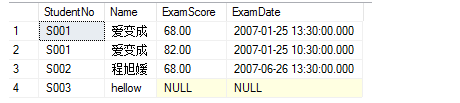
如果用cross Apply 不会出现第4行
分组
sql
var query = from p in context.Set<Post>()
            group p by p.AuthorId
            into g
            where g.Count() > 0
            orderby g.Key
            select new { g.Key, Count = g.Count() };
sql
SELECT [p].[AuthorId] AS [Key], COUNT(*) AS [Count]
FROM [Posts] AS [p]
GROUP BY [p].[AuthorId]
HAVING COUNT(*) > 0
ORDER BY [p].[AuthorId]
左连接
sql
var query = from b in context.Set<Blog>()
            join p in context.Set<Post>()
                on b.BlogId equals p.BlogId into grouping
            from p in grouping.DefaultIfEmpty()
            select new { b, p };

SELECT [b].[BlogId], [b].[OwnerId], [b].[Rating], [b].[Url], [p].[PostId], [p].[AuthorId], [p].[BlogId], [p].[Content], [p].[Rating], [p].[Title]
FROM [Blogs] AS [b]
LEFT JOIN [Posts] AS [p] ON [b].[BlogId] = [p].[BlogId]
分页
前端应该可以给传lastId的。假设在 PostId 上定义了索引,则此查询会非常高效,并且对 ID 值较低的任何并发更改也不敏感。
sql
var lastId = 55;
var nextPage = await context.Posts
    .OrderBy(b => b.PostId)
    .Where(b => b.PostId > lastId)
    .Take(10)
    .ToListAsync();