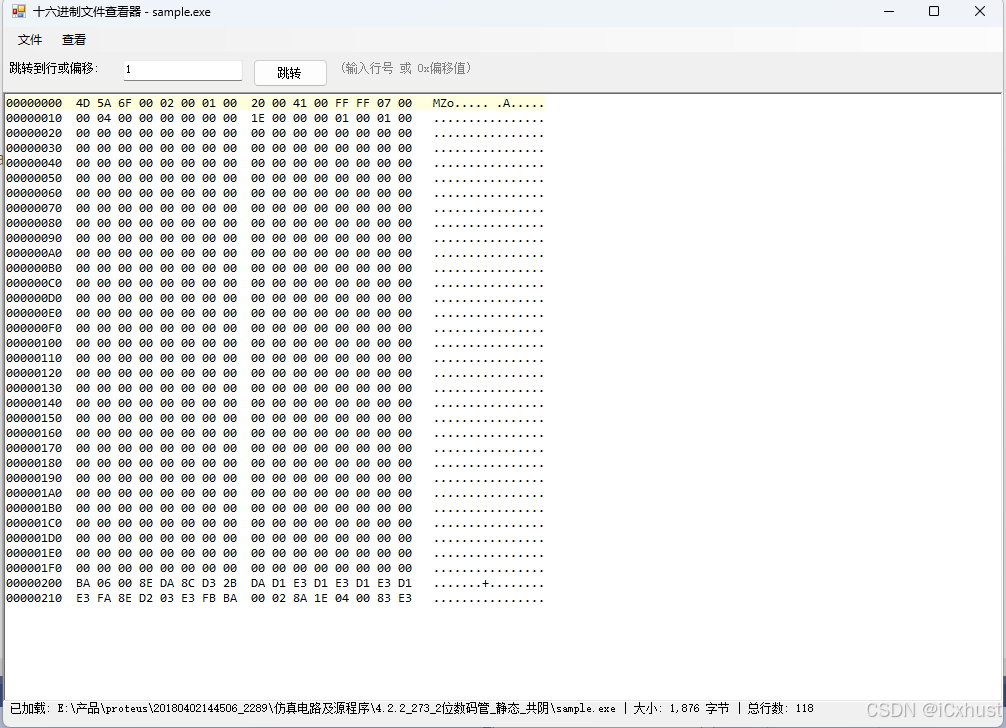
using System;
using System.IO;
using System.Text;
using System.Windows.Forms;

namespace HexViewer
{
    public partial class Form1 : Form
    {
        private byte[] fileData;
        private int bytesPerLine = 16;
        private int currentPosition = 0;
        private int totalLines = 0;

        // 控件声明
        private MenuStrip menuStrip;
        private ToolStripMenuItem fileMenu;
        private ToolStripMenuItem openMenuItem;
        private ToolStripMenuItem exitMenuItem;
        private ToolStripMenuItem viewMenu;
        private ToolStripMenuItem bytesPerLineMenu;
        private ToolStripMenuItem bytes8MenuItem;
        private ToolStripMenuItem bytes16MenuItem;
        private ToolStripMenuItem bytes32MenuItem;
        private RichTextBox hexRichTextBox;
        private TextBox lineNumberTextBox;
        private Button goToButton;
        private Label statusLabel;
        private Panel topPanel;
        private Label lineLabel;
        private OpenFileDialog openFileDialog;

        public Form1()
        {
            InitializeComponent();
            InitializeCustomComponents();
        }

        private void InitializeCustomComponents()
        {
            // 窗体设置
            this.Text = "十六进制文件查看器";
            this.Size = new System.Drawing.Size(1000, 700);
            this.StartPosition = FormStartPosition.CenterScreen;

            // 菜单栏
            menuStrip = new MenuStrip();

            fileMenu = new ToolStripMenuItem("文件");
            openMenuItem = new ToolStripMenuItem("打开", null, OpenFile_Click);
            openMenuItem.ShortcutKeys = Keys.Control | Keys.O;
            exitMenuItem = new ToolStripMenuItem("退出", null, (s, e) => Application.Exit());
            fileMenu.DropDownItems.Add(openMenuItem);
            fileMenu.DropDownItems.Add(new ToolStripSeparator());
            fileMenu.DropDownItems.Add(exitMenuItem);

            viewMenu = new ToolStripMenuItem("查看");
            bytesPerLineMenu = new ToolStripMenuItem("每行字节数");
            bytes8MenuItem = new ToolStripMenuItem("8 字节", null, (s, e) => SetBytesPerLine(8));
            bytes16MenuItem = new ToolStripMenuItem("16 字节", null, (s, e) => SetBytesPerLine(16));
            bytes32MenuItem = new ToolStripMenuItem("32 字节", null, (s, e) => SetBytesPerLine(32));
            bytes16MenuItem.Checked = true;
            bytesPerLineMenu.DropDownItems.Add(bytes8MenuItem);
            bytesPerLineMenu.DropDownItems.Add(bytes16MenuItem);
            bytesPerLineMenu.DropDownItems.Add(bytes32MenuItem);
            viewMenu.DropDownItems.Add(bytesPerLineMenu);

            menuStrip.Items.Add(fileMenu);
            menuStrip.Items.Add(viewMenu);

            // 顶部面板
            topPanel = new Panel();
            topPanel.Dock = DockStyle.Top;
            topPanel.Height = 40;
            topPanel.Padding = new Padding(5);

            lineLabel = new Label();
            lineLabel.Text = "跳转到行:";
            lineLabel.Location = new System.Drawing.Point(5, 10);
            lineLabel.Size = new System.Drawing.Size(70, 25);

            lineNumberTextBox = new TextBox();
            lineNumberTextBox.Location = new System.Drawing.Point(80, 8);
            lineNumberTextBox.Size = new System.Drawing.Size(100, 25);
            lineNumberTextBox.KeyPress += LineNumberTextBox_KeyPress;

            goToButton = new Button();
            goToButton.Text = "跳转";
            goToButton.Location = new System.Drawing.Point(190, 7);
            goToButton.Size = new System.Drawing.Size(75, 28);
            goToButton.Click += GoToButton_Click;

            topPanel.Controls.Add(lineLabel);
            topPanel.Controls.Add(lineNumberTextBox);
            topPanel.Controls.Add(goToButton);

            // 十六进制显示区域
            hexRichTextBox = new RichTextBox();
            hexRichTextBox.Dock = DockStyle.Fill;
            hexRichTextBox.Font = new System.Drawing.Font("Consolas", 10f);
            hexRichTextBox.WordWrap = false;
            hexRichTextBox.KeyDown += HexRichTextBox_KeyDown;

            // 状态栏
            statusLabel = new Label();
            statusLabel.Dock = DockStyle.Bottom;
            statusLabel.Height = 25;
            statusLabel.Text = "就绪 - 使用 Ctrl+O 打开文件";
            statusLabel.Padding = new Padding(5, 0, 0, 0);

            // 添加控件
            this.Controls.Add(hexRichTextBox);
            this.Controls.Add(topPanel);
            this.Controls.Add(statusLabel);
            this.Controls.Add(menuStrip);

            this.MainMenuStrip = menuStrip;

            // 文件对话框
            openFileDialog = new OpenFileDialog();
            openFileDialog.Title = "选择二进制文件";
            openFileDialog.Filter = "所有文件 (*.*)|*.*";
        }

        private void SetBytesPerLine(int bytes)
        {
            bytesPerLine = bytes;
            bytes8MenuItem.Checked = (bytes == 8);
            bytes16MenuItem.Checked = (bytes == 16);
            bytes32MenuItem.Checked = (bytes == 32);

            if (fileData != null)
            {
                DisplayHexData(currentPosition);
            }
        }

        private void OpenFile_Click(object sender, EventArgs e)
        {
            if (openFileDialog.ShowDialog() == DialogResult.OK)
            {
                try
                {
                    fileData = File.ReadAllBytes(openFileDialog.FileName);
                    currentPosition = 0;
                    totalLines = (fileData.Length + bytesPerLine - 1) / bytesPerLine;
                    DisplayHexData(0);
                    statusLabel.Text = $"已加载: {openFileDialog.FileName} | 大小: {fileData.Length:N0} 字节 | 总行数: {totalLines:N0}";
                    this.Text = $"十六进制文件查看器 - {Path.GetFileName(openFileDialog.FileName)}";
                    lineNumberTextBox.Text = "1";
                }
                catch (Exception ex)
                {
                    MessageBox.Show($"打开文件失败: {ex.Message}", "错误",
                        MessageBoxButtons.OK, MessageBoxIcon.Error);
                }
            }
        }

        private void DisplayHexData(int startPosition)
        {
            if (fileData == null || fileData.Length == 0)
            {
                hexRichTextBox.Text = "";
                return;
            }

            // 确保起始位置有效
            if (startPosition < 0) startPosition = 0;
            if (startPosition >= fileData.Length) startPosition = fileData.Length - 1;

            // 计算从哪一行开始显示
            int startLine = startPosition / bytesPerLine;
            int startOffset = startLine * bytesPerLine;

            // 计算显示的行数(基于窗口高度)
            int linesToShow = (hexRichTextBox.Height / 20) + 2; // 估算每行高度
            if (linesToShow < 20) linesToShow = 30;

            StringBuilder sb = new StringBuilder();

            for (int i = 0; i < linesToShow; i++)
            {
                int offset = startOffset + i * bytesPerLine;
                if (offset >= fileData.Length) break;

                // 行号 (8位十六进制)
                sb.Append(offset.ToString("X8"));
                sb.Append("  ");

                // 十六进制部分
                int bytesInThisLine = Math.Min(bytesPerLine, fileData.Length - offset);
                for (int j = 0; j < bytesPerLine; j++)
                {
                    if (j < bytesInThisLine)
                    {
                        sb.Append(fileData[offset + j].ToString("X2"));
                    }
                    else
                    {
                        sb.Append("  ");
                    }

                    if (j == bytesPerLine / 2 - 1)
                        sb.Append("  "); // 中间分隔
                    else
                        sb.Append(" ");
                }

                sb.Append(" ");

                // ASCII 部分
                for (int j = 0; j < bytesInThisLine; j++)
                {
                    byte b = fileData[offset + j];
                    char c = (b >= 32 && b <= 126) ? (char)b : '.';
                    sb.Append(c);
                }

                sb.AppendLine();
            }

            hexRichTextBox.Text = sb.ToString();

            // 高亮当前光标所在行
            HighlightCurrentLine();

            currentPosition = startOffset;
            UpdateStatus();
        }

        private void HighlightCurrentLine()
        {
            if (hexRichTextBox.Text.Length == 0) return;

            int currentLine = currentPosition / bytesPerLine;

            // 简单的行高亮:通过选择行文本
            int startIndex = 0;
            for (int i = 0; i < currentLine; i++)
            {
                startIndex = hexRichTextBox.Text.IndexOf('\n', startIndex) + 1;
                if (startIndex <= 0) return;
            }

            int endIndex = hexRichTextBox.Text.IndexOf('\n', startIndex);
            if (endIndex == -1) endIndex = hexRichTextBox.Text.Length;

            hexRichTextBox.SelectionStart = startIndex;
            hexRichTextBox.SelectionLength = endIndex - startIndex;
            hexRichTextBox.SelectionBackColor = System.Drawing.Color.LightYellow;

            // 滚动到可见位置
            hexRichTextBox.ScrollToCaret();
        }

        private void GoToLine(int lineNumber)
        {
            if (fileData == null)
            {
                MessageBox.Show("请先打开文件", "提示", MessageBoxButtons.OK, MessageBoxIcon.Information);
                return;
            }

            if (lineNumber < 1 || lineNumber > totalLines)
            {
                MessageBox.Show($"行号必须在 1 到 {totalLines} 之间", "无效行号",
                    MessageBoxButtons.OK, MessageBoxIcon.Warning);
                return;
            }

            int newPosition = (lineNumber - 1) * bytesPerLine;
            if (newPosition >= fileData.Length)
                newPosition = fileData.Length - 1;

            currentPosition = newPosition;
            DisplayHexData(currentPosition);
            lineNumberTextBox.Text = lineNumber.ToString();
        }

        private void GoToOffset(int offset)
        {
            if (fileData == null) return;

            if (offset < 0) offset = 0;
            if (offset >= fileData.Length) offset = fileData.Length - 1;

            currentPosition = offset;
            DisplayHexData(currentPosition);
            lineNumberTextBox.Text = ((currentPosition / bytesPerLine) + 1).ToString();
        }

        private void UpdateStatus()
        {
            if (fileData != null)
            {
                int currentLine = currentPosition / bytesPerLine + 1;
                int currentByte = currentPosition;
                statusLabel.Text = $"行: {currentLine:N0} / {totalLines:N0} | " +
                                  $"偏移: 0x{currentPosition:X8} ({currentPosition:N0}) | " +
                                  $"字节: {currentByte + 1} / {fileData.Length:N0}";
            }
        }

        private void GoToButton_Click(object sender, EventArgs e)
        {
            if (int.TryParse(lineNumberTextBox.Text, out int lineNumber))
            {
                GoToLine(lineNumber);
            }
            else
            {
                // 尝试解析为十六进制偏移
                string input = lineNumberTextBox.Text.Trim();
                if (input.StartsWith("0x", StringComparison.OrdinalIgnoreCase))
                {
                    if (int.TryParse(input.Substring(2), System.Globalization.NumberStyles.HexNumber, null, out int offset))
                    {
                        GoToOffset(offset);
                        return;
                    }
                }
                else if (int.TryParse(input, System.Globalization.NumberStyles.HexNumber, null, out int hexOffset))
                {
                    GoToOffset(hexOffset);
                    return;
                }

                MessageBox.Show("请输入有效的行号 (1-" + totalLines + ") 或十六进制偏移 (如 0x100)",
                    "无效输入", MessageBoxButtons.OK, MessageBoxIcon.Warning);
            }
        }

        private void LineNumberTextBox_KeyPress(object sender, KeyPressEventArgs e)
        {
            if (e.KeyChar == (char)Keys.Enter)
            {
                GoToButton_Click(sender, e);
                e.Handled = true;
            }
        }

        private void HexRichTextBox_KeyDown(object sender, KeyEventArgs e)
        {
            if (fileData == null) return;

            int currentLine = currentPosition / bytesPerLine;

            switch (e.KeyCode)
            {
                case Keys.Up:
                    if (currentLine > 0)
                    {
                        GoToLine(currentLine);
                    }
                    e.Handled = true;
                    break;

                case Keys.Down:
                    if (currentLine < totalLines - 1)
                    {
                        GoToLine(currentLine + 2);
                    }
                    e.Handled = true;
                    break;

                case Keys.PageUp:
                    int pageLines = (hexRichTextBox.Height / 20);
                    int newLine = Math.Max(0, currentLine - pageLines);
                    GoToLine(newLine + 1);
                    e.Handled = true;
                    break;

                case Keys.PageDown:
                    pageLines = (hexRichTextBox.Height / 20);
                    newLine = Math.Min(totalLines - 1, currentLine + pageLines);
                    GoToLine(newLine + 1);
                    e.Handled = true;
                    break;

                case Keys.Home:
                    GoToLine(1);
                    e.Handled = true;
                    break;

                case Keys.End:
                    GoToLine(totalLines);
                    e.Handled = true;
                    break;
            }
        }

        protected override void OnResize(EventArgs e)
        {
            base.OnResize(e);
            if (fileData != null)
            {
                DisplayHexData(currentPosition);
            }
        }
    }
}