引言
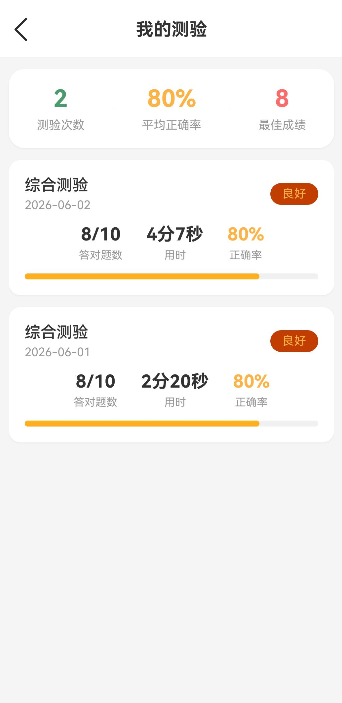
测验记录与错题本是帮助用户回顾和巩固知识的重要功能。本文将实现:
- 测验历史记录展示
- 错题本功能
- 成绩统计分析
- 重新练习错题
通过本文,你将掌握如何实现学习数据的管理和展示。
学习目标
完成本文后,你将能够:
- ✅ 实现测验记录展示
- ✅ 创建错题本功能
- ✅ 添加成绩统计
- ✅ 实现错题重做
- ✅ 管理学习数据
需求分析
功能模块设计
| 模块 | 功能描述 | 技术要点 |
|---|---|---|
| 记录列表 | 展示所有测验记录 | List布局、日期分组 |
| 成绩统计 | 平均分数、正确率 | 卡片布局、图表展示 |
| 错题本 | 收藏错误题目 | 列表展示、筛选功能 |
| 重做功能 | 重新练习错题 | 路由跳转、数据传递 |
| 数据管理 | 删除记录、清空错题 | 确认弹窗 |
核心实现
步骤1: 页面结构设计
完整代码
typescript
// pages/MyQuizRecords.ets

import router from '@ohos.router';
import { common } from '@kit.AbilityKit';
import promptAction from '@ohos.promptAction';
import { StorageService, type QuizRecord, type QuizStats } from '../services/StorageService';

@Entry
@Component
struct MyQuizRecords {
  @State records: QuizRecord[] = [];
  @State isLoading: boolean = true;
  @State totalCount: number = 0;
  @State averageAccuracy: number = 0;
  @State bestScore: number = 0;

  private storageService: StorageService | null = null;

  async aboutToAppear() {
    try {
      const context = getContext(this) as common.UIAbilityContext;
      this.storageService = new StorageService(context);
      await this.storageService.init();
      await this.loadQuizRecords();
    } catch (error) {
      console.error('初始化失败:', error);
      promptAction.showToast({ message: '加载失败,请重试' });
    }
  }

  async loadQuizRecords() {
    if (!this.storageService) {
      return;
    }

    try {
      // 加载测验记录
      this.records = await this.storageService.getQuizRecords();

      // 加载统计信息
      const stats = await this.storageService.getQuizStats();
      this.totalCount = stats.totalCount;
      this.averageAccuracy = stats.averageAccuracy;
      this.bestScore = stats.bestScore;

      this.isLoading = false;
    } catch (error) {
      console.error('加载测验记录失败:', error);
      promptAction.showToast({ message: '加载失败' });
      this.isLoading = false;
    }
  }

  /**
   * 格式化时长
   */
  formatDuration(seconds: number): string {
    const minutes = Math.floor(seconds / 60);
    const remainingSeconds = seconds % 60;
    if (remainingSeconds > 0) {
      return `${minutes}分${remainingSeconds}秒`;
    }
    return `${minutes}分钟`;
  }

  /**
   * 获取等级颜色
   */
  getLevelColor(accuracy: number): string {
    if (accuracy >= 90) return '#4A9B6D';
    if (accuracy >= 70) return '#FFB347';
    if (accuracy >= 60) return '#FFA726';
    return '#FF6B6B';
  }

  /**
   * 获取等级文字
   */
  getLevelText(accuracy: number): string {
    if (accuracy >= 90) return '优秀';
    if (accuracy >= 70) return '良好';
    if (accuracy >= 60) return '及格';
    return '待提高';
  }

  build(): void {
    Column() {
      // 标题栏
      Row() {
        Image($r('app.media.icon_back'))
          .width(24)
          .height(24)
          .fillColor('#333333')
          .onClick(() => {
            router.back();
          })

        Text('我的测验')
          .fontSize(18)
          .fontWeight(FontWeight.Bold)
          .fontColor('#333333')
          .layoutWeight(1)
          .textAlign(TextAlign.Center)

        Blank()
          .width(24)
      }
      .width('100%')
      .height(56)
      .padding({ left: 16, right: 16 })
      .backgroundColor('#FFFFFF')

      // 内容区域
      Column({ space: 12 }) {
        // 统计卡片
        this.buildStatsCard()

        // 测验记录列表
        if (this.isLoading) {
          Column() {
            Text('加载中...')
              .fontSize(14)
              .fontColor('#999999')
              .margin({ top: 40 })
          }
          .width('100%')
          .height(200)
          .justifyContent(FlexAlign.Center)
        } else if (this.records.length === 0) {
          // 空状态
          Column() {
            Image($r('app.media.icon_none'))
              .width(64)
              .height(64)
              .opacity(0.3)
              .margin({ bottom: 16 })

            Text('暂无测验记录')
              .fontSize(16)
              .fontColor('#999999')
              .margin({ bottom: 8 })

            Text('去参加测验吧')
              .fontSize(14)
              .fontColor('#CCCCCC')

            Button('去测验')
              .fontSize(14)
              .fontColor('#4A9B6D')
              .backgroundColor('#FFFFFF')
              .border({ width: 1, color: '#4A9B6D' })
              .padding({ left: 32, right: 32, top: 10, bottom: 10 })
              .borderRadius(20)
              .margin({ top: 24 })
              .onClick(() => {
                router.pushUrl({ url: 'pages/Quiz' });
              })
          }
          .width('100%')
          .height(300)
          .justifyContent(FlexAlign.Center)
        } else {
          Scroll() {
            Column({ space: 12 }) {
              ForEach(this.records, (record: QuizRecord) => {
                this.buildRecordCard(record)
              })
            }
            .width('100%')
            .padding({ bottom: 40 })
          }
          .width('100%')
          .scrollBar(BarState.Off)
        }
      }
      .width('100%')
      .flexGrow(1)
      .padding({ left: 16, right: 16, top: 12 })
    }
    .width('100%')
    .height('100%')
    .backgroundColor('#F5F5F5')
  }

  @Builder
  buildStatsCard(): void {
    Row({ space: 0 }) {
      // 总测验次数
      Column({ space: 6 }) {
        Text(this.totalCount.toString())
          .fontSize(24)
          .fontWeight(FontWeight.Bold)
          .fontColor('#4A9B6D')
        Text('测验次数')
          .fontSize(12)
          .fontColor('#999999')
      }
      .flexGrow(1)
      .padding(16)

      Divider()
        .height(40)
        .width(1)
        .color('#EEEEEE')

      // 平均正确率
      Column({ space: 6 }) {
        Text(this.averageAccuracy + '%')
          .fontSize(24)
          .fontWeight(FontWeight.Bold)
          .fontColor('#FFB347')
        Text('平均正确率')
          .fontSize(12)
          .fontColor('#999999')
      }
      .flexGrow(1)
      .padding(16)

      Divider()
        .height(40)
        .width(1)
        .color('#EEEEEE')

      // 最佳成绩
      Column({ space: 6 }) {
        Text(this.bestScore.toString())
          .fontSize(24)
          .fontWeight(FontWeight.Bold)
          .fontColor('#FF6B6B')
        Text('最佳成绩')
          .fontSize(12)
          .fontColor('#999999')
      }
      .flexGrow(1)
      .padding(16)
    }
    .width('100%')
    .backgroundColor('#FFFFFF')
    .borderRadius(16)
    .shadow({ radius: 4, color: '#0D000000', offsetX: 0, offsetY: 2 })
  }

  @Builder
  buildRecordCard(record: QuizRecord): void {
    Column({ space: 12 }) {
      Row() {
        Column({ space: 4 }) {
          Text(record.category)
            .fontSize(16)
            .fontWeight(FontWeight.Medium)
            .fontColor('#333333')
          Text(record.date)
            .fontSize(12)
            .fontColor('#999999')
        }
        .alignItems(HorizontalAlign.Start)
        .layoutWeight(1)

        // 等级标签
        Text(this.getLevelText(record.accuracy))
          .fontSize(12)
          .fontColor(this.getLevelColor(record.accuracy))
          .padding({ left: 12, right: 12, top: 4, bottom: 4 })
          .backgroundColor(this.getLevelColor(record.accuracy) + '1A')
          .borderRadius(12)
      }

      Row({ space: 24 }) {
        Column({ space: 4 }) {
          Text(`${record.score}/${record.totalQuestions}`)
            .fontSize(18)
            .fontWeight(FontWeight.Bold)
            .fontColor('#333333')
          Text('答对题数')
            .fontSize(11)
            .fontColor('#999999')
        }
        .alignItems(HorizontalAlign.Center)

        Column({ space: 4 }) {
          Text(this.formatDuration(record.duration))
            .fontSize(18)
            .fontWeight(FontWeight.Bold)
            .fontColor('#333333')
          Text('用时')
            .fontSize(11)
            .fontColor('#999999')
        }
        .alignItems(HorizontalAlign.Center)

        Column({ space: 4 }) {
          Text(`${record.accuracy}%`)
            .fontSize(18)
            .fontWeight(FontWeight.Bold)
            .fontColor(this.getLevelColor(record.accuracy))
          Text('正确率')
            .fontSize(11)
            .fontColor('#999999')
        }
        .alignItems(HorizontalAlign.Center)
      }

      // 进度条
      Stack({ alignContent: Alignment.Start }) {
        Row()
          .width('100%')
          .height(6)
          .backgroundColor('#F0F0F0')
          .borderRadius(3)

        Row()
          .width(`${record.accuracy}%`)
          .height(6)
          .backgroundColor(this.getLevelColor(record.accuracy))
          .borderRadius(3)
      }
    }
    .padding(16)
    .width('100%')
    .backgroundColor('#FFFFFF')
    .borderRadius(12)
    .shadow({ radius: 4, color: '#0D000000', offsetX: 0, offsetY: 2 })
    .onClick(() => {
      // TODO: 可以跳转到查看测验详情
      console.info('查看测验详情:', record.id);
    })
  }


}
代码解析
1. 状态管理
- currentTab: 当前选中的标签(records/wrong)
- records: 测验记录列表
- wrongQuestions: 错题列表
- statistics: 统计数据
2. 数据加载
- loadRecords(): 加载测验记录
- loadWrongQuestions(): 加载错题数据
步骤2: 顶部导航和标签切换
typescript
/**
 * 构建顶部导航
 */
@Builder
buildHeader(): void {
  Row({ space: 16 }) {
    Image($r('app.media.ic_back'))
      .width(24)
      .height(24)
      .fillColor('#333333')
      .onClick(() => {
        try {
          router.back();
        } catch (error) {
          console.error('返回失败: ' + JSON.stringify(error));
        }
      })

    Text('学习记录')
      .fontSize(18)
      .fontWeight(FontWeight.Bold)
      .fontColor('#333333')

    Blank()

    Image($r('app.media.ic_more'))
      .width(24)
      .height(24)
      .fillColor('#999999')
  }
  .width('100%')
  .height(56)
  .padding({ left: 16, right: 16 })
  .backgroundColor('#FFFFFF')
}

/**
 * 构建标签切换栏
 */
@Builder
buildTabBar(): void {
  Row({ space: 0 }) {
    // 测验记录
    Column({ space: 4 }) {
      Text('测验记录')
        .fontSize(16)
        .fontWeight(this.currentTab === 'records' ? FontWeight.Bold : FontWeight.Normal)
        .fontColor(this.currentTab === 'records' ? '#4A9B6D' : '#666666')

      if (this.currentTab === 'records') {
        Row()
          .width(24)
          .height(3)
          .backgroundColor('#4A9B6D')
          .borderRadius(2)
      }
    }
    .width('50%')
    .height(48)
    .justifyContent(FlexAlign.Center)
    .onClick(() => {
      this.currentTab = 'records';
    })

    // 错题本
    Column({ space: 4 }) {
      Text('错题本')
        .fontSize(16)
        .fontWeight(this.currentTab === 'wrong' ? FontWeight.Bold : FontWeight.Normal)
        .fontColor(this.currentTab === 'wrong' ? '#4A9B6D' : '#666666')

      if (this.currentTab === 'wrong') {
        Row()
          .width(24)
          .height(3)
          .backgroundColor('#4A9B6D')
          .borderRadius(2)
      }
    }
    .width('50%')
    .height(48)
    .justifyContent(FlexAlign.Center)
    .onClick(() => {
      this.currentTab = 'wrong';
    })
  }
  .width('100%')
  .backgroundColor('#FFFFFF')
  .borderStyle({ bottom: { width: 1, color: '#EEEEEE' } })
}设计要点:
- 顶部导航栏
- 标签切换功能
- 下划线指示当前选中标签
步骤3: 统计数据展示
typescript
/**
 * 构建统计卡片
 */
@Builder
buildStatisticsCard(): void {
  Card() {
    Column({ space: 16 }) {
      // 标题
      Row({ space: 8 }) {
        Image($r('app.media.ic_trending'))
          .width(20)
          .height(20)
          .fillColor('#4A9B6D')

        Text('学习统计')
          .fontSize(18)
          .fontWeight(FontWeight.Bold)
          .fontColor('#333333')
      }

      // 统计数据
      Grid() {
        GridItem() {
          this.buildStatItem('总测验次数', this.statistics.totalQuizzes.toString())
        }

        GridItem() {
          this.buildStatItem('平均得分', this.statistics.averageScore.toString() + '%')
        }

        GridItem() {
          this.buildStatItem('最高分', this.statistics.highestScore.toString() + '%')
        }

        GridItem() {
          this.buildStatItem('错题数量', this.statistics.wrongCount.toString())
        }
      }
      .columnsTemplate('1fr 1fr 1fr 1fr')
    }
    .padding(16)
  }
  .width('92%')
  .margin({ left: '4%', right: '4%', top: 12 })
}

/**
 * 构建统计项
 */
@Builder
buildStatItem(title: string, value: string): void {
  Column({ space: 4 }) {
    Text(value)
      .fontSize(18)
      .fontWeight(FontWeight.Bold)
      .fontColor('#333333')

    Text(title)
      .fontSize(12)
      .fontColor('#999999')
  }
  .width('100%')
  .alignItems(HorizontalAlign.Center)
}设计要点:
- 四列网格布局
- 显示总测验次数、平均分、最高分、错题数
步骤4: 测验记录列表
typescript
/**
 * 构建测验记录区域
 */
@Builder
buildRecordsSection(): void {
  Column({ space: 12 }) {
    // 统计卡片
    this.buildStatisticsCard()

    // 记录列表
    if (this.records.length === 0) {
      // 空状态
      Column({ space: 16 }) {
        Image($r('app.media.ic_empty'))
          .width(80)
          .height(80)
          .opacity(0.5)

        Text('暂无测验记录')
          .fontSize(14)
          .fontColor('#999999')

        Button('去测验')
          .width(120)
          .height(40)
          .backgroundColor('#4A9B6D')
          .fontColor('#FFFFFF')
          .borderRadius(20)
          .onClick(() => {
            try {
              router.pushUrl({ url: 'pages/Quiz' });
            } catch (error) {
              console.error('路由跳转失败: ' + JSON.stringify(error));
            }
          })
      }
      .width('100%')
      .padding(40)
    } else {
      // 记录列表
      List({ space: 12 }) {
        ForEach(this.records, (record: QuizRecord) => {
          ListItem() {
            this.buildRecordItem(record)
          }
        }, (record: QuizRecord) => record.id)
      }
      .width('92%')
      .padding({ bottom: 100 })
    }
  }
  .width('100%')
}

/**
 * 构建记录项
 */
@Builder
buildRecordItem(record: QuizRecord): void {
  Card() {
    Row({ space: 16 }) {
      // 分数展示
      Column({ space: 4 }) {
        Text(record.score.toString())
          .fontSize(32)
          .fontWeight(FontWeight.Bold)
          .fontColor(record.score >= 60 ? '#4A9B6D' : '#FF5252')

        Text('分')
          .fontSize(12)
          .fontColor('#999999')
      }
      .width(70)
      .alignItems(HorizontalAlign.Center)

      // 详情
      Column({ space: 6 }) {
        Row({ space: 8 }) {
          Text('正确率')
            .fontSize(14)
            .fontColor('#999999')

          Text((record.correct / record.total * 100).toFixed(0) + '%')
            .fontSize(14)
            .fontColor('#333333')
            .fontWeight(FontWeight.Medium)
        }

        Row({ space: 8 }) {
          Text(record.date)
            .fontSize(12)
            .fontColor('#999999')

          Text('|')
            .fontSize(12)
            .fontColor('#EEEEEE')

          Text(record.time)
            .fontSize(12)
            .fontColor('#999999')
        }
      }
      .flexGrow(1)

      // 删除按钮
      Image($r('app.media.ic_delete'))
        .width(20)
        .height(20)
        .fillColor('#CCCCCC')
        .onClick(() => {
          this.deleteRecord(record.id);
        })
    }
    .padding(16)
  }
}设计要点:
- 卡片式布局展示记录
- 分数高亮显示(及格绿色,不及格红色)
- 删除按钮
步骤5: 错题本
typescript
/**
 * 构建错题本区域
 */
@Builder
buildWrongQuestionsSection(): void {
  Column({ space: 12 }) {
    // 头部操作栏
    Row({ space: 8 }) {
      Text('共 ' + this.wrongQuestions.length + ' 道错题')
        .fontSize(14)
        .fontColor('#666666')

      Blank()

      if (this.wrongQuestions.length > 0) {
        Text('清空')
          .fontSize(13)
          .fontColor('#FF5252')
          .onClick(() => {
            this.clearWrongQuestions();
          })
      }
    }
    .width('92%')
    .padding({ top: 12 })

    // 错题列表
    if (this.wrongQuestions.length === 0) {
      // 空状态
      Column({ space: 16 }) {
        Image($r('app.media.ic_empty'))
          .width(80)
          .height(80)
          .opacity(0.5)

        Text('暂无错题')
          .fontSize(14)
          .fontColor('#999999')

        Text('继续保持,争取全对!')
          .fontSize(13)
          .fontColor('#BBBBBB')
      }
      .width('100%')
      .padding(40)
    } else {
      // 错题列表
      List({ space: 12 }) {
        ForEach(this.wrongQuestions, (question: WrongQuestion) => {
          ListItem() {
            this.buildWrongQuestionItem(question)
          }
        }, (question: WrongQuestion) => question.id)
      }
      .width('92%')
      .padding({ bottom: 100 })
    }

    // 底部操作按钮
    if (this.wrongQuestions.length > 0) {
      Button('重做错题')
        .width('92%')
        .height(48)
        .backgroundColor('#4A9B6D')
        .fontColor('#FFFFFF')
        .borderRadius(24)
        .position({ bottom: 60 })
        .onClick(() => {
          try {
            router.pushUrl({ url: 'pages/Quiz', params: { mode: 'wrong' } });
          } catch (error) {
            console.error('路由跳转失败: ' + JSON.stringify(error));
          }
        })
    }
  }
  .width('100%')
}

/**
 * 构建错题项
 */
@Builder
buildWrongQuestionItem(question: WrongQuestion): void {
  Card() {
    Column({ space: 12 }) {
      // 题目
      Text(question.question)
        .fontSize(15)
        .fontColor('#333333')
        .lineHeight(24)

      // 选项
      Column({ space: 8 }) {
        ForEach(question.options, (option: string, index: number) => {
          Row({ space: 8 }) {
            let icon = '○';
            let iconColor = '#999999';

            if (index === question.correctAnswer) {
              icon = '✓';
              iconColor = '#4A9B6D';
            } else if (index === question.userAnswer) {
              icon = '✗';
              iconColor = '#FF5252';
            }

            Text(icon)
              .fontSize(14)
              .fontColor(iconColor)

            Text(option)
              .fontSize(14)
              .fontColor(index === question.correctAnswer ? '#4A9B6D' :
                         index === question.userAnswer ? '#FF5252' : '#666666')
          }
        })
      }

      // 底部信息
      Row({ space: 16 }) {
        Row({ space: 4 }) {
          Text('错误次数')
            .fontSize(12)
            .fontColor('#999999')

          Text(question.wrongCount.toString())
            .fontSize(12)
            .fontColor('#FF5252')
        }

        Text(question.lastWrongDate)
          .fontSize(12)
          .fontColor('#999999')

        Blank()

        Row({ space: 8 }) {
          Text('移除')
            .fontSize(12)
            .fontColor('#999999')
            .onClick(() => {
              this.removeWrongQuestion(question.id);
            })
        }
      }
    }
    .padding(16)
  }
}设计要点:
- 题目内容展示
- 错误答案和正确答案对比
- 错误次数统计
- 移除和重做功能
常见问题与解决方案
问题1: 数据不持久
现象 :
退出应用后记录丢失。
解决方案:
typescript
// 使用StorageService保存数据
async saveRecords(): Promise<void> {
  await this.storageService.saveRecords(this.records);
}
问题2: 错题重做功能不生效
现象 :
点击重做错题没有反应。
解决方案:
typescript
// 确保路由参数正确传递
router.pushUrl({
  url: 'pages/Quiz',
  params: { mode: 'wrong', questions: JSON.stringify(this.wrongQuestions) }
});
本章小结
核心知识点
本文完成了测验记录与错题本功能的实现:
1. 测验记录
- 记录列表展示
- 成绩统计
- 删除记录功能
2. 错题本
- 错题列表展示
- 正确/错误答案对比
- 移除错题功能
- 重做错题功能
3. 统计数据
- 总测验次数
- 平均得分
- 最高分
- 错题数量
下一步预告
测验记录与错题本已经完成!在下一篇文章中,我们将学习:
- 个人中心页开发
- 用户信息展示
- 设置功能
- 学习统计
相关链接
- 项目源码 : Atomgit仓库