RTX 5090 Grounded-SAM-2 实时 RTSP 跟踪部署指南
从空白 Ubuntu 服务器开始,部署单路 RTSP 实时人物检测、跟踪、推流。包含所有踩过的坑。
硬件:RTX 5090(Blackwell, sm_120)| 系统:Ubuntu 24.04 LTS
0. 架构总览
RTSP源 ──► FFmpeg+NVDEC硬解 ──► 读帧线程(队列maxlen=1丢旧帧)
                                            │
                                            ▼
                            ┌───────────────────────────────┐
                            │  每N帧:Grounding DINO 检测   │
                            │  每帧:  SAM2 跟踪+ID复用      │
                            │  GPU端 mask 合成               │
                            └───────────────────────────────┘
                                            │
                                            ▼
FFmpeg+NVENC硬编 ──► mediamtx ──► 客户端核心组件:
- Grounding DINO --- 开放词汇检测(给定文字 prompt 找出对应物体)
- SAM 2 (Gy920 fork) --- 流式视频跟踪
- FFmpeg + NVDEC/NVENC --- GPU 硬件编解码
- mediamtx --- 出口 RTSP 服务器
1. 系统基础
1.1 安装依赖
bash
sudo apt update && sudo apt upgrade -y
sudo apt install -y build-essential git wget curl pkg-config \
    yasm nasm unzip ca-certificates software-properties-common
1.2 NVIDIA 驱动(必须 ≥ 570 支持 Blackwell)
bash
sudo apt install -y nvidia-driver-570 nvidia-utils-570
sudo reboot
重启后验证:
bash
nvidia-smi # 应显示 RTX 5090,Driver 570.x,CUDA Version 12.8⚠️ 坑 1 :550 及以下的驱动不识别 Blackwell,
nvidia-smi会显示"Unknown device"。
2. CUDA 12.8 + GCC 14
2.1 CUDA Toolkit 12.8
bash
wget https://developer.download.nvidia.com/compute/cuda/repos/ubuntu2404/x86_64/cuda-keyring_1.1-1_all.deb
sudo dpkg -i cuda-keyring_1.1-1_all.deb
sudo apt update
sudo apt install -y cuda-toolkit-12-8
环境变量(写入 ~/.bashrc):
bash
export CUDA_HOME=/usr/local/cuda-12.8
export PATH=$CUDA_HOME/bin:$PATH
export LD_LIBRARY_PATH=$CUDA_HOME/lib64:$LD_LIBRARY_PATH
nvcc -V 应显示 release 12.8。
2.2 GCC 14(CUDA 12.8 的编译兼容上限)
bash
sudo apt install -y gcc-14 g++-14
sudo update-alternatives --install /usr/bin/gcc gcc /usr/bin/gcc-13 50
sudo update-alternatives --install /usr/bin/gcc gcc /usr/bin/gcc-14 60
sudo update-alternatives --install /usr/bin/g++ g++ /usr/bin/g++-13 50
sudo update-alternatives --install /usr/bin/g++ g++ /usr/bin/g++-14 60
sudo update-alternatives --config gcc   # 选 gcc-14
sudo update-alternatives --config g++
⚠️ 坑 2 :用 GCC 13 编译 Grounding DINO 的 CUDA 算子会失败(
unsupported GNU version)。但 GCC 15 也不行------CUDA 12.8 严格要求 GCC ≤ 14。
3. FFmpeg(NVENC/NVDEC 硬件编解码)
RTX 5090 = 第 6 代 NVDEC + 第 9 代 NVENC,需要较新 FFmpeg。
推荐用静态构建(省去自己编译):
bash
cd /opt
sudo wget https://johnvansickle.com/ffmpeg/releases/ffmpeg-release-amd64-static.tar.xz
sudo tar -xJf ffmpeg-release-amd64-static.tar.xz
sudo ln -sf /opt/ffmpeg-*-amd64-static/ffmpeg /usr/local/bin/ffmpeg
sudo ln -sf /opt/ffmpeg-*-amd64-static/ffprobe /usr/local/bin/ffprobe
验证硬件编解码:
bash
ffmpeg -hwaccels | grep cuda
ffmpeg -codecs 2>&1 | grep -E "h264_cuvid|h264_nvenc"
测试 NVENC:
bash
ffmpeg -f lavfi -i testsrc=duration=3:size=1920x1080:rate=30 \
       -c:v h264_nvenc -f null - 2>&1 | tail -5
⚠️ 坑 3 :Ubuntu 24.04 apt 自带 FFmpeg 6.1,对 1080p H.264 够用,但不支持 Blackwell NVENC 的新特性(4:2:2、10-bit 等)。生产环境用 johnvansickle 的 7.x 静态版。
⚠️ 坑 4 :不要给 ffmpeg 加
-stimeout或-rw_timeout参数!新版 ffmpeg 这些参数语法变了,加错位置会导致连接直接失败、ffprobe 都跑不通。
4. mediamtx(出口 RTSP 服务器)
bash
cd /opt
sudo wget https://github.com/bluenviron/mediamtx/releases/latest/download/mediamtx_linux_amd64.tar.gz
sudo tar -xzf mediamtx_linux_amd64.tar.gz
sudo mv mediamtx /usr/local/bin/

sudo tee /etc/systemd/system/mediamtx.service > /dev/null <<'EOF'
[Unit]
Description=mediamtx
After=network.target

[Service]
ExecStart=/usr/local/bin/mediamtx
Restart=always

[Install]
WantedBy=multi-user.target
EOF

sudo systemctl daemon-reload
sudo systemctl enable --now mediamtx
默认监听 RTSP 8554,验证:
bash
ss -tlnp | grep 85545. Python 环境
5.1 Miniforge + Conda 环境
bash
wget https://github.com/conda-forge/miniforge/releases/latest/download/Miniforge3-Linux-x86_64.sh
bash Miniforge3-Linux-x86_64.sh -b -p $HOME/miniforge3
source $HOME/miniforge3/bin/activate
conda init bash && exec bash

conda create -n gsam2 python=3.10 -y
conda activate gsam2
5.2 PyTorch(必须 cu128 / 支持 sm_120)
先试稳定版:
bash
pip install torch torchvision torchaudio --index-url https://download.pytorch.org/whl/cu128
python -c "import torch; print(torch.__version__, torch.cuda.is_available(), torch.cuda.get_device_name(0))"
如果报 no kernel image available for sm_120,换 nightly:
bash
pip uninstall -y torch torchvision torchaudio
pip install --pre torch torchvision torchaudio --index-url https://download.pytorch.org/whl/nightly/cu128
⚠️ 坑 5 :RTX 5090 是 Blackwell(sm_120),2025 年中之前的 PyTorch 都不支持。验证方法是
torch.cuda.get_device_name(0)必须正确显示 "NVIDIA GeForce RTX 5090"。
6. Grounded-SAM-2 代码与权重
6.1 克隆并修改
bash
cd /data/zq   # 自选目录
git clone https://github.com/IDEA-Research/Grounded-SAM-2.git
cd Grounded-SAM-2

# === 关键 patch:Grounding DINO 加 sm_120 编译标志 ===
sed -i '/"-D__CUDA_NO_HALF2_OPERATORS__"/a\        "-gencode=arch=compute_120,code=sm_120",' grounding_dino/setup.py
⚠️ 坑 6:没有这个 patch,Grounding DINO 的 CUDA 算子编译时会报 sm_120 不支持,只能回退到 PyTorch 慢路径(速度差 5~10 倍)。
6.2 下载权重
bash
cd checkpoints && bash download_ckpts.sh && cd ..
cd gdino_checkpoints && bash download_ckpts.sh && cd ..
下载失败的话手动从 HuggingFace 镜像下:
bash
export HF_ENDPOINT=https://hf-mirror.com
# SAM2 权重
huggingface-cli download facebook/sam2.1-hiera-tiny --local-dir checkpoints/sam2.1-hiera-tiny
huggingface-cli download facebook/sam2.1-hiera-small --local-dir checkpoints/sam2.1-hiera-small
# Grounding DINO 权重
wget -O gdino_checkpoints/groundingdino_swint_ogc.pth \
  https://huggingface.co/ShilongLiu/GroundingDINO/resolve/main/groundingdino_swint_ogc.pth
6.3 安装包
bash
# 装 SAM 2(必须 --no-build-isolation,否则会重新下 2GB 的 torch)
pip install setuptools wheel ninja packaging
pip install -e . --no-build-isolation

# 装 Grounding DINO(同样要 --no-build-isolation)
pip install --no-build-isolation -e grounding_dino
⚠️ 坑 7 :不加
--no-build-isolation,pip 会在隔离环境里重下 PyTorch,卡 20 分钟看不到任何进度条,假死状态。
7. 流式 SAM 2 fork(Gy920)
官方 SAM 2 只支持离线视频(全片传播),实时流必须用社区流式 fork。
bash
cd /data/zq
git clone https://github.com/Gy920/segment-anything-2-real-time.git
cd segment-anything-2-real-time
pip install -e . --no-build-isolation
⚠️ 坑 8 :这一步会覆盖Grounded-SAM-2 仓库装的官方 SAM 2。但 fork 兼容官方所有接口,demo 仍能跑。
⚠️ 坑 9 :Grounded-SAM-2 仓库根目录下有个
sam2/文件夹,Python 工作目录优先级会优先 import 它,导致build_sam2_camera_predictor找不到。必须把它重命名让出 import 名字:
bashcd /data/zq/Grounded-SAM-2 mv sam2 sam2_official_unused
7.1 SAM 2 camera predictor 的硬限制
Gy920 fork 的 SAM2CameraPredictor 不支持在跟踪过程中动态添加新对象:
RuntimeError: Cannot add new object id 4 after tracking starts.
Please call 'reset_state' to restart from scratch.
正确的重检测模式 :每次 reground 时 reset_state() + load_first_frame() + 重新注入所有对象(包括复用旧 ID 的)。代码会处理这个逻辑。
8. 其他 Python 依赖
bash
pip install supervision addict yapf timm transformers==4.41.2 \
            numpy opencv-python pillow shapely
⚠️ 坑 10 :
transformers必须降到 4.41.2 !Grounding DINO 调用bert_model.get_head_mask,这个方法在 transformers 5.x 已被移除,会报'BertModel' object has no attribute 'get_head_mask'。
8.1 HuggingFace 镜像(国内)
bash
conda env config vars set HF_ENDPOINT=https://hf-mirror.com -n gsam2
conda deactivate && conda activate gsam2

# 预下载 BERT(Grounding DINO 启动时会用)
python - <<'PY'
from transformers import BertTokenizer, BertModel
BertTokenizer.from_pretrained("bert-base-uncased")
BertModel.from_pretrained("bert-base-uncased")
print("[OK] cached")
PY
⚠️ 坑 11 :不设镜像的话,首次启动会卡在
final text_encoder_type: bert-base-uncased,看起来是死了实际上在偷偷下载,国内基本超时。
9. 环境自检
切到 Grounded-SAM-2 目录(注意必须是这个目录,因为 grounding_dino 是路径风格 import):
bash
cd /data/zq/Grounded-SAM-2

python - <<'PY'
import torch
print("Torch:", torch.__version__, "GPU:", torch.cuda.get_device_name(0))

from sam2.build_sam import build_sam2_camera_predictor
print("[OK] sam2 camera predictor")

from grounding_dino.groundingdino.util.inference import load_model
print("[OK] grounding_dino")

# 关键:Grounding DINO CUDA 算子是否编译成功
from groundingdino import _C
print("[OK] groundingdino._C (CUDA op) loaded")
PY
四行都 OK 才算环境准备完成。
⚠️ 坑 12 :如果
groundingdino._C报 ImportError,说明 sm_120 patch 没生效或者 GCC 版本不对,推理会跑 PyTorch 慢路径,FPS 直接砍半。
10. 运行脚本(关键设计要点)
10.1 dtype 选择
- SAM 2 主推理:bf16(5090 Tensor Core 加速)
- Grounding DINO:fp32 (其 CUDA 算子
ms_deform_attn不支持 bf16)
python
DEVICE = "cuda"
DTYPE  = torch.bfloat16

with torch.inference_mode(), torch.autocast(DEVICE, dtype=DTYPE):
    # SAM 2 跟踪用 bf16
    obj_ids, mask_logits = sam2.track(frame)

def run_grounding(frame_bgr):
    # Grounding DINO 必须临时关 bf16
    with torch.autocast(DEVICE, enabled=False):
        boxes, logits, phrases = predict(model=gdino, image=img_t.float(), ...)
⚠️ 坑 13 :全局 bf16 包住所有推理会报
NotImplementedError: "ms_deform_attn_forward_cuda" not implemented for 'BFloat16'。
10.2 读帧必须独立线程
python
class RTSPReader(threading.Thread):
    def __init__(self, url, w, h):
        self.q = queue.Queue(maxsize=1)   # 关键:只缓存最新一帧

    def run(self):
        while not self.stop_flag:
            raw = self.proc.stdout.read(self.frame_bytes)
            frame = np.frombuffer(raw, np.uint8).reshape(self.h, self.w, 3)
            if self.q.full():
                try: self.q.get_nowait()    # 丢旧帧
                except: pass
                self.dropped += 1
            self.q.put(frame)
⚠️ 坑 14 :不解耦读帧的话,推理慢了之后摄像头帧堆积,触发 ffmpeg 报
No decoder surfaces left,最终解码器死掉。
10.3 mask 渲染必须搬到 GPU
python
# ❌ 错误:numpy 上做 1080p 半透明合成,每个 mask ~60ms
out[m == 1] = (0.5 * out[m == 1] + 0.5 * c).astype(np.uint8)

# ✅ 正确:GPU 端一次性合成,一次 cpu sync
frame_gpu = torch.from_numpy(frame).to(DEVICE)
blended = (frame_gpu * 0.5 + color_map * 0.5).to(torch.uint8)
out_np = torch.where(union, blended, frame_gpu).cpu().numpy()
⚠️ 坑 15:numpy 渲染会让 FPS 直接卡在 8 帧,GPU 渲染能跑到 25+。
10.4 FFmpeg 解码参数(已验证可用的最简组合)
python
def open_decoder(url, w, h):
    cmd = [
        "ffmpeg", "-loglevel", "warning",
        "-hwaccel", "cuda", "-hwaccel_output_format", "cuda",
        "-rtsp_transport", "tcp",
        "-fflags", "nobuffer+discardcorrupt",
        "-flags", "low_delay",
        "-err_detect", "ignore_err",
        "-i", url,
        "-vf", f"scale_cuda={w}:{h},hwdownload,format=nv12,format=bgr24",
        "-f", "rawvideo", "-pix_fmt", "bgr24", "-",
    ]
scale_cuda 让 NVDEC 解出来直接在 GPU 显存里缩放再下载,CPU 几乎不参与。
10.5 FFmpeg 编码参数
python
def open_encoder(url, w, h, fps):
    cmd = [
        "ffmpeg", "-loglevel", "warning", "-y",
        "-f", "rawvideo", "-pix_fmt", "bgr24",
        "-s", f"{w}x{h}", "-r", str(fps), "-i", "-",
        "-c:v", "h264_nvenc", "-preset", "p4", "-tune", "ll",
        "-rc", "cbr", "-b:v", "3M", "-maxrate", "3M",
        "-pix_fmt", "yuv420p",
        "-f", "rtsp", "-rtsp_transport", "tcp", url,
    ]
11. 海康摄像头的常见坑
实测海康摄像头(主码流)经常触发 ffmpeg 不支持的 H.264 特性,导致解码进程频繁退出:
[h264 @ ...] RTP H.264 NAL unit type 29 is not implemented.
[h264 @ ...] data partitioning is not implemented.
⚠️ 坑 16 :这两个错没法靠 ffmpeg 参数绕过,必须改摄像头配置:
登录摄像头 Web 后台 → 视音频 → 视频参数:
- 编码类型:H.264(不要 H.264+)
- Profile :Main(不要 High)
- SVC:关闭
- Smart 编码:关闭
或者直接拉副码流 (URL 末尾
101→102),通常更规范,且自带 720p,省去解码后缩放。
12. 性能调优要点
12.1 模型选择
| 模型 | 单帧耗时 (720p, 5090) | 适用 |
|---|---|---|
| SAM2 tiny | ~22 ms | 推荐,实时场景 |
| SAM2 small | ~33 ms | 精度优先 |
| SAM2 base+ | ~50 ms | 离线分析 |
| Grounding DINO Swin-T | ~80 ms | 推荐 |
| Grounding DINO Swin-B | ~150 ms | 精度+10% |
| YOLOv8s + person 类 | ~6 ms | 如果只检测人,精度速度全胜 |
12.2 关键参数
python
FRAME_W, FRAME_H = 1280, 720        # 720p 是性价比最优解
INFER_EVERY_N    = 2                # 跳帧:每 N 帧推理一次
REGROUND_EVERY   = 60               # 重检测间隔,越小越准但抖动
DTYPE            = torch.bfloat16   # 5090 原生加速
12.3 检测精度优化(避免误检)
python
TEXT_PROMPT = "person. mannequin. statue. poster."  # 列出干扰类别让模型消歧
BOX_THR     = 0.40   # 比默认 0.30 严格
TEXT_THR    = 0.30

# 几何过滤
MIN_BOX_AREA = 40 * 40
MAX_BOX_AREA = int(FRAME_W * FRAME_H * 0.6)
MIN_ASPECT   = 0.20   # 人是竖的,宽/高 比 0.2~1.2
MAX_ASPECT   = 1.20

# 只保留 phrase 命中 "person" 的框
if "person" not in phrase.lower():
    continue
建议 :如果只检测人,换 YOLOv8 person 类比 Grounding DINO 又快又准:
bashpip install ultralyticsGrounding DINO 的开放词汇优势在你只做单类检测时是浪费的。
13. 性能预期(RTX 5090 + bf16)
单路 720p + SAM2-tiny + 4 个对象:
| 阶段 | 耗时 |
|---|---|
| RTSP 读帧 | 1-3 ms |
| SAM 2 推理 | 22-35 ms |
| GPU mask 渲染 | 2-3 ms |
| NVENC 编码 + 推流 | 3-5 ms |
| 合计 | 30-45 ms / 帧 |
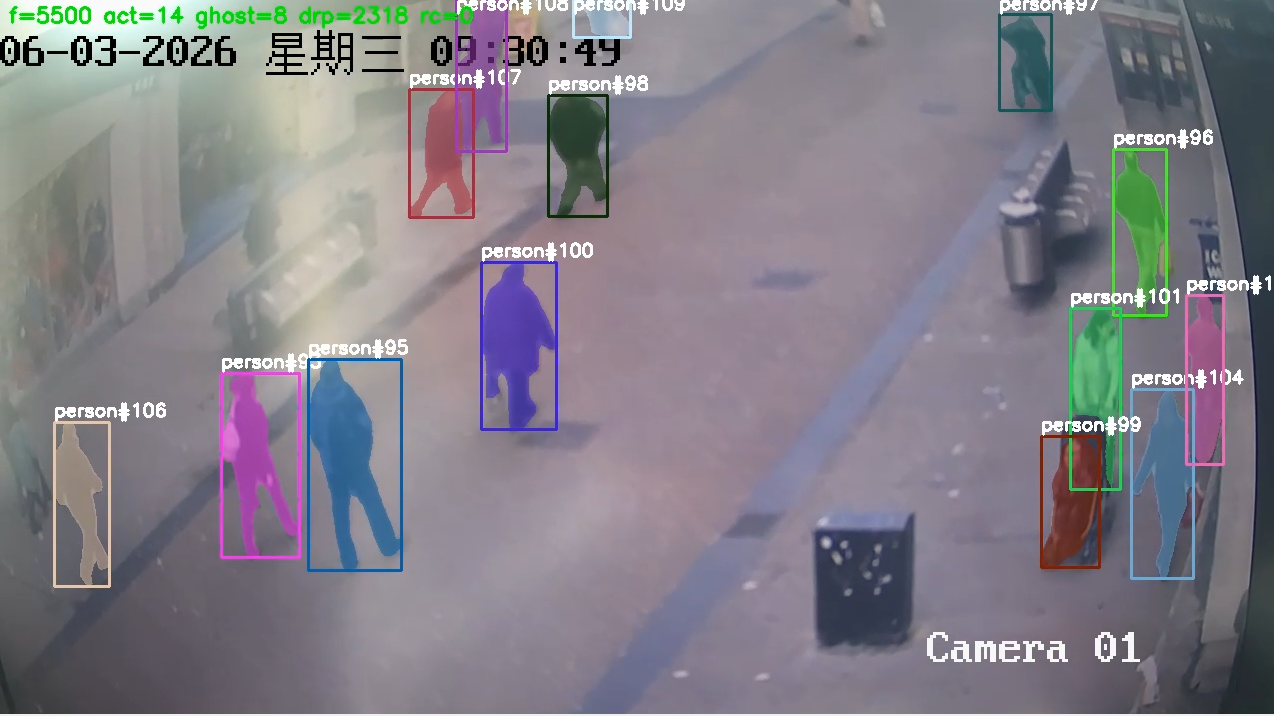
稳态 FPS:25-30 (摄像头帧率上限)。如果开 INFER_EVERY_N=2 跳帧,理论可冲到 50+,实际受限于摄像头出流。
端到端延迟(摄像头到客户端):200-400 ms。
14. 验证流程
14.1 启动 mediamtx
bash
sudo systemctl status mediamtx --no-pager14.2 启动主程序
bash
cd /data/zq/Grounded-SAM-2
conda activate gsam2
python grounded_sam2_rtsp.py
正常启动会看到:
[load] SAM2 camera predictor...
[load] Grounding DINO...
[init] 1280x720, detected 3 persons, active=[1, 2, 3]
[stat] 25.5 FPS, tracked=3, ...
14.3 拉流验证
另一台机器:
bash
ffplay -rtsp_transport tcp rtsp://<server_ip>:8554/live
# 或 VLC 打开同样的 URL
15. 故障速查
| 现象 | 排查 |
|---|---|
no kernel image available for sm_120 |
PyTorch 不识别 Blackwell,换 nightly cu128 |
Cannot import name 'build_sam2_camera_predictor' |
仓库根目录的 sam2/ 覆盖了 fork,重命名为 sam2_official_unused |
'BertModel' object has no attribute 'get_head_mask' |
transformers 版本过高,降到 4.41.2 |
ms_deform_attn_forward_cuda not implemented for 'BFloat16' |
Grounding DINO 没禁用 bf16,加 torch.autocast(enabled=False) |
Cannot add new object id N after tracking starts |
用 reset_state() + 重建,不要增量 add_new_prompt |
卡在 final text_encoder_type: bert-base-uncased |
BERT 没下下来,设 HF_ENDPOINT 镜像 |
No decoder surfaces left + 流断 |
读帧没解耦,加独立 RTSP 读帧线程 + 队列 maxlen=1 |
RTP H.264 NAL unit type 29 is not implemented |
摄像头开了 H.264+/SVC/Smart 编码,登后台关闭或切副码流 |
Installing build dependencies 卡死 |
加 --no-build-isolation |
| FPS 只有 8 帧 | mask 渲染在 CPU,改 GPU 端合成 |
Error submitting packet to decoder: Invalid data |
ffmpeg 加 -err_detect ignore_err 容错 |
16. 完整文件结构
/data/zq/
├── Grounded-SAM-2/              # 主仓库
│   ├── sam2_official_unused/    # ← 必须重命名让出 import
│   ├── grounding_dino/
│   ├── checkpoints/
│   │   ├── sam2.1_hiera_tiny.pt
│   │   └── sam2.1_hiera_small.pt
│   ├── gdino_checkpoints/
│   │   └── groundingdino_swint_ogc.pth
│   └── grounded_sam2_rtsp.py    # 主程序
└── segment-anything-2-real-time/   # ← 流式 fork
    └── sam2/                       # ← 实际被 import 的 sam2 包

/opt/
├── ffmpeg-7.x-amd64-static/     # 静态 FFmpeg
└── mediamtx                     # RTSP 服务器
17. 关键依赖版本(冻结清单)
Ubuntu              24.04 LTS
NVIDIA Driver       570+
CUDA Toolkit        12.8
GCC                 14
Python              3.10
PyTorch             2.11.0+cu128 (或 nightly)
transformers        4.41.2          ← 必须降级
tokenizers          0.19.x
huggingface_hub     0.23+
timm                1.x
opencv-python       4.x
ffmpeg              7.x (johnvansickle 静态版)
mediamtx            latest
SAM-2               from Gy920/segment-anything-2-real-time
groundingdino       0.1.0 (from IDEA-Research/Grounded-SAM-2)
18. 扩展方向
- 多路并发 :单进程跑 1 路没问题,4-8 路用
torch.multiprocessing一进程一路。8 路以上建议 DeepStream + Triton - 更高精度:Grounding DINO Swin-T → Swin-B,或换 YOLOv8 + SAM 2
- 事件流:把每帧 bbox 通过 MQTT/WebSocket/Kafka 推到下游
- 跨重连 ID 保持 :已实现的
ghostID 池可扩展加入外观 ReID 特征
最后 :这套方案在 RTX 5090 单卡上跑 1 路 720p RTSP 实时人物跟踪,稳定 25 FPS,端到端延迟 < 400 ms,完全够监控/告警场景用。生产部署前务必跑足 24 小时压测,关注 dropped 和 reconn 计数。