在Compose中,Modifier承担了绝大部分的修饰作用,通过它可以为控件设置width、height、size、padding、background等等。
一 链式调用
在Compose中每个控件都有Modifier属性,Modifier包含了许多属性设置,它可以通过链式调用的方式对控件进行修饰。
Kotlin
@Composable
private fun Greeting(name: String) {
    Column(
        modifier = Modifier
            .padding(24.dp)
            .fillMaxWidth()
    ) {
        Text(text = "Hello,")
        Text(text = name)
    }
}
二 链式调用顺序
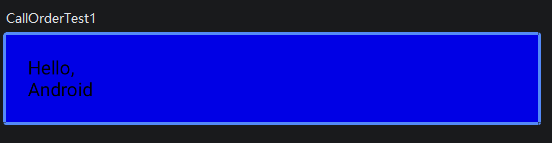
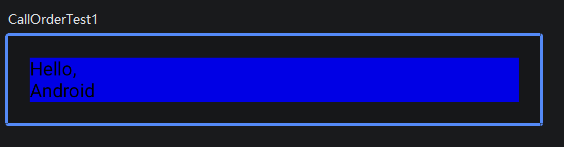
修饰符链式调用的顺序是会影响最终的显示效果的。通过如下例子可以了解:
Kotlin
@Preview
@Composable
fun CallOrderTest1(){
    val padding = 16.dp
    Column(
        Modifier
            .background(Color.Blue)
            .padding(padding)
            .fillMaxWidth()

    ) {
        Text(text = "Hello,")
        Text(text = "Android")
    }
}
Kotlin
@Preview
@Composable
fun CallOrderTest1(){
    val padding = 16.dp
    Column(
        Modifier
            .padding(padding)
            .background(Color.Blue)
            .fillMaxWidth()

    ) {
        Text(text = "Hello,")
        Text(text = "Android")
    }
}
上面两段代码仅仅对
.padding(padding)
.background(Color.Blue)
的顺序进行了调换,展现的效果却是不一样的,由此可见,调用顺序对最终效果是有影响的。
三 Compose中的修饰符作用域安全
单看这个标题,你可能一脸懵,接下来,请听我解释
(一)传统XML中存在的问题
让我们继续从传统XML的视角来了解,下面是两个传统XML布局
XML
<LinearLayout
    android:layout_width="match_parent"
    android:layout_height="match_parent"
    android:orientation="vertical"
    android:background="@color/teal_200"
    xmlns:android="http://schemas.android.com/apk/res/android">

    <!-- 线性布局里,layout_gravity 基本没用 -->
    <!-- 但 XML 允许你写,不会报错 -->
    <View
        android:layout_width="200dp"
        android:layout_height="200dp"
        android:background="@color/purple_200"
        android:layout_gravity="bottom"/>  <!-- 无效属性,XML不提示 -->

</LinearLayout>
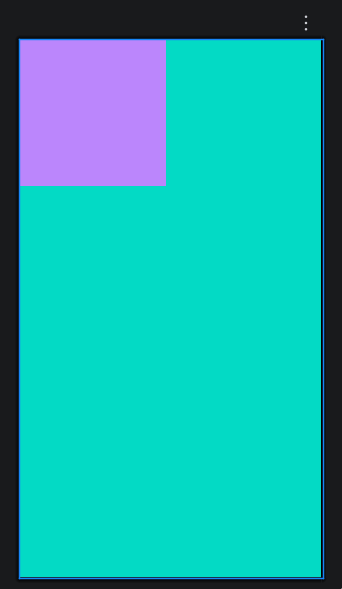
实际效果:View的位置依旧在左上角,并没有 设置layout_gravity="bottom"预期的在下方的效果,可见layout_gravity属性的设置并没有生效,但上述xml代码编译和运行时期都没有报错提示。
XML
<!-- 父布局:CoordinatorLayout黄色背景 -->
<androidx.coordinatorlayout.widget.CoordinatorLayout
    android:layout_width="match_parent"
    android:layout_height="200dp"
    android:background="#FFEB3B"
    xmlns:android="http://schemas.android.com/apk/res/android">

    <!-- 子 View1红色背景:试图用 weight=1 平分宽度 -->
    <View
        android:layout_width="0dp"
        android:layout_height="match_parent"
        android:layout_weight="1"
        android:background="#80CF0000"/>

    <!-- 子 View2蓝色背景:试图用 weight=1 平分宽度 -->
    <View
        android:layout_width="0dp"
        android:layout_height="match_parent"
        android:layout_weight="1"
        android:background="#800000CF"/>

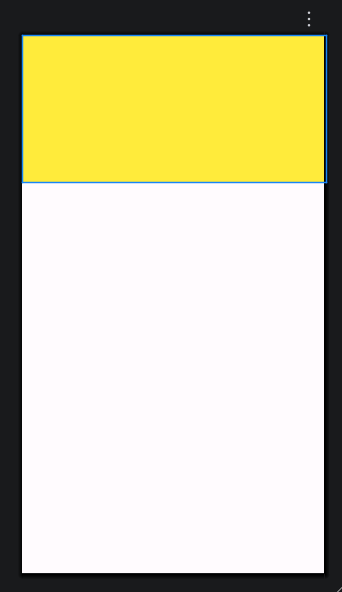
</androidx.coordinatorlayout.widget.CoordinatorLayout>实际效果:并没有达到原本想要的红蓝平分的效果,而是红蓝都不展示,说明layout_weight属性根本没有生效,但这份xml代码在编译和运行时都没有报错。
通过上面两个例子我们可以知道,在传统的XML布局中,很多属性都是没有严格限制使用区域的,也就是可以在不属于它修饰的区域编写编译运行成功,这样一来,我们就很容易写错属性,但
- 写错不会报错,只会布局错乱
- 必须靠反复调试才能发现问题
而Compose就很好的解决了这个问题。
(二)Compose的解决
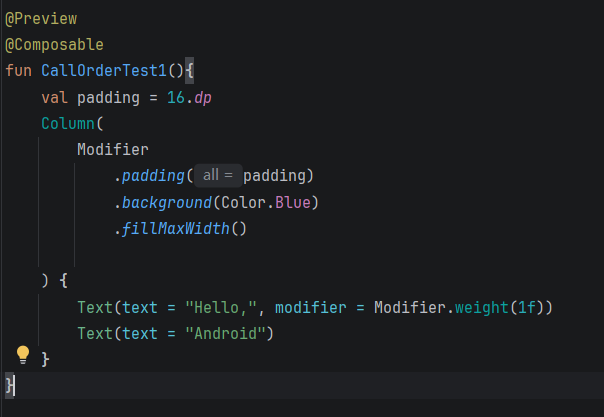
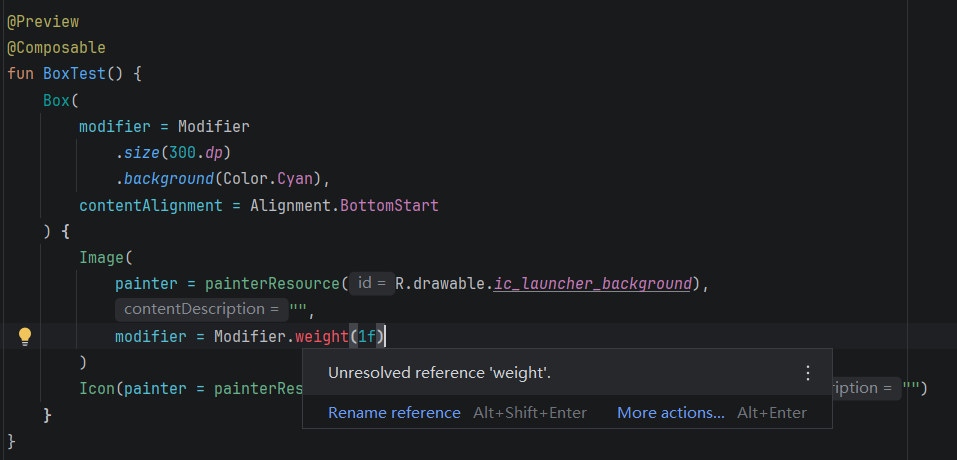
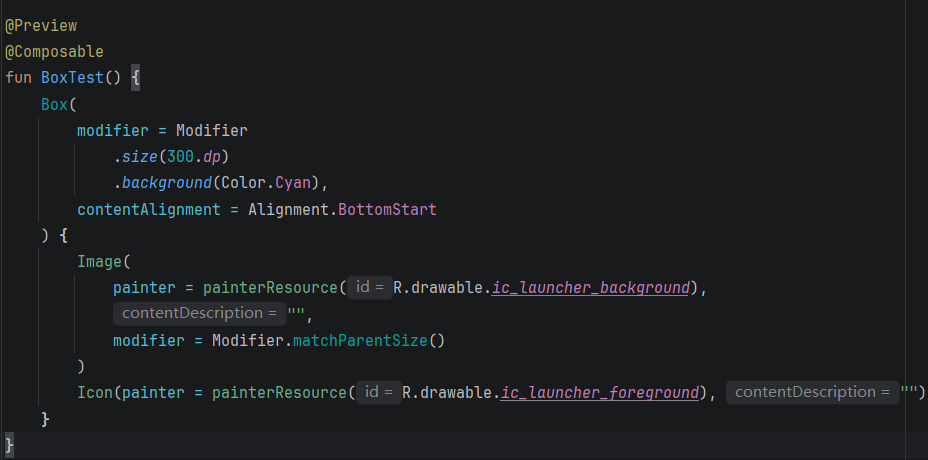
Compose利用 Kotlin 隐式 Receiver + @LayoutScopeMarker 注解,在编译期限制 API 只能在对应父组件内部使用,杜绝 View 体系无效 LayoutParams 的坑。
例如:
.weight()只能在Row/Column{}里调用
正确调用:在Column{}里调用
错误调用:在非在Box{}里调用
.matchParentSize()只能在Box{}里调用
正确调用:在Box{}里调用
错误调用:在Column{}里调用
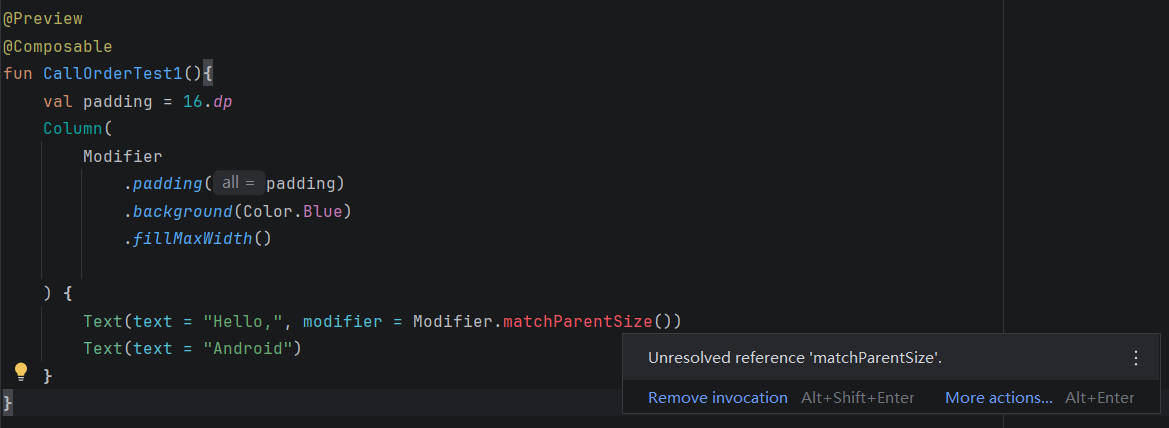
不在对应 Scope调用直接标红编译失败 ,就是标题所讲的修饰符作用域安全。
四 抽取和重用修饰符
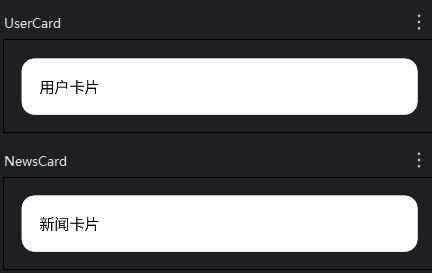
上面我们讲了,我们几乎可以为每一个组件设置Modifier修饰符,而Modifier修饰符本身是一个对象,故而我们可以在合适的位置对Modifier对象进行抽取和重用。
这样做的好处是:
- 改一处,全局生效
- 代码更简洁
- 比 XML style 更灵活
- 对于一些需要频繁重绘的控件(如动画或计数器),抽取可以提高性能,若不抽取,每重绘一次就需要重新创建一次对象。
(一)抽取公共样式(圆角、背景、内边距)
Kotlin
// 1. 定义公共复用的 Modifier(顶层、伴生对象里都可以)
val CommonCardModifier = Modifier
    .fillMaxWidth()
    .padding(16.dp)
    .background(Color.White, RoundedCornerShape(12.dp))
    .padding(16.dp)

// 2. 在组件中直接复用
@Preview
@Composable
fun UserCard() {
    Box(modifier = CommonCardModifier) {
        Text("用户卡片")
    }
}

@Preview
@Composable
fun NewsCard() {
    Box(modifier = CommonCardModifier) {
        Text("新闻卡片")
    }
}
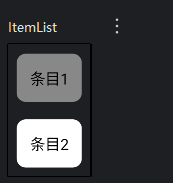
(二)带参数的可配置复用 Modifier
Kotlin
// 带参数的公共 Modifier 扩展函数
fun Modifier.itemStyle(
    bgColor: Color = Color.White,
    cornerSize: Dp = 8.dp
) = this.padding(8.dp)
    .background(bgColor, RoundedCornerShape(cornerSize))
    .padding(12.dp)

// 使用
@Preview
@Composable
fun ItemList() {
    Column{
        Text(
            text = "条目1",
            modifier = Modifier.itemStyle(Color.Gray) // 传参定制
        )
        Text(
            text = "条目2",
            modifier = Modifier.itemStyle() // 使用默认值
        )
    }
}
(三)组合多个 Modifier(超级复用)
Kotlin
val BaseModifier = Modifier.fillMaxWidth()

val FormModifier = BaseModifier
    .padding(16.dp)
    .background(Color.White)

val CardModifier = FormModifier
    .clip(RoundedCornerShape(16.dp))
(四)抽取频繁重绘组件中的Modifier
Kotlin
// 抽取到 Composable 函数外部(顶层/伴生对象)
// 全局只创建 一次 !!!
val CounterTextModifier = Modifier
    .padding(16.dp)
    .background(Color.Cyan)
    .clickable { }

@Composable
fun Counter() {
    var count by remember { mutableStateOf(0) }

    Column {
        Text(
            text = "计数:$count",
            // 直接复用已有的对象,不创建新对象
            modifier = CounterTextModifier
        )
    }
}