如何在双系统之间用共享内存传递数据呢?
首先,我们要创建一个SHM块,在RTS的配置WindowsEFI_Linux64.txt中,找到Shared Memory添加一块SHM区,name为shm的唯一索引,size是大小
bash
[/SHM/2]
    "name" = "data"
    "size" = uint64: 0x1000
需要重启整个RTS
rth -sysreboot
找到RTS的开发包,里面有API,需要利用到API的代码和动态链接库。以Linux为例,我们需要准备一台ubuntu24.0的机器,将API包拷贝到Ubuntu中
bash
podman@podman:~$ tree -L 3 API
API
├── Linux
│   ├── apps
│   │   ├── eventPingPong
│   │   ├── shmAccessDemo
│   │   ├── shmDataExchangeDemo
│   │   └── tools
│   ├── include
│   │   └── libRth.h
│   ├── lib
│   │   ├── libRth64.so.1.1.0
│   │   └── libRth.so.1.1.0
│   └── readme.txt
└── Windows
    ├── apps
    │   ├── apps.sln
    │   ├── eventPingPong
    │   ├── rthTool
    │   ├── shmAccessDemo
    │   └── shmDataExchangeDemo
    ├── include
    │   └── libRth.h
    ├── lib
    │   ├── Win32
    │   └── x64
    └── readme.txt
我们需要把头文件和动态链接库放到系统目录里
bash
sudo cp API/Linux/include/libRth.h /usr/include/

sudo cp API/Linux/lib/libRth64.so.1.1.0 /usr/lib/x86_64-linux-gnu/

ldconfig
然后进入API/Linux/apps/shmAccessDemo 这里有提供一个写/读的案例,我们先用这个案例进行示范。需要修改一下Makefile,这里自带的Makefile过时了,原先的会导致一直在找libRth64.so,但是实际上我们现在用的是libRth64.so.1
bash
################################################################################
##
##  Makefile for Shared memory access demo
##
##  Copyright (c) 2012-2025 congatec GmbH, Ravensburg, Germany. All Rights Reserved.
##
##  Target architecture (x86_64 or i386) is determined automatically.
##  To override it, use the ARCH parameter:
##      "make ARCH=i386"       compile and link for 32 bit target
##      "make ARCH=x86_64"     compile and link for 64 bit target
##
##  If libRth.so (or libRth64.so respectively) is not located in the default path
##  you may specify its location using the LPATH parameter:
##
##      "make ARCH=i386 LPATH=~/BSP/Linux"
##
################################################################################

#
# Override BITS if ARCH is specified, otherwise set automatically
ifndef ARCH
BITS = $(shell arch | awk '/x86_64/ {print 64} /i.86/ {print 32}')
else
ifeq ($(ARCH),i386)
BITS = 32
else
ifeq ($(ARCH),x86_64)
BITS = 64
else
$(error failed. Try: ARCH=i386 or ARCH=x86_64)
endif
endif
endif

NAME = shmAccessDemo

RTHLIB = Rth
CC = gcc
CFLAGS_EXTRA = -m$(BITS)

ifeq ($(BITS),64)
LPATH = /lib/x86_64-linux-gnu
RTHLIB := $(RTHLIB)$(BITS)
RTHSONAME = libRth64.so.1
else
LPATH = /lib/i386-linux-gnu
RTHSONAME = libRth.so.1
endif

OBJECTS = $(NAME).o
TARGET = $(NAME)

####################################################################

## link dynamic to libRth.so.1 or libRth64.so.1 (soname; no libRth64.so linker symlink required)
##  1. library has to be located at the default library path (e.g. /usr/lib) or at $(LPATH)
##  2. use -l:filename to link the versioned soname directly
$(TARGET): $(OBJECTS)
	$(CC) $(CFLAGS_EXTRA) $^ -L$(LPATH) -L. -l:$(RTHSONAME) -lrt -o $@

%.o: %.c
	$(CC) $(CFLAGS_EXTRA) -Wall -c $< -o $@

clean:
	rm -f $(OBJECTS) $(TARGET)
安装make工具,然后编译
bash
sudo apt install make

make

#文件如下

Makefile  shmAccessDemo  shmAccessDemo.c  shmAccessDemo.o
将生成的可执行文件shmAccessDemo 拷贝到rts的Linux里,如果拷贝过程中丢失了可执行权限的话,我们就给它补上
bash
scp shmAccessDemo  rts@<ip>:~/

ssh rts@<ip>


chmod a+x shmAccessDemo
bash
root@rts-deb:/home/rts# ./shmAccessDemo
Found Shared Memory Partition "data" size: 0x00001000 bytes.
Shared Memory Partition Lock acquired.
Write 23 bytes to Shared memory...OK
Read back written data...OK
Read back data via direct pointer access...OK
Shared Memory Partiton Lock released.
Partition closed. Shared Memory Demo successful!
接下来,我们要修改一下代码,让它在linux上只读取,在windows下只写入
CPP in Liunx
bash
/**
 * \file    shmAccessDemo.c
 *
 * \brief   Shared Memory API example (read-only access)
 *
 * This is a read-only demonstration of the Real-Time Hypervisor Shared Memory API functions.
 * It requires one configured Shared Memory partition named "data". Run the Windows write-only
 * demo on another OS to populate the partition, then use this demo to read and display the data.
 *
 * Copyright (c) 2008 - 2025 congatec GmbH, Ravensburg, Germany
 *
 * \n
 *
 * Permission is hereby granted, free of charge, to any person obtaining a copy
 * of this file, to deal in this file without restriction, including without
 * limitation the rights to use, copy, modify, merge, publish, distribute,
 * sublicense, and/or sell copies of this file, and to permit persons to whom
 * this file is furnished to do so, subject to the following conditions:
 *
 * The above copyright notice and this permission notice shall be included in all
 * copies of this file.
 *
 * THIS FILE IS PROVIDED "AS IS", WITHOUT WARRANTY OF ANY KIND, EXPRESS OR
 * IMPLIED, INCLUDING BUT NOT LIMITED TO THE WARRANTIES OF MERCHANTABILITY,
 * FITNESS FOR A PARTICULAR PURPOSE AND NONINFRINGEMENT. IN NO EVENT SHALL
 * THE AUTHORS OR COPYRIGHT HOLDERS BE LIABLE FOR ANY CLAIM, DAMAGES OR OTHER
 * LIABILITY, WHETHER IN AN ACTION OF CONTRACT, TORT OR OTHERWISE, ARISING
 * FROM, OUT OF OR IN CONNECTION WITH THIS FILE OR THE USE OR OTHER DEALINGS
 * IN THIS FILE.
 *
 */

/***************************************************************************************************
 *                                            INCLUDES
 */

#include "../../include/libRth.h"   /* Real-Time Hypervisor API declaration */
#include <stdio.h>

/***************************************************************************************************
 *                                            DEFINES
 */

/*
 * Name of the Shared Memory partition to test.
 * Must correspond to the partition name defined in the Hypervisor configuration file.
 */
#define SHM_PARTITION_NAME    "data"

/***************************************************************************************************
 *                                         IMPLEMENTATION
 */

int main(void)
{
    char
        pTest[100] = {0},
        *pShmAddress = NULL;
    unsigned long
        partitionSize = 0,
        areaSize = 0;
    tShmKey
        key = SHM_KEY_INVALID;
    int
        ret = -1;

    /* get the size of the Shared Memory Partition */
    partitionSize = shmSizeGet(SHM_PARTITION_NAME);

    /* found the partition? */
    if(0 == partitionSize)
    {
        printf("ERROR: Shared Memory Partition \"" SHM_PARTITION_NAME "\" not found.\n");
        return -1;
    }

    printf("Found Shared Memory Partition \"" SHM_PARTITION_NAME "\" size: 0x%08lX bytes.\n",
           partitionSize);

    /* try to open the whole partition at offset 0 */
    areaSize = partitionSize;
    key = shmOpen(SHM_PARTITION_NAME, 0, &areaSize);

    /* check if the partition could be opened */
    if(key == SHM_KEY_INVALID)
    {
        printf("ERROR: Cannot open Shared Memory Partition \"" SHM_PARTITION_NAME "\".\n");
        return -1;
    }

    /* check the actual size of the opened area */
    if(areaSize != partitionSize)
    {
        printf("WARNING: Opened Shared Memory Area size: 0x%08lX (smaller than desired size 0x%08lX).\n",
               areaSize, partitionSize);
    }

    /* indicate access to the partition, wait up to 2 sec */
    ret = shmLockAcquire(key, 2000);

    /* check for failure */
    if(ret)
    {
        printf("ERROR: Lock is already acquired by another OS.\n");
        /* close the shared memory partition  */
        shmClose(key);
        return -1;
    }

    printf("Shared Memory Partition Lock acquired.\n");

    /* read data from offset 0, use shmRead instead of direct access */
    printf("Read data from Shared memory...");
    ret = shmRead(key, 0, sizeof(pTest) - 1, pTest);

    /* check how much data was read */
    if(ret <= 0)
    {
        printf("\nERROR: Could not read data from Shared Memory (returned %d).\n", ret);
        goto fail;
    }
    pTest[ret] = '\0';
    printf("OK\n");
    printf("Read content via shmRead (%d bytes): '%s'\n", ret, pTest);

    printf("Read data via direct pointer access...");

    /* get direct access via pointer */
    pShmAddress = (char *)shmAddrGet(key);

    /* is address valid? */
    if(NULL == pShmAddress)
    {
        printf("\nERROR: shmAddrGet() failed.\n");
        goto fail;
    }

    printf("OK\n");
    printf("Read content via direct access: '%s'\n", pShmAddress);

    /* release the lock */
    ret = shmLockRelease(key);

    /* check for failure */
    if(ret) {
        printf("ERROR: Failed to release Partition Lock\n");
        shmClose(key);
        return -1;
    }
    printf("Shared Memory Partiton Lock released.\n");

    /* close partition */
    ret = shmClose(key);

    /* did it work? */
    if(ret)
    {
        printf("Cannot close Shared Memory Partition: shmClose() returned %d.\n", ret);
        return -1;
    }

    printf("Partition closed. Shared Memory read demo successful!\n");

    return 0;

fail:
    shmLockRelease(key);
    shmClose(key);
    return -1;
}
Windows CPP
bash
 /**
 * \file    shmAccessDemo.c
 *
 * \brief   Shared Memory API example (write-only access)
 *
 * This is a write-only demonstration of the Real-Time Hypervisor Shared Memory API functions.
 * It requires one configured Shared Memory partition named "data". Run the Linux read-only demo
 * on another OS to read and display the data written by this demo.
 *
 * \note
 *
 * Copyright (c) 2008 - 2025 congatec GmbH, Ravensburg, Germany
 *
 * \n
 *
 * Permission is hereby granted, free of charge, to any person obtaining a copy
 * of this file, to deal in this file without restriction, including without
 * limitation the rights to use, copy, modify, merge, publish, distribute,
 * sublicense, and/or sell copies of this file, and to permit persons to whom
 * this file is furnished to do so, subject to the following conditions:
 *
 * The above copyright notice and this permission notice shall be included in all
 * copies of this file.
 *
 * THIS FILE IS PROVIDED "AS IS", WITHOUT WARRANTY OF ANY KIND, EXPRESS OR
 * IMPLIED, INCLUDING BUT NOT LIMITED TO THE WARRANTIES OF MERCHANTABILITY,
 * FITNESS FOR A PARTICULAR PURPOSE AND NONINFRINGEMENT. IN NO EVENT SHALL
 * THE AUTHORS OR COPYRIGHT HOLDERS BE LIABLE FOR ANY CLAIM, DAMAGES OR OTHER
 * LIABILITY, WHETHER IN AN ACTION OF CONTRACT, TORT OR OTHERWISE, ARISING
 * FROM, OUT OF OR IN CONNECTION WITH THIS FILE OR THE USE OR OTHER DEALINGS
 * IN THIS FILE.
 *
 */

/***************************************************************************************************
 *                                            INCLUDES
 */

#include "../../include/libRth.h"   /* Real-Time Hypervisor API declaration */
#include <stdio.h>

/***************************************************************************************************
 *                                            DEFINES
 */

/** name of the Shared Memory partition to test (has to be defined in config.txt) */
#define SHM_PARTITION_NAME    "data"

/***************************************************************************************************
 *                                         IMPLEMENTATION
 */

int main(void)
{
    const char
        pBuf[] = "This is a test string from Windows.";
    unsigned long
        partitionSize = 0,
        areaSize = 0;
    tShmKey
        key = SHM_KEY_INVALID;
    int
        ret = -1;

    /* get the size of the Shared Memory Partition */
    partitionSize = shmSizeGet(SHM_PARTITION_NAME);

    /* found the partition? */
    if(0 == partitionSize)
    {
        printf("ERROR: Shared Memory Partition \"" SHM_PARTITION_NAME "\" not found.\n");
        return -1;
    }

    printf("Found Shared Memory Partition \"" SHM_PARTITION_NAME "\" size: 0x%08lX bytes.\n",
           partitionSize);

    /* try to open the whole partition at offset 0 */
    areaSize = partitionSize;
    key = shmOpen(SHM_PARTITION_NAME, 0, &areaSize);

    /* check if the partition could be opened */
    if(key == SHM_KEY_INVALID)
    {
        printf("ERROR: Cannot open Shared Memory Partition \"" SHM_PARTITION_NAME "\".\n");
        return -1;
    }

    /* check the actual size of the opened area */
    if(areaSize != partitionSize)
    {
        printf("WARNING: Opened Shared Memory Area size: 0x%08lX (smaller than desired size 0x%08lX).\n",
               areaSize, partitionSize);
    }

    /* indicate access to the partition, wait up to 2 sec */
    ret = shmLockAcquire(key, 2000);

    /* check for failure */
    if(ret)
    {
        printf("ERROR: Lock is already acquired by another OS.\n");
        /* close the shared memory partition  */
        shmClose(key);
        return -1;
    }

    printf("Shared Memory Partition Lock acquired.\n");

    /* write some data to offset 0, use shmWrite instead of direct access */
    printf("Write %zu bytes to Shared memory: \"%s\"...", sizeof(pBuf), pBuf);
    ret = shmWrite(key, 0, sizeof(pBuf), pBuf);

    /* check it */
    if(sizeof(pBuf) != ret)
    {
        printf("\nERROR: Could only write %d bytes to Shared Memory.\n", ret);
        /* close the shared memory partition  */
        shmLockRelease(key);
        shmClose(key);
        return -1;
    }
    printf("OK\n");
    printf("Written content: \"%s\"\n", pBuf);

    /* release the lock */
    ret = shmLockRelease(key);

    /* check for failure */
    if(ret)
    {
        printf("ERROR: Failed to release Partition Lock\n");
        /* close the shared memory partition  */
        shmClose(key);
        return -1;
    }
    printf("Shared Memory Partiton Lock released.\n");

    /* close partition */
    ret = shmClose(key);

    /* did it work? */
    if(ret)
    {
        printf("ERROR: Cannot close Shared Memory Partition: shmClose() returned %d.\n", ret);
        return -1;
    }

    printf("Partition closed. Shared Memory write demo successful!\n");

    return 0;
}
Windows侧需要安装Visual Studio,然后打开apps.sln文件,进行编译
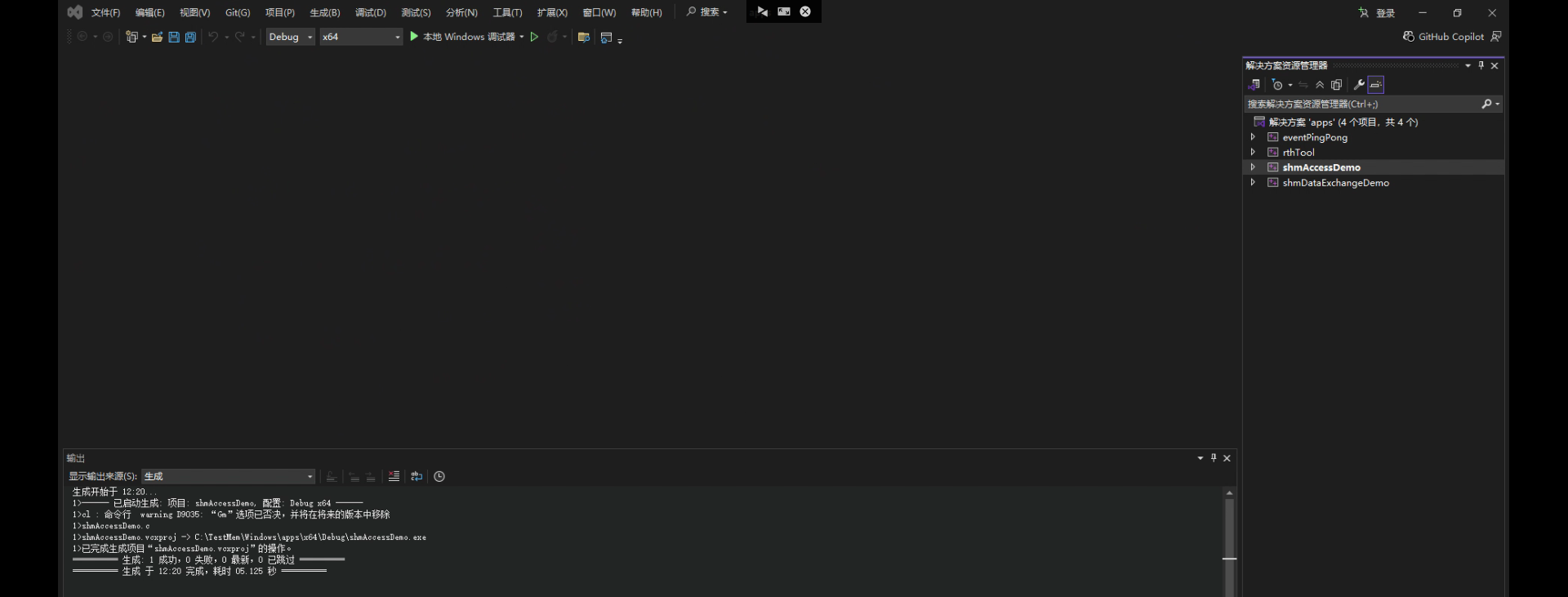

编译成功以后会获得可执行文件
我们把linux的可执行文件拷贝到rts中,替换之前的,然后先运行Windows下的shm写程序,再运行linux中的shm读程序。(Windows这边运行完就是闪一下结束了,如果想看到内容,需要添加头文件<stdlib>,在return 0 之前添加一个 system("pause");)
可以看到 Windows写入的是This is a test string from Windows.
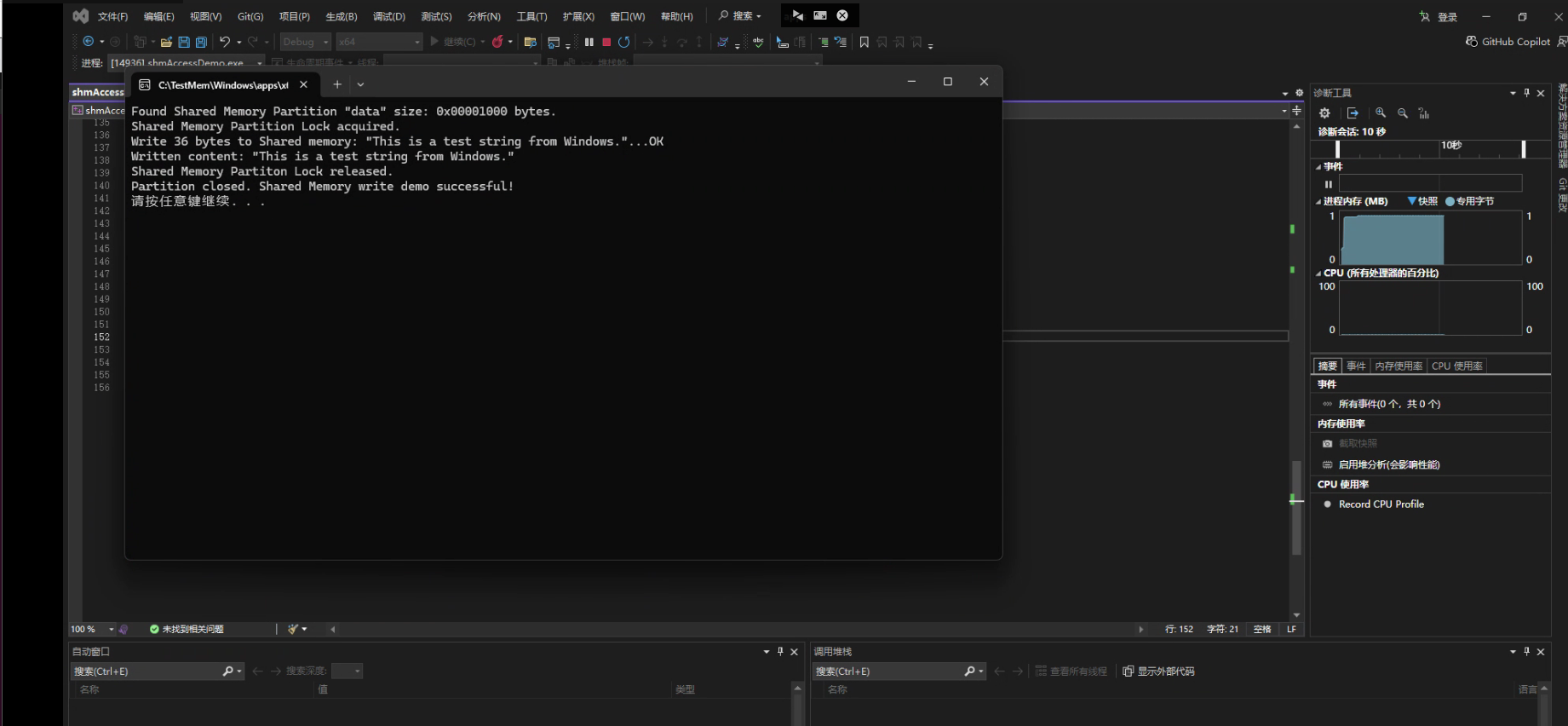
可以看到Linux这边输出了一样的内容,证明正确读到了Shm里的信息
bash
root@rts-deb:/home/rts# ./shmAccessDemo
Found Shared Memory Partition "data" size: 0x00001000 bytes.
Shared Memory Partition Lock acquired.
Read data from Shared memory...OK
Read content via shmRead (99 bytes): 'This is a test string from Windows.'
Read data via direct pointer access...OK
Read content via direct access: 'This is a test string from Windows.'
Shared Memory Partiton Lock released.
Partition closed. Shared Memory read demo successful!