前言
- 最近在项目中频繁使用到串口和数传,本期就来分享一下上位机中,如何分别使用
python和cpp完成串口通讯。 - 本次实现的串口通讯包含
一问一答式,异步发送和异步接受式(模拟最常用的TCP与UDP协议)
1 串口
1-1 介绍
-
串口(Serial Port)可以理解成设备之间一根线按顺序"一个比特一个比特"传数据的通信方式。
-
串口 = 一条"排队传输"的数据通道
-
就像两个人拿对讲机:
- 一个人说
- 另一个人听
- 按顺序一句一句来
-
不会像并口那样"一次很多位一起发",而是:
01101010...↑一位一位连续发送
-
所以叫 串行通信(Serial)。
1-2 最常见的几根线
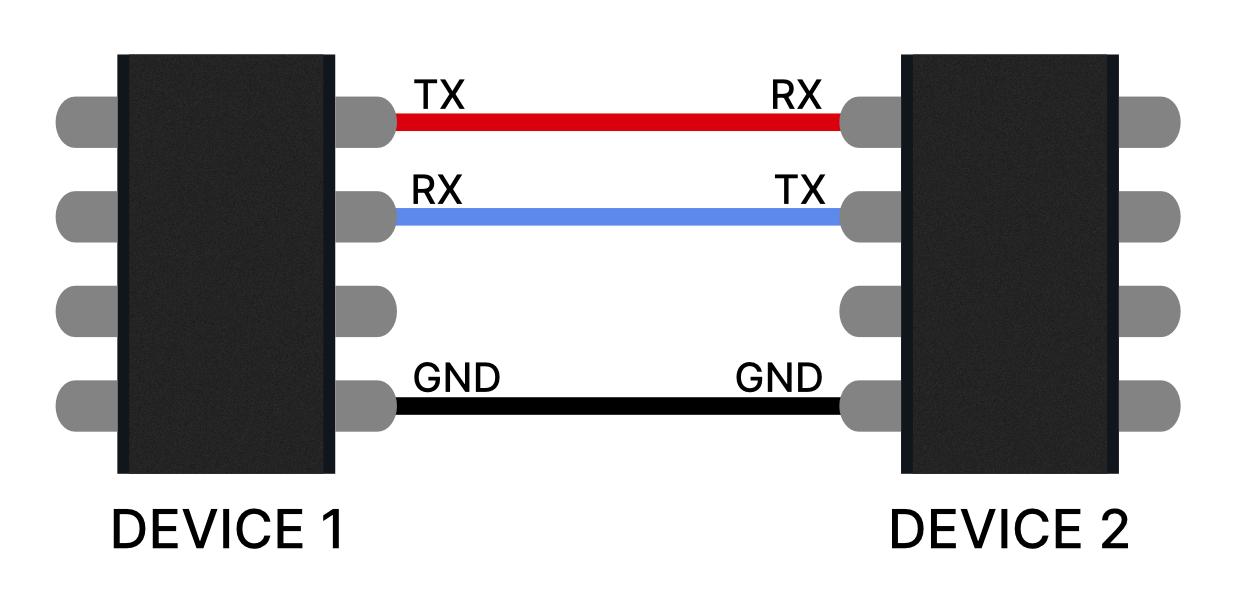
- TX(Transmit):发送数据
- RX(Receive):接收数据
- GND(Ground):必须共地,不然电平参考不一致。
- 连接通常是交叉:
TX对RX,RX对TX
1-3 串口原理
- 串口通信基于 UART(Universal Asynchronous Receiver/Transmitter) 实现。
- UART 的作用:
- 发送端:把 CPU/单片机里的并行数据转换成串行数据发送出去
- 接收端:把收到的串行数据重新转换成并行数据
-
即:
CPU数据(并行)
↓
UART发送器
↓
TX线(一位一位发送)
↓
RX线
↓
UART接收器
↓
CPU数据(并行) -
UART 属于 异步通信
- 不需要额外时钟线
- 双方提前约定好通信参数即可
- 约定内容通常包括:
- 波特率(如
115200) - 数据位(如
8) - 校验位(如
N) - 停止位(如
1)
- 波特率(如
- 发送时:
- 空闲状态下线路保持高电平
- 开始发送时先拉低(起始位)
- 再发送数据位
- 最后发送停止位恢复高电平
1-4 8N1
-
假设我们要发送字符
A,在ASCII里头对应的是65,转换为二进制是01000001 -
串口会变成类似:
起始位 + 数据位 + 校验位(可选) + 停止位
-
例如最常见
8N1,意思:- 8:8位数据
- N:无校验
- 1:1位停止位
-
发送时像:
[Start][01000001][Stop]
1-5 波特率
- baud rate(波特率)意思是每秒传多少个符号
- 常见的波特率有:
960057600115200(一般首选)921600
- 收发端口两边必须一致!!!否则数据会出现乱码!!
1-6 Linux中的串口设备
- 在 Ubuntu / Linux 系统中,串口设备通常会被映射成
/dev/tty*文件。 - 程序通过打开这些设备文件,就可以和硬件进行串口通信。
- 常见有以下几种:
1-6-1 /dev/ttyS*:板载 UART 串口
- 通常来自:
- 主板芯片串口
- 开发板硬件串口
- GPIO 引出的 UART
- 特点:
- 系统直接管理
- 延迟低
1-6-2 /dev/ttyUSB*:USB 转串口设备
- 常见芯片:
- WCH
CH340 - FTDI
FT232 - Silicon Labs
CP2102
- WCH
- 特点:
- 最常见
- 插上即识别
- 调试方便
- 插拔可以看:
bash
dmesg | grep tty1-6-3 /dev/ttyACM*:USB CDC ACM 设备
- 常见于:
- Arduino 开发板
- 飞控 USB
- 某些 IMU
- 调试串口
- 特点:
- 不需要额外 USB 转串口芯片
- 很多 MCU 直接支持
1-7 无线串口
-
除了通过 TX / RX 导线连接,串口数据也可以通过无线方式传输。
-
本质上仍然是串口通信:
设备A UART(TX/RX)
↓
无线模块
≈≈≈ 无线传输 ≈≈≈
无线模块
↓
设备B UART(TX/RX) -
这么理解:串口 + 无线模块 = 无线串口。
-
常见无线串口方式:
- 蓝牙串口
- Wi-Fi 串口
- 数传电台
-
缺点:(相比有线)
- 延迟更高
- 易受干扰
- 距离有限
- 丢包风险
2 初次连接测试
2-1 找到串口设备
- 就像刚刚
1-6说的Linux识别串口设备/dev/tty* - 我们可以通过插拔串口设备来判断当前是哪一个串口
bash
ls /dev/tty*- 推荐确定端口以后,直接绑定重命名【udev重命名详细教程】放弃硬编码,从重命名开始
2-2 pyserial
- PySerial 是 Python 中最常用的串口通信库。
- 个人一般喜欢使用
pyserial在初次链接串口的时候进行测试。
bash
pip install pyserial- 发送端测试
python
import serial
import time

PORT = "/dev/ttyUSB0"
BAUD = 115200

ser = None

try:
    # 打开串口
    ser = serial.Serial(
        port=PORT,
        baudrate=BAUD,
        timeout=1
    )

    # 检查
    if ser.is_open:
        print(f"串口打开成功: {PORT}")
    else:
        print("串口打开失败")
        exit(1)

    count = 0

    while True:
        msg = f"hello {count}\n"

        ser.write(msg.encode())

        print("发送:", msg.strip())

        count += 1
        time.sleep(1)

except serial.SerialException as e:
    print("串口异常:", e)

except KeyboardInterrupt:
    print("用户退出")

finally:
    if ser and ser.is_open:
        ser.close()
print("串口已关闭")- 接受端代码
python
import serial

PORT = "/dev/ttyUSB0"
BAUD = 115200

ser = None

try:
    ser = serial.Serial(
        port=PORT,
        baudrate=BAUD,
        timeout=1
    )

    if ser.is_open:
        print(f"串口打开成功: {PORT}")
    else:
        print("串口打开失败")
        exit(1)

    while True:
        if ser.in_waiting > 0:
            msg = ser.readline().decode(
                errors="ignore"
            )

            print("接收:", msg.strip())

except serial.SerialException as e:
    print("串口异常:", e)

except KeyboardInterrupt:
    print("用户退出")

finally:
    if ser and ser.is_open:
        ser.close()
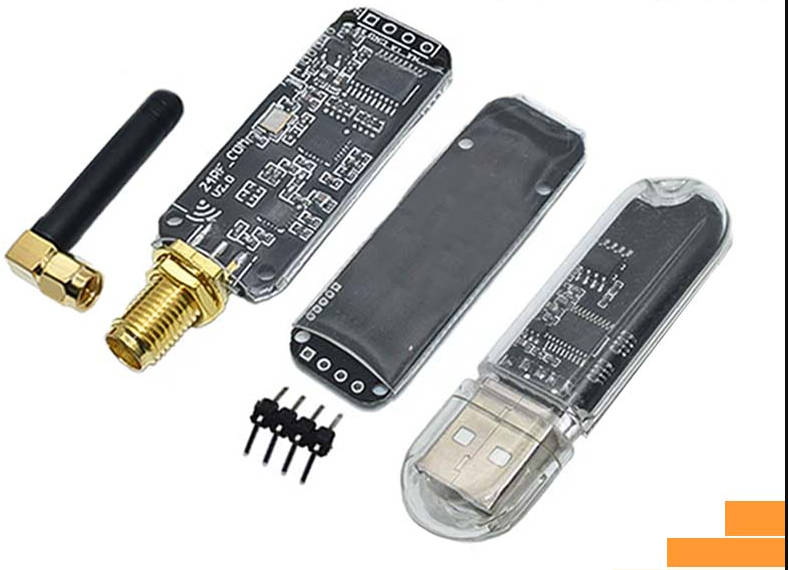
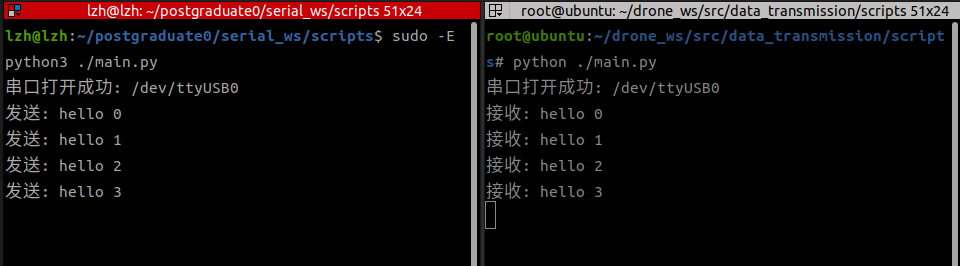
print("串口已关闭")- 这里我用的是USB无线串口模块,可以看到通讯正常:
3 C++封装SerialCenter实现
- 这一节我们提供实现,下一节我们分析原理
3-1 分析
- 串口通信常见有两种方式:
- 一问一回式:一端发送请求,另一端收到后立即返回响应。
- 异步通信:无需先请求,任意一方都可以在任意时刻主动发送数据。
- 但是需要注意的是,串口通讯在同时进行一问一回式和异步通讯的时候抢占的是同一个串口资源。为避免读写冲突,我们在封装的时候需要做到:
- 发送端通过互斥锁保证同一时刻仅有一个线程访问串口
- 接收端则持续监听并根据数据类型进行分发
- 从而保证同步请求与异步消息能够稳定并发运行。
3-2 完整代码实现
- 老规矩先上完整代码,再分析
SerialCenter.hpp
cpp
#pragma once

#include <string>
#include <queue>
#include <mutex>
#include <thread>
#include <condition_variable>

class SerialCenter
{
public:
    SerialCenter(
        const std::string& device,
        int baudrate);

    ~SerialCenter();

    bool open_port();

    void close_port();

    // =====================
    // 异步发送
    // =====================
    void send_async(
        const std::string& data);

    // =====================
    // 同步发送
    // =====================
    std::string send_cmd(
        const std::string& cmd,
        int timeout_ms = 500);

    // =====================
    // 读取普通消息
    // =====================
    bool read_available(
        std::string& out);

private:
    bool configure_port();

    void start_rx();
    void stop_rx();

    void start_tx();
    void stop_tx();

    void handle_message(
        const std::string& msg);

    bool is_response_message(
        const std::string& msg);

private:

    int fd = -1;

    std::string device;
    int baudrate;

    // =====================
    // RX
    // =====================
    std::thread rx_thread_;
    bool rx_running_ = false;

    std::queue<std::string> rx_queue;
    std::mutex rx_mtx;

    std::string rx_buffer_;

    // =====================
    // TX
    // =====================
    std::thread tx_thread_;
    bool tx_running_ = false;

    std::queue<std::string> tx_queue;
    std::mutex tx_mtx;

    std::condition_variable tx_cv;

    // =====================
    // 同步请求响应
    // =====================
    std::mutex resp_mtx;

    std::condition_variable resp_cv;

    bool waiting_response_ = false;

    std::string response_data;
};
serialCenter.cpp
cpp
#include "../include/SerialCenter.hpp"

#include <iostream>
#include <fcntl.h>
#include <unistd.h>
#include <termios.h>
#include <cstring>

SerialCenter::SerialCenter(
    const std::string& device,
    int baudrate)
    : device(device),
      baudrate(baudrate)
{
}

SerialCenter::~SerialCenter()
{
    close_port();
}

bool SerialCenter::open_port()
{
    fd = open(
        device.c_str(),
        O_RDWR | O_NOCTTY | O_NONBLOCK);

    if (fd < 0)
    {
        perror("open failed");
        return false;
    }

    bool ok = configure_port();

    if (!ok)
    {
        close(fd);
        fd = -1;
        return false;
    }

    start_rx();
    start_tx();

    return true;
}

void SerialCenter::close_port()
{
    stop_rx();
    stop_tx();

    if (fd != -1)
    {
        close(fd);
        fd = -1;
    }
}

bool SerialCenter::configure_port()
{
    struct termios tty{};

    if (tcgetattr(fd, &tty) != 0)
    {
        perror("tcgetattr");
        return false;
    }

    cfmakeraw(&tty);

    speed_t speed;

    switch (baudrate)
    {
        case 9600:
            speed = B9600;
            break;

        case 115200:
            speed = B115200;
            break;

        default:
            std::cerr
                << "Unsupported baudrate\n";
            return false;
    }

    cfsetispeed(&tty, speed);
    cfsetospeed(&tty, speed);

    tty.c_cflag |= (CLOCAL | CREAD);

    tty.c_cflag &= ~CSIZE;
    tty.c_cflag |= CS8;

    tty.c_cflag &= ~PARENB;
    tty.c_cflag &= ~CSTOPB;

    tty.c_cc[VMIN] = 0;
    tty.c_cc[VTIME] = 1;

    if (tcsetattr(
            fd,
            TCSANOW,
            &tty) != 0)
    {
        perror("tcsetattr");
        return false;
    }

    return true;
}

void SerialCenter::start_rx()
{
    if (rx_running_)
        return;

    rx_running_ = true;

    rx_thread_ = std::thread([this]() {

        char buffer[256];

        while (rx_running_)
        {
            int len = read(
                fd,
                buffer,
                sizeof(buffer));

            if (len > 0)
            {
                rx_buffer_.append(
                    buffer,
                    len);

                while (true)
                {
                    size_t pos =
                        rx_buffer_.find('\n');

                    if (pos ==
                        std::string::npos)
                        break;

                    std::string msg =
                        rx_buffer_.substr(
                            0,
                            pos + 1);

                    rx_buffer_.erase(
                        0,
                        pos + 1);

                    handle_message(msg);
                }
            }
            else
            {
                std::this_thread::sleep_for(
                    std::chrono::milliseconds(
                        2));
            }
        }
    });
}

void SerialCenter::stop_rx()
{
    rx_running_ = false;

    if (rx_thread_.joinable())
        rx_thread_.join();
}

void SerialCenter::start_tx()
{
    if (tx_running_)
        return;

    tx_running_ = true;

    tx_thread_ = std::thread([this]() {

        while (tx_running_)
        {
            std::unique_lock<std::mutex>
                lock(tx_mtx);

            tx_cv.wait(
                lock,
                [this]() {
                    return
                        !tx_running_
                        || !tx_queue.empty();
                });

            if (!tx_running_)
                break;

            std::string data =
                tx_queue.front();

            tx_queue.pop();

            lock.unlock();

            if (fd != -1)
            {
                ssize_t ret =
                    write(
                        fd,
                        data.c_str(),
                        data.size());

                if (ret < 0)
                {
                    perror(
                        "serial write");
                }
            }
        }
    });
}

void SerialCenter::stop_tx()
{
    tx_running_ = false;

    tx_cv.notify_all();

    if (tx_thread_.joinable())
        tx_thread_.join();
}

void SerialCenter::send_async(
    const std::string& data)
{
    if (fd == -1)
        return;

    {
        std::lock_guard<std::mutex>
            lock(tx_mtx);

        tx_queue.push(data);
    }

    tx_cv.notify_one();
}

bool SerialCenter::read_available(
    std::string& out)
{
    std::lock_guard<std::mutex>
        lock(rx_mtx);

    if (rx_queue.empty())
        return false;

    out = rx_queue.front();

    rx_queue.pop();

    return true;
}

bool SerialCenter::is_response_message(
    const std::string& msg)
{
    if (msg.rfind(
            "ACK:",
            0) == 0)
        return true;

    if (msg.rfind(
            "RET:",
            1) == 0)
        return true;

    return false;
}

void SerialCenter::handle_message(
    const std::string& msg)
{
    bool handled = false;

    {
        std::lock_guard<std::mutex>
            lock(resp_mtx);

        if (waiting_response_
            && is_response_message(msg))
        {
            response_data =
                msg;

            waiting_response_ =
                false;

            handled = true;
        }
    }

    if (handled)
    {
        resp_cv.notify_one();
    }
    else
    {
        std::lock_guard<std::mutex>
            lock(rx_mtx);

        rx_queue.push(msg);
    }
}

std::string SerialCenter::send_cmd(
    const std::string& cmd,
    int timeout_ms)
{
    if (fd == -1)
        return "";

    {
        std::lock_guard<std::mutex>
            lock(resp_mtx);

        waiting_response_ = true;

        response_data.clear();
    }

    send_async(cmd);

    std::unique_lock<std::mutex>
        lock(resp_mtx);

    bool ok =
        resp_cv.wait_for(
            lock,
            std::chrono::milliseconds(
                timeout_ms),
            [this]() {
                return
                    !waiting_response_;
            });

    if (!ok)
    {
        waiting_response_ = false;

        std::cerr
            << "timeout\n";

        return "";
    }

    return response_data;
}- 配合下面测试的
main.cpp进行编译:
bash
g++ -std=c++17 -I./include ./src/serialCenter.cpp ./src/main.cpp -o serial_test -pthread3-3 消息格式约定
- 每条消息以换行符
\n结尾 - 同步响应消息需要固定前缀
cpp
ACK:
RET:- 其他消息都视为异步消息
3-4 一问一回式测试
- 发送端
cpp
#include "../include/SerialCenter.hpp"

#include <iostream>
#include <thread>
#include <chrono>

int main()
{
    SerialCenter serial(
        "/dev/ttyUSB0",
        115200);

    if (!serial.open_port())
    {
        std::cerr << "open fail\n";
        return -1;
    }

    std::cout << "pc1 start\n";

    while (true)
    {
        std::string ret =
            serial.send_cmd(
                "GET_STATUS\n",
                3000);

        if (!ret.empty())
        {
            std::cout
                << "reply: "
                << ret;
        }

        std::this_thread::sleep_for(
            std::chrono::seconds(
                1));
    }
}- 接受端
cpp
#include "../include/SerialCenter.hpp"

#include <iostream>
#include <thread>
#include <chrono>

int main()
{
    SerialCenter serial(
        "/dev/ttyUSB0",
        115200);

    if (!serial.open_port())
    {
        std::cerr << "open fail\n";
        return -1;
    }

    std::cout << "pc2 start\n";

    while (true)
    {
        std::string msg;

        if (
            serial.read_available(
                msg))
        {
            std::cout
                << "[RX] "
                << msg;

            if (
                msg == "GET_STATUS\n")
            {
                serial.send_async(
                    "ACK:OK\n");
            }

            else
            {
                serial.send_async(
                    "RET:UNKNOWN\n");
            }
        }

        std::this_thread::sleep_for(
            std::chrono::milliseconds(
                10));
    }
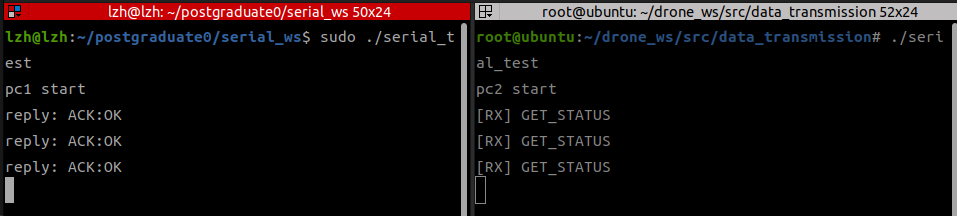
}- 一发一收OK
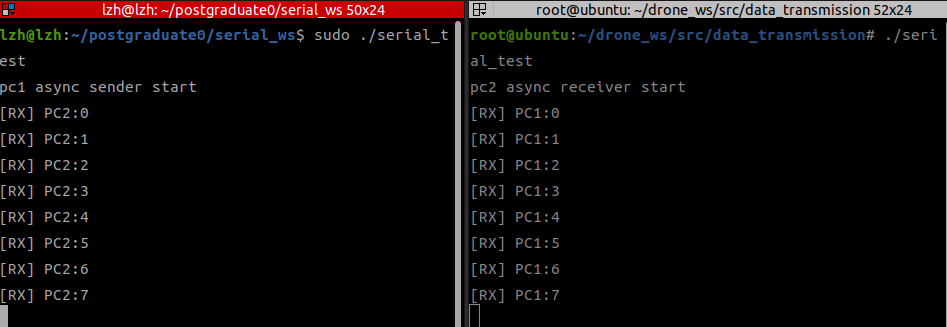
3-5 双向异步通讯测试
- 发送接受端1
cpp
#include "../include/SerialCenter.hpp"

#include <iostream>
#include <thread>
#include <chrono>

int main()
{
    SerialCenter serial(
        "/dev/ttyUSB0",
        115200);

    if (!serial.open_port())
    {
        std::cerr
            << "open fail\n";

        return -1;
    }

    std::cout
        << "pc1 async sender start\n";

    int count = 0;

    while (true)
    {
        serial.send_async(
            "PC1:" +
            std::to_string(count++) +
            "\n");

        std::string msg;

        if (serial.read_available(msg))
        {
            std::cout
                << "[RX] "
                << msg;
        }

        std::this_thread::sleep_for(
            std::chrono::milliseconds(
                500));
}

    return 0;
}- 发送接受端2
cpp
#include "../include/data_transmission/SerialCenter.hpp"

#include <iostream>
#include <thread>
#include <chrono>

int main()
{
    SerialCenter serial(
        "/dev/ttyUSB0",
        115200);

    if (!serial.open_port())
    {
        std::cerr
            << "open fail\n";

        return -1;
    }

    std::cout
        << "pc2 async receiver start\n";
    int count = 0;

    while (true)
    {
        serial.send_async(
            "PC2:" +
            std::to_string(count++) +
            "\n");

        std::string msg;

        if (serial.read_available(msg))
        {
            std::cout
                << "[RX] "
                << msg;
        }

        std::this_thread::sleep_for(
            std::chrono::milliseconds(
                500));
    }

    return 0;
}- 经过测试OK:
4 C++封装SerialCenter实现解析
- 这里我们主要讲解实现
SerialCenter的原理
4-1 打开串口open_port()
cpp
bool SerialCenter::open_port()
{
    fd = open(
        device.c_str(),
        O_RDWR | O_NOCTTY | O_NONBLOCK);

    if (fd < 0)
    {
        perror("open failed");
        return false;
    }

    bool ok = configure_port();

    if (!ok)
    {
        close(fd);
        fd = -1;
        return false;
    }

    start_rx();
    start_tx();

    return true;
}-
调用
open方法,接受传入的device设备名,并指定参数:O_RDWR:可读可写
O_NOCTTY:别把串口当终端O_NONBLOCK:非阻塞
-
fd是返回的串口句柄 -
并通过
configure_port()对串口进行配置- 然后分别启动:
- 接收线程
start_rx() - 发送线程
start_tx()
4-2 配置参数configure_port()
cpp
bool SerialCenter::configure_port()
{
    struct termios tty{};

    if (tcgetattr(fd, &tty) != 0)
    {
        perror("tcgetattr");
        return false;
    }

    cfmakeraw(&tty);

    speed_t speed;

    switch (baudrate)
    {
        case 9600:
            speed = B9600;
            break;

        case 115200:
            speed = B115200;
            break;

        default:
            std::cerr
                << "Unsupported baudrate\n";
            return false;
    }

    cfsetispeed(&tty, speed);
    cfsetospeed(&tty, speed);

    tty.c_cflag |= (CLOCAL | CREAD);

    tty.c_cflag &= ~CSIZE;
    tty.c_cflag |= CS8;

    tty.c_cflag &= ~PARENB;
    tty.c_cflag &= ~CSTOPB;

    tty.c_cc[VMIN] = 0;
    tty.c_cc[VTIME] = 1;

    if (tcsetattr(
            fd,
            TCSANOW,
            &tty) != 0)
    {
        perror("tcsetattr");
        return false;
    }

    return true;
}
4-2-1 串口配置结构体termios
struct termios tty{};这是 Linux 专门保存终端/串口配置的结构体,里面装着很多参数:- 波特率
- 数据位
- 校验位
- 停止位
- 超时设置
- 输入输出模式
4-2-2 读取串口句柄参数
tcgetattr(fd, &tty):去读取 串口句柄fd对应串口现在的参数,填到tty里面。- 因为我们通常不是从零写配置
- 先把系统原配置读出来,再改我们想改的
cfmakeraw(&tty);:把串口变成原始模式 :- 不自动换行
- 不做字符处理
- 收到什么就给什么
4-2-3 设置波特率
cpp
speed_t speed;

    switch (baudrate)
    {
        case 9600:
            speed = B9600;
            break;

        case 115200:
            speed = B115200;
            break;

        default:
            std::cerr
                << "Unsupported baudrate\n";
            return false;
    }

    cfsetispeed(&tty, speed);
cfsetospeed(&tty, speed);- 然后我们选取特定的波特率进行配置:
cfsetispeed(&tty, speed);:设置输入波特率(接收速度)cfsetospeed(&tty, speed);:设置输出波特率(发送速度)
4-2-4 配置8N1
cpp
tty.c_cflag |= (CLOCAL | CREAD);

tty.c_cflag &= ~CSIZE;
tty.c_cflag |= CS8;

tty.c_cflag &= ~PARENB;
tty.c_cflag &= ~CSTOPB;

tty.c_cc[VMIN] = 0;
tty.c_cc[VTIME] = 1;-
tty里头有很多成员,这里我们改其中两个:c_cflag:控制参数
c_cc:特殊字符/超时参数
-
c_cflag:控制参数|= (CLOCAL | CREAD):打开接收功能,并且忽略外部线路控制CREAD:允许接收CLOCAL:忽略 modem 控制线(USB 转串口一般没有电话线控制信号)
&= ~CSIZE:把原来的位数设置擦掉CSIZE是"数据位长度"的掩码。
|= CS8设置8位数据位,也就是8N1的8&= ~PARENB:关闭校验位&= ~CSTOPB1 位停止位,也就是8N1的1
-
c_cc:特殊字符/超时参数VMIN:最少收到多少字节才返回VTIME最多等多少0.1秒
4-2-5 写入串口
tcsetattr(fd,TCSANOW,&tty)把刚刚配置的写入串口
4-3 start_rx():启动接收线程
cpp
void SerialCenter::start_rx()
{
    if (rx_running_)
        return;

    rx_running_ = true;

    rx_thread_ = std::thread([this]() {

        char buffer[256];

        while (rx_running_)
        {
            int len = read(
                fd,
                buffer,
                sizeof(buffer));

            if (len > 0)
            {
                rx_buffer_.append(
                    buffer,
                    len);

                while (true)
                {
                    size_t pos =
                        rx_buffer_.find('\n');

                    if (pos ==
                        std::string::npos)
                        break;

                    std::string msg =
                        rx_buffer_.substr(
                            0,
                            pos + 1);

                    rx_buffer_.erase(
                        0,
                        pos + 1);

                    handle_message(msg);
                }
            }
            else
            {
                std::this_thread::sleep_for(
                    std::chrono::milliseconds(
                        2));
            }
        }
    });
}- 先判断有没有启动过,避免重复启动线程
- 创建线程执行 lambda。
cpp
 char buffer[256];

        while (rx_running_)
        {
            int len = read(
                fd,
                buffer,
                sizeof(buffer));

            if (len > 0)
            {
                rx_buffer_.append( buffer,   len);

                while (true)
                {
                    size_t pos = rx_buffer_.find('\n');

                    if (pos == std::string::npos)
                        break;

                    std::string msg =rx_buffer_.substr(0,pos + 1);

                    rx_buffer_.erase(0,pos + 1);

                    handle_message(msg);
                }
            }
            else
            {
                std::this_thread::sleep_for(std::chrono::milliseconds(2));
            }
        }
char buffer[256];临时缓冲区,每次从串口最多先读256字节。int len =read(fd,buffer,sizeof(buffer));从 fd 读数据到 buffer。rx_buffer_.append(buffer,len);需要拼包直到找一条完整消息- 这里我们规定
\n表示一条消息结束 pos == std::string::npos:如果还没找到\n就继续等待- 直到我们拼出完整的消息
std::string msg =rx_buffer_.substr(0,pos + 1);
- 这里我们规定
4-4 stop_rx():停止接收线程
cpp
void SerialCenter::stop_rx()
{
    rx_running_ = false;

    if (rx_thread_.joinable())
        rx_thread_.join();
}- 主线程等 rx_thread 真正退出再退出,防止资源没回收。
4-5 start_tx():启动发送线程
- 你可能会问为什么发送也要单独开线程?
- 因为业务层可能来自多个地方同时发消息:
send_async()send_cmd()
- 如果每个地方都直接 write(),容易抢占串口。
- 所以统一进入 tx_queue,由发送线程串行写入。
bash
void SerialCenter::start_tx()
{
    if (tx_running_)
        return;

    tx_running_ = true;

    tx_thread_ = std::thread([this]() {

        while (tx_running_)
        {
            std::unique_lock<std::mutex>
                lock(tx_mtx);

            tx_cv.wait(
                lock,
                [this]() {
                    return
                        !tx_running_
                        || !tx_queue.empty();
                });

            if (!tx_running_)
                break;

            std::string data =
                tx_queue.front();

            tx_queue.pop();

            lock.unlock();

            if (fd != -1)
            {
                ssize_t ret =
                    write(
                        fd,
                        data.c_str(),
                        data.size());

                if (ret < 0)
                {
                    perror(
                        "serial write");
                }
            }
        }
    });
}- 也是一样先判断线程打开与否防止重复
- 也是一样创建一个lambda来跑线程
- 这里需要加锁,因为
send_cmd()和send_async()都会访问tx_queue
cpp
std::unique_lock<std::mutex> lock(tx_mtx);- 没数据就睡眠等待(防止无线轮询),直到:
- 线程停止
- 或者队列有数据
cpp
tx_cv.wait(lock,
    [this]() {
        return !tx_running_|| !tx_queue.empty();
});- 解锁并发数据
cpp
std::string data = tx_queue.front();

tx_queue.pop();

lock.unlock();

if (fd != -1)
{
	ssize_t ret =write(fd,data.c_str(),data.size());

	if (ret < 0)
	{
		perror("serial write");
	}
}
4-6 stop_tx():停止发送线程
cpp
void SerialCenter::stop_tx()
{
    tx_running_ = false;

    tx_cv.notify_all();

    if (tx_thread_.joinable())
        tx_thread_.join();
}- 和前面那个一样,注意
tx_cv.notify_all();唤醒等待线程
4-7 send_async():异步发送
- 把数据放进发送队列,让发送线程去写串口。
cpp
  if (fd == -1)
        return;

    {
        std::lock_guard<std::mutex>
            lock(tx_mtx);

        tx_queue.push(data);
    }

tx_cv.notify_one();tx_cv.notify_one();通知发送线程上班了(不是)
4-8 read_available():异步接收
- 从异步接收队列里取一条消息。
cpp
bool SerialCenter::read_available(
    std::string& out)
{
    std::lock_guard<std::mutex>
        lock(rx_mtx);

    if (rx_queue.empty())
        return false;

    out = rx_queue.front();

    rx_queue.pop();

    return true;
}
4-9 is_response_message():消息判断辅助函数
- 判断收到的是"命令回复"还是"普通异步消息"。
cpp
bool SerialCenter::is_response_message(
    const std::string& msg)
{
    if (msg.rfind("ACK:",  0) == 0)
        return true;

    if (msg.rfind("RET:",0) == 0)
        return true;

    return false;
}
4-10 handle_message()核心!!!
- 收到一条完整消息后,判断该给谁。
cpp
void SerialCenter::handle_message(
    const std::string& msg)
{
    bool handled = false;

    {
        std::lock_guard<std::mutex>
            lock(resp_mtx);

        if (waiting_response_
            && is_response_message(msg))
        {
            response_data =
                msg;

            waiting_response_ =
                false;

            handled = true;
        }
    }

    if (handled)
    {
        resp_cv.notify_one();
    }
    else
    {
        std::lock_guard<std::mutex>
            lock(rx_mtx);

        rx_queue.push(msg);
    }
}handled:有没有被同步命令接走(是否是一问一答)- 如果一问一答:同时满足
正在等回复和当前消息是 ACK/RET- 保存消息
response_data = msg; resp_cv.notify_one();通知收到回复进程
- 保存消息
- 如果是异步:
rx_queue.push(msg);放进异步队列等业务层自己取
handle_message()负责把收到的数据分流到同步响应或异步队列,这样同一个串口就能同时支持"一问一答"和"主动上报"。
4-11 send_cmd()一问一答发送
- 发一条命令,并阻塞等待回应。
cpp
std::string SerialCenter::send_cmd(
    const std::string& cmd,
    int timeout_ms)
{
    if (fd == -1)
        return "";

    {
        std::lock_guard<std::mutex>
            lock(resp_mtx);

        waiting_response_ = true;

        response_data.clear();
    }

    send_async(cmd);

    std::unique_lock<std::mutex>
        lock(resp_mtx);

    bool ok =
        resp_cv.wait_for(
            lock,
            std::chrono::milliseconds(
                timeout_ms),
            [this]() {
                return
                    !waiting_response_;
            });

    if (!ok)
    {
        waiting_response_ = false;

        std::cerr
            << "timeout\n";

        return "";
    }

    return response_data;
}- 发送后开始标记标记开始等待
- 然后调用
send_async(cmd);进行发送,这样同步和异步都共用发送线程。不会抢串口。 resp_cv.wait_for然后开始等待,- 直到
waiting_response_ = false就苏醒 - 或者超时
- 直到
- 全流程:
bash
send_cmd
↓
waiting_response_=true
↓
send_async()
↓
push tx_queue
↓
notify tx thread
↓
tx线程 write()
↓
设备收到
↓
设备返回 ACK:25\n
↓
rx线程 read()
↓
handle_message()
↓
发现正在等回复
↓
response_data=ACK:25
↓
notify send_cmd
↓
send_cmd返回
问题解决:linux读不到串口
- 问题:通过插拔串口却发现前后两次的
ls /dev/*没有发生变化 - 我们可以查看一下内核日志:
bash
sudo dmesg | grep -Ei 'usb|ch34|ch341|tty'-
发现:fCH340 已经成功变成
/dev/ttyUSB0,但被brltty抢走并断开了。
-
brltty 是一个给盲文显示器(Braille display)和语音辅助用的后台服务。如果你用不到他,就直接删掉
bash
sudo apt remove brltty- 再次读取就能检测到了

总结
- 本文介绍了 Linux 环境下串口通信的基础使用,并通过 Python 测试与 C++ 封装实现了一个同时支持异步收发和同步指令通信的串口模块。
- 如有错误,欢迎指出!
- 感谢观看!