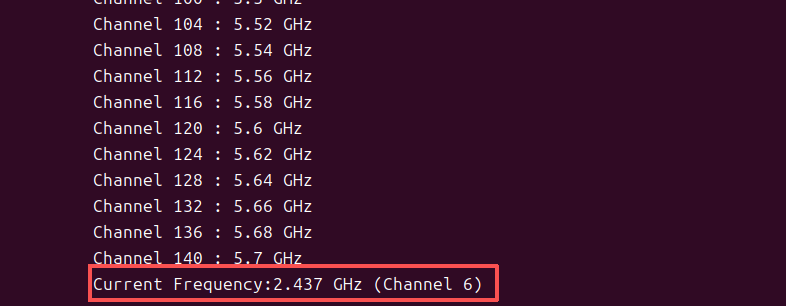
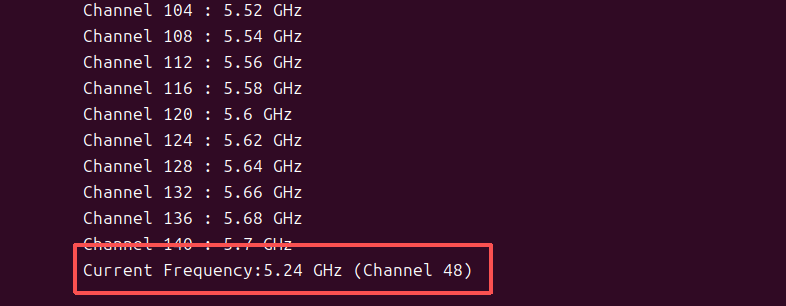
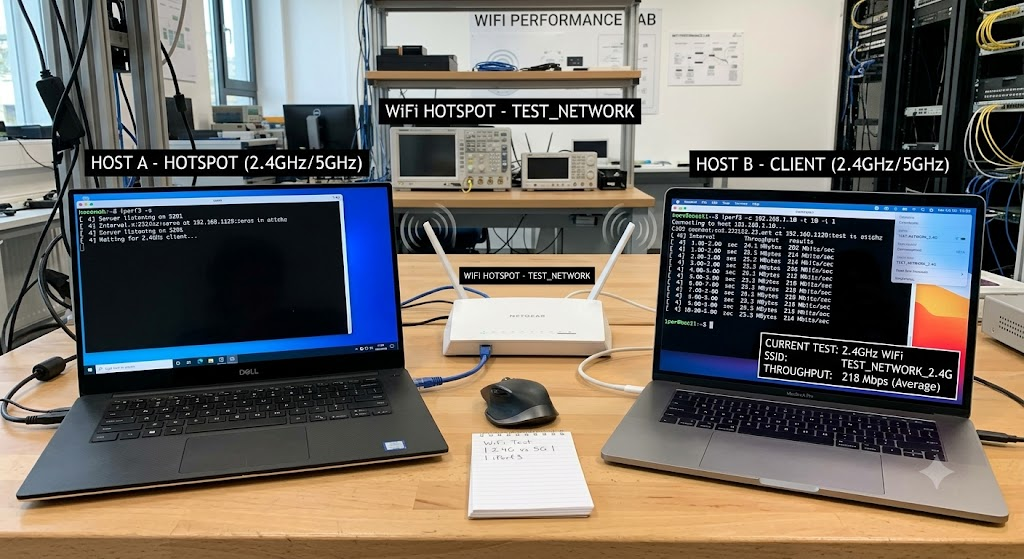
**目标:**主机1作为服务端开启WiFi热点,主机2作为客户端连接主机1的热点,通过UDP进行客户端与服务端的数据收发,测试网络的抖动,速率,以及带宽。
1.服务端创建WIFI热点
创建WIFI热点必须使用命令行的方式,如下所示:
bash
sudo nmcli connection add type wifi ifname wlp4s0 con-name haohao_wifi ssid haohao_wifi mode ap 802-11-wireless.band bg 802-11-wireless.channel 6 ipv4.method shared ipv4.addresses 192.168.120.1/24 wifi-sec.key-mgmt wpa-psk wifi-sec.psk "12345678"创建成功后会在**/etc/NetworkManger/system-connections/** 下生成配置文件 haohao_wifi,可以创建完修改配置文件,但不能自己在路径下创建文件,必须使用命令行。
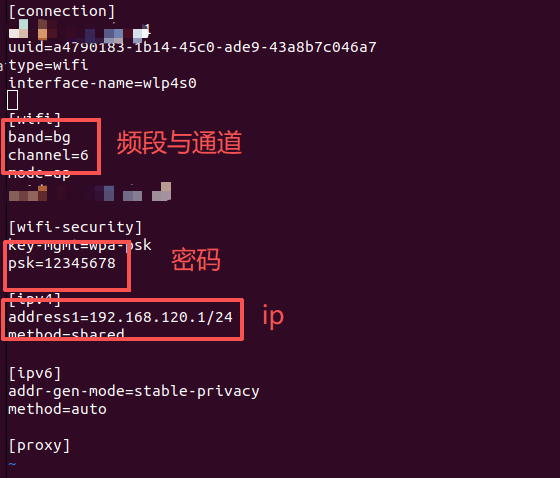
修改完配置文件保存。
之后执行命令:
bash
sudo nmcli connection reload让系统重新去读你保存在**/etc/NetworkManager/system-connections/** 下的文件
然后运行命令:
bash
sudo nmcli connection show查看创建的热点是否被识别到。
最后就可以通过命令行拉起热点了:
bash
sudo nmcli connection up haohao_wifi2.通讯测试
我们通过iperf3工具进行WiFi的通讯测试。
首先安装iperf3:
bash
sudo apt update
sudo apt install iperf3
iperf3参数说明:
-s,--server: iperf 服务器模式
-c,--client host: iperf 客户端模式,host是server端地址
-u,--udp: 表示采用UDP协议发送报文
-i: 指定报告间隔, 单位 s
-t: 设置测试的时长, 单位 s
-b: 设置UDP的发送带宽, 单位bit/s, 百兆 100M, 千兆 1000M
-d: 同时进行双向测试
-P: 并行客户端线程数量
服务端运行命令:
bash
iperf3 -s客户端运行命令:
bash
iperf -u -c 192.168.120.100 -d -i 1 -t 100 -b 100M3.更改WiFi频段进行测试(2.4G-5G)
在进行一会参数修改或配置时,可以先查看一下网卡信息,运行命令:
bash
sudo iw list
bash
(base) haohao@haohao:/$ sudo iw list
Wiphy phy0
wiphy index: 0
max # scan SSIDs: 9
max scan IEs length: 2304 bytes
max # sched scan SSIDs: 0
max # match sets: 0
Retry short limit: 7
Retry long limit: 4
Coverage class: 0 (up to 0m)
Device supports AP-side u-APSD.
Supported Ciphers:
* WEP40 (00-0f-ac:1)
* WEP104 (00-0f-ac:5)
* TKIP (00-0f-ac:2)
* CCMP-128 (00-0f-ac:4)
* CMAC (00-0f-ac:6)
* GCMP-128 (00-0f-ac:8)
* GCMP-256 (00-0f-ac:9)
* CCMP-256 (00-0f-ac:10)
* GMAC-128 (00-0f-ac:11)
* GMAC-256 (00-0f-ac:12)
* CMAC-256 (00-0f-ac:13)
Available Antennas: TX 0 RX 0
Supported interface modes:
* IBSS
* managed
* AP
* P2P-client
* P2P-GO
Band 1:
Capabilities: 0x19e3
RX LDPC
HT20/HT40
Static SM Power Save
RX HT20 SGI
RX HT40 SGI
TX STBC
RX STBC 1-stream
Max AMSDU length: 7935 bytes
DSSS/CCK HT40
Maximum RX AMPDU length 65535 bytes (exponent: 0x003)
Minimum RX AMPDU time spacing: 16 usec (0x07)
HT Max RX data rate: 300 Mbps
HT TX/RX MCS rate indexes supported: 0-15
HE Iftypes: AP
HE MAC Capabilities (0x0001120a0060):
+HTC HE Supported
All Ack
BSR
OM Control
Maximum A-MPDU Length Exponent: 2
OPS
A-MSDU in A-MPDU
HE PHY Capabilities: (0x02701a581dc0270e91b900):
HE40/2.4GHz
Device Class: 1
LDPC Coding in Payload
HE SU PPDU with 1x HE-LTF and 0.8us GI
NDP with 4x HE-LTF and 3.2us GI
STBC Rx <= 80MHz
Doppler Tx
DCM Max Constellation Rx: 3
Rx HE MU PPDU from Non-AP STA
SU Beamformee
Beamformee STS <= 80Mhz: 7
Ng = 16 SU Feedback
Ng = 16 MU Feedback
Codebook Size SU Feedback
Codebook Size MU Feedback
Triggered SU Beamforming Feedback
Partial Bandwidth Extended Range
Power Boost Factor ar
HE SU PPDU & HE PPDU 4x HE-LTF 0.8us GI
Max NC: 1
HE ER SU PPDU 4x HE-LTF 0.8us GI
HE ER SU PPDU 1x HE-LTF 0.8us GI
DCM Max BW: 2
Longer Than 16HE SIG-B OFDM Symbols
RX 1024-QAM
RX Full BW SU Using HE MU PPDU with Compression SIGB
RX Full BW SU Using HE MU PPDU with Non-Compression SIGB
HE RX MCS and NSS set <= 80 MHz
1 streams: MCS 0-11
2 streams: MCS 0-11
3 streams: not supported
4 streams: not supported
5 streams: not supported
6 streams: not supported
7 streams: not supported
8 streams: not supported
HE TX MCS and NSS set <= 80 MHz
1 streams: MCS 0-11
2 streams: MCS 0-11
3 streams: not supported
4 streams: not supported
5 streams: not supported
6 streams: not supported
7 streams: not supported
8 streams: not supported
HE Iftypes: managed
HE MAC Capabilities (0x0801120a8060):
+HTC HE Supported
Trigger Frame MAC Padding Duration: 2
All Ack
BSR
OM Control
Maximum A-MPDU Length Exponent: 2
OPS
A-MSDU in A-MPDU
HE PHY Capabilities: (0x02701a001d00270e91bd00):
HE40/2.4GHz
Device Class: 1
LDPC Coding in Payload
HE SU PPDU with 1x HE-LTF and 0.8us GI
NDP with 4x HE-LTF and 3.2us GI
STBC Rx <= 80MHz
Doppler Tx
SU Beamformee
Beamformee STS <= 80Mhz: 7
Codebook Size SU Feedback
Codebook Size MU Feedback
Triggered SU Beamforming Feedback
Partial Bandwidth Extended Range
Power Boost Factor ar
HE SU PPDU & HE PPDU 4x HE-LTF 0.8us GI
Max NC: 1
HE ER SU PPDU 4x HE-LTF 0.8us GI
HE ER SU PPDU 1x HE-LTF 0.8us GI
DCM Max BW: 2
Longer Than 16HE SIG-B OFDM Symbols
TX 1024-QAM
RX 1024-QAM
RX Full BW SU Using HE MU PPDU with Compression SIGB
RX Full BW SU Using HE MU PPDU with Non-Compression SIGB
HE RX MCS and NSS set <= 80 MHz
1 streams: MCS 0-11
2 streams: MCS 0-11
3 streams: not supported
4 streams: not supported
5 streams: not supported
6 streams: not supported
7 streams: not supported
8 streams: not supported
HE TX MCS and NSS set <= 80 MHz
1 streams: MCS 0-11
2 streams: MCS 0-11
3 streams: not supported
4 streams: not supported
5 streams: not supported
6 streams: not supported
7 streams: not supported
8 streams: not supported
Bitrates (non-HT):
* 1.0 Mbps
* 2.0 Mbps
* 5.5 Mbps
* 11.0 Mbps
* 6.0 Mbps
* 9.0 Mbps
* 12.0 Mbps
* 18.0 Mbps
* 24.0 Mbps
* 36.0 Mbps
* 48.0 Mbps
* 54.0 Mbps
Frequencies:
* 2412 MHz [1] (20.0 dBm)
* 2417 MHz [2] (20.0 dBm)
* 2422 MHz [3] (20.0 dBm)
* 2427 MHz [4] (20.0 dBm)
* 2432 MHz [5] (20.0 dBm)
* 2437 MHz [6] (20.0 dBm)
* 2442 MHz [7] (20.0 dBm)
* 2447 MHz [8] (20.0 dBm)
* 2452 MHz [9] (20.0 dBm)
* 2457 MHz [10] (20.0 dBm)
* 2462 MHz [11] (20.0 dBm)
* 2467 MHz [12] (20.0 dBm) (no IR)
* 2472 MHz [13] (20.0 dBm)
* 2484 MHz [14] (disabled)
Band 2:
Capabilities: 0x19e3
RX LDPC
HT20/HT40
Static SM Power Save
RX HT20 SGI
RX HT40 SGI
TX STBC
RX STBC 1-stream
Max AMSDU length: 7935 bytes
DSSS/CCK HT40
Maximum RX AMPDU length 65535 bytes (exponent: 0x003)
Minimum RX AMPDU time spacing: 16 usec (0x07)
HT Max RX data rate: 300 Mbps
HT TX/RX MCS rate indexes supported: 0-15
VHT Capabilities (0x03c011b1):
Max MPDU length: 7991
Supported Channel Width: neither 160 nor 80+80
RX LDPC
short GI (80 MHz)
TX STBC
SU Beamformee
+HTC-VHT
VHT RX MCS set:
1 streams: MCS 0-9
2 streams: MCS 0-9
3 streams: not supported
4 streams: not supported
5 streams: not supported
6 streams: not supported
7 streams: not supported
8 streams: not supported
VHT RX highest supported: 867 Mbps
VHT TX MCS set:
1 streams: MCS 0-9
2 streams: MCS 0-9
3 streams: not supported
4 streams: not supported
5 streams: not supported
6 streams: not supported
7 streams: not supported
8 streams: not supported
VHT TX highest supported: 867 Mbps
HE Iftypes: AP
HE MAC Capabilities (0x0001120a0060):
+HTC HE Supported
All Ack
BSR
OM Control
Maximum A-MPDU Length Exponent: 2
OPS
A-MSDU in A-MPDU
HE PHY Capabilities: (0x04701a581dc0270e91b900):
HE40/HE80/5GHz
Device Class: 1
LDPC Coding in Payload
HE SU PPDU with 1x HE-LTF and 0.8us GI
NDP with 4x HE-LTF and 3.2us GI
STBC Rx <= 80MHz
Doppler Tx
DCM Max Constellation Rx: 3
Rx HE MU PPDU from Non-AP STA
SU Beamformee
Beamformee STS <= 80Mhz: 7
Ng = 16 SU Feedback
Ng = 16 MU Feedback
Codebook Size SU Feedback
Codebook Size MU Feedback
Triggered SU Beamforming Feedback
Partial Bandwidth Extended Range
Power Boost Factor ar
HE SU PPDU & HE PPDU 4x HE-LTF 0.8us GI
Max NC: 1
HE ER SU PPDU 4x HE-LTF 0.8us GI
HE ER SU PPDU 1x HE-LTF 0.8us GI
DCM Max BW: 2
Longer Than 16HE SIG-B OFDM Symbols
RX 1024-QAM
RX Full BW SU Using HE MU PPDU with Compression SIGB
RX Full BW SU Using HE MU PPDU with Non-Compression SIGB
HE RX MCS and NSS set <= 80 MHz
1 streams: MCS 0-11
2 streams: MCS 0-11
3 streams: not supported
4 streams: not supported
5 streams: not supported
6 streams: not supported
7 streams: not supported
8 streams: not supported
HE TX MCS and NSS set <= 80 MHz
1 streams: MCS 0-11
2 streams: MCS 0-11
3 streams: not supported
4 streams: not supported
5 streams: not supported
6 streams: not supported
7 streams: not supported
8 streams: not supported
HE Iftypes: managed
HE MAC Capabilities (0x0801120a8060):
+HTC HE Supported
Trigger Frame MAC Padding Duration: 2
All Ack
BSR
OM Control
Maximum A-MPDU Length Exponent: 2
OPS
A-MSDU in A-MPDU
HE PHY Capabilities: (0x04701a001d00270e91bd00):
HE40/HE80/5GHz
Device Class: 1
LDPC Coding in Payload
HE SU PPDU with 1x HE-LTF and 0.8us GI
NDP with 4x HE-LTF and 3.2us GI
STBC Rx <= 80MHz
Doppler Tx
SU Beamformee
Beamformee STS <= 80Mhz: 7
Codebook Size SU Feedback
Codebook Size MU Feedback
Triggered SU Beamforming Feedback
Partial Bandwidth Extended Range
Power Boost Factor ar
HE SU PPDU & HE PPDU 4x HE-LTF 0.8us GI
Max NC: 1
HE ER SU PPDU 4x HE-LTF 0.8us GI
HE ER SU PPDU 1x HE-LTF 0.8us GI
DCM Max BW: 2
Longer Than 16HE SIG-B OFDM Symbols
TX 1024-QAM
RX 1024-QAM
RX Full BW SU Using HE MU PPDU with Compression SIGB
RX Full BW SU Using HE MU PPDU with Non-Compression SIGB
HE RX MCS and NSS set <= 80 MHz
1 streams: MCS 0-11
2 streams: MCS 0-11
3 streams: not supported
4 streams: not supported
5 streams: not supported
6 streams: not supported
7 streams: not supported
8 streams: not supported
HE TX MCS and NSS set <= 80 MHz
1 streams: MCS 0-11
2 streams: MCS 0-11
3 streams: not supported
4 streams: not supported
5 streams: not supported
6 streams: not supported
7 streams: not supported
8 streams: not supported
Bitrates (non-HT):
* 6.0 Mbps
* 9.0 Mbps
* 12.0 Mbps
* 18.0 Mbps
* 24.0 Mbps
* 36.0 Mbps
* 48.0 Mbps
* 54.0 Mbps
Frequencies:
* 5180 MHz [36] (20.0 dBm)
* 5200 MHz [40] (20.0 dBm)
* 5220 MHz [44] (20.0 dBm)
* 5240 MHz [48] (20.0 dBm)
* 5260 MHz [52] (20.0 dBm) (no IR, radar detection)
* 5280 MHz [56] (20.0 dBm) (no IR, radar detection)
* 5300 MHz [60] (20.0 dBm) (no IR, radar detection)
* 5320 MHz [64] (20.0 dBm) (no IR, radar detection)
* 5500 MHz [100] (20.0 dBm) (no IR, radar detection)
* 5520 MHz [104] (20.0 dBm) (no IR, radar detection)
* 5540 MHz [108] (20.0 dBm) (no IR, radar detection)
* 5560 MHz [112] (20.0 dBm) (no IR, radar detection)
* 5580 MHz [116] (20.0 dBm) (no IR, radar detection)
* 5600 MHz [120] (20.0 dBm) (no IR, radar detection)
* 5620 MHz [124] (20.0 dBm) (no IR, radar detection)
* 5640 MHz [128] (20.0 dBm) (no IR, radar detection)
* 5660 MHz [132] (20.0 dBm) (no IR, radar detection)
* 5680 MHz [136] (20.0 dBm) (no IR, radar detection)
* 5700 MHz [140] (20.0 dBm) (no IR, radar detection)
* 5720 MHz [144] (20.0 dBm) (no IR, radar detection)
* 5745 MHz [149] (20.0 dBm)
* 5765 MHz [153] (20.0 dBm)
* 5785 MHz [157] (20.0 dBm)
* 5805 MHz [161] (20.0 dBm)
* 5825 MHz [165] (20.0 dBm)
* 5845 MHz [169] (20.0 dBm) (no IR)
* 5865 MHz [173] (20.0 dBm) (no IR)
* 5885 MHz [177] (20.0 dBm) (no IR)
Supported commands:
* new_interface
* set_interface
* new_key
* start_ap
* new_station
* set_bss
* join_ibss
* set_pmksa
* del_pmksa
* flush_pmksa
* remain_on_channel
* frame
* set_channel
* connect
* disconnect
* channel_switch
* update_ft_ies
WoWLAN support:
* wake up on anything (device continues operating normally)
software interface modes (can always be added):
valid interface combinations:
* #{ managed, P2P-client } <= 2, #{ AP, P2P-GO } <= 1,
total <= 2, #channels <= 1
Device supports SAE with AUTHENTICATE command
Device supports scan flush.
Device supports randomizing MAC-addr in scans.
max # scan plans: 1
max scan plan interval: -1
max scan plan iterations: 0
Supported TX frame types:
* IBSS: 0x00 0x10 0x20 0x30 0x40 0x50 0x60 0x70 0x80 0x90 0xa0 0xb0 0xc0 0xd0 0xe0 0xf0
* managed: 0x00 0x10 0x20 0x30 0x40 0x50 0x60 0x70 0x80 0x90 0xa0 0xb0 0xc0 0xd0 0xe0 0xf0
* AP: 0x00 0x10 0x20 0x30 0x40 0x50 0x60 0x70 0x80 0x90 0xa0 0xb0 0xc0 0xd0 0xe0 0xf0
* AP/VLAN: 0x00 0x10 0x20 0x30 0x40 0x50 0x60 0x70 0x80 0x90 0xa0 0xb0 0xc0 0xd0 0xe0 0xf0
* P2P-client: 0x00 0x10 0x20 0x30 0x40 0x50 0x60 0x70 0x80 0x90 0xa0 0xb0 0xc0 0xd0 0xe0 0xf0
* P2P-GO: 0x00 0x10 0x20 0x30 0x40 0x50 0x60 0x70 0x80 0x90 0xa0 0xb0 0xc0 0xd0 0xe0 0xf0
Supported RX frame types:
* IBSS: 0xd0
* managed: 0x40 0xb0 0xd0
* AP: 0x00 0x20 0x40 0xa0 0xb0 0xc0 0xd0
* AP/VLAN: 0x00 0x20 0x40 0xa0 0xb0 0xc0 0xd0
* P2P-client: 0x40 0xb0 0xd0
* P2P-GO: 0x00 0x20 0x40 0xa0 0xb0 0xc0 0xd0
Maximum associated stations in AP mode: 32
Supported extended features:
* [ RRM ]: RRM
* [ DFS_OFFLOAD ]: DFS offload通过输出信息可以看到,物理网口0接有一个网卡,分为band1和band2说明这个网卡支持2.4G和5G。
**注意:**除此之外,我们还要观察输出的最后显示有:

这说明这张网卡可以最多分裂为两个虚拟网卡,且他们的channel数小于1,意思是两个虚拟网卡必须保持在同通道。所以,如果我们启用了两种虚拟网卡,其中一张我们用来作为热点,如果另一张网卡连接WiFi了,如果连接的是5GWiFi,那么我们输出的热点也是5G的,如果连接的是2.4G WiFi,那么另一种网卡输出的热点也是2.4G的,因为他们必须在同一个通道。所以我们如果要配置输出热点,最后先停掉另一张虚拟网卡:
bash
sudo nmcli device disconnect wlan0 接下来我们就可以配置WiFi的频段了。
在终端执行:
bash
sudo vim /etc/NetworkManger/system-connections/NIIC008_demo1修改上述生成的配置文件。
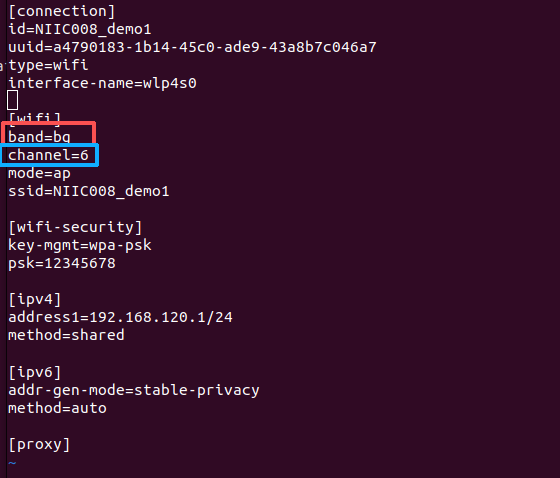
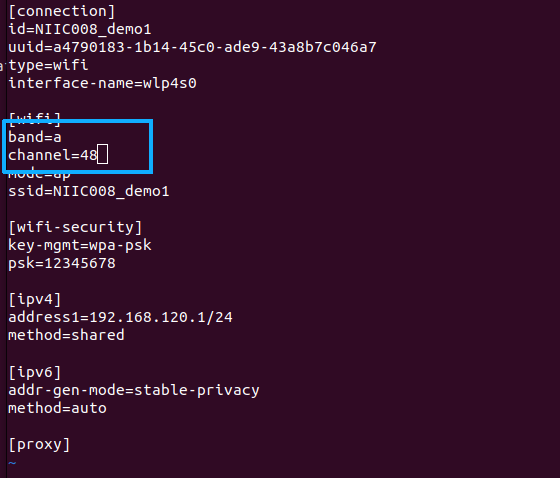
如图所示,修改频段只需要修改这两个参数:band,channel;
2.4G:band = bg,channel = 1,6,11等其中一个;
5G :band = a, channel = 48等其中一个;
修改之后运行:
bash
sudo nmcli connection reload接着拉起热点:
bash
sudo nmcli connection up NIIC008_demo1最后在终端运行命令检查是否配置成功:
bash
iwconfig wlp4s0wlp4s0为此热点的节点名称,可通过ifconfig自行查看。
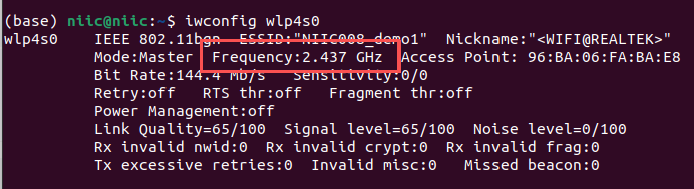
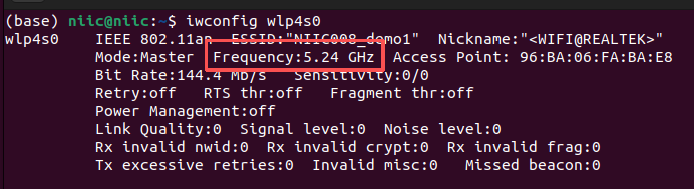
接着我们还可以查看切换频段前后的比特率:
bash
sudo wlp4s0 bitrate4.客户端查看
最后,客户端连接上热点之后一般会看两个参数,bitrate和channel;
bash
sudo iwlist wlp4s0 bitrate
sudo iwlist wlp4s0 channel