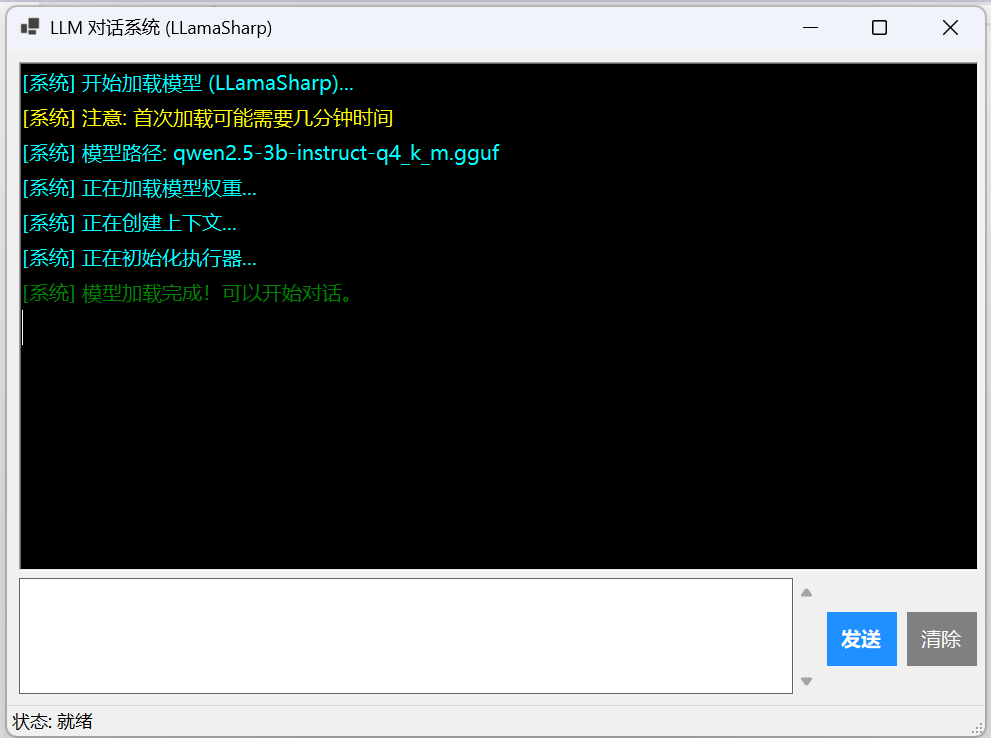
nuget安装 LLamaSharp、LLamaSharp.Backend.Cpu(或者Cuda版本)
Form1.Designer.cs
cs
namespace QwenAIChat;

partial class Form1
{
    private System.ComponentModel.IContainer components = null;

    // UI 控件声明
    private RichTextBox chatBox;
    private TextBox inputBox;
    private Button sendBtn;
    private Button clearBtn;
    private ProgressBar progressBar;

    protected override void Dispose(bool disposing)
    {
        if (disposing && (components != null))
        {
            components.Dispose();
        }
        base.Dispose(disposing);
    }

    private void InitializeComponent()
    {
        chatBox = new RichTextBox();
        inputBox = new TextBox();
        sendBtn = new Button();
        clearBtn = new Button();
        progressBar = new ProgressBar();
        statusStrip1 = new StatusStrip();
        statusLabel = new ToolStripStatusLabel();
        statusStrip1.SuspendLayout();
        SuspendLayout();
        //
        // chatBox
        //
        chatBox.Anchor = AnchorStyles.Top | AnchorStyles.Bottom | AnchorStyles.Left | AnchorStyles.Right;
        chatBox.BackColor = Color.Black;
        chatBox.BorderStyle = BorderStyle.FixedSingle;
        chatBox.Font = new Font("微软雅黑", 10F);
        chatBox.ForeColor = Color.LightGreen;
        chatBox.Location = new Point(12, 12);
        chatBox.Name = "chatBox";
        chatBox.ReadOnly = true;
        chatBox.Size = new Size(960, 509);
        chatBox.TabIndex = 0;
        chatBox.Text = "";
        //
        // inputBox
        //
        inputBox.Anchor = AnchorStyles.Bottom | AnchorStyles.Left | AnchorStyles.Right;
        inputBox.BorderStyle = BorderStyle.FixedSingle;
        inputBox.Font = new Font("微软雅黑", 11F);
        inputBox.Location = new Point(12, 528);
        inputBox.Multiline = true;
        inputBox.Name = "inputBox";
        inputBox.ScrollBars = ScrollBars.Vertical;
        inputBox.Size = new Size(800, 116);
        inputBox.TabIndex = 1;
        //
        // sendBtn
        //
        sendBtn.Anchor = AnchorStyles.Bottom | AnchorStyles.Right;
        sendBtn.BackColor = Color.DodgerBlue;
        sendBtn.Cursor = Cursors.Hand;
        sendBtn.Enabled = false;
        sendBtn.FlatAppearance.BorderSize = 0;
        sendBtn.FlatStyle = FlatStyle.Flat;
        sendBtn.Font = new Font("微软雅黑", 10F, FontStyle.Bold);
        sendBtn.ForeColor = Color.White;
        sendBtn.Location = new Point(820, 562);
        sendBtn.Name = "sendBtn";
        sendBtn.Size = new Size(70, 54);
        sendBtn.TabIndex = 2;
        sendBtn.Text = "发送";
        sendBtn.UseVisualStyleBackColor = false;
        sendBtn.Click += sendBtn_Click;
        //
        // clearBtn
        //
        clearBtn.Anchor = AnchorStyles.Bottom | AnchorStyles.Right;
        clearBtn.BackColor = Color.Gray;
        clearBtn.Cursor = Cursors.Hand;
        clearBtn.FlatAppearance.BorderSize = 0;
        clearBtn.FlatStyle = FlatStyle.Flat;
        clearBtn.Font = new Font("微软雅黑", 10F);
        clearBtn.ForeColor = Color.White;
        clearBtn.Location = new Point(900, 562);
        clearBtn.Name = "clearBtn";
        clearBtn.Size = new Size(70, 54);
        clearBtn.TabIndex = 3;
        clearBtn.Text = "清除";
        clearBtn.UseVisualStyleBackColor = false;
        //
        // progressBar
        //
        progressBar.Anchor = AnchorStyles.Bottom | AnchorStyles.Left | AnchorStyles.Right;
        progressBar.Location = new Point(12, 650);
        progressBar.Name = "progressBar";
        progressBar.Size = new Size(960, 5);
        progressBar.Style = ProgressBarStyle.Marquee;
        progressBar.TabIndex = 4;
        progressBar.Visible = false;
        //
        // statusStrip1
        //
        statusStrip1.ImageScalingSize = new Size(24, 24);
        statusStrip1.Items.AddRange(new ToolStripItem[] { statusLabel });
        statusStrip1.Location = new Point(0, 655);
        statusStrip1.Name = "statusStrip1";
        statusStrip1.Size = new Size(978, 31);
        statusStrip1.TabIndex = 5;
        statusStrip1.Text = "statusStrip1";
        //
        // statusLabel
        //
        statusLabel.Name = "statusLabel";
        statusLabel.Size = new Size(195, 24);
        statusLabel.Text = "toolStripStatusLabel1";
        //
        // Form1
        //
        BackColor = SystemColors.Control;
        ClientSize = new Size(978, 686);
        Controls.Add(statusStrip1);
        Controls.Add(chatBox);
        Controls.Add(inputBox);
        Controls.Add(sendBtn);
        Controls.Add(clearBtn);
        Controls.Add(progressBar);
        DoubleBuffered = true;
        MinimumSize = new Size(800, 500);
        Name = "Form1";
        StartPosition = FormStartPosition.CenterScreen;
        Text = "LLM 对话系统 (LLamaSharp)";
        statusStrip1.ResumeLayout(false);
        statusStrip1.PerformLayout();
        ResumeLayout(false);
        PerformLayout();
    }
    private StatusStrip statusStrip1;
    private ToolStripStatusLabel statusLabel;
}
Form1.cs
cs
using System.Text;
using LLama;
using LLama.Common;
using LLama.Sampling;

namespace QwenAIChat;

public partial class Form1 : Form
{
    private LLamaWeights? _weights;
    private LLamaContext? _context;
    private InteractiveExecutor? _executor;
    private ChatSession? _session;
    private bool _isModelLoaded = false;

    public Form1()
    {
        InitializeComponent();
        this.Load += Form1_Load;
        this.Resize += Form1_Resize;

        this.clearBtn.Click += ClearBtn_Click;
        this.inputBox.KeyDown += InputBox_KeyDown;
    }

    private void Form1_Resize(object? sender, EventArgs e)
    {
        int margin = 12;
        int btnWidth = 70;
        int btnGap = 10;
        int inputHeight = 80;
        int statusHeight = 30;
        int progressHeight = 5;

        int chatHeight = this.ClientSize.Height - margin - inputHeight - statusHeight - progressHeight - margin - margin;
        chatBox.Size = new Size(this.ClientSize.Width - margin * 2, chatHeight);

        int inputWidth = this.ClientSize.Width - margin * 2 - btnWidth * 2 - btnGap;
        inputBox.Size = new Size(inputWidth, inputHeight);
        inputBox.Location = new Point(margin, chatBox.Bottom + margin);

        sendBtn.Location = new Point(inputBox.Right + btnGap, inputBox.Top);
        clearBtn.Location = new Point(sendBtn.Right + btnGap, inputBox.Top);

        progressBar.Size = new Size(this.ClientSize.Width - margin * 2, progressHeight);
        progressBar.Location = new Point(margin, inputBox.Bottom + margin);
    }

    private async void Form1_Load(object? sender, EventArgs e) => await LoadModelAsync();

    private async Task LoadModelAsync()
    {
        statusLabel.Text = "状态: 正在加载模型...";
        AppendMessage("[系统] 开始加载模型 (LLamaSharp)...", Color.Cyan);
        AppendMessage("[系统] 注意: 首次加载可能需要几分钟时间", Color.Yellow);

        try
        {
            string modelPath = FindModelFile();
            AppendMessage($"[系统] 模型路径: {Path.GetFileName(modelPath)}", Color.Cyan);

            var parameters = new ModelParams(modelPath)
            {
                ContextSize = 4096,  // 增大上下文窗口  4096
                GpuLayerCount = 20,
                BatchSize = 512,
                Threads = Environment.ProcessorCount / 2 + 1
            };

            AppendMessage("[系统] 正在加载模型权重...", Color.Cyan);

            _weights = await Task.Run(() => LLamaWeights.LoadFromFile(parameters));

            if (_weights == null)
                throw new Exception("模型权重加载失败");

            AppendMessage("[系统] 正在创建上下文...", Color.Cyan);
            _context = _weights.CreateContext(parameters);

            if (_context == null)
                throw new Exception("上下文创建失败");

            AppendMessage("[系统] 正在初始化执行器...", Color.Cyan);
            _executor = new InteractiveExecutor(_context);

            var chatHistory = new ChatHistory();
            chatHistory.AddMessage(AuthorRole.System, "你是一个乐于助人的智能助手。请用中文回答问题,回答要简洁准确。");

            _session = new ChatSession(_executor, chatHistory);

            _isModelLoaded = true;
            sendBtn.Enabled = true;
            statusLabel.Text = "状态: 就绪";
            AppendMessage("[系统] 模型加载完成!可以开始对话。", Color.Green);
        }
        catch (Exception ex)
        {
            statusLabel.Text = "状态: 加载失败";
            AppendMessage($"[错误] {ex.Message}", Color.Red);
            MessageBox.Show($"加载失败: {ex.Message}", "错误", MessageBoxButtons.OK, MessageBoxIcon.Error);
        }
    }

    private string FindModelFile()
    {
        string[] possibleNames = new[]
        {
            "qwen2.5-3b-instruct-q4_k_m.gguf",
            "qwen2.5-0.5b-instruct-q4_0.gguf",
            "qwen2-0.5b-instruct-q4_k_m.gguf",
            "tinyllama-1.1b-chat-q4_k_m.gguf"
        };

        string[] possiblePaths = new[]
        {
            Path.Combine(Application.StartupPath, "Models"),
            Path.Combine(AppDomain.CurrentDomain.BaseDirectory, "Models"),
            Application.StartupPath,
        };

        foreach (var path in possiblePaths)
        {
            foreach (var name in possibleNames)
            {
                string fullPath = Path.Combine(path, name);
                if (File.Exists(fullPath))
                    return fullPath;
            }
        }

        throw new FileNotFoundException("找不到 GGUF 模型文件");
    }
    private async Task SendMessageAsync()
    {
        if (!_isModelLoaded || _session == null)
        {
            AppendMessage("[系统] 模型未就绪", Color.Red);
            return;
        }

        string userInput = inputBox.Text.Trim();
        if (string.IsNullOrEmpty(userInput)) return;

        sendBtn.Enabled = false;
        inputBox.Clear();
        statusLabel.Text = "状态: 生成中...";
        progressBar.Visible = true;

        AppendMessage($"用户: {userInput}", Color.Cyan);
        AppendMessage("助手: ", Color.LightGreen);

        try
        {
            var samplingPipeline = new DefaultSamplingPipeline
            {
                Temperature = 0.7f,
                TopP = 0.9f,
                TopK = 40,
                RepeatPenalty = 1.1f
            };

            // 使用 OverflowStrategy
            var inferenceParams = new InferenceParams
            {
                MaxTokens = -1,//
                AntiPrompts = new List<string> { "\nUser:", "\n用户:", "\nAssistant:" },
                SamplingPipeline = samplingPipeline,
                OverflowStrategy = ContextOverflowStrategy.TruncateAndReprefill  // 自动截断上下文
            };

            var message = new ChatHistory.Message(AuthorRole.User, userInput);
            StringBuilder response = new StringBuilder();

            await foreach (var text in _session.ChatAsync(message, inferenceParams))
            {
                if (!string.IsNullOrEmpty(text))
                {
                    response.Append(text);
                    string cleanText = text.Replace("Assistant:", "").Replace("assistant:", "");
                    Invoke(() =>
                    {
                        chatBox.AppendText(cleanText);
                        chatBox.ScrollToCaret();
                        Application.DoEvents();
                    });
                }
            }

            Invoke(() => chatBox.AppendText("\n"));
        }
        catch (Exception ex)
        {
            AppendMessage($"\n[错误] {ex.Message}", Color.Red);
        }
        finally
        {
            Invoke(() =>
            {
                sendBtn.Enabled = true;
                statusLabel.Text = "状态: 就绪";
                progressBar.Visible = false;
                inputBox.Focus();
            });
        }
    }

    private void ClearBtn_Click(object? sender, EventArgs e)
    {
        ClearHistory();
    }

    private void ClearHistory()
    {
        if (_executor != null)
        {
            var chatHistory = new ChatHistory();
            chatHistory.AddMessage(AuthorRole.System, "你是一个乐于助人的智能助手。请用中文回答问题,回答要简洁准确。");
            _session = new ChatSession(_executor, chatHistory);
        }

        chatBox.Clear();
        AppendMessage("[系统] 对话历史已清除", Color.Gray);
    }

    private void InputBox_KeyDown(object? sender, KeyEventArgs e)
    {
        if (e.Control && e.KeyCode == Keys.Enter)
        {
            sendBtn.PerformClick();
            e.SuppressKeyPress = true;
        }
    }

    private void AppendMessage(string text, Color color)
    {
        if (InvokeRequired)
        {
            Invoke(() => AppendMessage(text, color));
            return;
        }
        chatBox.SelectionStart = chatBox.TextLength;
        chatBox.SelectionColor = color;
        chatBox.AppendText(text + "\n");
        chatBox.SelectionColor = chatBox.ForeColor;
        chatBox.ScrollToCaret();
    }

    private async void sendBtn_Click(object sender, EventArgs e)
    {
        await SendMessageAsync();
    }
}