目录
[五 Redis 主从复制](#五 Redis 主从复制)
[5.1 环境配置](#5.1 环境配置)
[. 查看状态并测试](#. 查看状态并测试)
[5.2 配置主从同步](#5.2 配置主从同步)
[5.3 主从同步过程](#5.3 主从同步过程)
[六 Redis的哨兵(高可用)](#六 Redis的哨兵(高可用))
[6.1 Redis哨兵编辑](#6.1 Redis哨兵编辑)
[6.2 哨兵的实验过程](#6.2 哨兵的实验过程)
[6.3. 在整个架构中可能会出现的问题](#6.3. 在整个架构中可能会出现的问题)
[七 Redis Cluster(无中心化设计)](#七 Redis Cluster(无中心化设计))
[7.1 Redis Cluster 工作原理](#7.1 Redis Cluster 工作原理)
[7.2 创建redis cluster的前提](#7.2 创建redis cluster的前提)
[7.3 部署redis cluster](#7.3 部署redis cluster)
[7.4 redis-cli --cluster 参数说明](#7.4 redis-cli --cluster 参数说明)
[7.5. 创建redis-cluster](#7.5. 创建redis-cluster)
[7.6 集群扩容](#7.6 集群扩容)
[7.7 clsuter集群维护](#7.7 clsuter集群维护)
五 Redis 主从复制
从单机版进化到组合版
5.1 环境配置
主能写数据,从不能
redis-node1 master
redis-node2 slave
redis-node3 slave
!NOTE
在配置多台redis时建议用复制的方式节省编译时间
实验配置:
.Redis主节点配置
bash
[root@redis-node1 ~]# vim /etc/redis/redis.conf
#bind 127.0.0.1 -::1
bind * -::*
protected-mode no
[root@redis-node1 ~]# systemctl restart redis_6379.service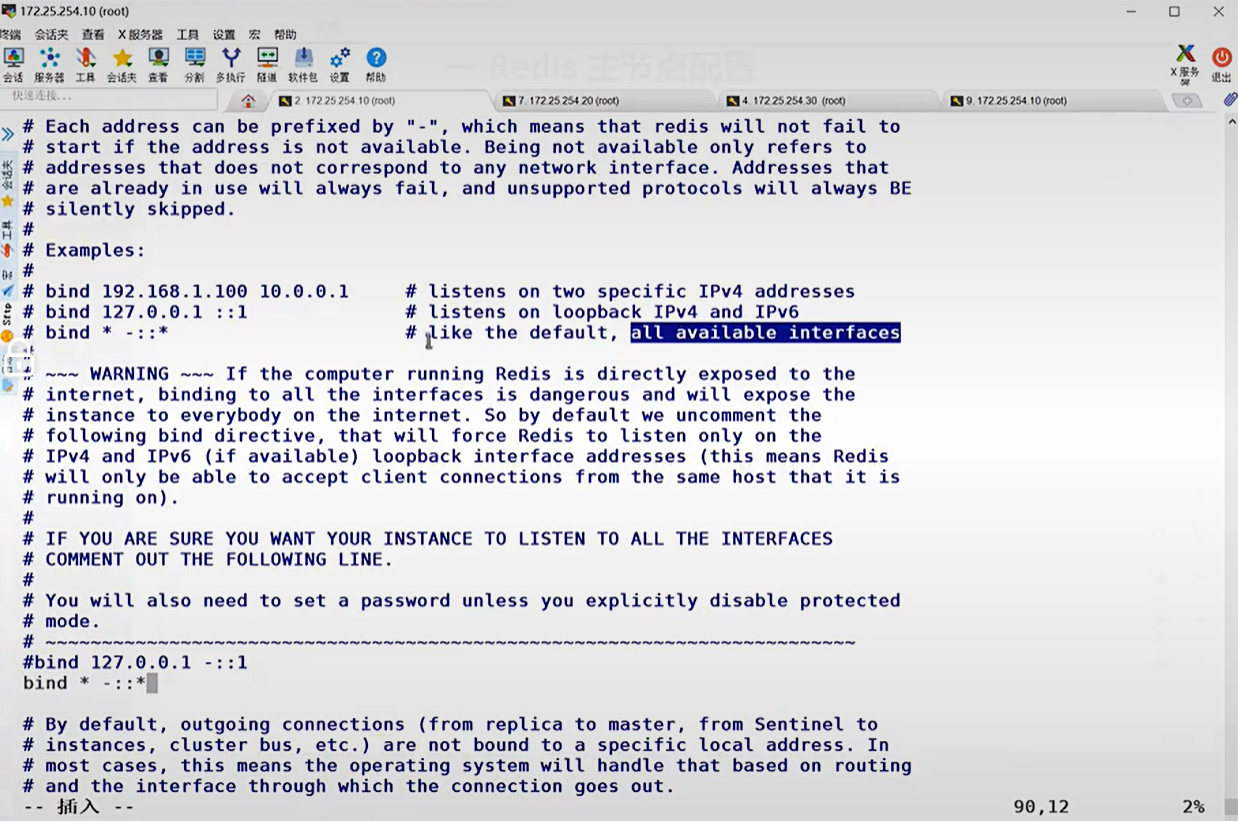
.配置Redis从节点
bash
#在redis-node2节点
[root@redis-node2 ~]# vim /etc/redis/redis.conf
#bind 127.0.0.1 -::1
bind * -::*
protected-mode no #关闭protected模式
replicaof 172.25.254.10 6379
[root@redis-node2 ~]# systemctl restart redis_6379.service
#在redis-node3节点
[root@redis-node3 ~]# vim /etc/redis/redis.conf
#bind 127.0.0.1 -::1
bind * -::*
protected-mode no
replicaof 172.25.254.10 6379
[root@redis-node3 ~]# systemctl restart redis_6379.service
. 查看状态并测试
1.状态查看
bash
[root@redis-node1 ~]# redis-cli
127.0.0.1:6379> info replications
127.0.0.1:6379> info replication
# Replication
role:master
connected_slaves:2
slave0:ip=172.25.254.20,port=6379,state=online,offset=391,lag=0
slave1:ip=172.25.254.30,port=6379,state=online,offset=391,lag=1
master_failover_state:no-failover
master_replid:e5f5cddc017ab0d5223213592d0482b832d3af77
master_replid2:0000000000000000000000000000000000000000
master_repl_offset:391
second_repl_offset:-1
repl_backlog_active:1
repl_backlog_size:1048576
repl_backlog_first_byte_offset:1
repl_backlog_histlen:391
[root@redis-node2 ~]# redis-cli
127.0.0.1:6379> info replication
# Replication
role:slave
master_host:172.25.254.10
master_port:6379
master_link_status:up
master_last_io_seconds_ago:5
master_sync_in_progress:0
slave_read_repl_offset:433
slave_repl_offset:433
slave_priority:100
slave_read_only:1
replica_announced:1
connected_slaves:0
master_failover_state:no-failover
master_replid:e5f5cddc017ab0d5223213592d0482b832d3af77
master_replid2:0000000000000000000000000000000000000000
master_repl_offset:433
second_repl_offset:-1
repl_backlog_active:1
repl_backlog_size:1048576
repl_backlog_first_byte_offset:1
repl_backlog_histlen:4332.测试数据同步性
bash
[root@redis-node1 ~]# redis-cli
127.0.0.1:6379> set name lee
OK
127.0.0.1:6379> get name
"lee"
[root@redis-node2 ~]# redis-cli
127.0.0.1:6379> get name
"lee"
#在从节点中不能写入数据
[root@redis-node3 ~]# redis-cli
127.0.0.1:6379> get name
"lee"
127.0.0.1:6379> set test 123
(error) READONLY You can't write against a read only replica.5.2 配置主从同步
1.修改mastser节点的配置文件
bash
[root@redis-node1 & node2 & node3 ~]# vim /etc/redis/6379.conf
protected-mode no #关闭protected模式
[root@redis-node1 &node2 & node3 ~]# /etc/init.d/redis_6379 restart
Stopping ...
Redis stopped
Starting Redis server...2.配置slave节点
bash
[root@redis-node2 & 3 ~]# vim /etc/redis/6379.conf
replicaof 172.25.254.100 6379
[root@redis-node2 & 3 ~]# /etc/init.d/redis_6379 restart
Stopping ...
Waiting for Redis to shutdown ...
Redis stopped
Starting Redis server...
3.测试效果
bash
#在mastser节点
[root@redis-node1 ~]# redis-cli
127.0.0.1:6379> set name lee
OK
#在slave节点查看
[root@redis-node2 ~]# redis-cli
127.0.0.1:6379> get name
"lee"5.3 主从同步过程
slave节点发送同步亲求到master节点
slave节点通过master节点的认证开始进行同步
master节点会开启bgsave进程发送内存rbd到slave节点,在此过程中是异步操作,也就是说master节点仍然可以进行写入动作
slave节点收到rdb后首先清空自己的所有数据
slave节点加载rdb并进行数据恢复
在master和slave同步过程中master还会开启新的bgsave进程把没有同步的数据进行缓存
然后通过自有的replactionfeedslave函数把未通过内存快照发动到slave的数据一条一条写入到slave中
六 Redis的哨兵(高可用)
实验环境:我们用主两从来实现Redis的高可用架构
主从最大的问题就是坏了没人修,单点故障怎么办,从故障无妨,主故障业务崩溃
6.1 Redis哨兵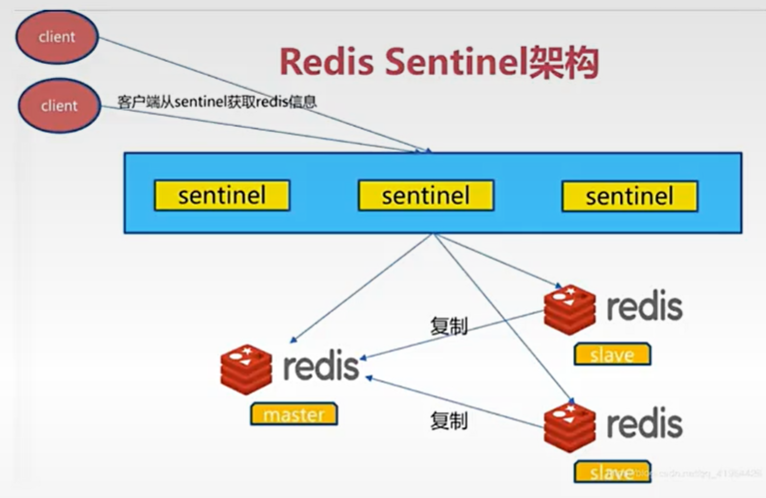
Sentinel 进程是用于监控redis集群中Master主服务器工作的状态,在Master主服务器发生故障的时候,可以实现Master和Slave服务器的切换,保证系统的高可用,此功能在redis2.6+的版本已引用,Redis的哨兵模式到了2.8版本之后就稳定了下来。一般在生产环境也建议使用Redis的2.8版本的以后版本
每个哨兵(Sentinel)进程会向其它哨兵(Sentinel)、Master、Slave定时发送消息,以确认对方是否"活"着,如果发现对方在指定配置时间(此项可配置)内未得到回应,则暂时认为对方已离线,也就是所谓的"主观认为宕机" (主观:是每个成员都具有的独自的而且可能相同也可能不同的意识),英文名称:Subjective Down,简称SDOWN
有主观宕机,对应的有客观宕机。当"哨兵群"中的多数Sentinel进程在对Master主服务器做出SDOWN 的判断,并且通过 SENTINEL is-master-down-by-addr 命令互相交流之后,得出的Master Server下线判断,这种方式就是"客观宕机"(客观:是不依赖于某种意识而已经实际存在的一切事物),英文名称是:Objectively Down, 简称 ODOWN
两个主观换一个客观
通过一定的vote算法,从剩下的slave从服务器节点中,选一台提升为Master服务器节点,然后自动修改相关配置,并开启故障转移(failover)
Sentinel 机制可以解决master和slave角色的自动切换问题,但单个 Master 的性能瓶颈问题无法解决,类似于MySQL中的MHA功能
Redis Sentinel中的Sentinel节点个数应该为大于等于3且最好为奇数
sentinel中的三个定时任务
-
每10秒每个sentinel对master和slave执行info
-
发现slave节点
-
确认主从关系
-
-
每2秒每个sentinel通过master节点的channel交换信息(pub/sub) :交换确定自己是否还活着
-
通过sentinel__:hello频道交互
-
交互对节点的"看法"和自身信息
-
-
每1秒每个sentinel对其他sentinel和redis执行pi
配置Redis哨兵模式
bash#redis 主节点 [root@redis-node1 ~]# cd redis-7.4.8/ [root@redis-node1 redis-7.4.8]# cp -p sentinel.conf /etc/redis/ [root@redis-node1 ~]# vim /etc/redis/sentinel.conf [root@redis-node1 redis-7.4.0]# vim /etc/redis/sentinel.conf protected-mode no #关闭保护模式 port 26379 #监听端口 daemonize no #进入不打如后台 pidfile /var/run/redis-sentinel.pid #sentinel进程pid文件 loglevel notice #日志级别 sentinel monitor mymaster 172.25.254.100 6379 2 #创建sentinel监控监控master主机,2表示必须得到2票 sentinel down-after-milliseconds mymaster 10000 #master中断时长,10秒连不上视为master下线 sentinel parallel-syncs mymaster 1 #发生故障转移后,同时开始同步新master数据的slave数量 sentinel failover-timeout mymaster 180000 #整个故障切换的超时时间为3分钟 #在从节点关闭protected-mode模式 [root@redis-node2 ~]# vim /etc/redis/redis.conf protected-mode no [root@redis-node2 ~]# systemctl restart redis_6379.service [root@redis-node3 ~]# vim /etc/redis/redis.conf protected-mode no [root@redis-node3 ~]# systemctl restart redis_6379.service #在主节点复制sentinel.conf到从节点 [root@redis-node1 ~]# scp /etc/redis/sentinel.conf root@172.25.254.20:/etc/redis/ sentinel.conf 100% 14KB 16.5MB/s 00:00 [root@redis-node1 ~]# scp /etc/redis/sentinel.conf root@172.25.254.30:/etc/redis/ sentinel.conf #所有节点开启哨兵 [root@redis-node1~3 ~]# redis-sentinel /etc/redis/sentinel.conf 36628:X 08 Mar 2026 16:55:25.041 # WARNING Memory overcommit must be enabled! Without it, a background save or replication may fail under low memory condition. Being disabled, it can also cause failures without low memory condition, see https://github.com/jemalloc/jemalloc/issues/1328. To fix this issue add 'vm.overcommit_memory = 1' to /etc/sysctl.conf and then reboot or run the command 'sysctl vm.overcommit_memory=1' for this to take effect. 36628:X 08 Mar 2026 16:55:25.041 * oO0OoO0OoO0Oo Redis is starting oO0OoO0OoO0Oo 36628:X 08 Mar 2026 16:55:25.041 * Redis version=7.4.8, bits=64, commit=00000000, modified=0, pid=36628, just started 36628:X 08 Mar 2026 16:55:25.041 * Configuration loaded 36628:X 08 Mar 2026 16:55:25.041 * Increased maximum number of open files to 10032 (it was originally set to 1024). 36628:X 08 Mar 2026 16:55:25.041 * monotonic clock: POSIX clock_gettime _._ _.-``__ ''-._ _.-`` `. `_. ''-._ Redis Community Edition .-`` .-```. ```\/ _.,_ ''-._ 7.4.8 (00000000/0) 64 bit ( ' , .-` | `, ) Running in sentinel mode |`-._`-...-` __...-.``-._|'` _.-'| Port: 26379 | `-._ `._ / _.-' | PID: 36628 `-._ `-._ `-./ _.-' _.-' |`-._`-._ `-.__.-' _.-'_.-'| | `-._`-._ _.-'_.-' | https://redis.io `-._ `-._`-.__.-'_.-' _.-' |`-._`-._ `-.__.-' _.-'_.-'| | `-._`-._ _.-'_.-' | `-._ `-._`-.__.-'_.-' _.-' `-._ `-.__.-' _.-' `-._ _.-' `-.__.-' 36628:X 08 Mar 2026 16:55:25.043 * Sentinel new configuration saved on disk 36628:X 08 Mar 2026 16:55:25.043 * Sentinel ID is c3a93bf0891df6ad009eb7945e8b17926b0ad35a 36628:X 08 Mar 2026 16:55:25.043 # +monitor master mymaster 172.25.254.10 6379 quorum 2 36628:X 08 Mar 2026 16:55:25.043 * +slave slave 172.25.254.20:6379 172.25.254.20 6379 @ mymaster 172.25.254.10 6379 36628:X 08 Mar 2026 16:55:25.044 * Sentinel new configuration saved on disk 36628:X 08 Mar 2026 16:55:25.044 * +slave slave 172.25.254.30:6379 172.25.254.30 6379 @ mymaster 172.25.254.10 6379 36628:X 08 Mar 2026 16:55:25.045 * Sentinel new configuration saved on disk 36628:X 08 Mar 2026 16:55:35.063 # +sdown slave 172.25.254.20:6379 172.25.254.20 6379 @ mymaster 172.25.254.10 6379 36628:X 08 Mar 2026 16:55:35.063 # +sdown slave 172.25.254.30:6379 172.25.254.30 6379 @ mymaster 172.25.254.10 6379 36628:X 08 Mar 2026 16:56:06.067 * +sentinel sentinel 28f2f3da2b20967c546118a9e1ab4b2276600d87 172.25.254.20 26379 @ mymaster 172.25.254.10 6379 36628:X 08 Mar 2026 16:56:06.069 * Sentinel new configuration saved on disk 36628:X 08 Mar 2026 16:56:17.710 * +sentinel sentinel 89568283004e144d0d7be04c65f5e85dbf6dc147 172.25.254.30 26379 @ mymaster 172.25.254.10 6379 36628:X 08 Mar 2026 16:56:17.712 * Sentinel new configuration saved on disk
daemonize no: 会占用你当前的SHELL终端;yes是后台运行
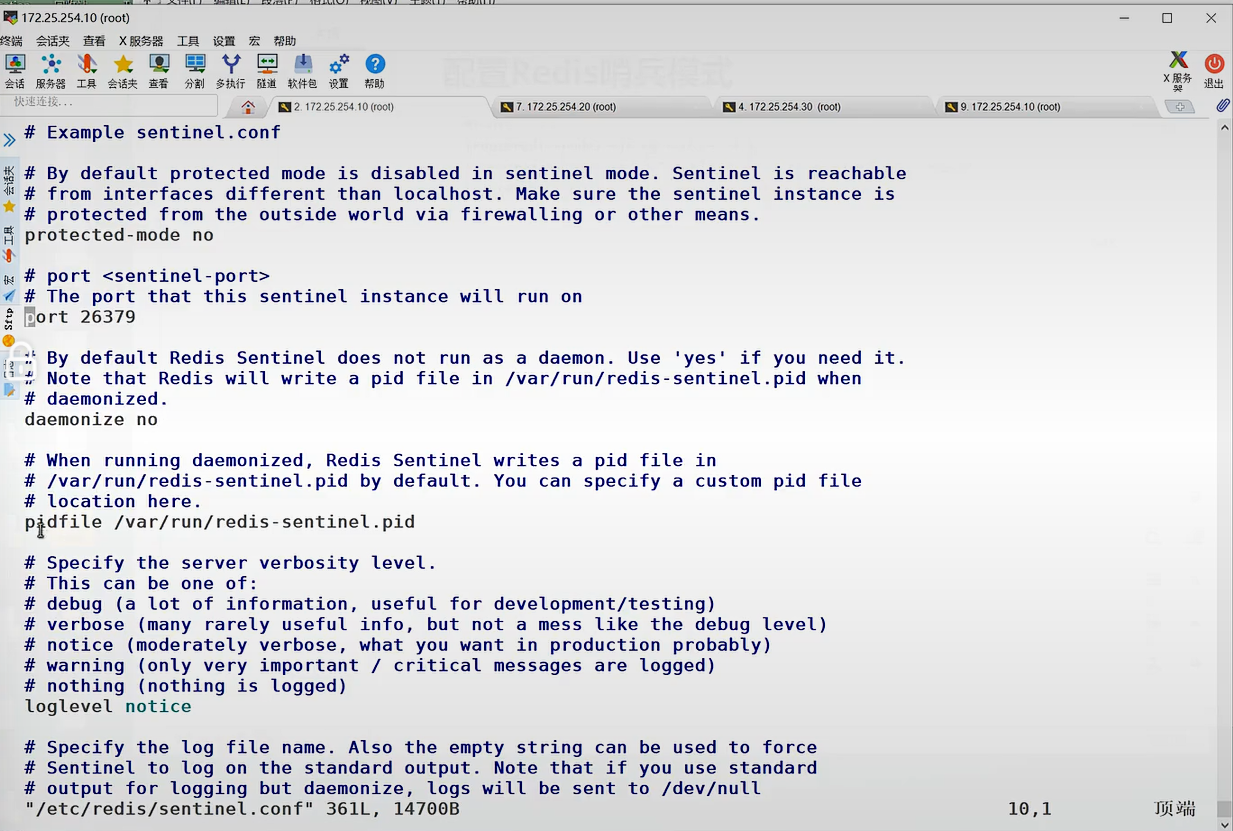
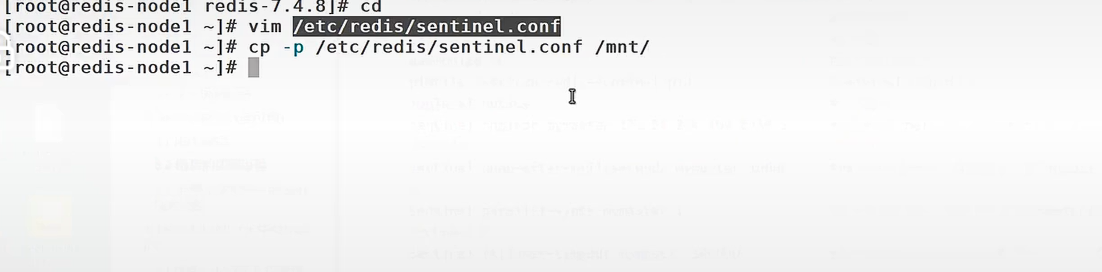
复制一份,以后有妙用
测试故障切换
bash
[root@redis-node1 6379]# redis-cli
127.0.0.1:6379> SHUTDOWN
not connected> quit
#切换信息
37502:X 08 Mar 2026 17:56:40.872 * Sentinel new configuration saved on disk
37502:X 08 Mar 2026 17:56:40.872 * Sentinel ID is d0780e7fd242a8f3244bc4dbead0fe63f793af03
37502:X 08 Mar 2026 17:56:40.872 # +monitor master mymaster 172.25.254.10 6379 quorum 2
37502:X 08 Mar 2026 17:56:40.873 * +slave slave 172.25.254.20:6379 172.25.254.20 6379 @ mymaster 172.25.254.10 6379
37502:X 08 Mar 2026 17:56:40.874 * Sentinel new configuration saved on disk
37502:X 08 Mar 2026 17:56:40.874 * +slave slave 172.25.254.30:6379 172.25.254.30 6379 @ mymaster 172.25.254.10 6379
37502:X 08 Mar 2026 17:56:40.902 * Sentinel new configuration saved on disk
37502:X 08 Mar 2026 17:57:02.726 * +sentinel sentinel ae862a91f4d7dba85c8e23da1c2e3e2758e5741d 172.25.254.20 26379 @ mymaster 172.25.254.10 6379
37502:X 08 Mar 2026 17:57:02.727 * Sentinel new configuration saved on disk
37502:X 08 Mar 2026 17:58:22.387 * +sentinel sentinel 7ef7c9ff4a5c9891530c9bd5f9379a39e5941079 172.25.254.30 26379 @ mymaster 172.25.254.10 6379
37502:X 08 Mar 2026 17:58:22.389 * Sentinel new configuration saved on disk
37502:X 08 Mar 2026 17:59:16.271 # +sdown master mymaster 172.25.254.10 6379
37502:X 08 Mar 2026 17:59:16.338 # +odown master mymaster 172.25.254.10 6379 #quorum 2/2
37502:X 08 Mar 2026 17:59:16.338 # +new-epoch 1
37502:X 08 Mar 2026 17:59:16.338 # +try-failover master mymaster 172.25.254.10 6379
37502:X 08 Mar 2026 17:59:16.340 * Sentinel new configuration saved on disk
37502:X 08 Mar 2026 17:59:16.340 # +vote-for-leader d0780e7fd242a8f3244bc4dbead0fe63f793af03 1
37502:X 08 Mar 2026 17:59:16.342 * 7ef7c9ff4a5c9891530c9bd5f9379a39e5941079 voted for d0780e7fd242a8f3244bc4dbead0fe63f793af03 1
37502:X 08 Mar 2026 17:59:16.343 * ae862a91f4d7dba85c8e23da1c2e3e2758e5741d voted for d0780e7fd242a8f3244bc4dbead0fe63f793af03 1
37502:X 08 Mar 2026 17:59:16.440 # +elected-leader master mymaster 172.25.254.10 6379
37502:X 08 Mar 2026 17:59:16.441 # +failover-state-select-slave master mymaster 172.25.254.10 6379
37502:X 08 Mar 2026 17:59:16.503 # +selected-slave slave 172.25.254.20:6379 172.25.254.20 6379 @ mymaster 172.25.254.10 6379
37502:X 08 Mar 2026 17:59:16.503 * +failover-state-send-slaveof-noone slave 172.25.254.20:6379 172.25.254.20 6379 @ mymaster 172.25.254.10 6379
37502:X 08 Mar 2026 17:59:16.580 * +failover-state-wait-promotion slave 172.25.254.20:6379 172.25.254.20 6379 @ mymaster 172.25.254.10 6379
37502:X 08 Mar 2026 17:59:16.641 * Sentinel new configuration saved on disk
37502:X 08 Mar 2026 17:59:16.641 # +promoted-slave slave 172.25.254.20:6379 172.25.254.20 6379 @ mymaster 172.25.254.10 6379
37502:X 08 Mar 2026 17:59:16.641 # +failover-state-reconf-slaves master mymaster 172.25.254.10 6379
37502:X 08 Mar 2026 17:59:16.693 * +slave-reconf-sent slave 172.25.254.30:6379 172.25.254.30 6379 @ mymaster 172.25.254.10 6379
37502:X 08 Mar 2026 17:59:17.520 # -odown master mymaster 172.25.254.10 6379 #客观下线
37502:X 08 Mar 2026 17:59:17.674 * +slave-reconf-inprog slave 172.25.254.30:6379 172.25.254.30 6379 @ mymaster 172.25.254.10 6379
37502:X 08 Mar 2026 17:59:17.674 * +slave-reconf-done slave 172.25.254.30:6379 172.25.254.30 6379 @ mymaster 172.25.254.10 6379
37502:X 08 Mar 2026 17:59:17.746 # +failover-end master mymaster 172.25.254.10 6379
37502:X 08 Mar 2026 17:59:17.746 # +switch-master mymaster 172.25.254.10 6379 172.25.254.20 6379 #主节点被切换到20
#在30中查看信息
[root@redis-node3 ~]# redis-cli
127.0.0.1:6379> info replication
# Replication
role:slave
master_host:172.25.254.20
master_port:6379
master_link_status:up
master_last_io_seconds_ago:1
master_sync_in_progress:0
slave_read_repl_offset:123299
slave_repl_offset:123299
slave_priority:100
slave_read_only:1
replica_announced:1
connected_slaves:0
master_failover_state:no-failover
master_replid:dcd9e887a20f05380a448cca1f332ec2501e5477
master_replid2:d4caee184d2c8ffdf82d30fc7267ec6cedbf08f8
master_repl_offset:123299
second_repl_offset:113351
repl_backlog_active:1
repl_backlog_size:1048576
repl_backlog_first_byte_offset:91236
repl_backlog_histlen:32064
#恢复10redis
[root@redis-node1 6379]# /etc/init.d/redis_6379 start
Starting Redis server...
#在20查看信息
[root@redis-node2 ~]# redis-cli
127.0.0.1:6379> info replication
# Replication
role:master
connected_slaves:1
slave0:ip=172.25.254.30,port=6379,state=online,offset=130264,lag=1
slave1:ip=172.25.254.10,port=6379,state=online,offset=135673,lag=0
master_failover_state:no-failover
master_replid:dcd9e887a20f05380a448cca1f332ec2501e5477
master_replid2:d4caee184d2c8ffdf82d30fc7267ec6cedbf08f8
master_repl_offset:130405
second_repl_offset:113351
repl_backlog_active:1
repl_backlog_size:1048576
repl_backlog_first_byte_offset:91236
repl_backlog_histlen:39170
6.2 哨兵的实验过程
在所有阶段中关闭 protected-mode no
1.在master节点中
bash
#编辑配置文件
[root@redis-node1 ~]# cd redis-7.4.0/
[root@redis-node1 redis-7.4.0]# cp sentinel.conf /etc/redis/
[root@redis-node1 redis-7.4.0]# vim /etc/redis/sentinel.conf
protected-mode no #关闭保护模式
port 26379 #监听端口
daemonize no #进入不打如后台
pidfile /var/run/redis-sentinel.pid #sentinel进程pid文件
loglevel notice #日志级别
sentinel monitor mymaster 172.25.254.100 6379 2 #创建sentinel监控监控master主机,2表示必须得到2票
sentinel down-after-milliseconds mymaster 10000 #master中断时长,10秒连不上视为master下线
sentinel parallel-syncs mymaster 1 #发生故障转移后,同时开始同步新master数据的slave数量
sentinel failover-timeout mymaster 180000 #整个故障切换的超时时间为3分钟
####复制配置文件到其他阶段
[root@redis-node1 redis-7.4.0]# scp /etc/redis/sentinel.conf root@172.25.254.201:/etc/redis/
root@172.25.254.201's password:
sentinel.conf 100% 14KB 9.7MB/s 00:00
[root@redis-node1 redis-7.4.0]# scp /etc/redis/sentinel.conf root@172.25.254.200:/etc/redis/
root@172.25.254.200's password:
sentinel.conf 2 启动服务
bash
[root@redis-node1 redis-7.4.0]# redis-sentinel /etc/redis/sentinel.conf
39319:X 05 Aug 2024 20:53:16.807 # WARNING Memory overcommit must be enabled! Without it, a background save or replication may fail under low memory condition. Being disabled, it can also cause failures without low memory condition, see https://github.com/jemalloc/jemalloc/issues/1328. To fix this issue add 'vm.overcommit_memory = 1' to /etc/sysctl.conf and then reboot or run the command 'sysctl vm.overcommit_memory=1' for this to take effect.
39319:X 05 Aug 2024 20:53:16.807 * oO0OoO0OoO0Oo Redis is starting oO0OoO0OoO0Oo
39319:X 05 Aug 2024 20:53:16.807 * Redis version=7.4.0, bits=64, commit=00000000, modified=0, pid=39319, just started
39319:X 05 Aug 2024 20:53:16.807 * Configuration loaded
39319:X 05 Aug 2024 20:53:16.808 * Increased maximum number of open files to 10032 (it was originally set to 1024).
39319:X 05 Aug 2024 20:53:16.808 * monotonic clock: POSIX clock_gettime
_._
_.-``__ ''-._
_.-`` `. `_. ''-._ Redis Community Edition
.-`` .-```. ```\/ _.,_ ''-._ 7.4.0 (00000000/0) 64 bit
( ' , .-` | `, ) Running in sentinel mode
|`-._`-...-` __...-.``-._|'` _.-'| Port: 26379
| `-._ `._ / _.-' | PID: 39319
`-._ `-._ `-./ _.-' _.-'
|`-._`-._ `-.__.-' _.-'_.-'|
| `-._`-._ _.-'_.-' | https://redis.io
`-._ `-._`-.__.-'_.-' _.-'
|`-._`-._ `-.__.-' _.-'_.-'|
| `-._`-._ _.-'_.-' |
`-._ `-._`-.__.-'_.-' _.-'
`-._ `-.__.-' _.-'
`-._ _.-'
`-.__.-'
39319:X 05 Aug 2024 20:53:16.810 * Sentinel new configuration saved on disk
39319:X 05 Aug 2024 20:53:16.810 * Sentinel ID is e568add863fd7c132e03f7a6ce2c5ef367d3bdae
39319:X 05 Aug 2024 20:53:16.810 # +monitor master mymaster 172.25.254.100 6379 quorum 2
39319:X 05 Aug 2024 20:53:16.811 * +slave slave 172.25.254.201:6379 172.25.254.201 6379 @ mymaster 172.25.254.100 6379
39319:X 05 Aug 2024 20:53:16.812 * Sentinel new configuration saved on disk
39319:X 05 Aug 2024 20:53:16.812 * +slave slave 172.25.254.200:6379 172.25.254.200 6379 @ mymaster 172.25.254.100 6379
39319:X 05 Aug 2024 20:53:16.813 * Sentinel new configuration saved on disk
39319:X 05 Aug 2024 20:53:41.769 * +sentinel sentinel 4fe1dcbe25a801e75d6edfc5b0a8517bfa7992c3 172.25.254.200 26379 @ mymaster 172.25.254.100 6379
39319:X 05 Aug 2024 20:53:41.771 * Sentinel new configuration saved on disk
39319:X 05 Aug 2024 20:53:57.227 * +sentinel sentinel 83f928aafe317a5f9081eea8fc5c383ff31c55ef 172.25.254.201 26379 @ mymaster 172.25.254.100 6379
39319:X 05 Aug 2024 20:53:57.229 * Sentinel new configuration saved on disk!WARNING
/etc/redis/sentinel.conf 文件在用哨兵程序调用后会更改其配置文件,如果需要重新做需要删掉文件重新编辑
测试:
bash
在开一个master节点终端
[root@redis-node1 ~]# redis-cli
127.0.0.1:6379> SHUTDOWN
[root@redis-node2 ~]# redis-cli
127.0.0.1:6379> info replications
127.0.0.1:6379> info replication
# Replication
role:master
connected_slaves:2
slave0:ip=172.25.254.201,port=6379,state=online,offset=211455,lag=1
slave1:ip=172.25.254.100,port=6379,state=online,offset=211455,lag=1
master_failover_state:no-failover
master_replid:d42fd72f3dfae94c84ca722ad1653417495ef4fd
master_replid2:290c3407108cc6120086981b7149a6fa377594c4
master_repl_offset:211598
second_repl_offset:185931
repl_backlog_active:1
repl_backlog_size:1048576
repl_backlog_first_byte_offset:150986
repl_backlog_histlen:60613
6.3. 在整个架构中可能会出现的问题
问题:
在生产环境中如果master和slave中的网络出现故障,由于哨兵的存在会把master提出去
当网络恢复后,master发现环境发生改变,master就会把自己的身份转换成slave
master变成slave后会把网络故障那段时间写入自己中的数据清掉,这样数据就丢失了。
解决:
master在被写入数据时会持续连接slave,mater确保有2个slave可以写入我才允许写入
如果slave数量少于2个便拒绝写入
bash
#在matster中设定
[root@redis-node2 ~]# redis-cli
127.0.0.1:6379> CONFIG GET min-slaves-to-write
1) "min-slaves-to-write"
2) "0"
127.0.0.1:6379> CONFIG set min-slaves-to-write 2
OK
127.0.0.1:6379> CONFIG GET min-slaves-to-write
1) "min-slaves-to-write"
2) "2"
#如果要永久保存写到配置文件中/etc/redis/6379.conf七 Redis Cluster(无中心化设计)
哨兵解决了单点故障问题,单点出现故障后升级为新的master,
单台主机能提供的内存大小是有限的,但是数据是无穷大。所以进行分布式
7.1 Redis Cluster 工作原理
在哨兵sentinel机制中,可以解决redis高可用问题,即当master故障后可以自动将slave提升为master,从而可以保证redis服务的正常使用,但是无法解决redis单机写入的瓶颈问题,即单机redis写入性能**受限于单机的内存大小、并发数量、网卡速率等因素。**硬件问题可以通过氪金解决
redis 3.0版本之后推出了无中心架构的redis cluster机制,在无(中心的redis集群当中,其每个节点保存当前节点数据和整个集群状态,每个节点都和其他所有节点连接。
Redis Cluster特点如下
-
所有Redis节点使用(PING机制)互联
-
集群中某个节点的是否失效,是由整个集群中超过半数的节点监测都失效,才能算真正的失效
-
客户端不需要proxy即可直接连接redis,应用程序中需要配置有全部的redis服务器IP
-
redis cluster把所有的redis node 平均映射到 0-16383个槽位(slot)哈希槽上,读写需要到指定的redis node上进行操作,因此有多少个redis node相当于redis 并发扩展了多少倍,每个redis node 承担16384/N个槽位
-
Redis cluster预先分配16384个(slot)槽位,当需要在redis集群中写入一个key -value的时候,会使用CRC16(key) mod 16384之后的值,决定将key写入值哪一个槽位从而决定写入哪一个Redis节点上,从而有效解决单机瓶颈。
Redis cluster 架构
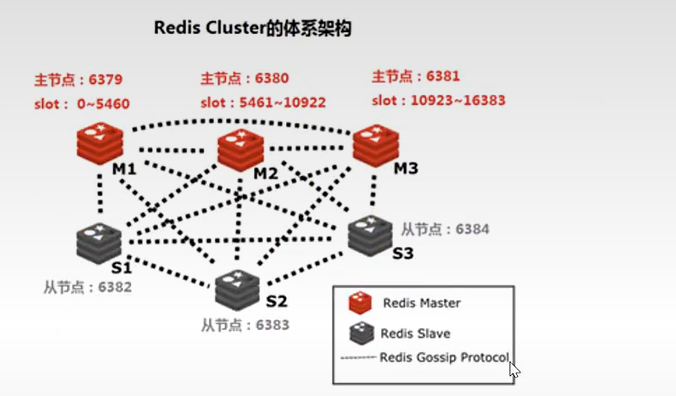
出问题后slave就来接管相对应的槽位
所以实验最少需要6台主机
假如三个主节点分别是:A, B, C 三个节点,采用哈希槽 (hash slot)的方式来分配16384个slot 的话它们三个节点分别承担的slot 区间可以是:
节点A覆盖 0-5460

节点B覆盖 5461-10922

节点C覆盖 10923-16383
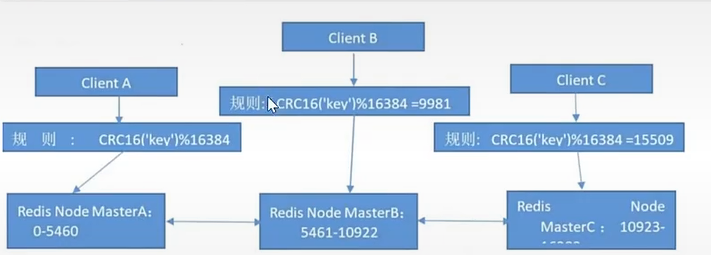
cluster存值原理
Redis cluster 主从架构
Redis cluster的架构虽然解决了并发的问题,但是又引入了一个新的问题,每个Redis master的高可用如何解决?
那就是对每个master 节点都实现主从复制,从而实现 redis 高可用性
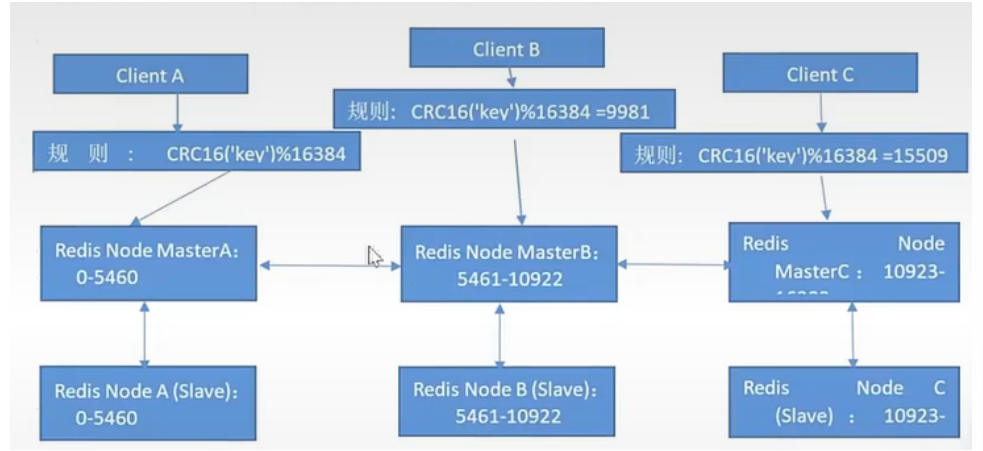
cluster主从
Redis Cluster 部署架构说明
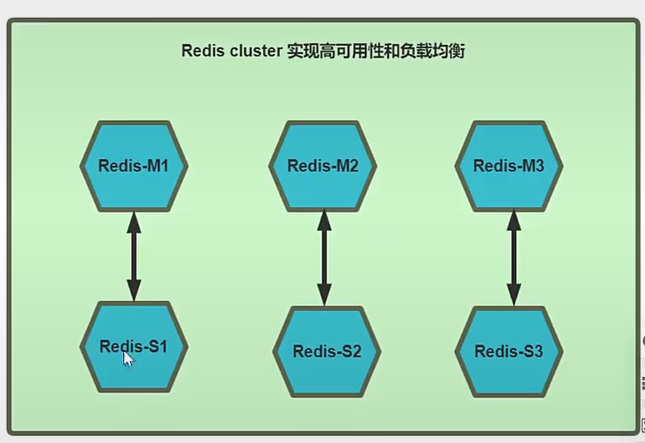
生产环境架构
然后设置IP
第一台:
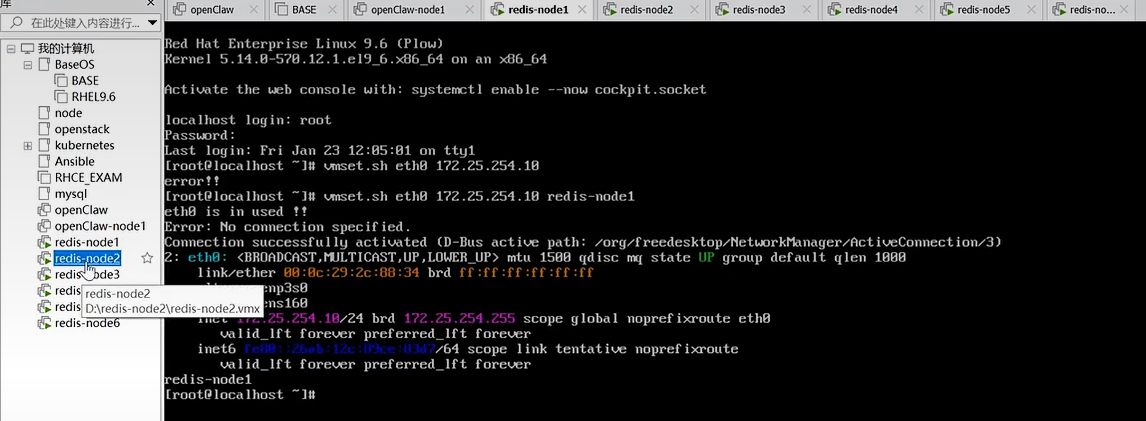
第二台:
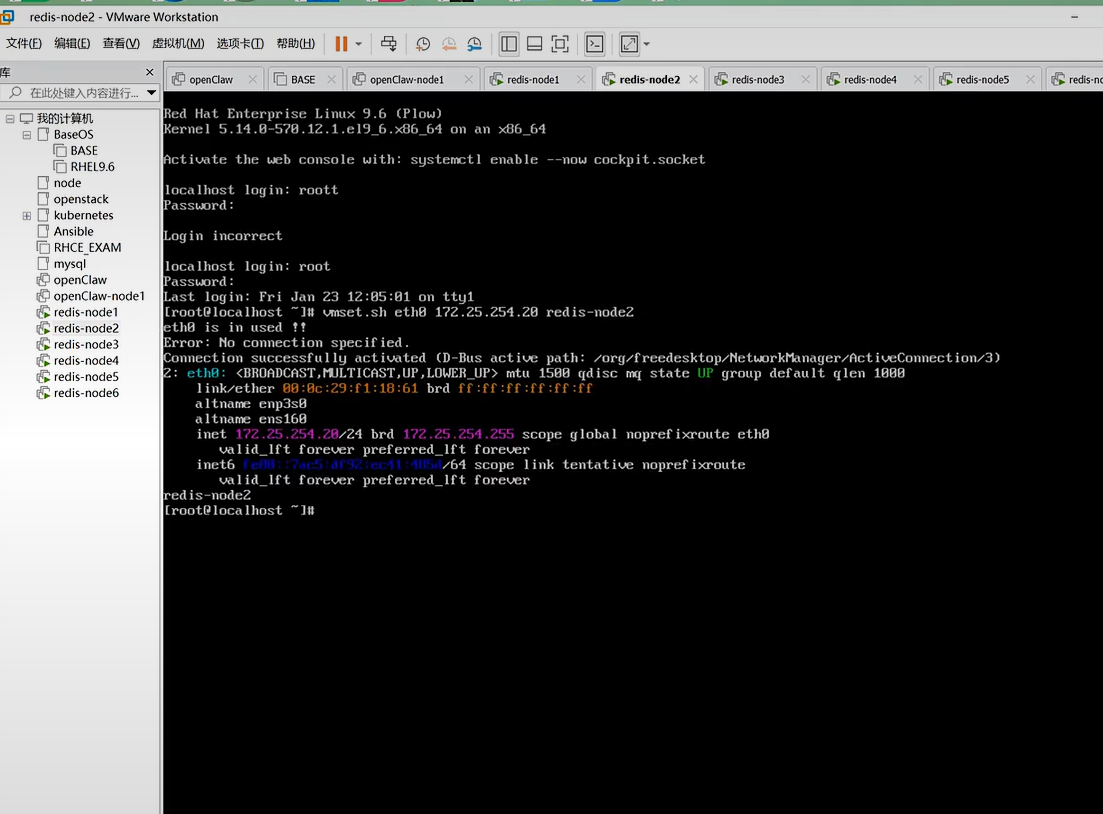
第三胎:
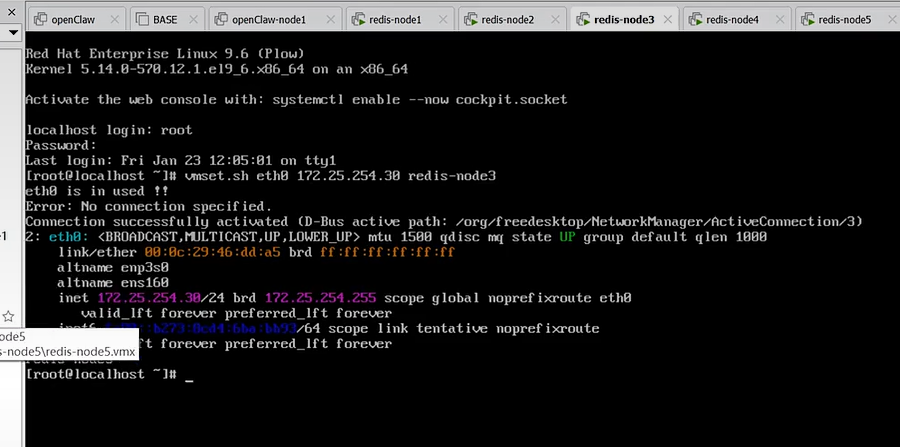
第四台:
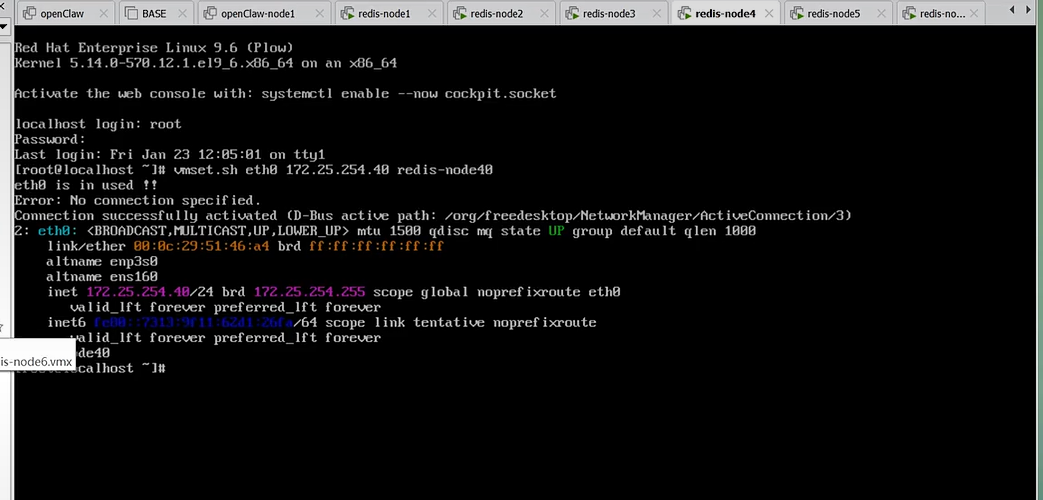
第五台:
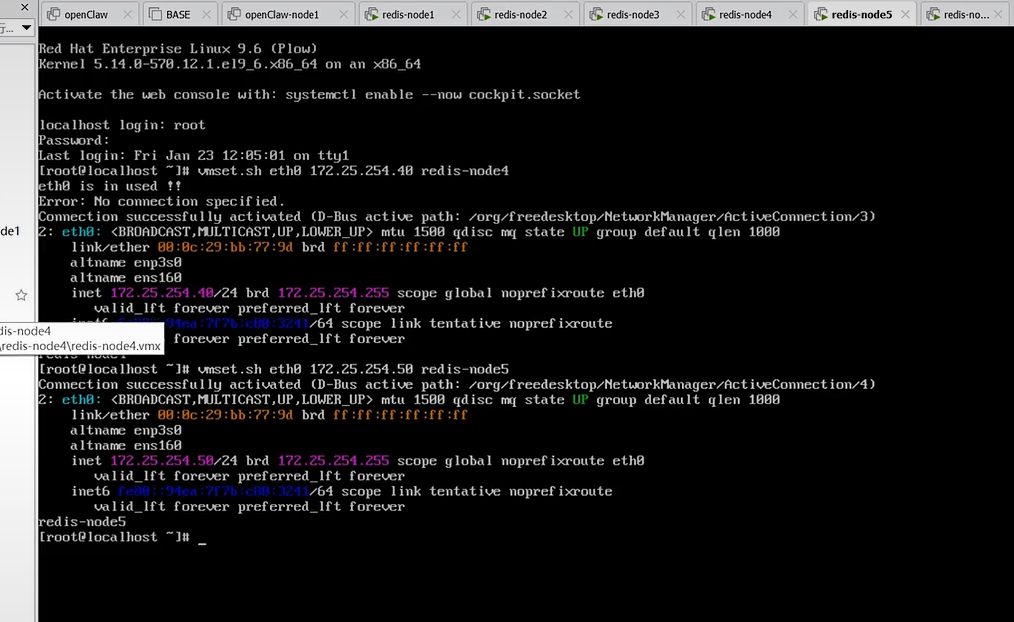
diliutai: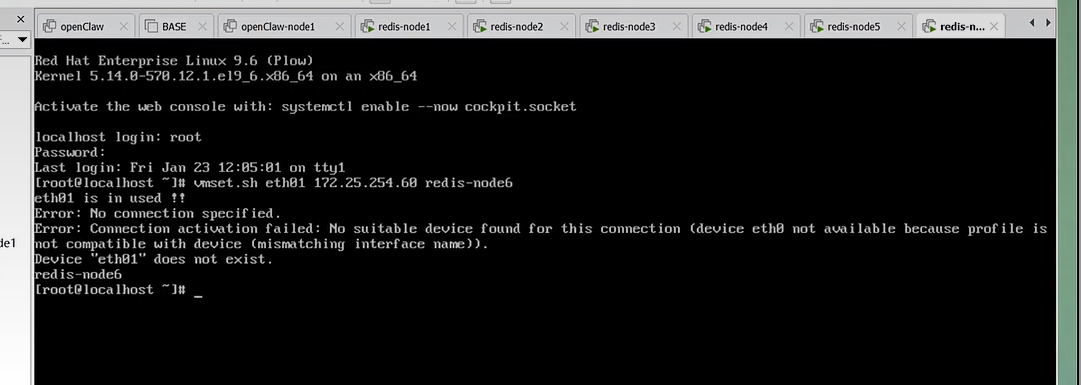
依次连接安装:
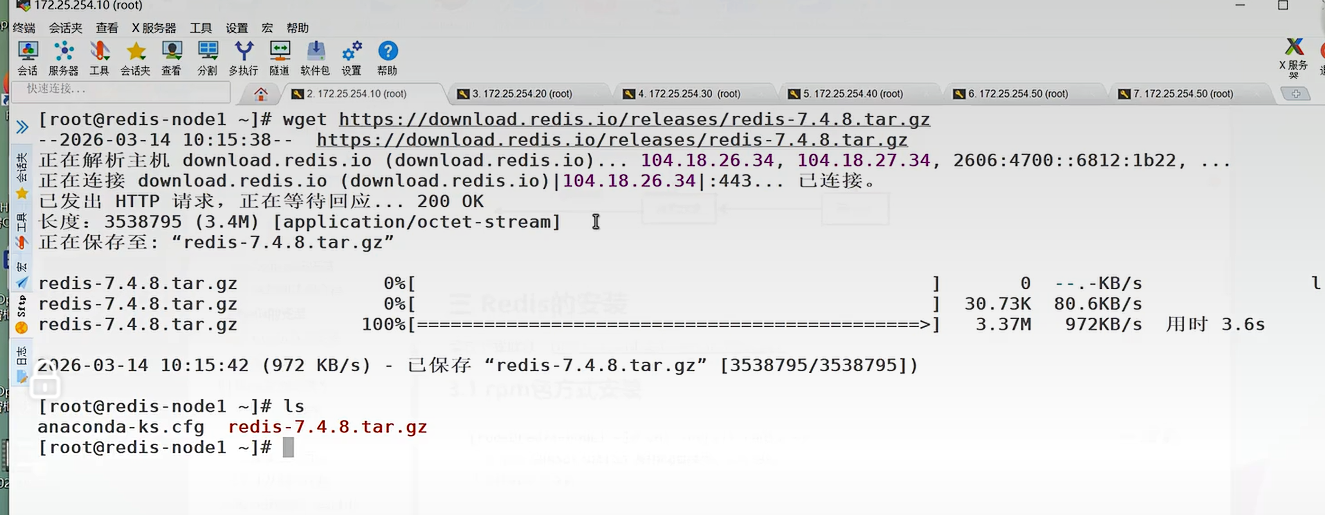
7.2 创建redis cluster的前提
1.每个redis node节点采用相同的硬件配置、相同的密码、相同的redis版本。
2.每个节点必须开启的参数
-
cluster-enabled yes #必须开启集群状态,开启后redis进程会有cluster显示
-
cluster-config-file nodes-6380.conf #此文件有redis cluster集群自动创建和维护,不需要任何手动操作
3.所有redis服务器必须没有任何数据
4.先启动为单机redis且没有任何key value
7.3 部署redis cluster
在所有redis主机中
bash
[root@redis-masterx ~]# vim /etc/redis/redis.conf
masterauth "123456" #集群主从认证
requirepass "123456" #redis登陆密码 redis-cli 命令连接redis后要用"auth 密码"进行认证
cluster-enabled yes #开启cluster集群功能
cluster-config-file nodes-6379.conf #指定集群配置文件
cluster-node-timeout 15000 #节点加入集群的超时时间单位是ms
[root@redis-master1 ~]# systemctl restart redis.service
[root@redis-master1 ~]# redis-cli
127.0.0.1:6379> auth 123456
OK
127.0.0.1:6379> info
# Cluster
cluster_enabled:17.4 redis-cli --cluster 参数说明
bash
[root@redis-master1 ~]# redis-cli --cluster help
Cluster Manager Commands:
create host1:port1 ... hostN:portN #创建集群
--cluster-replicas <arg> #指定master的副本数
check <host:port> or <host> <port> #检测集群信息
info <host:port> or <host> <port> #查看集群信息
fix <host:port> or <host> <port> #修复集群
reshard <host:port> or <host> <port> #在线热迁移集群指定主机的slots数据
rebalance <host:port> or <host> <port> #平衡各集群主机的slot数量
add-node new_host:new_port existing_host:existing_port #添加主机
del-node host:port node_id #删除主机
import host:port #导入外部redis服务器的数据到当前集群
-7.5. 创建redis-cluster
bash
[root@redis-master1 ~]# redis-cli --cluster create -a 123456 \
> 172.25.254.10:6379 172.25.254.20:6379 172.25.254.30:6379 \
> 172.25.254.110:6379 172.25.254.120:6379 172.25.254.130:6379 \
> --cluster-replicas 1
>>> Performing hash slots allocation on 6 nodes...
Master[0] -> Slots 0 - 5460 #哈希槽分配
Master[1] -> Slots 5461 - 10922
Master[2] -> Slots 10923 - 16383
Adding replica 172.25.254.120:6379 to 172.25.254.10:6379 #主从分配情况
Adding replica 172.25.254.130:6379 to 172.25.254.20:6379
Adding replica 172.25.254.110:6379 to 172.25.254.30:6379
M: 5ab2e93f4f0783983676f7bd118efaacfb202bd1 172.25.254.10:6379
slots:[0-5460] (5461 slots) master
M: ba504e78f14df5944280f9035543277a0cf5976b 172.25.254.20:6379
slots:[5461-10922] (5462 slots) master
M: 1fcaeb1dd936b46f4ea1efe4330c54195e66acf7 172.25.254.30:6379
slots:[10923-16383] (5461 slots) master
S: c20c9b5465b2e64868161c0e285d55bc81358ba4 172.25.254.110:6379
replicates 1fcaeb1dd936b46f4ea1efe4330c54195e66acf7
S: d458f34fa900d83212c021dc1e65396e490b5495 172.25.254.120:6379
replicates 5ab2e93f4f0783983676f7bd118efaacfb202bd1
S: 83d7a82fe896cf9f4d8212cb533058659bba16ce 172.25.254.130:6379
replicates ba504e78f14df5944280f9035543277a0cf5976b
Can I set the above configuration? (type 'yes' to accept): yes
>>> Performing Cluster Check (using node 172.25.254.10:6379)
M: 5ab2e93f4f0783983676f7bd118efaacfb202bd1 172.25.254.10:6379
slots:[0-5460] (5461 slots) master
1 additional replica(s)
S: c20c9b5465b2e64868161c0e285d55bc81358ba4 172.25.254.110:6379
slots: (0 slots) slave
replicates 1fcaeb1dd936b46f4ea1efe4330c54195e66acf7
M: ba504e78f14df5944280f9035543277a0cf5976b 172.25.254.20:6379
slots:[5461-10922] (5462 slots) master
1 additional replica(s)
S: 83d7a82fe896cf9f4d8212cb533058659bba16ce 172.25.254.130:6379
slots: (0 slots) slave
replicates ba504e78f14df5944280f9035543277a0cf5976b
M: 1fcaeb1dd936b46f4ea1efe4330c54195e66acf7 172.25.254.30:6379
slots:[10923-16383] (5461 slots) master
1 additional replica(s)
S: d458f34fa900d83212c021dc1e65396e490b5495 172.25.254.120:6379
slots: (0 slots) slave
replicates 5ab2e93f4f0783983676f7bd118efaacfb202bd1
[OK] All nodes agree about slots configuration.
>>> Check for open slots... #检查打开的哈希槽位
>>> Check slots coverage... #检查槽位覆盖范围
[OK] All 16384 slots covered. #所有槽位分配完成
#配置文件位置
[root@redis-master1 ~]# ll /var/lib/redis/nodes-6379.conf检测redis集群状态
bash
[root@redis-master1 ~]# redis-cli -a 123456 --cluster info 172.25.254.10:6379 #查看集群状态
Warning: Using a password with '-a' or '-u' option on the command line interface may not be safe.
172.25.254.10:6379 (5ab2e93f...) -> 0 keys | 5461 slots | 1 slaves.
172.25.254.20:6379 (ba504e78...) -> 0 keys | 5462 slots | 1 slaves.
172.25.254.30:6379 (1fcaeb1d...) -> 0 keys | 5461 slots | 1 slaves.
[OK] 0 keys in 3 masters.
0.00 keys per slot on average.
[root@redis-master1 ~]# redis-cli -a 123456 cluster info
Warning: Using a password with '-a' or '-u' option on the command line interface may not be safe.
cluster_state:ok
cluster_slots_assigned:16384
cluster_slots_ok:16384
cluster_slots_pfail:0
cluster_slots_fail:0
cluster_known_nodes:6
cluster_size:3
cluster_current_epoch:6
cluster_my_epoch:1
cluster_stats_messages_ping_sent:821
cluster_stats_messages_pong_sent:801
cluster_stats_messages_sent:1622
cluster_stats_messages_ping_received:796
cluster_stats_messages_pong_received:821
cluster_stats_messages_meet_received:5
cluster_stats_messages_received:1622
[root@redis-master1 ~]# redis-cli -a 123456 --cluster check 172.25.254.10:6379 #检测集群
Warning: Using a password with '-a' or '-u' option on the command line interface may not be safe.
172.25.254.10:6379 (5ab2e93f...) -> 0 keys | 5461 slots | 1 slaves.
172.25.254.20:6379 (ba504e78...) -> 0 keys | 5462 slots | 1 slaves.
172.25.254.30:6379 (1fcaeb1d...) -> 0 keys | 5461 slots | 1 slaves.
[OK] 0 keys in 3 masters.
0.00 keys per slot on average.
>>> Performing Cluster Check (using node 172.25.254.10:6379)
M: 5ab2e93f4f0783983676f7bd118efaacfb202bd1 172.25.254.10:6379
slots:[0-5460] (5461 slots) master
1 additional replica(s)
S: c20c9b5465b2e64868161c0e285d55bc81358ba4 172.25.254.110:6379
slots: (0 slots) slave
replicates 1fcaeb1dd936b46f4ea1efe4330c54195e66acf7
M: ba504e78f14df5944280f9035543277a0cf5976b 172.25.254.20:6379
slots:[5461-10922] (5462 slots) master
1 additional replica(s)
S: 83d7a82fe896cf9f4d8212cb533058659bba16ce 172.25.254.130:6379
slots: (0 slots) slave
replicates ba504e78f14df5944280f9035543277a0cf5976b
M: 1fcaeb1dd936b46f4ea1efe4330c54195e66acf7 172.25.254.30:6379
slots:[10923-16383] (5461 slots) master
1 additional replica(s)
S: d458f34fa900d83212c021dc1e65396e490b5495 172.25.254.120:6379
slots: (0 slots) slave
replicates 5ab2e93f4f0783983676f7bd118efaacfb202bd1
[OK] All nodes agree about slots configuration.
>>> Check for open slots...
>>> Check slots coverage...
[OK] All 16384 slots covered.
写入数据
bash
[root@redis-master1 ~]# redis-cli -a 123456
Warning: Using a password with '-a' or '-u' option on the command line interface may not be safe.
127.0.0.1:6379> set key1 value1 #被分配到20的hash槽位上
(error) MOVED 9189 172.25.254.20:6379
[root@redis-master2 ~]# redis-cli -a 123456
Warning: Using a password with '-a' or '-u' option on the command line interface may not be safe.
127.0.0.1:6379> set key1 value1
OK7.6 集群扩容
bash
#添加master
[root@redis-master1 ~]# redis-cli -a 123456 --cluster add-node 172.25.254.40:6379 172.25.254.10:6379
Warning: Using a password with '-a' or '-u' option on the command line interface may not be safe.
>>> Adding node 172.25.254.40:6379 to cluster 172.25.254.10:6379
>>> Performing Cluster Check (using node 172.25.254.10:6379)
M: 5ab2e93f4f0783983676f7bd118efaacfb202bd1 172.25.254.10:6379
slots:[0-5460] (5461 slots) master
1 additional replica(s)
S: c20c9b5465b2e64868161c0e285d55bc81358ba4 172.25.254.110:6379
slots: (0 slots) slave
replicates 1fcaeb1dd936b46f4ea1efe4330c54195e66acf7
M: ba504e78f14df5944280f9035543277a0cf5976b 172.25.254.20:6379
slots:[5461-10922] (5462 slots) master
1 additional replica(s)
S: 83d7a82fe896cf9f4d8212cb533058659bba16ce 172.25.254.130:6379
slots: (0 slots) slave
replicates ba504e78f14df5944280f9035543277a0cf5976b
M: 1fcaeb1dd936b46f4ea1efe4330c54195e66acf7 172.25.254.30:6379
slots:[10923-16383] (5461 slots) master
1 additional replica(s)
S: d458f34fa900d83212c021dc1e65396e490b5495 172.25.254.120:6379
slots: (0 slots) slave
replicates 5ab2e93f4f0783983676f7bd118efaacfb202bd1
[OK] All nodes agree about slots configuration.
>>> Check for open slots...
>>> Check slots coverage...
[OK] All 16384 slots covered.
>>> Getting functions from cluster
>>> Failed retrieving Functions from the cluster, skip this step as Redis version do not support function command (error = 'ERR unknown command `FUNCTION`, with args beginning with: `DUMP`, ')
>>> Send CLUSTER MEET to node 172.25.254.40:6379 to make it join the cluster.
[OK] New node added correctly.
[root@redis-master1 ~]# redis-cli -a 123456 --cluster info 172.25.254.10:6379
Warning: Using a password with '-a' or '-u' option on the command line interface may not be safe.
172.25.254.10:6379 (5ab2e93f...) -> 0 keys | 5461 slots | 1 slaves.
172.25.254.40:6379 (009571cb...) -> 0 keys | 0 slots | 0 slaves.
172.25.254.20:6379 (ba504e78...) -> 1 keys | 5462 slots | 1 slaves.
172.25.254.30:6379 (1fcaeb1d...) -> 0 keys | 5461 slots | 1 slaves.
[OK] 1 keys in 4 masters.
0.00 keys per slot on average.
#分配槽位
[root@redis-master1 ~]# redis-cli -a 123456 --cluster reshard 172.25.254.10:6379
Warning: Using a password with '-a' or '-u' option on the command line interface may not be safe.
>>> Performing Cluster Check (using node 172.25.254.10:6379)
M: 5ab2e93f4f0783983676f7bd118efaacfb202bd1 172.25.254.10:6379
slots:[0-5460] (5461 slots) master
1 additional replica(s)
S: c20c9b5465b2e64868161c0e285d55bc81358ba4 172.25.254.110:6379
slots: (0 slots) slave
replicates 1fcaeb1dd936b46f4ea1efe4330c54195e66acf7
M: 009571cb206a89afa6658b60b2d403136056ac09 172.25.254.40:6379
slots: (0 slots) master
M: ba504e78f14df5944280f9035543277a0cf5976b 172.25.254.20:6379
slots:[5461-10922] (5462 slots) master
1 additional replica(s)
S: 83d7a82fe896cf9f4d8212cb533058659bba16ce 172.25.254.130:6379
slots: (0 slots) slave
replicates ba504e78f14df5944280f9035543277a0cf5976b
M: 1fcaeb1dd936b46f4ea1efe4330c54195e66acf7 172.25.254.30:6379
slots:[10923-16383] (5461 slots) master
1 additional replica(s)
S: d458f34fa900d83212c021dc1e65396e490b5495 172.25.254.120:6379
slots: (0 slots) slave
replicates 5ab2e93f4f0783983676f7bd118efaacfb202bd1
[OK] All nodes agree about slots configuration.
>>> Check for open slots...
>>> Check slots coverage...
[OK] All 16384 slots covered.
How many slots do you want to move (from 1 to 16384)? 4096
What is the receiving node ID? 009571cb206a89afa6658b60b2d403136056ac09
Please enter all the source node IDs.
Type 'all' to use all the nodes as source nodes for the hash slots.
Type 'done' once you entered all the source nodes IDs.
Source node #1: all
#添加salve
[root@redis-master1 ~]# redis-cli -a 123456 --cluster add-node 172.25.254.140:6379 172.25.254.10:6379 --cluster-slave --cluster-master-id 009571cb206a89afa6658b60b2d403136056ac09
Warning: Using a password with '-a' or '-u' option on the command line interface may not be safe.
>>> Adding node 172.25.254.140:6379 to cluster 172.25.254.10:6379
>>> Performing Cluster Check (using node 172.25.254.10:6379)
M: 5ab2e93f4f0783983676f7bd118efaacfb202bd1 172.25.254.10:6379
slots:[1365-5460] (4096 slots) master
1 additional replica(s)
S: c20c9b5465b2e64868161c0e285d55bc81358ba4 172.25.254.110:6379
slots: (0 slots) slave
replicates 1fcaeb1dd936b46f4ea1efe4330c54195e66acf7
M: 009571cb206a89afa6658b60b2d403136056ac09 172.25.254.40:6379
slots:[0-1364],[5461-6826],[10923-12287] (4096 slots) master
M: ba504e78f14df5944280f9035543277a0cf5976b 172.25.254.20:6379
slots:[6827-10922] (4096 slots) master
1 additional replica(s)
S: 83d7a82fe896cf9f4d8212cb533058659bba16ce 172.25.254.130:6379
slots: (0 slots) slave
replicates ba504e78f14df5944280f9035543277a0cf5976b
M: 1fcaeb1dd936b46f4ea1efe4330c54195e66acf7 172.25.254.30:6379
slots:[12288-16383] (4096 slots) master
1 additional replica(s)
S: d458f34fa900d83212c021dc1e65396e490b5495 172.25.254.120:6379
slots: (0 slots) slave
replicates 5ab2e93f4f0783983676f7bd118efaacfb202bd1
[OK] All nodes agree about slots configuration.
>>> Check for open slots...
>>> Check slots coverage...
[OK] All 16384 slots covered.
>>> Send CLUSTER MEET to node 172.25.254.140:6379 to make it join the cluster.
Waiting for the cluster to join
>>> Configure node as replica of 172.25.254.40:6379.
[OK] New node added correctly.7.7 clsuter集群维护
添加节点的时候是先添加node节点到集群,然后分配槽位,删除节点的操作与添加节点的操作正好相反,是先将被删除的Redis node上的槽位迁移到集群中的其他Redis node节点上,然后再将其删除,如果一个Redis node节点上的槽位没有被完全迁移,删除该node的时候会提示有数据且无法删除。
bash
#移除要下线主机的哈希槽位
[root@redis-master2 ~]# redis-cli -a 123456 --cluster reshard 172.25.254.20:6379
Warning: Using a password with '-a' or '-u' option on the command line interface may not be safe.
>>> Performing Cluster Check (using node 172.25.254.20:6379)
M: ba504e78f14df5944280f9035543277a0cf5976b 172.25.254.20:6379
slots:[6827-10922] (4096 slots) master
1 additional replica(s)
M: 1fcaeb1dd936b46f4ea1efe4330c54195e66acf7 172.25.254.30:6379
slots:[12288-16383] (4096 slots) master
1 additional replica(s)
M: 009571cb206a89afa6658b60b2d403136056ac09 172.25.254.40:6379
slots:[0-1364],[5461-6826],[10923-12287] (4096 slots) master
1 additional replica(s)
S: c20c9b5465b2e64868161c0e285d55bc81358ba4 172.25.254.110:6379
slots: (0 slots) slave
replicates 1fcaeb1dd936b46f4ea1efe4330c54195e66acf7
S: d458f34fa900d83212c021dc1e65396e490b5495 172.25.254.120:6379
slots: (0 slots) slave
replicates 5ab2e93f4f0783983676f7bd118efaacfb202bd1
M: 5ab2e93f4f0783983676f7bd118efaacfb202bd1 172.25.254.10:6379
slots:[1365-5460] (4096 slots) master
1 additional replica(s)
S: 83d7a82fe896cf9f4d8212cb533058659bba16ce 172.25.254.130:6379
slots: (0 slots) slave
replicates ba504e78f14df5944280f9035543277a0cf5976b
S: 86a4a8fb08e70e41b5a30f829deb983d23854ea7 172.25.254.140:6379
slots: (0 slots) slave
replicates 009571cb206a89afa6658b60b2d403136056ac09
[OK] All nodes agree about slots configuration.
>>> Check for open slots...
>>> Check slots coverage...
[OK] All 16384 slots covered.
How many slots do you want to move (from 1 to 16384)? 4096
What is the receiving node ID? 1fcaeb1dd936b46f4ea1efe4330c54195e66acf7
Please enter all the source node IDs.
Type 'all' to use all the nodes as source nodes for the hash slots.
Type 'done' once you entered all the source nodes IDs.
Source node #1: 5ab2e93f4f0783983676f7bd118efaacfb202bd1
Source node #2: done
#删除master
[root@redis-master2 ~]# redis-cli -a 123456 --cluster del-node 172.25.254.120:6379 d458f34fa900d83212c021dc1e65396e490b5495
Warning: Using a password with '-a' or '-u' option on the command line interface may not be safe.
>>> Removing node d458f34fa900d83212c021dc1e65396e490b5495 from cluster 172.25.254.120:6379
>>> Sending CLUSTER FORGET messages to the cluster...
>>> Sending CLUSTER RESET SOFT to the deleted node.
[root@redis-master2 ~]# redis-cli -a 123456 --cluster del-node 172.25.254.10:6379 5ab2e93f4f0783983676f7bd118efaacfb202bd1
Warning: Using a password with '-a' or '-u' option on the command line interface may not be safe.
>>> Removing node 5ab2e93f4f0783983676f7bd118efaacfb202bd1 from cluster 172.25.254.10:6379
>>> Sending CLUSTER FORGET messages to the cluster...
>>> Sending CLUSTER RESET SOFT to the deleted node.实验集合:
一.修改所有节点配置文件
bash
[root@redis-node1 ~]# vim /etc/redis/6379.conf
masterauth "123456" #集群主从认证
cluster-enabled yes #开启cluster集群功能
cluster-config-file nodes-6379.conf #指定集群配置文件
cluster-node-timeout 15000 #节点加入集群的超时时间单位是ms
[root@redis-node1 ~]# /etc/init.d/redis_6379 stop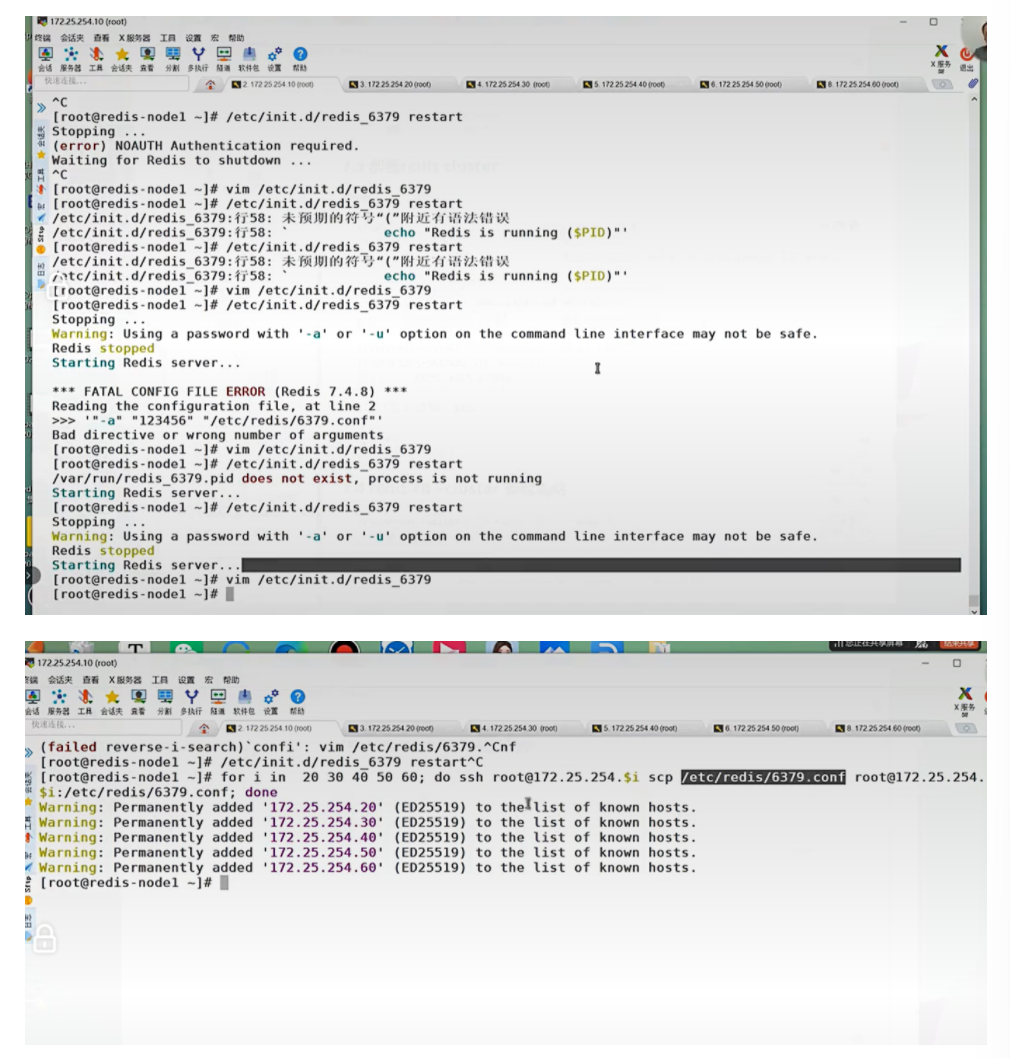
二.启动集群
bash
[root@redis-node1 ~]# redis-cli --cluster create 172.25.254.10:6379 172.25.254.20:6379 172.25.254.30:6379 172.25.254.40:6379 172.25.254.50:6379 172.25.254.60:6379 --cluster-replicas 1
>>> Performing hash slots allocation on 6 nodes...
Master[0] -> Slots 0 - 5460
Master[1] -> Slots 5461 - 10922
Master[2] -> Slots 10923 - 16383
Adding replica 172.25.254.50:6379 to 172.25.254.10:6379
Adding replica 172.25.254.60:6379 to 172.25.254.20:6379
Adding replica 172.25.254.40:6379 to 172.25.254.30:6379
M: 8db833f3c3bc6b8f93e87111f13f56d366f833a0 172.25.254.10:6379
slots:[0-5460] (5461 slots) master
M: ca599940209f55c07d06951480703bb0a5d8873a 172.25.254.20:6379
slots:[5461-10922] (5462 slots) master
M: d9300173b75149d3056f0ee3edec063f8ec66e9a 172.25.254.30:6379
slots:[10923-16383] (5461 slots) master
S: 32d797eb30094b77edb896abcc0b0fc91ccdb4fd 172.25.254.40:6379
replicates d9300173b75149d3056f0ee3edec063f8ec66e9a
S: ba6ef067c63d30c213493eb48d43427015018898 172.25.254.50:6379
replicates 8db833f3c3bc6b8f93e87111f13f56d366f833a0
S: c939a04358edc1ce7a1c1a44561d77fb402025fd 172.25.254.60:6379
replicates ca599940209f55c07d06951480703bb0a5d8873a
Can I set the above configuration? (type 'yes' to accept): yes #输入内容
>>> Nodes configuration updated
>>> Assign a different config epoch to each node
>>> Sending CLUSTER MEET messages to join the cluster
Waiting for the cluster to join
..
>>> Performing Cluster Check (using node 172.25.254.10:6379)
M: 8db833f3c3bc6b8f93e87111f13f56d366f833a0 172.25.254.10:6379
slots:[0-5460] (5461 slots) master
1 additional replica(s)
S: c939a04358edc1ce7a1c1a44561d77fb402025fd 172.25.254.60:6379
slots: (0 slots) slave
replicates ca599940209f55c07d06951480703bb0a5d8873a
M: d9300173b75149d3056f0ee3edec063f8ec66e9a 172.25.254.30:6379
slots:[10923-16383] (5461 slots) master
1 additional replica(s)
M: ca599940209f55c07d06951480703bb0a5d8873a 172.25.254.20:6379
slots:[5461-10922] (5462 slots) master
1 additional replica(s)
S: ba6ef067c63d30c213493eb48d43427015018898 172.25.254.50:6379
slots: (0 slots) slave
replicates 8db833f3c3bc6b8f93e87111f13f56d366f833a0
S: 32d797eb30094b77edb896abcc0b0fc91ccdb4fd 172.25.254.40:6379
slots: (0 slots) slave
replicates d9300173b75149d3056f0ee3edec063f8ec66e9a
[OK] All nodes agree about slots configuration.
#查看集群状态
[root@redis-node1 ~]# redis-cli --cluster info 172.25.254.10:6379
172.25.254.10:6379 (8db833f3...) -> 0 keys | 5461 slots | 1 slaves.
172.25.254.30:6379 (d9300173...) -> 0 keys | 5461 slots | 1 slaves.
172.25.254.20:6379 (ca599940...) -> 0 keys | 5462 slots | 1 slaves.
[OK] 0 keys in 3 masters.
0.00 keys per slot on average.
#查看集群信息
[root@redis-node1 ~]# redis-cli cluster info
cluster_state:ok
cluster_slots_assigned:16384
cluster_slots_ok:16384
cluster_slots_pfail:0
cluster_slots_fail:0
cluster_known_nodes:6
cluster_size:3
cluster_current_epoch:6
cluster_my_epoch:1
cluster_stats_messages_ping_sent:168
cluster_stats_messages_pong_sent:163
cluster_stats_messages_sent:331
cluster_stats_messages_ping_received:158
cluster_stats_messages_pong_received:168
cluster_stats_messages_meet_received:5
cluster_stats_messages_received:331
total_cluster_links_buffer_limit_exceeded:0
#检测当前集群
[root@redis-node1 ~]# redis-cli --cluster check 172.25.254.10:6379
172.25.254.10:6379 (8db833f3...) -> 0 keys | 5461 slots | 1 slaves.
172.25.254.30:6379 (d9300173...) -> 0 keys | 5461 slots | 1 slaves.
172.25.254.20:6379 (ca599940...) -> 0 keys | 5462 slots | 1 slaves.
[OK] 0 keys in 3 masters.
0.00 keys per slot on average.
>>> Performing Cluster Check (using node 172.25.254.10:6379)
M: 8db833f3c3bc6b8f93e87111f13f56d366f833a0 172.25.254.10:6379
slots:[0-5460] (5461 slots) master
1 additional replica(s)
S: c939a04358edc1ce7a1c1a44561d77fb402025fd 172.25.254.60:6379
slots: (0 slots) slave
replicates ca599940209f55c07d06951480703bb0a5d8873a
M: d9300173b75149d3056f0ee3edec063f8ec66e9a 172.25.254.30:6379
slots:[10923-16383] (5461 slots) master
1 additional replica(s)
M: ca599940209f55c07d06951480703bb0a5d8873a 172.25.254.20:6379
slots:[5461-10922] (5462 slots) master
1 additional replica(s)
S: ba6ef067c63d30c213493eb48d43427015018898 172.25.254.50:6379
slots: (0 slots) slave
replicates 8db833f3c3bc6b8f93e87111f13f56d366f833a0
S: 32d797eb30094b77edb896abcc0b0fc91ccdb4fd 172.25.254.40:6379
slots: (0 slots) slave
replicates d9300173b75149d3056f0ee3edec063f8ec66e9a
[OK] All nodes agree about slots configuration.
>>> Check for open slots...
>>> Check slots coverage...
[OK] All 16384 slots covered.
三.集群扩容
bash
#添加master
[root@redis-node1 ~]# redis-cli --cluster add-node 172.25.254.70:6379 172.25.254.10:6379
[root@redis-node1 ~]# redis-cli --cluster check 172.25.254.10:6379
172.25.254.10:6379 (8db833f3...) -> 0 keys | 5461 slots | 1 slaves.
172.25.254.70:6379 (dfabfe07...) -> 0 keys | 0 slots | 0 slaves.
172.25.254.30:6379 (d9300173...) -> 0 keys | 5461 slots | 1 slaves.
172.25.254.20:6379 (ca599940...) -> 1 keys | 5462 slots | 1 slaves.
[OK] 1 keys in 4 masters.
0.00 keys per slot on average.
>>> Performing Cluster Check (using node 172.25.254.10:6379)
M: 8db833f3c3bc6b8f93e87111f13f56d366f833a0 172.25.254.10:6379
slots:[0-5460] (5461 slots) master
1 additional replica(s)
M: dfabfe07170ac9b5d20a5a7a70c836877bd64504 172.25.254.70:6379
slots: (0 slots) master
S: c939a04358edc1ce7a1c1a44561d77fb402025fd 172.25.254.60:6379
slots: (0 slots) slave
replicates ca599940209f55c07d06951480703bb0a5d8873a
M: d9300173b75149d3056f0ee3edec063f8ec66e9a 172.25.254.30:6379
slots:[10923-16383] (5461 slots) master
1 additional replica(s)
M: ca599940209f55c07d06951480703bb0a5d8873a 172.25.254.20:6379
slots:[5461-10922] (5462 slots) master
1 additional replica(s)
S: ba6ef067c63d30c213493eb48d43427015018898 172.25.254.50:6379
slots: (0 slots) slave
replicates 8db833f3c3bc6b8f93e87111f13f56d366f833a0
S: 32d797eb30094b77edb896abcc0b0fc91ccdb4fd 172.25.254.40:6379
slots: (0 slots) slave
replicates d9300173b75149d3056f0ee3edec063f8ec66e9a
[OK] All nodes agree about slots configuration.
>>> Check for open slots...
>>> Check slots coverage...
[OK] All 16384 slots covered.
#分配solt给新加入的主机
>>> Performing Cluster Check (using node 172.25.254.10:6379)
M: 8db833f3c3bc6b8f93e87111f13f56d366f833a0 172.25.254.10:6379
slots:[0-5460] (5461 slots) master
1 additional replica(s)
M: dfabfe07170ac9b5d20a5a7a70c836877bd64504 172.25.254.70:6379
slots: (0 slots) master
S: c939a04358edc1ce7a1c1a44561d77fb402025fd 172.25.254.60:6379
slots: (0 slots) slave
replicates ca599940209f55c07d06951480703bb0a5d8873a
M: d9300173b75149d3056f0ee3edec063f8ec66e9a 172.25.254.30:6379
slots:[10923-16383] (5461 slots) master
1 additional replica(s)
M: ca599940209f55c07d06951480703bb0a5d8873a 172.25.254.20:6379
slots:[5461-10922] (5462 slots) master
1 additional replica(s)
S: ba6ef067c63d30c213493eb48d43427015018898 172.25.254.50:6379
slots: (0 slots) slave
replicates 8db833f3c3bc6b8f93e87111f13f56d366f833a0
S: 32d797eb30094b77edb896abcc0b0fc91ccdb4fd 172.25.254.40:6379
slots: (0 slots) slave
replicates d9300173b75149d3056f0ee3edec063f8ec66e9a
[OK] All nodes agree about slots configuration.
>>> Check for open slots...
>>> Check slots coverage...
[OK] All 16384 slots covered.
How many slots do you want to move (from 1 to 16384)? 4096 #分配solt的数量
What is the receiving node ID? dfabfe07170ac9b5d20a5a7a70c836877bd64504
Please enter all the source node IDs.
Type 'all' to use all the nodes as source nodes for the hash slots.
Type 'done' once you entered all the source nodes IDs.
Source node #1: all #solt来源
Ready to move 4096 slots.
#给新主机添加slave
[root@redis-node1 ~]# redis-cli --cluster add-node 172.25.254.80:6379 172.25.254.10:6379 --cluster-slave --cluster-master-id dfabfe07170ac9b5d20a5a7a70c836877bd64504
[root@redis-node1 ~]# redis-cli --cluster check 172.25.254.10:6379 172.25.254.10:6379 (8db833f3...) -> 0 keys | 4096 slots | 1 slaves.
172.25.254.70:6379 (dfabfe07...) -> 1 keys | 4096 slots | 1 slaves.
172.25.254.30:6379 (d9300173...) -> 0 keys | 4096 slots | 1 slaves.
172.25.254.20:6379 (ca599940...) -> 0 keys | 4096 slots | 1 slaves.
[OK] 1 keys in 4 masters.
0.00 keys per slot on average.
>>> Performing Cluster Check (using node 172.25.254.10:6379)
M: 8db833f3c3bc6b8f93e87111f13f56d366f833a0 172.25.254.10:6379
slots:[1365-5460] (4096 slots) master
1 additional replica(s)
S: 1176ee294e6b5071ca57e93374d04ac22028daed 172.25.254.80:6379
slots: (0 slots) slave
replicates dfabfe07170ac9b5d20a5a7a70c836877bd64504
M: dfabfe07170ac9b5d20a5a7a70c836877bd64504 172.25.254.70:6379
slots:[0-1364],[5461-6826],[10923-12287] (4096 slots) master
1 additional replica(s)
S: c939a04358edc1ce7a1c1a44561d77fb402025fd 172.25.254.60:6379
slots: (0 slots) slave
replicates ca599940209f55c07d06951480703bb0a5d8873a
M: d9300173b75149d3056f0ee3edec063f8ec66e9a 172.25.254.30:6379
slots:[12288-16383] (4096 slots) master
1 additional replica(s)
M: ca599940209f55c07d06951480703bb0a5d8873a 172.25.254.20:6379
slots:[6827-10922] (4096 slots) master
1 additional replica(s)
S: ba6ef067c63d30c213493eb48d43427015018898 172.25.254.50:6379
slots: (0 slots) slave
replicates 8db833f3c3bc6b8f93e87111f13f56d366f833a0
S: 32d797eb30094b77edb896abcc0b0fc91ccdb4fd 172.25.254.40:6379
slots: (0 slots) slave
replicates d9300173b75149d3056f0ee3edec063f8ec66e9a
[OK] All nodes agree about slots configuration.
>>> Check for open slots...
>>> Check slots coverage...
[OK] All 16384 slots covered.四,集群缩容
bash
#集群槽位回收到10主机中
[root@redis-node1 ~]# redis-cli --cluster reshard 172.25.254.10:6379
>>> Performing Cluster Check (using node 172.25.254.10:6379)
M: 8db833f3c3bc6b8f93e87111f13f56d366f833a0 172.25.254.10:6379
slots:[1365-5460] (4096 slots) master
1 additional replica(s)
S: 1176ee294e6b5071ca57e93374d04ac22028daed 172.25.254.80:6379
slots: (0 slots) slave
replicates dfabfe07170ac9b5d20a5a7a70c836877bd64504
M: dfabfe07170ac9b5d20a5a7a70c836877bd64504 172.25.254.70:6379
slots:[0-1364],[5461-6826],[10923-12287] (4096 slots) master
1 additional replica(s)
S: c939a04358edc1ce7a1c1a44561d77fb402025fd 172.25.254.60:6379
slots: (0 slots) slave
replicates ca599940209f55c07d06951480703bb0a5d8873a
M: d9300173b75149d3056f0ee3edec063f8ec66e9a 172.25.254.30:6379
slots:[12288-16383] (4096 slots) master
1 additional replica(s)
M: ca599940209f55c07d06951480703bb0a5d8873a 172.25.254.20:6379
slots:[6827-10922] (4096 slots) master
1 additional replica(s)
S: ba6ef067c63d30c213493eb48d43427015018898 172.25.254.50:6379
slots: (0 slots) slave
replicates 8db833f3c3bc6b8f93e87111f13f56d366f833a0
S: 32d797eb30094b77edb896abcc0b0fc91ccdb4fd 172.25.254.40:6379
slots: (0 slots) slave
replicates d9300173b75149d3056f0ee3edec063f8ec66e9a
[OK] All nodes agree about slots configuration.
>>> Check for open slots...
>>> Check slots coverage...
[OK] All 16384 slots covered.
How many slots do you want to move (from 1 to 16384)? 4096
What is the receiving node ID? 8db833f3c3bc6b8f93e87111f13f56d366f833a0 #10id
Please enter all the source node IDs.
Type 'all' to use all the nodes as source nodes for the hash slots.
Type 'done' once you entered all the source nodes IDs.
Source node #1: dfabfe07170ac9b5d20a5a7a70c836877bd64504 #70id
Source node #2: done
#删除70和80节点
[root@redis-node1 ~]# redis-cli --cluster del-node 172.25.254.10:6379 dfabfe07170ac9b5d20a5a7a70c836877bd64504
>>> Removing node dfabfe07170ac9b5d20a5a7a70c836877bd64504 from cluster 172.25.254.10:6379
>>> Sending CLUSTER FORGET messages to the cluster...
>>> Sending CLUSTER RESET SOFT to the deleted node.
[root@redis-node1 ~]# redis-cli --cluster del-node 172.25.254.10:6379 1176ee294e6b5071ca57e93374d04ac22028daed
>>> Removing node 1176ee294e6b5071ca57e93374d04ac22028daed from cluster 172.25.254.10:6379
>>> Sending CLUSTER FORGET messages to the cluster...
>>> Sending CLUSTER RESET SOFT to the deleted node.
[root@redis-node1 ~]# redis-cli --cluster check 172.25.254.10:6379
172.25.254.10:6379 (8db833f3...) -> 1 keys | 8192 slots | 1 slaves.
172.25.254.30:6379 (d9300173...) -> 0 keys | 4096 slots | 1 slaves.
172.25.254.20:6379 (ca599940...) -> 0 keys | 4096 slots | 1 slaves.
[OK] 1 keys in 3 masters.
0.00 keys per slot on average.
>>> Performing Cluster Check (using node 172.25.254.10:6379)
M: 8db833f3c3bc6b8f93e87111f13f56d366f833a0 172.25.254.10:6379
slots:[0-6826],[10923-12287] (8192 slots) master
1 additional replica(s)
S: c939a04358edc1ce7a1c1a44561d77fb402025fd 172.25.254.60:6379
slots: (0 slots) slave
replicates ca599940209f55c07d06951480703bb0a5d8873a
M: d9300173b75149d3056f0ee3edec063f8ec66e9a 172.25.254.30:6379
slots:[12288-16383] (4096 slots) master
1 additional replica(s)
M: ca599940209f55c07d06951480703bb0a5d8873a 172.25.254.20:6379
slots:[6827-10922] (4096 slots) master
1 additional replica(s)
S: ba6ef067c63d30c213493eb48d43427015018898 172.25.254.50:6379
slots: (0 slots) slave
replicates 8db833f3c3bc6b8f93e87111f13f56d366f833a0
S: 32d797eb30094b77edb896abcc0b0fc91ccdb4fd 172.25.254.40:6379
slots: (0 slots) slave
replicates d9300173b75149d3056f0ee3edec063f8ec66e9a
[OK] All nodes agree about slots configuration.
>>> Check for open slots...
>>> Check slots coverage...
[OK] All 16384 slots covered.