一、实验目标
- 理解 ROS Service 的通信机制,包括请求(Request)与响应(Response)。
- 掌握创建 .srv 文件并在 ROS 中使用 Service。
- 能够实现两个示例 Service:
- 计算器服务:实现加、减、乘、除运算。
- 整形数组排序服务:对输入的整形数组进行排序并返回结果。
- 掌握 Service Server 和 Client 的实现流程
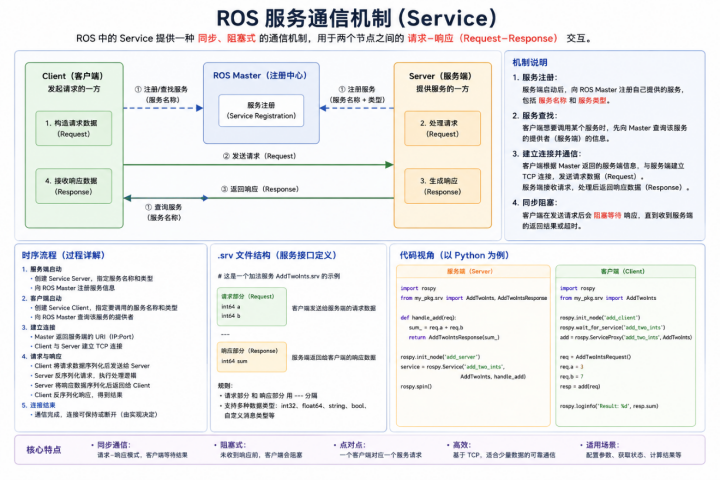
二、实验原理
1. ROS Service 机制
- Server:提供服务,等待 Client 请求。
- Client:发起请求,接收 Server 响应。
- Service 通过 .srv 文件定义 请求字段 与 响应字段。
示意图:
Client --------> Server
Request Response
2. Service 文件
- .srv 文件结构:
python
# 请求字段
int32 a
int32 b
string op
---
# 响应字段
float32 result
string status- 请求与响应之间使用 --- 分隔。
三、实验准备
- 软件环境
- Ubuntu 20.04
- ROS Noetic
- Python 3
- RViz(可选)
- ROS 工作空间
bash
cd ~/catkin_ws/src
catkin_create_pkg my_service_pkg rospy std_msgs
cd ~/catkin_ws
catkin_make
source devel/setup.bash
四、实验内容与步骤
实验1:计算器服务
第五天ROS Service 通信实验1
1. 创建 Service 文件
bash
cd ~/catkin_ws/src/my_service_pkg

mkdir srv

cd srv

gedit Calculator.srv
路径:~/catkin_ws/src/my_service_pkg/srv/Calculator.srv
内容:
python
float32 a
float32 b
string op
---
float32 result
string status
2. 编写 Server 节点
bash
cd ~/catkin_ws/src/my_service_pkg/

mkdir scripts

cd scripts

gedit calculator_server.py
文件:calculator_server.py
python
#!/usr/bin/env python3
import rospy
from my_service_pkg.srv import Calculator, CalculatorResponse

def handle_calculator(req):
    try:
        if req.op == '+':
            res = req.a + req.b
        elif req.op == '-':
            res = req.a - req.b
        elif req.op == '*':
            res = req.a * req.b
        elif req.op == '/':
            res = req.a / req.b
        else:
            return CalculatorResponse(0, "Unsupported operation")
        return CalculatorResponse(res, "OK")
    except Exception as e:
        return CalculatorResponse(0, str(e))

def calculator_server():
    rospy.init_node('calculator_server')
    s = rospy.Service('calculator', Calculator, handle_calculator)
    rospy.loginfo("Calculator Service Ready...")
    rospy.spin()

if __name__ == "__main__":
    calculator_server()
3. 编写 Client 节点
文件:calculator_client.py
cd ~/catkin_ws/src/my_service_pkg/scripts
gedit calculator_client.py
python
#!/usr/bin/env python3
import rospy
from my_service_pkg.srv import Calculator

def calculator_client(a, b, op):
    rospy.wait_for_service('calculator')
    try:
        calc = rospy.ServiceProxy('calculator', Calculator)
        resp = calc(a, b, op)
        return resp.result, resp.status
    except rospy.ServiceException as e:
        print("Service call failed: %s"%e)
        return None, str(e)

if __name__ == "__main__":
    rospy.init_node('calculator_client')

    # 手动输入
    try:
        a = float(input("请输入第一个数字: "))
        b = float(input("请输入第二个数字: "))
        op = input("请输入运算符 (+, -, *, /): ")
    except ValueError:
        print("输入无效,请输入数字!")
        exit(1)

    result, status = calculator_client(a, b, op)
    print("计算结果:", result, "状态:", status)
实验2:整形数组排序服务
1. 创建 Service 文件
路径:~/catkin_ws/src/my_service_pkg/srv/SortArray.srv
内容:
bash
int32[] array
---
int32[] sorted_array
string status
2. 编写 Server 节点
文件:sort_array_server.py
python
#!/usr/bin/env python3
import rospy
from my_service_pkg.srv import SortArray, SortArrayResponse

def handle_sort_array(req):
    try:
        sorted_arr = sorted(req.array)
        return SortArrayResponse(sorted_arr, "OK")
    except Exception as e:
        return SortArrayResponse([], str(e))

def sort_array_server():
    rospy.init_node('sort_array_server')
    s = rospy.Service('sort_array', SortArray, handle_sort_array)
    rospy.loginfo("Sort Array Service Ready...")
    rospy.spin()

if __name__ == "__main__":
    sort_array_server()
3. 编写 Client 节点
文件:sort_array_client.py
python
#!/usr/bin/env python3
import rospy
from my_service_pkg.srv import SortArray

def sort_array_client(array):
    rospy.wait_for_service('sort_array')
    try:
        sort_srv = rospy.ServiceProxy('sort_array', SortArray)
        resp = sort_srv(array)
        return resp.sorted_array, resp.status
    except rospy.ServiceException as e:
        print("Service call failed: %s" % e)
        return None, str(e)

if __name__ == "__main__":
    rospy.init_node('sort_array_client')

    try:
        # 手动输入数组(用空格分隔)
        user_input = input("请输入一组整数(用空格分隔,例如:5 2 9 1 7):\n")

        # 转换为整数列表
        array = list(map(int, user_input.strip().split()))

    except ValueError:
        print("输入格式错误,请输入整数!")
        exit(1)

    sorted_array, status = sort_array_client(array)

    print("排序结果:", sorted_array)
    print("状态:", status)
4.实验步骤总结
1.创建 Service .srv 文件。
2.修改 CMakeLists.txt
bash
find_package(catkin REQUIRED COMPONENTS

  rospy

  std_msgs

  message_generation

)


add_service_files(
    FILES
    Calculator.srv
    SortArray.srv
)

generate_messages(
    DEPENDENCIES std_msgs
)

catkin_package(
    CATKIN_DEPENDS rospy std_msgs message_runtime
)
3.修改package.xml:
bash
<build_depend>message_generation</build_depend>

<exec_depend>message_runtime</exec_depend>

<build_export_depend>message_runtime</build_export_depend>
4.编译工作空间:
bash
cd ~/catkin_ws
catkin_make
source devel/setup.bash
5.给calculator_client.py和calculator_server.py添加可执行权限!
bash
cd ~/catkin_ws/src/my_service_pkg/scripts

    chmod   +x calculator_client.py

    chmod   +x calculator_server .py
6.启动运行
1.启动 Server 节点。
rosrun my_service_pkg calculator_server.py
2.运行 Client 节点,观察结果。
rosrun my_service_pkg calculator_client.py
五、注意事项
- Service 名称应唯一,避免与已有节点冲突。
- 对除零等异常情况要进行处理。
- Client 发送请求前需等待 Service 可用:
rospy.wait_for_service('service_name')