1.背景:
最近AI盛行,Spring 官方也有AI方面的东西,于是也了解下。
2.思路:
观看spring官方资料 结合deepseek整理。
3.解决:
使用spring_Ai包
3.1目录:
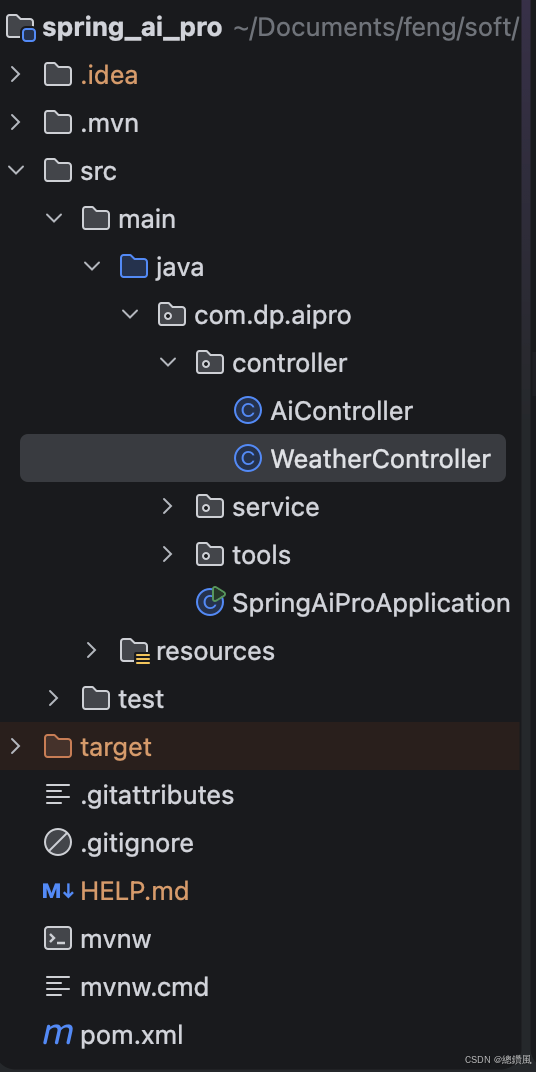
3.2代码:
pom.xml
java
<?xml version="1.0" encoding="UTF-8"?>
<project xmlns="http://maven.apache.org/POM/4.0.0"
         xmlns:xsi="http://www.w3.org/2001/XMLSchema-instance"
         xsi:schemaLocation="http://maven.apache.org/POM/4.0.0 https://maven.apache.org/xsd/maven-4.0.0.xsd">
    <modelVersion>4.0.0</modelVersion>
    <parent>
        <groupId>org.springframework.boot</groupId>
        <artifactId>spring-boot-starter-parent</artifactId>
        <version>3.3.0</version>
        <relativePath/>
    </parent>

    <groupId>com.dp</groupId>
    <artifactId>spring_ai_pro</artifactId>
    <version>0.0.1-SNAPSHOT</version>
    <name>spring_ai_pro</name>

    <properties>
        <java.version>17</java.version>
        <spring-ai-alibaba.version>1.0.0.3</spring-ai-alibaba.version>
    </properties>

    <dependencyManagement>
        <dependencies>
            <dependency>
                <groupId>com.alibaba.cloud.ai</groupId>
                <artifactId>spring-ai-alibaba-bom</artifactId>
                <version>${spring-ai-alibaba.version}</version>
                <type>pom</type>
                <scope>import</scope>
            </dependency>
        </dependencies>
    </dependencyManagement>

    <dependencies>
        <!-- 核心:DashScope Starter(通义千问适配器) -->
        <dependency>
            <groupId>com.alibaba.cloud.ai</groupId>
            <artifactId>spring-ai-alibaba-starter</artifactId>
            <version>1.0.0-M5.1</version>
        </dependency>

        <dependency>
            <groupId>org.springframework.boot</groupId>
            <artifactId>spring-boot-starter-web</artifactId>
        </dependency>

        <dependency>
            <groupId>org.projectlombok</groupId>
            <artifactId>lombok</artifactId>
            <optional>true</optional>
        </dependency>
    </dependencies>

    <!-- 需要这两个仓库才能下载依赖 -->
    <repositories>
        <repository>
            <id>spring-milestones</id>
            <name>Spring Milestones</name>
            <url>https://repo.spring.io/milestone</url>
        </repository>
        <repository>
            <id>spring-snapshots</id>
            <name>Spring Snapshots</name>
            <url>https://repo.spring.io/snapshot</url>
        </repository>
    </repositories>

    <build>
        <plugins>
            <plugin>
                <groupId>org.springframework.boot</groupId>
                <artifactId>spring-boot-maven-plugin</artifactId>
            </plugin>
        </plugins>
    </build>
</project>
application.yml
java
spring:
  ai:
    dashscope:
      api-key: sk-dc58ae76e4c34020axxxx
      chat:
        options:
          model: qwen-plus

server:
  port: 8080
api-key是阿里ai官网申请的API的key,免费。
大模型服务平台百炼控制台 大模型服务平台百炼控制台百炼控制台是阿里云大模型服务平台,提供AI模型训练、部署、推理一站式服务,支持多种大模型框架,助力企业快速构建AI应用。 https://bailian.console.aliyun.com/cn-beijing#/home
WeatherTools.Java
java
package com.dp.aipro.tools;

import org.springframework.ai.tool.annotation.Tool;
import org.springframework.ai.tool.annotation.ToolParam;
import org.springframework.stereotype.Component;

import java.util.HashMap;
import java.util.Map;

@Component // 重要:将该类注册为Spring Bean
public class WeatherTools {

    // 模拟一个简单的天气数据库
    private static final Map<String, String> WEATHER_DB = new HashMap<>();
    static {
        WEATHER_DB.put("深圳,明天", "深圳明天:多云转晴,26-32℃,午后可能有短时阵雨。");
        WEATHER_DB.put("北京,后天", "北京后天:晴,18-25℃,空气质量良。");
        WEATHER_DB.put("上海,明天", "上海明天:小雨,22-28℃,记得带伞。");
        // 你可以根据需要添加更多城市...
    }

    /**
     * 核心:使用 @Tool 注解标记这个方法是一个AI可调用的工具。
     * description 是给AI看的"说明书",至关重要!
     */
    @Tool(description = "根据城市名称和日期获取天气预报。如果用户问'明天'或'后天',请先计算出具体日期再传入。")
    public String getWeather(
            @ToolParam(description = "城市名称,例如:深圳、北京、上海") String city,
            @ToolParam(description = "日期,格式为YYYY-MM-DD,例如2026-06-06") String date) {

        // 为了演示,这里使用简单匹配。实际开发中你可以调用真实的API或查询数据库。
        String key = city + "," + date;
        String weatherInfo = WEATHER_DB.get(key);

        if (weatherInfo == null) {
            // 如果找不到精确匹配,返回一个默认的模拟数据
            return String.format("%s在%s的天气预报:多云,气温24-30℃。", city, date);
        }
        return weatherInfo;
    }
}WeatherController.java
java
package com.dp.aipro.controller;

import com.dp.aipro.tools.WeatherTools;
import org.springframework.ai.chat.client.ChatClient;
import org.springframework.beans.factory.annotation.Autowired;
import org.springframework.web.bind.annotation.GetMapping;
import org.springframework.web.bind.annotation.RequestParam;
import org.springframework.web.bind.annotation.RestController;

import java.time.LocalDate;

@RestController
public class WeatherController {

    private final ChatClient chatClient;

    @Autowired
    public WeatherController(ChatClient.Builder builder) {
        // 直接构建 ChatClient,不再需要配置 defaultFunctions
        this.chatClient = builder.build();
    }

    @GetMapping("/ai/weather")
    public String askWeather(@RequestParam String question, WeatherTools weatherTools) {
        // 获取当前日期,让AI知道"明天"是哪一天
        String currentDate = LocalDate.now().toString();
        String fullQuestion = String.format("今天是%s。问题:%s", currentDate, question);

        // 关键:在每次请求时通过 .tools() 方法注册工具
        return chatClient.prompt(fullQuestion)
                .tools(weatherTools) // <--- 就在这里直接注册工具实例
                .call()
                .content();
    }
}AiController.java
java
package com.dp.aipro.controller;

import org.springframework.ai.chat.client.ChatClient;
import org.springframework.web.bind.annotation.RequestMapping;
import org.springframework.web.bind.annotation.RequestParam;
import org.springframework.web.bind.annotation.RestController;

@RestController
@RequestMapping("/ai")
public class AiController {
    private final ChatClient chatClient;

    public AiController(ChatClient.Builder builder) {
        this.chatClient = builder.build();
    }

    @RequestMapping("/chat")
    public String chat(@RequestParam String question) {
        return this.chatClient.prompt().user(question).call().content();
    }
}
3.3 测试


Done.