部分软件默认在C盘占用了很大的磁盘. 将文件夹迁移到其他盘,原地留下软连接,软件启动的之后,会访问到迁移后的位置,不影响软件适合用
poython脚本
python
import ctypes
import os
import shutil
import subprocess
import threading
import tkinter as tk
from ctypes import wintypes
from pathlib import Path
from tkinter import filedialog, messagebox, ttk


SEE_MASK_NOCLOSEPROCESS = 0x00000040
SW_HIDE = 0
ERROR_CANCELLED = 1223


class SHELLEXECUTEINFO(ctypes.Structure):
    _fields_ = [
        ("cbSize", wintypes.DWORD),
        ("fMask", ctypes.c_ulong),
        ("hwnd", wintypes.HWND),
        ("lpVerb", wintypes.LPCWSTR),
        ("lpFile", wintypes.LPCWSTR),
        ("lpParameters", wintypes.LPCWSTR),
        ("lpDirectory", wintypes.LPCWSTR),
        ("nShow", ctypes.c_int),
        ("hInstApp", wintypes.HINSTANCE),
        ("lpIDList", ctypes.c_void_p),
        ("lpClass", wintypes.LPCWSTR),
        ("hkeyClass", wintypes.HKEY),
        ("dwHotKey", wintypes.DWORD),
        ("hIconOrMonitor", wintypes.HANDLE),
        ("hProcess", wintypes.HANDLE),
    ]


def normalized(path):
    return os.path.normcase(os.path.abspath(path))


def is_same_or_child(path, parent):
    try:
        return os.path.commonpath([normalized(path), normalized(parent)]) == normalized(parent)
    except ValueError:
        return False


def run_mklink_as_admin(link_path, target_path):
    command = subprocess.list2cmdline(
        ["/c", "mklink", "/D", str(link_path), str(target_path)]
    )
    info = SHELLEXECUTEINFO()
    info.cbSize = ctypes.sizeof(info)
    info.fMask = SEE_MASK_NOCLOSEPROCESS
    info.lpVerb = "runas"
    info.lpFile = "cmd.exe"
    info.lpParameters = command
    info.nShow = SW_HIDE

    if not ctypes.windll.shell32.ShellExecuteExW(ctypes.byref(info)):
        error = ctypes.get_last_error()
        if error == ERROR_CANCELLED:
            raise RuntimeError("已取消管理员授权。")
        raise ctypes.WinError(error)

    try:
        ctypes.windll.kernel32.WaitForSingleObject(info.hProcess, 0xFFFFFFFF)
        exit_code = wintypes.DWORD()
        if not ctypes.windll.kernel32.GetExitCodeProcess(
            info.hProcess, ctypes.byref(exit_code)
        ):
            raise ctypes.WinError()
        if exit_code.value != 0:
            raise RuntimeError(f"mklink 执行失败,退出代码:{exit_code.value}")
    finally:
        ctypes.windll.kernel32.CloseHandle(info.hProcess)


class FolderMigrator(tk.Tk):
    def __init__(self):
        super().__init__()
        self.title("文件夹迁移")
        self.geometry("680x250")
        self.minsize(600, 250)

        self.source_var = tk.StringVar()
        self.target_var = tk.StringVar()
        self.status_var = tk.StringVar(value="请选择原文件夹和目标文件夹")

        self.columnconfigure(1, weight=1)
        self._build_ui()

    def _build_ui(self):
        padding = {"padx": 14, "pady": 10}

        ttk.Label(self, text="原文件夹").grid(row=0, column=0, sticky="w", **padding)
        ttk.Entry(self, textvariable=self.source_var).grid(
            row=0, column=1, sticky="ew", pady=10
        )
        ttk.Button(self, text="选择...", command=self.choose_source).grid(
            row=0, column=2, **padding
        )

        ttk.Label(self, text="目标文件夹").grid(row=1, column=0, sticky="w", **padding)
        ttk.Entry(self, textvariable=self.target_var).grid(
            row=1, column=1, sticky="ew", pady=10
        )
        ttk.Button(self, text="选择...", command=self.choose_target).grid(
            row=1, column=2, **padding
        )

        ttk.Separator(self).grid(
            row=2, column=0, columnspan=3, sticky="ew", padx=14, pady=6
        )
        ttk.Label(self, textvariable=self.status_var).grid(
            row=3, column=0, columnspan=3, sticky="w", padx=14, pady=8
        )

        self.migrate_button = ttk.Button(
            self, text="迁移并创建链接", command=self.start_migration
        )
        self.migrate_button.grid(row=4, column=0, columnspan=3, pady=14)

    def choose_source(self):
        path = filedialog.askdirectory(title="选择要迁移的原文件夹")
        if path:
            self.source_var.set(path)

    def choose_target(self):
        path = filedialog.askdirectory(title="选择迁移到的目标文件夹")
        if path:
            self.target_var.set(path)

    def validate_paths(self):
        source_text = self.source_var.get().strip()
        target_text = self.target_var.get().strip()
        if not source_text or not target_text:
            raise ValueError("请选择原文件夹和目标文件夹。")

        source = Path(source_text)
        target_parent = Path(target_text)
        if not source.is_dir():
            raise ValueError("原文件夹不存在或不是文件夹。")
        if source.is_symlink():
            raise ValueError("原文件夹已经是符号链接,不能再次迁移。")
        if not target_parent.is_dir():
            raise ValueError("目标文件夹不存在或不是文件夹。")

        destination = target_parent / source.name
        if normalized(source) == normalized(destination):
            raise ValueError("目标位置与原文件夹位置相同。")
        if destination.exists() or destination.is_symlink():
            raise FileExistsError(
                f"目标文件夹中已经存在同名项目:\n{destination}"
            )
        if is_same_or_child(target_parent, source):
            raise ValueError("目标文件夹不能位于原文件夹内部。")

        return source, destination

    def start_migration(self):
        try:
            source, destination = self.validate_paths()
        except (ValueError, FileExistsError) as exc:
            messagebox.showerror("无法迁移", str(exc))
            return

        confirmed = messagebox.askyesno(
            "确认迁移",
            "将执行以下操作:\n\n"
            f"剪切:{source}\n"
            f"到:{destination}\n\n"
            f"然后创建目录链接:\n{source} -> {destination}",
        )
        if not confirmed:
            return

        self.migrate_button.config(state="disabled")
        self.status_var.set("正在迁移文件夹,请勿关闭程序...")
        threading.Thread(
            target=self.migrate, args=(source, destination), daemon=True
        ).start()

    def migrate(self, source, destination):
        moved = False
        try:
            shutil.move(str(source), str(destination))
            moved = True
            self.after(0, self.status_var.set, "迁移完成,正在请求管理员权限...")
            run_mklink_as_admin(source, destination)
        except Exception as exc:
            rollback_error = None
            if moved and destination.exists() and not source.exists():
                try:
                    shutil.move(str(destination), str(source))
                except Exception as rollback_exc:
                    rollback_error = rollback_exc

            text = str(exc)
            if rollback_error:
                text += (
                    "\n\n自动还原也失败了,请手动处理:"
                    f"\n当前文件夹:{destination}"
                    f"\n还原位置:{source}"
                    f"\n原因:{rollback_error}"
                )
            elif moved:
                text += "\n\n已将文件夹自动移回原位置。"
            self.after(0, self.finish_error, text)
            return

        self.after(0, self.finish_success, source, destination)

    def finish_success(self, source, destination):
        self.migrate_button.config(state="normal")
        self.status_var.set("迁移和目录链接创建成功")
        messagebox.showinfo(
            "迁移完成",
            f"文件夹已迁移到:\n{destination}\n\n"
            f"原位置已创建目录链接:\n{source}",
        )

    def finish_error(self, text):
        self.migrate_button.config(state="normal")
        self.status_var.set("迁移失败")
        messagebox.showerror("迁移失败", text)


if __name__ == "__main__":
    if os.name != "nt":
        raise SystemExit("此工具仅支持 Windows。")
    FolderMigrator().mainloop()
运行命令
我的脚本名字叫 folder_migrator.py
python
python folder_migrator.py打包命令
python
python -m PyInstaller -F -w -n "磁盘迁移" folder_migrator.py使用
- 选择原文件夹和目标的文件夹,点击按扭之后,会弹窗进行确认
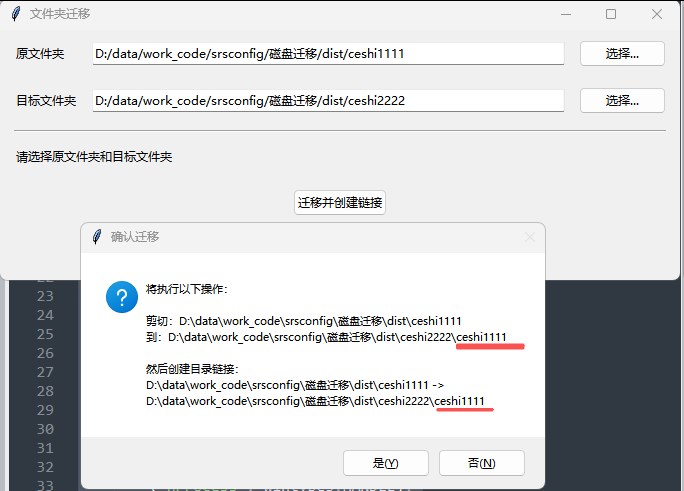
- 点击确认,会迁移文件并调用cmd的管理员命令进行创建连接,若是原文件夹的迁移需要管理员权限,启动软件的时候,