YOLO 标签是标准格式如下:
class_id x_center y_center width height其中**width** 和**height** 是归一化后的比例值,那么要按照 COCO 的标准统计目标尺寸,必须结合对应图像的实际分辨率计算目标面积。
COCO 数据集尺寸划分定义:
- Small:面积 < 32² = 1024 px²
- Medium:32² ≤ 面积 < 96² = 9216 px²
- Large:面积 ≥ 96² = 9216 px²
代码如下:
python
import os
import cv2
from tqdm import tqdm

# ==========================
# 配置路径
# ==========================
label_dir = r"D:\Documents\Datasets\FLIR-ALIGN\FLIR-ALIGN\labels\train"   # YOLO标签目录
image_dir = r"D:\Documents\Datasets\FLIR-ALIGN\FLIR-ALIGN\thermal-images\train"   # 对应图像目录
# ==========================


def find_image(img_dir, file_name):
    """
    根据标签名寻找对应图像
    """
    exts = [".jpg", ".jpeg", ".png", ".bmp", ".tif", ".tiff"]

    for ext in exts:
        img_path = os.path.join(img_dir, file_name + ext)
        if os.path.exists(img_path):
            return img_path

    return None


small_count = 0
medium_count = 0
large_count = 0

label_files = [f for f in os.listdir(label_dir) if f.endswith(".txt")]

for label_file in tqdm(label_files):

    base_name = os.path.splitext(label_file)[0]

    img_path = find_image(image_dir, base_name)

    if img_path is None:
        print(f"未找到对应图像: {base_name}")
        continue

    img = cv2.imread(img_path)

    if img is None:
        print(f"图像读取失败: {img_path}")
        continue

    h_img, w_img = img.shape[:2]

    label_path = os.path.join(label_dir, label_file)

    with open(label_path, "r", encoding="utf-8") as f:
        lines = f.readlines()

    for line in lines:

        parts = line.strip().split()

        if len(parts) != 5:
            continue

        _, xc, yc, w, h = map(float, parts)

        # 转换为像素尺寸
        box_w = w * w_img
        box_h = h * h_img

        area = box_w * box_h

        # COCO标准
        if area < 32 * 32:
            small_count += 1

        elif area < 96 * 96:
            medium_count += 1

        else:
            large_count += 1


total = small_count + medium_count + large_count

print("\n========== COCO目标尺寸统计 ==========")
print(f"Small  (<32²)      : {small_count}")
print(f"Medium (32²~96²)   : {medium_count}")
print(f"Large  (>96²)      : {large_count}")
print("--------------------------------------")
print(f"Total              : {total}")

if total > 0:
    print("\n比例:")
    print(f"Small  : {small_count/total*100:.2f}%")
    print(f"Medium : {medium_count/total*100:.2f}%")
    print(f"Large  : {large_count/total*100:.2f}%")
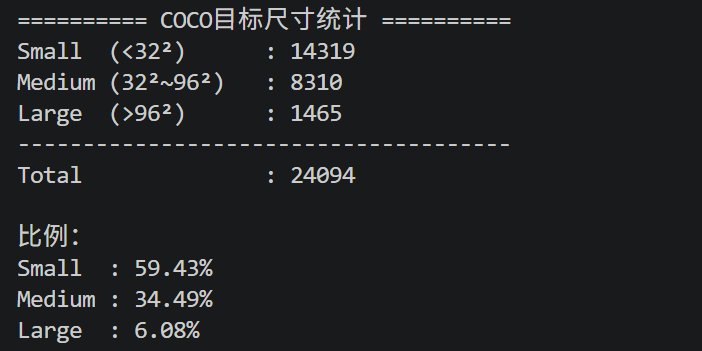
代码只需要修改label_dir和image_dir即可
输出示例: