目录
[1. 理解"一切皆文件"](#1. 理解“一切皆文件”)
[2. 缓冲区](#2. 缓冲区)
[2.1 什么是缓冲区](#2.1 什么是缓冲区)
[2.2 为什么要有缓冲区](#2.2 为什么要有缓冲区)
[2.3 缓冲类型](#2.3 缓冲类型)
[2.4 FILE](#2.4 FILE)
[3. 设计一个简单的libc库](#3. 设计一个简单的libc库)
正文开始:
1. 理解"一切皆文件"
首先,在windows中是文件的东西,它们在linux中也是文件;其次一些在windows中不是文件的东西,比如进程、磁盘、显示器、键盘这样硬件设备也被抽象成了文件,你可以使用访问文件的方法访问它们获得信息;甚至管道,也是文件;
这样做最明显的好处是,开发者仅需要使用一套 API 和开发工具,即可调取 Linux 系统中绝大部分的资源。举个简单的例子,Linux 中几乎所有读(读文件,读系统状态,读PIPE)的操作都可以用 read 函数来进行;几乎所有更改(更改文件,更改系统参数,写 PIPE)的操作都可以用 write 函数来进行。
当打开一个文件时,操作系统为了管理所打开的文件,都会为这个文件创建⼀个file结构体,以下我展示了该结构部分内容:
cpp
struct file {
	...

	struct inode* f_inode;   /* cached value */
	const struct file_operations* f_op;

	...

	atomic_long_t f_count; // 表⽰打开⽂件的引⽤计数,如果有多个⽂件指针指向它,就会增加f_count的值。

	unsigned int f_flags;  // 表⽰打开⽂件的权限

	fmode_t f_mode;        // 设置对⽂件的访问模式,例如:只读,只写等。所有的标志在头⽂件<fcntl.h> 中定义

	loff_t f_pos;          // 表⽰当前读写⽂件的位置

	...

} __attribute__((aligned(4))); /* lest something weird decides that 2 is OK*/
值得关注的是 struct file 中的 f_op 指针指向了一个 file_operations 结构体,这个结构体中的成员除了struct module* owner 其余都是函数指针。
cpp
struct file_operations {
	struct module* owner;
	//指向拥有该模块的指针;

	loff_t(*llseek) (struct file*, loff_t, int);
	//llseek ⽅法⽤作改变⽂件中的当前读/写位置, 并且新位置作为(正的)返回值.

	ssize_t(*read) (struct file*, char __user*, size_t, loff_t*);
	 /*⽤来从设备中获取数据.在这个位置的⼀个空指针导致 read 系统调⽤以 -
	EINVAL("Invalid argument") 失败.⼀个⾮负返回值代表了成功读取的字节数(返回值是⼀个
	"signed size" 类型, 常常是⽬标平台本地的整数类型).*/

	ssize_t(*write) (struct file*, const char __user*, size_t, loff_t*);
	//发送数据给设备. 如果 NULL, -EINVAL 返回给调⽤ write 系统调⽤的程序. 如果⾮负,返回值代表成功写的字节数.

	ssize_t(*aio_read) (struct kiocb*, const struct iovec*, unsigned long, loff_t);
	//初始化⼀个异步读 -- 可能在函数返回前不结束的读操作.

	ssize_t(*aio_write) (struct kiocb*, const struct iovec*, unsigned long, loff_t);
	//初始化设备上的⼀个异步写.

	int (*readdir) (struct file*, void*, filldir_t);
	//对于设备⽂件这个成员应当为 NULL; 它⽤来读取⽬录, 并且仅对**⽂件系统**有⽤.

	unsigned int (*poll) (struct file*, struct poll_table_struct*);
	int (*ioctl) (struct inode*, struct file*, unsigned int, unsigned long);
	long (*unlocked_ioctl) (struct file*, unsigned int, unsigned long);
	long (*compat_ioctl) (struct file*, unsigned int, unsigned long);

	int (*mmap) (struct file*, struct vm_area_struct*);
	//mmap ⽤来请求将设备内存映射到进程的地址空间. 如果这个⽅法是 NULL, mmap 系统调⽤返回 - ENODEV.

	int (*open) (struct inode*, struct file*);
	//打开⼀个⽂件

	int (*flush) (struct file*, fl_owner_t id);
	//flush 操作在进程关闭它的设备⽂件描述符的拷⻉时调⽤;

	int (*release) (struct inode*, struct file*);
	//在⽂件结构被释放时引⽤这个操作. 如同 open, release 可以为 NULL.

	int (*fsync) (struct file*, struct dentry*, int datasync);
	//⽤⼾调⽤来刷新任何挂着的数据.

	int (*aio_fsync) (struct kiocb*, int datasync);
	int (*fasync) (int, struct file*, int);
	int (*lock) (struct file*, int, struct file_lock*);
	//lock ⽅法⽤来实现⽂件加锁; 加锁对常规⽂件是必不可少的特性, 但是设备驱动⼏乎从不实现它.

	ssize_t(*sendpage) (struct file*, struct page*, int, size_t, loff_t*, int);
	unsigned long (*get_unmapped_area)(struct file*, unsigned long, unsigned long, unsigned long, unsigned long);
	int (*check_flags)(int);
	int (*flock) (struct file*, int, struct file_lock*);
	ssize_t(*splice_write)(struct pipe_inode_info*, struct file*, loff_t*, size_t, unsigned int);
	ssize_t(*splice_read)(struct file*, loff_t*, struct pipe_inode_info*, size_t, unsigned int);
	int (*setlease)(struct file*, long, struct file_lock**);
};
file_operation 就是把系统调用和驱动程序关联起来的关键数据结构,这个结构的每一个成员都对应着一个系统调用。读取 file_operation 中相应的函数指针,接着把控制权转交给函数,从而完成了Linux设备驱动程序的工作。
总结:
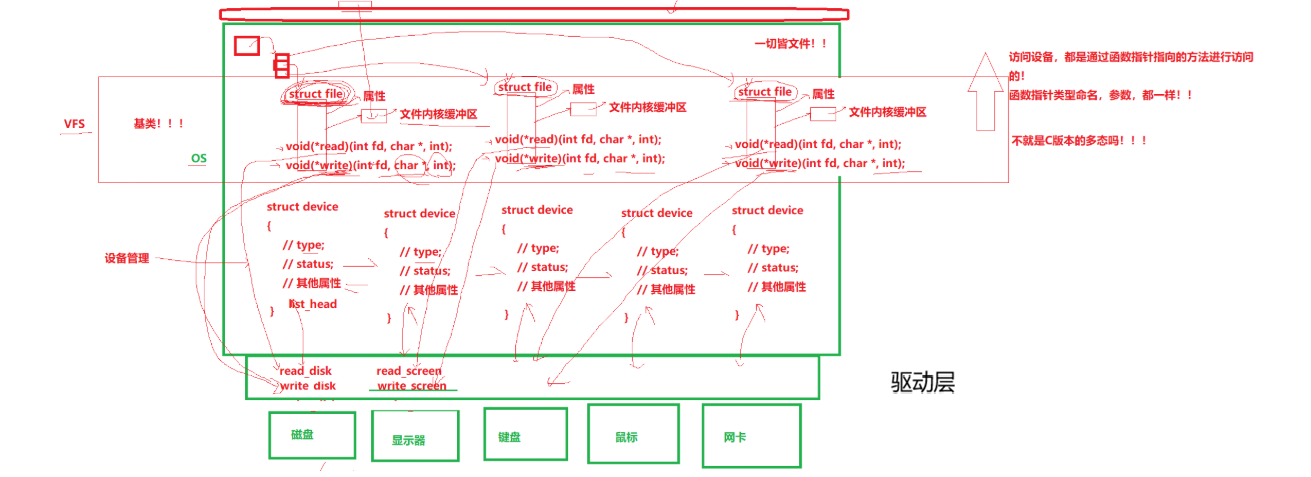
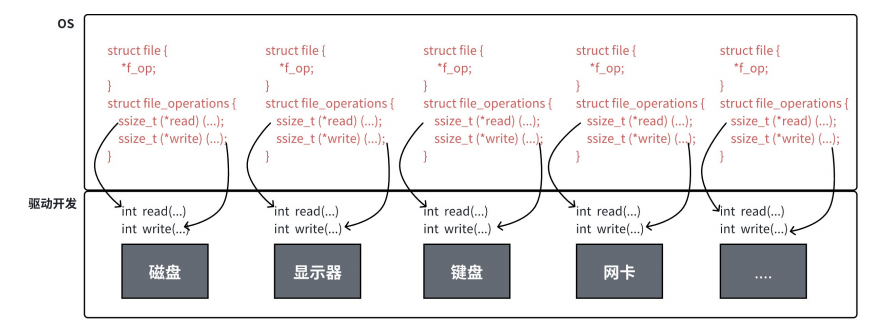
上图中的外设,每个设备都可以有自己的read、write,但一定是对应着不同的操作方法!!但通过struct file 下 file_operation 中的各种函数回调,让我们开发者只用file便可调取 Linux 系统中绝大部分的资源!!这便是"linux下一切皆文件"的核心理解。
2. 缓冲区
2.1 什么是缓冲区
缓冲区是内存空间的一部分。也就是说,在内存空间中预留了一定的存储空间,这些存储空间用来缓冲输入或输出的数据,这部分预留的空间就叫做缓冲区。缓冲区根据其对应的是输入设备还是输出设备,分为输入缓冲区和输出缓冲区。
2.2 为什么要有缓冲区
读写文件时,如果不会开辟对文件操作的缓冲区,直接通过系统调用对磁盘进行操作(读、写等),那么每次对文件进行一次读写操作时,都需要使用读写系统调用来处理此操作,即需要执行一次系统调用,执行一次系统调用将涉及到CPU状态的切换,即从用户空间切换到内核空间,实现进程上下文的切换,这将损耗一定的CPU时间,频繁的磁盘访问对程序的执行效率造成很大的影响。
为了减少使用系统调用的次数,提高效率,我们就可以采用缓冲机制。比如我们从磁盘里取信息,可以在磁盘文件进行操作时,可以一次从文件中读出大量的数据到缓冲区中,以后对这部分的访问就不需要再使用系统调用了,等缓冲区的数据取完后再去磁盘中读取,这样就可以减少磁盘的读写次数,再加上计算机对缓冲区的操作快于对磁盘的操作,故应用缓冲区可大大提高计算机的运行速度。
又比如,我们使用打印机打印文档,由于打印机的打印速度相对较慢,我们先把文档输出到打印机相应的缓冲区,打印机再自行逐步打印,这时我们的CPU可以处理别的事情。可以看出,缓冲区就是一块内存区,它用在输入输出设备和CPU之间,用来缓存数据。它使得低速的输入输出设备和高速的CPU能够协调工作,避免低速的输入输出设备占用CPU,解放出CPU,使其能够高效率工作。
2.3 缓冲类型
标准I/O提供了3种类型的缓冲区:
- 全缓冲区:这种缓冲方式要求填满整个缓冲区后才进行I/O系统调用操作。对于磁盘文件的操作通常使用全缓冲的⽅式访问。
- 是行缓冲区:在行缓冲情况下,当在输⼊和输出中遇到换行符时,标准I/O库函数将会执行系统调用操作。当所操作的流涉及⼀个终端时(例如标准输入和标准输出),使用缓冲方式。因为标准I/O库每行的缓冲区长度是固定的,所以只要填满了缓冲区,即使还没有遇到换行符,也会执行I/O系统调用操作,默认行缓冲区的大小为1024。
- 无缓冲区:无缓冲区是指标准I/O库不对字符进行缓存,直接调用系统调用。标准出错流stderr通常是不带缓冲区的,这使得出错信息能够尽快地显示出来。
除了上述列举的默认刷新方式,下列特殊情况也会引发缓冲区的刷新:
- 缓冲区满时;
- 执行 fflush 语句;
- 进程结束
示例如下:
cpp
#include <stdio.h>
#include <string.h>
#include <sys/types.h>
#include <sys/stat.h>
#include <fcntl.h>
#include <unistd.h>

int main() {
    close(1);
    int fd = open("log.txt", O_WRONLY | O_CREAT | O_TRUNC, 0666);
    if (fd < 0) {
        perror("open");
        return 0;
    }

    printf("hello world: %d\n", fd);
    close(fd);
    return 0;
}
我们本来想使用重定向思维,让本应该打印在显示器上的内容写到"log.txt"文件中,但我们发现,程序运行结束后,文件中并没有被写入内容:
bash
[hyb@VM-8-12-centos buffer]$ ./myfile
[hyb@VM-8-12-centos buffer]$ ls
log.txt makefile myfile myfile.c
[hyb@VM-8-12-centos buffer]$ cat log.txt
[hyb@VM-8-12-centos buffer]$
这是由于我们将1号描述符重定向到磁盘文件后,缓冲区的刷新方式成为了全缓冲。而我们写入的内容并没有填满整个缓冲区,导致并不会将缓冲区的内容刷新到磁盘文件中。怎么办呢?可以使用fflush强制刷新下缓冲区。
cpp
#include <stdio.h>
#include <string.h>
#include <sys/types.h>
#include <sys/stat.h>
#include <fcntl.h>
#include <unistd.h>

int main() {
    close(1);
    int fd = open("log.txt", O_WRONLY | O_CREAT | O_TRUNC, 0666);
    if (fd < 0) {
        perror("open");
        return 0;
    }

    printf("hello world: %d\n", fd);
    fflush(stdout);
    close(fd);
    return 0;
}
还有一种解决方法,并且也可以观察到stderr是不带缓冲区的,代码如下:
cpp
#include <stdio.h>
#include <string.h>
#include <sys/types.h>
#include <sys/stat.h>
#include <fcntl.h>
#include <unistd.h>

int main() {
    close(2);
    int fd = open("log.txt", O_WRONLY | O_CREAT | O_TRUNC, 0666);
    if (fd < 0) {
        perror("open");
        return 0;
    }
    perror("hello world");
    close(fd);
    return 0;
}
这种方式便可以将2号文件描述符重定向至文件,由于stderr没有缓冲区,"hello world"不用fflash就可以写入文件:
bash
[hyb@VM-8-12-centos buffer]$ ./myfile
[hyb@VM-8-12-centos buffer]$ cat log.txt
hello world: Success
2.4 FILE
- 因为IO相关函数与系统调用接口对应,并且库函数封装系统调用,所以本质上,访问文件都是通过fd访问的
- 所以C库当中的FILE结构体内部,必定封装了fd
请看如下代码:
cpp
#include <stdio.h>
#include <string.h>

int main()
{
    const char *msg0="hello printf\n";
    const char *msg1="hello fwrite\n";
    const char *msg2="hello write\n";

    printf("%s", msg0);
    fwrite(msg1, strlen(msg0), 1, stdout);
    write(1, msg2, strlen(msg2));

    fork();

    return 0;
}
运行后结果:
cpp
hello printf
hello fwrite
hello write
但如果对进程实现输出重定向呢? ./hello > file , 我们发现结果变成了:
cpp
hello write
hello printf
hello fwrite
hello printf
hello fwrite
我们发现 printf 和 fwrite (库函数)都输出了2次,而 write 只输出了⼀次(系统调用)。为什么呢?肯定和fork有关!
⼀般C库函数写入文件时是全缓冲的,而写入显示器(如bash中的 ./hello 命令)是行缓冲,printf 、fwrite 库函数会自带缓冲区,当发生重定向到普通文件时,数据的缓冲方式由行缓冲变成了全缓冲,而我们放在缓冲区中的数据,就不会被立即刷新,甚至是fork之后。但当进程退出之后,会统一刷新,写入文件当中。在fork的时候,父子数据会发生写时拷贝,所以当你父进程准备刷新的时候,子进程也就有了同样的⼀份数据,随即产生两份数据。write 没有变化,说明没有所谓的缓冲。
综上: printf fwrite 库函数会自带缓冲区,而 write 系统调用没有带缓冲区。另外,我们这里所说的缓冲区,都是用户级缓冲区。是为了提升整机性能,OS也会提供相关内核级缓冲区。
那这个缓冲区谁提供呢? printf fwrite 是库函数, write 是系统调用,库函数在系统调用的"上层", 是对系统调用的"封装",但是 write 没有缓冲区,而 printf fwrite 有,足以说明,该缓冲区是⼆次加上的,又因为是C,所以由C标准库提供。
以下展示FILE结构体:
cpp
在/usr/include/libio.h
struct _IO_FILE {
    int _flags; /* High-order word is _IO_MAGIC; rest is flags.*/

#define _IO_file_flags _flags

//缓冲区相关
/* The following pointers correspond to the C++ streambuf protocol. */
/* Note: Tk uses the _IO_read_ptr and _IO_read_end fields directly. */
char* _IO_read_ptr; /* Current read pointer */
char* _IO_read_end; /* End of get area. */
char* _IO_read_base; /* Start of putback+get area. */
char* _IO_write_base; /* Start of put area. */
char* _IO_write_ptr; /* Current put pointer. */
char* _IO_write_end; /* End of put area. */
char* _IO_buf_base; /* Start of reserve area. */
char* _IO_buf_end; /* End of reserve area. */
/* The following fields are used to support backing up and undo. */
char *_IO_save_base; /* Pointer to start of non-current get area. */
char *_IO_backup_base; /* Pointer to first valid character of backup area */
char *_IO_save_end; /* Pointer to end of non-current get area. */

struct _IO_marker *_markers;

struct _IO_FILE *_chain;

  int _fileno; //封装的⽂件描述符
#if 0
  int _blksize;
#else
  int _flags2;
#endif
  _IO_off_t _old_offset; /* This used to be _offset but it's too small. */

#define __HAVE_COLUMN /* temporary */
/* 1+column number of pbase(); 0 is unknown. */
unsigned short _cur_column;
signed char _vtable_offset;
char _shortbuf[1];

/* char* _save_gptr; char* _save_egptr; */

_IO_lock_t *_lock;

#ifdef _IO_USE_OLD_IO_FILE
};
3. 设计一个简单的libc库
Makefile:
cpp
code:mystdio.c usercode.c
	g++ -o $@ $^
.PHONY:clean
clean:
	rm -f code
mystdio.h:
cpp
#pragma once

#include <stdio.h>

#define MAX 1024
#define NONE_FLUSH (1<<0)
#define LINE_FLUSH (1<<1)
#define FULL_FLUSH (1<<2)

typedef struct IO_FILE
{
    int fileno;
    int flag;
    char outbuffer[MAX];
    int bufferlen;
    int flush_method;
}MyFile;


MyFile *MyFopen(const char *path, const char *mode);
void MyFclose(MyFile *);
int MyFwrite(MyFile *, void *str, int len);
void MyFFlush(MyFile *);
mystdio.c:
cpp
#include "mystdio.h"
#include <sys/types.h>
#include <sys/stat.h>
#include <fcntl.h>
#include <string.h>
#include <stdlib.h>
#include <unistd.h>

static MyFile *BuyFile(int fd, int flag)
{
    MyFile *f = (MyFile*)malloc(sizeof(MyFile));
    if(f == NULL) return NULL;
    f->bufferlen = 0;
    f->fileno = fd;
    f->flag = flag;
    f->flush_method = LINE_FLUSH;
    memset(f->outbuffer, 0, sizeof(f->outbuffer));
    return f;
}

MyFile *MyFopen(const char *path, const char *mode)
{
    int fd = -1;
    int flag = 0;
    if(strcmp(mode, "w") == 0)
    {
        flag = O_CREAT | O_WRONLY | O_TRUNC;
        fd = open(path, flag, 0666);
    }
    else if(strcmp(mode, "a") == 0)
    {
        flag = O_CREAT | O_WRONLY | O_APPEND;
        fd = open(path, flag, 0666);
    }
    else if(strcmp(mode, "r") == 0)
    {
        flag = O_RDWR;
        fd = open(path, flag);
    }
    else
    {
        //TODO
    }
    if(fd < 0) return NULL;
    return BuyFile(fd, flag);
}
void MyFclose(MyFile *file)
{
    if(file->fileno < 0) return;
    MyFFlush(file);
    close(file->fileno);
    free(file);
}
int MyFwrite(MyFile *file, void *str, int len)
{
    // 1. 拷贝
    memcpy(file->outbuffer+file->bufferlen, str, len);
    file->bufferlen += len;
    // 2. 尝试判断是否满足刷新条件!
    if((file->flush_method & LINE_FLUSH) && file->outbuffer[file->bufferlen-1] == '\n')
    {
        MyFFlush(file);
    }
    return 0;
}
void MyFFlush(MyFile *file)
{
    if(file->bufferlen <= 0) return;
    // 把数据从用户拷贝到内核文件缓冲区中
    int n = write(file->fileno, file->outbuffer, file->bufferlen);
    (void)n;
    fsync(file->fileno);
    file->bufferlen = 0;
}
main.c:
cpp
#include "mystdio.h"
#include <string.h>
#include <unistd.h>

int main()
{
    MyFile *filep = MyFopen("./log.txt", "a");
    if(!filep)
    {
        printf("fopen error!\n");
        return 1;
    }

    int cnt = 10;
    while(cnt--)
    {
        char *msg = (char*)"hello myfile!!!";
        MyFwrite(filep, msg, strlen(msg));
        MyFFlush(filep);
        printf("buffer: %s\n", filep->outbuffer);
        sleep(1);
    }
    MyFclose(filep); // FILE *fp
    return 0;
}