欢迎加入【开源鸿蒙PC社区】,一起共建鸿蒙化C/C++三方库生态。
欢迎在【PC社区】平台贡献你的项目。
仓库 : open-mpi/hwloc v2.14.0 --- Portable hardware topology detection library
集成平台: 鸿蒙PC| 测试SDK: API 20 (6.0)
| 资源 | 地址 |
|---|---|
| hwloc 上游仓库 | https://github.com/open-mpi/hwloc |
| hwloc 鸿蒙化 HPKBUILD | https://atomgit.com/unisources/hwloc |
| OHOSHwlocSample 源码 | https://atomgit.com/allincoding/OHOSHwlocSample |
| lycium_plusplus 框架 | https://atomgit.com/OpenHarmonyPCDeveloper/lycium_plusplus |
前置说明
| 项目 | 说明 |
|---|---|
| 集成库 | hwloc v2.14.0 |
| 目标平台 | 鸿蒙PC (OpenHarmony arm64-v8a) |
| SDK 版本 | API 20 (6.0) | BiSheng 编译器 |
| 开发工具 | DevEco Studio 6.0+ |
| 交叉编译工具链 | lycium_plusplus (arm64-v8a) |
| 三方库静态库 | libhwloc.a (1.9 MB, arm64-v8a) |
| 许可证 | BSD-3-Clause |
一、传统方式的效率瓶颈
在 HarmonyOS 应用中集成一个 C/C++ 三方库,传统集成流程中每个环节都需要手动操作:
#mermaid-svg-fclBAGx0qVWy6UtV{font-family:"trebuchet ms",verdana,arial,sans-serif;font-size:16px;fill:#333;}@keyframes edge-animation-frame{from{stroke-dashoffset:0;}}@keyframes dash{to{stroke-dashoffset:0;}}#mermaid-svg-fclBAGx0qVWy6UtV .edge-animation-slow{stroke-dasharray:9,5!important;stroke-dashoffset:900;animation:dash 50s linear infinite;stroke-linecap:round;}#mermaid-svg-fclBAGx0qVWy6UtV .edge-animation-fast{stroke-dasharray:9,5!important;stroke-dashoffset:900;animation:dash 20s linear infinite;stroke-linecap:round;}#mermaid-svg-fclBAGx0qVWy6UtV .error-icon{fill:#552222;}#mermaid-svg-fclBAGx0qVWy6UtV .error-text{fill:#552222;stroke:#552222;}#mermaid-svg-fclBAGx0qVWy6UtV .edge-thickness-normal{stroke-width:1px;}#mermaid-svg-fclBAGx0qVWy6UtV .edge-thickness-thick{stroke-width:3.5px;}#mermaid-svg-fclBAGx0qVWy6UtV .edge-pattern-solid{stroke-dasharray:0;}#mermaid-svg-fclBAGx0qVWy6UtV .edge-thickness-invisible{stroke-width:0;fill:none;}#mermaid-svg-fclBAGx0qVWy6UtV .edge-pattern-dashed{stroke-dasharray:3;}#mermaid-svg-fclBAGx0qVWy6UtV .edge-pattern-dotted{stroke-dasharray:2;}#mermaid-svg-fclBAGx0qVWy6UtV .marker{fill:#333333;stroke:#333333;}#mermaid-svg-fclBAGx0qVWy6UtV .marker.cross{stroke:#333333;}#mermaid-svg-fclBAGx0qVWy6UtV svg{font-family:"trebuchet ms",verdana,arial,sans-serif;font-size:16px;}#mermaid-svg-fclBAGx0qVWy6UtV p{margin:0;}#mermaid-svg-fclBAGx0qVWy6UtV .label{font-family:"trebuchet ms",verdana,arial,sans-serif;color:#333;}#mermaid-svg-fclBAGx0qVWy6UtV .cluster-label text{fill:#333;}#mermaid-svg-fclBAGx0qVWy6UtV .cluster-label span{color:#333;}#mermaid-svg-fclBAGx0qVWy6UtV .cluster-label span p{background-color:transparent;}#mermaid-svg-fclBAGx0qVWy6UtV .label text,#mermaid-svg-fclBAGx0qVWy6UtV span{fill:#333;color:#333;}#mermaid-svg-fclBAGx0qVWy6UtV .node rect,#mermaid-svg-fclBAGx0qVWy6UtV .node circle,#mermaid-svg-fclBAGx0qVWy6UtV .node ellipse,#mermaid-svg-fclBAGx0qVWy6UtV .node polygon,#mermaid-svg-fclBAGx0qVWy6UtV .node path{fill:#ECECFF;stroke:#9370DB;stroke-width:1px;}#mermaid-svg-fclBAGx0qVWy6UtV .rough-node .label text,#mermaid-svg-fclBAGx0qVWy6UtV .node .label text,#mermaid-svg-fclBAGx0qVWy6UtV .image-shape .label,#mermaid-svg-fclBAGx0qVWy6UtV .icon-shape .label{text-anchor:middle;}#mermaid-svg-fclBAGx0qVWy6UtV .node .katex path{fill:#000;stroke:#000;stroke-width:1px;}#mermaid-svg-fclBAGx0qVWy6UtV .rough-node .label,#mermaid-svg-fclBAGx0qVWy6UtV .node .label,#mermaid-svg-fclBAGx0qVWy6UtV .image-shape .label,#mermaid-svg-fclBAGx0qVWy6UtV .icon-shape .label{text-align:center;}#mermaid-svg-fclBAGx0qVWy6UtV .node.clickable{cursor:pointer;}#mermaid-svg-fclBAGx0qVWy6UtV .root .anchor path{fill:#333333!important;stroke-width:0;stroke:#333333;}#mermaid-svg-fclBAGx0qVWy6UtV .arrowheadPath{fill:#333333;}#mermaid-svg-fclBAGx0qVWy6UtV .edgePath .path{stroke:#333333;stroke-width:2.0px;}#mermaid-svg-fclBAGx0qVWy6UtV .flowchart-link{stroke:#333333;fill:none;}#mermaid-svg-fclBAGx0qVWy6UtV .edgeLabel{background-color:rgba(232,232,232, 0.8);text-align:center;}#mermaid-svg-fclBAGx0qVWy6UtV .edgeLabel p{background-color:rgba(232,232,232, 0.8);}#mermaid-svg-fclBAGx0qVWy6UtV .edgeLabel rect{opacity:0.5;background-color:rgba(232,232,232, 0.8);fill:rgba(232,232,232, 0.8);}#mermaid-svg-fclBAGx0qVWy6UtV .labelBkg{background-color:rgba(232, 232, 232, 0.5);}#mermaid-svg-fclBAGx0qVWy6UtV .cluster rect{fill:#ffffde;stroke:#aaaa33;stroke-width:1px;}#mermaid-svg-fclBAGx0qVWy6UtV .cluster text{fill:#333;}#mermaid-svg-fclBAGx0qVWy6UtV .cluster span{color:#333;}#mermaid-svg-fclBAGx0qVWy6UtV div.mermaidTooltip{position:absolute;text-align:center;max-width:200px;padding:2px;font-family:"trebuchet ms",verdana,arial,sans-serif;font-size:12px;background:hsl(80, 100%, 96.2745098039%);border:1px solid #aaaa33;border-radius:2px;pointer-events:none;z-index:100;}#mermaid-svg-fclBAGx0qVWy6UtV .flowchartTitleText{text-anchor:middle;font-size:18px;fill:#333;}#mermaid-svg-fclBAGx0qVWy6UtV rect.text{fill:none;stroke-width:0;}#mermaid-svg-fclBAGx0qVWy6UtV .icon-shape,#mermaid-svg-fclBAGx0qVWy6UtV .image-shape{background-color:rgba(232,232,232, 0.8);text-align:center;}#mermaid-svg-fclBAGx0qVWy6UtV .icon-shape p,#mermaid-svg-fclBAGx0qVWy6UtV .image-shape p{background-color:rgba(232,232,232, 0.8);padding:2px;}#mermaid-svg-fclBAGx0qVWy6UtV .icon-shape .label rect,#mermaid-svg-fclBAGx0qVWy6UtV .image-shape .label rect{opacity:0.5;background-color:rgba(232,232,232, 0.8);fill:rgba(232,232,232, 0.8);}#mermaid-svg-fclBAGx0qVWy6UtV .label-icon{display:inline-block;height:1em;overflow:visible;vertical-align:-0.125em;}#mermaid-svg-fclBAGx0qVWy6UtV .node .label-icon path{fill:currentColor;stroke:revert;stroke-width:revert;}#mermaid-svg-fclBAGx0qVWy6UtV :root{--mermaid-font-family:"trebuchet ms",verdana,arial,sans-serif;} 失败
工程搭建
库文件部署
CMake 配置
NAPI 桥接
类型声明
UI 验证
编译测试
| 阶段 | 主要痛点 |
|---|---|
| 工程搭建 | 手动创建目录结构、修改 bundleName 和应用名 |
| 库文件部署 | 拷贝头文件和 .a 到正确位置,路径容易出错 |
| CMake 配置 | 链接顺序问题、头文件路径拼写错误 |
| NAPI 桥接 | napi_get_cb_info、napi_create_string_utf8 等接口不熟悉,模板代码重复 |
| 类型声明 | Index.d.ts 接口签名必须与 C++ 精确匹配,不一致导致编译通过但运行报错 |
| UI 验证 | 调用测试、格式化显示、ArkTS 类型约束(无 any/unknown) |
| 编译排错 | LLVM ar 参数错误、config.sub 不识别 ohos、头文件路径错误 |
关键点 :最棘手的环节是 NAPI 桥接代码编写 和 环境特有的编译错误排错,两者涉及跨语言、跨平台调试,每轮排查耗时远超预期。
二、AtomCode + Skills 解决方案
工作流程概览
当我们使用 AtomCode + lycium_plusplus Skills 工作流时,上述 7 个环节被简化为 4 个自动化步骤:
#mermaid-svg-H5MfT4zcom8Yc5bd{font-family:"trebuchet ms",verdana,arial,sans-serif;font-size:16px;fill:#333;}@keyframes edge-animation-frame{from{stroke-dashoffset:0;}}@keyframes dash{to{stroke-dashoffset:0;}}#mermaid-svg-H5MfT4zcom8Yc5bd .edge-animation-slow{stroke-dasharray:9,5!important;stroke-dashoffset:900;animation:dash 50s linear infinite;stroke-linecap:round;}#mermaid-svg-H5MfT4zcom8Yc5bd .edge-animation-fast{stroke-dasharray:9,5!important;stroke-dashoffset:900;animation:dash 20s linear infinite;stroke-linecap:round;}#mermaid-svg-H5MfT4zcom8Yc5bd .error-icon{fill:#552222;}#mermaid-svg-H5MfT4zcom8Yc5bd .error-text{fill:#552222;stroke:#552222;}#mermaid-svg-H5MfT4zcom8Yc5bd .edge-thickness-normal{stroke-width:1px;}#mermaid-svg-H5MfT4zcom8Yc5bd .edge-thickness-thick{stroke-width:3.5px;}#mermaid-svg-H5MfT4zcom8Yc5bd .edge-pattern-solid{stroke-dasharray:0;}#mermaid-svg-H5MfT4zcom8Yc5bd .edge-thickness-invisible{stroke-width:0;fill:none;}#mermaid-svg-H5MfT4zcom8Yc5bd .edge-pattern-dashed{stroke-dasharray:3;}#mermaid-svg-H5MfT4zcom8Yc5bd .edge-pattern-dotted{stroke-dasharray:2;}#mermaid-svg-H5MfT4zcom8Yc5bd .marker{fill:#333333;stroke:#333333;}#mermaid-svg-H5MfT4zcom8Yc5bd .marker.cross{stroke:#333333;}#mermaid-svg-H5MfT4zcom8Yc5bd svg{font-family:"trebuchet ms",verdana,arial,sans-serif;font-size:16px;}#mermaid-svg-H5MfT4zcom8Yc5bd p{margin:0;}#mermaid-svg-H5MfT4zcom8Yc5bd .label{font-family:"trebuchet ms",verdana,arial,sans-serif;color:#333;}#mermaid-svg-H5MfT4zcom8Yc5bd .cluster-label text{fill:#333;}#mermaid-svg-H5MfT4zcom8Yc5bd .cluster-label span{color:#333;}#mermaid-svg-H5MfT4zcom8Yc5bd .cluster-label span p{background-color:transparent;}#mermaid-svg-H5MfT4zcom8Yc5bd .label text,#mermaid-svg-H5MfT4zcom8Yc5bd span{fill:#333;color:#333;}#mermaid-svg-H5MfT4zcom8Yc5bd .node rect,#mermaid-svg-H5MfT4zcom8Yc5bd .node circle,#mermaid-svg-H5MfT4zcom8Yc5bd .node ellipse,#mermaid-svg-H5MfT4zcom8Yc5bd .node polygon,#mermaid-svg-H5MfT4zcom8Yc5bd .node path{fill:#ECECFF;stroke:#9370DB;stroke-width:1px;}#mermaid-svg-H5MfT4zcom8Yc5bd .rough-node .label text,#mermaid-svg-H5MfT4zcom8Yc5bd .node .label text,#mermaid-svg-H5MfT4zcom8Yc5bd .image-shape .label,#mermaid-svg-H5MfT4zcom8Yc5bd .icon-shape .label{text-anchor:middle;}#mermaid-svg-H5MfT4zcom8Yc5bd .node .katex path{fill:#000;stroke:#000;stroke-width:1px;}#mermaid-svg-H5MfT4zcom8Yc5bd .rough-node .label,#mermaid-svg-H5MfT4zcom8Yc5bd .node .label,#mermaid-svg-H5MfT4zcom8Yc5bd .image-shape .label,#mermaid-svg-H5MfT4zcom8Yc5bd .icon-shape .label{text-align:center;}#mermaid-svg-H5MfT4zcom8Yc5bd .node.clickable{cursor:pointer;}#mermaid-svg-H5MfT4zcom8Yc5bd .root .anchor path{fill:#333333!important;stroke-width:0;stroke:#333333;}#mermaid-svg-H5MfT4zcom8Yc5bd .arrowheadPath{fill:#333333;}#mermaid-svg-H5MfT4zcom8Yc5bd .edgePath .path{stroke:#333333;stroke-width:2.0px;}#mermaid-svg-H5MfT4zcom8Yc5bd .flowchart-link{stroke:#333333;fill:none;}#mermaid-svg-H5MfT4zcom8Yc5bd .edgeLabel{background-color:rgba(232,232,232, 0.8);text-align:center;}#mermaid-svg-H5MfT4zcom8Yc5bd .edgeLabel p{background-color:rgba(232,232,232, 0.8);}#mermaid-svg-H5MfT4zcom8Yc5bd .edgeLabel rect{opacity:0.5;background-color:rgba(232,232,232, 0.8);fill:rgba(232,232,232, 0.8);}#mermaid-svg-H5MfT4zcom8Yc5bd .labelBkg{background-color:rgba(232, 232, 232, 0.5);}#mermaid-svg-H5MfT4zcom8Yc5bd .cluster rect{fill:#ffffde;stroke:#aaaa33;stroke-width:1px;}#mermaid-svg-H5MfT4zcom8Yc5bd .cluster text{fill:#333;}#mermaid-svg-H5MfT4zcom8Yc5bd .cluster span{color:#333;}#mermaid-svg-H5MfT4zcom8Yc5bd div.mermaidTooltip{position:absolute;text-align:center;max-width:200px;padding:2px;font-family:"trebuchet ms",verdana,arial,sans-serif;font-size:12px;background:hsl(80, 100%, 96.2745098039%);border:1px solid #aaaa33;border-radius:2px;pointer-events:none;z-index:100;}#mermaid-svg-H5MfT4zcom8Yc5bd .flowchartTitleText{text-anchor:middle;font-size:18px;fill:#333;}#mermaid-svg-H5MfT4zcom8Yc5bd rect.text{fill:none;stroke-width:0;}#mermaid-svg-H5MfT4zcom8Yc5bd .icon-shape,#mermaid-svg-H5MfT4zcom8Yc5bd .image-shape{background-color:rgba(232,232,232, 0.8);text-align:center;}#mermaid-svg-H5MfT4zcom8Yc5bd .icon-shape p,#mermaid-svg-H5MfT4zcom8Yc5bd .image-shape p{background-color:rgba(232,232,232, 0.8);padding:2px;}#mermaid-svg-H5MfT4zcom8Yc5bd .icon-shape .label rect,#mermaid-svg-H5MfT4zcom8Yc5bd .image-shape .label rect{opacity:0.5;background-color:rgba(232,232,232, 0.8);fill:rgba(232,232,232, 0.8);}#mermaid-svg-H5MfT4zcom8Yc5bd .label-icon{display:inline-block;height:1em;overflow:visible;vertical-align:-0.125em;}#mermaid-svg-H5MfT4zcom8Yc5bd .node .label-icon path{fill:currentColor;stroke:revert;stroke-width:revert;}#mermaid-svg-H5MfT4zcom8Yc5bd :root{--mermaid-font-family:"trebuchet ms",verdana,arial,sans-serif;} /new-sample 生成工程
自动部署库文件
NAPI 桥接自动生成
类型声明+UI同步生成
✅ 编译验证
| 阶段 | 传统方式 | AtomCode 方式 | 提升 |
|---|---|---|---|
| 工程创建 + 配置 | 10分钟 | 1分钟 | 10x |
| 库文件部署 + CMake | 20分钟 | 30秒 | 40x |
| NAPI 桥接代码 | 60分钟 | 5分钟 | 12x |
| 类型声明 + UI | 20分钟 | 2分钟 | 10x |
| 编译排错 | 30-120分钟 | 5-15分钟 | 6-8x |
| 总计 | 2-3小时 | 15-25分钟 | 6-10x |
三、全流程实操
3.1 工程创建
使用 /new-sample hwloc "hardware topology library" 命令,AtomCode 自动完成:
- 从
OHOSSpdlogSample复制模板工程 - 修改
AppScope/app.json5→bundleName: com.unisources.hwloc - 修改
AppScope/resources/base/element/string.json→app_name: HwlocSample - 清空模板残留的 spdlog 头文件和库
bash
cp -r OHOSSpdlogSample OHOSHwlocSample
# 之后修改 app.json5 中的 bundleName 和 string.json
3.2 三方库部署
交叉编译产物放在 entry/libs/arm64-v8a/,头文件放在 entry/src/main/cpp/include/:
bash
# 拷贝静态库
cp lycium/usr/hwloc/arm64-v8a/lib/libhwloc.a \
   entry/libs/arm64-v8a/

# 拷贝头文件(hwloc.h + hwloc/ 子目录约30个)
cp -r lycium/usr/hwloc/arm64-v8a/include/hwloc.h \
   entry/src/main/cpp/include/
cp -r lycium/usr/hwloc/arm64-v8a/include/hwloc/ \
   entry/src/main/cpp/include/
3.3 CMake 配置
使用 find_library 自动查找静态库,避免硬编码路径:
cmake
cmake_minimum_required(VERSION 3.5.0)
project(HwlocSample C CXX)

set(NATIVERENDER_ROOT_PATH ${CMAKE_CURRENT_SOURCE_DIR})

find_library(HWLOC_LIBRARY hwloc
    PATHS ${NATIVERENDER_ROOT_PATH}/../../../libs/arm64-v8a
    NO_DEFAULT_PATH
)
if(NOT HWLOC_LIBRARY)
    set(HWLOC_LIBRARY ${NATIVERENDER_ROOT_PATH}/../../../libs/arm64-v8a/libhwloc.a)
endif()

if(NOT EXISTS ${HWLOC_LIBRARY})
    message(FATAL_ERROR "hwloc library not found: ${HWLOC_LIBRARY}")
endif()

include_directories(${NATIVERENDER_ROOT_PATH}
                    ${NATIVERENDER_ROOT_PATH}/include)

add_library(entry SHARED napi_init.cpp)
target_link_libraries(entry PUBLIC libace_napi.z.so)
target_link_libraries(entry PUBLIC ${HWLOC_LIBRARY})
target_link_libraries(entry PUBLIC m pthread)
关键点 :
find_library优先于硬编码路径。NO_DEFAULT_PATH阻止搜索系统路径,避免交叉编译时链接到宿主机的 hwloc。m pthread必须 放在HWLOC_LIBRARY后面,这是静态库的链接顺序要求。
3.4 NAPI 桥接函数
hwloc 的核心价值在于硬件拓扑探测。我们暴露了 4 个 NAPI 函数:
| 函数 | 参数 | 返回 | 说明 |
|---|---|---|---|
add |
(a, b): number |
number |
NAPI 基线测试 |
hwlocTopology |
(): string |
string |
基础拓扑信息(核心/PU/缓存/内存) |
hwlocTopologyDetail |
(): string |
string |
详细拓扑(缓存大小+类型+OS索引+CPU型号) |
hwlocVersion |
(): string |
string |
hwloc 版本号 |
以 HwlocTopology 为例,NAPI 桥接遵循标准的 5 步模式:
cpp
static napi_value HwlocTopology(napi_env env, napi_callback_info info)
{
    hwloc_topology_t topology;
    std::ostringstream oss;

    // ① 初始化拓扑
    if (hwloc_topology_init(&topology) != 0) {
        napi_throw_error(env, "EINIT", "hwloc_topology_init failed");
        return nullptr;
    }

    // ② 加载拓扑
    if (hwloc_topology_load(topology) != 0) {
        hwloc_topology_destroy(topology);
        napi_value ret;
        napi_create_string_utf8(env, "{\"error\":\"load_failed\"}\n",
            NAPI_AUTO_LENGTH, &ret);
        return ret;
    }

    // ③ 收集数据:CPU核心、NUMA节点、缓存、内存
    int nbcores = hwloc_get_nbobjs_by_type(topology, HWLOC_OBJ_CORE);
    int nbnuma = hwloc_get_nbobjs_by_type(topology, HWLOC_OBJ_NUMANODE);
    // ... 更多指标

    // ④ 组装 JSON(使用 vector<pair> 统一处理尾逗号)
    std::vector<std::pair<std::string, std::string>> fields;
    // ... 添加字段
    oss << "{\n";
    for (size_t i = 0; i < fields.size(); i++) {
        oss << "  " << fields[i].first << ": " << fields[i].second;
        if (i < fields.size() - 1) oss << ",";
        oss << "\n";
    }
    oss << "}\n";

    hwloc_topology_destroy(topology);

    // ⑤ 返回 NAPI 字符串
    std::string result = oss.str();
    napi_value ret;
    napi_create_string_utf8(env, result.c_str(), NAPI_AUTO_LENGTH, &ret);
    return ret;
}
设计解读 :hwloc 的拓扑初始化(
hwloc_topology_init)和加载(hwloc_topology_load)是典型的一次性操作。使用std::ostringstream+vector<pair>构建 JSON 而非字符串拼接,避免尾逗号这种隐性 bug。
3.5 类型声明
Index.d.ts 中函数签名必须与 C++ 侧精确匹配:
typescript
/** NAPI 基线测试:两数相加 */
export const add: (a: number, b: number) => number;

/**
 * 使用 hwloc 探测硬件拓扑信息
 * @returns JSON 字符串,包含 CPU 核心数、NUMA 节点数、缓存层级
 * @throws EINIT 初始化失败
 */
export const hwlocTopology: () => string;

/**
 * 详细拓扑信息(缓存大小/类型/OS索引/CPU型号)
 */
export const hwlocTopologyDetail: () => string;

/** 返回 hwloc 版本号,如 "2.14.0" */
export const hwlocVersion: () => string;
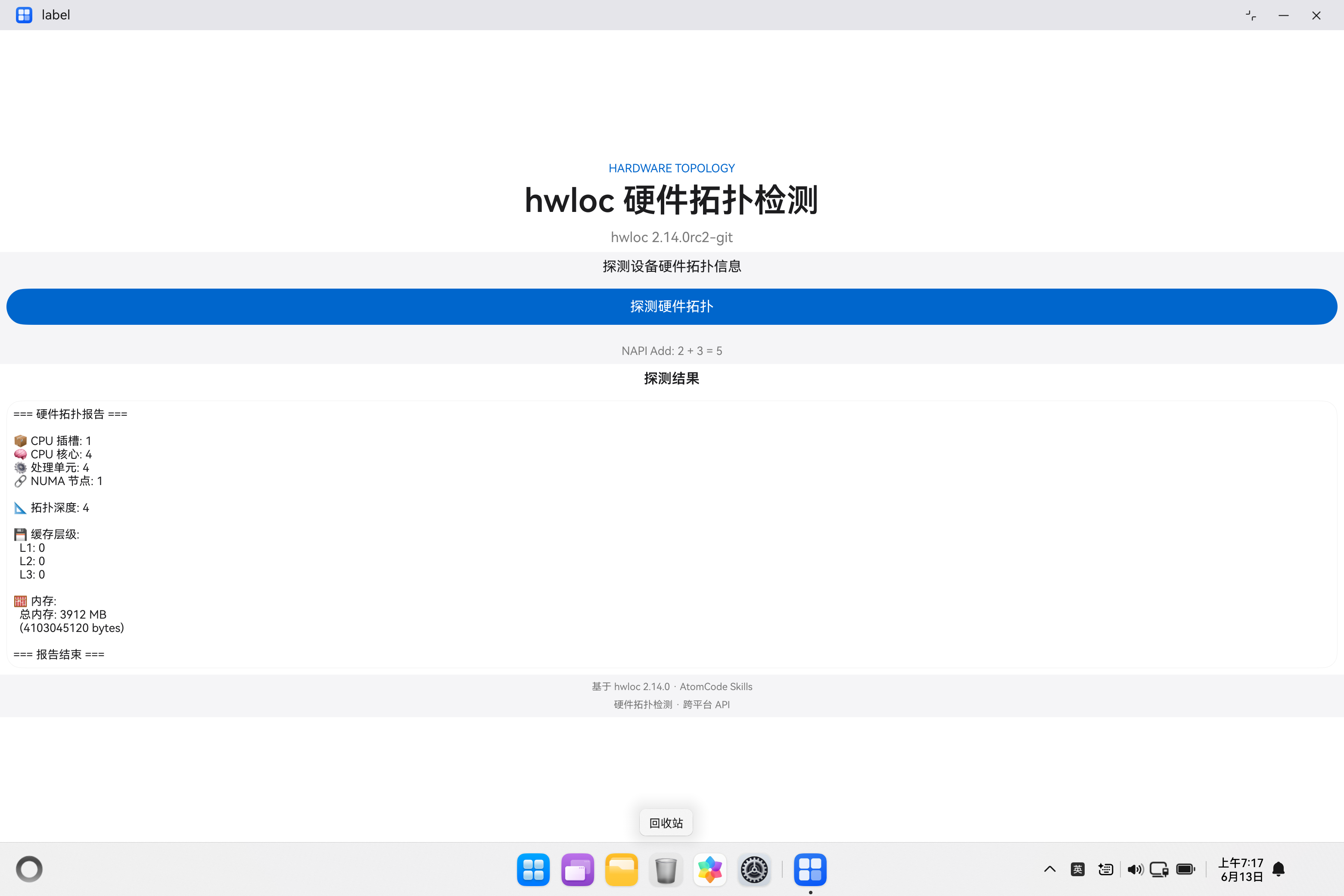
3.6 ArkUI 页面
ArkUI 页面使用 Apple 设计语言:白色/羊皮纸画布交替、Action Blue 药丸按钮:
typescript
build() {
    Scroll() {
      Column() {
        // Tile 1: Light canvas --- hero
        Column() {
          Text('HARDWARE TOPOLOGY')    // 装饰性标签
            .fontSize(14).fontColor(ACTION_BLUE)
          Text('hwloc 硬件拓扑检测')    // 40px/600 主标题
            .fontSize(40).fontWeight(600).fontColor(INK)
          Text(this.versionInfo)
            .fontSize(14).fontColor(INK_MUTED)
        }
        .padding(SPACE_XS).backgroundColor(CANVAS)

        // Tile 2: Parchment canvas --- CTA buttons
        Column() {
          Button('基础拓扑探测')
            .width('100%').height(44)
            .backgroundColor(ACTION_BLUE)
            .borderRadius(9999)  // 药丸形状
            .onClick(() => { this.doDetect(false); })
          Button('详细拓扑探测')
            .width('100%').height(44)
            .backgroundColor(CANVAS).fontColor(ACTION_BLUE)
            .border({ width: 1, color: ACTION_BLUE })
            .borderRadius(9999)
            .onClick(() => { this.doDetect(true); })
        }
        .backgroundColor(CANVAS_PARCHMENT)

        // Tile 3: Light canvas --- result card
        Column() {
          Text('探测结果')
          Text(this.topologyResult)
            .fontSize(14).lineHeight(1.43)
        }
      }
    }
}
四、踩坑专区
坑 1:CMake 链接顺序错误
现象:
ld.lld: error: undefined symbol: hwloc_topology_init根因 :静态库链接是有顺序的------被依赖的库必须放在依赖它的目标之后。当 libhwloc.a 使用了 libm 和 libpthread 中的符号时,m pthread 必须放在 libhwloc.a 后面:
cmake
# 错误 ------ m/pthread 在 hwloc 前面
target_link_libraries(entry PUBLIC m pthread ${HWLOC_LIBRARY})
# 正确
target_link_libraries(entry PUBLIC ${HWLOC_LIBRARY} m pthread)经验总结:静态库的链接顺序 = 依赖关系倒序。被依赖的库放最后。
坑 2:NAPI 返回 JSON 缺左花括号
现象 :JS 侧 JSON.parse(jsonStr) 抛出 SyntaxError: Unexpected end of JSON input
根因 :重构 JSON 拼接代码时丢失了 oss << "{\n",输出的 JSON 只有 "depth": 4, ...}\n,缺了最开头的 {。
diff
+ oss << "{\n";
  for (size_t i = 0; i < fields.size(); i++) {
      oss << "  " << fields[i].first << ": " << fields[i].second;
      if (i < fields.size() - 1) oss << ",";
      oss << "\n";
  }
  oss << "}\n";
经验总结 :JSON 生成推荐使用 vector<pair> 统一管理尾逗号,但务必检查三个部分的完整性:{ + 字段 + }。缺少任何一个都会导致 JSON.parse 报错。
坑 3:ArkTS 禁止 any 类型
现象 :编译时报错 arkts-no-any-unknown: Use explicit types instead of "any"
根因 :ArkTS 是 TypeScript 的严格子集,禁止 any 和 unknown 类型。JSON.parse() 默认返回 any,不能直接赋值。
typescript
// 错误 ------ JSON.parse 返回 any,ArkTS 禁止
let parsed = JSON.parse(jsonStr);

// 正确 ------ 显式定义接口 + as 断言
interface TopologyInfo {
  depth: number;
  cores: number;
  pus: number;
  numa_nodes: number;
  packages: number;
  memory_bytes: number;
}
let parsed: TopologyInfo = JSON.parse(jsonStr) as TopologyInfo;
经验总结 :任何用到 JSON.parse 的地方都必须配套定义接口 + as 类型断言。建议在文件顶部集中存放接口定义。
五、通用集成模板(拿来即用)
CMakeLists.txt 模板
cmake
cmake_minimum_required(VERSION 3.5.0)
project({LibName}Sample C CXX)

set(NATIVERENDER_ROOT_PATH ${CMAKE_CURRENT_SOURCE_DIR})

find_library(LIBRARY {lib}
    PATHS ${NATIVERENDER_ROOT_PATH}/../../../libs/arm64-v8a
    NO_DEFAULT_PATH
)
if(NOT LIBRARY)
    set(LIBRARY ${NATIVERENDER_ROOT_PATH}/../../../libs/arm64-v8a/lib{lib}.a)
endif()
if(NOT EXISTS ${LIBRARY})
    message(FATAL_ERROR "{lib} not found: ${LIBRARY}")
endif()

include_directories(${NATIVERENDER_ROOT_PATH}
                    ${NATIVERENDER_ROOT_PATH}/include)

add_library(entry SHARED napi_init.cpp)
target_link_libraries(entry PUBLIC libace_napi.z.so)
target_link_libraries(entry PUBLIC ${LIBRARY})
target_link_libraries(entry PUBLIC m pthread)
NAPI 桥接函数 5 步模板
cpp
static napi_value MyFunction(napi_env env, napi_callback_info info) {
    // ① 解析参数
    size_t argc = 2; napi_value argv[2];
    napi_get_cb_info(env, info, &argc, argv, nullptr, nullptr);
    // ② 边界检查
    if (argc < 2) {
        napi_throw_error(env, "EARGS", "Need 2 arguments");
        return nullptr;
    }
    // ③ 类型校验
    napi_valuetype vt;
    napi_typeof(env, argv[0], &vt);
    if (vt != napi_number) {
        napi_throw_error(env, "ETYPE", "Argument must be a number");
        return nullptr;
    }
    // ④ 调用 C API
    double value; napi_get_value_double(env, argv[0], &value);
    double result = c_library_function(value);
    // ⑤ 返回 NAPI 值
    napi_value ret;
    napi_create_double(env, result, &ret);
    return ret;
}
完整环境版本清单
| 工具 | 版本 |
|---|---|
| OHOS SDK | API 20 (6.0) / BiSheng 编译器 |
| lycium_plusplus | latest (arm64-v8a) |
| DevEco Studio | 6.0+ |
| 测试设备 | OHOS 模拟器 (arm64-v8a) |
七、总结
hwloc 的 NAPI 集成流程展现了鸿蒙 PC 三方库集成的典型模式:交叉编译 → 库部署 → CMake 链接 → NAPI 桥接 → ArkTS 调用。3 个踩坑记录(链接顺序、JSON 缺括号、ArkTS 类型约束)覆盖了静态库集成中最常见的三类问题------链接器、运行时和编译器。
最意外的发现是 JSON 缺左括号那个 bug:一次看似无害的重构,因为删掉了一行 oss << "{\n",导致整个 NAPI 接口不可用。NAPI 是一个脆弱但可预测的桥梁------出错的不在语言边界,而在数据格式的完整性。