文章目录
前言
在使用elasticsearch的时候,难免少不了进行数据迁移,本文介绍两种试用的数据迁移方法,es版本为7.8.1
方式1:直接拷贝
如果elasticsearch版本是一样的,只是切换服务器,可以直接迁移elasticsearch的文件。例如:
elasticsearch的文件一般为
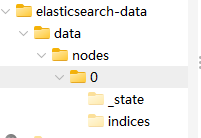
elasticsearch-data/data/nodes/0
执行命令,在目标服务器里面执行该命令。从源服务器拷贝node到目标服务器中,其中192.168.0.99为目标服务器,当前服务器为源服务器
scp -r es@192.168.0.99:/data/elk/elasticsearch-7.8.1/data ./拷贝完需要重启服务器
方式2:使用elasticdump
注意,使用该命令需要安装nodejs,并且版本大于18.0.0
需先安装nodejs
打开浏览器,搜索nodejs https://nodejs.org/en,并且进行下载
目前安装的版本为:v22.22.3
shell
# Download and install nvm:
curl -o- https://raw.githubusercontent.com/nvm-sh/nvm/v0.40.5/install.sh | bash

# in lieu of restarting the shell
\. "$HOME/.nvm/nvm.sh"

# Download and install Node.js:
nvm install 22

# Verify the Node.js version:
node -v # Should print "v22.22.3".

# Verify npm version:
npm -v # Should print "10.9.8".
再安装elasticdump
shell
npm install -g elasticdump安装好后,执行命令,看看是否安装成功过
shell
elasticdump --help- 单个索引的迁移
本案例是将 192.168.0.99:9200 迁移到 192.168.20.197:9200,索引为jzkj_operate_log_202606
shell
# 1. 迁移结构(mapping)
elasticsearch-dump \
--input=http://192.168.20.197:9200/jzkj_operate_log_202606 \
--output=http://192.168.0.99:9200/jzkj_operate_log_202606 \
--type=mapping \
--limit=1000 --timeout=60000

# 2. 迁移数据
elasticsearch-dump \
--input=http://192.168.20.197:9200/jzkj_operate_log_202606 \
--output=http://192.168.0.99:9200/jzkj_operate_log_202606 \
--type=data \
--limit=1000 --concurrency=5 --timeout=60000- 匹配索引的迁移
本案例是将 192.168.0.99:9200 迁移到 192.168.20.197:9200,把所有jzkj_operate_log开头的索引全部备份
注意/data/es_backup存在,且有读写权限
shell
# 第一步:dump 源 ES 到本地目录,注意/data/es_backup存在,且有读写权限
multielasticdump \
  --direction=dump \
  --input=http://192.168.0.99:9200 \
  --output=/data/es_backup \
  --match='^jzkj_operate_log.*' \
  --limit=1000 \
  --concurrency=5 \
  --timeout=60000
# 第二步:load 本地目录到目标 ES
multielasticdump \
  --direction=load \
  --input=/data/es_backup \
  --output=http://192.168.20.197:9200 \
  --match='^jzkj_operate_log.*' \
  --limit=1000 \
  --concurrency=5 \
  --timeout=60000