一、背景
最近在项目中接入了 SSE,也就是 Server-Sent Events。
业务场景是:后端需要持续向前端推送数据,前端页面要实时接收并展示。例如:
text
1. AI 对话的打字机效果
2. 实时任务进度
项目技术栈如下:
text
前端:Vue3
后端:JDK 21 + Spring Boot
代理:Nginx
一开始本地调试时,SSE 是正常的。
后端每推送一条消息,前端就能立刻收到。但是部署到线上后,经过 Nginx 代理,问题出现了:
text
本地直连后端:SSE 正常实时返回
线上经过 Nginx:SSE 不实时,甚至出现超时异常
这篇文章记录一下完整排查过程。
二、SSE 接口设计
假设这里有两个 SSE 相关的接口。
text
GET  /api/sse/connect?clientId=demo    创建 SSE 连接
POST /api/sse/push?clientId=demo       向客户端推送消息
第一个接口负责创建 SSE 长连接。
第二个接口用于向指定客户端推送消息。
三、后端:创建 SSE 连接
Spring Boot 中可以使用 SseEmitter 实现 SSE。
下面是一个简化版示例。
java
@RestController
@RequestMapping("/api/sse")
public class SseController {

    private final Map<String, SseEmitter> clients = new ConcurrentHashMap<>();

    @GetMapping("/connect")
    public SseEmitter connect(@RequestParam String clientId) {
		// 设置 10 分钟超时,避免默认超时时间过短
	    SseEmitter emitter = new SseEmitter(10 * 60 * 1000L);

        clients.put(clientId, emitter);

        emitter.onCompletion(() -> clients.remove(clientId));
        emitter.onTimeout(() -> clients.remove(clientId));
        emitter.onError(e -> clients.remove(clientId));

        try {
            emitter.send(SseEmitter.event()
                    .name("connect")
                    .data("SSE 连接成功"));
        } catch (IOException e) {
            clients.remove(clientId);
        }

        return emitter;
    }

    @PostMapping("/push")
    public String push(@RequestParam String clientId,
                       @RequestParam(defaultValue = "hello sse") String message) throws IOException {
        SseEmitter emitter = clients.get(clientId);

        if (emitter == null) {
            return "客户端未连接";
        }

        emitter.send(SseEmitter.event()
                .name("message")
                .data(message));

        return "推送成功";
    }
}
这段代码主要做了几件事:
text
1. 前端访问 /api/sse/connect 后,后端创建 SseEmitter
2. 使用 clientId 保存当前客户端连接
3. 后续通过 /api/sse/push 向指定客户端推送消息
4. 连接完成、超时、异常时,从 Map 中移除连接
这里有一个比较重要的点:
java
SseEmitter emitter = new SseEmitter(10 * 60 * 1000L);我在代码里已经显式设置了 SSE 连接的超时时间,也就是 10 分钟。
所以后面看到超时异常时,我第一反应不是直接怀疑业务代码写错了,而是先思考:既然 Java 代码里已经设置了较长超时时间,为什么线上还是会提前超时?
这也是后面排查 Nginx 的关键入口。
四、SSE 响应格式说明
SSE 的响应类型是:
http
Content-Type: text/event-stream如果使用 Spring 的 SseEmitter,框架会帮我们处理大部分事件格式。
如果自己手动写响应流,格式通常类似这样:
text
event: message
data: hello sse
注意最后有一个空行。
SSE 每条消息之间需要用空行分隔,否则前端可能不会立即触发消息回调。
五、前端:Vue3 接收 SSE 消息
Vue3 前端可以直接使用浏览器原生的 EventSource。
vue
import { ref, onBeforeUnmount } from 'vue'

const clientId = 'demo'
const messages = ref([])
let eventSource = null

const connectSse = () => {
  eventSource = new EventSource(`/api/sse/connect?clientId=${clientId}`)

  eventSource.addEventListener('connect', (event) => {
    console.log('连接成功:', event.data)
    messages.value.push(event.data)
  })

  eventSource.addEventListener('message', (event) => {
    console.log('收到消息:', event.data)
    messages.value.push(event.data)
  })

  eventSource.onerror = (error) => {
    console.error('SSE 连接异常:', error)
  }
}

const closeSse = () => {
  if (eventSource) {
    eventSource.close()
    eventSource = null
  }
}

onBeforeUnmount(() => {
  closeSse()
})
</script>

<template>
  <button @click="connectSse">连接 SSE</button>
  <button @click="closeSse">关闭 SSE</button>

  <div v-for="item in messages" :key="item">
    {{ item }}
  </div>
</template>
这里也要注意一点:
text
页面销毁时,一定要调用 eventSource.close()否则用户频繁进入页面、退出页面,可能导致后端保留大量无效 SSE 连接。
六、本地测试:直连后端是正常的
本地启动 Spring Boot 服务后,先建立 SSE 连接:
text
GET http://localhost:8099/api/sse/connect?clientId=demo然后通过接口模拟推送消息:
bash
curl -X POST "http://localhost:8099/api/sse/push?clientId=demo&message=hello"本地测试时,前端页面可以实时收到消息。
也就是说,本地链路是正常的:
text
Vue3 EventSource
        ↓
Spring Boot SseEmitter
此时没有经过 Nginx。
所以可以初步说明:
text
1. 前端 EventSource 基本没问题
2. 后端 SseEmitter 基本没问题
3. 本地直连时,SSE 可以实时推送
但是部署到线上后,链路变成了:
text
前端页面
   ↓
Nginx
   ↓
Spring Boot
问题也正是在这个链路中出现的。
七、线上问题:后端出现 AsyncRequestTimeoutException
线上运行一段时间后,后端日志出现了下面这段异常:
text
2026-06-12 14:35:07.674 [http-nio-8099-exec-7] ERROR c.xxx.xxx.AppGlobalExceptionHandler - 系统异常
org.springframework.web.context.request.async.AsyncRequestTimeoutException: null
	at org.springframework.web.context.request.async.TimeoutDeferredResultProcessingInterceptor.handleTimeout(TimeoutDeferredResultProcessingInterceptor.java:42)
	at org.springframework.web.context.request.async.DeferredResultInterceptorChain.triggerAfterTimeout(DeferredResultInterceptorChain.java:81)
	at org.springframework.web.context.request.async.WebAsyncManager.lambda$startDeferredResultProcessing$5(WebAsyncManager.java:430)
	at java.base/java.util.ArrayList.forEach(ArrayList.java:1596)
	at org.springframework.web.context.request.async.StandardServletAsyncWebRequest.onTimeout(StandardServletAsyncWebRequest.java:149)
	at org.apache.catalina.core.AsyncListenerWrapper.fireOnTimeout(AsyncListenerWrapper.java:44)
	at org.apache.catalina.core.AsyncContextImpl.timeout(AsyncContextImpl.java:136)
	at org.apache.catalina.connector.CoyoteAdapter.asyncDispatch(CoyoteAdapter.java:135)
	at org.apache.coyote.AbstractProcessor.dispatch(AbstractProcessor.java:243)
	at org.apache.coyote.AbstractProcessorLight.process(AbstractProcessorLight.java:57)
	at org.apache.coyote.AbstractProtocol$ConnectionHandler.process(AbstractProtocol.java:896)
	at org.apache.tomcat.util.net.NioEndpoint$SocketProcessor.doRun(NioEndpoint.java:1744)
	at org.apache.tomcat.util.net.SocketProcessorBase.run(SocketProcessorBase.java:52)
	at org.apache.tomcat.util.threads.ThreadPoolExecutor.runWorker(ThreadPoolExecutor.java:1191)
	at org.apache.tomcat.util.threads.ThreadPoolExecutor$Worker.run(ThreadPoolExecutor.java:659)
	at org.apache.tomcat.util.threads.TaskThread$WrappingRunnable.run(TaskThread.java:63)
	at java.base/java.lang.Thread.run(Thread.java:1583)
2026-06-12 14:35:07.674 [http-nio-8099-exec-7] WARN  c.xxx.xxx.AppGlobalExceptionHandler - 检测到SSE请求异常,跳过Result返回,避免再次写入text/event-stream响应体
核心异常是:
text
org.springframework.web.context.request.async.AsyncRequestTimeoutException从名字可以看出,这是 Spring MVC 异步请求超时异常。
但是看到这个异常时,不能马上下结论说:一定是 Java 代码写错了。
因为我的 SSE 代码里已经显式设置了超时时间:
java
SseEmitter emitter = new SseEmitter(10 * 60 * 1000L);并且也注册了连接释放逻辑:
java
emitter.onCompletion(() -> clients.remove(clientId));
emitter.onTimeout(() -> clients.remove(clientId));
emitter.onError(e -> clients.remove(clientId));
同时,本地直连 Spring Boot 时,SSE 是可以正常实时返回的。
于是脑袋里就有一个大大的问号:
text
为什么本地直连不会超时,线上经过 Nginx 后会超时?
为什么后端已经 send 了数据,前端却没有实时收到?
八、关键转折:为什么开始怀疑 Nginx
到这里,排查结果是:
text
1. 后端代码里已经给 SseEmitter 设置了 10 分钟超时
2. onCompletion、onTimeout、onError 都做了连接释放
3. 前端页面销毁时也调用了 eventSource.close()
4. 本地直连 Spring Boot 时,SSE 正常实时返回
5. 只有线上经过 Nginx 后,才出现不实时或超时
于是我去查了一下 SSE 经过 Nginx 的相关问题,发现一个很关键的点:
text
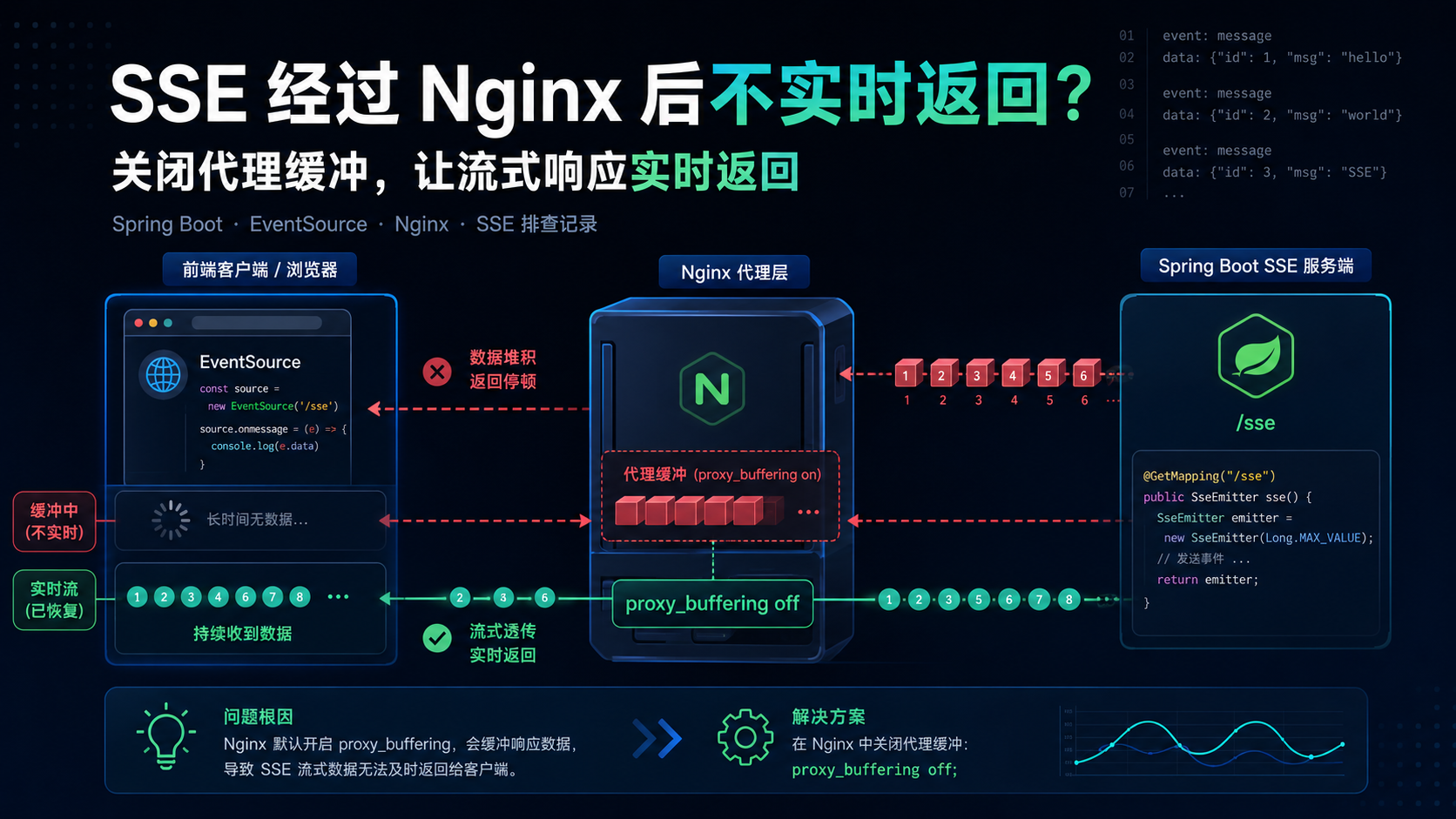
Nginx 默认会对上游响应进行缓冲。普通 HTTP 接口通常是一次性返回 JSON,这种缓冲一般没有明显问题。
但 SSE 不是普通接口。
普通接口的请求过程是:
text
客户端请求
后端处理
后端一次性返回 JSON
请求结束
而 SSE 的请求过程是:
text
客户端建立连接
后端保持连接
后端持续写入事件
客户端持续接收
连接长时间不结束
如果 Nginx 把后端响应先缓冲起来,就会出现这种情况:
text
后端已经 emitter.send() 了
Nginx 没有立刻转发给浏览器
前端 EventSource 收不到实时消息
等缓冲区满足条件或请求结束后,数据才一次性返回
这就和线上现象完全对上了:
text
本地直连:实时返回
经过 Nginx:不实时,甚至超时
九、原来的 Nginx 配置
一开始,Nginx 只是普通接口代理配置,大概类似这样:
nginx
location /api/ {
    proxy_pass http://springboot_server;

    proxy_set_header Host $host;
    proxy_set_header X-Real-IP $remote_addr;
    proxy_set_header X-Forwarded-For $proxy_add_x_forwarded_for;
}
这类配置对普通 REST 接口是没问题的。
但是对 SSE 来说,它缺少几个关键配置:
text
1. 没有关闭 proxy_buffering
2. 没有针对 SSE 增加 proxy_read_timeout
3. 没有给 SSE 单独配置 location
最终表现出来就是:
text
1. 前端 EventSource 请求一直 pending
2. 后端已经发送数据,但前端不能实时收到
3. 数据最后一次性返回
4. 一段时间后后端出现 AsyncRequestTimeoutException
十、Nginx 层可能看到的日志
如果继续查看 Nginx 的 error.log,在长连接超时场景下,可能会看到类似日志:
text
upstream timed out (110: Connection timed out) while reading upstream这个通常表示 Nginx 在读取上游服务响应时超时。
如果客户端刷新页面、关闭页面,或者 EventSource 主动断开,也可能看到类似:
text
client prematurely closed connection while reading upstream第二种不一定都是服务端问题。
用户关闭页面、刷新页面、浏览器断开连接,也可能触发类似日志。
所以排查 SSE 问题时,不能只看一条日志,要结合链路判断:
text
1. 本地直连是否正常
2. 经过 Nginx 是否不实时
3. 前端 Network 是否一直 pending
4. 后端是否出现异步请求超时
5. Nginx 是否存在 upstream timeout
十一、解决方案:给 SSE 单独配置 Nginx location
最终,我没有直接修改所有 /api/ 接口,而是给 SSE 单独加了一个 location。
修改后的 Nginx 配置如下:
nginx
location /api/sse/ {
    proxy_pass http://springboot_server;

    # SSE 是长连接场景,建议使用 HTTP/1.1
    proxy_http_version 1.1;
    proxy_set_header Connection "";

    # 关键:关闭代理缓冲,避免流式响应被 Nginx 攒起来
    proxy_buffering off;

    # SSE 是实时事件流,不走缓存
    proxy_cache off;

    # 增加读取超时时间,避免长时间无消息时连接被断开
    proxy_read_timeout 3600s;

    # 透传必要请求头
    proxy_set_header Host $host;
    proxy_set_header X-Real-IP $remote_addr;
    proxy_set_header X-Forwarded-For $proxy_add_x_forwarded_for;
}
这里最关键的是:
nginx
proxy_buffering off;它解决的是:
text
后端已经推送数据,但 Nginx 没有立刻转发给前端。关闭缓冲后,Nginx 会尽量把后端返回的数据实时转发给浏览器。
另一个重要配置是:
nginx
proxy_read_timeout 3600s;它解决的是:
text
SSE 长连接长时间无消息时,被 Nginx 提前断开。十二、几个关键配置说明
1. proxy_buffering off
nginx
proxy_buffering off;这是 SSE 经过 Nginx 时最重要的配置。
如果不关闭代理缓冲,Nginx 可能会先把后端响应缓存起来,等缓冲区满足条件或者请求结束后,再统一返回给客户端。
2. proxy_cache off
nginx
proxy_cache off;SSE 是实时事件流,不应该被缓存。
如果当前 Nginx 没有启用缓存,这项不是绝对必须,但建议针对 SSE 路径显式关闭。
3. proxy_read_timeout
nginx
proxy_read_timeout 3600s;SSE 连接可能会持续很久。
如果后端一段时间没有新消息,Nginx 可能会因为读取上游响应超时而断开连接。
所以这里需要设置一个较大的超时时间。
4. proxy_http_version
nginx
proxy_http_version 1.1;SSE 是一个持续打开的 HTTP 连接,代理到后端时建议使用 HTTP/1.1。
5. proxy_set_header Connection
nginx
proxy_set_header Connection "";这行用于清理客户端传入的 Connection 头,避免不合适的连接头影响后端长连接。
十三、后端建议增加心跳
即使 Nginx 配置了较长超时时间,后端也建议增加心跳。
如果业务消息不是持续产生的,SSE 连接就可能长时间没有任何数据传输。
可以定期发送一个注释事件:
java
emitter.send(SseEmitter.event()
        .comment("heartbeat"));
或者发送一个简单的 ping 事件:
java
emitter.send(SseEmitter.event()
        .name("ping")
        .data("ping"));
心跳的作用是:
text
1. 避免连接长时间完全空闲
2. 帮助前端判断连接是否还活着
3. 降低代理层因为空闲而断开连接的概率
心跳频率不要太高,一般十几秒到几十秒一次即可,具体根据业务调整。
十四、修改后如何验证
修改 Nginx 配置后,先检查配置是否正确:
bash
nginx -t确认没有问题后,重新加载 Nginx:
bash
nginx -s reload或者:
bash
systemctl reload nginx然后可以使用 curl -N 测试 SSE 是否实时返回:
bash
curl -N "https://your-domain.com/api/sse/connect?clientId=demo"另开一个终端推送消息:
bash
curl -X POST "https://your-domain.com/api/sse/push?clientId=demo&message=hello"如果 Nginx 配置生效,第一个终端应该能立即看到服务端推送的消息。
如果还是不实时,可以继续检查:
text
1. 请求是否真的命中了 /api/sse/ 这个 location
2. proxy_buffering off 是否写在正确位置
3. 是否还有其他网关、负载均衡、CDN 在中间缓冲
4. 后端是否真的及时 send 数据
5. 浏览器 EventSource 是否正常连接
十五、最终解决方案:
修改nginx配置
nginx
proxy_http_version 1.1;
proxy_set_header Connection "";
proxy_buffering off;
proxy_cache off;
proxy_read_timeout 3600s;
其中最关键的是:
nginx
proxy_buffering off;这次问题可以总结成一句话:
text
后端已经在流式输出,但 Nginx 默认可能把响应攒起来了。