背景
在 Python 体验用欧几里得算法计算最大公约数的过程 一文中,我们体验了用欧几里得算法计算最大公约数的过程。我觉得那篇文章中,引入欧几里得算法的过程有点生硬,于是想再试试其他方式。
正文
根据定义暴力计算
根据最大公约数的定义,我们可以用暴力的方式进行计算自然数 a 和自然数 b 的最大公约数( a=0 和 b=0 不能同时成立)。对应的 Python 代码如下
python
def brute_force_gcd(a, b):
    if a == 0 and b == 0:
        raise ValueError("a and b cannot be both 0")
    if a == 0:
        return b
    if b == 0:
        return a
    candidate = min(a, b)
    while True:
        if a % candidate == 0 and b % candidate == 0:
            return candidate
        candidate -= 1
探索最大公约数的规律
在此基础上,我们可以用 Pygame 来实现一个探索较小整数之间最大公约数关系的图形化界面。以下是完整代码
python
import pygame
import sys

# 除了 brute_force_gcd 方法外,其他代码均由 trae 生成(我在 trae 生成的代码的基础上做了一些调整)
class GcdDisplayer:
    def __init__(self, screen_width = 900, screen_height = 700):
        pygame.init()
        self.screen = pygame.display.set_mode((screen_width, screen_height))
        pygame.display.set_caption("GCD Interactive Chart")
        self.clock = pygame.time.Clock()
        self.x_axis_elements = range(40 + 1)

    def brute_force_gcd(self, a, b):
        if a == 0 and b == 0:
            raise ValueError("a and b cannot be both 0")
        if a == 0:
            return b
        if b == 0:
            return a
        candidate = min(a, b)
        while True:
            if a % candidate == 0 and b % candidate == 0:
                return candidate
            candidate -= 1

    def get_font(self, size):
        try:
            return pygame.font.SysFont("arial", size)
        except:
            try:
                return pygame.font.SysFont("helvetica", size)
            except:
                return pygame.font.Font(None, size)

    def draw_button(self, x, y, width, height, text, color, hover_color, mouse_pos, clicked):
        button_rect = pygame.Rect(x, y, width, height)
        is_hovered = button_rect.collidepoint(mouse_pos)
        is_clicked = is_hovered and clicked

        current_color = hover_color if is_hovered else color
        pygame.draw.rect(self.screen, current_color, button_rect, border_radius=10)
        pygame.draw.rect(self.screen, (50, 50, 50), button_rect, 2, border_radius=10)

        font = self.get_font(28)
        text_surface = font.render(text, True, (0, 0, 0))
        text_rect = text_surface.get_rect(center=button_rect.center)
        self.screen.blit(text_surface, text_rect)

        return is_clicked

    def draw_control_panel(self, current_b, mouse_pos, clicked):
        button_height = 40
        button_width = 80
        button_spacing = 10
        buttons_per_row = 5

        panel_x = 30
        panel_y = self.screen.get_height() - 200
        panel_width = self.screen.get_width() - 60
        panel_height = 170

        pygame.draw.rect(self.screen, (240, 240, 240), (panel_x, panel_y, panel_width, panel_height), border_radius=15)
        pygame.draw.rect(self.screen, (200, 200, 200), (panel_x, panel_y, panel_width, panel_height), 2, border_radius=15)

        instruction_font = self.get_font(24)
        instruction = instruction_font.render("Click a button to select b value", True, (80, 80, 80))
        self.screen.blit(instruction, (panel_width // 2 - instruction.get_width() // 2, panel_y + 15))

        button_texts = [f"b={i}" for i in range(1, 11)]
        new_b = current_b
        for i, text in enumerate(button_texts):
            row = i // buttons_per_row
            col = i % buttons_per_row
            x = self.screen.get_width() // 2 - (buttons_per_row * button_width + (buttons_per_row - 1) * button_spacing) // 2 + col * (button_width + button_spacing)
            y = panel_y + 50 + row * (button_height + 20)
            if self.draw_button(x, y, button_width, button_height, text, (200, 200, 200), (150, 150, 255), mouse_pos, clicked):
                new_b = i + 1

        return new_b

    def draw_bar_chart(self, gcd_results, b):
        screen_width = self.screen.get_width()
        chart_x = 120
        chart_y = 60
        chart_width = screen_width - 180
        chart_height = 380

        bar_width = chart_width / len(self.x_axis_elements)
        max_gcd = 10
        max_x = self.x_axis_elements[-1]

        label_font_size = max(14, min(22, int(300 // len(self.x_axis_elements))))
        font = self.get_font(label_font_size)
        title_font = self.get_font(32)

        title = title_font.render(f"GCD(a, {b}) for a from 0 to {max_x}", True, (0, 0, 0))
        self.screen.blit(title, (chart_x, chart_y - 50))

        unique_gcd_values = sorted(set(gcd_results))
        base_colors = [
            (255, 100, 100),
            (255, 255, 100),
            (100, 200, 100),
            (100, 150, 255)
        ]
        color_map = {
            val: base_colors[i % len(base_colors)]
            for i, val in enumerate(unique_gcd_values)
        }

        for _, (num, g) in enumerate(zip(self.x_axis_elements, gcd_results)):
            bar_height = (g / max_gcd) * (chart_height - 50) if max_gcd > 0 else 0
            actual_bar_width = min(bar_width * 0.8, 30)
            bar_center_x = chart_x + num * bar_width + bar_width * 0.5
            bar_x = bar_center_x - actual_bar_width / 2
            bar_y = chart_y + chart_height - bar_height - 30

            bar_rect = pygame.Rect(bar_x, bar_y, actual_bar_width, bar_height)
            color = color_map[g]

            pygame.draw.rect(self.screen, color, bar_rect, border_radius=5)
            pygame.draw.rect(self.screen, (50, 50, 50), bar_rect, 2, border_radius=5)

        x_axis_y = chart_y + chart_height - 10
        for x_val in range(0, max_x + 1, 5):
            tick_x = chart_x + x_val * bar_width + bar_width * 0.5
            pygame.draw.line(self.screen, (200, 200, 200), (tick_x, x_axis_y), (tick_x, x_axis_y + 5), 2)
            num_label = font.render(str(x_val), True, (0, 0, 0))
            num_rect = num_label.get_rect(center=(tick_x, x_axis_y + 15))
            self.screen.blit(num_label, num_rect)

        for tick in range(max_gcd + 1):
            tick_y = chart_y + chart_height - 30 - (tick / max_gcd) * (chart_height - 50)
            pygame.draw.line(self.screen, (200, 200, 200), (chart_x - 5, tick_y), (chart_x, tick_y), 2)
            tick_label = font.render(str(tick), True, (0, 0, 0))
            self.screen.blit(tick_label, (chart_x - 30, tick_y - tick_label.get_height() // 2))

        y_label = font.render("GCD Value", True, (0, 0, 0))
        self.screen.blit(y_label, (20, chart_y + chart_height // 2 - 10))
        x_label = font.render("a", True, (0, 0, 0))
        self.screen.blit(x_label, (chart_x + chart_width // 2 - 10, chart_y + chart_height + 80))

    def run(self):
        b = 4
        gcd_results = [self.brute_force_gcd(num, b) for num in self.x_axis_elements]

        running = True
        while running:
            clicked = False
            for event in pygame.event.get():
                if event.type == pygame.QUIT:
                    running = False
                elif event.type == pygame.MOUSEBUTTONDOWN:
                    clicked = True

            mouse_pos = pygame.mouse.get_pos()

            self.screen.fill((255, 255, 255))

            self.draw_bar_chart(gcd_results, b)

            new_b = self.draw_control_panel(b, mouse_pos, clicked)
            if new_b != b:
                b = new_b
                gcd_results = [self.brute_force_gcd(num, b) for num in self.x_axis_elements]

            pygame.display.flip()
            self.clock.tick(60)

        pygame.quit()
        sys.exit()

if __name__ == "__main__":
    GcdDisplayer().run()
运行效果
请将上一小节提供的完整代码保存为 calc_gcd.py,用下方的命令可以运行 calc_gcd.py
bash
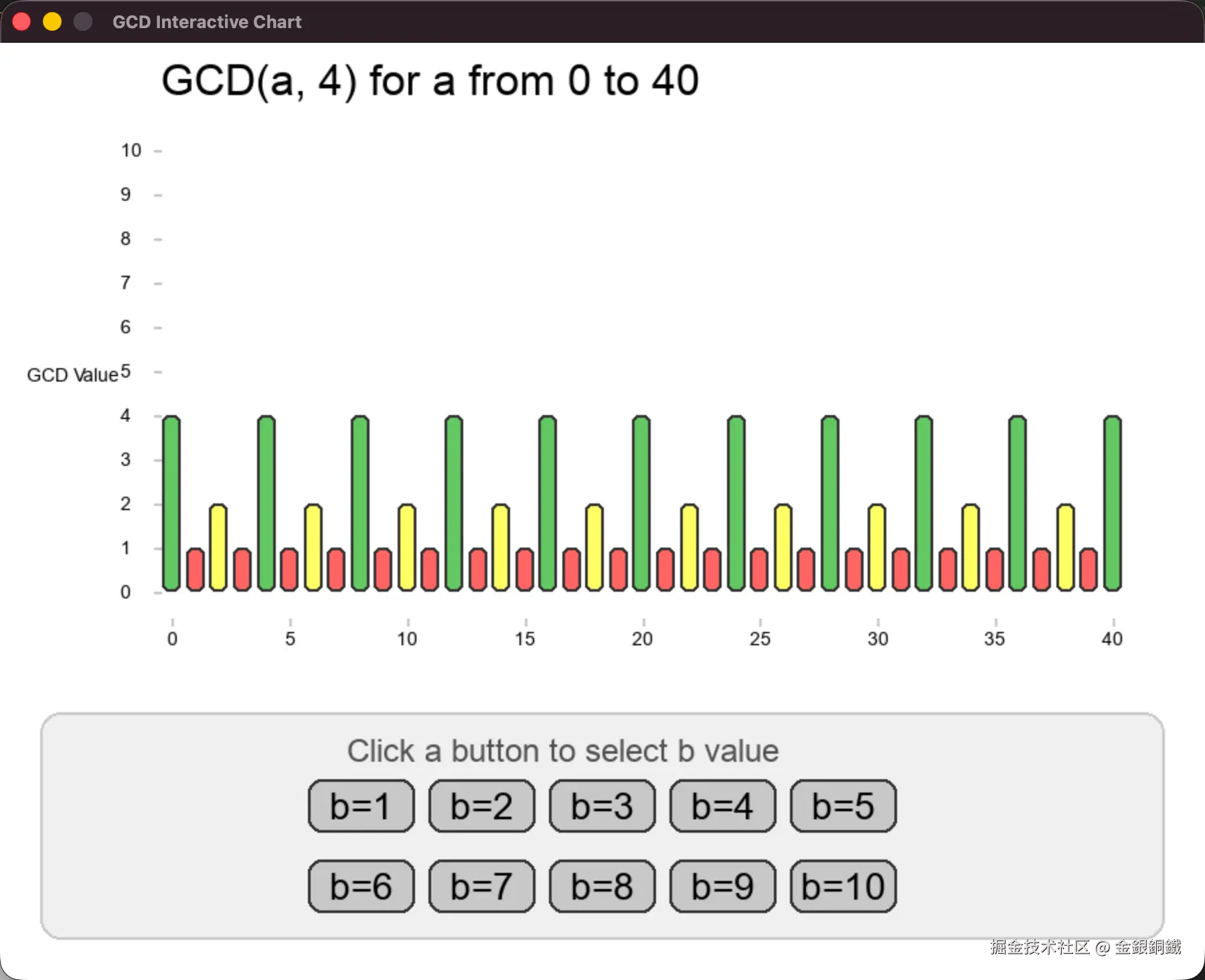
python3 calc_gcd.py最初的界面会展示 a 和 4 的最大公约数(整数 a 满足 0≤a≤40)
我们点击图中的按钮,可以指定不同的 b 值,相应地,界面上会展示 a 和 b 的最大公约数(整数 a 满足 0≤a≤40, b 是用户通过点击按钮指定的值)。下图展示了点击 b=6 按钮之后的效果 ⬇️
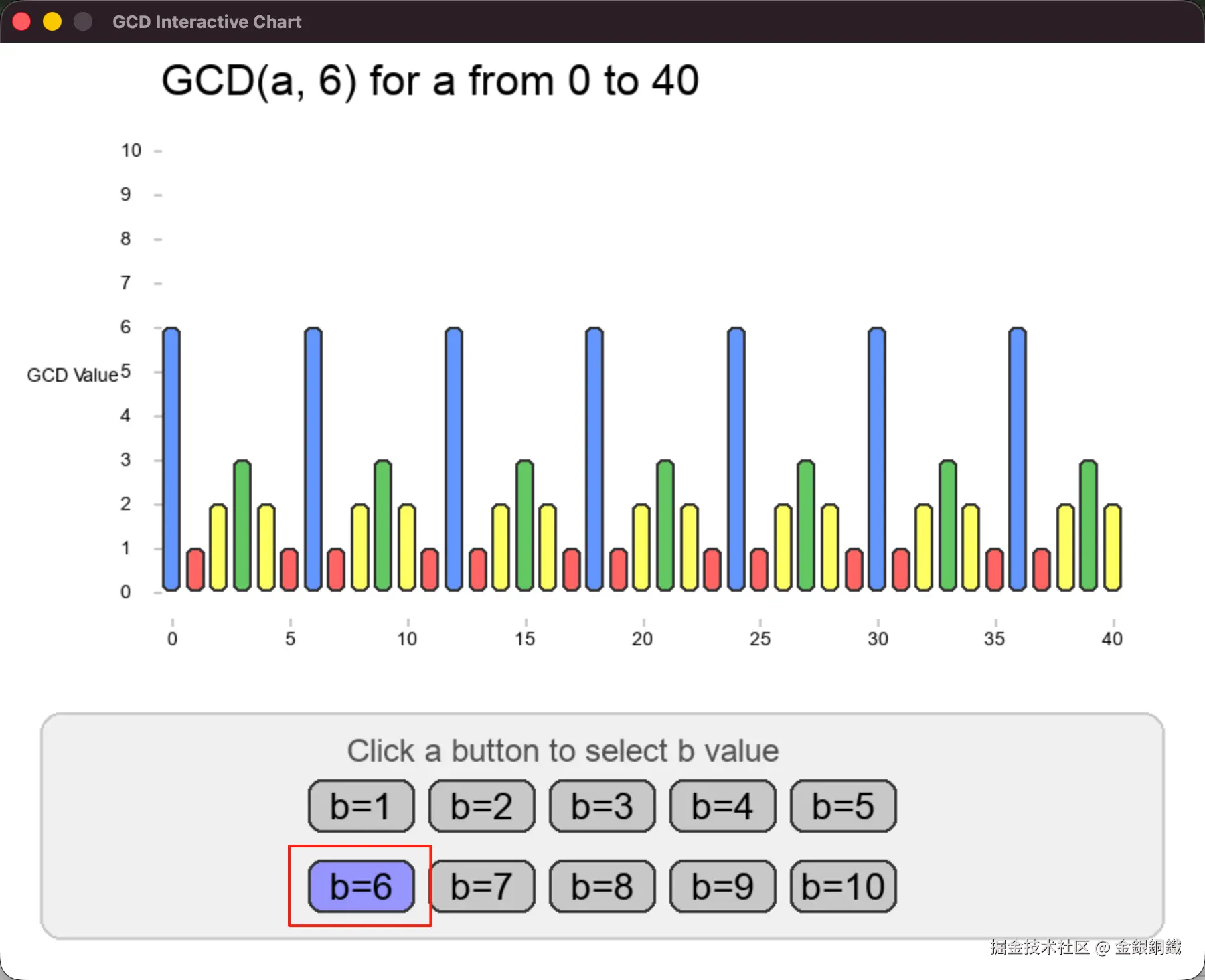
用户通过使用图形化界面,对(较小整数的)最大公约数的值有了感性的认识后,再引入欧几里得算法,从而进行理性分析,感觉这样会比较顺畅。
说明
文中提供的代码,暴力计算最大公约数的部分,是我自己写的。和 Pygame 相关的代码,我让 trae 生成了几个版本,我又做了些调整(从整体上说,和 Pygame 相关的代码是 trae 完成的)。