一个支持桌面悬浮窗和 Web 浏览器双端的实时聊天系统,HTTP 与 WebSocket 共用单端口,SQLite 零配置持久化,Docker 一键部署。
一、为什么做这个项目
直播场景下,主播需要一个不遮挡画面 的悬浮聊天窗口,观众需要通过浏览器 参与互动。我们需要的不是又一个 SaaS 聊天工具,而是一个可自托管、可定制、跨平台的实时聊天系统。
最终架构如下:
┌─ Electron Client ─┐     ┌─ Web Browser ────┐
│  main.js (IPC)    │     │  Vue 3 + Vite    │
│  chat.js (WS)     │     │  App.vue (WS)    │
└─────┬─────────────┘     └──────┬───────────┘
      │ HTTP REST API           │ HTTP + WS
      └──────────┬──────────────┘
                 ▼
      ┌─────────────────────┐
      │  Server :11728      │
      │  index.js           │
      │  ├ routes.js (REST) │
      │  └ websocket.js(WS) │
      │  database.js(SQLite)│
      └─────────────────────┘
核心设计决策:HTTP 与 WebSocket 共用同一端口 ,WebSocket 路由为 /api/websocket。这不仅简化了部署(只需开一个端口),也让 Nginx 反向代理配置更加清爽。
二、后端服务:单端口承载 HTTP + WebSocket
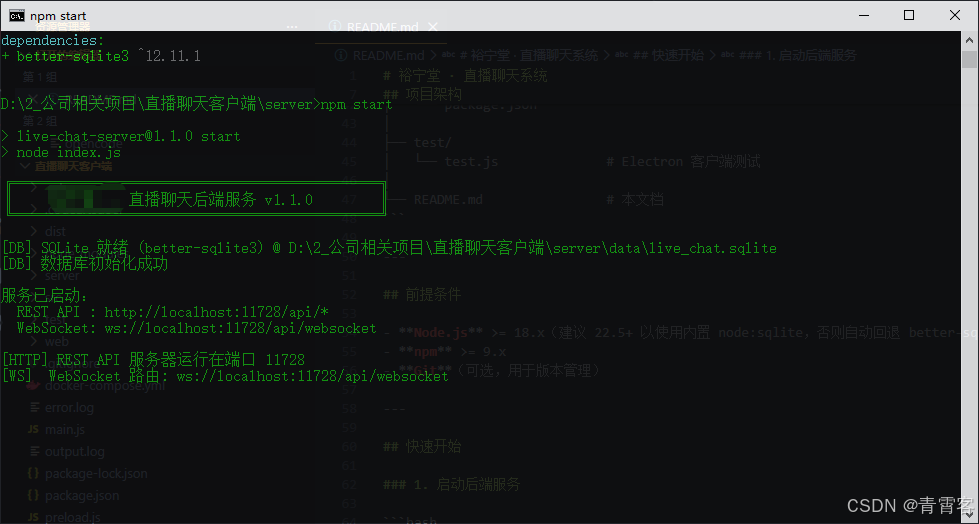
2.1 服务入口
server/index.js 是整个系统的枢纽:
js
require('dotenv').config();
const http = require('http');
const { initDatabase, closeDatabase, getMessagesSinceGlobal } = require('./database');
const { attachWebSocket, getWSS, broadcastMessage } = require('./websocket');
const { setupRoutes } = require('./routes');

const HTTP_PORT = parseInt(process.env.HTTP_PORT || '11728', 10);

async function main() {
  await initDatabase();

  const httpServer = http.createServer(async (req, res) => {
    res.setHeader('Access-Control-Allow-Origin', '*');
    if (req.method === 'OPTIONS') {
      res.writeHead(204); res.end(); return;
    }
    await setupRoutes(req, res);
  });

  attachWebSocket(httpServer);
  httpServer.listen(HTTP_PORT);

  // 后台定时同步:每 2 秒轮询数据库,广播增量消息
  let globalLastMsgId = 0;
  setInterval(async () => {
    const rows = await getMessagesSinceGlobal(globalLastMsgId, 100);
    rows.forEach(row => {
      broadcastMessage('new_message', row.room, {
        id: row.id,
        username: row.username,
        content: row.content,
        title: row.title || '',
        createdAt: row.createdAt
      });
      if (row.id > globalLastMsgId) globalLastMsgId = row.id;
    });
  }, 2000);
}

main().catch(e => { console.error('启动失败:', e); process.exit(1); });这里有一个容易被忽略的设计:后台 2 秒轮询 。为什么已经有了 WebSocket 实时推送还需要轮询?因为消息写入和 WebSocket 广播是在同一个请求链路中完成的,但如果有其他进程 或直接数据库写入(比如管理员后台注入系统消息),WebSocket 不会自动感知。轮询充当了"兜底同步"的角色。
2.2 WebSocket 挂载逻辑
关键代码在 server/websocket.js,使用 ws 库的 noServer 模式:
js
const { WebSocketServer } = require('ws');

let wss = null;

function attachWebSocket(server) {
  wss = new WebSocketServer({ noServer: true, clientTracking: true });

  server.on('upgrade', (req, socket, head) => {
    const url = new URL(req.url, 'http://' + (req.headers.host || 'localhost'));
    const pathname = url.pathname.replace(/\/+$/, '') || '/';

    if (pathname === '/api/websocket') {
      wss.handleUpgrade(req, socket, head, (ws) => {
        wss.emit('connection', ws, req);
      });
    } else {
      socket.destroy();
    }
  });

  wss.on('connection', (ws) => {
    console.log('[WS] 新客户端已连接');
    ws.on('close', () => console.log('[WS] 客户端已断开'));
    ws.on('error', (err) => console.error('[WS] 客户端错误:', err.message));
  });

  return wss;
}

function broadcastMessage(type, room, message) {
  if (!wss) return;
  const data = JSON.stringify({ type, room, message });
  wss.clients.forEach((client) => {
    if (client.readyState === 1) client.send(data);
  });
}

function getWSS() { return wss; }

module.exports = { attachWebSocket, broadcastMessage, getWSS };这个模式的精髓在于------不需要独立的 WebSocket 端口 。服务器拦截 HTTP upgrade 请求,根据路径决定是否升级协议。clientTracking: true 自动维护所有连接的客户端列表,broadcastMessage 直接向所有客户端广播(客户端按 room 字段自行过滤)。
2.3 SQLite 双驱动适配
server/database.js 中最值得关注的是驱动抽象层 。Node.js 22.5+ 内置了 node:sqlite,但为了兼容低版本,我们做了自动回退:
js
let api = null;
let driver = 'unknown';

function loadDriver() {
  if (api) return api;

  // 优先 Node 内置 node:sqlite(Node 22.5+)
  try {
    const { Database } = require('node:sqlite');
    api = wrapNodeSqlite(Database);
    driver = 'node-sqlite';
    return api;
  } catch (e) { /* 降级 */ }

  // 回退 better-sqlite3
  try {
    const Database = require('better-sqlite3');
    api = wrapBetterSqlite3(Database);
    driver = 'better-sqlite3';
    return api;
  } catch (e) { /* 降级 */ }

  throw new Error('未找到可用的 SQLite 驱动');
}
两个驱动的 prepare/all/run 接口签名几乎一致,通过包装层抹平差异:
js
function wrapNodeSqlite(Database) {
  return {
    open(file) { return new Database(file); },
    prepare(inst, sql) { return inst.prepare(sql); },
    all(stmt, params) { return stmt.all(...(params || [])); },
    run(stmt, params) {
      const r = stmt.run(...(params || []));
      return { changes: r.changes, lastInsertRowid: Number(r.lastInsertRowid) };
    },
    exec(inst, sql) { inst.exec(sql); },
    close(inst) { inst.close(); }
  };
}
数据库表结构极简------单表设计:
sql
CREATE TABLE IF NOT EXISTS live_chat (
  id          INTEGER PRIMARY KEY AUTOINCREMENT,
  username    TEXT    NOT NULL,
  room        TEXT    NOT NULL DEFAULT 'general',
  content     TEXT    NOT NULL,
  title       TEXT    NOT NULL DEFAULT '',
  created_at  TEXT    NOT NULL DEFAULT (strftime('%Y-%m-%dT%H:%M:%fZ','now'))
);

CREATE INDEX IF NOT EXISTS idx_room_id ON live_chat(room, id);
strftime('%Y-%m-%dT%H:%M:%fZ','now') 生成了 UTC ISO 8601 时间戳,便于前端直接 new Date() 解析。(room, id) 复合索引覆盖了按房间查询并按 ID 排序的典型场景。
2.4 REST API 路由
server/routes.js 提供了 6 个接口:
| 方法 | 路径 | 用途 |
|---|---|---|
GET |
/api/health |
健康检查,返回数据库状态 |
POST |
/api/login |
登录验证(无密码,仅校验格式) |
POST |
/api/messages |
发送消息 → 写入 SQLite → 广播 WebSocket |
GET |
/api/messages/recent |
最近 N 条历史消息 |
GET |
/api/messages/since |
增量拉取(sinceId) |
GET |
/api/users/active |
最近 N 分钟活跃用户列表 |
消息发送接口完成写入后立即通过 WebSocket 广播:
js
// POST /api/messages
const result = await db.sendMessage(body.username, body.room, body.content, body.title);
if (result.ok) {
  broadcastMessage('new_message', body.room || 'general', result.message);
}
json(res, result.ok ? 200 : 400, result);
完整的路由分发逻辑:
js
const url = require('url');
const db = require('./database');
const { broadcastMessage } = require('./websocket');

function parseBody(req) {
  return new Promise((resolve, reject) => {
    let body = '';
    req.on('data', (chunk) => { body += chunk; });
    req.on('end', () => {
      try { resolve(body ? JSON.parse(body) : {}); }
      catch (e) { reject(new Error('JSON 解析失败')); }
    });
    req.on('error', reject);
  });
}

function json(res, status, data) {
  res.writeHead(status, { 'Content-Type': 'application/json; charset=utf-8' });
  res.end(JSON.stringify(data));
}

async function setupRoutes(req, res) {
  const parsed = url.parse(req.url, true);
  const pathname = parsed.pathname.replace(/\/+$/, '') || '/';
  const method = req.method.toUpperCase();

  // GET /api/health
  if (method === 'GET' && pathname === '/api/health') {
    const dbStatus = await db.testConnection();
    json(res, 200, {
      ok: true, status: 'running',
      database: dbStatus.ok ? 'connected' : 'disconnected',
      timestamp: new Date().toISOString()
    });
    return;
  }

  // POST /api/login
  if (method === 'POST' && pathname === '/api/login') {
    const body = await parseBody(req);
    const username = String(body.username || '').trim();
    const room = String(body.room || 'general').trim() || 'general';
    const title = String(body.title || '').trim().slice(0, 32);
    if (!username) { json(res, 400, { ok: false, error: '请输入用户名' }); return; }
    if (username.length > 32) { json(res, 400, { ok: false, error: '用户名过长' }); return; }
    json(res, 200, { ok: true, username, room, title });
    return;
  }

  // POST /api/messages
  if (method === 'POST' && pathname === '/api/messages') {
    const body = await parseBody(req);
    const result = await db.sendMessage(body.username, body.room, body.content, body.title);
    if (result.ok) {
      broadcastMessage('new_message', body.room || 'general', result.message);
    }
    json(res, result.ok ? 200 : 400, result);
    return;
  }

  // GET /api/messages/recent
  if (method === 'GET' && pathname === '/api/messages/recent') {
    const room = parsed.query.room || 'general';
    const limit = parseInt(parsed.query.limit || '50', 10);
    const messages = await db.getRecentMessages(room, limit);
    json(res, 200, { ok: true, messages });
    return;
  }

  // GET /api/messages/since
  if (method === 'GET' && pathname === '/api/messages/since') {
    const room = parsed.query.room || 'general';
    const sinceId = parseInt(parsed.query.sinceId || '0', 10);
    const messages = await db.getMessagesSince(room, sinceId);
    json(res, 200, { ok: true, messages });
    return;
  }

  // GET /api/users/active
  if (method === 'GET' && pathname === '/api/users/active') {
    const room = parsed.query.room || 'general';
    const minutes = parseInt(parsed.query.minutes || '5', 10);
    const users = await db.getActiveUsers(room, minutes);
    json(res, 200, { ok: true, users });
    return;
  }

  json(res, 404, { ok: false, error: '接口不存在' });
}

module.exports = { setupRoutes };
2.5 活跃用户是怎么算的
我们没有用 WebSocket 心跳来追踪在线用户,而是用了消息时间窗口 + SQL 聚合:
js
async function getActiveUsers(room, minutes) {
  const r = String(room || 'general').trim() || 'general';
  const m = Math.max(Number(minutes) || 5, 1);
  const since = new Date(Date.now() - m * 60 * 1000).toISOString();
  const stmt = api.prepare(db,
    'SELECT username, MAX(created_at) AS last_at, COUNT(*) AS cnt ' +
    'FROM live_chat WHERE room = ? AND created_at >= ? ' +
    'GROUP BY username ORDER BY last_at DESC LIMIT 100');
  const rows = api.all(stmt, [r, since]);
  return rows.map(row => ({
    username: row.username,
    last_at: row.last_at,
    cnt: row.cnt
  }));
}
这意味着"活跃用户" = 最近 N 分钟内发过消息的用户。它不计入只看不说的用户,但对课程/直播场景来说,这恰恰是更准确的"参与度"指标。客户端每 10 秒轮询一次。
三、Electron 桌面客户端:IPC 桥接 + 透明悬浮窗
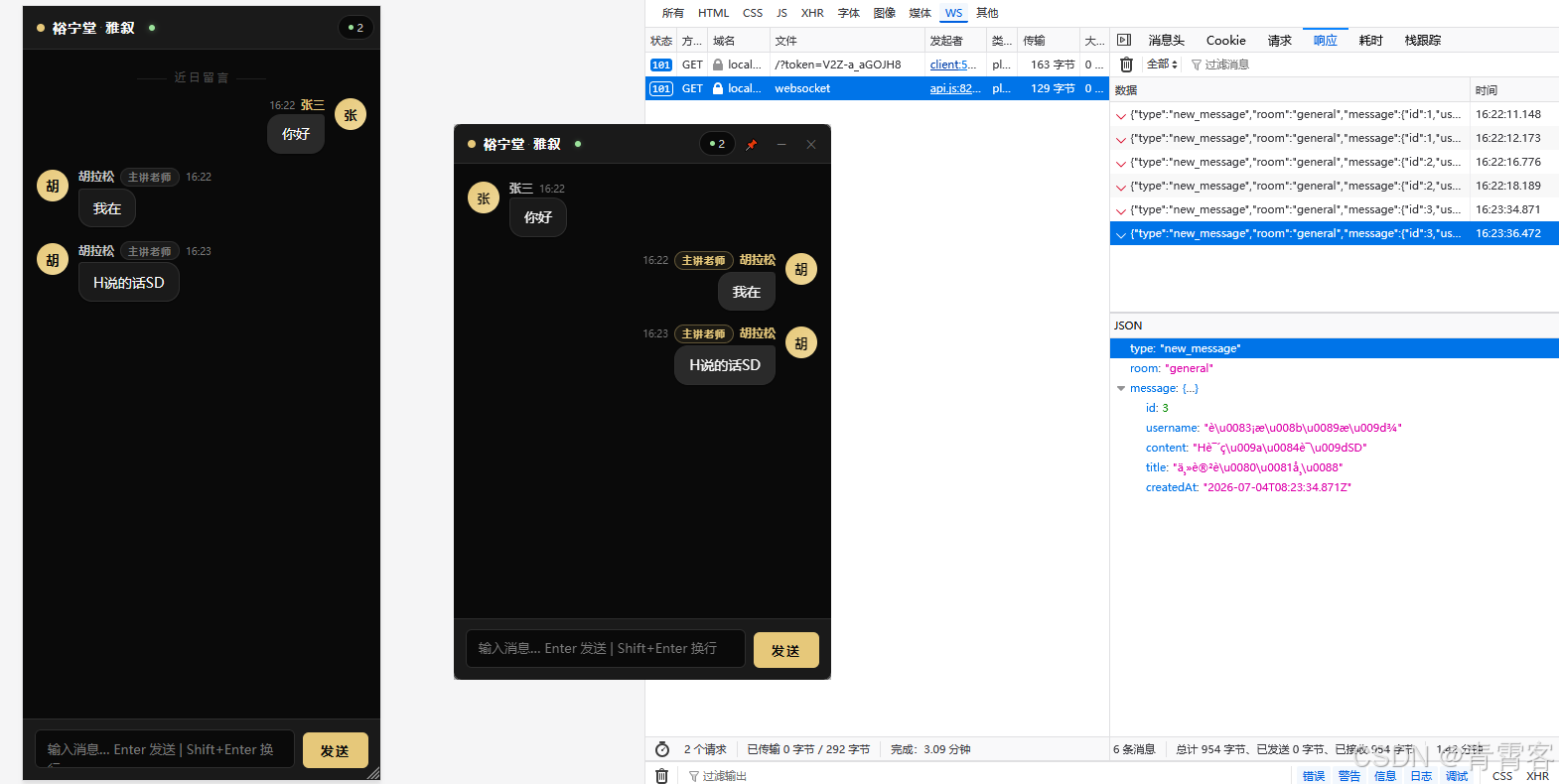
3.1 主进程:只做窗口管理和 IPC 转发
main.js 的核心逻辑:主进程不碰 WebSocket,只做 HTTP 请求转发 。渲染进程通过 contextBridge 暴露的 API 调用主进程,主进程再用 Node.js 原生 http 模块请求后端:
js
const { app, BrowserWindow, ipcMain, screen } = require('electron');
const path = require('path');
const http = require('http');

const SERVER_CONFIG = {
  httpHost: process.env.API_HOST || 'localhost',
  httpPort: parseInt(process.env.API_PORT || '11728', 10)
};

let loginWin = null;
let chatWin = null;
let currentUser = null;

function apiFetch(method, apiPath, body) {
  return new Promise((resolve, reject) => {
    const opts = {
      hostname: SERVER_CONFIG.httpHost,
      port: SERVER_CONFIG.httpPort,
      path: apiPath,
      method,
      headers: { 'Content-Type': 'application/json' }
    };
    const req = http.request(opts, (res) => {
      let data = '';
      res.on('data', (chunk) => { data += chunk; });
      res.on('end', () => {
        try { resolve(JSON.parse(data)); }
        catch (e) { resolve({ ok: false, error: '响应解析失败' }); }
      });
    });
    req.on('error', (e) => reject(e));
    if (body) req.write(JSON.stringify(body));
    req.end();
  });
}
渲染进程通过 preload.js 获得安全且受限的 API:
js
const { contextBridge, ipcRenderer } = require('electron');

contextBridge.exposeInMainWorld('api', {
  health: () => ipcRenderer.invoke('server:health'),
  login: (username, room, title) => ipcRenderer.invoke('chat:login', { username, room, title }),
  current: () => ipcRenderer.invoke('chat:current'),
  send: (username, room, content, title) =>
    ipcRenderer.invoke('chat:send', { username, room, content, title }),
  fetch: (room, sinceId) => ipcRenderer.invoke('chat:fetch', { room, sinceId }),
  recent: (room, limit) => ipcRenderer.invoke('chat:recent', { room, limit }),
  users: (room, minutes) => ipcRenderer.invoke('chat:users', { room, minutes }),
  getServerConfig: () => ipcRenderer.invoke('server:config'),
  minimize: () => ipcRenderer.invoke('win:minimize'),
  close: () => ipcRenderer.invoke('win:close'),
  toggleTop: () => ipcRenderer.invoke('win:toggleTop'),
});这种架构的好处:渲染进程与后端服务完全解耦 。渲染进程不知道后端在哪里,它只和主进程通信。切换后端地址只需要改环境变量 API_HOST / API_PORT,无需重新打包。
3.2 悬浮聊天窗
聊天窗口配置了 frame: false、transparent: true、alwaysOnTop: true:
js
function createChatWindow() {
  const { width: sw, height: sh } = screen.getPrimaryDisplay().workAreaSize;
  chatWin = new BrowserWindow({
    width: 380,
    height: 560,
    x: sw - 400,
    y: 60,
    frame: false,
    transparent: true,
    resizable: true,
    minWidth: 300,
    minHeight: 420,
    alwaysOnTop: true,
    skipTaskbar: false,
    backgroundColor: '#00000000',
    hasShadow: true,
    webPreferences: {
      preload: path.join(__dirname, 'preload.js'),
      contextIsolation: true,
      nodeIntegration: false
    }
  });
  chatWin.loadFile(path.join(__dirname, 'src', 'chat.html'));
}

function createLoginWindow() {
  loginWin = new BrowserWindow({
    width: 420, height: 520,
    resizable: false,
    maximizable: false,
    backgroundColor: '#0a0a0a',
    autoHideMenuBar: true,
    webPreferences: {
      preload: path.join(__dirname, 'preload.js'),
      contextIsolation: true,
      nodeIntegration: false
    }
  });
  loginWin.loadFile(path.join(__dirname, 'src', 'login.html'));
}

app.whenReady().then(() => { createLoginWindow(); });
app.on('window-all-closed', () => { app.quit(); });
这种窗口是直播场景的理想选择------悬浮在屏幕右上角,不遮挡主要内容区。用户还可以通过按钮切换 alwaysOnTop 状态:
js
// 窗口控制 IPC
ipcMain.handle('win:minimize', async () => { if (chatWin) chatWin.minimize(); });
ipcMain.handle('win:close', async () => { if (chatWin) chatWin.close(); });
ipcMain.handle('win:toggleTop', async () => {
  if (chatWin) {
    const top = chatWin.isAlwaysOnTop();
    chatWin.setAlwaysOnTop(!top);
    return !top;
  }
  return true;
});
3.3 客户端 WebSocket 连接
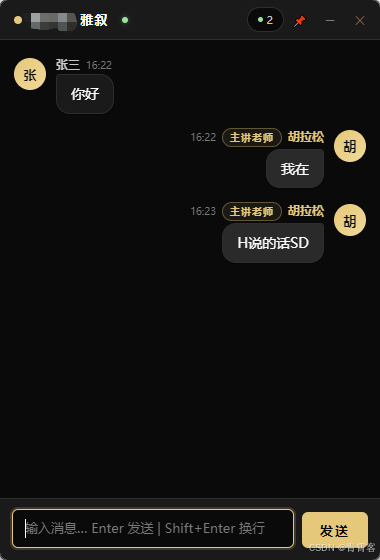
Electron 聊天窗口的 WebSocket 连接在渲染进程的 chat.js 中完成。与 Web 版不同,Electron 的 WebSocket 地址从主进程获取:
js
const $ = (id) => document.getElementById(id);
const connStatus = $('connStatus');
const messagesList = $('messagesList');
const msgInput = $('msgInput');
const btnSend = $('btnSend');

let currentUser = null;
let currentUserTitle = '';
let currentRoom = 'general';
let lastMsgId = 0;
let ws = null;
let wsReconnectTimer = null;

async function init() {
  const user = await window.api.current();
  if (user && user.username) {
    currentUser = user.username;
    currentUserTitle = user.title || '';
    currentRoom = user.room || 'general';
    await loadRecent();
    connectWebSocket();
    startUsersPoll();
  }
}

async function connectWebSocket() {
  if (ws && (ws.readyState === WebSocket.OPEN || ws.readyState === WebSocket.CONNECTING)) return;
  if (ws) { ws.close(); ws = null; }

  const config = await window.api.getServerConfig();
  const wsUrl = `ws://${config.httpHost}:${config.httpPort}/api/websocket`;
  ws = new WebSocket(wsUrl);

  ws.onopen = function() {
    if (connStatus) connStatus.className = 'conn-status ok';
  };

  ws.onmessage = function(evt) {
    try {
      const data = JSON.parse(evt.data);
      if (data.type === 'new_message' && data.message && data.room === currentRoom) {
        const msg = data.message;
        // 自己的消息已通过 sendMessage 立即显示,跳过避免重复
        if (msg.username !== currentUser && msg.id > lastMsgId) {
          appendMessage(msg, true);
          lastMsgId = msg.id;
          if (isNearBottom()) scrollToBottom();
        }
        if (msg.id > lastMsgId) lastMsgId = msg.id;
      }
    } catch (e) { console.error('[WS] 消息解析失败:', e); }
  };

  ws.onclose = function() {
    if (connStatus) connStatus.className = 'conn-status err';
    wsReconnectTimer = setTimeout(connectWebSocket, 5000);
  };

  ws.onerror = function() {
    if (connStatus) connStatus.className = 'conn-status err';
  };
}关键模式是乐观 UI 更新 + 跳过 WebSocket 回显:
发送消息 → POST /api/messages → 立即追加到 UI → 服务端广播 → 收到自己的广播 → 跳过这消除了 WebSocket 往返延迟,消息"秒显示"。而断线重连用简单的 5 秒定时器实现------够用且稳定。
js
async function sendMessage() {
  const content = msgInput.value.trim();
  if (!content || isSending) return;
  isSending = true;
  btnSend.disabled = true;

  const r = await window.api.send(currentUser, currentRoom, content, currentUserTitle);
  if (r && r.ok) {
    // 立即在 UI 中显示,不再依赖 WebSocket 广播
    const msg = {
      id: r.id || Date.now(),
      username: currentUser,
      content: content,
      title: currentUserTitle,
      createdAt: new Date().toISOString()
    };
    appendMessage(msg, true);
    if (msg.id > lastMsgId) lastMsgId = msg.id;
    scrollToBottom();
    msgInput.value = '';
  }

  isSending = false;
  btnSend.disabled = false;
  msgInput.focus();
}

// Enter 发送,Shift+Enter 换行
btnSend.addEventListener('click', sendMessage);
msgInput.addEventListener('keydown', function(e) {
  if (e.key === 'Enter' && !e.shiftKey) {
    e.preventDefault();
    sendMessage();
  }
});
3.4 消息渲染与样式
消息渲染区分自己、他人和系统消息:
js
function appendMessage(msg, animate) {
  const isSelf = msg.username === currentUser;
  const div = document.createElement('div');
  div.className = 'msg' + (isSelf ? ' self' : '');

  if (msg.username === '__system__') {
    div.classList.add('system');
    div.innerHTML = '<div class="body"><div class="bubble">' + escapeHtml(msg.content) + '</div></div>';
  } else {
    const titleHtml = (msg.title && msg.title !== '')
      ? '<span class="user-title">' + escapeHtml(msg.title) + '</span>'
      : '';
    div.innerHTML =
      '<div class="avatar">' + getInitials(msg.username) + '</div>' +
      '<div class="body">' +
        '<div class="meta">' +
          '<span class="uname' + (isSelf ? ' self' : '') + '">' + escapeHtml(msg.username) + '</span>' +
          titleHtml +
          '<span class="time">' + fmtTime(msg.createdAt) + '</span>' +
        '</div>' +
        '<div class="bubble">' + escapeHtml(msg.content) + '</div>' +
      '</div>';
  }

  if (!animate) div.style.animation = 'none';
  messagesList.appendChild(div);
}
四、Vue 3 网页客户端:同一套 UI 逻辑的 Composition API 实现
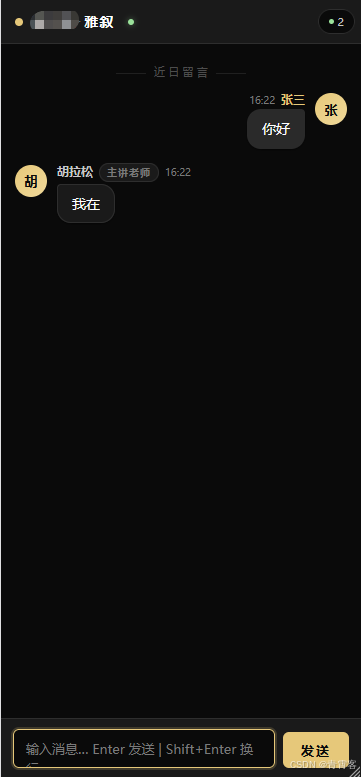
4.1 API 封装
web/src/api.js 统一管理 HTTP 和 WebSocket:
js
const API_HOST = import.meta.env.VITE_API_HOST || 'localhost'
const API_PORT = import.meta.env.VITE_API_PORT || '11728'
const BASE_URL = `http://${API_HOST}:${API_PORT}`
const WS_URL = `ws://${API_HOST}:${API_PORT}/api/websocket`

async function apiFetch(method, path, body) {
  const opts = {
    method,
    headers: { 'Content-Type': 'application/json' }
  }
  if (body) opts.body = JSON.stringify(body)
  const res = await fetch(`${BASE_URL}${path}`, opts)
  return res.json()
}

export async function health() { return apiFetch('GET', '/api/health') }
export async function login(username, room = 'general', title = '') {
  return apiFetch('POST', '/api/login', { username, room, title })
}
export async function sendMessage(username, room, content, title = '') {
  return apiFetch('POST', '/api/messages', { username, room, content, title })
}
export async function getRecentMessages(room = 'general', limit = 50) {
  const res = await apiFetch('GET', `/api/messages/recent?room=${encodeURIComponent(room)}&limit=${limit}`)
  return res.messages || []
}
export async function getMessagesSince(room = 'general', sinceId = 0) {
  const res = await apiFetch('GET', `/api/messages/since?room=${encodeURIComponent(room)}&sinceId=${sinceId}`)
  return res.messages || []
}
export async function getActiveUsers(room = 'general', minutes = 5) {
  const res = await apiFetch('GET', `/api/users/active?room=${encodeURIComponent(room)}&minutes=${minutes}`)
  return res.users || []
}

export function createWebSocket(onMessage, onStatusChange) {
  let ws = null, reconnectTimer = null, closed = false

  function connect() {
    if (closed) return
    ws = new WebSocket(WS_URL)
    ws.onopen = () => onStatusChange?.(true)
    ws.onmessage = (evt) => {
      try {
        const data = JSON.parse(evt.data)
        if (onMessage) onMessage(data)
      } catch (e) { console.error('[WS] 消息解析失败:', e) }
    }
    ws.onclose = () => {
      onStatusChange?.(false)
      if (!closed) reconnectTimer = setTimeout(connect, 5000)
    }
    ws.onerror = () => { onStatusChange?.(false) }
  }
  connect()
  return { close() { closed = true; clearTimeout(reconnectTimer); ws?.close() } }
}
4.2 组件逻辑
App.vue 使用 Composition API,登录和聊天在两个独立区域,由 loggedIn ref 切换:
vue
<script setup>
import { ref, reactive, computed, onMounted, onUnmounted, nextTick } from 'vue'
import * as api from './api.js'

// 登录状态
const loggedIn = ref(false)
const username = ref('')
const room = ref('general')
const title = ref('')
const loggingIn = ref(false)
const currentUsername = ref('')
const currentRoom = ref('general')
const currentTitle = ref('')

const brandIconText = computed(() => {
  const t = (title.value || '裕宁堂').trim()
  return t ? t.charAt(0) : '裕'
})

// WebSocket 状态
const wsConnected = ref(false)
let wsConnection = null

// 消息
const messages = reactive([])
const lastMsgId = ref(0)
const inputText = ref('')
const sending = ref(false)

// 在线用户
const onlineUsers = reactive([])
const showUsers = ref(false)
let usersTimer = null

// 登录
async function doLogin() {
  const name = username.value.trim()
  const rm = room.value.trim() || 'general'
  if (!name) return

  loggingIn.value = true
  try {
    const r = await api.login(name, rm, title.value.trim())
    if (r && r.ok) {
      currentUsername.value = name
      currentRoom.value = rm
      currentTitle.value = title.value.trim()
      loggedIn.value = true
      await loadMessages()
      initWebSocket()
      startUsersPoll()
    }
  } finally {
    loggingIn.value = false
  }
}

// WebSocket 消息处理
function initWebSocket() {
  wsConnection = api.createWebSocket(
    (data) => {
      if (data.type === 'new_message' && data.room === currentRoom.value) {
        const msg = data.message
        if (msg.username !== currentUsername.value && msg.id > lastMsgId.value) {
          messages.push(msg)
          lastMsgId.value = msg.id
          nextTick(() => { if (isNearBottom()) scrollToBottom() })
        }
        if (msg.id > lastMsgId.value) lastMsgId.value = msg.id
      }
    },
    (connected) => { wsConnected.value = connected }
  )
}

// 发送消息
async function sendMsg() {
  const content = inputText.value.trim()
  if (!content || sending.value) return

  sending.value = true
  try {
    const r = await api.sendMessage(currentUsername.value, currentRoom.value, content, currentTitle.value)
    if (r && r.ok) {
      const msg = {
        id: r.id || Date.now(),
        username: currentUsername.value,
        content: content,
        title: currentTitle.value,
        createdAt: new Date().toISOString()
      }
      messages.push(msg)
      if (msg.id > lastMsgId.value) lastMsgId.value = msg.id
      nextTick(() => scrollToBottom())
      inputText.value = ''
    }
  } finally {
    sending.value = false
  }
}

// 消息气泡用模板渲染
</script>
模板中区分自己/他人/系统消息:
html
<template>
  <div class="app-container">
    <!-- 登录视图 -->
    <div v-if="!loggedIn" class="login-wrap">
      <div class="brand-area">
        <div class="brand-icon">{{ brandIconText }}</div>
        <div class="brand-title">{{ title || '裕宁堂' }}</div>
        <div class="brand-subtitle">悬壶论道 · 即时相闻</div>
      </div>

      <div class="divider"></div>

      <div class="field">
        <label class="label">堂号标题</label>
        <input v-model="title" class="input" maxlength="16"
          placeholder="自定义堂号标题(留空即显示 裕宁堂)" />
      </div>
      <div class="field">
        <label class="label">用户名</label>
        <input v-model="username" class="input" maxlength="32"
          placeholder="请输入您的用户名" @keydown.enter="roomInput?.focus()" />
      </div>
      <div class="field">
        <label class="label">房间</label>
        <input v-model="room" class="input" maxlength="32"
          placeholder="留空即入总堂" @keydown.enter="doLogin" />
      </div>

      <button class="btn" @click="doLogin" :disabled="loggingIn">
        {{ loggingIn ? '进入中...' : '进入聊天' }}
      </button>

      <div class="footer">
        <span class="server-status">
          <span class="status-dot" :class="serverStatus"></span>
          <span class="status-text">{{ serverStatusText }}</span>
        </span>
      </div>

      <div class="copyright">{{ title || '裕宁雅集' }} · 共话乾坤</div>
    </div>

    <!-- 聊天视图 -->
    <div v-else class="chat-view">
      <!-- 标题栏 -->
      <div class="chat-titlebar">
        <div class="chat-brand">
          <span class="brand-indicator"></span>
          <span class="chat-title">{{ title || '裕宁堂' }}<span class="sep">·</span>雅叙</span>
          <span class="conn-led" :class="wsConnected ? 'on' : 'off'"></span>
        </div>
        <div class="chat-actions">
          <span class="online-badge" @click="toggleUsers" title="在线用户">
            <span class="dot"></span>
            <span>{{ onlineUsers.length }}</span>
          </span>
        </div>
      </div>

      <!-- 消息列表 -->
      <div class="messages-wrap" ref="messagesWrap">
        <div v-if="messages.length === 0" class="empty-hint">...</div>
        <div v-else>
          <div class="divider-text">近 日 留 言</div>
          <div v-for="msg in messages" :key="msg.id" class="msg"
            :class="{ self: msg.username === currentUsername, system: msg.username === '__system__' }">
            <template v-if="msg.username !== '__system__'">
              <div class="avatar">{{ msg.username.charAt(0).toUpperCase() }}</div>
              <div class="body">
                <div class="meta">
                  <span class="uname" :class="{ self: msg.username === currentUsername }">{{ msg.username }}</span>
                  <span v-if="msg.title" class="user-title">{{ msg.title }}</span>
                  <span class="time">{{ formatTime(msg.createdAt) }}</span>
                </div>
                <div class="bubble">{{ msg.content }}</div>
              </div>
            </template>
            <template v-else>
              <div class="body"><div class="bubble system-msg">{{ msg.content }}</div></div>
            </template>
          </div>
        </div>
        <div ref="scrollAnchor"></div>
      </div>

      <!-- 输入栏 -->
      <div class="inputbar">
        <textarea v-model="inputText" class="msg-input" rows="1"
          placeholder="输入消息... Enter 发送 | Shift+Enter 换行"
          @keydown="onInputKeydown" @input="autoResize"></textarea>
        <button class="btn-send" @click="sendMsg" :disabled="sending">发送</button>
      </div>
    </div>
  </div>
</template>
五、统一暗色主题 UI
整个系统采用一致的设计语言:金色(#e6c87a)+ 深黑(#0a0a0a),灵感来自传统中医美学。
CSS 变量体系贯穿 Electron 和 Web 两端:
css
:root {
  --primary: #e6c87a;
  --primary-light: #f0dca0;
  --primary-bg: rgba(230, 200, 122, 0.12);
  --accent: #d4b870;
  --bg: #0a0a0a;
  --surface: #1a1a1a;
  --border: rgba(255, 255, 255, 0.06);
  --text: #ffffff;
  --text-secondary: rgba(255, 255, 255, 0.75);
  --text-muted: rgba(255, 255, 255, 0.35);
  --radius: 12px;
  --radius-sm: 8px;
  --radius-full: 999px;
  --shadow-sm: 0 1px 3px rgba(0, 0, 0, 0.3);
  --shadow-lg: 0 8px 32px rgba(0, 0, 0, 0.5);
}
消息气泡的设计区分:
- 自己发的:金色背景,右对齐,右上角直角
- 别人发的:暗色背景,左对齐,左上角直角
- 系统消息:居中灰色,无头像,无边框
css
.msg {
  display: flex;
  gap: 10px;
  margin-bottom: 14px;
  animation: msgIn 0.2s ease-out;
}
.msg .avatar {
  width: 32px; height: 32px;
  border-radius: 50%;
  background: linear-gradient(135deg, var(--primary), var(--primary-light));
  display: flex;
  align-items: center;
  justify-content: center;
  font-size: 13px;
  font-weight: 700;
  color: #0a0a0a;
  flex-shrink: 0;
}
.msg .body .bubble {
  display: inline-block;
  background: var(--surface);
  border: 1px solid var(--border);
  border-radius: 4px 14px 14px 14px;
  padding: 8px 14px;
  font-size: 14px;
  line-height: 1.55;
  color: var(--text);
  max-width: 100%;
  word-break: break-word;
}

.msg.self {
  flex-direction: row-reverse;
}
.msg.self .body .bubble {
  background: var(--primary-bg);
  border-color: transparent;
  border-radius: 14px 4px 14px 14px;
}
.msg.self .body .meta {
  flex-direction: row-reverse;
}

.msg.system {
  justify-content: center;
}
.msg.system .avatar { display: none; }
.msg.system .body .bubble {
  background: transparent;
  border-color: transparent;
  color: var(--text-muted);
  font-size: 11px;
  text-align: center;
}
六、Docker 一键部署
整个系统通过 docker-compose.yml 一键启动:
yaml
version: '3.8'

services:
  server:
    build: ./server
    container_name: live-chat-server
    ports:
      - "11728:11728"
    environment:
      HTTP_PORT: "11728"
      DB_FILE: "/app/data/live_chat.sqlite"
    volumes:
      - server_data:/app/data
    restart: unless-stopped

  web:
    build: ./web
    container_name: live-chat-web
    ports:
      - "80:80"
    depends_on:
      - server
    restart: unless-stopped

volumes:
  server_data:
服务器端 Dockerfile:
dockerfile
FROM node:18-alpine
RUN apk add --no-cache python3 make g++
WORKDIR /app
COPY package*.json ./
RUN npm install --production
COPY . .
RUN mkdir -p /app/data
VOLUME ["/app/data"]
EXPOSE 11728
CMD ["node", "index.js"]
Web 端 Dockerfile(多阶段构建):
dockerfile
FROM node:18-alpine AS builder
WORKDIR /app
COPY package*.json ./
RUN npm install
COPY . .
RUN npm run build

FROM nginx:alpine
COPY --from=builder /app/dist /usr/share/nginx/html
COPY nginx.conf /etc/nginx/conf.d/default.conf
EXPOSE 80
CMD ["nginx", "-g", "daemon off;"]
Nginx 同时代理静态文件和 API(含 WebSocket 升级):
nginx
server {
    listen 80;
    root /usr/share/nginx/html;
    index index.html;

    location / {
        try_files $uri $uri/ /index.html;
    }

    location /api/ {
        proxy_pass http://server:11728;
        proxy_http_version 1.1;
        proxy_set_header Upgrade $http_upgrade;
        proxy_set_header Connection "upgrade";
        proxy_set_header Host $host;
        proxy_set_header X-Real-IP $remote_addr;
    }
}
七、技术亮点总结
| 设计 | 解决的问题 |
|---|---|
| HTTP + WebSocket 单端口 | 简化部署,只需开一个端口;Nginx 代理也只需配一个 location |
| SQLite 双驱动适配 | 兼容 Node 22.5+ 内置驱动和 better-sqlite3,零外部依赖 |
| Electron IPC 中转架构 | 渲染进程安全隔离,后端地址变更无需重打包 |
| 乐观 UI + 广播跳过 | 消除发送消息的感知延迟,避免消息重复 |
| 后台轮询兜底 | 覆盖非标准途径写入的消息(管理员后台、直接 DB 操作) |
| SQL 聚合算活跃用户 | 避免 WebSocket 心跳复杂度,天然获得发言频次统计 |
| CSS 变量统一主题 | Electron 和 Web 两端 UI 完全一致,一次设计到处复用 |
| 单表 SQLite 设计 | 无需 MySQL / PostgreSQL,一个 SQLite 文件搞定所有数据 |
| 自动重连机制 | 5 秒定时重连,断线后自动恢复,用户无感知 |
八、上手体验
bash
# 启动后端
cd server
npm install
npm start

# 启动 Electron 桌面端(另一个终端,项目根目录)
npm install
npm start

# 启动 Web 端(另一个终端)
cd web
npm install
npm run dev
浏览器访问 http://localhost:5203,或直接使用桌面悬浮窗,即可开始实时聊天。
总结
这个项目展示了如何用最精简的技术栈搭建一个生产可用的实时聊天系统。没有 Redis,没有 MySQL,没有 Kubernetes------一个 Node.js 进程 + 一个 SQLite 文件 + 一个 Nginx 容器,就支撑了桌面端和 Web 端的实时通信。
代码量上,server 目录约 600 行,Electron 客户端约 600 行,Vue 3 客户端约 900 行------总代码量 2100 行出头。对于希望快速拥有自托管聊天系统的团队来说,这是一个轻量而完整的起点。
几个关键设计值得在任何实时应用中借鉴:
- 单端口 HTTP + WebSocket------减少部署复杂度,降低容器编排成本
- 乐观 UI 更新------用户感知到的延迟 = API 延迟,而不是 WebSocket 往返
- 纯 SQL 驱动的活跃度计算------不需要额外的心跳系统,复用业务数据即可
- 跨端一致的 UI 主题------CSS 变量使得 Electron 和 Web 端的 UI 完全统一
本文原创,原创不易,如需转载,请联系作者授权。