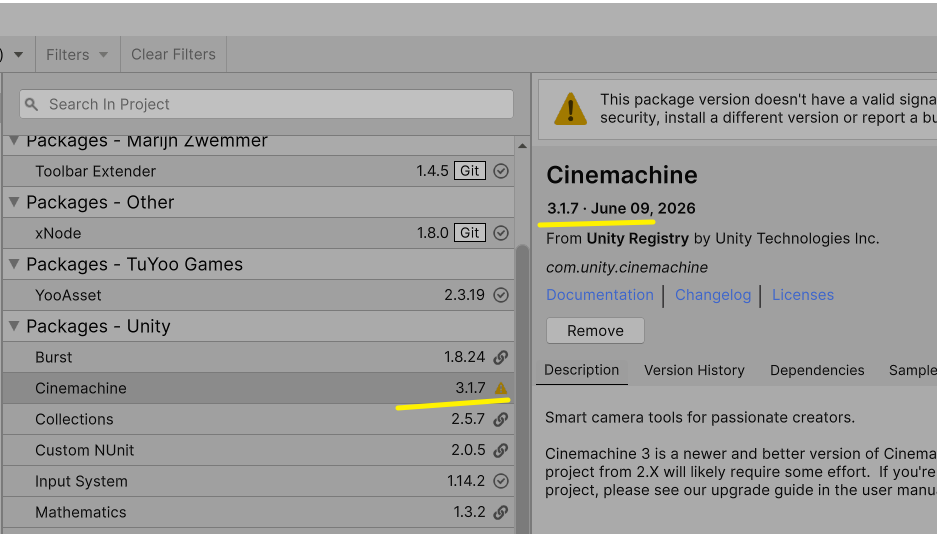
AI建议用3.0
1. 反射缓存(最常见)
CinemachineBrain 内部大量用反射查找组件,每次 LateUpdate 都在做:
// Cinemachine 内部简化
foreach (var vcam in allVirtualCameras)
{
    var components = vcam.GetComponents<Component>();  // ← 每帧调,有 GC
    foreach (var c in components)
    {
        var type = c.GetType();                       // ← 反射
        var method = type.GetMethod("ProcessCamera"); // ← 反射
        method.Invoke(c, null);                       // ← 装箱 GC
    }
}
2. 临时变量和协程
// Cinemachine 内部 LateUpdate 里创建大量临时变量
void LateUpdate()
{
    var cameraPos = new Vector3();        // ← struct
    var lookAtPos = new Vector3();        // ← struct
    var damping = new List<float>();      // ← 每帧 new List
    var rotations = new Quaternion[3];    // ← 每帧 new Array
    // ...
}
Profiler 中表现
CinemachineBrain.LateUpdate
  ├─ GetComponents<CinemachineVirtualCameraBase>()  2.1KB  GC
  ├─ List<VirtualCamera>.Add()                      0.8KB  GC
  ├─ CalculateLookAtDampingStyles()                 0.5KB  GC
  └─ UpdateVirtualCameras()
       └─ BlendRoot.Create()                        0.3KB  GC
   ------
  GC Alloc: 3-5KB/frame  Time: 0.5-1ms
解决方案
最直接:升级 Cinemachine
旧版 Cinemachine (2.x) GC 问题严重。Cinemachine 3.x 重写了内部架构,缓存了反射
# package.json
"com.unity.cinemachine": "3.0.0"  ← 2.x 升 3.x
GC 从每帧 3-5KB 降到几乎 0。
如果不能升级:减少 vcam 数量
// 不用的 vcam 必须禁用
vcam.Priority = 0;   // 不够,Priority=0 仍然会被 Brain 遍历
vcam.enabled = false; // 必须 enabled = false
Brain 遍历所有启用的 vcam,数量越少 GC 越少。
除了Camera 可能还有Cloth 的问题
留个尾巴
Packagemanager 安装
- Package Manager 安装 Cinemachine(如果是新版用 Cinemachine 3.x)
- Hierarchy 右键 → Cinemachine → Virtual Camera ,会自动生成一个
CM vcam1和Main Camera上的CinemachineBrain - 选中
CM vcam1,Inspector 里:- Follow → 拖入玩家 GameObject
- LookAt → 拖入玩家 GameObject
- 选 Body 的绑定模式(推荐 Framing Transposer + Screen Space)
- 运行,摄像机跟随
总共 3 步:装包 → 建 vcam → 拖 Follow/LookAt。
Visual Camera配置参数(按以下结构)
项目用的是 CinemachineVirtualCamera + CinemachinePOV,Follow/LookAt 分离。适合 ARPG 的合理配置如下:
场景结构
直接绑定骨骼为什么不好?骨骼点已经很多拉,一个腰部,一个头部,正好不是?
但其实还是创建独立结构比较好,原因不说了
Player (角色)
├── vcamFollow  (空物体,放在角色胸口高度)
└── vcamLookAt  (空物体,放在角色头部稍上方)
vcam 推荐配置
Lens:
- Field of View: 40-50(ARPG 不用太广,40 偏电影感,50 偏常规)
Body → Framing Transposer:
- Tracked Object Offset: (0, 1.5, 0) (跟随点抬高到胸口)
- Camera Distance: 5-6
- Dead Zone Width: 0.15(角色在中间 15% 范围内移动不触发摄像机位移)
- Dead Zone Height: 0.2
- X Damping: 1.5
- Y Damping: 1.5
- Z Damping: 0.5(Z 跟快一点,避免拉近拉远延迟)
Aim → POV:
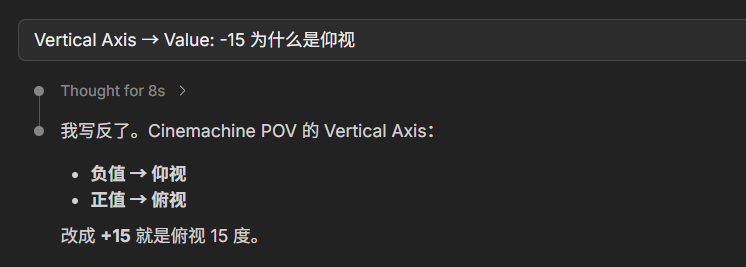
- Vertical Axis → Value: -15(俯视 15 度,ARPG 标准俯角)
- Vertical Axis → Range: Min -40 , Max 10
- Horizontal Axis → Range: Min -60 , Max 60
- H Recenter Target: Target(松开摇杆后回正)
- H Recenter Speed: 3
- V Recenter Target: Target
- V Recenter Speed: 3
CinemachineInputProvider:
- Horizontal Axis → Input Axis Name: Mouse X
- Vertical Axis → Input Axis Name: Mouse Y
快速手动步骤
- 建 2 个空物体
vcamFollow/vcamLookAt,放在角色身上,高度分别约 1.2 / 1.6 - 建 vcam,Follow 拖
vcamFollow,LookAt 拖vcamLookAt - Body 选 Framing Transposer,按上面配
- Aim 选 POV,按上面配
- 加 CinemachineInputProvider 组件,绑鼠标轴
这套配置的效果:摄像机在角色后上方 5-6 米,俯视 15 度,鼠标控制水平/垂直旋转,松手回正。
问题1Update()事件内的代码
-
这行代码在每帧都将
lookAtVector重置为(0, lookAtHeight, 0) -
然后立即在
LookAt中使用它 -
这完全没必要,因为:
-
如果
lookAtHeight是常数,应该在Start/Awake中初始化一次 -
如果
lookAtHeight需要变化,应该单独控制,而不是每帧重置
-
最终修改代码:
cs
private Vector3 lookAtVector;

//修改为

private Vector3 lookAtVector => new Vector3(0,lookAtHeight,0);问题2:Time.fixedDeltaTime 使用不当
csharp
cs
currentHeight = Mathf.Lerp(currentHeight, wantedHeight, heightDamping * Time.fixedDeltaTime);-
在
LateUpdate中使用Time.fixedDeltaTime而不是Time.deltaTime -
LateUpdate每帧调用,应该使用Time.deltaTime -
Time.fixedDeltaTime用于FixedUpdate中的物理计算
应该改为:
csharp
cs
currentHeight = Mathf.Lerp(currentHeight, wantedHeight, heightDamping * Time.deltaTime);问题3:Mathf.SmoothDampAngle 用于距离计算
csharpCode
usedDistance = Mathf.SmoothDampAngle(usedDistance, distance, ref zVelocity, 0.1f);-
SmoothDampAngle是专门处理角度(处理360°环绕)的 -
用于距离计算可能不合适,应该用
Mathf.SmoothDamp
应该改为:
csharpCode
usedDistance = Mathf.SmoothDamp(usedDistance, distance, ref zVelocity, 0.1f);参考:
对应的 API 变化
| 2.x | 3.x |
|---|---|
| CinemachineVirtualCamera | CinemachineCamera |
| GetCinemachineComponent<CinemachinePOV>() | GetCinemachineComponent(CinemachineCore.Stage.Aim) 或直接 GetComponent<CinemachinePOV>() |
| AddCinemachineComponent<CinemachinePOV>() | gameObject.AddComponent<CinemachinePOV>() |
| DestroyCinemachineComponent<CinemachineComposer>() | DestroyImmediate(GetComponent<CinemachineComposer>()) |
| CinemachineFramingTransposer | CinemachineFramingTransposer(保留)或 CinemachinePositionComposer |
| CinemachineInputProvider | CinemachineInputAxisController |