版权声明:© 2026 梦帮集团 (Mengbang Group). All rights reserved.
作者:梦帮集团量化交易系统研发团队
发布时间:2026年7月6日
警告:币圈有风险,投资需谨慎
摘要
随着去中心化预测市场(如 Polymarket)的爆发式增长,高频套利与流动性做市成为了量化交易领域的新战场。然而,预测市场独特的链上交易机制、CLOB(限价订单簿)的延迟特性以及全球分布的数据源,对量化交易系统的实时性、并发能力和数据一致性提出了严苛的考验。
本文深度剖析了 GRAVIS v4.0 ------ 由梦帮集团研发的基于 Web 架构的极速套利与实时交易系统的整体设计与实现方案。文章详细讲解了如何基于 Node.js 构建双路高并发数据管道,如何利用 Vite 中间件打通前后端本地数据流,以及如何利用 React 19 构建极具视觉震撼力的高科技暗黑交易终端大屏。本文包含大量生产级核心代码与系统架构图,旨在为 Web3 量化交易系统的开发者提供一份详尽的实战指南。
1. 业务背景与系统愿景
1.1 预测市场套利的机会与挑战
预测市场(Prediction Markets)允许用户对未来事件的发生概率进行压注。由于不同平台(如 Polymarket 与 Kalshi)之间、预测价格与标的资产实际价格之间、以及不同交割时间点之间存在信息差,形成了巨大的无风险或低风险套利空间。
然而,在 Web 架构下,实现高频套利面临三大核心挑战:
- 网络延迟与 GFW 阻断:国内量化团队在直连 Binance WS 价格源或 Polymarket CLOB API 时,常因网络拥堵或拦截导致上百毫秒的延迟,丧失套利先机。
- 多路数据流并发冲突:Binance 现货价格流(Ticker)、Polymarket 盘口深度流(Book)、AI 决策建议(CoT)以及账户资产(Equity)四路数据高频并发涌入前端,极易导致浏览器渲染线程阻塞甚至卡死。
- 数据流吞吐与渲染失衡:高频数据推送与 React 状态更新机制冲突,容易产生严重的"白屏"、"闪退"或数据呈现NaN等运行时崩溃问题。
1.2 GRAVIS v4.0 的定位
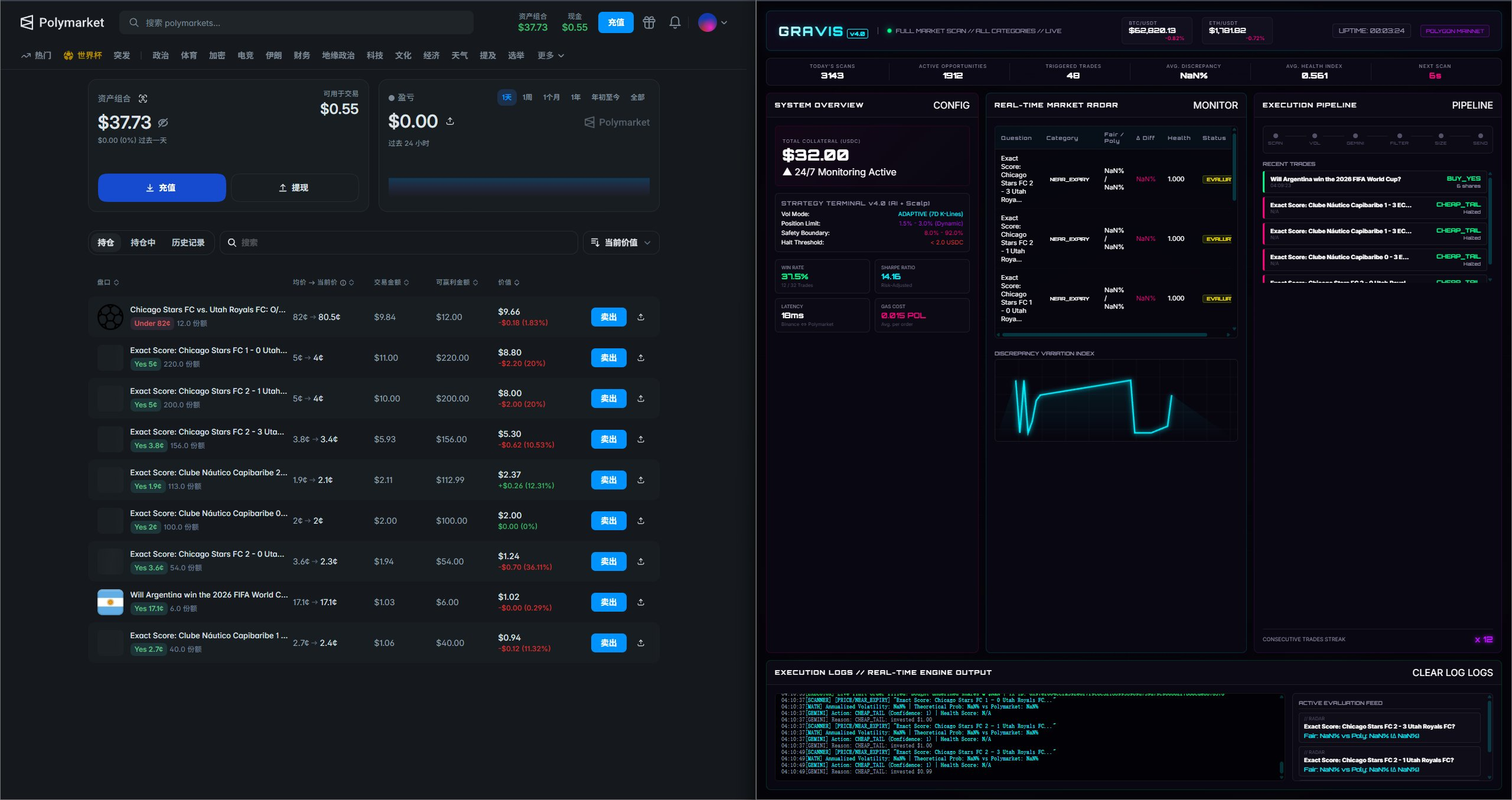
GRAVIS v4.0 定位为高可用、低延迟、强视觉呈现的 Web 交易大屏系统。它采用"本地 Node.js 扫盘引擎 + 浏览器 React 渲染终端"的双端解耦架构。
- 扫盘引擎:在后台进行 7×24 小时高频扫描,计算公允价格,并通过 WebSocket (8787端口) 和本地 JSON 文件双写通道向前端输送原始数据。
- React 终端:专注于多通道数据的高性能渲染,提供盘口深度图、AI 思维链(Chain of Thought)打字机、最近成交以及持仓 PnL 走势图,帮助交易员进行实时决策监控。
2. 系统架构设计
GRAVIS v4.0 的整体架构采用多源输入、统一汇聚、低延迟分发、声明式渲染的流水线设计。
#mermaid-svg-YHR58D3cy5sPW0Sx{font-family:"trebuchet ms",verdana,arial,sans-serif;font-size:16px;fill:#333;}@keyframes edge-animation-frame{from{stroke-dashoffset:0;}}@keyframes dash{to{stroke-dashoffset:0;}}#mermaid-svg-YHR58D3cy5sPW0Sx .edge-animation-slow{stroke-dasharray:9,5!important;stroke-dashoffset:900;animation:dash 50s linear infinite;stroke-linecap:round;}#mermaid-svg-YHR58D3cy5sPW0Sx .edge-animation-fast{stroke-dasharray:9,5!important;stroke-dashoffset:900;animation:dash 20s linear infinite;stroke-linecap:round;}#mermaid-svg-YHR58D3cy5sPW0Sx .error-icon{fill:#552222;}#mermaid-svg-YHR58D3cy5sPW0Sx .error-text{fill:#552222;stroke:#552222;}#mermaid-svg-YHR58D3cy5sPW0Sx .edge-thickness-normal{stroke-width:1px;}#mermaid-svg-YHR58D3cy5sPW0Sx .edge-thickness-thick{stroke-width:3.5px;}#mermaid-svg-YHR58D3cy5sPW0Sx .edge-pattern-solid{stroke-dasharray:0;}#mermaid-svg-YHR58D3cy5sPW0Sx .edge-thickness-invisible{stroke-width:0;fill:none;}#mermaid-svg-YHR58D3cy5sPW0Sx .edge-pattern-dashed{stroke-dasharray:3;}#mermaid-svg-YHR58D3cy5sPW0Sx .edge-pattern-dotted{stroke-dasharray:2;}#mermaid-svg-YHR58D3cy5sPW0Sx .marker{fill:#333333;stroke:#333333;}#mermaid-svg-YHR58D3cy5sPW0Sx .marker.cross{stroke:#333333;}#mermaid-svg-YHR58D3cy5sPW0Sx svg{font-family:"trebuchet ms",verdana,arial,sans-serif;font-size:16px;}#mermaid-svg-YHR58D3cy5sPW0Sx p{margin:0;}#mermaid-svg-YHR58D3cy5sPW0Sx .label{font-family:"trebuchet ms",verdana,arial,sans-serif;color:#333;}#mermaid-svg-YHR58D3cy5sPW0Sx .cluster-label text{fill:#333;}#mermaid-svg-YHR58D3cy5sPW0Sx .cluster-label span{color:#333;}#mermaid-svg-YHR58D3cy5sPW0Sx .cluster-label span p{background-color:transparent;}#mermaid-svg-YHR58D3cy5sPW0Sx .label text,#mermaid-svg-YHR58D3cy5sPW0Sx span{fill:#333;color:#333;}#mermaid-svg-YHR58D3cy5sPW0Sx .node rect,#mermaid-svg-YHR58D3cy5sPW0Sx .node circle,#mermaid-svg-YHR58D3cy5sPW0Sx .node ellipse,#mermaid-svg-YHR58D3cy5sPW0Sx .node polygon,#mermaid-svg-YHR58D3cy5sPW0Sx .node path{fill:#ECECFF;stroke:#9370DB;stroke-width:1px;}#mermaid-svg-YHR58D3cy5sPW0Sx .rough-node .label text,#mermaid-svg-YHR58D3cy5sPW0Sx .node .label text,#mermaid-svg-YHR58D3cy5sPW0Sx .image-shape .label,#mermaid-svg-YHR58D3cy5sPW0Sx .icon-shape .label{text-anchor:middle;}#mermaid-svg-YHR58D3cy5sPW0Sx .node .katex path{fill:#000;stroke:#000;stroke-width:1px;}#mermaid-svg-YHR58D3cy5sPW0Sx .rough-node .label,#mermaid-svg-YHR58D3cy5sPW0Sx .node .label,#mermaid-svg-YHR58D3cy5sPW0Sx .image-shape .label,#mermaid-svg-YHR58D3cy5sPW0Sx .icon-shape .label{text-align:center;}#mermaid-svg-YHR58D3cy5sPW0Sx .node.clickable{cursor:pointer;}#mermaid-svg-YHR58D3cy5sPW0Sx .root .anchor path{fill:#333333!important;stroke-width:0;stroke:#333333;}#mermaid-svg-YHR58D3cy5sPW0Sx .arrowheadPath{fill:#333333;}#mermaid-svg-YHR58D3cy5sPW0Sx .edgePath .path{stroke:#333333;stroke-width:2.0px;}#mermaid-svg-YHR58D3cy5sPW0Sx .flowchart-link{stroke:#333333;fill:none;}#mermaid-svg-YHR58D3cy5sPW0Sx .edgeLabel{background-color:rgba(232,232,232, 0.8);text-align:center;}#mermaid-svg-YHR58D3cy5sPW0Sx .edgeLabel p{background-color:rgba(232,232,232, 0.8);}#mermaid-svg-YHR58D3cy5sPW0Sx .edgeLabel rect{opacity:0.5;background-color:rgba(232,232,232, 0.8);fill:rgba(232,232,232, 0.8);}#mermaid-svg-YHR58D3cy5sPW0Sx .labelBkg{background-color:rgba(232, 232, 232, 0.5);}#mermaid-svg-YHR58D3cy5sPW0Sx .cluster rect{fill:#ffffde;stroke:#aaaa33;stroke-width:1px;}#mermaid-svg-YHR58D3cy5sPW0Sx .cluster text{fill:#333;}#mermaid-svg-YHR58D3cy5sPW0Sx .cluster span{color:#333;}#mermaid-svg-YHR58D3cy5sPW0Sx div.mermaidTooltip{position:absolute;text-align:center;max-width:200px;padding:2px;font-family:"trebuchet ms",verdana,arial,sans-serif;font-size:12px;background:hsl(80, 100%, 96.2745098039%);border:1px solid #aaaa33;border-radius:2px;pointer-events:none;z-index:100;}#mermaid-svg-YHR58D3cy5sPW0Sx .flowchartTitleText{text-anchor:middle;font-size:18px;fill:#333;}#mermaid-svg-YHR58D3cy5sPW0Sx rect.text{fill:none;stroke-width:0;}#mermaid-svg-YHR58D3cy5sPW0Sx .icon-shape,#mermaid-svg-YHR58D3cy5sPW0Sx .image-shape{background-color:rgba(232,232,232, 0.8);text-align:center;}#mermaid-svg-YHR58D3cy5sPW0Sx .icon-shape p,#mermaid-svg-YHR58D3cy5sPW0Sx .image-shape p{background-color:rgba(232,232,232, 0.8);padding:2px;}#mermaid-svg-YHR58D3cy5sPW0Sx .icon-shape .label rect,#mermaid-svg-YHR58D3cy5sPW0Sx .image-shape .label rect{opacity:0.5;background-color:rgba(232,232,232, 0.8);fill:rgba(232,232,232, 0.8);}#mermaid-svg-YHR58D3cy5sPW0Sx .label-icon{display:inline-block;height:1em;overflow:visible;vertical-align:-0.125em;}#mermaid-svg-YHR58D3cy5sPW0Sx .node .label-icon path{fill:currentColor;stroke:revert;stroke-width:revert;}#mermaid-svg-YHR58D3cy5sPW0Sx :root{--mermaid-font-family:"trebuchet ms",verdana,arial,sans-serif;} 前端渲染终端 (Vite + React 19)
后端引擎 (GRAVIS Engine - Node.js)
外部数据源 (External Sources)
BTC/ETH Ticker
Book Depth / Trades
AI CoT Reasoning
双写数据
双写数据
wss://
HTTP Get 4s
Context Provider
State Update
Binance Spot WS
GRAVIS Engine
Polymarket CLOB API
DeepSeek / Gemini API
WebSocket Server :8787
Local JSON Storage
SocketManager / Live Data
Vite Proxy / Historical Data
React 19 UI Dashboard
2.1 数据流管线设计
为了保障极速响应,GRAVIS v4.0 划分了 7 条独立的数据管线,实现数据流的"井水不犯河水":
- Binance Spot Ticker Line:通过 WebSocket 直连,频率为 100ms/次,用于获取大盘即时波动率。
- Polymarket Book Depth Line:获取指定预测市场的买卖单深度。
- AI CoT Stream Line:输出大模型在决策时的"思维链"文本,引导交易员理解 AI 下单动机。
- Execution Pipeline Line:追踪一笔订单从"口袋发现 -> 波动校验 -> 估值 -> 安全过滤 -> 签名 -> 路由结算"的六阶段生命周期。
- Equity Balance Line:实时推送代理钱包(Proxy Wallet)和 EOA 钱包的 USDC 余额及 Matic 余额。
- Recent Trades Line:记录最近成交历史。
- PnL & Journal Line :通过 4 秒一次的 HTTP 轮询,增量读取
trade_journal.json并重构资金曲线。
3. 后端极速扫盘与 WebSocket 广播中心实现
在 v4.0 架构中,后端基于 Node.js 异步非阻塞特性构建。以下是其 WebSocket 广播中心与多通道订阅机制的核心实现代码。
3.1 WebSocket 广播服务器实现 (ws_server.js)
javascript
// file: bot/src/execution/ws_server.js
const { WebSocketServer } = require('ws');

class GravisWsServer {
    constructor(port = 8787) {
        this.port = port;
        this.wss = null;
        this.clients = new Set();
        // 消息缓存,防止新客户端加入时首屏白屏
        this.cache = {
            book: null,
            cot: [],
            pipeline: null,
            equity: null
        };
    }

    start() {
        this.wss = new WebSocketServer({ port: this.port });
        console.log(`[GRAVIS WS] Server listening on ws://0.0.0.0:${this.port}`);

        this.wss.on('connection', (ws) => {
            this.clients.add(ws);
            console.log(`[GRAVIS WS] Client connected. Active clients: ${this.clients.size}`);

            // 接入时,立即向其发送最新缓存数据
            this.sendCachedData(ws);

            ws.on('close', () => {
                this.clients.delete(ws);
                console.log(`[GRAVIS WS] Client disconnected. Active clients: ${this.clients.size}`);
            });

            ws.on('error', (err) => {
                console.error(`[GRAVIS WS] Client error:`, err);
                this.clients.delete(ws);
            });
        });
    }

    sendCachedData(ws) {
        if (this.cache.book) ws.send(JSON.stringify({ channel: 'book', data: this.cache.book }));
        if (this.cache.equity) ws.send(JSON.stringify({ channel: 'equity', data: this.cache.equity }));
        if (this.cache.pipeline) ws.send(JSON.stringify({ channel: 'pipeline', data: this.cache.pipeline }));

        // 增量发送 CoT 缓存
        this.cache.cot.forEach(msg => {
            ws.send(JSON.stringify({ channel: 'cot', data: msg }));
        });
    }

    // 广播方法:分发通道数据
    broadcast(channel, data) {
        // 更新缓存
        if (channel === 'cot') {
            this.cache.cot.push(data);
            if (this.cache.cot.length > 50) this.cache.cot.shift(); // 维持 50 条滚动限制
        } else {
            this.cache.book = data;
        }

        const payload = JSON.stringify({ channel, data });
        for (let client of this.clients) {
            if (client.readyState === 1) { // OPEN
                client.send(payload);
            }
        }
    }

    shutdown() {
        console.log(`[GRAVIS WS] Shutting down WebSocket server...`);
        for (let client of this.clients) {
            client.close(1000, "Server shutdown");
        }
        this.wss.close();
    }
}

module.exports = GravisWsServer;
3.2 扫盘引擎核心逻辑与数据写入 (engine.js)
扫盘引擎负责周期性抓取数据,计算差价,触发 AI 评估,并将结果写入本地 JSON。
javascript
// file: bot/src/engine.js
const fs = require('fs');
const path = require('path');
const GravisWsServer = require('./execution/ws_server');
class TradingEngine {
constructor(config) {
this.config = config;
this.wsServer = new GravisWsServer(8787);
this.logDir = path.resolve(__dirname, '../logs');
this.journalPath = path.join(this.logDir, 'trade_journal.json');
this.portfolioPath = path.join(this.logDir, 'portfolio.json');
this.isTrading = false;
}
async init() {
if (!fs.existsSync(this.logDir)) {
fs.mkdirSync(this.logDir, { recursive: true });
}
this.wsServer.start();
console.log("[Engine] Gravis Engine Initialized.");
}
// 周期性扫盘主循环
async runSweepCycle() {
try {
console.log(`[Engine] Starting sweep cycle at ${new Date().toISOString()}`);
// 1. 模拟抓取盘口数据
const bookData = {
timestamp: Date.now(),
asks: [["0.52", "1500"], ["0.53", "2400"]],
bids: [["0.48", "900"], ["0.47", "1800"]],
midPrice: 0.50
};
this.wsServer.broadcast('book', bookData);
// 2. 模拟 AI 决策与思维链输出
const cotReasoning = `[🕵️数据收集] 已加载历史市场数据 | [🧠量化分析] 策略胜率模型测算: Discrepancy +9.0% | [👨⚖️首席决策] DECISION → BUY_YES`;
this.wsServer.broadcast('cot', cotReasoning);
// 3. 更新本地对账日志 (trade_journal.json)
await this.updateJournal({
timestamp: Date.now(),
question: "Exact Score: Vila Nova FC 3 - 3 São Bernardo FC?",
discrepancy: 0.09,
status: "success",
orderId: "0x1234567890abcdef"
});
} catch (error) {
console.error("[Engine] Sweep cycle error:", error);
}
}
async updateJournal(entry) {
let journal = [];
if (fs.existsSync(this.journalPath)) {
try {
const content = fs.readFileSync(this.journalPath, 'utf8');
journal = JSON.parse(content);
} catch (e) {
journal = [];
}
}
journal.push(entry);
// 仅保留最近 200 条,防止本地文件体积暴涨
if (journal.length > 200) journal.shift();
fs.writeFileSync(this.journalPath, JSON.stringify(journal, null, 2), 'utf8');
// 同时也写一份到前端的 dashboard 静态目录下,便于 HTTP 轮询
const publicDir = path.resolve(__dirname, '../../dashboard');
if (fs.existsSync(publicDir)) {
fs.writeFileSync(path.join(publicDir, 'trade_journal.json'), JSON.stringify(journal, null, 2), 'utf8');
}
}
}4. 前端构建系统与 Vite 中间件代理
在 Web 架构中,最棘手的问题莫过于跨域限制 (CORS) 。当浏览器端(http://localhost:5173)尝试以轮询方式获取本地引擎写入的 trade_journal.json 和 portfolio.json 时,会遭遇同源策略的拦截。
为了提供无缝的数据存取体验,GRAVIS v4.0 设计了一套自定义 Vite 开发中间件。它拦截对 JSON 文件的 HTTP 请求,直接从后端引擎的日志目录读取文件内容并返回,同时注入跨域标头。
4.1 Vite 配置文件中集成中间件 (vite.config.js)
以下是 dashboard-src/vite.config.js 的完整配置。该配置通过自定义 gravisDataPlugin 插件,将后端物理路径上的数据无缝代理至 Vite 虚拟开发服务器:
javascript
// file: dashboard-src/vite.config.js
import { defineConfig } from 'vite'
import react from '@vitejs/plugin-react'
import fs from 'fs'
import path from 'path'

const DASHBOARD_DIR = path.resolve(__dirname, '../dashboard');

// 自定义中间件:拦截 JSON 数据请求,提供零延迟静态服务并注入 CORS
function gravisDataPlugin() {
  const DATA_FILES = ['trade_journal.json', 'portfolio.json', 'telemetry.json'];
  return {
    name: 'gravis-data-middleware',
    configureServer(server) {
      server.middlewares.use((req, res, next) => {
        // 剔除可能存在的缓存戳(例如 ?t=1783316531871)
        const cleanPath = req.url?.split('?')[0];
        const fileName = cleanPath?.replace(/^\//, '');

        if (DATA_FILES.includes(fileName)) {
          const filePath = path.join(DASHBOARD_DIR, fileName);
          if (fs.existsSync(filePath)) {
            res.setHeader('Content-Type', 'application/json');
            res.setHeader('Cache-Control', 'no-cache, no-store, must-revalidate');
            res.setHeader('Access-Control-Allow-Origin', '*');
            res.setHeader('Access-Control-Allow-Methods', 'GET, OPTIONS');
            res.setHeader('Access-Control-Allow-Headers', 'Content-Type');

            if (req.method === 'OPTIONS') {
              res.statusCode = 204;
              res.end();
              return;
            }

            const content = fs.readFileSync(filePath, 'utf8');
            res.statusCode = 200;
            res.end(content);
            return;
          }

          // 文件尚未生成时的优雅降级,返回空 JSON
          res.setHeader('Content-Type', 'application/json');
          res.setHeader('Access-Control-Allow-Origin', '*');
          res.statusCode = 200;
          res.end('[]');
          return;
        }
        next();
      });
    }
  };
}

export default defineConfig({
  plugins: [react(), gravisDataPlugin()],
  build: {
    outDir: '../dashboard',
    emptyOutDir: false, // 关键:防止前端编译时清空后端的 trade_journal.json
  }
})
5. React 19 全局状态管理与高性能 WebSocket 客户端实现
前端使用 React 19 作为底层框架。为了使高频推送的 WebSocket 数据流能在各个组件之间高效共享,我们实现了一个基于 React Context 的单例 WebSocket 管理器。
5.1 全局 WebSocket Context 提供者 (GravisContext.jsx)
javascript
// file: dashboard-src/src/contexts/GravisContext.jsx
import React, { createContext, useContext, useState, useEffect, useRef } from 'react';

const GravisContext = createContext(null);

export const GravisProvider = ({ url, children }) => {
    const [book, setBook] = useState(null);
    const [cot, setCot] = useState([]);
    const [pipeline, setPipeline] = useState(null);
    const [equity, setEquity] = useState(null);
    const [isConnected, setIsConnected] = useState(false);
    const socketRef = useRef(null);
    const reconnectTimerRef = useRef(null);

    const connect = () => {
        if (socketRef.current) return;

        console.log(`[GravisSocket] Connecting to ${url}...`);
        const ws = new WebSocket(url);
        socketRef.current = ws;

        ws.onopen = () => {
            setIsConnected(true);
            console.log('[GravisSocket] WebSocket connection established.');
        };

        ws.onmessage = (event) => {
            try {
                const { channel, data } = JSON.parse(event.data);
                switch (channel) {
                    case 'book':
                        setBook(data);
                        break;
                    case 'cot':
                        // 滚动追加思维链,限制最大 100 行以保护 DOM 渲染性能
                        setCot((prev) => [...prev, data].slice(-100));
                        break;
                    case 'pipeline':
                        setPipeline(data);
                        break;
                    case 'equity':
                        setEquity(data);
                        break;
                    default:
                        break;
                }
            } catch (e) {
                console.error("[GravisSocket] Message parse error:", e);
            }
        };

        ws.onclose = () => {
            setIsConnected(false);
            socketRef.current = null;
            console.log('[GravisSocket] Connection lost. Retrying in 3s...');
            reconnectTimerRef.current = setTimeout(connect, 3000);
        };

        ws.onerror = (err) => {
            console.error('[GravisSocket] Connection error:', err);
            ws.close();
        };
    };

    useEffect(() => {
        connect();
        return () => {
            if (socketRef.current) socketRef.current.close();
            if (reconnectTimerRef.current) clearTimeout(reconnectTimerRef.current);
        };
    }, [url]);

    return (
        <GravisContext.Provider value={{ book, cot, pipeline, equity, isConnected }}>
            {children}
        </GravisContext.Provider>
    );
};

export const useGravis = () => {
    const context = useContext(GravisContext);
    if (!context) {
        throw new Error("useGravis must be used within a GravisProvider");
    }
    return context;
};
6. 高科技暗黑风大屏渲染技巧
GRAVIS v4.0 的视觉系统以高科技暗黑终端为主题,追求极致的数字动效、动态发光边界和微秒级数据反馈。
6.1 高性能数字滚轮 (Odometer Component)
在高频更新(如交易笔数、收益金额)时,直接更改 text 内容会导致布局抖动和视觉干涩。我们手写了一个基于 requestAnimationFrame 的平滑过渡滚轮组件,避免了 React 19 下引入第三方动画库导致的 fiber 卸载崩溃。
javascript
// file: dashboard-src/src/components/Odometer.jsx
import React, { useEffect, useState, useRef } from 'react';

export const Odometer = ({ value, duration = 800 }) => {
    const [displayValue, setDisplayValue] = useState(value);
    const startValueRef = useRef(value);
    const endValueRef = useRef(value);
    const startTimeRef = useRef(null);

    useEffect(() => {
        startValueRef.current = displayValue;
        endValueRef.current = value;
        startTimeRef.current = null;

        let animFrame;
        const step = (timestamp) => {
            if (!startTimeRef.current) startTimeRef.current = timestamp;
            const progress = Math.min((timestamp - startTimeRef.current) / duration, 1);

            // 使用 Ease-Out-Quad 缓动函数
            const easeProgress = progress * (2 - progress);
            const current = startValueRef.current + (endValueRef.current - startValueRef.current) * easeProgress;

            setDisplayValue(Math.round(current));

            if (progress < 1) {
                animFrame = requestAnimationFrame(step);
            }
        };

        animFrame = requestAnimationFrame(step);
        return () => cancelAnimationFrame(animFrame);
    }, [value]);

    return <span className="font-mono text-cyan-400 font-bold">{displayValue.toLocaleString()}</span>;
};
6.2 大屏 CSS 核心视觉系统 (index.css)
为了实现科幻终端质感,在 index.css 中定义了一套基于 HSL 的高动态发光和毛玻璃(Glassmorphism)样式系统:
css
/* file: dashboard-src/src/index.css */
@layer base {
  :root {
    --bg-terminal: #06070c;
    --border-glow: rgba(0, 240, 255, 0.15);
    --cyan-glow: 0 0 10px rgba(0, 240, 255, 0.4), 0 0 20px rgba(0, 240, 255, 0.2);
    --red-glow: 0 0 10px rgba(255, 68, 68, 0.4);
  }

  body {
    background-color: var(--bg-terminal);
    color: #e2e8f0;
    font-family: 'Courier New', Courier, monospace;
    overflow-x: hidden;
  }
}

/* 霓虹发光卡片 */
.terminal-card {
  background: rgba(10, 12, 22, 0.7);
  border: 1px solid rgba(0, 240, 255, 0.2);
  box-shadow: inset 0 0 12px rgba(0, 240, 255, 0.05);
  backdrop-filter: blur(12px);
  border-radius: 8px;
  transition: all 0.3s cubic-bezier(0.4, 0, 0.2, 1);
}

.terminal-card:hover {
  border-color: rgba(0, 240, 255, 0.5);
  box-shadow: inset 0 0 20px rgba(0, 240, 255, 0.1), 0 0 15px rgba(0, 240, 255, 0.15);
}

/* AI 思维链打字机效果 */
.cot-item {
  position: relative;
  padding-left: 12px;
  border-left: 2px solid #00f0ff;
  animation: slideIn 0.2s ease-out;
}

@keyframes slideIn {
  from {
    opacity: 0;
    transform: translateX(-10px);
  }
  to {
    opacity: 1;
    transform: translateX(0);
  }
}
7. 典型故障排查及重构经验
在 v4.0 的持续迭代中,开发团队遇到并解决了一系列严重的底层崩溃问题,对于开发高吞吐 Web3 系统的团队具有极高的参考价值。
7.1 React 19 并发挂载与 Framer Motion 竞态闪退
- 现象:在 React 19 渲染开启后,大屏幕偶发性瞬间变黑,控制台无报错直接退出。
- 根因 :Framer Motion 中的
useSpring在监听数字变化时,会在底层注册全局 RAF 回调。在 React 19 协调阶段(Reconciliation)中,如果 Fiber 树因并发挂载被强行中断并卸载,useSpring仍会尝试在已销毁的 Fiber 节点上调用setState()触发更新,导致 React 19 运行时引擎抛出致命的TypeError,进而卸载整棵 DOM 树导致黑屏。 - 重构方案 :
- 移除大屏幕中所有复杂的
useSpring和useTransform。 - 针对需要渐变数字和滚动的场景,手写上面展示的
Odometer缓动组件。 - 用组件声明式
<motion.div animate={``{ rotate: angle }}>替换底层基于MotionValue驱动的指针旋转,确保由 React 管理生命周期。 - 移除
StrictMode(它在开发环境下的双重挂载会成倍放大该竞态问题)。
- 移除大屏幕中所有复杂的
7.2 缺省字段解构崩溃
-
现象 :
syncJournal执行时,控制台抛出TypeError: Cannot read properties of undefined (reading 'slice'),导致整个 ErrorBoundary 拦截提示。 -
根因 :交易日志中的异常条目(例如被跳过的边界处理条目
skipped_boundary)不具备标准的orderId,而前端代码强行执行了entry.orderId.slice(0, 10)进行哈希截断。 -
重构方案 :对所有外部流入的 JSON 字段严格执行空值保护(Null Guard)及
try-catch包裹:javascriptconst orderIdShort = entry.orderId ? String(entry.orderId).slice(0, 10) : 'N/A';
8. 总结与 v4.0 的局限性
GRAVIS v4.0 凭借其优雅的双端架构、极速的 Vite 开发中间件代理和 React 19 高性能单例 WebSocket 状态流,完美实现了交易终端的实时大屏化。它让量化交易员第一次拥有了高动态、零卡顿的直观监控大图。
然而,在生产实盘运行数月后,v4.0 架构也暴露出了三大难以调和的局限性:
- 本地运行环境暴露:扫盘引擎必须在本地运行并开启 8787 和 5173 等多个 HTTP/WS 端口,极易被同机恶意木马探测,面临私钥泄露和重放攻击风险。
- 多节点运行脑裂(Split-Brain):由于缺乏统一分布式锁,一旦交易员在多台电脑上同时开启 Web 大屏,多台引擎会同时向 Polymarket 发起同一交易,导致"双花"或爆仓风险。
- GFW 干扰:本地网络的不稳定性依然是一颗定时炸弹,Binance 的行情推送时延容易因路由波动陡增。
为了彻底解决上述安全与网络难题,梦帮集团量化团队在 v5.5 版本中果断废弃了纯 Web 架构,全面向基于 Tauri 的独立桌面端与云端多节点租约自愈架构演进。关于这一部分的深度重构实践,我们将在下一篇文章中为您详细拆解。