06 项目目录结构与编码规范:三层架构与 DAO 模式实践
前言
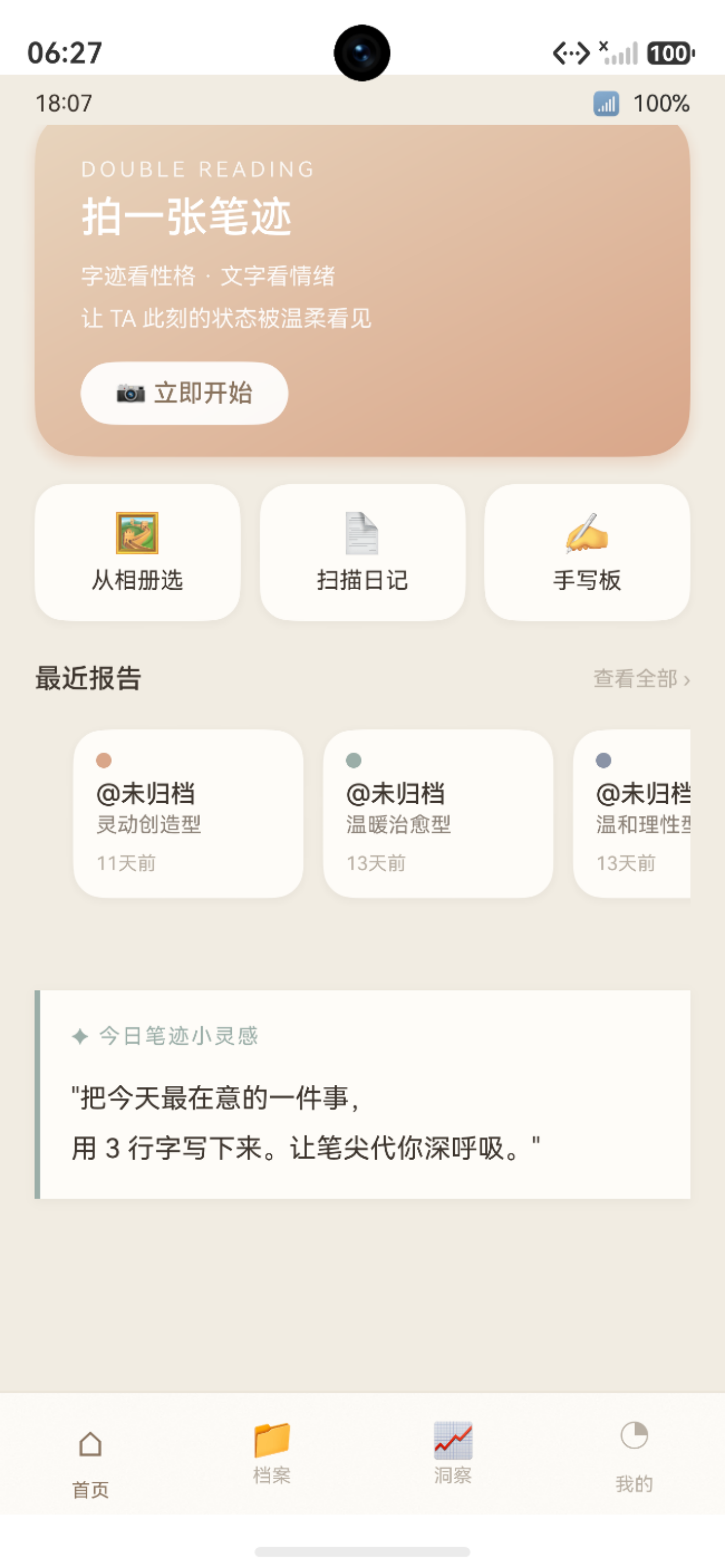
图:06 项目目录结构与编码规范:三层架构与 DAO 模式实践 运行效果截图(HarmonyOS NEXT)
良好的目录结构和编码规范,是大型项目"可维护、可扩展、可协作"的基石。随着业务逻辑增长,没有规范的项目会变成"意大利面条代码"------任何人改动一处都可能牵一发动全身。
"鹿鹿·笔迹心理分析"项目拥有约 13,000 行 ArkTS 代码 、50 个 .ets 文件,在这样的规模下,合理的架构和规范的命名尤为重要。本文将系统介绍项目的目录组织原则、三层架构设计和各层的编码规范。
官方文档·项目目录结构:developer.huawei.com
ArkTS 编码规范:developer.huawei.com
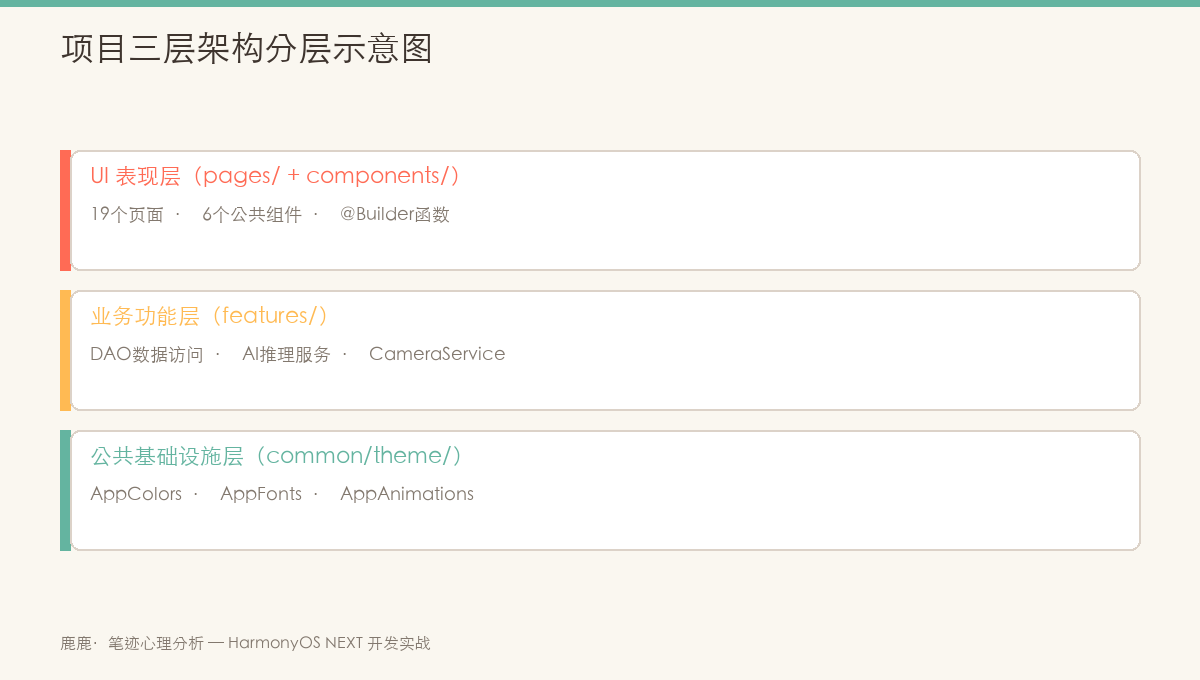
图:鹿鹿项目三层架构------UI 表现层 → 业务功能层 → 公共基础设施层,职责清晰,层间依赖单向
一、项目完整目录树
1.1 顶层目录结构
harmony-app/
├── AppScope/                   # 应用级资源(全局共用)
│   ├── app.json5               # 应用配置(包名、版本等)
│   └── resources/base/
│       ├── element/string.json # 应用名字符串
│       └── media/app_icon.svg  # 应用图标
│
├── entry/                      # 主 Entry 模块(唯一模块)
│   ├── src/main/
│   │   ├── ets/                # ArkTS 源码根目录
│   │   ├── resources/          # 模块资源文件
│   │   └── module.json5        # 模块配置
│   ├── build-profile.json5     # 模块构建配置
│   ├── hvigorfile.ts           # hvigor 构建脚本
│   └── oh-package.json5        # 模块依赖
│
├── oh_modules/                 # ohpm 依赖(不提交 git)
├── hvigor/                     # hvigor 配置目录
├── build-profile.json5         # 项目构建配置
├── oh-package.json5            # 项目根依赖
└── hvigorfile.ts               # 项目 hvigor 入口
1.2 源码目录详细结构
entry/src/main/ets/
├── EntryAbility.ets            # 应用入口 Ability
│
├── common/                     # 公共基础设施层
│   ├── components/             # 可复用 UI 组件(6 个)
│   │   ├── EmotionTrendChart.ets    # 情绪折线图
│   │   ├── EmptyState.ets           # 空状态组件
│   │   ├── HandwritingRadar.ets     # 6 维雷达图
│   │   ├── HmTitleBar.ets           # 标题栏
│   │   ├── MatchRing.ets            # 匹配度圆环
│   │   └── PosterTemplate.ets       # 分享海报模板
│   └── theme/                  # 设计令牌系统(3 个文件)
│       ├── AppAnimations.ets        # 动画常量(时长、曲线)
│       ├── AppColors.ets            # 颜色令牌(20+ 颜色)
│       └── AppFonts.ets             # 字体/间距/圆角令牌
│
├── features/                   # 业务功能层
│   ├── ai/                     # AI 推理模块(4 个文件)
│   │   ├── AiPipelineService.ets    # 推理流水线(统一入口)
│   │   ├── EmotionClassifier.ets    # 情绪分类器
│   │   ├── HandwritingFeatureExtractor.ets # 手写特征提取
│   │   └── OcrService.ets           # OCR 文字识别
│   └── data/                   # 数据访问层(8 个文件)
│       ├── ArchiveDao.ets           # 档案 DAO
│       ├── DatabaseService.ets      # RDB 数据库单例
│       ├── DemoSeeder.ets           # 演示数据播种器
│       ├── HandwritingDao.ets       # 手写记录 DAO
│       ├── Models.ets               # 数据实体接口定义
│       ├── RelationDao.ets          # 关系 DAO
│       ├── ReportDao.ets            # 报告 DAO
│       └── UserDao.ets              # 用户 DAO
│
└── pages/                      # UI 表现层(16 个页面)
    ├── AnalyzingPage.ets            # 分析中(进度动画)
    ├── ArchivePage.ets              # 档案管理
    ├── BindRelationPage.ets         # NFC 绑定伴侣
    ├── CapturePage.ets              # 拍照/相册选图
    ├── CoupleHomePage.ets           # 双人空间首页
    ├── DuetReportPage.ets           # 双人合盘报告
    ├── EmptyPage.ets                # 空状态/占位
    ├── HomePage.ets                 # 应用主页
    ├── LoginPage.ets                # 华为账号登录
    ├── MePage.ets                   # 个人中心
    ├── PhoneLoginPage.ets           # 手机号登录
    ├── ReportDetailPage.ets         # 报告详情
    ├── SharePage.ets                # 分享页面
    ├── TrendPage.ets                # 情绪趋势
    ├── UnclassifiedArchivePage.ets  # 未归类整理
    └── WritePage.ets                # 手写板
二、三层架构设计
2.1 架构分层原则
项目采用经典的三层架构(Three-Tier Architecture):
#mermaid-svg-8GUQmlcrBs6p5G1t{font-family:"trebuchet ms",verdana,arial,sans-serif;font-size:16px;fill:#333;}@keyframes edge-animation-frame{from{stroke-dashoffset:0;}}@keyframes dash{to{stroke-dashoffset:0;}}#mermaid-svg-8GUQmlcrBs6p5G1t .edge-animation-slow{stroke-dasharray:9,5!important;stroke-dashoffset:900;animation:dash 50s linear infinite;stroke-linecap:round;}#mermaid-svg-8GUQmlcrBs6p5G1t .edge-animation-fast{stroke-dasharray:9,5!important;stroke-dashoffset:900;animation:dash 20s linear infinite;stroke-linecap:round;}#mermaid-svg-8GUQmlcrBs6p5G1t .error-icon{fill:#552222;}#mermaid-svg-8GUQmlcrBs6p5G1t .error-text{fill:#552222;stroke:#552222;}#mermaid-svg-8GUQmlcrBs6p5G1t .edge-thickness-normal{stroke-width:1px;}#mermaid-svg-8GUQmlcrBs6p5G1t .edge-thickness-thick{stroke-width:3.5px;}#mermaid-svg-8GUQmlcrBs6p5G1t .edge-pattern-solid{stroke-dasharray:0;}#mermaid-svg-8GUQmlcrBs6p5G1t .edge-thickness-invisible{stroke-width:0;fill:none;}#mermaid-svg-8GUQmlcrBs6p5G1t .edge-pattern-dashed{stroke-dasharray:3;}#mermaid-svg-8GUQmlcrBs6p5G1t .edge-pattern-dotted{stroke-dasharray:2;}#mermaid-svg-8GUQmlcrBs6p5G1t .marker{fill:#333333;stroke:#333333;}#mermaid-svg-8GUQmlcrBs6p5G1t .marker.cross{stroke:#333333;}#mermaid-svg-8GUQmlcrBs6p5G1t svg{font-family:"trebuchet ms",verdana,arial,sans-serif;font-size:16px;}#mermaid-svg-8GUQmlcrBs6p5G1t p{margin:0;}#mermaid-svg-8GUQmlcrBs6p5G1t .label{font-family:"trebuchet ms",verdana,arial,sans-serif;color:#333;}#mermaid-svg-8GUQmlcrBs6p5G1t .cluster-label text{fill:#333;}#mermaid-svg-8GUQmlcrBs6p5G1t .cluster-label span{color:#333;}#mermaid-svg-8GUQmlcrBs6p5G1t .cluster-label span p{background-color:transparent;}#mermaid-svg-8GUQmlcrBs6p5G1t .label text,#mermaid-svg-8GUQmlcrBs6p5G1t span{fill:#333;color:#333;}#mermaid-svg-8GUQmlcrBs6p5G1t .node rect,#mermaid-svg-8GUQmlcrBs6p5G1t .node circle,#mermaid-svg-8GUQmlcrBs6p5G1t .node ellipse,#mermaid-svg-8GUQmlcrBs6p5G1t .node polygon,#mermaid-svg-8GUQmlcrBs6p5G1t .node path{fill:#ECECFF;stroke:#9370DB;stroke-width:1px;}#mermaid-svg-8GUQmlcrBs6p5G1t .rough-node .label text,#mermaid-svg-8GUQmlcrBs6p5G1t .node .label text,#mermaid-svg-8GUQmlcrBs6p5G1t .image-shape .label,#mermaid-svg-8GUQmlcrBs6p5G1t .icon-shape .label{text-anchor:middle;}#mermaid-svg-8GUQmlcrBs6p5G1t .node .katex path{fill:#000;stroke:#000;stroke-width:1px;}#mermaid-svg-8GUQmlcrBs6p5G1t .rough-node .label,#mermaid-svg-8GUQmlcrBs6p5G1t .node .label,#mermaid-svg-8GUQmlcrBs6p5G1t .image-shape .label,#mermaid-svg-8GUQmlcrBs6p5G1t .icon-shape .label{text-align:center;}#mermaid-svg-8GUQmlcrBs6p5G1t .node.clickable{cursor:pointer;}#mermaid-svg-8GUQmlcrBs6p5G1t .root .anchor path{fill:#333333!important;stroke-width:0;stroke:#333333;}#mermaid-svg-8GUQmlcrBs6p5G1t .arrowheadPath{fill:#333333;}#mermaid-svg-8GUQmlcrBs6p5G1t .edgePath .path{stroke:#333333;stroke-width:2.0px;}#mermaid-svg-8GUQmlcrBs6p5G1t .flowchart-link{stroke:#333333;fill:none;}#mermaid-svg-8GUQmlcrBs6p5G1t .edgeLabel{background-color:rgba(232,232,232, 0.8);text-align:center;}#mermaid-svg-8GUQmlcrBs6p5G1t .edgeLabel p{background-color:rgba(232,232,232, 0.8);}#mermaid-svg-8GUQmlcrBs6p5G1t .edgeLabel rect{opacity:0.5;background-color:rgba(232,232,232, 0.8);fill:rgba(232,232,232, 0.8);}#mermaid-svg-8GUQmlcrBs6p5G1t .labelBkg{background-color:rgba(232, 232, 232, 0.5);}#mermaid-svg-8GUQmlcrBs6p5G1t .cluster rect{fill:#ffffde;stroke:#aaaa33;stroke-width:1px;}#mermaid-svg-8GUQmlcrBs6p5G1t .cluster text{fill:#333;}#mermaid-svg-8GUQmlcrBs6p5G1t .cluster span{color:#333;}#mermaid-svg-8GUQmlcrBs6p5G1t div.mermaidTooltip{position:absolute;text-align:center;max-width:200px;padding:2px;font-family:"trebuchet ms",verdana,arial,sans-serif;font-size:12px;background:hsl(80, 100%, 96.2745098039%);border:1px solid #aaaa33;border-radius:2px;pointer-events:none;z-index:100;}#mermaid-svg-8GUQmlcrBs6p5G1t .flowchartTitleText{text-anchor:middle;font-size:18px;fill:#333;}#mermaid-svg-8GUQmlcrBs6p5G1t rect.text{fill:none;stroke-width:0;}#mermaid-svg-8GUQmlcrBs6p5G1t .icon-shape,#mermaid-svg-8GUQmlcrBs6p5G1t .image-shape{background-color:rgba(232,232,232, 0.8);text-align:center;}#mermaid-svg-8GUQmlcrBs6p5G1t .icon-shape p,#mermaid-svg-8GUQmlcrBs6p5G1t .image-shape p{background-color:rgba(232,232,232, 0.8);padding:2px;}#mermaid-svg-8GUQmlcrBs6p5G1t .icon-shape .label rect,#mermaid-svg-8GUQmlcrBs6p5G1t .image-shape .label rect{opacity:0.5;background-color:rgba(232,232,232, 0.8);fill:rgba(232,232,232, 0.8);}#mermaid-svg-8GUQmlcrBs6p5G1t .label-icon{display:inline-block;height:1em;overflow:visible;vertical-align:-0.125em;}#mermaid-svg-8GUQmlcrBs6p5G1t .node .label-icon path{fill:currentColor;stroke:revert;stroke-width:revert;}#mermaid-svg-8GUQmlcrBs6p5G1t :root{--mermaid-font-family:"trebuchet ms",verdana,arial,sans-serif;} ② 业务功能层 (features/)
读写 AppStorage
使用设计令牌
调用推理
③ 公共基础设施 (common/theme/)
设计令牌系统
AppColors · AppFonts · AppAnimations
① UI 表现层 (pages/ + common/components/)
16 个 @Entry 页面
HomePage · CapturePage · WritePage
AnalyzingPage · ReportDetailPage · ...
6 个可复用组件
HandwritingRadar · EmotionTrendChart
MatchRing · HmTitleBar · EmptyState
data/ --- 数据访问层 (DAO)
DatabaseService · UserDao
ArchiveDao · ReportDao · ...
ai/ --- AI 推理层
AiPipelineService
OcrService · FeatureExtractor
EmotionClassifier
2.2 各层职责
| 层次 | 目录 | 主要职责 | 依赖方向 |
|---|---|---|---|
| UI 表现层 | pages/ + common/components/ |
页面布局、用户交互、动画效果 | 依赖 features/ 和 common/theme/ |
| 业务功能层 | features/data/ + features/ai/ |
数据 CRUD、AI 推理、业务逻辑 | 依赖 common/theme/(偶尔) |
| 公共基础设施 | common/theme/ |
设计令牌、动画常量 | 无依赖(最底层) |
层间依赖原则 :只允许上层依赖下层,禁止下层依赖上层(
features/data不应该 import 任何pages/中的内容)。
三、DAO 设计模式
3.1 DAO 模式的统一结构
项目中每个 DAO 类都遵循相同的接口约定:
typescript
export class XxxDao {
  // ① 私有 getStore:获取 RDB 实例(防止外部绕过 DatabaseService)
  private static getStore(): relationalStore.RdbStore {
    return DatabaseService.getInstance().getStore();
  }

  // ② 创建记录
  static async create(item: XxxEntity): Promise<number> {
    try {
      const store = XxxDao.getStore();
      const values: relationalStore.ValuesBucket = { /* 字段映射 */ };
      return await store.insert('xxx_table', values);
    } catch (e) {
      hilog.error(0x0000, TAG, 'create 失败: %{public}s', JSON.stringify(e));
      throw e;
    }
  }

  // ③ 按 ID 查询
  static async findById(id: number): Promise<XxxEntity | null> { /* ... */ }

  // ④ 条件查询列表
  static async listBy(condition: string): Promise<XxxEntity[]> { /* ... */ }

  // ⑤ 更新
  static async update(item: XxxEntity): Promise<void> { /* ... */ }

  // ⑥ 删除
  static async deleteById(id: number): Promise<void> { /* ... */ }

  // ⑦ 私有 parseRow:ResultSet → Entity 转换
  private static parseRow(rs: relationalStore.ResultSet): XxxEntity {
    return {
      id: rs.getLong(rs.getColumnIndex('id')),
      // ... 字段映射
    };
  }
}
3.2 DAO 设计的优势
这种统一的 DAO 模式带来了三个核心优势:
- 解耦:UI 层不需要知道数据库的具体实现,只调用 DAO 方法
- 可测试:DAO 是纯静态类,可以单独测试,不依赖 UI 框架
- 一致性 :所有数据操作都经过
DatabaseService.getStore()进行,不会出现野生的数据库操作
四、命名规范
4.1 标识符命名约定
| 类型 | 规范 | 示例 |
|---|---|---|
| 类名 | PascalCase | DatabaseService、HandwritingRadar |
| 接口名 | PascalCase + Entity/Service/Result |
UserEntity、RadarScores |
| 方法名 | camelCase,动词开头 | getInstance()、loadRecent() |
| 私有方法 | camelCase,同上 | parseRow()、draw() |
| @State 变量 | camelCase | isLoading、recentItems |
| 常量 | UPPER_SNAKE_CASE | DB_VERSION、TAG |
| 文件名 | PascalCase + .ets |
AppColors.ets、HandwritingDao.ets |
| 数据库表名 | snake_case | handwriting_records、user_archives |
| 数据库字段 | snake_case | archive_id、created_at |
4.2 装饰器使用约定
typescript
// ✅ 标准写法:@Entry 和 @Component 分别一行
@Entry
@Component
struct HomePage {

  // ✅ 公开 @Prop:PascalCase 类型,= 赋默认值
  @Prop title: string = ''
  @Prop showBack: boolean = false

  // ✅ 内部 @State:一目了然的变量名
  @State isLoading: boolean = false
  @State items: ArchiveEntity[] = []

  // ✅ @Watch 与 @State 放在一起
  @State @Watch('onProgressChange') drawProgress: number = 0

  // ✅ 私有常量:类顶部定义
  private readonly TAG = 'HomePage'
  private readonly PAGE_SIZE = 20

  // ✅ 生命周期方法在前,@Builder 在后,build() 最后
  aboutToAppear(): void { ... }
  aboutToDisappear(): void { ... }

  @Builder
  RecentCard(item: RecentItem) { ... }

  build() { ... }
}
五、文件组织规范
5.1 页面文件结构规范
每个页面文件 (pages/XxxPage.ets) 按以下顺序组织代码:
typescript
// 1. import 语句(按 @kit 包 → 业务模块 → 组件顺序)
import { hilog } from '@kit.PerformanceAnalysisKit';
import { ArchiveDao } from '../features/data/ArchiveDao';
import { HmTitleBar } from '../common/components/HmTitleBar';
import { AppColors, AppFonts } from '../common/theme/AppColors';

// 2. 本地接口/类型定义
interface RecentItem {
  reportId: number;
  name: string;
  personalityType: string;
}

// 3. 常量定义
const TAG = 'ArchivePage';
const PAGE_SIZE = 20;

// 4. 页面组件
@Entry
@Component
struct ArchivePage {
  // 4.1 @Prop 属性(外部传入)
  // 4.2 @State 属性(内部状态)
  // 4.3 私有成员变量
  // 4.4 生命周期方法
  // 4.5 私有业务方法
  // 4.6 @Builder 方法
  // 4.7 build() 方法(放最后)
}
5.2 组件文件规范
typescript
// common/components/HandwritingRadar.ets

// 1. 类型定义(放在组件文件内,一起导出)
export interface RadarPoint {
  label: string;
  value: number;
}

// 2. 组件定义(export struct)
@Component
export struct HandwritingRadar {
  // @Prop 外部数据
  @Prop data: RadarPoint[] = [];
  @Prop radarSize: number = 280;

  // 私有内部状态
  private context: CanvasRenderingContext2D;
  @State @Watch('onDrawProgressChange') drawProgress: number = 0;

  // 生命周期
  aboutToAppear(): void { ... }

  // @Watch 回调
  onDrawProgressChange(): void { ... }

  // 私有绘图方法
  private draw(): void { ... }

  // build()
  build() {
    Canvas(this.context)
      .width(this.radarSize)
      .height(this.radarSize)
  }
}
六、设计令牌系统
6.1 AppColors 颜色体系
typescript
// common/theme/AppColors.ets --- 颜色令牌(不允许直接写 hex 魔数)
export class AppColors {
  // 品牌色系(暖棕色系)
  static readonly BG: string = '#F1ECE2';          // 背景色
  static readonly CARD: string = '#F9F5EF';         // 卡片背景
  static readonly PRIMARY: string = '#A8907A';       // 主色
  static readonly PRIMARY_DEEP: string = '#8B7264';  // 深主色
  static readonly WARM: string = '#D9A689';          // 暖橙色

  // 文字色系(三级层次)
  static readonly TEXT: string = '#3D352E';          // 主文字
  static readonly TEXT_2: string = '#8B7E72';        // 次要文字
  static readonly TEXT_3: string = '#B5A99A';        // 第三级文字

  // 辅助色系(情绪色)
  static readonly QUIET: string = '#7B96C2';         // 沉静蓝
  static readonly ROSE: string = '#D4849A';          // 玫瑰粉
  static readonly DEEP: string = '#6B5D52';          // 深棕色

  // 线条/边框
  static readonly LINE: string = '#E8E0D5';          // 浅分割线
}
6.2 AppFonts 字体令牌
typescript
// common/theme/AppFonts.ets --- 字体尺寸令牌
export abstract class AppFonts {
  // 字号系统(6 级)
  static readonly TITLE_L: number = 28;   // 大标题
  static readonly TITLE_M: number = 20;   // 中标题
  static readonly SUBTITLE: number = 16;  // 副标题
  static readonly BODY: number = 14;      // 正文
  static readonly CAPTION: number = 12;   // 辅助
  static readonly TINY: number = 10;      // 极小

  // 字重常量
  static readonly W_REGULAR: number = 400;
  static readonly W_MEDIUM: number = 500;
  static readonly W_BOLD: number = 700;
}
七、代码质量规范
7.1 ArkTS 特有约束
ArkTS 相对 TypeScript 有一些额外的限制,需要注意:
- 禁止使用
any类型:必须明确声明类型 - 禁止动态属性访问 :
obj['key']应改为(obj as Record<string, T>)['key'] - 禁止
eval():ArkTS 不支持动态代码执行 - 接口声明方式 :ArkTS 推荐使用
interface而非type(用于对象类型)
typescript
// ❌ TypeScript 写法(在 ArkTS 中不推荐或不允许)
const value = obj['dynamicKey'];    // 动态属性访问
const x: any = someValue;           // any 类型

// ✅ ArkTS 推荐写法
const record = obj as Record<string, Object>;
const value = record['dynamicKey'];  // 先类型断言再访问
const x: number | string = someValue;  // 明确类型
7.2 错误处理规范
typescript
// ✅ 推荐的错误处理模式
static async create(item: ArchiveEntity): Promise<number> {
  try {
    const store = ArchiveDao.getStore();
    return await store.insert('archives', this.toValuesBucket(item));
  } catch (e) {
    // 1. 记录日志(包含方法名和原始错误)
    hilog.error(0x0000, TAG, 'ArchiveDao.create 失败: %{public}s', JSON.stringify(e));
    // 2. 重新抛出(让调用方决定如何处理)
    throw new Error(`ArchiveDao.create failed: ${JSON.stringify(e)}`);
  }
}
7.3 注释规范
typescript
/**
 * 双人匹配度圆环组件
 *
 * 使用场景:DuetReportPage 顶部的匹配度展示区域
 * 特点:Canvas 绘制 + @Watch 驱动动画(从 0 到目标值顺时针生长)
 *
 * @example
 * MatchRing({ matchValue: 78, ringSize: 200, label: '整体匹配度' })
 */
@Component
export struct MatchRing {
  @Prop matchValue: number = 78  // 匹配度 0-100
  @Prop ringSize: number = 200   // 圆环尺寸(宽高相等)
  @Prop label: string = '匹配度' // 中心文字标签
}
八、注意事项与常见问题
8.1 开发注意事项
在实际开发过程中,需特别注意以下几点:
- API 兼容性:部分接口仅在特定 HarmonyOS NEXT 版本中可用,需做版本条件判断
- 权限模型:采用静态声明(module.json5)+ 动态申请(requestPermissionsFromUser)的两阶段授权
- 生命周期 :合理使用
aboutToAppear()和aboutToDisappear()管理资源初始化与释放 - 状态同步 :跨页面数据通过 AppStorage 共享,组件内状态使用
@State/@Prop/@Link装饰器
8.2 常见错误与解决方案
开发过程中的高频问题汇总:
| 错误现象 | 可能原因 | 解决方案 |
|---|---|---|
| 权限被系统拒绝 | 未在 module.json5 中静态声明 |
添加 requestPermissions 权限配置项 |
| 页面跳转后白屏 | 路由路径未在 main_pages.json 注册 |
检查并补充路由配置文件 |
| UI 状态不刷新 | 状态变量未添加响应式装饰器 | 为变量加 @State / @Observed 装饰器 |
| 数据库查询返回空 | 查询条件与存储数据格式不匹配 | 使用 hilog.debug 打印 SQL 条件排查 |
| 相机预览黑屏 | 运行时相机权限未获取 | 先调用 requestPermissionsFromUser 申请 |
总结
项目的目录结构和编码规范遵循以下核心原则:
- 三层架构:UI 层 → 业务层 → 基础设施层,层间依赖单向,职责清晰
- DAO 模式:统一的数据访问接口,解耦 UI 和数据库
- 设计令牌:AppColors/AppFonts/AppAnimations 集中管理,禁止魔数
- 命名规范:PascalCase(类/文件)、camelCase(方法/变量)、UPPER_SNAKE(常量)
- 文件组织:import → 接口定义 → 常量 → 组件,固定顺序保证可读性
下一篇预告 :第07篇 ArkTS 基础类型与接口定义
如果这篇文章对你有帮助,欢迎点赞👍、收藏⭐、关注🔔,你的支持是我持续创作的动力!
相关资源: