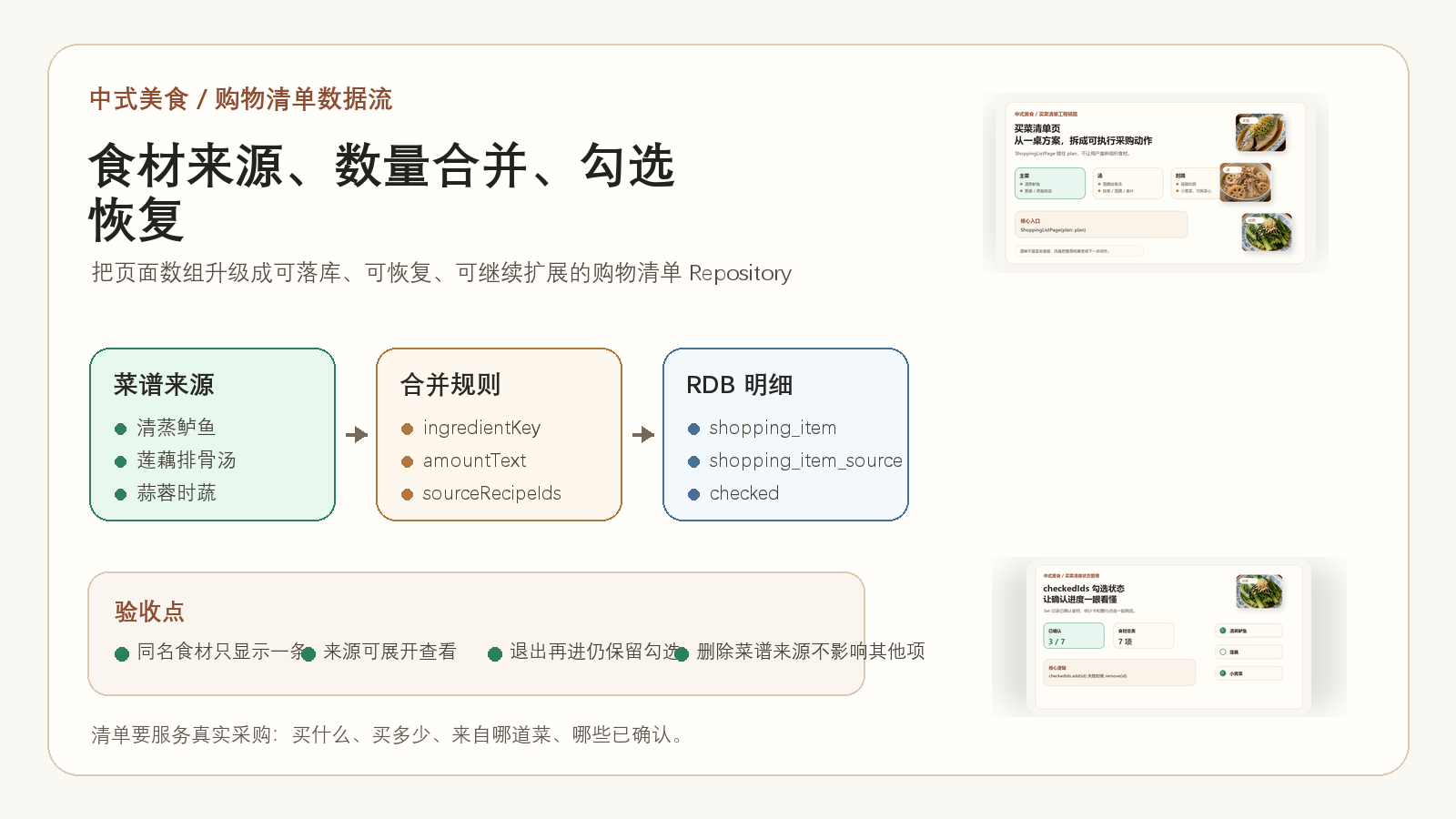
中式美食前面已经把餐桌方案、买菜清单页和 checkedIds 勾选状态拆过一轮。页面能展示、能勾选以后,下一个更实际的问题会冒出来:如果一桌菜里两道菜都用到葱,清单里到底显示两条,还是合并成一条?如果用户勾选了"葱",退出页面再回来,这个状态应该从哪里恢复?
我更倾向于把买菜清单当成一个独立的数据流,而不是页面临时数组。页面可以先跑通,但只要开始考虑"来源、数量、勾选、恢复、删除某道菜来源"这些动作,就应该让 Repository 接手,后面再迁到 HarmonyOS RDB 时也不会大改。
本章位置
| 项目 | 内容 |
|---|---|
| 应用名称 | 中式美食 |
| 当前链路 | 餐桌方案 -> 买菜清单 -> 厨房执行 |
| 已有页面 | TableSolutionPage、ShoppingListPage |
| 已有状态 | TableSolutionPlan、ShoppingItemData、checkedIds |
| 本文重点 | 按菜谱来源生成购物清单,并合并同名食材数量 |
| 技术方向 | ArkTS、RDB、Repository、本地持久化 |
本文导读
这篇不把重点放在 UI 上,而是放在"清单数据到底怎么来"。我会按下面这条线讲:
| 问题 | 处理方式 |
|---|---|
| 一个清单项来自哪道菜 | 给清单项保留 sourceRecipeIds |
| 同名食材怎么处理 | 用标准化后的 ingredientKey 合并 |
| 数量怎么合并 | 先保留文本数量,再给可计算单位留字段 |
| 勾选状态怎么恢复 | 用 checked 或单独状态表保存 |
| 页面怎么读写 | 页面只调 Repository,不直接拼 SQL |
为什么购物清单不能只用页面数组
页面数组适合第一版验证体验,比如:
dart
final items = [
  ShoppingItemData(name: '小葱', amount: '2 根'),
  ShoppingItemData(name: '莲藕', amount: '1 节'),
  ShoppingItemData(name: '小青菜', amount: '300g'),
];
这能让页面先跑起来,但它解决不了后面的几个问题:
| 场景 | 页面数组的问题 |
|---|---|
| 两道菜都需要小葱 | 可能重复显示两条,用户不知道总共买多少 |
| 用户已经勾选一半 | 页面退出后状态容易丢 |
| 删除某一道菜 | 不知道哪些食材只属于这道菜 |
| 做推荐排序 | 无法统计用户经常购买哪些食材 |
| 后续接 RDB | 页面里到处都有派生逻辑,迁移成本高 |
所以这里要把"展示清单"往前推一步,变成"生成清单"。清单是从餐桌方案和菜谱食材里推导出来的,不应该由页面临时手写。
先定义一条可以落库的清单项
如果后面走 HarmonyOS RDB,我会先把购物清单拆成两层:清单批次和清单明细。
| 表 | 作用 |
|---|---|
shopping_list |
一次买菜任务,比如"周三晚餐清单" |
shopping_item |
具体食材项,比如"小葱 2 根" |
shopping_item_source |
食材来源关系,比如"小葱来自清蒸鲈鱼和莲藕排骨汤" |
对应到 ArkTS 里,可以先用这种模型表达:
ts
type ShoppingItemRecord = {
  id: string
  listId: string
  ingredientKey: string
  displayName: string
  amountText: string
  unit?: string
  quantity?: number
  checked: boolean
  note?: string
  updatedAt: number
}

type ShoppingItemSourceRecord = {
  itemId: string
  recipeId: string
  recipeName: string
  rawAmountText: string
}
这里我没有一开始就强行把所有数量都变成数字。原因很简单:中式菜谱里的数量经常是"少许""适量""半根""一小把"。如果第一版就把单位解析做得太重,反而容易卡住。
更稳的做法是先保留 amountText,能计算的再写入 quantity + unit。这样页面能展示,后面也能逐步增强。
合并同名食材,关键不是 equals
合并食材时,最容易犯的错是直接拿 name 做判断:
ts
if (item.name === next.name) {
  // merge
}
这在真实菜谱里不够用,因为"小葱""葱""香葱"可能是同一类采购项,"青菜""小青菜""菜心"又可能是替换关系,不一定能直接合并。
所以我会加一个标准化函数,先把能明确归一的名称变成同一个 key:
ts
function normalizeIngredientName(name: string): string {
  const text = name.trim()
  const aliasMap: Record<string, string> = {
    '香葱': '小葱',
    '葱花': '小葱',
    '青菜': '小青菜',
    '菜心': '小青菜',
  }
  return aliasMap[text] ?? text
}
这个函数不用一开始写得很大。先把项目里真实出现的高频食材放进去,比维护一张看起来很全但没人验证的别名表更靠谱。
Repository 负责生成清单
页面不应该关心怎么合并食材。页面只需要说:"我选择了这几道菜,请给我一份可以买的清单。"
ts
class ShoppingListRepository {
  async createFromRecipes(recipeIds: string[]): Promise<string> {
    const listId = createId()
    const recipes = await this.recipeRepository.findByIds(recipeIds)
    const merged = this.mergeIngredients(recipes)

    await this.store.runTransaction(async () => {
      await this.store.insertShoppingList({
        id: listId,
        title: '晚餐买菜清单',
        createdAt: Date.now(),
      })
      for (const item of merged) {
        await this.store.insertShoppingItem({ ...item, listId })
        await this.store.insertShoppingItemSources(item.id, item.sources)
      }
    })

    return listId
  }
}
这里有两个点比较重要。
第一,生成清单和写入来源要放在同一个事务里。否则清单项写进去了,来源关系没写进去,后面用户点开"小葱来自哪几道菜"就会断。
第二,Repository 返回的是 listId,不是直接把一大坨页面对象丢回去。页面拿到 listId 后再读一次清单明细,这样后面做刷新、恢复、跨页面跳转都会清楚很多。
合并逻辑要保留来源
食材合并不是把来源吞掉。合并后的清单项仍然要能告诉用户:这个食材为什么出现在这里。
ts
private mergeIngredients(recipes: RecipeRecord[]): MergedShoppingItem[] {
  const bucket = new Map<string, MergedShoppingItem>()

  for (const recipe of recipes) {
    for (const ingredient of recipe.ingredients) {
      const key = normalizeIngredientName(ingredient.name)
      const current = bucket.get(key)

      if (!current) {
        bucket.set(key, {
          id: createId(),
          ingredientKey: key,
          displayName: key,
          amountText: ingredient.amountText,
          checked: false,
          sources: [{
            recipeId: recipe.id,
            recipeName: recipe.name,
            rawAmountText: ingredient.amountText,
          }],
        })
        continue
      }

      current.amountText = mergeAmountText(current.amountText, ingredient.amountText)
      current.sources.push({
        recipeId: recipe.id,
        recipeName: recipe.name,
        rawAmountText: ingredient.amountText,
      })
    }
  }

  return Array.from(bucket.values())
}
sources 这个字段很容易被省掉,但我不建议省。用户看到"小葱 3 根"时,如果能展开看到"清蒸鲈鱼 1 根、莲藕排骨汤 2 根",信任感会更强。后面删除某道菜时,也能准确扣掉它贡献的食材来源。
checkedIds 可以从本地记录恢复
前一篇讲过,页面里可以用 checkedIds 记录已确认食材。到了 RDB 版本以后,这个状态可以落到 shopping_item.checked:
ts
async toggleChecked(itemId: string): Promise<void> {
  const item = await this.store.findShoppingItem(itemId)
  await this.store.updateShoppingItemChecked(itemId, !item.checked)
}

async getCheckedIds(listId: string): Promise<Set<string>> {
  const items = await this.store.findShoppingItems(listId)
  return new Set(
    items
      .filter(item => item.checked)
      .map(item => item.id)
  )
}
这样页面初始化时不需要猜状态:
ts
const items = await shoppingListRepository.findItems(listId)
const checkedIds = await shoppingListRepository.getCheckedIds(listId)
也就是说,页面里的 checkedIds 仍然可以保留,但它不再是唯一来源,而是本地数据库状态的页面映射。用户退出再回来,状态能恢复;换一个页面入口回来,也能读到同一份清单。
页面只消费 ViewModel
到了页面层,我希望它看到的是已经整理好的 ViewModel:
ts
type ShoppingListViewModel = {
  listId: string
  title: string
  totalCount: number
  checkedCount: number
  sections: ShoppingSectionViewModel[]
}

type ShoppingSectionViewModel = {
  title: string
  items: ShoppingItemViewModel[]
}
页面不需要知道 shopping_item_source 怎么查,也不需要知道 mergeAmountText() 怎么处理"少许"。它只要把 sections 渲染出来,把点击事件交回 Repository 或 ViewModel。
这个边界一旦清楚,后面从 Flutter 迁到 ArkUI,或者从 Preferences 换成 RDB,都不会把页面打碎。
工程验收记录
| 验收动作 | 预期结果 |
|---|---|
| 选择两道都包含小葱的菜 | 清单里只出现一条"小葱",数量文本合并 |
| 展开小葱来源 | 能看到它来自哪些菜,每道菜贡献了多少 |
| 勾选小葱后退出页面 | 再进入同一清单时,小葱仍然是已确认状态 |
| 删除某一道菜来源 | 只扣掉该来源贡献的数量,不影响其他菜 |
| 清空本地数据后进入清单 | 页面显示空状态,不崩溃,不显示脏数据 |
这张验收表比"页面能打开"更有用。因为买菜清单真正容易出错的地方,不是按钮能不能点,而是来源、数量、状态这些数据有没有互相打架。
推荐阅读
| 主题 | 为什么建议一起看 | 链接 |
|---|---|---|
| RDB 菜谱表设计 | 这一篇是购物清单落库的前置表结构 | 阅读文章 |
| 买菜清单页 | 先看页面怎么承接餐桌方案,再看本文的数据生成 | 阅读文章 |
| 勾选状态 | checkedIds 的页面状态设计和本文的落库恢复能连起来看 |
阅读文章 |
| 餐桌方案页 | 购物清单的上游来源是餐桌方案,不是孤立页面 | 阅读文章 |
本章小结
买菜清单如果只看页面,很容易被写成一个数组。但中式美食真正要做的是把"选了一桌菜"变成"知道该买什么、买多少、为什么买、买到哪一步了"。
所以我会把清单生成放进 Repository:按菜谱来源生成,按标准化食材 key 合并,保留来源明细,再把勾选状态写回本地。这样用户体验更稳,后面的推荐排序、家庭库存、常买食材也更容易接。
最后留一个具体问题:如果你做买菜清单,食材数量会先做"文本合并",还是一开始就做单位换算?我目前更倾向于先文本合并,把真实流程跑顺,再逐步把克、斤、根、勺这些单位做成可计算字段。这样工程风险更低,也更符合中式菜谱的表达习惯。