背景
进行模 n 运算时,会有一些规律。如果我们能通过图形化界面来展示模 n 运算的结果,应该更容易发现这些规律。本文只关心 n 是质数的情况。
正文
受到 A Friendly Introduction to Number Theory 中第 9 章 (Congruences, Powers, and Fermat's Little Theorem) 的启发,我觉得可以借助图形化界面来探索模 n 运算的规律。本文只关心 n 是质数的情况。
代码
我用 豆包 和 trae 写了如下的代码 (我在 Python 费马小定理 一文中也提供了这部分代码)
python
import pygame

# ===================== 1. 初始化配置 =====================
pygame.init()

# 可选的质数 p 列表
PRIMES = [2, 3, 5, 7, 11, 13, 17, 19]
# 初始选中的 p(默认 None,未选择)
selected_p = None

# 基础窗口设置(自适应大小,最小600x600)
MIN_WIDTH, MIN_HEIGHT = 650, 650
screen = pygame.display.set_mode((MIN_WIDTH, MIN_HEIGHT), pygame.RESIZABLE)
pygame.display.set_caption("a^n mod p visualization tool")

# 颜色配置
WHITE = (255, 255, 255)
BLACK = (0, 0, 0)
GRAY = (200, 200, 200)
BLUE = (60, 130, 220)    # 按钮颜色
LIGHT_BLUE = (140, 190, 240)
RED = (220, 60, 60)     # 标题颜色
GREEN = (50, 180, 50)   # 结果文字颜色
DARK_BLUE = (30, 80, 180) # a/n标签颜色

def get_fonts(cell_size):
    """根据单元格大小动态调整字体"""
    base_size = max(10, int(cell_size * 0.55))
    font_grid = pygame.font.SysFont("Arial", base_size)
    font_an = pygame.font.SysFont("Arial", base_size)
    return font_grid, font_an

font_btn = pygame.font.SysFont("Arial", 24)
font_label = pygame.font.SysFont("Arial", 26)

def calc_pow(a, n, p):
    """calc a**n mod p"""
    if n == 0:
        return 1
    temp = calc_pow(a, n // 2, p)
    if n % 2 == 0:
        return (temp * temp) % p
    return (temp * temp * a) % p

# ===================== 2. 按钮绘制与点击判断 =====================
def draw_buttons():
    """绘制顶部的p选择按钮"""
    btn_width, btn_height = 60, 40
    start_x = 20
    start_y = 20
    spacing = 10

    for i, p in enumerate(PRIMES):
        btn_x = start_x + i * (btn_width + spacing)
        btn_rect = pygame.Rect(btn_x, start_y, btn_width, btn_height)

        # 选中的按钮变色
        color = LIGHT_BLUE if p == selected_p else BLUE
        pygame.draw.rect(screen, color, btn_rect, border_radius=5)

        # 按钮文字
        text = font_btn.render(f"p={p}", True, WHITE)
        text_rect = text.get_rect(center=btn_rect.center)
        screen.blit(text, text_rect)

def get_clicked_p(mouse_pos):
    """判断点击了哪个p按钮,返回对应的p值"""
    btn_width, btn_height = 60, 40
    start_x = 20
    start_y = 20
    spacing = 10

    for i, p in enumerate(PRIMES):
        btn_x = start_x + i * (btn_width + spacing)
        btn_rect = pygame.Rect(btn_x, start_y, btn_width, btn_height)
        if btn_rect.collidepoint(mouse_pos):
            return p
    return None

def resize_window(p):
    """根据选择的p自动调整窗口大小"""
    cell_size = min(70, (MIN_WIDTH - 120) // p)
    _, font_an = get_fonts(cell_size)
    max_num_str = str(p)
    max_label_width = font_an.size(max_num_str)[0]
    label_space = max_label_width + 10

    needed_width = cell_size * p + label_space + 60
    needed_height = 120 + cell_size * p + label_space + 60

    needed_width = max(needed_width, MIN_WIDTH)
    needed_height = max(needed_height, MIN_HEIGHT)

    return pygame.display.set_mode((needed_width, needed_height), pygame.RESIZABLE)

# ===================== 3. 网格绘制(显式标注a和n的值) =====================
def draw_grid(p):
    """绘制a-n网格,显式展示a、n和a^n mod p的值"""
    if p is None:
        tip = font_label.render("Please select p value", True, RED)
        screen.blit(tip, (screen.get_width()//2 - tip.get_width()//2, 100))
        return

    cell_size = min(70, (screen.get_width() - 120) // p)
    font_grid, font_an = get_fonts(cell_size)

    max_num_str = str(p)
    max_label_width = font_an.size(max_num_str)[0]
    label_space = max_label_width + 10

    total_grid_width = cell_size * p + label_space
    grid_start_x = (screen.get_width() - total_grid_width) // 2 + label_space
    grid_start_y = 120 + label_space
    grid_start_x = (screen.get_width() - total_grid_width) // 2 + label_space
    grid_start_y = 120 + label_space

    # -------- 1. 绘制坐标轴标题 --------
    n_title = font_label.render("n →", True, DARK_BLUE)
    n_title_x = grid_start_x + (cell_size * p) // 2
    n_title_y = 85
    screen.blit(n_title, (n_title_x - n_title.get_width()//2, n_title_y))

    a_title = font_label.render("a ↓", True, DARK_BLUE)
    a_title_x = (screen.get_width() - total_grid_width) // 2 - 25
    a_title_y = grid_start_y + (cell_size * p) // 2
    screen.blit(a_title, (a_title_x, a_title_y - a_title.get_height()//2))

    # -------- 2. 绘制顶部:显式展示所有 n 的值(横坐标) --------
    for i in range(p):
        n = i + 1
        x = grid_start_x + i * cell_size + cell_size//2
        y = grid_start_y - label_space//2
        n_text = font_an.render(str(n), True, DARK_BLUE)
        n_rect = n_text.get_rect(center=(x, y))
        screen.blit(n_text, n_rect)

    # -------- 3. 绘制左侧:显式展示所有 a 的值(纵坐标) --------
    for a in range(p):
        x = grid_start_x - label_space//2
        y = grid_start_y + a * cell_size + cell_size//2
        a_text = font_an.render(str(a), True, DARK_BLUE)
        a_rect = a_text.get_rect(center=(x, y))
        screen.blit(a_text, a_rect)

    # -------- 4. 绘制网格主体 + 计算结果 --------
    for i in range(p):
        n = i + 1
        for a in range(p):
            x = grid_start_x + i * cell_size
            y = grid_start_y + a * cell_size
            cell_rect = pygame.Rect(x, y, cell_size, cell_size)

            pygame.draw.rect(screen, BLACK, cell_rect, 1)

            val = calc_pow(a, n, p)
            val_text = font_grid.render(str(val), True, GREEN)
            val_rect = val_text.get_rect(center=cell_rect.center)
            screen.blit(val_text, val_rect)

# ===================== 4. 主循环 =====================
running = True
while running:
    screen.fill(WHITE)

    # 绘制按钮
    draw_buttons()
    # 绘制网格(含显式a/n标注)
    draw_grid(selected_p)

    # 事件处理
    for event in pygame.event.get():
        # 关闭窗口
        if event.type == pygame.QUIT:
            running = False

        # 鼠标点击事件
        if event.type == pygame.MOUSEBUTTONDOWN:
            mouse_pos = pygame.mouse.get_pos()
            # 获取点击的p值
            clicked_p = get_clicked_p(mouse_pos)
            if clicked_p is not None:
                selected_p = clicked_p
                screen = resize_window(selected_p)

    # 刷新界面
    pygame.display.flip()

pygame.quit()
请将以上代码保存为 show_mod_pow.py。使用如下命令可以运行 show_mod_pow.py
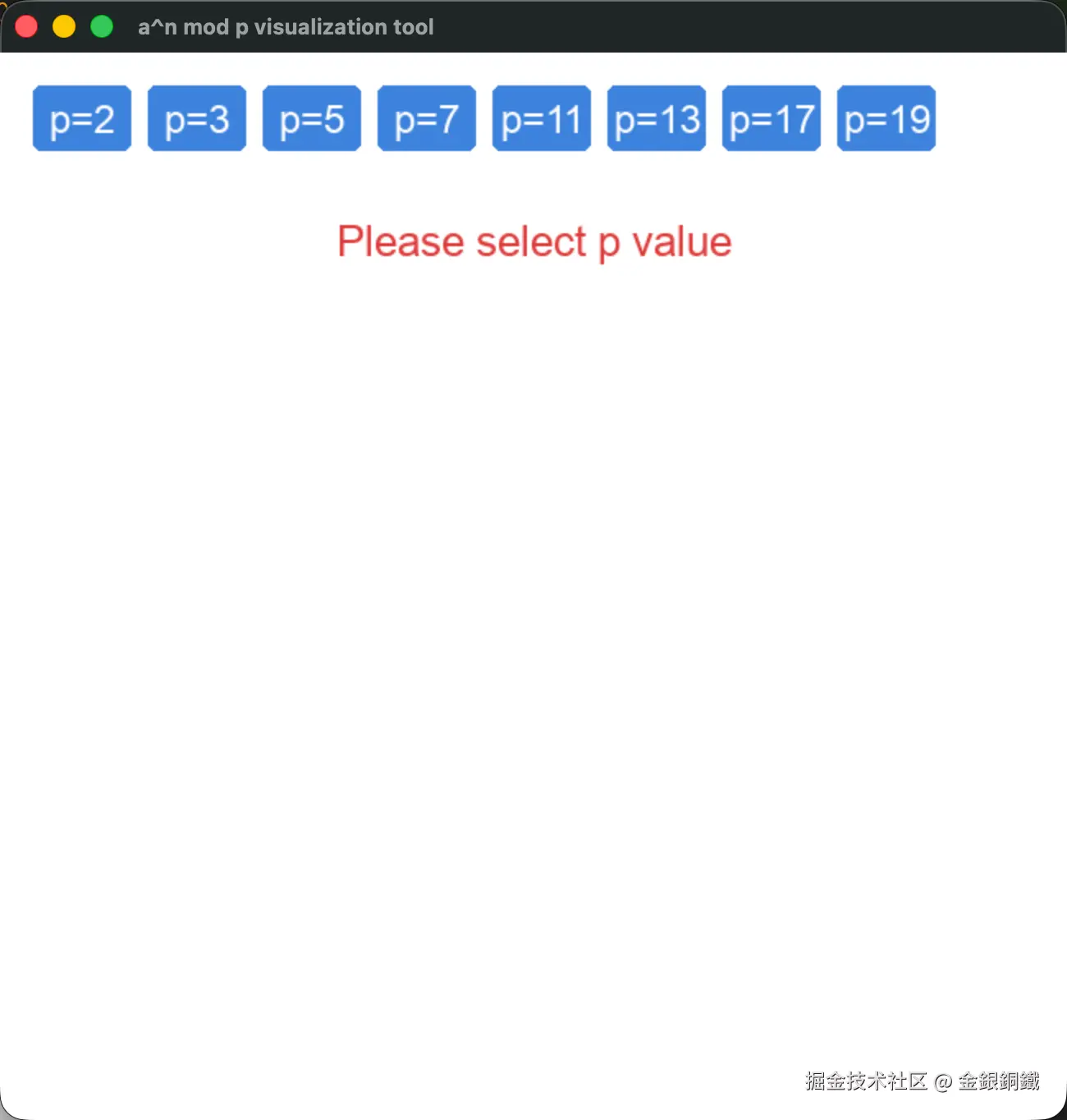
python3 show_mod_pow.py开始时的效果如下 ⬇️
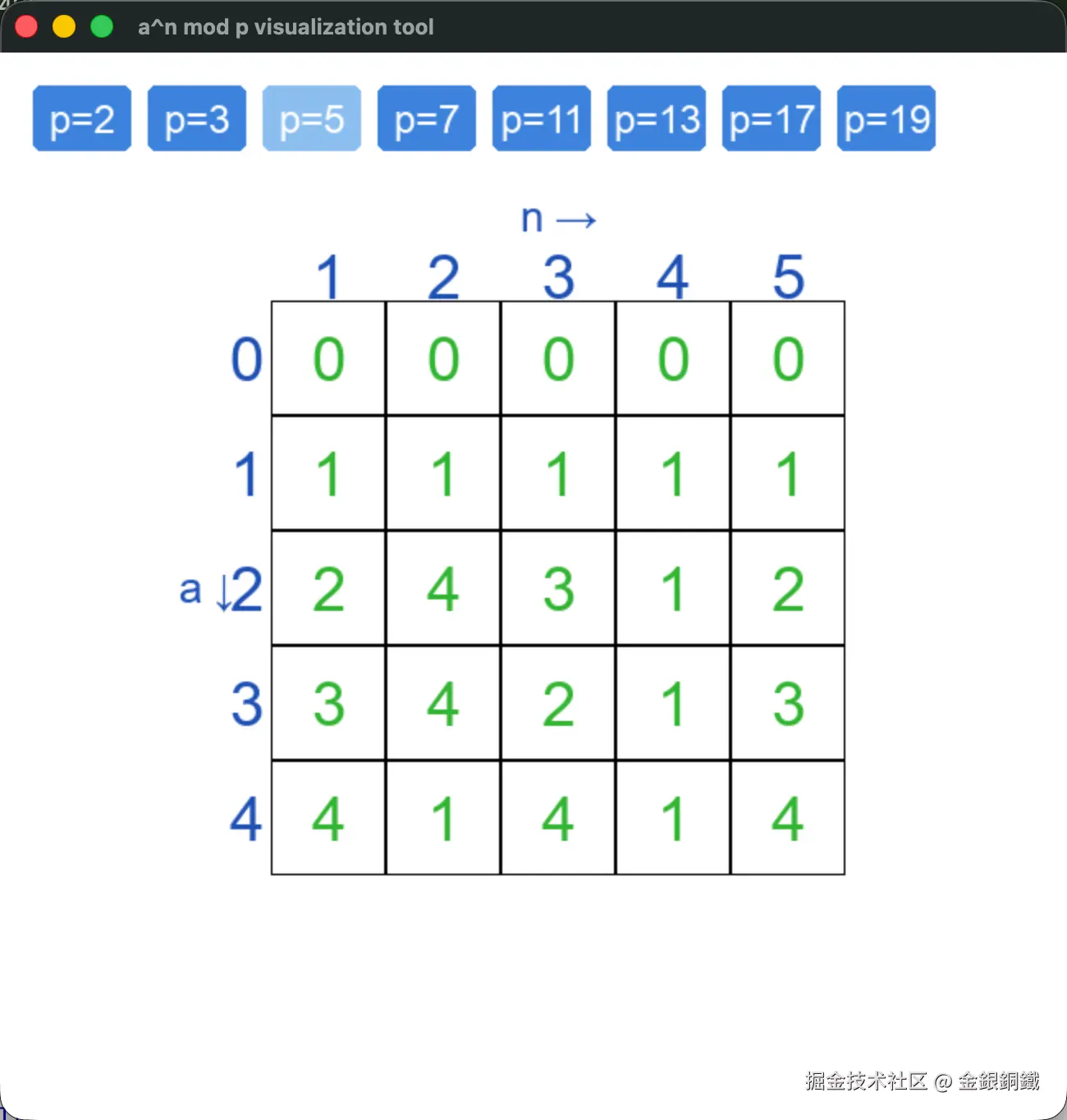
选择不同的 p 值,就能看到 anmodp 的计算结果。以 p=5 为例,计算结果如下
探索
以 p=2,3,5,7 的情况为例,我进行了一些探索,我把对应的规律展示在下方(为了便于查看,我把四张图合并到一起了)
规律一: a2 分布对称
第一个规律是: a2 分布对称,即对满足 0<a<p 的 a 而言, a2≡(p−a)2(modp) 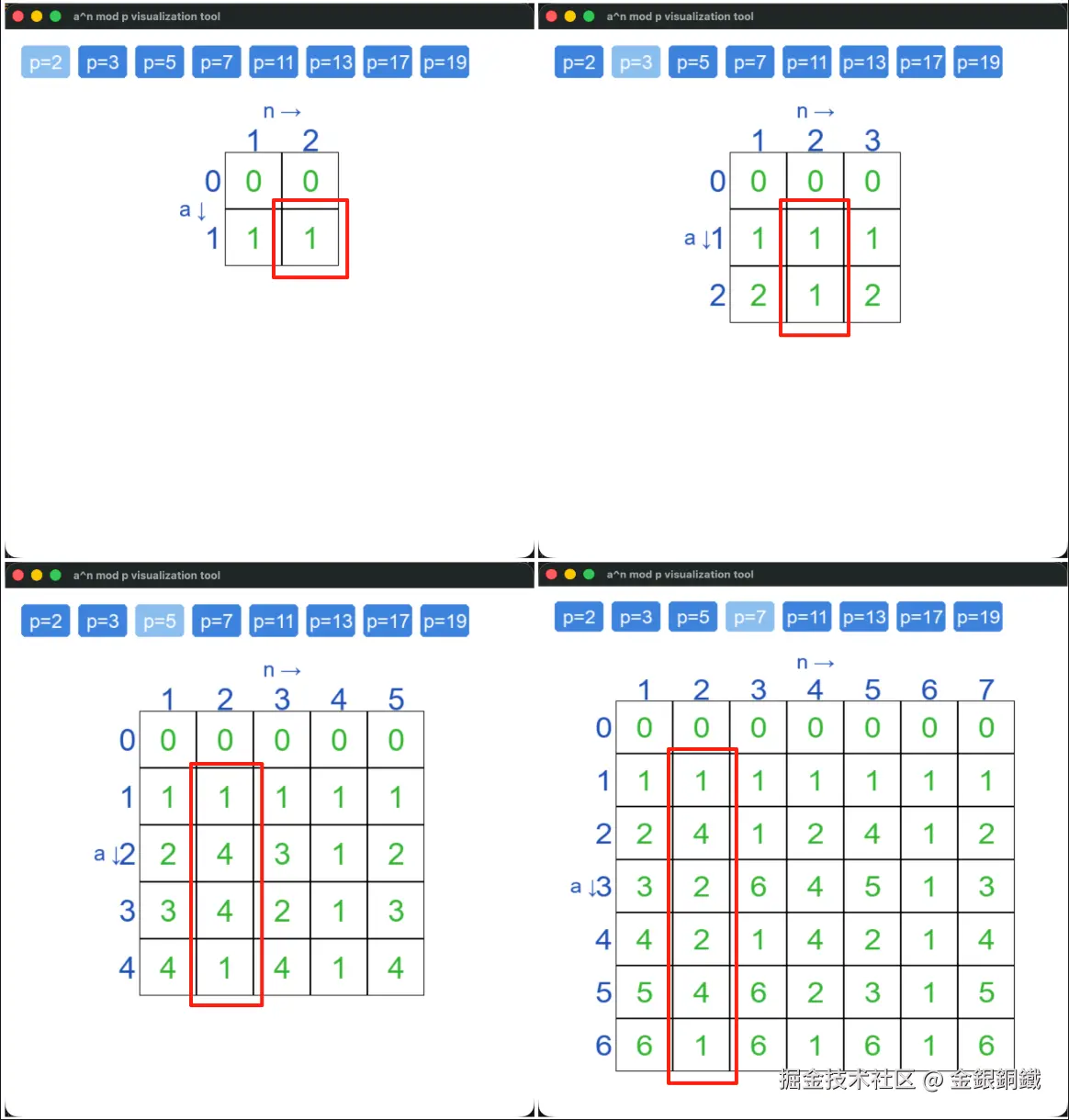
这个规律不难证明 ⬇️
a2−(p−a)2=a2−(p2−2pa+aa)=−p2+2pa
而
p∣(−p2+2pa)
所以 p∣(a2−(p−a)2)。所以 a2≡(p−a)2(modp) 成立(其实 a 可以是任意整数)
规律二: 费马小定理
第二个规律是:对满足 0<a<p 的 a 而言, ap−1≡1(modp) 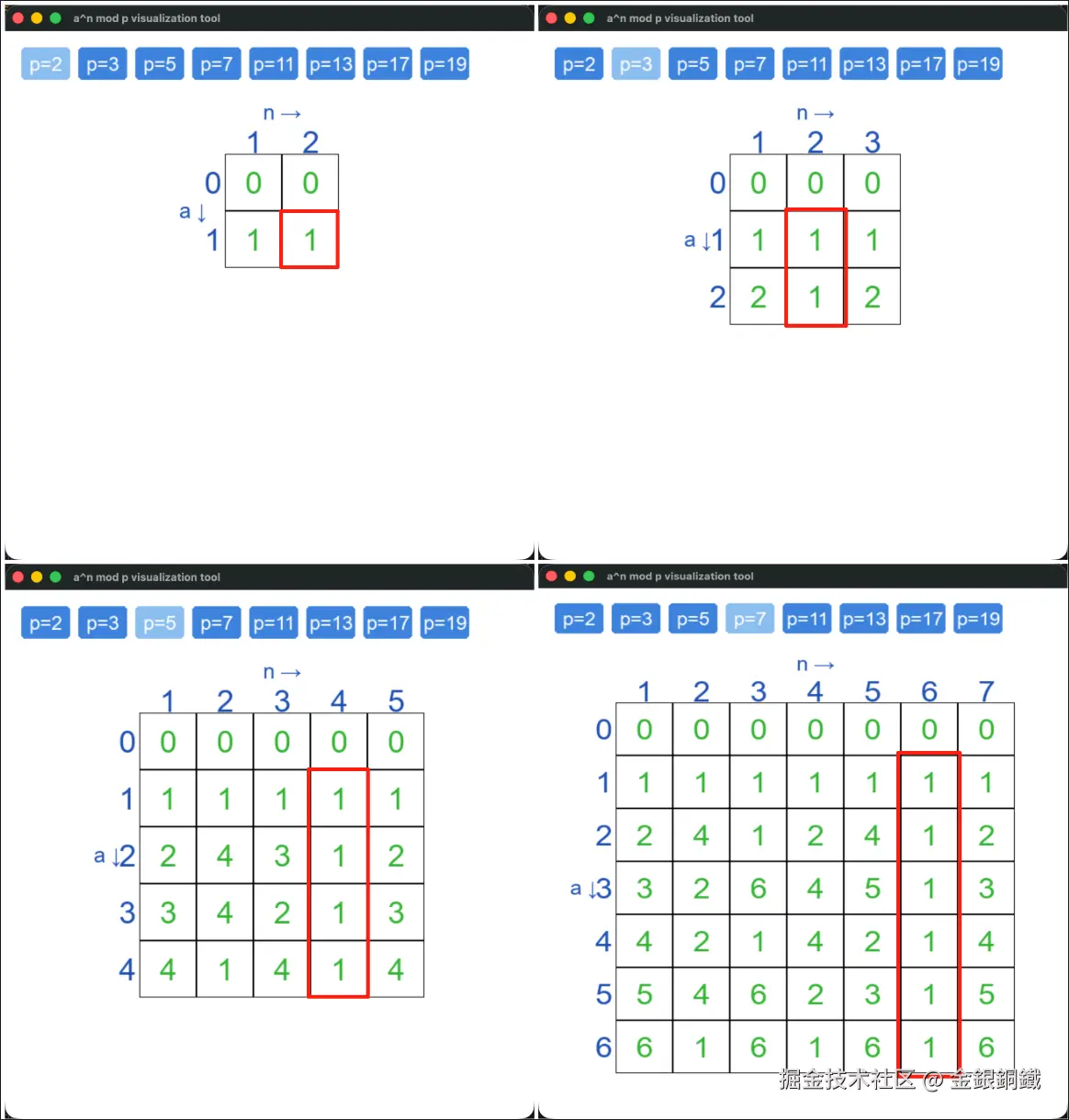 这个规律其实就是费马小定理。我在 Python 费马小定理 一文中对其进行了更多介绍。
规律三: ap≡a(modp)
第三个规律是:对满足 0≤a<p 的 a 而言, ap≡a(modp) 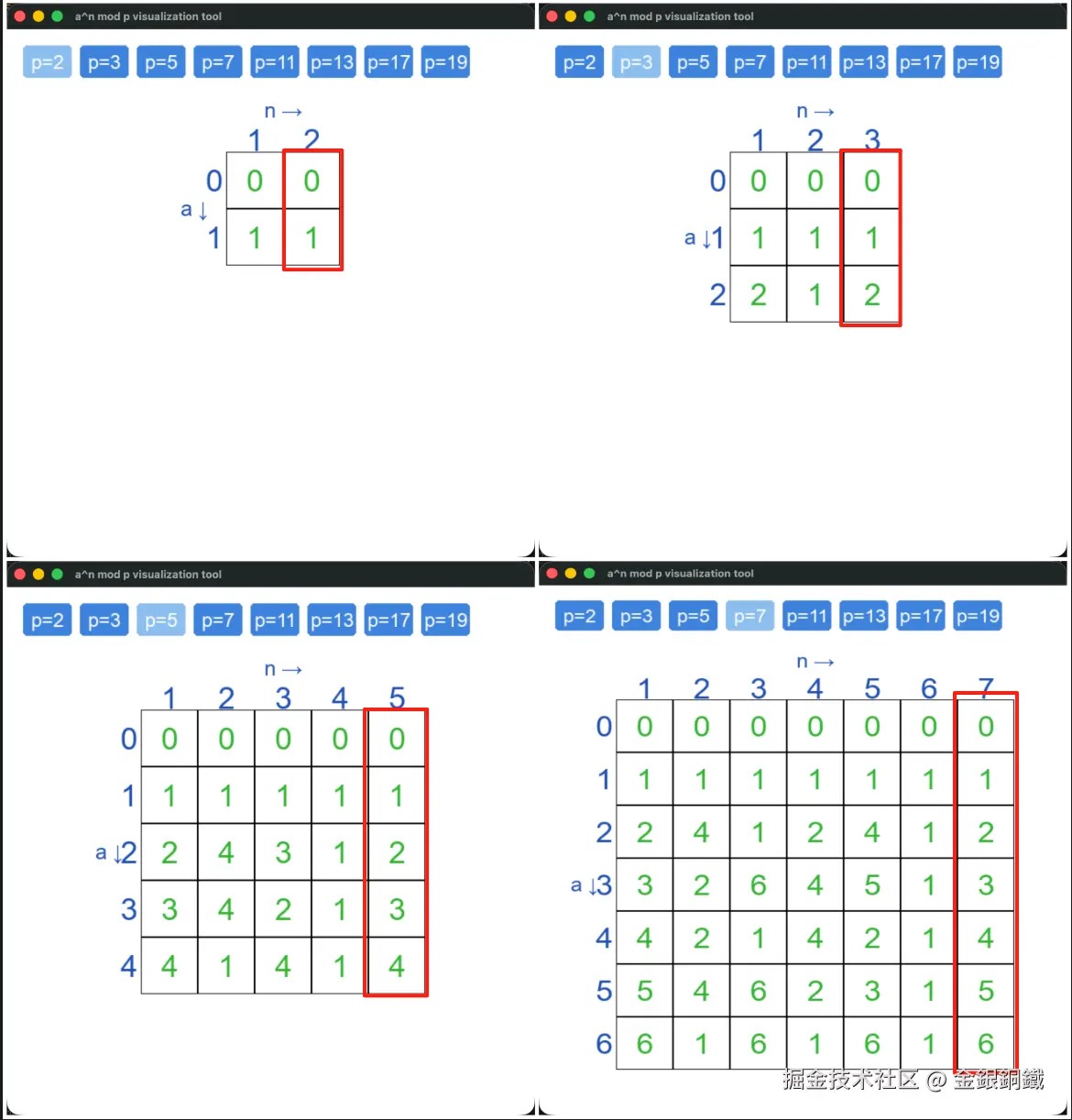
这个规律不难证明 ⬇️
- 如果 a=0,那么 0p≡0(modp) 显然成立
- 如果 0<a<p,那么由费马小定理可得 ap−1≡1(modp)。等式两边一起乘以 a,可以得出 ap≡a(modp)
证明结束
参考资料
- A Friendly Introduction to Number Theory 中的第 9 章 (
Congruences, Powers, and Fermat's Little Theorem) - 我写的另一篇文章:Python 费马小定理