dify 从1.14.2 升级到1.16.1后,打开编辑好的工作流,页面出现 "同步数据中,只需要几秒钟" ,出现报错
打开任何一个工作室的应用工作流,就出现"同步数据中,只需要几秒钟"的报错,页面不可用。
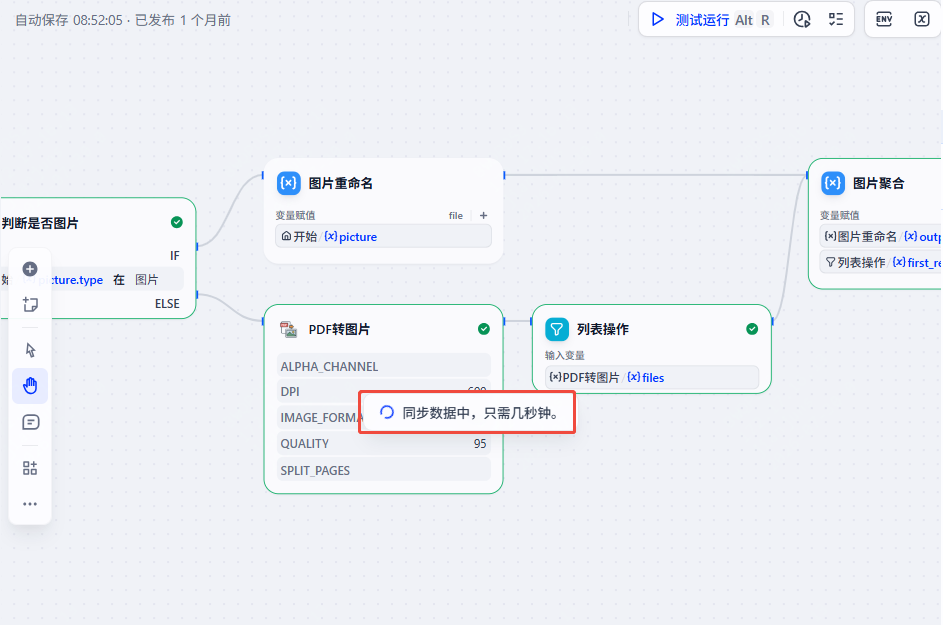
后面按F12,看到接口都是正常的,console出现报错。粘贴如下:
html
0t-i-de8cc5v_.js:1 WebSocket connection to 'ws://localhost/socket.io/?EIO=4&transport=websocket' failed: Error during WebSocket handshake: net::ERR_CONNECTION_RESET
createSocket @ 0t-i-de8cc5v_.js:1
doOpen @ 0t-i-de8cc5v_.js:1
open @ 0t-i-de8cc5v_.js:1
_open @ 0t-i-de8cc5v_.js:1
$ @ 0t-i-de8cc5v_.js:1
Q @ 0t-i-de8cc5v_.js:1
X @ 0t-i-de8cc5v_.js:1
open @ 0t-i-de8cc5v_.js:1
ty @ 0t-i-de8cc5v_.js:1
tm @ 0t-i-de8cc5v_.js:1
connect @ 0t-i-de8cc5v_.js:1
connect @ 1gqxzk4bp4b4w.js:1
1gqxzk4bp4b4w.js:1 WebSocket connection error: B: websocket error
    at websocket.onError (0t-i-de8cc5v_.js:1:4349)
    at ws.onerror (0t-i-de8cc5v_.js:1:10591)
(anonymous) @ 1gqxzk4bp4b4w.js:1
w.emit @ 0t-i-de8cc5v_.js:1
onerror @ 0t-i-de8cc5v_.js:1
w.emit @ 0t-i-de8cc5v_.js:1
i @ 0t-i-de8cc5v_.js:1
w.emit @ 0t-i-de8cc5v_.js:1
_onError @ 0t-i-de8cc5v_.js:1
w.emit @ 0t-i-de8cc5v_.js:1
onError @ 0t-i-de8cc5v_.js:1
ws.onerror @ 0t-i-de8cc5v_.js:1
0t-i-de8cc5v_.js:1 WebSocket connection to 'ws://localhost/socket.io/?EIO=4&transport=websocket' failed: Error during WebSocket handshake: net::ERR_CONNECTION_RESET
createSocket @ 0t-i-de8cc5v_.js:1
doOpen @ 0t-i-de8cc5v_.js:1
open @ 0t-i-de8cc5v_.js:1
_open @ 0t-i-de8cc5v_.js:1
$ @ 0t-i-de8cc5v_.js:1
Q @ 0t-i-de8cc5v_.js:1
X @ 0t-i-de8cc5v_.js:1
open @ 0t-i-de8cc5v_.js:1
(anonymous) @ 0t-i-de8cc5v_.js:1
1gqxzk4bp4b4w.js:1 WebSocket connection error: B: websocket error
    at websocket.onError (0t-i-de8cc5v_.js:1:4349)
    at ws.onerror (0t-i-de8cc5v_.js:1:10591)
(anonymous) @ 1gqxzk4bp4b4w.js:1
w.emit @ 0t-i-de8cc5v_.js:1
onerror @ 0t-i-de8cc5v_.js:1
w.emit @ 0t-i-de8cc5v_.js:1
i @ 0t-i-de8cc5v_.js:1
w.emit @ 0t-i-de8cc5v_.js:1
_onError @ 0t-i-de8cc5v_.js:1
w.emit @ 0t-i-de8cc5v_.js:1
onError @ 0t-i-de8cc5v_.js:1
ws.onerror @ 0t-i-de8cc5v_.js:1
0t-i-de8cc5v_.js:1 WebSocket connection to 'ws://localhost/socket.io/?EIO=4&transport=websocket' failed: Error during WebSocket handshake: net::ERR_CONNECTION_RESET
createSocket @ 0t-i-de8cc5v_.js:1
doOpen @ 0t-i-de8cc5v_.js:1
open @ 0t-i-de8cc5v_.js:1
_open @ 0t-i-de8cc5v_.js:1
$ @ 0t-i-de8cc5v_.js:1
Q @ 0t-i-de8cc5v_.js:1
X @ 0t-i-de8cc5v_.js:1
open @ 0t-i-de8cc5v_.js:1
(anonymous) @ 0t-i-de8cc5v_.js:1
1gqxzk4bp4b4w.js:1 WebSocket connection error: B: websocket error
    at websocket.onError (0t-i-de8cc5v_.js:1:4349)
    at ws.onerror (0t-i-de8cc5v_.js:1:10591)
(anonymous) @ 1gqxzk4bp4b4w.js:1
w.emit @ 0t-i-de8cc5v_.js:1
onerror @ 0t-i-de8cc5v_.js:1
w.emit @ 0t-i-de8cc5v_.js:1
i @ 0t-i-de8cc5v_.js:1
w.emit @ 0t-i-de8cc5v_.js:1
_onError @ 0t-i-de8cc5v_.js:1
w.emit @ 0t-i-de8cc5v_.js:1
onError @ 0t-i-de8cc5v_.js:1
ws.onerror @ 0t-i-de8cc5v_.js:1
0t-i-de8cc5v_.js:1 WebSocket connection to 'ws://localhost/socket.io/?EIO=4&transport=websocket' failed: Error during WebSocket handshake: net::ERR_CONNECTION_RESET
createSocket @ 0t-i-de8cc5v_.js:1
doOpen @ 0t-i-de8cc5v_.js:1
open @ 0t-i-de8cc5v_.js:1
_open @ 0t-i-de8cc5v_.js:1
$ @ 0t-i-de8cc5v_.js:1
Q @ 0t-i-de8cc5v_.js:1
X @ 0t-i-de8cc5v_.js:1
open @ 0t-i-de8cc5v_.js:1
(anonymous) @ 0t-i-de8cc5v_.js:1
1gqxzk4bp4b4w.js:1 WebSocket connection error: B: websocket error
    at websocket.onError (0t-i-de8cc5v_.js:1:4349)
    at ws.onerror (0t-i-de8cc5v_.js:1:10591)
(anonymous) @ 1gqxzk4bp4b4w.js:1
w.emit @ 0t-i-de8cc5v_.js:1
onerror @ 0t-i-de8cc5v_.js:1
w.emit @ 0t-i-de8cc5v_.js:1
i @ 0t-i-de8cc5v_.js:1
w.emit @ 0t-i-de8cc5v_.js:1
_onError @ 0t-i-de8cc5v_.js:1
w.emit @ 0t-i-de8cc5v_.js:1
onError @ 0t-i-de8cc5v_.js:1
ws.onerror @ 0t-i-de8cc5v_.js:1
0t-i-de8cc5v_.js:1 WebSocket connection to 'ws://localhost/socket.io/?EIO=4&transport=websocket' failed: Error during WebSocket handshake: net::ERR_CONNECTION_RESET
createSocket @ 0t-i-de8cc5v_.js:1
doOpen @ 0t-i-de8cc5v_.js:1
open @ 0t-i-de8cc5v_.js:1
_open @ 0t-i-de8cc5v_.js:1
$ @ 0t-i-de8cc5v_.js:1
Q @ 0t-i-de8cc5v_.js:1
X @ 0t-i-de8cc5v_.js:1
open @ 0t-i-de8cc5v_.js:1
(anonymous) @ 0t-i-de8cc5v_.js:1
1gqxzk4bp4b4w.js:1 WebSocket connection error: B: websocket error
    at websocket.onError (0t-i-de8cc5v_.js:1:4349)
    at ws.onerror (0t-i-de8cc5v_.js:1:10591)
一看是ws地址连接有问题,ws://localhost/socket.io/?EIO=4&transport=websocket 这一看就是本地地址,需要配置
于是去改了 dify/docker/.env文件,找到 ws地址配置项:

将其改成正确的配置相。重启dify所有docker组件后,再打开页面,情况继续,但是console上面的报错已经不一样了,现在变成:
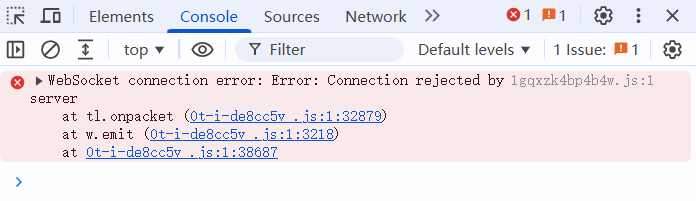
看来是刚刚修改ws地址起了点作用,但是现在的报错已经超出了我的知识范围,期待哪位大佬帮忙解决一下?
十分感谢 Zhelx 大牛提供的思路。继续分析:
打开docker 日志 容器docker-api_websocket-1,有大量报错。
docker logs -f -t --tail=100 docker-api_websocket-1
bash
2026-07-30T09:03:56.636429855Z Cannot receive from redis... retrying in 1 secs
2026-07-30T09:03:56.636567557Z 2026-07-30 09:03:56.636 ERROR [Dummy-2] [redis_manager.py:188]  - Cannot receive from redis... retrying in 1 secs
2026-07-30T09:04:02.643028663Z Cannot receive from redis... retrying in 1 secs
2026-07-30T09:04:02.643247819Z 2026-07-30 09:04:02.642 ERROR [Dummy-2] [redis_manager.py:188]  - Cannot receive from redis... retrying in 1 secs
2026-07-30T09:04:08.651231646Z Cannot receive from redis... retrying in 1 secs
2026-07-30T09:04:08.651520464Z 2026-07-30 09:04:08.650 ERROR [Dummy-2] [redis_manager.py:188]  - Cannot receive from redis... retrying in 1 secs
2026-07-30T09:04:14.659484789Z Cannot receive from redis... retrying in 1 secs
2026-07-30T09:04:14.659635410Z 2026-07-30 09:04:14.659 ERROR [Dummy-2] [redis_manager.py:188]  - Cannot receive from redis... retrying in 1 secs
2026-07-30T09:04:15.000366094Z 2026-07-30 09:04:14.997 ERROR [Dummy-15] [workflow.py:59]  - Socket authentication failed
2026-07-30T09:04:15.000427203Z Traceback (most recent call last):
2026-07-30T09:04:15.000444204Z   File "/app/api/.venv/lib/python3.12/site-packages/socketio/server.py", line 541, in _handle_connect
2026-07-30T09:04:15.000457663Z     success = self._trigger_event(
2026-07-30T09:04:15.000469506Z               ^^^^^^^^^^^^^^^^^^^^
2026-07-30T09:04:15.000479301Z   File "/app/api/.venv/lib/python3.12/site-packages/socketio/server.py", line 623, in _trigger_event
2026-07-30T09:04:15.000488293Z     return handler(*args)
2026-07-30T09:04:15.000496256Z            ^^^^^^^^^^^^^^
2026-07-30T09:04:15.000504577Z TypeError: socket_connect() missing 1 required positional argument: 'auth'
2026-07-30T09:04:15.000513331Z
2026-07-30T09:04:15.000521263Z During handling of the above exception, another exception occurred:
2026-07-30T09:04:15.000530439Z
2026-07-30T09:04:15.000537787Z Traceback (most recent call last):
2026-07-30T09:04:15.000545749Z   File "/app/api/libs/passport.py", line 16, in verify
2026-07-30T09:04:15.000554844Z     return jwt.decode(token, self.sk, algorithms=["HS256"])
2026-07-30T09:04:15.000560589Z            ^^^^^^^^^^^^^^^^^^^^^^^^^^^^^^^^^^^^^^^^^^^^^^^^
2026-07-30T09:04:15.000565937Z   File "/app/api/.venv/lib/python3.12/site-packages/jwt/api_jwt.py", line 368, in decode
2026-07-30T09:04:15.000571743Z     decoded = self.decode_complete(
2026-07-30T09:04:15.000577036Z               ^^^^^^^^^^^^^^^^^^^^^
2026-07-30T09:04:15.000582067Z   File "/app/api/.venv/lib/python3.12/site-packages/jwt/api_jwt.py", line 265, in decode_complete
2026-07-30T09:04:15.000587440Z     decoded = self._jws.decode_complete(
2026-07-30T09:04:15.000593116Z               ^^^^^^^^^^^^^^^^^^^^^^^^^^
2026-07-30T09:04:15.000598103Z   File "/app/api/.venv/lib/python3.12/site-packages/jwt/api_jws.py", line 270, in decode_complete
2026-07-30T09:04:15.000604020Z     self._verify_signature(
2026-07-30T09:04:15.000609351Z   File "/app/api/.venv/lib/python3.12/site-packages/jwt/api_jws.py", line 417, in _verify_signature
2026-07-30T09:04:15.000614980Z     raise InvalidSignatureError("Signature verification failed")
2026-07-30T09:04:15.000620490Z jwt.exceptions.InvalidSignatureError: Signature verification failed
2026-07-30T09:04:15.000626147Z
2026-07-30T09:04:15.000631002Z During handling of the above exception, another exception occurred:
2026-07-30T09:04:15.000636236Z
2026-07-30T09:04:15.000643653Z Traceback (most recent call last):
2026-07-30T09:04:15.000651901Z   File "/app/api/controllers/console/socketio/workflow.py", line 40, in socket_connect
2026-07-30T09:04:15.000678803Z     decoded = PassportService().verify(token)
2026-07-30T09:04:15.000684640Z               ^^^^^^^^^^^^^^^^^^^^^^^^^^^^^^^
2026-07-30T09:04:15.000689968Z   File "/app/api/libs/passport.py", line 20, in verify
2026-07-30T09:04:15.000695406Z     raise Unauthorized("Invalid token signature.")
2026-07-30T09:04:15.000701158Z werkzeug.exceptions.Unauthorized: 401 Unauthorized: Invalid token signature.
思路如下:
可能问题一:WebSocket 连接失败(Redis 超时)
现象:浏览器控制台报错 WebSocket connection failed,api_websocket 容器日志不断输出 Cannot receive from redis... retrying in 1 secs。
原因:REDIS_SOCKET_TIMEOUT=5 导致 Redis pub/sub 监听器在 5 秒无消息时超时断开。socketio.RedisManager 使用 pubsub.listen() 阻塞等待消息,但 socket_timeout=5 强行中断了等待。
解决:REDIS_SOCKET_TIMEOUT=300(5 分钟,DifyConfig 要求必须 >0)。
问题 二:WebSocket 连接失败(JWT 签名不一致) 最有可能
现象:浏览器能建立 WebSocket 连接,但立即被服务器拒绝,日志报 InvalidSignatureError: Signature verification failed。
原因:SECRET_KEY 在 .env 中留空,Dify 在每个容器首次启动时自动生成并存入 storage/.dify_secret_key。当 api_websocket 容器被重建时,它生成了新的密钥,而 api 容器仍用旧的。客户端从 api 获取 JWT 令牌(用旧密钥签名),api_websocket 用新密钥验证 → 签名不匹配 → 拒绝连接。
在.env里面配置固定密钥
SECRET_KEY=***
INIT_PASSWORD=***
按照这个思路,修改了.env文件下面三个变量的值,果然问题解决了,dify又恢复了可用。
REDIS_SOCKET_TIMEOUT=300
SECRET_KEY=***
INIT_PASSWORD=***
问题二:升级到1.16.1后还出现milvus向量数据库不可用的问题
后面又发现dify上的知识库表面上全部正常,但是真正用起来却全部卡住,后面全部超时失败。
向量数据库使用的是milvus,检查发现milvus容器全部正常运行,就是无法连通。用外部工具连接也是无法连通。
试用了很多手段发现都没有。
milvus原来的组件:milvus-etcd,milvus-minio,milvus-standalone他们默认的networks都是:milvus
networks:
- milvus
后面无意间将 milvus相关的组件的network网络换成 default,竟然解决问题。
networks:
- default
至于为什么换成default后就可以,官方也未给出解释。