鸿蒙实战:UnclassifiedArchivePage 长按多选与批量归档
前言
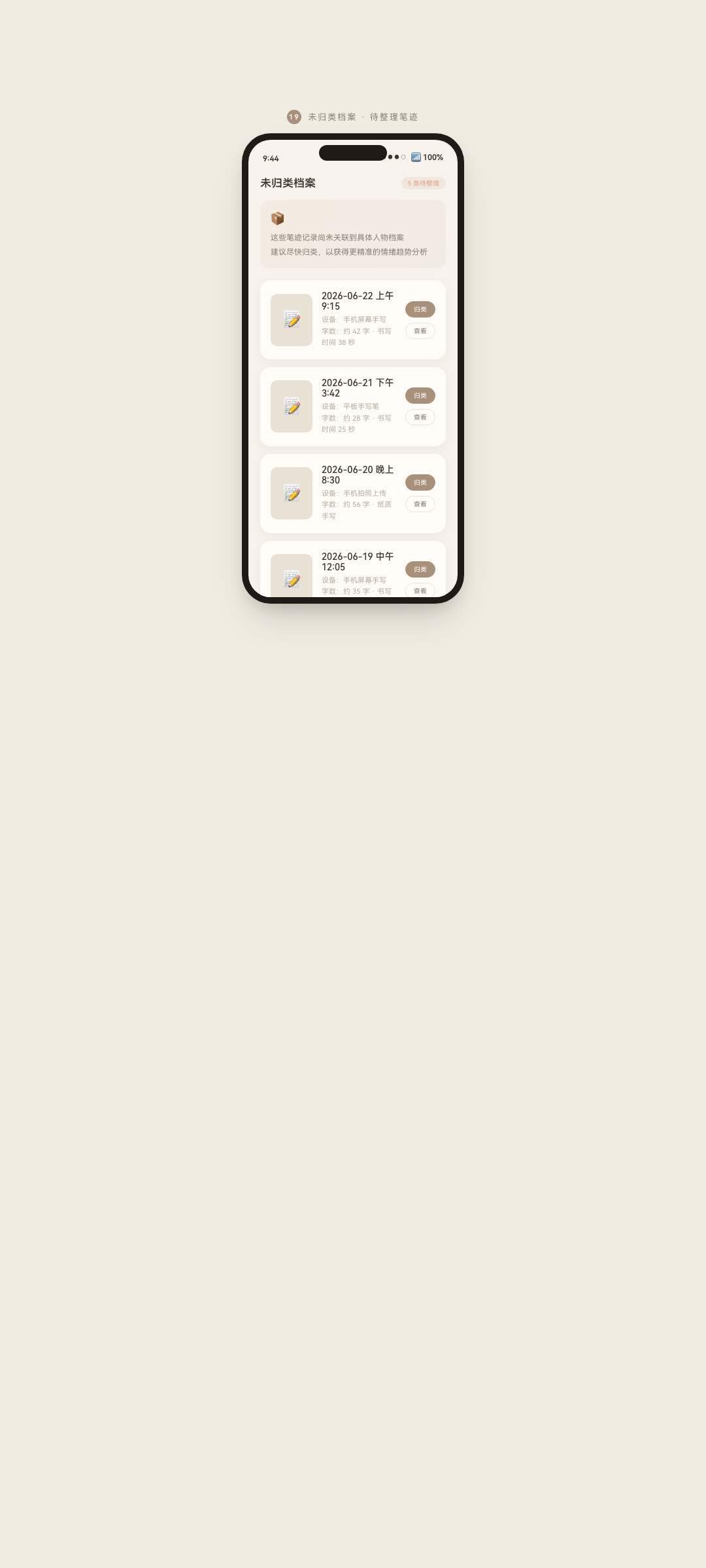
图:鸿蒙实战第97篇:UnclassifiedArchivePage 长按多选与批量归档 运行效果截图(HarmonyOS NEXT)
UnclassifiedArchivePage(未归类整理页)解决了一个实际产品问题:用户拍照分析后,笔迹记录暂时没有归属的档案,需要一个批量整理的入口。这 527 行代码的核心是长按触发多选模式 ------这在 ArkUI 中需要 LongPressGesture 与 onClick 共存的特殊写法。
本篇重点拆解:
LongPressGesture与onClick共存的手势处理- 选择模式的进入/退出与 Transition 动画
selectAll全选切换逻辑- 批量归档两步写入 (
batchUpdateArchive+incrementRecordBy)
系列导航:96 SharePage · 98 FormCardsPreview
相关文档:Gesture 手势 API · transition 组件转场 · HandwritingDao
一、页面功能架构
1.1 两种模式对比
#mermaid-svg-0PDfwvT2X1JOqHsL{font-family:"trebuchet ms",verdana,arial,sans-serif;font-size:16px;fill:#333;}@keyframes edge-animation-frame{from{stroke-dashoffset:0;}}@keyframes dash{to{stroke-dashoffset:0;}}#mermaid-svg-0PDfwvT2X1JOqHsL .edge-animation-slow{stroke-dasharray:9,5!important;stroke-dashoffset:900;animation:dash 50s linear infinite;stroke-linecap:round;}#mermaid-svg-0PDfwvT2X1JOqHsL .edge-animation-fast{stroke-dasharray:9,5!important;stroke-dashoffset:900;animation:dash 20s linear infinite;stroke-linecap:round;}#mermaid-svg-0PDfwvT2X1JOqHsL .error-icon{fill:#552222;}#mermaid-svg-0PDfwvT2X1JOqHsL .error-text{fill:#552222;stroke:#552222;}#mermaid-svg-0PDfwvT2X1JOqHsL .edge-thickness-normal{stroke-width:1px;}#mermaid-svg-0PDfwvT2X1JOqHsL .edge-thickness-thick{stroke-width:3.5px;}#mermaid-svg-0PDfwvT2X1JOqHsL .edge-pattern-solid{stroke-dasharray:0;}#mermaid-svg-0PDfwvT2X1JOqHsL .edge-thickness-invisible{stroke-width:0;fill:none;}#mermaid-svg-0PDfwvT2X1JOqHsL .edge-pattern-dashed{stroke-dasharray:3;}#mermaid-svg-0PDfwvT2X1JOqHsL .edge-pattern-dotted{stroke-dasharray:2;}#mermaid-svg-0PDfwvT2X1JOqHsL .marker{fill:#333333;stroke:#333333;}#mermaid-svg-0PDfwvT2X1JOqHsL .marker.cross{stroke:#333333;}#mermaid-svg-0PDfwvT2X1JOqHsL svg{font-family:"trebuchet ms",verdana,arial,sans-serif;font-size:16px;}#mermaid-svg-0PDfwvT2X1JOqHsL p{margin:0;}#mermaid-svg-0PDfwvT2X1JOqHsL defs #statediagram-barbEnd{fill:#333333;stroke:#333333;}#mermaid-svg-0PDfwvT2X1JOqHsL g.stateGroup text{fill:#9370DB;stroke:none;font-size:10px;}#mermaid-svg-0PDfwvT2X1JOqHsL g.stateGroup text{fill:#333;stroke:none;font-size:10px;}#mermaid-svg-0PDfwvT2X1JOqHsL g.stateGroup .state-title{font-weight:bolder;fill:#131300;}#mermaid-svg-0PDfwvT2X1JOqHsL g.stateGroup rect{fill:#ECECFF;stroke:#9370DB;}#mermaid-svg-0PDfwvT2X1JOqHsL g.stateGroup line{stroke:#333333;stroke-width:1;}#mermaid-svg-0PDfwvT2X1JOqHsL .transition{stroke:#333333;stroke-width:1;fill:none;}#mermaid-svg-0PDfwvT2X1JOqHsL .stateGroup .composit{fill:white;border-bottom:1px;}#mermaid-svg-0PDfwvT2X1JOqHsL .stateGroup .alt-composit{fill:#e0e0e0;border-bottom:1px;}#mermaid-svg-0PDfwvT2X1JOqHsL .state-note{stroke:#aaaa33;fill:#fff5ad;}#mermaid-svg-0PDfwvT2X1JOqHsL .state-note text{fill:black;stroke:none;font-size:10px;}#mermaid-svg-0PDfwvT2X1JOqHsL .stateLabel .box{stroke:none;stroke-width:0;fill:#ECECFF;opacity:0.5;}#mermaid-svg-0PDfwvT2X1JOqHsL .edgeLabel .label rect{fill:#ECECFF;opacity:0.5;}#mermaid-svg-0PDfwvT2X1JOqHsL .edgeLabel{background-color:rgba(232,232,232, 0.8);text-align:center;}#mermaid-svg-0PDfwvT2X1JOqHsL .edgeLabel p{background-color:rgba(232,232,232, 0.8);}#mermaid-svg-0PDfwvT2X1JOqHsL .edgeLabel rect{opacity:0.5;background-color:rgba(232,232,232, 0.8);fill:rgba(232,232,232, 0.8);}#mermaid-svg-0PDfwvT2X1JOqHsL .edgeLabel .label text{fill:#333;}#mermaid-svg-0PDfwvT2X1JOqHsL .label div .edgeLabel{color:#333;}#mermaid-svg-0PDfwvT2X1JOqHsL .stateLabel text{fill:#131300;font-size:10px;font-weight:bold;}#mermaid-svg-0PDfwvT2X1JOqHsL .node circle.state-start{fill:#333333;stroke:#333333;}#mermaid-svg-0PDfwvT2X1JOqHsL .node .fork-join{fill:#333333;stroke:#333333;}#mermaid-svg-0PDfwvT2X1JOqHsL .node circle.state-end{fill:#9370DB;stroke:white;stroke-width:1.5;}#mermaid-svg-0PDfwvT2X1JOqHsL .end-state-inner{fill:white;stroke-width:1.5;}#mermaid-svg-0PDfwvT2X1JOqHsL .node rect{fill:#ECECFF;stroke:#9370DB;stroke-width:1px;}#mermaid-svg-0PDfwvT2X1JOqHsL .node polygon{fill:#ECECFF;stroke:#9370DB;stroke-width:1px;}#mermaid-svg-0PDfwvT2X1JOqHsL #statediagram-barbEnd{fill:#333333;}#mermaid-svg-0PDfwvT2X1JOqHsL .statediagram-cluster rect{fill:#ECECFF;stroke:#9370DB;stroke-width:1px;}#mermaid-svg-0PDfwvT2X1JOqHsL .cluster-label,#mermaid-svg-0PDfwvT2X1JOqHsL .nodeLabel{color:#131300;}#mermaid-svg-0PDfwvT2X1JOqHsL .statediagram-cluster rect.outer{rx:5px;ry:5px;}#mermaid-svg-0PDfwvT2X1JOqHsL .statediagram-state .divider{stroke:#9370DB;}#mermaid-svg-0PDfwvT2X1JOqHsL .statediagram-state .title-state{rx:5px;ry:5px;}#mermaid-svg-0PDfwvT2X1JOqHsL .statediagram-cluster.statediagram-cluster .inner{fill:white;}#mermaid-svg-0PDfwvT2X1JOqHsL .statediagram-cluster.statediagram-cluster-alt .inner{fill:#f0f0f0;}#mermaid-svg-0PDfwvT2X1JOqHsL .statediagram-cluster .inner{rx:0;ry:0;}#mermaid-svg-0PDfwvT2X1JOqHsL .statediagram-state rect.basic{rx:5px;ry:5px;}#mermaid-svg-0PDfwvT2X1JOqHsL .statediagram-state rect.divider{stroke-dasharray:10,10;fill:#f0f0f0;}#mermaid-svg-0PDfwvT2X1JOqHsL .note-edge{stroke-dasharray:5;}#mermaid-svg-0PDfwvT2X1JOqHsL .statediagram-note rect{fill:#fff5ad;stroke:#aaaa33;stroke-width:1px;rx:0;ry:0;}#mermaid-svg-0PDfwvT2X1JOqHsL .statediagram-note rect{fill:#fff5ad;stroke:#aaaa33;stroke-width:1px;rx:0;ry:0;}#mermaid-svg-0PDfwvT2X1JOqHsL .statediagram-note text{fill:black;}#mermaid-svg-0PDfwvT2X1JOqHsL .statediagram-note .nodeLabel{color:black;}#mermaid-svg-0PDfwvT2X1JOqHsL .statediagram .edgeLabel{color:red;}#mermaid-svg-0PDfwvT2X1JOqHsL #dependencyStart,#mermaid-svg-0PDfwvT2X1JOqHsL #dependencyEnd{fill:#333333;stroke:#333333;stroke-width:1;}#mermaid-svg-0PDfwvT2X1JOqHsL .statediagramTitleText{text-anchor:middle;font-size:18px;fill:#333;}#mermaid-svg-0PDfwvT2X1JOqHsL :root{--mermaid-font-family:"trebuchet ms",verdana,arial,sans-serif;} LongPressGesture\n(500ms长按)
点击"取消"按钮
批量归档完成
点击全选/取消全选
浏览模式
选择模式
1.2 状态变量
typescript
@Entry
@Component
struct UnclassifiedArchivePage {
  @State handwritings: HandwritingEntity[] = []   // 所有未归类笔迹
  @State selectedIds: Set<number> = new Set()     // 已选中的 ID 集合
  @State isSelectMode: boolean = false            // 选择模式开关
  @State archives: ArchiveEntity[] = []           // 目标档案列表
  @State showArchivePicker: boolean = false       // 归档目标选择器
  @State isBatchMoving: boolean = false           // 批量移动中
}
二、LongPressGesture 与 onClick 共存
2.1 手势冲突问题
ArkUI 默认情况下,.gesture() 和 .onClick() 会产生事件竞争:长按 500ms 后系统同时触发长按和点击,导致多选模式激活的同时也触发了"进入详情"。
解决方案 :用 GestureGroup 加 GesturePriority 控制优先级:
typescript
ListItem()
  .onClick(() => {
    if (this.isSelectMode) {
      // 选择模式:点击切换选中
      this.toggleSelect(item.id)
    } else {
      // 浏览模式:点击进入详情
      this.openDetail(item)
    }
  })
  .gesture(
    LongPressGesture({ duration: 500 })
      .onAction(() => {
        if (!this.isSelectMode) {
          this.enterSelectMode(item.id)  // 长按:进入选择模式并选中当前项
        }
      })
  )
关键点 :当
isSelectMode === false时,长按触发进入选择模式;当isSelectMode === true时,长按被忽略(避免重复激活),只有onClick负责切换选中状态。通过isSelectMode标志在两种模式间切换,而不是替换手势处理器。
2.2 进入选择模式
typescript
private enterSelectMode(firstItemId: number): void {
  this.isSelectMode = true
  this.selectedIds = new Set([firstItemId])  // 长按的那一项自动选中

  // 触感反馈(HarmonyOS 振动 API)
  // vibrator.startVibration({ type: 'time', duration: 50 })
}
三、勾选框 Transition 动画
3.1 动画效果
进入选择模式时,每个列表项左侧出现勾选圆圈,配合缩放动画:
typescript
@Builder
CheckboxArea(item: HandwritingEntity) {
  if (this.isSelectMode) {
    Column() {
      // 勾选圆圈
      Column() {
        if (this.selectedIds.has(item.id)) {
          Text('✓').fontSize(12).fontColor(Color.White)
        }
      }
      .width(24)
      .height(24)
      .borderRadius(12)
      .backgroundColor(
        this.selectedIds.has(item.id) ? AppColors.PRIMARY : 'transparent'
      )
      .border({
        width: 2,
        color: this.selectedIds.has(item.id)
          ? AppColors.PRIMARY : AppColors.BORDER
      })
      .justifyContent(FlexAlign.Center)
      .animation({ duration: 200, curve: Curve.FastOutSlowIn })
    }
    .transition({
      type: TransitionType.Insert,
      scale: { x: 0, y: 0 }      // 进入时从 0 缩放到 1
    })
    .transition({
      type: TransitionType.Delete,
      scale: { x: 0, y: 0 }      // 退出时从 1 缩放到 0
    })
  }
}
3.2 选中切换逻辑
typescript
private toggleSelect(id: number): void {
  const newSet = new Set(this.selectedIds)
  if (newSet.has(id)) {
    newSet.delete(id)  // 已选中:取消选中
  } else {
    newSet.add(id)     // 未选中:选中
  }
  this.selectedIds = newSet  // 触发 @State 更新
}
为什么重新赋值
new Set? ArkTS 的@State对 Set/Map 的内部变化(add/delete)不能自动检测,必须将 Set 替换为新对象才能触发重渲染。这是 ArkUI 响应式系统的重要细节。
四、全选/取消全选
typescript
private toggleSelectAll(): void {
  const allSelected = this.handwritings.every(
    item => this.selectedIds.has(item.id)
  )

  if (allSelected) {
    // 当前全选:取消全选
    this.selectedIds = new Set()
  } else {
    // 当前非全选:全部选中
    this.selectedIds = new Set(this.handwritings.map(item => item.id))
  }
}| 当前状态 | every() 结果 |
操作 |
|---|---|---|
| 全部选中 | true |
清空 selectedIds |
| 部分选中 | false |
全部加入 selectedIds |
| 全不选中 | false |
全部加入 selectedIds |
五、批量归档两步写入
5.1 操作流程
#mermaid-svg-SG2TrE6ZIRYIh50G{font-family:"trebuchet ms",verdana,arial,sans-serif;font-size:16px;fill:#333;}@keyframes edge-animation-frame{from{stroke-dashoffset:0;}}@keyframes dash{to{stroke-dashoffset:0;}}#mermaid-svg-SG2TrE6ZIRYIh50G .edge-animation-slow{stroke-dasharray:9,5!important;stroke-dashoffset:900;animation:dash 50s linear infinite;stroke-linecap:round;}#mermaid-svg-SG2TrE6ZIRYIh50G .edge-animation-fast{stroke-dasharray:9,5!important;stroke-dashoffset:900;animation:dash 20s linear infinite;stroke-linecap:round;}#mermaid-svg-SG2TrE6ZIRYIh50G .error-icon{fill:#552222;}#mermaid-svg-SG2TrE6ZIRYIh50G .error-text{fill:#552222;stroke:#552222;}#mermaid-svg-SG2TrE6ZIRYIh50G .edge-thickness-normal{stroke-width:1px;}#mermaid-svg-SG2TrE6ZIRYIh50G .edge-thickness-thick{stroke-width:3.5px;}#mermaid-svg-SG2TrE6ZIRYIh50G .edge-pattern-solid{stroke-dasharray:0;}#mermaid-svg-SG2TrE6ZIRYIh50G .edge-thickness-invisible{stroke-width:0;fill:none;}#mermaid-svg-SG2TrE6ZIRYIh50G .edge-pattern-dashed{stroke-dasharray:3;}#mermaid-svg-SG2TrE6ZIRYIh50G .edge-pattern-dotted{stroke-dasharray:2;}#mermaid-svg-SG2TrE6ZIRYIh50G .marker{fill:#333333;stroke:#333333;}#mermaid-svg-SG2TrE6ZIRYIh50G .marker.cross{stroke:#333333;}#mermaid-svg-SG2TrE6ZIRYIh50G svg{font-family:"trebuchet ms",verdana,arial,sans-serif;font-size:16px;}#mermaid-svg-SG2TrE6ZIRYIh50G p{margin:0;}#mermaid-svg-SG2TrE6ZIRYIh50G .label{font-family:"trebuchet ms",verdana,arial,sans-serif;color:#333;}#mermaid-svg-SG2TrE6ZIRYIh50G .cluster-label text{fill:#333;}#mermaid-svg-SG2TrE6ZIRYIh50G .cluster-label span{color:#333;}#mermaid-svg-SG2TrE6ZIRYIh50G .cluster-label span p{background-color:transparent;}#mermaid-svg-SG2TrE6ZIRYIh50G .label text,#mermaid-svg-SG2TrE6ZIRYIh50G span{fill:#333;color:#333;}#mermaid-svg-SG2TrE6ZIRYIh50G .node rect,#mermaid-svg-SG2TrE6ZIRYIh50G .node circle,#mermaid-svg-SG2TrE6ZIRYIh50G .node ellipse,#mermaid-svg-SG2TrE6ZIRYIh50G .node polygon,#mermaid-svg-SG2TrE6ZIRYIh50G .node path{fill:#ECECFF;stroke:#9370DB;stroke-width:1px;}#mermaid-svg-SG2TrE6ZIRYIh50G .rough-node .label text,#mermaid-svg-SG2TrE6ZIRYIh50G .node .label text,#mermaid-svg-SG2TrE6ZIRYIh50G .image-shape .label,#mermaid-svg-SG2TrE6ZIRYIh50G .icon-shape .label{text-anchor:middle;}#mermaid-svg-SG2TrE6ZIRYIh50G .node .katex path{fill:#000;stroke:#000;stroke-width:1px;}#mermaid-svg-SG2TrE6ZIRYIh50G .rough-node .label,#mermaid-svg-SG2TrE6ZIRYIh50G .node .label,#mermaid-svg-SG2TrE6ZIRYIh50G .image-shape .label,#mermaid-svg-SG2TrE6ZIRYIh50G .icon-shape .label{text-align:center;}#mermaid-svg-SG2TrE6ZIRYIh50G .node.clickable{cursor:pointer;}#mermaid-svg-SG2TrE6ZIRYIh50G .root .anchor path{fill:#333333!important;stroke-width:0;stroke:#333333;}#mermaid-svg-SG2TrE6ZIRYIh50G .arrowheadPath{fill:#333333;}#mermaid-svg-SG2TrE6ZIRYIh50G .edgePath .path{stroke:#333333;stroke-width:2.0px;}#mermaid-svg-SG2TrE6ZIRYIh50G .flowchart-link{stroke:#333333;fill:none;}#mermaid-svg-SG2TrE6ZIRYIh50G .edgeLabel{background-color:rgba(232,232,232, 0.8);text-align:center;}#mermaid-svg-SG2TrE6ZIRYIh50G .edgeLabel p{background-color:rgba(232,232,232, 0.8);}#mermaid-svg-SG2TrE6ZIRYIh50G .edgeLabel rect{opacity:0.5;background-color:rgba(232,232,232, 0.8);fill:rgba(232,232,232, 0.8);}#mermaid-svg-SG2TrE6ZIRYIh50G .labelBkg{background-color:rgba(232, 232, 232, 0.5);}#mermaid-svg-SG2TrE6ZIRYIh50G .cluster rect{fill:#ffffde;stroke:#aaaa33;stroke-width:1px;}#mermaid-svg-SG2TrE6ZIRYIh50G .cluster text{fill:#333;}#mermaid-svg-SG2TrE6ZIRYIh50G .cluster span{color:#333;}#mermaid-svg-SG2TrE6ZIRYIh50G div.mermaidTooltip{position:absolute;text-align:center;max-width:200px;padding:2px;font-family:"trebuchet ms",verdana,arial,sans-serif;font-size:12px;background:hsl(80, 100%, 96.2745098039%);border:1px solid #aaaa33;border-radius:2px;pointer-events:none;z-index:100;}#mermaid-svg-SG2TrE6ZIRYIh50G .flowchartTitleText{text-anchor:middle;font-size:18px;fill:#333;}#mermaid-svg-SG2TrE6ZIRYIh50G rect.text{fill:none;stroke-width:0;}#mermaid-svg-SG2TrE6ZIRYIh50G .icon-shape,#mermaid-svg-SG2TrE6ZIRYIh50G .image-shape{background-color:rgba(232,232,232, 0.8);text-align:center;}#mermaid-svg-SG2TrE6ZIRYIh50G .icon-shape p,#mermaid-svg-SG2TrE6ZIRYIh50G .image-shape p{background-color:rgba(232,232,232, 0.8);padding:2px;}#mermaid-svg-SG2TrE6ZIRYIh50G .icon-shape .label rect,#mermaid-svg-SG2TrE6ZIRYIh50G .image-shape .label rect{opacity:0.5;background-color:rgba(232,232,232, 0.8);fill:rgba(232,232,232, 0.8);}#mermaid-svg-SG2TrE6ZIRYIh50G .label-icon{display:inline-block;height:1em;overflow:visible;vertical-align:-0.125em;}#mermaid-svg-SG2TrE6ZIRYIh50G .node .label-icon path{fill:currentColor;stroke:revert;stroke-width:revert;}#mermaid-svg-SG2TrE6ZIRYIh50G :root{--mermaid-font-family:"trebuchet ms",verdana,arial,sans-serif;} 用户选择目标档案
HandwritingDao.batchUpdateArchive
ids, targetArchiveId
批量更新 archive_id 字段
ArchiveDao.incrementRecordBy
targetArchiveId, selectedIds.size
档案计数 + N
刷新列表
loadHandwritings
退出选择模式
isSelectMode = false
5.2 batchUpdateArchive 实现
typescript
// HandwritingDao.ets
static async batchUpdateArchive(
  ids: number[],
  archiveId: number
): Promise<void> {
  if (ids.length === 0) return
  const store = HandwritingDao.getStore()
  const predicates = new relationalStore.RdbPredicates('handwriting')
  predicates.in('id', ids)  // WHERE id IN (1, 2, 3, ...)
  await store.update(
    { archive_id: archiveId } as relationalStore.ValuesBucket,
    predicates
  )
  hilog.info(TAG, '批量迁移 %{public}d 条记录到档案 %{public}d', ids.length, archiveId)
}
predicates.in('id', ids) 是 RDB Predicates 的多值匹配,等同于 SQL WHERE id IN (...) 。
5.3 调用代码
typescript
private async batchMoveToArchive(targetArchiveId: number): Promise<void> {
  this.isBatchMoving = true
  try {
    const ids = Array.from(this.selectedIds)

    // ① 批量更新笔迹的 archive_id
    await HandwritingDao.batchUpdateArchive(ids, targetArchiveId)

    // ② 更新目标档案的记录数
    await ArchiveDao.incrementRecordBy(targetArchiveId, ids.length)

    // ③ 反馈 + 刷新
    promptAction.showToast({
      message: `${ids.length} 条记录已归入档案`
    })
    await this.loadHandwritings()
    this.isSelectMode = false
    this.selectedIds = new Set()

  } catch (e) {
    hilog.error(TAG, '批量归档失败: %{public}s', JSON.stringify(e))
    promptAction.showToast({ message: '归档失败,请重试' })
  } finally {
    this.isBatchMoving = false
  }
}
六、底部操作栏(选择模式专属)
typescript
@Builder
SelectModeBar() {
  if (this.isSelectMode) {
    Row({ space: 12 }) {
      Text(`已选 ${this.selectedIds.size} 项`)
        .fontSize(14)
        .fontColor(AppColors.TEXT)

      Blank()

      Button('全选')
        .type(ButtonType.Capsule)
        .backgroundColor(AppColors.CARD)
        .fontColor(AppColors.TEXT_2)
        .onClick(() => this.toggleSelectAll())

      Button('归入档案')
        .type(ButtonType.Capsule)
        .backgroundColor(AppColors.PRIMARY)
        .fontColor(Color.White)
        .enabled(this.selectedIds.size > 0)
        .opacity(this.selectedIds.size > 0 ? 1 : 0.5)
        .onClick(() => {
          if (this.selectedIds.size > 0) {
            this.showArchivePicker = true
          }
        })
    }
    .width('100%')
    .padding({ left: 16, right: 16, top: 12, bottom: 12 })
    .backgroundColor(AppColors.CARD)
    .transition({
      type: TransitionType.Insert,
      translate: { y: 60 }   // 从底部滑入
    })
  }
}
八、注意事项与常见问题
8.1 开发注意事项
在实际开发过程中,需特别注意以下几点:
- API 兼容性:部分接口仅在特定 HarmonyOS NEXT 版本中可用,需做版本条件判断
- 权限模型:采用静态声明(module.json5)+ 动态申请(requestPermissionsFromUser)的两阶段授权
- 生命周期 :合理使用
aboutToAppear()和aboutToDisappear()管理资源初始化与释放 - 状态同步 :跨页面数据通过 AppStorage 共享,组件内状态使用
@State/@Prop/@Link装饰器
8.2 常见错误与解决方案
开发过程中的高频问题汇总:
| 错误现象 | 可能原因 | 解决方案 |
|---|---|---|
| 权限被系统拒绝 | 未在 module.json5 中静态声明 |
添加 requestPermissions 权限配置项 |
| 页面跳转后白屏 | 路由路径未在 main_pages.json 注册 |
检查并补充路由配置文件 |
| UI 状态不刷新 | 状态变量未添加响应式装饰器 | 为变量加 @State / @Observed 装饰器 |
| 数据库查询返回空 | 查询条件与存储数据格式不匹配 | 使用 hilog.debug 打印 SQL 条件排查 |
| 相机预览黑屏 | 运行时相机权限未获取 | 先调用 requestPermissionsFromUser 申请 |
总结
UnclassifiedArchivePage 的 527 行代码的核心收获:
LongPressGesture+onClick共存 :用isSelectMode标志在回调内部区分两种模式,避免手势冲突@State Set必须替换对象 :ArkTS 无法检测 Set 内部变化,必须new Set(...)触发重渲染every()实现全选状态检测:一行代码判断当前是否全选,决定"全选/取消全选"操作predicates.in(field, values)批量查询 :IN (...)等效 SQL,O(1) 次 DB 操作完成批量更新- Transition 滑入效果 :选择模式底部操作栏用
translate.y:60→0实现底部滑入
下一篇预告 :第98篇 FormCardsPreview 桌面卡片与 EmptyPage 空状态 Canvas 插画
如果这篇文章对你有帮助,欢迎点赞👍、收藏⭐、关注🔔,你的支持是我持续创作的动力!
相关资源:
- Gesture 手势识别 API
- LongPressGesture 长按手势
- transition 组件转场动画
- relationalStore Predicates.in
- 第85篇 HandwritingDao 批量操作
- 第84篇 ArchiveDao 档案操作
- 第61篇 交互反馈动画
- 第17篇 ForEach 列表渲染
七、UnclassifiedArchivePage 核心实现
7.1 长按触发多选模式
ArkUI 中 LongPressGesture 与 onClick 的共存写法:
typescript
ListItem() { /* 手写记录卡片 */ }
  .gesture(
    GestureGroup(GestureMode.Exclusive,
      LongPressGesture({ duration: 500 })
        .onAction(() => {
          if (!this.isMultiSelect) {
            this.isMultiSelect = true;  // 进入多选模式
            this.selectedIds.add(item.id);  // 长按的项自动选中
          }
        }),
      TapGesture()
        .onAction(() => {
          if (this.isMultiSelect) {
            // 多选模式下,点击切换选中状态
            if (this.selectedIds.has(item.id)) {
              this.selectedIds.delete(item.id);
            } else {
              this.selectedIds.add(item.id);
            }
          } else {
            // 普通模式下,跳转详情
            router.pushUrl({ url: 'pages/ReportDetailPage', params: { reportId: item.reportId } });
          }
        })
    )
  )
7.2 批量归档操作
typescript
private async batchAssignToArchive(archiveId: number) {
  const ids = Array.from(this.selectedIds);
  await HandwritingDao.updateArchiveBatch(ids, archiveId);
  promptAction.showToast({ message: `已将 ${ids.length} 条记录归入档案` });
  this.isMultiSelect = false;
  this.selectedIds.clear();
  this.loadUnclassified();
}
7.3 多选状态的视觉反馈
typescript
// 选中状态:添加勾选角标 + 边框高亮
Column() { /* 卡片内容 */ }
  .border({
    width: this.selectedIds.has(item.id) ? 2 : 0,
    color: AppColors.accentMain
  })
  .overlay(
    this.selectedIds.has(item.id)
      ? CheckMark()  // 右上角绿色勾选图标
      : null,
    { align: Alignment.TopEnd }
  )
七、UnclassifiedArchivePage 设计总结
| 功能 | 核心实现 | 技术要点 |
|---|---|---|
| 多选模式切换 | @State isSelecting |
animateTo 展示/隐藏底部工具栏 |
| 批量归档操作 | selectedIds: Set<number> |
遍历集合执行 ArchiveDao.update |
| 覆盖层勾选图标 | overlay() 修饰符 |
Alignment.TopEnd 定位 |
| 空状态兜底 | EmptyState 组件 |
无数据时居中显示插画 |
延伸阅读:第92篇 ArchivePage 档案管理页 · 第84篇 ArchiveDao 实现
如果这篇文章对你有帮助,欢迎点赞👍、收藏⭐、关注🔔,你的支持是我持续创作的动力!