
文章目录
-
-
- [一、状态变量设计:6 个变量的"Native 桥接状态"](#一、状态变量设计:6 个变量的"Native 桥接状态")
- 二、NativeInfoSection:模块的"身份证"
-
- 四个导出函数的设计意图
- [`nativeAvailable` 的防御性设计](#
nativeAvailable的防御性设计)
- 三、BenchmarkSection:跑分的"可视化对比"
- 四、ActionSection:操作台
-
- 两个按钮的职责分离
- [为什么"重新加载"不受 `nativeAvailable` 限制](#为什么"重新加载"不受
nativeAvailable限制)
- [五、ArchitectureSection:NAPI 集成链路](#五、ArchitectureSection:NAPI 集成链路)
- 六、PracticesSection:最佳实践
- [七、LogSection:NAPI 调用日志](#七、LogSection:NAPI 调用日志)
- 八、与前一个页面(二进制流)的架构对比
- 九、潜在的性能隐患与优化建议
-
- [`barWidth` 的 O(n) 遍历](#
barWidth的 O(n) 遍历) - [`ForEach` 的 key 生成](#
ForEach的 key 生成)
- [`barWidth` 的 O(n) 遍历](#
- 完整代码
-
- [总结:Native 性能的"试金石"](#总结:Native 性能的"试金石")
-
一、状态变量设计:6 个变量的"Native 桥接状态"
| 变量 | 类型 | 角色 | 更新频率 |
|---|---|---|---|
nativeStatus |
string | Native 模块加载状态 | 低 |
nativeVersion |
string | .so 库版本号 |
低 |
nativeAvailable |
boolean | Native 模块是否可用 | 低 |
benchmarkResults |
NativeBenchmarkResult\[\] | 跑分结果集 | 低(仅跑分后更新) |
nativeLogs |
NativeLogItem\[\] | NAPI 调用日志 | 中 |
lastSpeedup |
number | 最近一次最高加速比 | 低 |
与前一个页面(二进制流)的关键差异
| 维度 | 二进制流页面 | Native NAPI 页面 |
|---|---|---|
| 状态数量 | 8 个 | 6 个 |
| 高频更新 | streamMetrics、parsedPackets 持续刷新 |
benchmarkResults 仅在跑分后一次性更新 |
| 数据流方向 | 持续流入(推流 → 解析 → UI) | 请求-响应(点击 → 跑分 → 结果) |
| 交互模式 | 实时流式 | 离散触发式 |
这意味着 Native 页面的 UI 刷新压力远低于二进制流页面,但单次计算量可能更大。
二、NativeInfoSection:模块的"身份证"
typescript
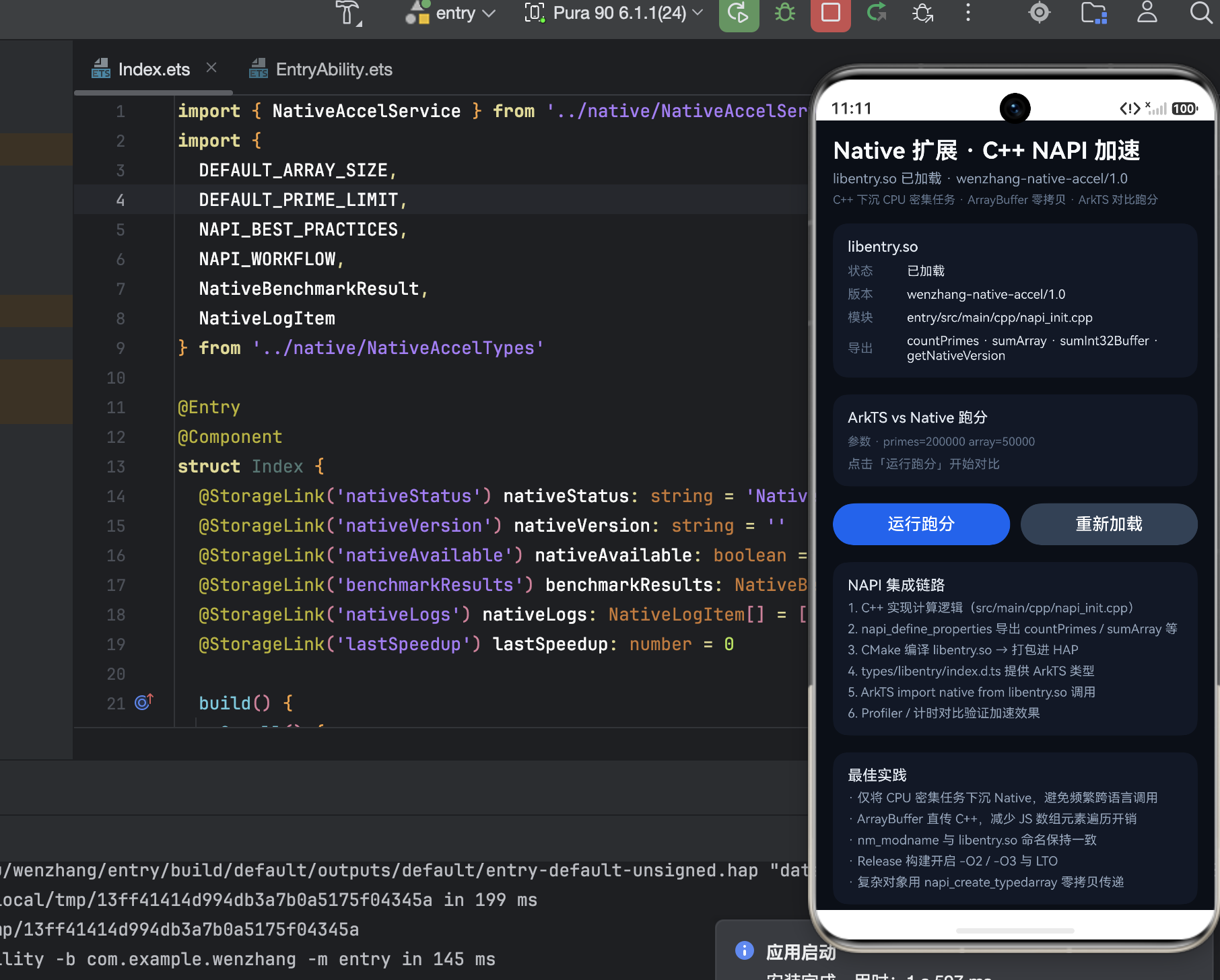
this.InfoRow('状态', this.nativeAvailable ? '已加载' : '不可用')
this.InfoRow('版本', this.nativeVersion.length > 0 ? this.nativeVersion : '-')
this.InfoRow('模块', 'entry/src/main/cpp/napi_init.cpp')
this.InfoRow('导出', 'countPrimes · sumArray · sumInt32Buffer · getNativeVersion')
四个导出函数的设计意图
这四个函数不是随意选择的,它们覆盖了 NAPI 开发中最典型的四种场景:
| 函数 | 数据类型 | 场景 |
|---|---|---|
countPrimes |
标量计算 | 纯 CPU 密集型,无数据传输,最能体现 C++ 算法优势 |
sumArray |
数组传递 | 需要跨语言传递数组,测试序列化/反序列化开销 |
sumInt32Buffer |
ArrayBuffer | 零拷贝场景,直接操作共享内存,性能最优 |
getNativeVersion |
字符串返回 | 最简单的调用,用于验证 NAPI 桥接是否正常工作 |
nativeAvailable 的防御性设计
typescript
Button('运行跑分')
  .enabled(this.nativeAvailable)
如果 .so 文件加载失败(编译错误、ABI 不匹配、依赖缺失),按钮会被禁用,防止用户触发崩溃。这是 Native 开发中的标准防御模式------Native 层的崩溃不会抛出 ArkTS 异常,而是直接导致进程终止。
三、BenchmarkSection:跑分的"可视化对比"
这是整个页面最核心的部分。
跑分结果的数据结构
typescript
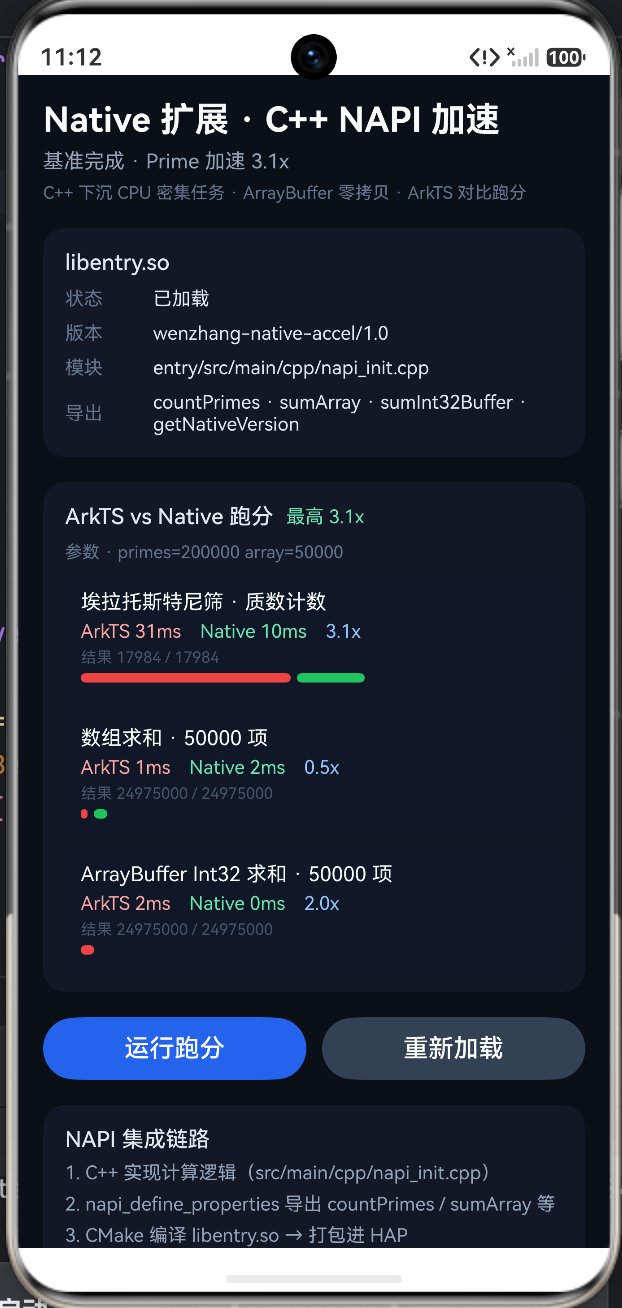
ForEach(this.benchmarkResults, (item: NativeBenchmarkResult) => {
  Text(item.task)                          // 任务名称
  Text(`ArkTS ${item.arkTsMs}ms`)          // ArkTS 耗时
  Text(`Native ${item.nativeMs}ms`)        // Native 耗时
  Text(`${item.speedup.toFixed(1)}x`)      // 加速比
  Text(`结果 ${item.arkTsOutput} / ${item.nativeOutput}`)  // 正确性校验
})
正确性校验
typescript
Text(`结果 ${item.arkTsOutput} / ${item.nativeOutput}`)
  .fontSize(10)
.fontColor('#475569')这行代码看似简单,实则至关重要。跑分不仅要对比速度,还要验证结果一致性 。如果 ArkTS 算出素数个数是 10000,而 Native 算出 9998,说明 C++ 实现有 bug。颜色用 #475569(暗灰)表示这是辅助信息,不干扰主要的性能对比。
颜色编码的语义
typescript
Text(`ArkTS ${item.arkTsMs}ms`).fontColor('#FCA5A5')  // 红色 → 慢
Text(`Native ${item.nativeMs}ms`).fontColor('#6EE7B7') // 绿色 → 快
Text(`${item.speedup.toFixed(1)}x`).fontColor('#93C5FD') // 蓝色 → 中性指标
红-绿-蓝三色形成清晰的视觉层次:红色警示"这是瓶颈",绿色表示"这是优化后的结果",蓝色标注"这是量化指标"。
进度条:性能可视化
typescript
Row({ space: 4 }) {
  Column()
    .width(`${this.barWidth(item.arkTsMs)}%`)
    .height(6)
    .backgroundColor('#EF4444')    // 红色条 → ArkTS
    .borderRadius(3)
  Column()
    .width(`${this.barWidth(item.nativeMs)}%`)
    .height(6)
    .backgroundColor('#22C55E')    // 绿色条 → Native
    .borderRadius(3)
}
barWidth 的归一化算法
typescript
private barWidth(ms: number): number {
  if (this.benchmarkResults.length === 0) return 0
  let maxMs = 1
  for (let i = 0; i < this.benchmarkResults.length; i++) {
    const item = this.benchmarkResults[i]
    if (item.arkTsMs > maxMs) maxMs = item.arkTsMs
    if (item.nativeMs > maxMs) maxMs = item.nativeMs
  }
  return (ms / maxMs) * 45
}
这个方法的逻辑:
- 找到所有跑分结果中的最大耗时(遍历 ArkTS 和 Native 两组数据)。
- 按比例缩放:最大耗时对应 45% 宽度,其余按比例缩短。
- 为什么是 45% 而不是 100%:因为两条进度条(红+绿)是水平排列的,45% × 2 = 90%,留出 10% 的间距。
这是一种跨任务归一化------不同任务(素数计数 vs 数组求和)的绝对耗时可能差异巨大,但通过归一化,可以在同一视觉尺度上对比。
四、ActionSection:操作台
typescript
Button('运行跑分')
  .enabled(this.nativeAvailable)
  .onClick(() => {
    NativeAccelService.runAllBenchmarks()
  })

Button('重新加载')
  .onClick(() => {
    NativeAccelService.initialize()
  })
两个按钮的职责分离
- 运行跑分 :执行
countPrimes、sumArray、sumInt32Buffer三组对比测试,生成benchmarkResults。 - 重新加载 :重新调用
NativeAccelService.initialize(),尝试重新加载.so文件。这在开发阶段非常有用------修改 C++ 代码后重新编译,无需重启应用即可热加载。
为什么"重新加载"不受 nativeAvailable 限制
如果 Native 模块加载失败,nativeAvailable 为 false,"运行跑分"被禁用,但"重新加载"仍然可用。这允许开发者在修复编译错误后,直接点击"重新加载"重试,而不需要退出页面再进入。
五、ArchitectureSection:NAPI 集成链路
typescript
ForEach(NAPI_WORKFLOW, (step: string, index: number) => {
  Text(`${index + 1}. ${step}`)
})
NAPI_WORKFLOW 描述的是一条完整的 Native 集成链路,典型的步骤包括:
- 编写 C++ 代码 :在
entry/src/main/cpp/下实现业务逻辑。 - 注册 NAPI 模块 :通过
napi_define_properties将 C++ 函数暴露给 ArkTS。 - 配置 CMakeLists.txt :编译生成
libentry.so。 - ArkTS 侧加载 :通过
import napi from 'libentry.so'引入。 - 调用与回调:ArkTS 调用 NAPI 函数,传递参数,接收结果。
将这条链路渲染在 UI 上,相当于一个内嵌的开发文档,帮助开发者理解 Native 扩展的完整生命周期。
六、PracticesSection:最佳实践
typescript
ForEach(NAPI_BEST_PRACTICES, (tip: string) => {
  Text(`· ${tip}`)
})
NAPI_BEST_PRACTICES 数组中的建议通常涵盖:
- 优先使用 ArrayBuffer 传递大数据:避免数组的逐元素序列化开销。
- 避免在 NAPI 调用中创建大量 JS 对象:每次创建都有 GC 压力。
- CPU 密集型任务才下沉 Native:简单任务跨语言调用的开销可能超过收益。
- 注意线程安全:NAPI 回调默认在 JS 线程,长时间阻塞会导致 UI 卡顿。
- 使用
napi_threadsafe_function处理异步回调:从 Worker 线程安全地回调到 JS 线程。
七、LogSection:NAPI 调用日志
typescript
ForEach(this.nativeLogs, (item: NativeLogItem) => {
  Row({ space: 8 }) {
    Text(item.time)
    Text(item.layer)
  }
  Text(item.message)
})
与二进制流页面的日志结构完全一致,但内容不同:
| 二进制流日志 | Native NAPI 日志 |
|---|---|
| "包头解析完成,payloadType=0" | "NAPI 模块加载成功,版本 1.0.0" |
| "缓冲区追加 1024 字节" | "countPrimes 调用开始,limit=100000" |
| "PCM peak = 0.832" | "sumInt32Buffer 完成,耗时 3ms" |
八、与前一个页面(二进制流)的架构对比
| 维度 | 二进制流页面 | Native NAPI 页面 |
|---|---|---|
| 核心关注 | 数据解析正确性 | 跨语言性能差异 |
| 数据流 | 持续流入,实时处理 | 离散触发,批量计算 |
| UI 刷新频率 | 高(每帧可能刷新) | 低(仅跑分后刷新) |
| 状态变量数 | 8 个 | 6 个 |
| 错误处理 | 解析错误计数 + 日志 | nativeAvailable 开关 + 日志 |
| 可视化重点 | Hex 预览 + 包结构 | 红绿进度条对比 |
| 教学价值 | 二进制协议、字节序 | NAPI 集成、零拷贝、性能优化 |
九、潜在的性能隐患与优化建议
barWidth 的 O(n) 遍历
typescript
for (let i = 0; i < this.benchmarkResults.length; i++) {
  // 每次渲染都遍历所有结果找最大值
}
每次 ForEach 渲染一个 NativeBenchmarkResult 时,都会调用 barWidth,而 barWidth 内部又遍历整个数组。如果有 N 个结果,总复杂度是 O(N²)。虽然跑分结果通常只有 3-4 条,影响不大,但更优的做法是预计算 maxMs 并缓存:
typescript
private maxMs: number = 1

// 在跑分完成后计算一次
private updateMaxMs(): void {
  this.maxMs = 1
  for (const item of this.benchmarkResults) {
    this.maxMs = Math.max(this.maxMs, item.arkTsMs, item.nativeMs)
  }
}
ForEach 的 key 生成
typescript
ForEach(this.benchmarkResults, (item: NativeBenchmarkResult) => {
  // ...
}, (item: NativeBenchmarkResult) => item.task)
使用 item.task 作为 key 是合理的,因为每个任务名称(如 "countPrimes")是唯一的。但如果未来支持同一任务多次跑分,需要改为组合 key(如 ${item.task}_${item.runId})。
完整代码
dart
import { NativeAccelService } from '../native/NativeAccelService'
import {
  DEFAULT_ARRAY_SIZE,
  DEFAULT_PRIME_LIMIT,
  NAPI_BEST_PRACTICES,
  NAPI_WORKFLOW,
  NativeBenchmarkResult,
  NativeLogItem
} from '../native/NativeAccelTypes'

@Entry
@Component
struct Index {
  @StorageLink('nativeStatus') nativeStatus: string = 'Native NAPI 就绪'
  @StorageLink('nativeVersion') nativeVersion: string = ''
  @StorageLink('nativeAvailable') nativeAvailable: boolean = false
  @StorageLink('benchmarkResults') benchmarkResults: NativeBenchmarkResult[] = []
  @StorageLink('nativeLogs') nativeLogs: NativeLogItem[] = []
  @StorageLink('lastSpeedup') lastSpeedup: number = 0

  build() {
    Scroll() {
      Column({ space: 16 }) {
        this.HeaderSection()
        this.NativeInfoSection()
        this.BenchmarkSection()
        this.ActionSection()
        this.ArchitectureSection()
        this.PracticesSection()
        this.LogSection()
      }
      .width('100%')
      .padding(16)
    }
    .width('100%')
    .height('100%')
    .backgroundColor('#0B0F17')
  }

  @Builder
  HeaderSection() {
    Column({ space: 6 }) {
      Text('Native 扩展 · C++ NAPI 加速')
        .fontSize(22)
        .fontWeight(FontWeight.Bold)
        .fontColor('#F8FAFC')

      Text(this.nativeStatus)
        .fontSize(13)
        .fontColor('#94A3B8')

      Text('C++ 下沉 CPU 密集任务 · ArrayBuffer 零拷贝 · ArkTS 对比跑分')
        .fontSize(11)
        .fontColor('#64748B')
    }
    .alignItems(HorizontalAlign.Start)
    .width('100%')
  }

  @Builder
  NativeInfoSection() {
    Column({ space: 8 }) {
      Text('libentry.so')
        .fontSize(14)
        .fontWeight(FontWeight.Medium)
        .fontColor('#E2E8F0')

      this.InfoRow('状态', this.nativeAvailable ? '已加载' : '不可用')
      this.InfoRow('版本', this.nativeVersion.length > 0 ? this.nativeVersion : '-')
      this.InfoRow('模块', 'entry/src/main/cpp/napi_init.cpp')
      this.InfoRow('导出', 'countPrimes · sumArray · sumInt32Buffer · getNativeVersion')
    }
    .alignItems(HorizontalAlign.Start)
    .width('100%')
    .padding(14)
    .backgroundColor('#121826')
    .borderRadius(14)
  }

  @Builder
  BenchmarkSection() {
    Column({ space: 8 }) {
      Row({ space: 8 }) {
        Text('ArkTS vs Native 跑分')
          .fontSize(14)
          .fontWeight(FontWeight.Medium)
          .fontColor('#E2E8F0')
        if (this.lastSpeedup > 0) {
          Text(`最高 ${this.lastSpeedup.toFixed(1)}x`)
            .fontSize(12)
            .fontColor('#6EE7B7')
        }
      }
      .width('100%')

      Text(`参数 · primes=${DEFAULT_PRIME_LIMIT} array=${DEFAULT_ARRAY_SIZE}`)
        .fontSize(11)
        .fontColor('#64748B')

      if (this.benchmarkResults.length === 0) {
        Text('点击「运行跑分」开始对比')
          .fontSize(12)
          .fontColor('#64748B')
      } else {
        ForEach(this.benchmarkResults, (item: NativeBenchmarkResult) => {
          Column({ space: 4 }) {
            Text(item.task)
              .fontSize(13)
              .fontColor('#F8FAFC')

            Row({ space: 12 }) {
              Text(`ArkTS ${item.arkTsMs}ms`)
                .fontSize(12)
                .fontColor('#FCA5A5')
              Text(`Native ${item.nativeMs}ms`)
                .fontSize(12)
                .fontColor('#6EE7B7')
              Text(`${item.speedup.toFixed(1)}x`)
                .fontSize(12)
                .fontColor('#93C5FD')
            }

            Text(`结果 ${item.arkTsOutput} / ${item.nativeOutput}`)
              .fontSize(10)
              .fontColor('#475569')

            Row({ space: 4 }) {
              Column()
                .width(`${this.barWidth(item.arkTsMs)}%`)
                .height(6)
                .backgroundColor('#EF4444')
                .borderRadius(3)
              Column()
                .width(`${this.barWidth(item.nativeMs)}%`)
                .height(6)
                .backgroundColor('#22C55E')
                .borderRadius(3)
            }
            .width('100%')
          }
          .alignItems(HorizontalAlign.Start)
          .width('100%')
          .padding(10)
          .backgroundColor('#111827')
          .borderRadius(8)
        }, (item: NativeBenchmarkResult) => item.task)
      }
    }
    .alignItems(HorizontalAlign.Start)
    .width('100%')
    .padding(14)
    .backgroundColor('#121826')
    .borderRadius(14)
  }

  @Builder
  ActionSection() {
    Row({ space: 10 }) {
      Button('运行跑分')
        .layoutWeight(1)
        .backgroundColor('#2563EB')
        .enabled(this.nativeAvailable)
        .onClick(() => {
          NativeAccelService.runAllBenchmarks()
        })

      Button('重新加载')
        .layoutWeight(1)
        .backgroundColor('#334155')
        .onClick(() => {
          NativeAccelService.initialize()
        })
    }
    .width('100%')
  }

  @Builder
  ArchitectureSection() {
    Column({ space: 6 }) {
      Text('NAPI 集成链路')
        .fontSize(14)
        .fontWeight(FontWeight.Medium)
        .fontColor('#E2E8F0')

      ForEach(NAPI_WORKFLOW, (step: string, index: number) => {
        Text(`${index + 1}. ${step}`)
          .fontSize(12)
          .fontColor('#94A3B8')
      }, (step: string, index: number) => `${index}_${step}`)
    }
    .alignItems(HorizontalAlign.Start)
    .width('100%')
    .padding(14)
    .backgroundColor('#121826')
    .borderRadius(14)
  }

  @Builder
  PracticesSection() {
    Column({ space: 6 }) {
      Text('最佳实践')
        .fontSize(14)
        .fontWeight(FontWeight.Medium)
        .fontColor('#E2E8F0')

      ForEach(NAPI_BEST_PRACTICES, (tip: string) => {
        Text(`· ${tip}`)
          .fontSize(12)
          .fontColor('#94A3B8')
      }, (tip: string) => tip)
    }
    .alignItems(HorizontalAlign.Start)
    .width('100%')
    .padding(14)
    .backgroundColor('#121826')
    .borderRadius(14)
  }

  @Builder
  LogSection() {
    Column({ space: 8 }) {
      Text('NAPI 日志')
        .fontSize(14)
        .fontWeight(FontWeight.Medium)
        .fontColor('#E2E8F0')

      if (this.nativeLogs.length === 0) {
        Text('暂无日志')
          .fontSize(12)
          .fontColor('#64748B')
      } else {
        ForEach(this.nativeLogs, (item: NativeLogItem) => {
          Column({ space: 2 }) {
            Row({ space: 8 }) {
              Text(item.time)
                .fontSize(10)
                .fontColor('#64748B')
              Text(item.layer)
                .fontSize(11)
                .fontColor('#93C5FD')
            }
            Text(item.message)
              .fontSize(12)
              .fontColor('#CBD5E1')
          }
          .alignItems(HorizontalAlign.Start)
          .width('100%')
          .padding({ top: 4, bottom: 4 })
        }, (item: NativeLogItem) => item.id)
      }
    }
    .alignItems(HorizontalAlign.Start)
    .width('100%')
    .padding(14)
    .backgroundColor('#121826')
    .borderRadius(14)
  }

  @Builder
  InfoRow(label: string, value: string) {
    Row({ space: 8 }) {
      Text(label)
        .fontSize(12)
        .fontColor('#64748B')
        .width(48)
      Text(value)
        .fontSize(12)
        .fontColor('#E2E8F0')
        .layoutWeight(1)
    }
    .width('100%')
  }

  private barWidth(ms: number): number {
    if (this.benchmarkResults.length === 0) {
      return 0
    }
    let maxMs = 1
    for (let i = 0; i < this.benchmarkResults.length; i++) {
      const item = this.benchmarkResults[i]
      if (item.arkTsMs > maxMs) {
        maxMs = item.arkTsMs
      }
      if (item.nativeMs > maxMs) {
        maxMs = item.nativeMs
      }
    }
    return (ms / maxMs) * 45
  }
}
总结:Native 性能的"试金石"
这个页面是一个完整的 NAPI 性能验证工具,它涵盖了:
- 模块管理:加载、版本查询、可用性检测。
- 性能对比:ArkTS vs C++ 的跑分,涵盖标量计算、数组传递、ArrayBuffer 零拷贝三种场景。
- 正确性校验:确保 Native 计算结果与 ArkTS 一致。
- 可视化:红绿进度条直观展示加速比。
- 架构文档:NAPI 集成链路和最佳实践内嵌在 UI 中。
- 容错设计 :
nativeAvailable开关防止在模块不可用时触发崩溃。
对于任何需要评估"是否值得引入 Native 扩展"的开发者,这个页面提供了一个标准化的决策框架:先跑分,看加速比,再决定是否下沉。