文章目录
完整代码一览
c
import numpy as np
import dlib
import cv2
from sklearn.metrics.pairwise import euclidean_distances
from PIL import Image, ImageDraw, ImageFont

# 计算眼睛EAR纵横比
def eye_aspect_ratio(eye):
    A = euclidean_distances(eye[1].reshape(1,2), eye[5].reshape(1,2))
    B = euclidean_distances(eye[2].reshape(1,2), eye[4].reshape(1,2))
    C = euclidean_distances(eye[0].reshape(1,2), eye[3].reshape(1,2))
    ear = ((A + B) / 2.0) / C
    return ear

# 绘制中文文字
def cv2AddChineseText(img, text, position, textColor=(255, 0, 0), textSize=50):
    if isinstance(img, np.ndarray):
        img = Image.fromarray(cv2.cvtColor(img, cv2.COLOR_BGR2RGB))
    draw = ImageDraw.Draw(img)
    fontStyle = ImageFont.truetype("simhei.ttf", textSize, encoding="utf-8")
    draw.text(position, text, textColor, fontStyle)
    return cv2.cvtColor(np.asarray(img), cv2.COLOR_RGB2BGR)

# 绘制眼睛轮廓
def drawEye(eye):
    eyeHull = cv2.convexHull(eye)
    cv2.drawContours(frame, [eyeHull], -1, (0, 255, 0), 2)

COUNTER = 0

detector = dlib.get_frontal_face_detector()
predictor = dlib.shape_predictor("shape_predictor_68_face_landmarks.dat")
cap = cv2.VideoCapture(0)

while True:
    ret, frame = cap.read()
    if not ret:
        break
    faces = detector(frame, 0)
    for face in faces:
        shape = predictor(frame, face)
        shape = np.array([[p.x, p.y] for p in shape.parts()])
        rightEye = shape[36:42]
        leftEye = shape[42:48]
        rightEAR = eye_aspect_ratio(rightEye)
        leftEAR = eye_aspect_ratio(leftEye)
        ear = (leftEAR + rightEAR) / 2.0

        if ear < 0.3:
            COUNTER += 1
            if COUNTER >= 30:
                frame = cv2AddChineseText(frame, "!!!!危险!!!!", (250,250))
        else:
            COUNTER = 0

        drawEye(leftEye)
        drawEye(rightEye)
        info = "EAR: {:.2f}".format(ear[0][0])
        frame = cv2AddChineseText(frame, info, (0,30))

    cv2.imshow("Frame", frame)
    if cv2.waitKey(1) == 27:
        break

cap.release()
cv2.destroyAllWindows()
环境准备与模型下载
c
import numpy as np
import dlib
import cv2
from sklearn.metrics.pairwise import  euclidean_distances #计算欧氏距离
from PIL import Image, ImageDraw, ImageFont
dlib安装可以看博主的另外一篇文章了解,本文不过多赘述:
核心原理:眼睛纵横比(EAR)
EAR(Eye Aspect Ratio)是衡量眼睛张开程度的一个指标。
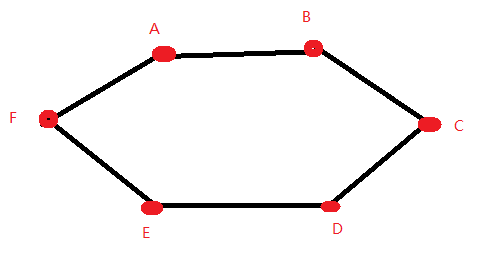
- 上眼睑左点:A
- 上眼睑右点:B
- 右眼角:C
- 下眼睑右点:D
- 下眼睑左点:E
- 左眼角:F
EAR = (||A-E|| + ||B-D||) / (2 * ||F-C||)
分子是两只眼睛垂直方向的平均距离(约等于眼睛高度),
分母是水平方向的距离(约等于眼睛宽度)。
当眼睛睁开时,EAR 值较大(约 0.25~0.3);当眼睛闭合时,EAR 急剧减小(接近 0)。我们设定一个阈值(如 0.3),即可判断睁闭眼。
逐行代码详解
导入库
c
import numpy as np #数组操作
import dlib #人脸检测
import cv2 #图像处理
from sklearn.metrics.pairwise import euclidean_distances #计算欧氏距离
from PIL import Image, ImageDraw, ImageFont
EAR 计算函数
c
def eye_aspect_ratio(eye):
    A = euclidean_distances(eye[1].reshape(1,2), eye[5].reshape(1,2))
    B = euclidean_distances(eye[2].reshape(1,2), eye[4].reshape(1,2))
    C = euclidean_distances(eye[0].reshape(1,2), eye[3].reshape(1,2))
    ear = ((A + B) / 2.0) / C
    return ear
EAR公式:(A+B)/(2*C)
eye 是包含 6 个点坐标的 NumPy 数组,形状为 (6, 2)。
按照 dlib 的索引顺序,0 和 3 是水平两端,1和5、2和4 是垂直两对。
计算三组距离,代入公式得到 EAR。注意返回的 ear 是一个 (1,1) 数组,后面取值时需用 ear00。
中文绘制函数
c
def cv2AddChineseText(img, text, position, textColor=(255, 0, 0), textSize=50):
    if isinstance(img, np.ndarray):
        img = Image.fromarray(cv2.cvtColor(img, cv2.COLOR_BGR2RGB))
    draw = ImageDraw.Draw(img)
    fontStyle = ImageFont.truetype("simhei.ttf", textSize, encoding="utf-8")
    draw.text(position, text, textColor, fontStyle)
    return cv2.cvtColor(np.asarray(img), cv2.COLOR_RGB2BGR)
将 OpenCV 的 BGR 图像转为 PIL 的 RGB 图像,绘制文字后再转回 BGR。
绘制眼睛轮廓
c
def drawEye(eye):
    eyeHull = cv2.convexHull(eye)
    cv2.drawContours(frame, [eyeHull], -1, (0, 255, 0), 2)
cv2.convexHull 计算眼睛点的凸包,然后绘制绿色轮廓线,用于直观显示眼睛区域。
主程序
c
COUNTER = 0
detector = dlib.get_frontal_face_detector()
predictor = dlib.shape_predictor("shape_predictor_68_face_landmarks.dat")
cap = cv2.VideoCapture(0)
COUNTER 用于统计连续闭眼帧数。
初始化检测器、预测器,打开默认摄像头。
主循环
c
while True:
    ret, frame = cap.read()
    if not ret:
        break
    faces = detector(frame, 0)
逐帧读取,检测人脸。
c
    for face in faces:
        shape = predictor(frame, face)
        shape = np.array([[p.x, p.y] for p in shape.parts()])
        rightEye = shape[36:42]
        leftEye = shape[42:48]
        rightEAR = eye_aspect_ratio(rightEye)
        leftEAR = eye_aspect_ratio(leftEye)
        ear = (leftEAR + rightEAR) / 2.0
提取 68 点,分别截取左右眼的 6 个点(注意 dlib 中右眼是 36~41,左眼是 42~47)。
分别计算两眼的 EAR,取平均值作为最终的 ear。
c
        if ear < 0.3:
            COUNTER += 1
            if COUNTER >= 30:
                frame = cv2AddChineseText(frame, "!!!!危险!!!!", (250,250))
        else:
            COUNTER = 0
如果 EAR 低于阈值 0.3,说明眼睛闭合,计数器加 1。
当连续闭眼超过 30 帧,判定为疲劳瞌睡,在画面中央显示红色警告文字。
一旦睁眼,计数器清零。
c
        drawEye(leftEye)
        drawEye(rightEye)
        info = "EAR: {:.2f}".format(ear[0][0])
        frame = cv2AddChineseText(frame, info, (0,30))
绘制眼睛轮廓,并在屏幕左上角显示当前的 EAR 数值,方便调试。
c
    cv2.imshow("Frame", frame)
    if cv2.waitKey(1) == 27:
        break
显示画面,按 ESC 退出。