游戏结束时的仪式感------结果弹窗的层叠设计
游戏截图:
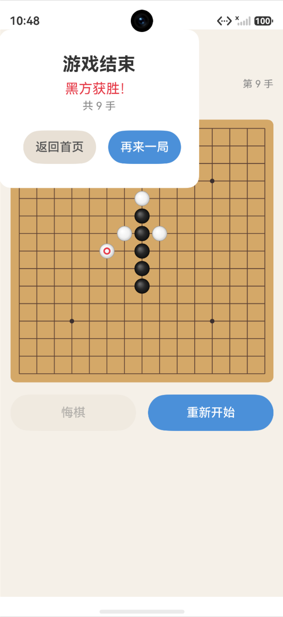
Stack层叠布局
typescript
build() {
  Stack({ alignContent: Alignment.TopStart }) {
    // 第一层:游戏界面
    Column() {
      // 导航栏、状态栏、棋盘、按钮...
    }
    .width('100%')
    .height('100%')
    .backgroundColor('#F5F0E8')

    // 第二层:结果弹窗(条件渲染)
    if (this.showResultDialog) {
      Column() {
        // 弹窗内容...
      }
      .width('70%')
      .padding(32)
      .backgroundColor('#FFFFFF')
      .borderRadius(16)
    }
  }
  .width('100%')
  .height('100%')
}
Stack的层叠原理
Stack
├── Column (游戏界面)     ← 底层
└── Column (结果弹窗)     ← 上层,覆盖游戏界面
Stack中的子组件按声明顺序层叠------后声明的在上层。弹窗声明在后面,所以覆盖游戏界面。
条件渲染
typescript
if (this.showResultDialog) {
  Column() { /* 弹窗内容 */ }
}showResultDialog为true时弹窗渲染,为false时不渲染。ArkUI的条件渲染会完全创建/销毁组件。
弹窗触发时机
typescript
private onCellClick(row: number, col: number): void {
  if (this.result !== GameResult.PLAYING) return;
  const success = this.engine.placePiece(row, col, this.currentPlayer);
  if (success) {
    this.refreshBoardData();
    if (this.result !== GameResult.PLAYING) {
      this.showResultDialog = true;  // 游戏结束时显示弹窗
    }
  }
}落子后如果result不再是PLAYING(有人获胜或平局),设置showResultDialog = true。
弹窗内容设计
typescript
Column() {
  Text(this.result === GameResult.DRAW ? '平局!' : '游戏结束')
    .fontSize(24)
    .fontWeight(FontWeight.Bold)
    .fontColor('#333333')
    .margin({ bottom: 8 })

  Text(this.getStatusText())
    .fontSize(18)
    .fontColor('#E63946')
    .margin({ bottom: 4 })

  Text(`共 ${this.moveCount} 手`)
    .fontSize(14)
    .fontColor('#888888')
    .margin({ bottom: 24 })

  Row({ space: 16 }) {
    Button('返回首页')
      .fontSize(16)
      .fontColor('#555555')
      .backgroundColor('#E8E0D5')
      .borderRadius(24)
      .height(44)
      .onClick(() => { router.back(); })

    Button('再来一局')
      .fontSize(16)
      .fontColor('#FFFFFF')
      .backgroundColor('#4A90D9')
      .borderRadius(24)
      .height(44)
      .onClick(() => { this.restart(); })
  }
}
.width('70%')
.padding(32)
.backgroundColor('#FFFFFF')
.borderRadius(16)
.justifyContent(FlexAlign.Center)
.alignItems(HorizontalAlign.Center)
弹窗信息层级
┌─────────────────────────┐
│                         │
│       游戏结束            │  ← 24px Bold 主标题
│       黑方获胜!          │  ← 18px 红色 结果
│       共 47 手           │  ← 14px 灰色 统计
│                         │
│  [返回首页]  [再来一局]   │  ← 44px 按钮
│                         │
└─────────────────────────┘
弹窗按钮逻辑
返回首页
typescript
Button('返回首页')
.onClick(() => { router.back(); })调用router.back()返回Index首页。当前页面的组件和引擎实例会被销毁。
再来一局
typescript
Button('再来一局')
  .onClick(() => { this.restart(); })
typescript
private restart(): void {
  this.engine.reset();        // 重置引擎
  this.showResultDialog = false;  // 关闭弹窗
  this.refreshBoardData();    // 刷新UI
}restart关闭弹窗并重置游戏------弹窗通过showResultDialog = false消失,棋盘清空。
弹窗样式
typescript
.width('70%')           // 宽度70%,两侧留边
.padding(32)            // 内边距32
.backgroundColor('#FFFFFF')  // 白色背景
.borderRadius(16)       // 圆角
.justifyContent(FlexAlign.Center)   // 垂直居中
.alignItems(HorizontalAlign.Center)  // 水平居中
Stack的alignContent
typescript
Stack({ alignContent: Alignment.TopStart })Alignment.TopStart让未指定对齐方式的子组件(弹窗)从左上角开始排列。但弹窗设置了justifyContent(Center)和alignItems(Center),所以内容在弹窗内部居中。
注意:Stack默认居中对齐子组件。如果想让弹窗覆盖全屏并居中,可以:
typescript
Stack({ alignContent: Alignment.Center }) {
  Column() { /* 游戏界面 */ }
  if (this.showResultDialog) {
    Column() { /* 弹窗 */ }  // 自动居中
  }
}本项目TwoPlayerPage使用TopStart让游戏界面从顶部开始,弹窗通过Stack默认行为居中显示。
对比AIBattlePage的弹窗
AIBattlePage的弹窗更复杂------有半透明遮罩层:
typescript
@Builder
resultDialog() {
  Stack({ alignContent: Alignment.Center }) {
    // 半透明遮罩
    Column()
      .width('100%')
      .height('100%')
      .backgroundColor('#00000066')  // 40%透明黑

    // 弹窗内容
    Column() { ... }
  }
}
TwoPlayerPage没有遮罩层,AIBattlePage有------设计上的差异。
总结
结果弹窗的设计要点:
- Stack层叠:弹窗覆盖在游戏界面上方
- 条件渲染 :
if (showResultDialog)控制显示 - 信息层级:主标题→结果→统计→按钮
- 弹窗样式:70%宽度、32内边距、16圆角
- 按钮逻辑:返回首页或再来一局
弹窗是游戏结束的"仪式感"------它让用户感受到对局的完整闭环。