前言
在上一篇文章中,我们学习了如何创建自定义 Skill。但在实际开发中,Skill 并非孤立运行------它需要与 Plugin(插件) 、Workflow(工作流) 等其他能力单元协同工作,才能实现真正复杂的业务场景。
Skill 负责"做什么",Plugin 负责"怎么做"。Skill 定义了完整的交互流程和业务逻辑,而 Plugin 提供具体的工具调用能力。理解二者的协作模式,是构建高质量智能体的关键。
本文将深入探讨 Skill 与 Plugin 的协同开发模式,包括 Skill 内部调用 Plugin 的多种方式、参数传递机制、数据共享策略以及事件驱动编程模式。
一、Skill 与 Plugin 的关系模型
1.1 核心关系
Skill 和 Plugin 在智能体系统中扮演着不同角色,它们的协作关系可以理解为:
plaintext
用户交互层
    │
    ▼
┌─────────────────────────────────────┐
│            Skill (技能)              │
│  - 管理多轮对话交互                   │
│  - 维护对话状态                       │
│  - 编排任务流程                       │
│  - 组装返回结果                       │
└──────────┬──────────────────────────┘
           │ 调用
           ▼
┌─────────────────────────────────────┐
│    Plugin Manager (插件管理器)        │
│  - 路由到对应插件                     │
│  - 管理插件生命周期                   │
│  - 处理插件调用结果                   │
└──────┬──────────────┬───────────────┘
       │              │
       ▼              ▼
┌──────────┐  ┌──────────────┐
│ Plugin A │  │  Plugin B    │
│ 天气查询  │  │  图片生成     │
└──────────┘  └──────────────┘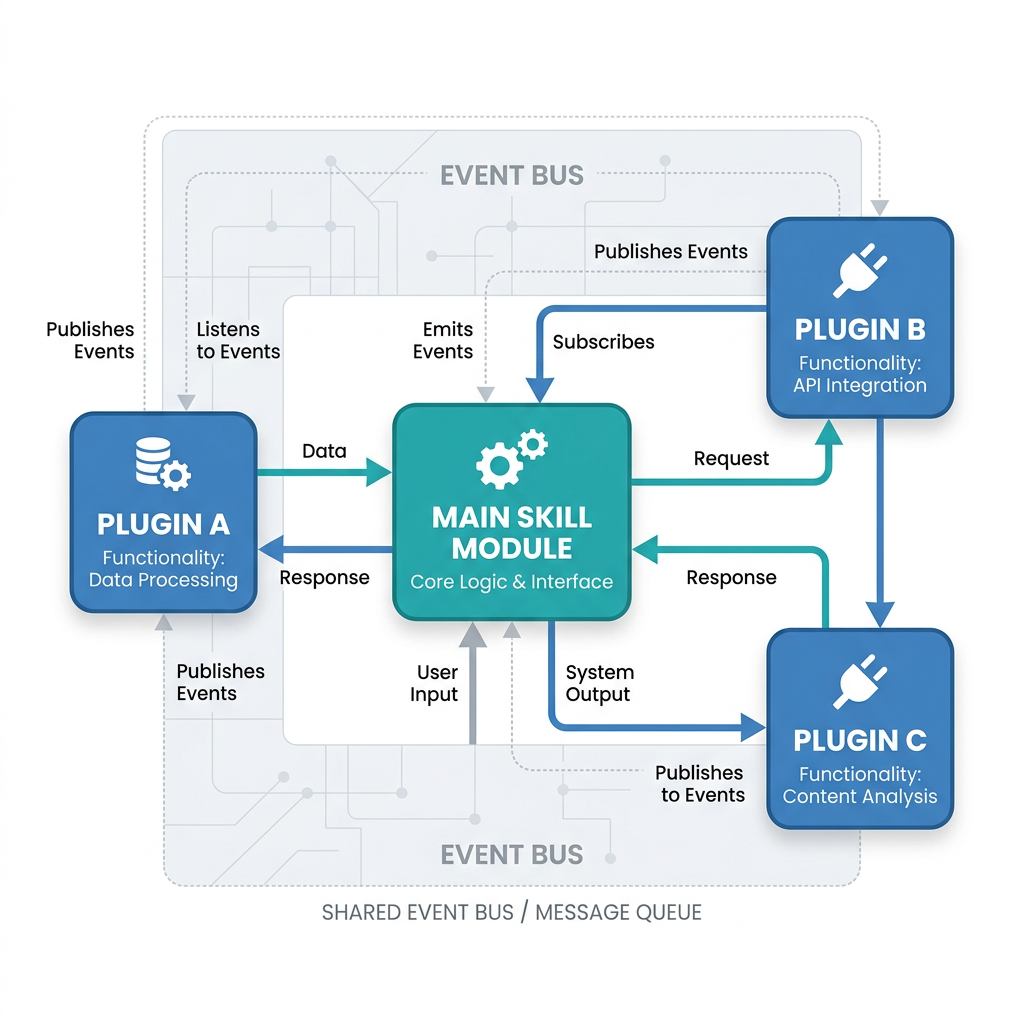
上图展示了 Skill 通过 Plugin Manager 统一调度多个 Plugin 的协作架构,实现能力复用与解耦
1.2 三种协作模式
Skill 与 Plugin 的协作有三种基本模式:
| 协作模式 | 描述 | 适用场景 | 示例 |
|---|---|---|---|
| 顺序调用 | Skill 依次调用多个 Plugin | 多步骤任务 | 先查天气 → 再生成壁纸 |
| 条件调用 | Skill 根据条件选择 Plugin | 分支场景 | 晴天调用A,雨天调用B |
| 并行调用 | Skill 同时调用多个 Plugin | 信息聚合 | 同时查价格+库存+评价 |
1.3 传统 API 调用 vs Skill+Plugin 模式
python
# 传统 API 调用方式
import httpx

def get_weather(city: str) -> dict:
    """传统方式:直接调用 API"""
    response = httpx.get(f"https://api.weather.com/v1/{city}")
    return response.json()

def generate_image(prompt: str) -> dict:
    """传统方式:直接调用 AI 模型"""
    response = httpx.post(
        "https://api.example.com/images/generations",
        json={"prompt": prompt}
    )
    return response.json()

# 问题:业务逻辑分散,难以复用和维护


# Skill + Plugin 模式
class WeatherPlugin:
    """天气插件:封装 API 调用"""

    async def execute(self, params: dict) -> dict:
        city = params.get("city")
        response = await httpx.AsyncClient().get(
            f"https://api.weather.com/v1/{city}"
        )
        return response.json()


class ImageGenerationPlugin:
    """图片生成插件:封装 AI 模型调用"""

    async def execute(self, params: dict) -> dict:
        prompt = params.get("prompt")
        response = await httpx.AsyncClient().post(
            "https://api.example.com/images/generations",
            json={"prompt": prompt}
        )
        return response.json()


class TravelGuideSkill:
    """旅行指南 Skill:编排多个插件"""

    def __init__(self):
        self.weather_plugin = WeatherPlugin()
        self.image_plugin = ImageGenerationPlugin()

    async def recommend_travel(self, city: str) -> dict:
        """推荐旅行目的地:同时调用天气和图片插件"""

        # 并行调用
        import asyncio
        weather_task = self.weather_plugin.execute({"city": city})
        image_task = self.image_plugin.execute({"prompt": f"{city} 风景"})

        weather_result, image_result = await asyncio.gather(
            weather_task, image_task
        )

        return {
            "city": city,
            "weather": weather_result,
            "image": image_result,
            "recommendation": self._generate_recommendation(weather_result)
        }

    def _generate_recommendation(self, weather: dict) -> str:
        """基于天气生成建议"""
        if weather.get("condition") == "sunny":
            return "今天天气很好,适合户外活动!"
        return "建议带伞,室内活动也不错"
二、在 Skill 中调用插件
2.1 基本的 Plugin 调用方式
在小艺开放平台上,Skill 通过 PluginManager 调用插件。下图展示了平台中插件的添加和管理界面:
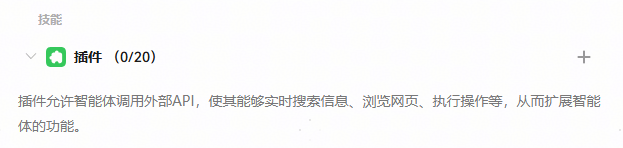
上图展示了智能体编排页面中的插件添加入口,开发者可以在「编排 → 能力拓展 → 插件」中为智能体添加和管理插件能力
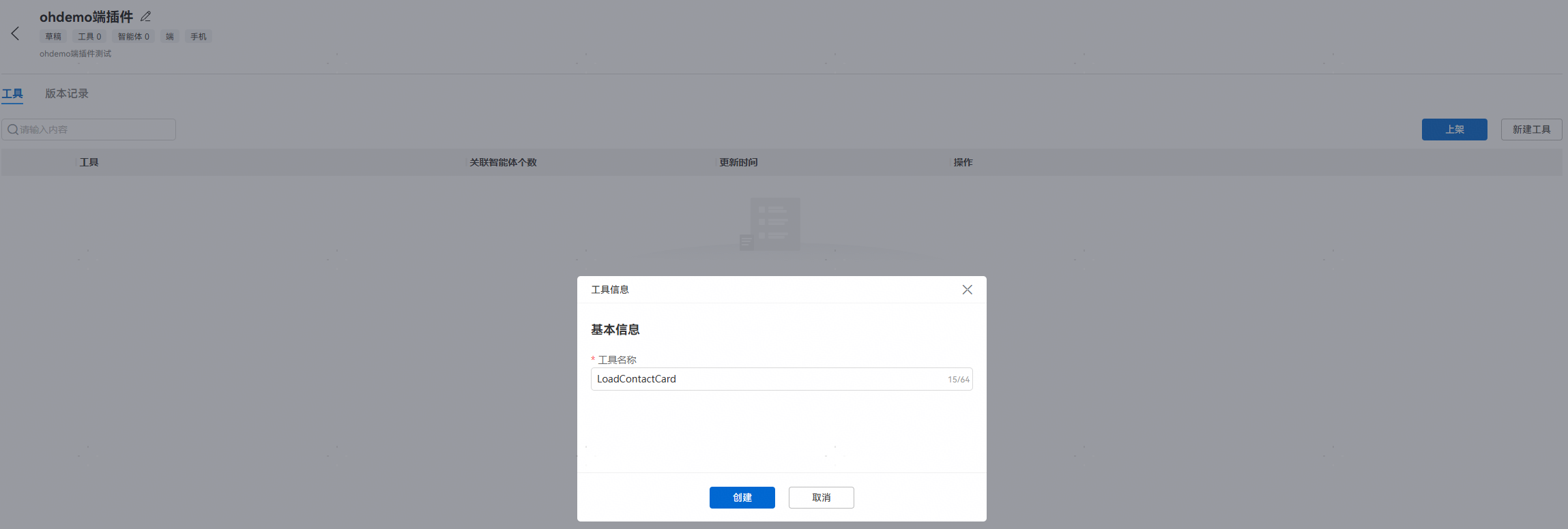
上图展示了端插件的配置界面,支持设置插件参数、模拟集和绑卡配置
提示:在调用插件前,请确保已在「编排 → 能力拓展 → 插件」页面中完成插件的添加和参数配置,否则 Skill 调用时将无法找到对应的插件工具。
python
import json
from typing import Dict, Any, List, Optional


class PluginManager:
    """
    插件管理器
    负责管理插件的注册、查找和调用
    """

    def __init__(self):
        self.plugins: Dict[str, Any] = {}

    def register_plugin(self, name: str, plugin: Any):
        """注册插件"""
        self.plugins[name] = plugin
        print(f"插件 {name} 已注册")

    def get_plugin(self, name: str) -> Optional[Any]:
        """获取插件实例"""
        return self.plugins.get(name)

    async def call_plugin(
        self,
        plugin_name: str,
        tool_name: str,
        params: Dict[str, Any]
    ) -> Dict[str, Any]:
        """
        调用插件的指定工具

        Args:
            plugin_name: 插件名称
            tool_name: 工具名称(一个插件可包含多个工具)
            params: 调用参数

        Returns:
            调用结果
        """
        plugin = self.get_plugin(plugin_name)
        if not plugin:
            return {"error": f"Plugin '{plugin_name}' not found"}

        print(f"调用插件: {plugin_name}.{tool_name}({params})")
        result = await plugin.execute(tool_name, params)
        print(f"插件返回: {json.dumps(result, ensure_ascii=False)[:200]}")

        return result


# 全局插件管理器实例
plugin_manager = PluginManager()


async def call_plugin_from_skill(
    skill_name: str,
    plugin_name: str,
    tool_name: str,
    params: Dict[str, Any]
) -> Dict[str, Any]:
    """
    在 Skill 中调用插件(通用接口)

    Args:
        skill_name: 调用方的 Skill 名称
        plugin_name: 插件名称
        tool_name: 工具名称
        params: 参数

    Returns:
        插件调用结果
    """
    result = await plugin_manager.call_plugin(
        plugin_name, tool_name, params
    )
    return result
2.2 Skill 集成本地 Plugin 示例
以下是一个壁纸生成 Skill 集成多个 Plugin 的完整示例:
python
import asyncio
from typing import Dict, Any, List, Optional
from datetime import datetime


# =============== 插件定义 ===============

class ImageGenerationPlugin:
    """图片生成插件"""

    def __init__(self):
        self.name = "image_generation"
        self.tools = ["generate_image", "enhance_prompt"]

    async def execute(self, tool_name: str, params: Dict[str, Any]) -> Dict[str, Any]:
        """执行插件工具"""
        if tool_name == "generate_image":
            return await self._generate_image(
                prompt=params.get("prompt"),
                size=params.get("size", "1080x2400"),
                style=params.get("style")
            )
        elif tool_name == "enhance_prompt":
            return await self._enhance_prompt(
                prompt=params.get("prompt"),
                style=params.get("style")
            )
        return {"error": f"Unknown tool: {tool_name}"}

    async def _generate_image(self, prompt: str, size: str, style: str = None) -> Dict[str, Any]:
        """生成图片"""
        # 调用外部 AI 模型
        import httpx
        async with httpx.AsyncClient() as client:
            response = await client.post(
                "https://api.example.com/images/generations",
                json={
                    "prompt": prompt,
                    "size": size,
                    "n": 1
                }
            )
            return response.json()

    async def _enhance_prompt(self, prompt: str, style: str = None) -> Dict[str, Any]:
        """优化提示词"""
        import httpx
        system_prompt = f"你是一个艺术提示词优化专家,请优化以下描述为高质量的壁纸提示词"
        async with httpx.AsyncClient() as client:
            response = await client.post(
                "https://api.example.com/chat/completions",
                json={
                    "model": "doubao-pro",
                    "messages": [
                        {"role": "system", "content": system_prompt},
                        {"role": "user", "content": prompt}
                    ]
                }
            )
            return response.json()


class WeatherPlugin:
    """天气查询插件"""

    def __init__(self):
        self.name = "weather"
        self.tools = ["query_weather"]

    async def execute(self, tool_name: str, params: Dict[str, Any]) -> Dict[str, Any]:
        if tool_name == "query_weather":
            return await self._query_weather(params.get("city", "北京"))
        return {"error": f"Unknown tool: {tool_name}"}

    async def _query_weather(self, city: str) -> Dict[str, Any]:
        """查询天气"""
        import httpx
        async with httpx.AsyncClient() as client:
            response = await client.get(
                f"https://api.weather.com/v1/{city}",
                params={"key": "YOUR_API_KEY"}
            )
            return response.json()


# =============== Skill 定义 ===============

class WallpaperSkill:
    """
    壁纸生成 Skill

    集成了多个插件:
    - image_generation:图片生成和提示词优化
    - weather:天气查询(用于生成天气相关壁纸)
    """

    def __init__(self):
        self.name = "wallpaper_generator"
        self.state = "idle"
        self.conversation_history: List[Dict[str, str]] = []

        # 注册所需的插件
        self.plugins = {
            "image_generation": ImageGenerationPlugin(),
            "weather": WeatherPlugin(),
        }

    async def handle_conversation(self, user_input: str) -> Dict[str, Any]:
        """
        处理用户对话

        Args:
            user_input: 用户输入

        Returns:
            回复内容
        """
        self.conversation_history.append({
            "role": "user",
            "content": user_input,
            "timestamp": datetime.now().isoformat()
        })

        # 分析用户意图
        intent = await self._analyze_intent(user_input)

        if intent["type"] == "generate_wallpaper":
            # 生成壁纸:调用图片生成插件
            result = await self._handle_wallpaper_generation(
                intent.get("params", {})
            )
        elif intent["type"] == "weather_wallpaper":
            # 天气壁纸:先查天气,再生成
            result = await self._handle_weather_wallpaper(
                intent.get("params", {})
            )
        elif intent["type"] == "chat":
            # 闲聊
            result = {"reply": "你好!我是壁纸助手,想生成什么样的壁纸呢?"}
        else:
            result = {"reply": "抱歉,我不太理解您的意思,请描述您想要的壁纸吧!"}

        self.conversation_history.append({
            "role": "assistant",
            "content": result.get("reply", ""),
            "timestamp": datetime.now().isoformat()
        })

        return result

    async def _analyze_intent(self, user_text: str) -> Dict[str, Any]:
        """
        分析用户意图

        简单规则匹配,实际项目中可用 LLM 判断
        """
        if "天气" in user_text or "气候" in user_text:
            return {"type": "weather_wallpaper", "params": {}}
        elif any(kw in user_text for kw in ["壁纸", "生成", "制作", "设计"]):
            return {"type": "generate_wallpaper", "params": {"prompt": user_text}}
        else:
            return {"type": "chat", "params": {}}

    async def _handle_wallpaper_generation(
        self,
        params: Dict[str, Any]
    ) -> Dict[str, Any]:
        """
        处理壁纸生成请求

        1. 优化提示词 → 2. 生成图片 → 3. 返回结果
        """
        prompt = params.get("prompt", "美丽风景")
        style = params.get("style")

        # 步骤 1: 优化提示词(调用插件)
        enhance_result = await self.plugins["image_generation"].execute(
            "enhance_prompt",
            {"prompt": prompt, "style": style}
        )
        enhanced_prompt = enhance_result.get("choices", [{}])[0].get("message", {}).get("content", prompt)

        # 步骤 2: 生成图片(调用插件)
        image_result = await self.plugins["image_generation"].execute(
            "generate_image",
            {"prompt": enhanced_prompt, "size": "1080x2400"}
        )
        image_url = image_result.get("data", [{}])[0].get("url", "")

        return {
            "reply": "壁纸已生成!看看效果如何?",
            "image_url": image_url,
            "enhanced_prompt": enhanced_prompt,
            "can_regenerate": True
        }

    async def _handle_weather_wallpaper(
        self,
        params: Dict[str, Any]
    ) -> Dict[str, Any]:
        """
        处理天气壁纸请求

        1. 查天气 → 2. 根据天气生成壁纸 → 3. 返回
        """
        city = params.get("city", "北京")

        # 步骤 1: 查天气
        weather_result = await self.plugins["weather"].execute(
            "query_weather",
            {"city": city}
        )
        weather_desc = weather_result.get("description", "晴")

        # 步骤 2: 根据天气生成壁纸
        wallpaper_prompt = f"{city}的{weather_desc}天气,艺术风格壁纸"
        image_result = await self.plugins["image_generation"].execute(
            "generate_image",
            {"prompt": wallpaper_prompt, "size": "1080x2400"}
        )
        image_url = image_result.get("data", [{}])[0].get("url", "")

        return {
            "reply": f"当前{city}天气:{weather_desc}。已为你生成天气主题壁纸!",
            "image_url": image_url,
            "weather_info": {"city": city, "weather": weather_desc}
        }


# =============== 使用示例 ===============

async def demo_wallpaper_skill():
    """演示壁纸 Skill 的使用"""
    skill = WallpaperSkill()

    # 测试 1:生成壁纸
    result1 = await skill.handle_conversation("帮我生成一张星空主题的壁纸")
    print(f"回复: {result1['reply']}")
    print(f"图片URL: {result1.get('image_url', 'N/A')}")

    # 测试 2:天气壁纸
    result2 = await skill.handle_conversation("生成一张与天气相关的壁纸")
    print(f"回复: {result2['reply']}")


# 运行演示
# asyncio.run(demo_wallpaper_skill())
2.3 在平台上配置 Skill 绑定插件
在平台侧,Skill 绑定插件的配置如下:
json
{
    "skillName": "wallpaper_generator",
    "boundPlugins": [
        {
            "pluginId": "plugin_image_generation",
            "pluginName": "图片生成插件",
            "bindingType": "required",
            "toolMapping": [
                {
                    "skillTool": "generate_wallpaper",
                    "pluginTool": "generate_image",
                    "paramMapping": {
                        "input.prompt": "params.text",
                        "input.size": "params.size"
                    }
                },
                {
                    "skillTool": "enhance_prompt",
                    "pluginTool": "chat_completion",
                    "paramMapping": {
                        "input.text": "params.messages[0].content"
                    }
                }
            ]
        },
        {
            "pluginId": "plugin_weather",
            "pluginName": "天气查询插件",
            "bindingType": "optional",
            "toolMapping": [
                {
                    "skillTool": "weather_wallpaper",
                    "pluginTool": "query_weather",
                    "paramMapping": {
                        "input.city": "params.city"
                    }
                }
            ]
        }
    ]
}
三、Skill 间通信与数据共享
3.1 Skill 间直接通信
在某些场景下,多个 Skill 需要协同工作:
python
class SkillBus:
    """
    Skill 通信总线

    提供 Skill 之间的消息发布/订阅机制
    """

    def __init__(self):
        self.subscribers: Dict[str, List[callable]] = {}

    def subscribe(self, event_type: str, callback: callable):
        """订阅事件"""
        if event_type not in self.subscribers:
            self.subscribers[event_type] = []
        self.subscribers[event_type].append(callback)
        print(f"已订阅事件: {event_type}")

    def unsubscribe(self, event_type: str, callback: callable):
        """取消订阅"""
        if event_type in self.subscribers:
            self.subscribers[event_type].remove(callback)

    async def publish(self, event_type: str, data: Any):
        """发布事件"""
        if event_type in self.subscribers:
            for callback in self.subscribers[event_type]:
                await callback(data)

    def get_subscriber_count(self, event_type: str) -> int:
        """获取某事件的订阅者数量"""
        return len(self.subscribers.get(event_type, []))


# 全局 Skill 通信总线
skill_bus = SkillBus()


# Skill 通信示例
class WallpaperSkillV2:
    """壁纸生成 Skill V2(支持通信)"""

    def __init__(self):
        self.name = "wallpaper_generator_v2"
        # 订阅事件
        skill_bus.subscribe("user_logged_in", self.on_user_login)
        skill_bus.subscribe("wallpaper_generated", self.on_wallpaper_generated)

    async def on_user_login(self, data: dict):
        """用户登录事件处理"""
        user_id = data.get("userId")
        print(f"[Skill] 用户 {user_id} 登录,准备个性化壁纸推荐")

    async def on_wallpaper_generated(self, data: dict):
        """壁纸生成事件处理"""
        print(f"[Skill] 壁纸已生成,通知其他 Skill")

    async def generate_wallpaper(self, prompt: str):
        """生成壁纸并发布事件"""
        # 生成壁纸...
        await skill_bus.publish("wallpaper_generated", {
            "prompt": prompt,
            "timestamp": datetime.now().isoformat()
        })
3.2 数据共享机制
Skill 之间通过统一的上下文管理器共享数据:
python
class SkillContextManager:
    """
    Skill 上下文管理器

    提供 Skill 之间的数据共享机制
    """

    def __init__(self):
        self.context_store: Dict[str, Dict[str, Any]] = {}

    def get_context(self, session_id: str) -> Dict[str, Any]:
        """获取会话上下文"""
        if session_id not in self.context_store:
            self.context_store[session_id] = {
                "created_at": datetime.now().isoformat(),
                "shared_data": {},
                "skill_states": {}
            }
        return self.context_store[session_id]

    def set_shared_data(
        self,
        session_id: str,
        key: str,
        value: Any
    ):
        """设置共享数据"""
        context = self.get_context(session_id)
        context["shared_data"][key] = value

    def get_shared_data(
        self,
        session_id: str,
        key: str,
        default: Any = None
    ) -> Any:
        """获取共享数据"""
        context = self.get_context(session_id)
        return context["shared_data"].get(key, default)

    def set_skill_state(
        self,
        session_id: str,
        skill_name: str,
        state: Any
    ):
        """设置 Skill 状态"""
        context = self.get_context(session_id)
        context["skill_states"][skill_name] = state

    def get_skill_state(
        self,
        session_id: str,
        skill_name: str,
        default: Any = None
    ) -> Any:
        """获取 Skill 状态"""
        context = self.get_context(session_id)
        return context["skill_states"].get(skill_name, default)

    def clear_context(self, session_id: str):
        """清理上下文"""
        if session_id in self.context_store:
            del self.context_store[session_id]


# 全局上下文管理器
context_manager = SkillContextManager()


# 使用示例
class WeatherWallpaperSkill:
    """天气壁纸 Skill(使用共享数据)"""

    async def generate(self, session_id: str, city: str):
        """生成天气壁纸,并将结果存入共享数据"""
        # 获取共享的用户偏好
        user_preferences = context_manager.get_shared_data(
            session_id, "user_preferences", {}
        )

        # 检查是否已有壁纸风格偏好
        preferred_style = user_preferences.get("preferred_style", "自然")

        # 生成壁纸...
        result = {
            "city": city,
            "style": preferred_style,
            "image_url": "https://example.com/wallpaper.jpg"
        }

        # 将结果存入共享数据
        context_manager.set_shared_data(session_id, "last_wallpaper", result)

        return result
四、事件驱动的 Skill 协同
4.1 事件驱动架构
事件驱动是 Skill 间协同的高级模式:
python
from enum import Enum
from typing import Callable, Any, Dict, List
import asyncio


class SkillEvent(Enum):
    """Skill 事件类型"""
    SKILL_ACTIVATED = "skill_activated"
    SKILL_COMPLETED = "skill_completed"
    SKILL_FAILED = "skill_failed"
    PARAMETER_COLLECTED = "parameter_collected"
    PARAMETER_MISSING = "parameter_missing"
    PLUGIN_CALLED = "plugin_called"
    PLUGIN_RESULT = "plugin_result"
    USER_INTERVENTION = "user_intervention"


class EventDrivenSkillEngine:
    """
    事件驱动的 Skill 执行引擎

    Skill 通过事件进行松耦合通信
    """

    def __init__(self):
        self.handlers: Dict[SkillEvent, List[Callable]] = {
            event: [] for event in SkillEvent
        }
        self.event_history: List[Dict[str, Any]] = []

    def on(self, event: SkillEvent, handler: Callable):
        """注册事件处理器"""
        self.handlers[event].append(handler)
        return handler  # 支持装饰器

    async def emit(self, event: SkillEvent, data: Any = None):
        """触发事件"""
        event_record = {
            "event": event.value,
            "data": data,
            "timestamp": datetime.now().isoformat()
        }
        self.event_history.append(event_record)

        print(f"[事件] {event.value}: {data}")

        # 异步调用所有处理器
        tasks = []
        for handler in self.handlers[event]:
            if asyncio.iscoroutinefunction(handler):
                tasks.append(handler(data))
            else:
                handler(data)

        if tasks:
            await asyncio.gather(*tasks, return_exceptions=True)

    def get_history(self, event_type: SkillEvent = None) -> List[Dict]:
        """获取事件历史"""
        if event_type:
            return [
                e for e in self.event_history
                if e["event"] == event_type.value
            ]
        return self.event_history


# 全局事件引擎
event_engine = EventDrivenSkillEngine()


# 事件驱动协同示例
@event_engine.on(SkillEvent.PARAMETER_COLLECTED)
async def on_parameter_collected(data: dict):
    """参数收集完成后触发"""
    print(f"参数已收集: {data}")

    # 检查是否所有必要参数已就绪
    if data.get("all_ready"):
        await event_engine.emit(
            SkillEvent.SKILL_ACTIVATED,
            {"skill": "wallpaper_generator", "params": data["params"]}
        )


@event_engine.on(SkillEvent.SKILL_ACTIVATED)
async def on_skill_activated(data: dict):
    """Skill 被激活"""
    print(f"Skill 已激活: {data['skill']}")
    # 执行业务逻辑...


@event_engine.on(SkillEvent.PLUGIN_RESULT)
async def on_plugin_result(data: dict):
    """插件返回结果"""
    print(f"插件返回: {data.get('result', {})}")
    # 处理插件结果


@event_engine.on(SkillEvent.SKILL_FAILED)
async def on_skill_failed(data: dict):
    """Skill 执行失败"""
    print(f"Skill 执行失败: {data.get('error', '未知错误')}")
    # 发送错误通知
4.2 Pipeline 模式
python
class SkillPipeline:
    """
    Skill 流水线模式

    将多个 Skill 按流水线方式组织,
    前一个 Skill 的输出作为后一个 Skill 的输入
    """

    def __init__(self, name: str):
        self.name = name
        self.stages: List[Dict[str, Any]] = []

    def add_stage(
        self,
        skill_name: str,
        input_mapping: Dict[str, str],
        output_mapping: Dict[str, str]
    ):
        """
        添加流水线阶段

        Args:
            skill_name: Skill 名称
            input_mapping: 输入映射 {pipeline_var: skill_input_param}
            output_mapping: 输出映射 {skill_output_param: pipeline_var}
        """
        self.stages.append({
            "skill": skill_name,
            "input_mapping": input_mapping,
            "output_mapping": output_mapping,
        })
        return self

    async def execute(self, initial_input: Dict[str, Any]) -> Dict[str, Any]:
        """
        执行流水线

        Args:
            initial_input: 初始输入

        Returns:
            最终输出
        """
        pipeline_data = dict(initial_input)

        for i, stage in enumerate(self.stages):
            print(f"[流水线] 执行阶段 {i+1}/{len(self.stages)}: {stage['skill']}")

            # 构建 Skill 输入
            skill_input = {}
            for pipeline_key, skill_param in stage["input_mapping"].items():
                if pipeline_key in pipeline_data:
                    skill_input[skill_param] = pipeline_data[pipeline_key]

            # 调用 Skill
            skill_output = await self._call_skill(stage["skill"], skill_input)

            # 映射输出到流水线数据
            for skill_key, pipeline_key in stage["output_mapping"].items():
                if skill_key in skill_output:
                    pipeline_data[pipeline_key] = skill_output[skill_key]

        return pipeline_data

    async def _call_skill(
        self,
        skill_name: str,
        params: Dict[str, Any]
    ) -> Dict[str, Any]:
        """调用指定 Skill"""
        # 实际项目会调用 Skill 管理器
        return {"result": f"{skill_name} executed with {params}"}


# 壁纸生成流水线示例
wallpaper_pipeline = SkillPipeline("壁纸生成流水线")
wallpaper_pipeline \
    .add_stage(
        "意图识别",
        {"user_input": "text"},
        {"intent": "intent", "params": "params"}
    ) \
    .add_stage(
        "提示词优化",
        {"params": "prompt"},
        {"enhanced_prompt": "prompt"}
    ) \
    .add_stage(
        "图片生成",
        {"prompt": "prompt"},
        {"image_url": "url"}
    ) \
    .add_stage(
        "结果组装",
        {"url": "image_url"},
        {"final_reply": "reply"}
    )
五、参数传递与数据转换
5.1 参数映射配置
Skill 调用 Plugin 时的参数映射是关键环节:
python
class ParameterMapper:
    """
    参数映射器

    负责 Skill 参数和 Plugin 参数之间的转换
    """

    @staticmethod
    def map_parameters(
        skill_params: Dict[str, Any],
        mapping_rules: List[Dict[str, str]]
    ) -> Dict[str, Any]:
        """
        根据映射规则转换参数

        Args:
            skill_params: Skill 参数
            mapping_rules: 映射规则列表

        Returns:
            转换后的 Plugin 参数
        """
        plugin_params = {}

        for rule in mapping_rules:
            source = rule.get("source", "")
            target = rule.get("target", "")
            transform = rule.get("transform", "direct")

            # 从嵌套路径获取值
            value = ParameterMapper._get_nested_value(skill_params, source)

            if value is not None:
                # 应用转换
                if transform == "direct":
                    plugin_params[target] = value
                elif transform == "stringify":
                    plugin_params[target] = str(value)
                elif transform == "json_encode":
                    import json
                    plugin_params[target] = json.dumps(value, ensure_ascii=False)
                elif transform == "array_wrap":
                    plugin_params[target] = [value] if not isinstance(value, list) else value

        return plugin_params

    @staticmethod
    def _get_nested_value(data: dict, path: str) -> Any:
        """从嵌套字典中获取值(支持点号路径)"""
        keys = path.split(".")
        value = data
        for key in keys:
            if isinstance(value, dict):
                value = value.get(key)
            else:
                return None
        return value


# 参数映射示例
mapping_config = [
    {"source": "style", "target": "params.style", "transform": "direct"},
    {"source": "theme", "target": "params.subject", "transform": "direct"},
    {"source": "resolution", "target": "params.size", "transform": "direct"},
    {"source": "user_text", "target": "params.description", "transform": "stringify"},
]

skill_params = {
    "style": "极简主义",
    "theme": "远山轮廓",
    "resolution": "1080x2400",
    "user_text": "一张简约风格的壁纸"
}

mapped = ParameterMapper.map_parameters(skill_params, mapping_config)
# 结果: {"params.style": "极简主义", "params.subject": "远山轮廓", ...}
5.2 结果聚合
python
class ResultAggregator:
    """
    结果聚合器

    将多个 Plugin 的返回结果合并为统一的 Skill 输出
    """

    @staticmethod
    def aggregate(
        results: List[Dict[str, Any]],
        strategy: str = "merge"
    ) -> Dict[str, Any]:
        """
        聚合多个结果

        Args:
            results: 各 Plugin 返回的结果列表
            strategy: 聚合策略 (merge/priority/concat)

        Returns:
            聚合后的结果
        """
        if strategy == "merge":
            merged = {}
            for r in results:
                merged.update(r)
            return merged

        elif strategy == "priority":
            # 按优先级取第一个非空结果
            for r in results:
                if r and not r.get("error"):
                    return r
            return results[-1] if results else {}

        elif strategy == "concat":
            # 拼接文本结果
            texts = []
            for r in results:
                if isinstance(r, dict) and "text" in r:
                    texts.append(r["text"])
            return {"combined_text": "\n".join(texts)}

        return {}
六、最佳实践与常见问题
6.1 Skill 插件协同设计原则
| 原则 | 说明 | 示例 |
|---|---|---|
| 职责分离 | Skill 负责流程,Plugin 负责执行 | Skill 不直接调用 API |
| 松耦合 | 通过接口定义而非具体实现 | 依赖注入而非硬编码 |
| 幂等性 | 多次调用同一 Plugin 结果一致 | 图片生成也需幂等 |
| 超时处理 | 为 Plugin 调用设置超时 | 超过 30 秒返回默认值 |
| 降级策略 | Plugin 不可用时提供兜底 | 返回缓存数据或默认回复 |
6.2 常见问题
问题 1:Plugin 调用超时
python
import asyncio

async def call_plugin_with_timeout(
    plugin: Any,
    tool: str,
    params: dict,
    timeout: float = 10.0
) -> dict:
    """
    带超时的 Plugin 调用

    Args:
        plugin: 插件实例
        tool: 工具名称
        params: 参数
        timeout: 超时时间(秒)

    Returns:
        调用结果,超时返回错误信息
    """
    try:
        result = await asyncio.wait_for(
            plugin.execute(tool, params),
            timeout=timeout
        )
        return result
    except asyncio.TimeoutError:
        print(f"Plugin {plugin.name}.{tool} 调用超时 ({timeout}s)")
        return {"error": "timeout", "message": "插件调用超时,请稍后重试"}
问题 2:Plugin 顺序依赖
python
class DependentPluginExecutor:
    """处理有依赖关系的插件调用"""

    async def execute_chain(
        self,
        chain: List[Dict[str, Any]],
        initial_params: Dict[str, Any]
    ) -> Dict[str, Any]:
        """
        按依赖顺序执行 Plugin 链

        Args:
            chain: Plugin 调用链,每一项为 {plugin, tool, params, depends_on}
            initial_params: 初始参数

        Returns:
            所有 Plugin 的执行结果
        """
        results = {}
        params = dict(initial_params)

        for step in chain:
            plugin = step["plugin"]
            tool = step["tool"]

            # 如果依赖前一步的结果,则注入
            if "depends_on" in step:
                dep_result = results.get(step["depends_on"], {})
                if "output_mapping" in step:
                    for source, target in step["output_mapping"].items():
                        if source in dep_result:
                            params[target] = dep_result[source]

            # 执行
            result = await plugin.execute(tool, params)
            results[step.get("name", tool)] = result

            # 如果有输出映射,更新参数
            if "input_mapping" in step:
                for source, target in step["input_mapping"].items():
                    if source in result:
                        params[target] = result[source]

        return results
七、插件绑卡与卡片配置
7.1 插件绑卡概述
插件绑卡是指将插件工具的输出结果绑定到特定的消息卡片上,实现数据的可视化展示:
json
{
    "plugin_card_binding": {
        "plugin_name": "wallpaper_generator",
        "tool_name": "generate_wallpaper",
        "card_template": "image_card",
        "data_mapping": {
            "image_url": "${result.image_url}",
            "title": "${result.style} - ${result.theme}",
            "description": "${result.prompt}"
        }
    }
}
7.2 卡片类型与适用场景
| 卡片类型 | 适用插件 | 展示内容 | 示例 |
|---|---|---|---|
| 文本卡片 | 查询类插件 | 结构化文本信息 | 天气查询结果 |
| 图片卡片 | 生成类插件 | 图片+描述 | 壁纸生成结果 |
| 列表卡片 | 检索类插件 | 多条目列表 | 商品搜索结果 |
| 表单卡片 | 交互类插件 | 输入表单 | 预约填写 |
最佳实践:插件绑卡配置应在插件创建时完成,确保输出数据与卡片模板的字段映射准确无误。
总结
本文深入探讨了 Skill 与 Plugin 的协同开发,涵盖了以下核心内容:
- 关系模型:Skill 和 Plugin 的分工定位与三种协作模式
- Plugin 调用:在 Skill 中集成和调用 Plugin 的完整代码实现
- 平台配置:在平台上配置 Skill 与 Plugin 绑定的 JSON 规范
- Skill 间通信:基于事件总线的通信机制和上下文数据共享
- 事件驱动模式:Skill 间的事件驱动架构和 Pipeline 流水线模式
- 参数映射:参数转换和结果聚合的实现方案
- 最佳实践:职责分离、松耦合、超时处理等设计建议
Skill 与 Plugin 的协同设计,是构建模块化、可复用智能体系统的关键。合理设计二者的协作关系,能让智能体能力更强大、更容易维护。下一篇文章将介绍 Skill 的测试、发布与管理。
如果这篇文章对你有帮助,欢迎点赞 👍、收藏 ⭐ 和关注 🎯!你的支持是我持续创作的动力!