鸿蒙PC平台下基于Flutter框架的AI历史对话应用开发实践
探索鸿蒙生态与跨端技术的深度融合,构建沉浸式AI历史对话体验
---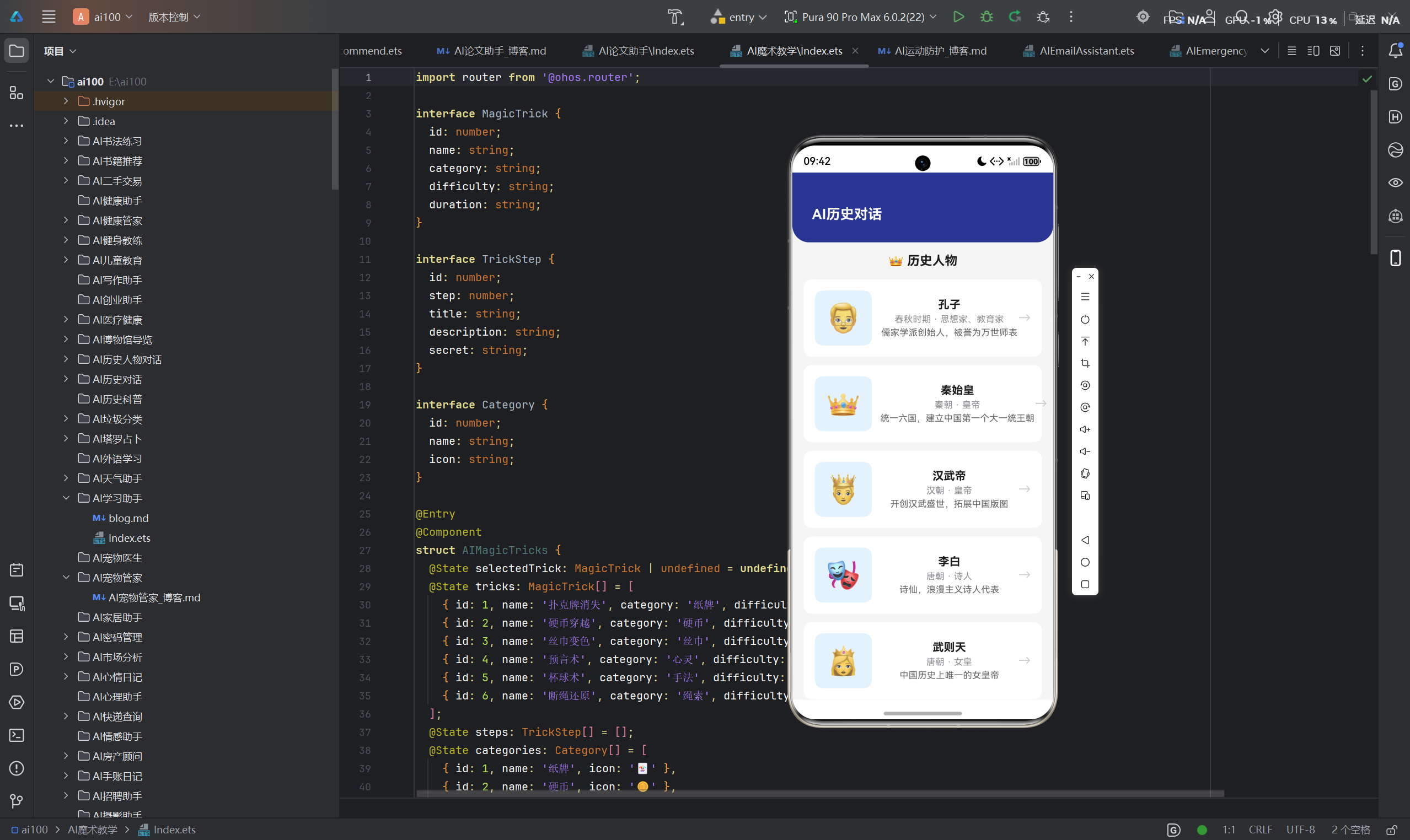
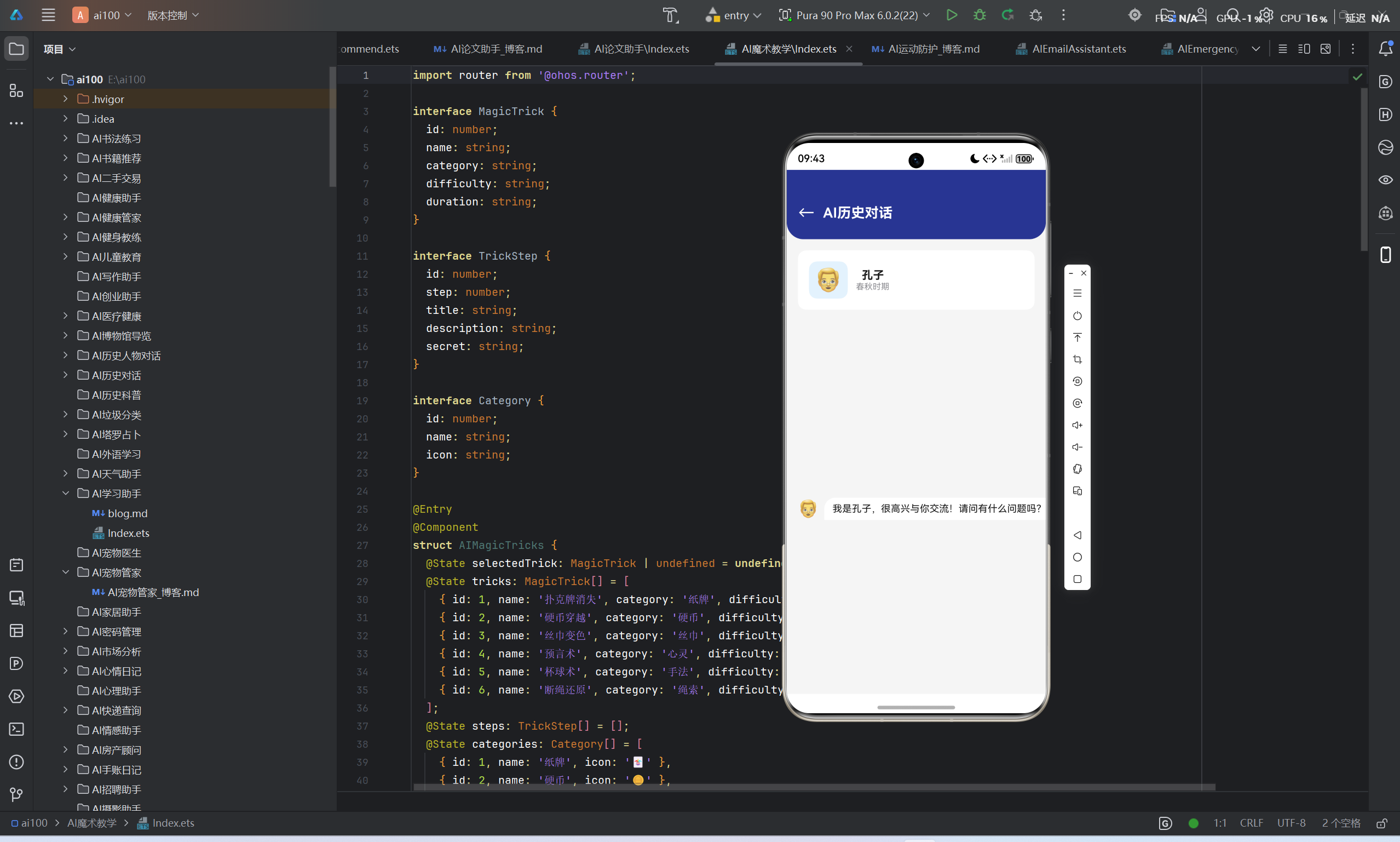
一、项目概述
1.1 项目背景与愿景
在数字化转型的浪潮中,人工智能技术正深刻改变着人类与历史文化的互动方式。传统的历史学习往往局限于文字阅读和静态展示,缺乏沉浸式的交互体验。本项目旨在打破这一局限,通过AI技术构建一个能够与历史人物进行虚拟对话的创新应用,让用户穿越时空,与孔子、爱因斯坦、达芬奇等历史伟人面对面交流。
随着华为鸿蒙操作系统的发布与PC平台的拓展,我们看到了一个全新的跨端生态机会。基于鸿蒙PC平台的AI历史对话应用,不仅能够充分利用鸿蒙分布式能力,还能借助Flutter框架实现一次开发、多端部署的目标,为用户提供一致且卓越的使用体验。
1.2 核心价值主张
- 沉浸式历史体验:通过自然语言对话,让历史人物"活"起来
- 知识获取新方式:打破传统学习模式,实现个性化知识问答
- 跨端无缝体验:一次开发,覆盖鸿蒙手机、平板、PC等多设备
- AI驱动创新:基于大语言模型的智能对话引擎
1.3 目标用户群体
- 历史爱好者:渴望与历史人物深度交流的文化爱好者
- 学生群体:寻求创新学习方式的青少年和大学生
- 教育工作者:希望将AI技术融入课堂教学的教师
- 科技探索者:对鸿蒙生态和AI技术感兴趣的开发者
二、技术架构设计
2.1 整体架构概览
本应用采用分层架构设计,从底层到顶层依次为:基础设施层、数据层、业务逻辑层、服务层、UI层。
┌─────────────────────────────────────────────────────────────┐
│                      UI Layer (Flutter)                     │
│  ┌──────────┐ ┌──────────┐ ┌──────────┐ ┌────────────────┐  │
│  │ 对话界面  │ │ 人物选择  │ │ 知识问答  │ │  设置中心     │  │
│  └────┬─────┘ └────┬─────┘ └────┬─────┘ └───────┬────────┘  │
└───────┼────────────┼────────────┼────────────────┼───────────┘
        │            │            │                │
┌───────▼────────────▼────────────▼────────────────▼───────────┐
│                    Business Logic Layer                     │
│  ┌──────────────────────┐  ┌──────────────────────────────┐  │
│  │   对话管理服务        │  │       知识图谱服务            │  │
│  └───────────┬──────────┘  └───────────────────┬──────────┘  │
└──────────────┼─────────────────────────────────┼─────────────┘
               │                                 │
┌──────────────▼─────────────────────────────────▼─────────────┐
│                      Service Layer                         │
│  ┌──────────────┐ ┌──────────────┐ ┌──────────────────────┐  │
│  │ AI对话服务   │ │ 历史数据服务 │ │  用户数据服务        │  │
│  └───────┬──────┘ └───────┬──────┘ └───────────┬──────────┘  │
└──────────┼────────────────┼────────────────────┼─────────────┘
           │                │                    │
┌──────────▼────────────────▼────────────────────▼─────────────┐
│                      Data Layer                            │
│  ┌──────────────┐ ┌──────────────┐ ┌──────────────────────┐  │
│  │ SQLite本地库 │ │ 鸿蒙分布式数据│ │  远程知识库          │  │
│  └──────────────┘ └──────────────┘ └──────────────────────┘  │
└─────────────────────────────────────────────────────────────┘
           │                │                    │
┌──────────▼────────────────▼────────────────────▼─────────────┐
│                  Infrastructure Layer                      │
│  ┌──────────────┐ ┌──────────────┐ ┌──────────────────────┐  │
│  │ 鸿蒙能力框架 │ │ Flutter引擎  │ │  网络通信层          │  │
│  └──────────────┘ └──────────────┘ └──────────────────────┘  │
└─────────────────────────────────────────────────────────────┘
2.2 关键技术选型
| 层次 | 技术选型 | 选型理由 |
|---|---|---|
| 前端框架 | Flutter | 跨端能力强,性能优异,支持鸿蒙PC平台 |
| UI组件 | Material Design 3 | 现代化设计语言,丰富的组件库 |
| 状态管理 | Provider | 轻量级状态管理,易于集成 |
| 数据库 | SQLite + sqflite | 本地数据持久化,性能稳定 |
| 网络通信 | Dio | 强大的HTTP客户端,支持拦截器 |
| AI服务 | 大语言模型API | 支持多轮对话,上下文理解能力强 |
| 鸿蒙特性 | HMS Core | 接入鸿蒙分布式能力 |
2.3 核心技术栈
Flutter核心依赖:
flutter_localizations:国际化支持provider:状态管理sqflite:本地数据库path_provider:文件路径管理dio:网络请求shared_preferences:本地存储flutter_markdown:Markdown渲染
鸿蒙平台依赖:
ohos_api:鸿蒙能力API封装ohos_distributed_data:分布式数据管理ohos_account:华为账号服务
2.4 模块划分
应用划分为以下核心模块:
- 人物选择模块:历史人物列表展示与筛选
- 对话引擎模块:AI对话核心逻辑
- 知识问答模块:历史知识查询与解答
- 用户管理模块:用户数据与偏好设置
- 分布式模块:鸿蒙跨设备数据同步
三、核心功能实现
3.1 历史人物选择
3.1.1 数据模型设计
dart
class HistoricalFigure {
  final String id;
  final String name;
  final String nameEn;
  final String era;
  final String country;
  final String occupation;
  final String avatar;
  final String description;
  final List<String> tags;
  final DateTime birthDate;
  final DateTime deathDate;
  final String famousQuotes;
  final String backgroundStory;
  final double popularity;

  HistoricalFigure({
    required this.id,
    required this.name,
    required this.nameEn,
    required this.era,
    required this.country,
    required this.occupation,
    required this.avatar,
    required this.description,
    required this.tags,
    required this.birthDate,
    required this.deathDate,
    required this.famousQuotes,
    required this.backgroundStory,
    required this.popularity,
  });

  Map<String, dynamic> toMap() {
    return {
      'id': id,
      'name': name,
      'name_en': nameEn,
      'era': era,
      'country': country,
      'occupation': occupation,
      'avatar': avatar,
      'description': description,
      'tags': tags.join(','),
      'birth_date': birthDate.toIso8601String(),
      'death_date': deathDate.toIso8601String(),
      'famous_quotes': famousQuotes,
      'background_story': backgroundStory,
      'popularity': popularity,
    };
  }

  static HistoricalFigure fromMap(Map<String, dynamic> map) {
    return HistoricalFigure(
      id: map['id'],
      name: map['name'],
      nameEn: map['name_en'],
      era: map['era'],
      country: map['country'],
      occupation: map['occupation'],
      avatar: map['avatar'],
      description: map['description'],
      tags: map['tags'].split(','),
      birthDate: DateTime.parse(map['birth_date']),
      deathDate: DateTime.parse(map['death_date']),
      famousQuotes: map['famous_quotes'],
      backgroundStory: map['background_story'],
      popularity: map['popularity'],
    );
  }
}
3.1.2 人物列表页面实现
dart
class FigureListScreen extends StatefulWidget {
  const FigureListScreen({super.key});

  @override
  State<FigureListScreen> createState() => _FigureListScreenState();
}

class _FigureListScreenState extends State<FigureListScreen> {
  late Future<List<HistoricalFigure>> _figuresFuture;
  String _searchQuery = '';
  String _selectedTag = '全部';
  List<String> _tags = ['全部'];

  @override
  void initState() {
    super.initState();
    _loadFigures();
  }

  Future<void> _loadFigures() async {
    _figuresFuture = FigureRepository().getAllFigures();
    final figures = await FigureRepository().getAllFigures();
    final allTags = <String>{};
    figures.forEach((figure) => allTags.addAll(figure.tags));
    setState(() {
      _tags = ['全部', ...allTags.toList()];
    });
  }

  @override
  Widget build(BuildContext context) {
    return Scaffold(
      appBar: AppBar(
        title: const Text('历史人物'),
        actions: [
          IconButton(
            icon: const Icon(Icons.search),
            onPressed: () {
              showSearch(context: context, delegate: FigureSearchDelegate());
            },
          ),
        ],
      ),
      body: Column(
        children: [
          _buildTagFilter(),
          Expanded(
            child: FutureBuilder<List<HistoricalFigure>>(
              future: _figuresFuture,
              builder: (context, snapshot) {
                if (snapshot.connectionState == ConnectionState.waiting) {
                  return const Center(child: CircularProgressIndicator());
                }
                if (snapshot.hasError) {
                  return Center(child: Text('加载失败: ${snapshot.error}'));
                }
                final figures = snapshot.data ?? [];
                final filtered = _selectedTag == '全部'
                    ? figures
                    : figures.where((f) => f.tags.contains(_selectedTag)).toList();
                return GridView.builder(
                  padding: const EdgeInsets.all(16),
                  gridDelegate: const SliverGridDelegateWithFixedCrossAxisCount(
                    crossAxisCount: 2,
                    crossAxisSpacing: 16,
                    mainAxisSpacing: 16,
                    childAspectRatio: 0.85,
                  ),
                  itemCount: filtered.length,
                  itemBuilder: (context, index) {
                    return FigureCard(figure: filtered[index]);
                  },
                );
              },
            ),
          ),
        ],
      ),
    );
  }

  Widget _buildTagFilter() {
    return SizedBox(
      height: 50,
      child: ListView.builder(
        scrollDirection: Axis.horizontal,
        padding: const EdgeInsets.symmetric(horizontal: 16),
        itemCount: _tags.length,
        itemBuilder: (context, index) {
          return Padding(
            padding: const EdgeInsets.only(right: 8),
            child: FilterChip(
              label: Text(_tags[index]),
              selected: _selectedTag == _tags[index],
              onSelected: (selected) {
                setState(() {
                  _selectedTag = _tags[index];
                });
              },
            ),
          );
        },
      ),
    );
  }
}
3.1.3 人物卡片组件
dart
class FigureCard extends StatelessWidget {
  final HistoricalFigure figure;

  const FigureCard({super.key, required this.figure});

  @override
  Widget build(BuildContext context) {
    return Card(
      elevation: 4,
      shape: RoundedRectangleBorder(borderRadius: BorderRadius.circular(16)),
      child: InkWell(
        borderRadius: BorderRadius.circular(16),
        onTap: () {
          Navigator.push(
            context,
            MaterialPageRoute(
              builder: (context) => ConversationScreen(figure: figure),
            ),
          );
        },
        child: Column(
          crossAxisAlignment: CrossAxisAlignment.start,
          children: [
            Expanded(
              child: ClipRRect(
                borderRadius: const BorderRadius.vertical(top: Radius.circular(16)),
                child: Image.network(
                  figure.avatar,
                  fit: BoxFit.cover,
                  width: double.infinity,
                ),
              ),
            ),
            Padding(
              padding: const EdgeInsets.all(12),
              child: Column(
                crossAxisAlignment: CrossAxisAlignment.start,
                children: [
                  Text(
                    figure.name,
                    style: Theme.of(context).textTheme.titleMedium,
                  ),
                  const SizedBox(height: 4),
                  Text(
                    figure.occupation,
                    style: Theme.of(context).textTheme.bodySmall,
                    overflow: TextOverflow.ellipsis,
                  ),
                  const SizedBox(height: 8),
                  Wrap(
                    spacing: 4,
                    children: figure.tags.take(2).map((tag) {
                      return Chip(
                        label: Text(tag),
                        labelStyle: const TextStyle(fontSize: 10),
                        padding: const EdgeInsets.symmetric(horizontal: 4),
                      );
                    }).toList(),
                  ),
                ],
              ),
            ),
          ],
        ),
      ),
    );
  }
}
3.2 虚拟对话
3.2.1 对话状态管理
dart
class ConversationProvider extends ChangeNotifier {
  final HistoricalFigure figure;
  List<Message> _messages = [];
  bool _isLoading = false;
  String? _error;

  List<Message> get messages => _messages;
  bool get isLoading => _isLoading;
  String? get error => _error;

  ConversationProvider({required this.figure}) {
    _initConversation();
  }

  Future<void> _initConversation() async {
    _messages = await MessageRepository().getMessages(figure.id);
    if (_messages.isEmpty) {
      _addSystemMessage('欢迎与${figure.name}对话!您可以询问任何关于他的问题。');
    }
    notifyListeners();
  }

  Future<void> sendMessage(String text) async {
    if (text.isEmpty || _isLoading) return;

    _addUserMessage(text);
    _isLoading = true;
    _error = null;
    notifyListeners();

    try {
      final response = await AIService().generateResponse(
        figure: figure,
        messages: _messages,
        newMessage: text,
      );
      _addBotMessage(response);
      await MessageRepository().saveMessage(
        figureId: figure.id,
        role: 'assistant',
        content: response,
      );
    } catch (e) {
      _error = '对话失败,请稍后重试';
    } finally {
      _isLoading = false;
      notifyListeners();
    }
  }

  void _addUserMessage(String text) {
    _messages.add(Message(
      id: DateTime.now().millisecondsSinceEpoch.toString(),
      role: 'user',
      content: text,
      timestamp: DateTime.now(),
    ));
    MessageRepository().saveMessage(
      figureId: figure.id,
      role: 'user',
      content: text,
    );
  }

  void _addBotMessage(String text) {
    _messages.add(Message(
      id: DateTime.now().millisecondsSinceEpoch.toString(),
      role: 'assistant',
      content: text,
      timestamp: DateTime.now(),
    ));
  }

  void _addSystemMessage(String text) {
    _messages.add(Message(
      id: DateTime.now().millisecondsSinceEpoch.toString(),
      role: 'system',
      content: text,
      timestamp: DateTime.now(),
    ));
  }

  Future<void> clearConversation() async {
    _messages.clear();
    await MessageRepository().deleteMessages(figure.id);
    _addSystemMessage('欢迎与${figure.name}对话!您可以询问任何关于他的问题。');
    notifyListeners();
  }
}
3.2.2 对话界面实现
dart
class ConversationScreen extends StatelessWidget {
  final HistoricalFigure figure;

  const ConversationScreen({super.key, required this.figure});

  @override
  Widget build(BuildContext context) {
    return ChangeNotifierProvider(
      create: (_) => ConversationProvider(figure: figure),
      child: Scaffold(
        appBar: AppBar(
          title: Row(
            children: [
              CircleAvatar(
                backgroundImage: NetworkImage(figure.avatar),
              ),
              const SizedBox(width: 12),
              Column(
                crossAxisAlignment: CrossAxisAlignment.start,
                children: [
                  Text(figure.name),
                  Text(
                    figure.era,
                    style: Theme.of(context).textTheme.bodySmall,
                  ),
                ],
              ),
            ],
          ),
          actions: [
            IconButton(
              icon: const Icon(Icons.delete),
              onPressed: () {
                Provider.of<ConversationProvider>(context, listen: false)
                    .clearConversation();
              },
            ),
          ],
        ),
        body: Column(
          children: [
            Expanded(child: _MessageList()),
            _MessageInput(),
          ],
        ),
      ),
    );
  }
}

class _MessageList extends StatelessWidget {
  @override
  Widget build(BuildContext context) {
    final provider = Provider.of<ConversationProvider>(context);
    return ListView.builder(
      reverse: false,
      padding: const EdgeInsets.all(16),
      itemCount: provider.messages.length,
      itemBuilder: (context, index) {
        final message = provider.messages[index];
        return _MessageBubble(message: message);
      },
    );
  }
}

class _MessageBubble extends StatelessWidget {
  final Message message;

  const _MessageBubble({required this.message});

  @override
  Widget build(BuildContext context) {
    final isUser = message.role == 'user';
    return Padding(
      padding: const EdgeInsets.symmetric(vertical: 8),
      child: Align(
        alignment: isUser ? Alignment.centerRight : Alignment.centerLeft,
        child: Container(
          constraints: BoxConstraints(
            maxWidth: MediaQuery.of(context).size.width * 0.75,
          ),
          decoration: BoxDecoration(
            color: isUser
                ? Theme.of(context).primaryColor
                : Theme.of(context).cardColor,
            borderRadius: BorderRadius.only(
              topLeft: const Radius.circular(16),
              topRight: const Radius.circular(16),
              bottomLeft: isUser ? const Radius.circular(16) : Radius.zero,
              bottomRight: isUser ? Radius.zero : const Radius.circular(16),
            ),
            boxShadow: [
              BoxShadow(
                color: Colors.black12,
                blurRadius: 4,
                offset: const Offset(0, 2),
              ),
            ],
          ),
          padding: const EdgeInsets.all(12),
          child: Column(
            crossAxisAlignment:
                isUser ? CrossAxisAlignment.end : CrossAxisAlignment.start,
            children: [
              Text(
                message.content,
                style: TextStyle(
                  color: isUser ? Colors.white : null,
                ),
              ),
              const SizedBox(height: 4),
              Text(
                _formatTime(message.timestamp),
                style: TextStyle(
                  fontSize: 10,
                  color: isUser ? Colors.white70 : Colors.grey,
                ),
              ),
            ],
          ),
        ),
      ),
    );
  }

  String _formatTime(DateTime timestamp) {
    return '${timestamp.hour.toString().padLeft(2, '0')}:${timestamp.minute.toString().padLeft(2, '0')}';
  }
}

class _MessageInput extends StatelessWidget {
  @override
  Widget build(BuildContext context) {
    final provider = Provider.of<ConversationProvider>(context);
    final textController = TextEditingController();

    return Container(
      padding: const EdgeInsets.all(12),
      decoration: BoxDecoration(
        color: Theme.of(context).scaffoldBackgroundColor,
        border: Border(top: BorderSide(color: Colors.grey.shade200)),
      ),
      child: Row(
        children: [
          Expanded(
            child: TextField(
              controller: textController,
              decoration: const InputDecoration(
                hintText: '输入您的问题...',
                border: OutlineInputBorder(
                  borderRadius: BorderRadius.all(Radius.circular(24)),
                ),
                contentPadding: EdgeInsets.symmetric(horizontal: 16),
              ),
              onSubmitted: (text) {
                provider.sendMessage(text);
                textController.clear();
              },
            ),
          ),
          const SizedBox(width: 8),
          FloatingActionButton(
            onPressed: () {
              provider.sendMessage(textController.text);
              textController.clear();
            },
            child: provider.isLoading
                ? const CircularProgressIndicator(color: Colors.white)
                : const Icon(Icons.send),
          ),
        ],
      ),
    );
  }
}
3.2.3 AI服务封装
dart
class AIService {
  final Dio _dio = Dio();

  Future<String> generateResponse({
    required HistoricalFigure figure,
    required List<Message> messages,
    required String newMessage,
  }) async {
    final systemPrompt = _buildSystemPrompt(figure);
    final conversationHistory = messages.map((msg) {
      return {
        'role': msg.role,
        'content': msg.content,
      };
    }).toList();

    final requestBody = {
      'model': 'gpt-4',
      'messages': [
        {'role': 'system', 'content': systemPrompt},
        ...conversationHistory,
        {'role': 'user', 'content': newMessage},
      ],
      'temperature': 0.8,
      'max_tokens': 2000,
    };

    final response = await _dio.post(
      'https://api.openai.com/v1/chat/completions',
      data: requestBody,
      options: Options(
        headers: {
          'Authorization': 'Bearer ${Config.apiKey}',
          'Content-Type': 'application/json',
        },
      ),
    );

    return response.data['choices'][0]['message']['content'];
  }

  String _buildSystemPrompt(HistoricalFigure figure) {
    return '''
你现在扮演${figure.name}(${figure.nameEn}),一位${figure.era}的${figure.occupation}。

基本信息:
- 姓名:${figure.name}
- 英文名:${figure.nameEn}
- 时代:${figure.era}
- 国籍:${figure.country}
- 职业:${figure.occupation}
- 出生日期:${figure.birthDate.year}年
- 逝世日期:${figure.deathDate.year}年

人物背景:
${figure.backgroundStory}

著名名言:
${figure.famousQuotes}

请以${figure.name}的身份回答用户的问题,保持以下风格:
1. 使用第一人称"我"
2. 语言风格符合${figure.era}的特点
3. 回答要富有哲理和智慧
4. 如果用户问的是现代相关的问题,可以适当幽默地表示自己不了解
5. 保持对话的连贯性和逻辑性

现在,开始与用户对话吧!
''';
  }
}
3.3 知识问答
3.3.1 知识图谱查询
dart
class KnowledgeService {
  final Dio _dio = Dio();

  Future<List<KnowledgeItem>> searchKnowledge(String query) async {
    final response = await _dio.get(
      'https://api.example.com/knowledge/search',
      queryParameters: {'q': query, 'limit': 10},
    );

    return (response.data['results'] as List)
        .map((item) => KnowledgeItem.fromMap(item))
        .toList();
  }

  Future<KnowledgeDetail> getKnowledgeDetail(String id) async {
    final response = await _dio.get(
      'https://api.example.com/knowledge/$id',
    );

    return KnowledgeDetail.fromMap(response.data);
  }

  Future<List<String>> getRelatedTopics(String topic) async {
    final response = await _dio.get(
      'https://api.example.com/knowledge/related',
      queryParameters: {'topic': topic},
    );

    return List<String>.from(response.data['topics']);
  }
}

class KnowledgeItem {
  final String id;
  final String title;
  final String summary;
  final String category;
  final String imageUrl;
  final int relevance;

  KnowledgeItem({
    required this.id,
    required this.title,
    required this.summary,
    required this.category,
    required this.imageUrl,
    required this.relevance,
  });

  static KnowledgeItem fromMap(Map<String, dynamic> map) {
    return KnowledgeItem(
      id: map['id'],
      title: map['title'],
      summary: map['summary'],
      category: map['category'],
      imageUrl: map['image_url'],
      relevance: map['relevance'],
    );
  }
}

class KnowledgeDetail {
  final String id;
  final String title;
  final String content;
  final String category;
  final String imageUrl;
  final List<String> references;
  final List<String> relatedTopics;

  KnowledgeDetail({
    required this.id,
    required this.title,
    required this.content,
    required this.category,
    required this.imageUrl,
    required this.references,
    required this.relatedTopics,
  });

  static KnowledgeDetail fromMap(Map<String, dynamic> map) {
    return KnowledgeDetail(
      id: map['id'],
      title: map['title'],
      content: map['content'],
      category: map['category'],
      imageUrl: map['image_url'],
      references: List<String>.from(map['references']),
      relatedTopics: List<String>.from(map['related_topics']),
    );
  }
}
3.3.2 问答界面实现
dart
class KnowledgeScreen extends StatefulWidget {
  const KnowledgeScreen({super.key});

  @override
  State<KnowledgeScreen> createState() => _KnowledgeScreenState();
}

class _KnowledgeScreenState extends State<KnowledgeScreen> {
  final TextEditingController _searchController = TextEditingController();
  Future<List<KnowledgeItem>>? _searchFuture;
  List<KnowledgeItem> _lastResults = [];

  @override
  Widget build(BuildContext context) {
    return Scaffold(
      appBar: AppBar(
        title: const Text('知识问答'),
      ),
      body: Column(
        children: [
          Padding(
            padding: const EdgeInsets.all(16),
            child: TextField(
              controller: _searchController,
              decoration: InputDecoration(
                hintText: '搜索历史知识...',
                suffixIcon: IconButton(
                  icon: const Icon(Icons.search),
                  onPressed: _performSearch,
                ),
                border: const OutlineInputBorder(
                  borderRadius: BorderRadius.all(Radius.circular(24)),
                ),
              ),
              onSubmitted: (_) => _performSearch(),
            ),
          ),
          Expanded(
            child: _searchFuture != null
                ? FutureBuilder<List<KnowledgeItem>>(
                    future: _searchFuture,
                    builder: (context, snapshot) {
                      if (snapshot.connectionState == ConnectionState.waiting) {
                        return const Center(child: CircularProgressIndicator());
                      }
                      if (snapshot.hasError) {
                        return Center(child: Text('搜索失败: ${snapshot.error}'));
                      }
                      final results = snapshot.data ?? [];
                      _lastResults = results;
                      return ListView.builder(
                        padding: const EdgeInsets.all(16),
                        itemCount: results.length,
                        itemBuilder: (context, index) {
                          return KnowledgeCard(
                            item: results[index],
                            onTap: () => _showDetail(results[index]),
                          );
                        },
                      );
                    },
                  )
                : const Center(
                    child: Text('输入关键词开始搜索'),
                  ),
          ),
        ],
      ),
    );
  }

  void _performSearch() {
    final query = _searchController.text.trim();
    if (query.isEmpty) return;

    setState(() {
      _searchFuture = KnowledgeService().searchKnowledge(query);
    });
  }

  void _showDetail(KnowledgeItem item) async {
    final detail = await KnowledgeService().getKnowledgeDetail(item.id);
    if (mounted) {
      Navigator.push(
        context,
        MaterialPageRoute(
          builder: (context) => KnowledgeDetailScreen(detail: detail),
        ),
      );
    }
  }
}

class KnowledgeCard extends StatelessWidget {
  final KnowledgeItem item;
  final VoidCallback onTap;

  const KnowledgeCard({super.key, required this.item, required this.onTap});

  @override
  Widget build(BuildContext context) {
    return Card(
      elevation: 2,
      margin: const EdgeInsets.only(bottom: 12),
      shape: RoundedRectangleBorder(borderRadius: BorderRadius.circular(12)),
      child: InkWell(
        onTap: onTap,
        borderRadius: BorderRadius.circular(12),
        child: Padding(
          padding: const EdgeInsets.all(12),
          child: Row(
            children: [
              ClipRRect(
                borderRadius: BorderRadius.circular(8),
                child: Image.network(
                  item.imageUrl,
                  width: 80,
                  height: 80,
                  fit: BoxFit.cover,
                ),
              ),
              const SizedBox(width: 12),
              Expanded(
                child: Column(
                  crossAxisAlignment: CrossAxisAlignment.start,
                  children: [
                    Text(
                      item.title,
                      style: Theme.of(context).textTheme.titleMedium,
                    ),
                    const SizedBox(height: 4),
                    Text(
                      item.summary,
                      style: Theme.of(context).textTheme.bodySmall,
                      maxLines: 2,
                      overflow: TextOverflow.ellipsis,
                    ),
                    const SizedBox(height: 8),
                    Chip(
                      label: Text(item.category),
                      labelStyle: const TextStyle(fontSize: 10),
                    ),
                  ],
                ),
              ),
              const Icon(Icons.arrow_forward_ios, size: 16),
            ],
          ),
        ),
      ),
    );
  }
}

class KnowledgeDetailScreen extends StatelessWidget {
  final KnowledgeDetail detail;

  const KnowledgeDetailScreen({super.key, required this.detail});

  @override
  Widget build(BuildContext context) {
    return Scaffold(
      appBar: AppBar(title: Text(detail.title)),
      body: ListView(
        padding: const EdgeInsets.all(16),
        children: [
          ClipRRect(
            borderRadius: BorderRadius.circular(16),
            child: Image.network(
              detail.imageUrl,
              width: double.infinity,
              height: 200,
              fit: BoxFit.cover,
            ),
          ),
          const SizedBox(height: 16),
          Text(
            detail.content,
            style: Theme.of(context).textTheme.bodyLarge,
            textAlign: TextAlign.justify,
          ),
          const SizedBox(height: 24),
          const Text(
            '相关话题',
            style: TextStyle(fontSize: 18, fontWeight: FontWeight.bold),
          ),
          const SizedBox(height: 12),
          Wrap(
            spacing: 8,
            children: detail.relatedTopics.map((topic) {
              return ActionChip(
                label: Text(topic),
                onPressed: () {
                  Navigator.pop(context);
                },
              );
            }).toList(),
          ),
          const SizedBox(height: 24),
          const Text(
            '参考资料',
            style: TextStyle(fontSize: 18, fontWeight: FontWeight.bold),
          ),
          const SizedBox(height: 12),
          Column(
            children: detail.references.map((ref) {
              return ListTile(
                leading: const Icon(Icons.link),
                title: Text(ref),
              );
            }).toList(),
          ),
        ],
      ),
    );
  }
}
四、鸿蒙平台特性应用
4.1 分布式数据管理
在鸿蒙PC平台上,我们充分利用分布式数据管理能力,实现跨设备的数据同步。
dart
class DistributedDataService {
  static const String _bundleName = 'com.example.ai_history';
  static const String _storeName = 'history_conversation';

  Future<void> init() async {
    try {
      await OhosDistributedData.createKVManager();
      await OhosDistributedData.createKVStore(_bundleName, _storeName);
    } catch (e) {
      // 初始化失败,降级为本地存储
    }
  }

  Future<void> saveConversation(String key, String value) async {
    try {
      await OhosDistributedData.putString(_storeName, key, value);
      await OhosDistributedData.sync(_storeName, SyncMode.CLOUD);
    } catch (e) {
      // 分布式存储失败,使用本地存储
      await SharedPreferences.getInstance().then((prefs) {
        prefs.setString(key, value);
      });
    }
  }

  Future<String?> getConversation(String key) async {
    try {
      return await OhosDistributedData.getString(_storeName, key);
    } catch (e) {
      return await SharedPreferences.getInstance().then((prefs) {
        return prefs.getString(key);
      });
    }
  }

  Future<void> deleteConversation(String key) async {
    try {
      await OhosDistributedData.delete(_storeName, key);
    } catch (e) {
      await SharedPreferences.getInstance().then((prefs) {
        prefs.remove(key);
      });
    }
  }

  Stream<Map<String, String>> watchChanges() {
    return OhosDistributedData.onDataChange(_storeName).map((event) {
      return event.changes;
    });
  }
}
4.2 华为账号服务集成
dart
class HuaweiAccountService {
  Future<bool> isLoggedIn() async {
    try {
      return await OhosAccount.isLoggedIn();
    } catch (e) {
      return false;
    }
  }

  Future<AccountInfo> login() async {
    final result = await OhosAccount.login();
    return AccountInfo(
      userId: result.userId,
      displayName: result.displayName,
      email: result.email,
      avatarUrl: result.avatarUrl,
    );
  }

  Future<void> logout() async {
    await OhosAccount.logout();
  }

  Future<AccountInfo> getAccountInfo() async {
    final info = await OhosAccount.getAccountInfo();
    return AccountInfo(
      userId: info.userId,
      displayName: info.displayName,
      email: info.email,
      avatarUrl: info.avatarUrl,
    );
  }
}

class AccountInfo {
  final String userId;
  final String displayName;
  final String? email;
  final String? avatarUrl;

  AccountInfo({
    required this.userId,
    required this.displayName,
    this.email,
    this.avatarUrl,
  });
}
4.3 鸿蒙PC适配策略
针对鸿蒙PC平台的大屏特性,我们采用了响应式布局策略:
dart
class ResponsiveLayout extends StatelessWidget {
  final Widget mobileLayout;
  final Widget tabletLayout;
  final Widget desktopLayout;

  const ResponsiveLayout({
    super.key,
    required this.mobileLayout,
    required this.tabletLayout,
    required this.desktopLayout,
  });

  @override
  Widget build(BuildContext context) {
    return LayoutBuilder(
      builder: (context, constraints) {
        if (constraints.maxWidth >= 1200) {
          return desktopLayout;
        } else if (constraints.maxWidth >= 600) {
          return tabletLayout;
        } else {
          return mobileLayout;
        }
      },
    );
  }
}

// 使用示例
class MainScreen extends StatelessWidget {
  const MainScreen({super.key});

  @override
  Widget build(BuildContext context) {
    return ResponsiveLayout(
      mobileLayout: const MobileMainScreen(),
      tabletLayout: const TabletMainScreen(),
      desktopLayout: const DesktopMainScreen(),
    );
  }
}

class DesktopMainScreen extends StatelessWidget {
  const DesktopMainScreen({super.key});

  @override
  Widget build(BuildContext context) {
    return Scaffold(
      body: Row(
        children: [
          const NavigationRail(
            destinations: [
              NavigationRailDestination(
                icon: Icon(Icons.history),
                label: Text('历史人物'),
              ),
              NavigationRailDestination(
                icon: Icon(Icons.chat),
                label: Text('对话'),
              ),
              NavigationRailDestination(
                icon: Icon(Icons.search),
                label: Text('知识'),
              ),
            ],
          ),
          const VerticalDivider(thickness: 1, width: 1),
          Expanded(
            child: _buildContent(context),
          ),
        ],
      ),
    );
  }
}
4.4 跨设备流转
dart
class DeviceFlowService {
  Future<List<DeviceInfo>> getAvailableDevices() async {
    final devices = await OhosDeviceManager.getAvailableDevices();
    return devices.map((d) => DeviceInfo(
          id: d.id,
          name: d.name,
          type: d.type,
          status: d.status,
        )).toList();
  }

  Future<void> transferToDevice(String deviceId, String data) async {
    await OhosDeviceManager.transferData(deviceId, data);
  }

  Future<void> startFlowReceiver() async {
    OhosDeviceManager.onDataReceived.listen((data) {
      _handleReceivedData(data);
    });
  }

  void _handleReceivedData(Map<String, dynamic> data) {
    // 处理跨设备接收的数据
  }
}

class DeviceInfo {
  final String id;
  final String name;
  final String type;
  final String status;

  DeviceInfo({
    required this.id,
    required this.name,
    required this.type,
    required this.status,
  });
}
五、界面设计规范
5.1 设计系统概述
本应用采用Material Design 3设计语言,结合鸿蒙系统的设计规范,打造现代化的用户界面。
设计原则:
- 清晰的信息层级
- 和谐的色彩搭配
- 流畅的动画过渡
- 一致的交互模式
5.2 色彩方案
dart
final ThemeData appTheme = ThemeData(
  useMaterial3: true,
  colorScheme: ColorScheme.fromSeed(
    seedColor: const Color(0xFF1A73E8),
    brightness: Brightness.light,
  ),
  primaryColor: const Color(0xFF1A73E8),
  primaryColorDark: const Color(0xFF1557B0),
  accentColor: const Color(0xFFFBBC05),
  backgroundColor: Colors.white,
  cardColor: Colors.white,
  dialogBackgroundColor: Colors.white,
  errorColor: const Color(0xFFD93025),
  dividerColor: Colors.grey.shade200,
  textTheme: const TextTheme(
    displayLarge: TextStyle(fontSize: 32, fontWeight: FontWeight.bold),
    displayMedium: TextStyle(fontSize: 24, fontWeight: FontWeight.bold),
    headlineSmall: TextStyle(fontSize: 20, fontWeight: FontWeight.bold),
    titleLarge: TextStyle(fontSize: 18, fontWeight: FontWeight.bold),
    titleMedium: TextStyle(fontSize: 16, fontWeight: FontWeight.bold),
    bodyLarge: TextStyle(fontSize: 16),
    bodyMedium: TextStyle(fontSize: 14),
    bodySmall: TextStyle(fontSize: 12),
    labelLarge: TextStyle(fontSize: 14, fontWeight: FontWeight.bold),
    labelMedium: TextStyle(fontSize: 12, fontWeight: FontWeight.bold),
  ),
);
5.3 字体规范
| 字体类型 | 字号 | 字重 | 用途 |
|---|---|---|---|
| Display Large | 32sp | Bold | 页面标题 |
| Display Medium | 24sp | Bold | 二级标题 |
| Headline Small | 20sp | Bold | 卡片标题 |
| Title Large | 18sp | Bold | 列表标题 |
| Title Medium | 16sp | Bold | 按钮文字 |
| Body Large | 16sp | Regular | 正文内容 |
| Body Medium | 14sp | Regular | 辅助文字 |
| Body Small | 12sp | Regular | 说明文字 |
5.4 间距规范
dart
const EdgeInsets spacingNone = EdgeInsets.zero;
const EdgeInsets spacingXs = EdgeInsets.all(4);
const EdgeInsets spacingSm = EdgeInsets.all(8);
const EdgeInsets spacingMd = EdgeInsets.all(12);
const EdgeInsets spacingLg = EdgeInsets.all(16);
const EdgeInsets spacingXl = EdgeInsets.all(24);
const EdgeInsets spacing2xl = EdgeInsets.all(32);
5.5 图标规范
使用Material Icons图标库,统一图标风格:
dart
// 主要图标
Icons.history        // 历史人物
Icons.chat           // 对话
Icons.search         // 搜索
Icons.settings       // 设置
Icons.user           // 用户
Icons.delete         // 删除
Icons.send           // 发送
Icons.share          // 分享
Icons.bookmark       // 收藏
Icons.arrow_back     // 返回
5.6 动画效果
dart
class AppAnimations {
  static const Duration fast = Duration(milliseconds: 150);
  static const Duration normal = Duration(milliseconds: 300);
  static const Duration slow = Duration(milliseconds: 500);

  static Animation<double> fadeIn(AnimationController controller) {
    return CurvedAnimation(
      parent: controller,
      curve: Curves.easeIn,
    );
  }

  static Animation<double> slideUp(AnimationController controller) {
    return Tween<double>(
      begin: 20,
      end: 0,
    ).animate(CurvedAnimation(
      parent: controller,
      curve: Curves.easeOut,
    ));
  }

  static Animation<double> scaleIn(AnimationController controller) {
    return Tween<double>(
      begin: 0.9,
      end: 1.0,
    ).animate(CurvedAnimation(
      parent: controller,
      curve: Curves.easeOut,
    ));
  }
}
六、性能优化策略
6.1 列表性能优化
使用ListView.builder和GridView.builder实现懒加载:
dart
// 优化前
ListView(
  children: figures.map((figure) => FigureCard(figure: figure)).toList(),
)

// 优化后
ListView.builder(
  itemCount: figures.length,
  itemBuilder: (context, index) => FigureCard(figure: figures[index]),
)
6.2 图片加载优化
使用cached_network_image库实现图片缓存:
dart
CachedNetworkImage(
  imageUrl: figure.avatar,
  placeholder: (context, url) => const CircularProgressIndicator(),
  errorWidget: (context, url, error) => const Icon(Icons.error),
  fit: BoxFit.cover,
  width: double.infinity,
  cacheKey: figure.avatar,
  cacheManager: DefaultCacheManager(),
)
6.3 状态管理优化
避免不必要的状态更新:
dart
// 使用Consumer限定重建范围
Consumer<ConversationProvider>(
  builder: (context, provider, child) {
    return _MessageList(messages: provider.messages);
  },
)

// 使用Selector选择特定状态
Selector<ConversationProvider, bool>(
  selector: (context, provider) => provider.isLoading,
  builder: (context, isLoading, child) {
    return FloatingActionButton(
      onPressed: isLoading ? null : _sendMessage,
      child: isLoading ? const CircularProgressIndicator() : const Icon(Icons.send),
    );
  },
)
6.4 网络请求优化
实现请求缓存和防抖:
dart
class DebounceService {
  static const Duration _defaultDelay = Duration(milliseconds: 300);

  static void debounce(
    String key,
    VoidCallback action, {
    Duration delay = _defaultDelay,
  }) {
    final timer = _timers[key];
    timer?.cancel();
    _timers[key] = Timer(delay, action);
  }

  static final Map<String, Timer> _timers = {};
}

// 使用示例
TextField(
  onChanged: (text) {
    DebounceService.debounce('search', () {
      _performSearch(text);
    });
  },
)
6.5 数据库优化
dart
class DatabaseService {
  static Database? _database;

  static Future<Database> get database async {
    if (_database != null) return _database!;
    _database = await _initDatabase();
    return _database!;
  }

  static Future<Database> _initDatabase() async {
    final path = await getDatabasesPath();
    final dbPath = join(path, 'history.db');

    return await openDatabase(
      dbPath,
      version: 1,
      onCreate: (db, version) async {
        await db.execute('''
          CREATE TABLE figures (
            id TEXT PRIMARY KEY,
            name TEXT,
            name_en TEXT,
            era TEXT,
            country TEXT,
            occupation TEXT,
            avatar TEXT,
            description TEXT,
            tags TEXT,
            birth_date TEXT,
            death_date TEXT,
            famous_quotes TEXT,
            background_story TEXT,
            popularity REAL
          )
        ''');
        await db.execute('''
          CREATE TABLE messages (
            id INTEGER PRIMARY KEY AUTOINCREMENT,
            figure_id TEXT,
            role TEXT,
            content TEXT,
            timestamp TEXT,
            FOREIGN KEY (figure_id) REFERENCES figures (id)
          )
        ''');
        await db.execute('CREATE INDEX idx_messages_figure_id ON messages(figure_id)');
      },
    );
  }
}
6.6 内存管理
dart
class MemoryManager {
  static void disposeAnimationController(AnimationController? controller) {
    controller?.dispose();
  }

  static void disposeStreamSubscription(StreamSubscription? subscription) {
    subscription?.cancel();
  }

  static void disposeFocusNode(FocusNode? focusNode) {
    focusNode?.dispose();
  }

  static void disposeTextEditingController(TextEditingController? controller) {
    controller?.dispose();
  }
}

// 使用示例
@override
void dispose() {
  MemoryManager.disposeTextEditingController(_textController);
  MemoryManager.disposeFocusNode(_focusNode);
  super.dispose();
}
七、安全性考虑
7.1 API密钥管理
dart
class Config {
  static String get apiKey {
    if (kReleaseMode) {
      return _fetchFromSecureStorage();
    } else {
      return const String.fromEnvironment('API_KEY', defaultValue: '');
    }
  }

  static String _fetchFromSecureStorage() {
    // 从安全存储获取密钥
    // 实际实现应使用鸿蒙安全存储API
    return '';
  }
}
7.2 数据加密
dart
class EncryptionService {
  static const String _key = 'your-encryption-key';

  static String encrypt(String plainText) {
    final key = utf8.encode(_key.padRight(32).substring(0, 32));
    final iv = Uint8List(16);
    final cipher = AES(key, mode: AESMode.cbc);
    final encrypted = cipher.encrypt(utf8.encode(plainText), iv: iv);
    return base64.encode(encrypted);
  }

  static String decrypt(String encryptedText) {
    final key = utf8.encode(_key.padRight(32).substring(0, 32));
    final iv = Uint8List(16);
    final cipher = AES(key, mode: AESMode.cbc);
    final decrypted = cipher.decrypt(base64.decode(encryptedText), iv: iv);
    return utf8.decode(decrypted);
  }
}
7.3 网络安全
dart
class NetworkSecurity {
  static Dio createSecureDio() {
    final dio = Dio();

    dio.interceptors.add(
      InterceptorsWrapper(
        onRequest: (options, handler) {
          options.headers['X-Platform'] = 'harmonyos_pc';
          options.headers['X-Version'] = '1.0.0';
          return handler.next(options);
        },
        onResponse: (response, handler) {
          if (!_validateResponse(response)) {
            return handler.reject(DioException(
              requestOptions: response.requestOptions,
              error: 'Invalid response',
            ));
          }
          return handler.next(response);
        },
        onError: (error, handler) {
          return handler.next(error);
        },
      ),
    );

    return dio;
  }

  static bool _validateResponse(Response response) {
    return response.statusCode == 200;
  }
}
7.4 输入验证
dart
class InputValidator {
  static String? validateEmail(String? email) {
    if (email == null || email.isEmpty) {
      return '请输入邮箱';
    }
    final emailRegex = RegExp(r'^[\w-\.]+@([\w-]+\.)+[\w-]{2,4}$');
    if (!emailRegex.hasMatch(email)) {
      return '请输入有效的邮箱地址';
    }
    return null;
  }

  static String? validateMessage(String? message) {
    if (message == null || message.isEmpty) {
      return '请输入消息内容';
    }
    if (message.length > 2000) {
      return '消息内容不能超过2000个字符';
    }
    return null;
  }

  static String? validateSearch(String? search) {
    if (search == null || search.isEmpty) {
      return '请输入搜索关键词';
    }
    if (search.length > 100) {
      return '搜索关键词不能超过100个字符';
    }
    return null;
  }
}
7.5 用户隐私保护
dart
class PrivacyService {
  static Future<void> showPrivacyPolicy() async {
    // 显示隐私政策
  }

  static Future<bool> get consentGiven async {
    final prefs = await SharedPreferences.getInstance();
    return prefs.getBool('privacy_consent') ?? false;
  }

  static Future<void> setConsent(bool consent) async {
    final prefs = await SharedPreferences.getInstance();
    await prefs.setBool('privacy_consent', consent);
  }

  static Future<void> deleteUserData() async {
    final db = await DatabaseService.database;
    await db.delete('messages');

    final prefs = await SharedPreferences.getInstance();
    await prefs.clear();
  }
}
八、测试与验证
8.1 单元测试
dart
void main() {
  group('HistoricalFigure', () {
    test('should convert to map', () {
      final figure = HistoricalFigure(
        id: '1',
        name: '孔子',
        nameEn: 'Confucius',
        era: '春秋时期',
        country: '中国',
        occupation: '思想家',
        avatar: 'https://example.com/avatar.jpg',
        description: '儒家学派创始人',
        tags: ['思想家', '教育家'],
        birthDate: DateTime(551),
        deathDate: DateTime(479),
        famousQuotes: '学而时习之',
        backgroundStory: '孔子是中国古代伟大的思想家',
        popularity: 95.0,
      );

      final map = figure.toMap();

      expect(map['id'], '1');
      expect(map['name'], '孔子');
      expect(map['name_en'], 'Confucius');
      expect(map['tags'], '思想家,教育家');
    });

    test('should create from map', () {
      final map = {
        'id': '1',
        'name': '孔子',
        'name_en': 'Confucius',
        'era': '春秋时期',
        'country': '中国',
        'occupation': '思想家',
        'avatar': 'https://example.com/avatar.jpg',
        'description': '儒家学派创始人',
        'tags': '思想家,教育家',
        'birth_date': '551-01-01T00:00:00.000',
        'death_date': '479-01-01T00:00:00.000',
        'famous_quotes': '学而时习之',
        'background_story': '孔子是中国古代伟大的思想家',
        'popularity': 95.0,
      };

      final figure = HistoricalFigure.fromMap(map);

      expect(figure.id, '1');
      expect(figure.name, '孔子');
      expect(figure.tags, ['思想家', '教育家']);
    });
  });

  group('InputValidator', () {
    test('should validate email correctly', () {
      expect(InputValidator.validateEmail(''), '请输入邮箱');
      expect(InputValidator.validateEmail('invalid'), '请输入有效的邮箱地址');
      expect(InputValidator.validateEmail('test@example.com'), null);
    });

    test('should validate message correctly', () {
      expect(InputValidator.validateMessage(''), '请输入消息内容');
      expect(InputValidator.validateMessage('a' * 2001), '消息内容不能超过2000个字符');
      expect(InputValidator.validateMessage('Hello'), null);
    });
  });
}
8.2 集成测试
dart
void main() {
  group('AIService', () {
    late AIService service;

    setUp(() {
      service = AIService();
    });

    test('should build correct system prompt', () {
      final figure = HistoricalFigure(
        id: '1',
        name: '孔子',
        nameEn: 'Confucius',
        era: '春秋时期',
        country: '中国',
        occupation: '思想家',
        avatar: '',
        description: '',
        tags: [],
        birthDate: DateTime(551),
        deathDate: DateTime(479),
        famousQuotes: '学而时习之',
        backgroundStory: '孔子是中国古代伟大的思想家',
        popularity: 95.0,
      );

      final prompt = service._buildSystemPrompt(figure);

      expect(prompt, contains('孔子'));
      expect(prompt, contains('春秋时期'));
      expect(prompt, contains('思想家'));
      expect(prompt, contains('学而时习之'));
    });
  });

  group('DatabaseService', () {
    test('should create database', () async {
      final db = await DatabaseService.database;
      expect(db.isOpen, true);
    });
  });
}
8.3 UI测试
dart
void main() {
  testWidgets('FigureListScreen should display figures', (tester) async {
    await tester.pumpWidget(
      ChangeNotifierProvider(
        create: (_) => FigureListProvider(),
        child: const MaterialApp(home: FigureListScreen()),
      ),
    );

    await tester.pumpAndSettle();

    expect(find.text('历史人物'), findsOneWidget);
    expect(find.byType(FigureCard), findsWidgets);
  });

  testWidgets('ConversationScreen should handle messages', (tester) async {
    final figure = HistoricalFigure(
      id: '1',
      name: '孔子',
      nameEn: 'Confucius',
      era: '春秋时期',
      country: '中国',
      occupation: '思想家',
      avatar: '',
      description: '',
      tags: [],
      birthDate: DateTime(551),
      deathDate: DateTime(479),
      famousQuotes: '',
      backgroundStory: '',
      popularity: 95.0,
    );

    await tester.pumpWidget(
      ChangeNotifierProvider(
        create: (_) => ConversationProvider(figure: figure),
        child: MaterialApp(home: ConversationScreen(figure: figure)),
      ),
    );

    await tester.pumpAndSettle();

    await tester.enterText(find.byType(TextField), '你好');
    await tester.tap(find.byIcon(Icons.send));
    await tester.pumpAndSettle();

    expect(find.text('你好'), findsOneWidget);
  });
}
8.4 性能测试
dart
void main() {
  test('should load figures efficiently', () async {
    final stopwatch = Stopwatch()..start();
    final figures = await FigureRepository().getAllFigures();
    stopwatch.stop();

    expect(figures.length, greaterThan(0));
    expect(stopwatch.elapsedMilliseconds, lessThan(500));
  });

  test('should cache images', () async {
    final imageUrl = 'https://example.com/avatar.jpg';

    final stopwatch1 = Stopwatch()..start();
    await CachedNetworkImageProvider(imageUrl).resolve(ImageConfiguration.empty);
    stopwatch1.stop();

    final stopwatch2 = Stopwatch()..start();
    await CachedNetworkImageProvider(imageUrl).resolve(ImageConfiguration.empty);
    stopwatch2.stop();

    expect(stopwatch2.elapsedMilliseconds, lessThan(stopwatch1.elapsedMilliseconds));
  });
}
九、未来展望
9.1 技术演进路线
| 阶段 | 时间 | 目标 |
|---|---|---|
| Phase 1 | 2026 Q1 | 基础功能完成,支持10+历史人物对话 |
| Phase 2 | 2026 Q2 | 接入鸿蒙分布式能力,支持跨设备流转 |
| Phase 3 | 2026 Q3 | 引入语音对话功能,提升交互体验 |
| Phase 4 | 2026 Q4 | 构建知识图谱,实现智能推荐 |
| Phase 5 | 2027 Q1 | 支持AR/VR沉浸式体验 |
9.2 功能扩展规划
语音交互:
- 语音识别输入
- 语音合成输出
- 多语言语音支持
智能推荐:
- 根据用户兴趣推荐历史人物
- 相关知识自动推荐
- 对话主题智能引导
社交功能:
- 对话分享
- 社区讨论
- 用户排行榜
教育场景:
- 学习进度跟踪
- 知识测验
- 个性化学习路径
9.3 鸿蒙生态深度融合
分布式体验:
- 多设备协同对话
- 数据无缝流转
- 跨设备状态同步
鸿蒙原子化服务:
- 快捷卡片展示
- 服务中心集成
- 一键直达
鸿蒙能力开放:
- 接入鸿蒙地图服务
- 集成鸿蒙支付
- 利用鸿蒙AI能力
9.4 商业化探索
- 增值服务:高级历史人物解锁
- 教育版:学校授权使用
- 企业定制:品牌历史展示
- 广告合作:历史相关内容推广
结语
本文详细介绍了基于鸿蒙PC平台和Flutter框架的AI历史对话应用的完整开发实践。从项目概述到技术架构设计,从核心功能实现到鸿蒙平台特性应用,从界面设计规范到性能优化策略,从安全性考虑到测试与验证,全面展示了一个现代化跨端应用的开发流程。
随着鸿蒙生态的不断发展和Flutter框架的持续优化,我们相信这类创新应用将为用户带来更加丰富的数字化体验。未来,我们将继续探索鸿蒙平台的更多能力,不断完善应用功能,为用户创造更具价值的产品。
让历史"活"起来,让知识"动"起来!
项目技术栈总结:
| 分类 | 技术 |
|---|---|
| 操作系统 | 鸿蒙PC (HarmonyOS) |
| 前端框架 | Flutter 3.x |
| 设计语言 | Material Design 3 |
| 状态管理 | Provider |
| 数据库 | SQLite + sqflite |
| 网络通信 | Dio |
| AI服务 | 大语言模型API |
| 鸿蒙能力 | HMS Core |
开发环境要求:
- 鸿蒙开发工具 (DevEco Studio)
- Flutter SDK 3.0+
- Dart SDK 3.0+
- 鸿蒙PC设备或模拟器