开发环境 和风天气+vs2019及以上版本
完整代码下载:通过网盘分享的文件:c#获取和风天气数据.rar
链接: https://pan.baidu.com/s/1YZhmGyV_jpj84416vyEEGw 提取码: abcd
--来自百度网盘超级会员v6的分享
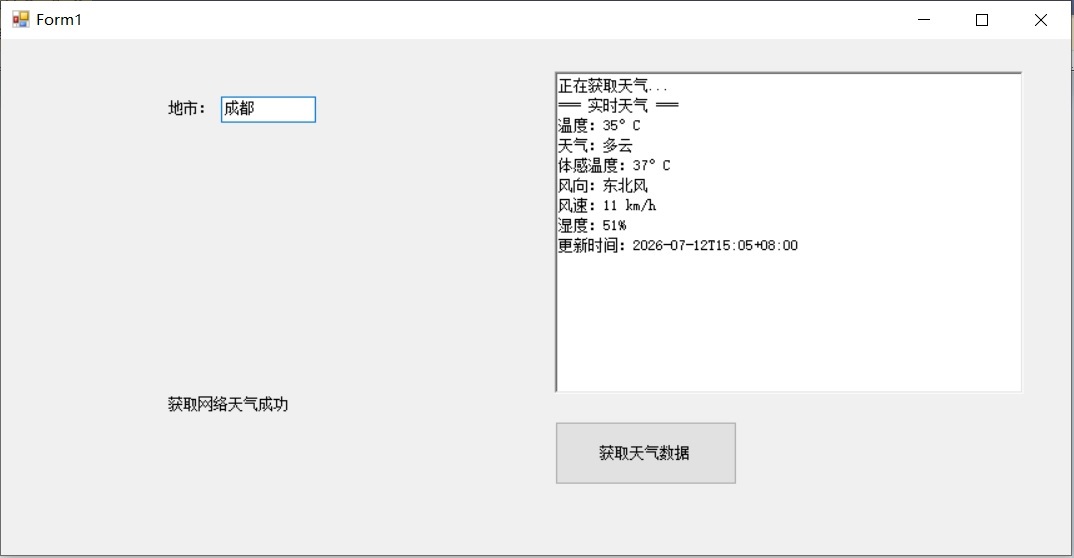
1、和风天气官网 注册
2、建立控制台建立创建项目和凭据
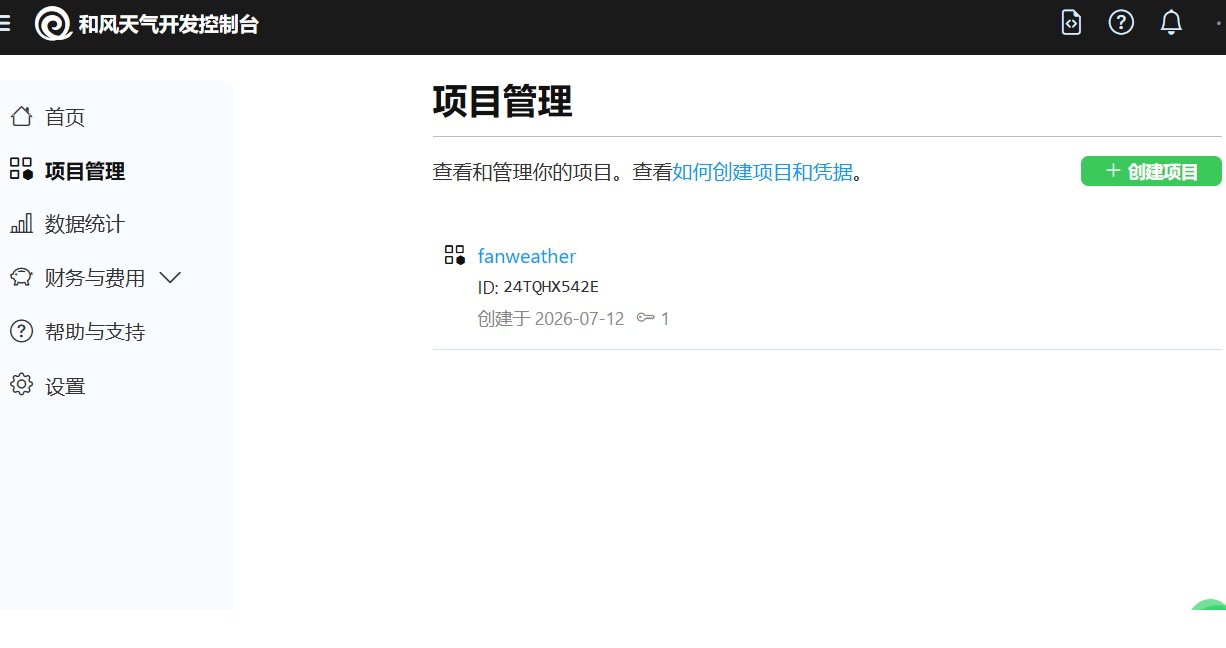
记录好你的 API Host和 API key
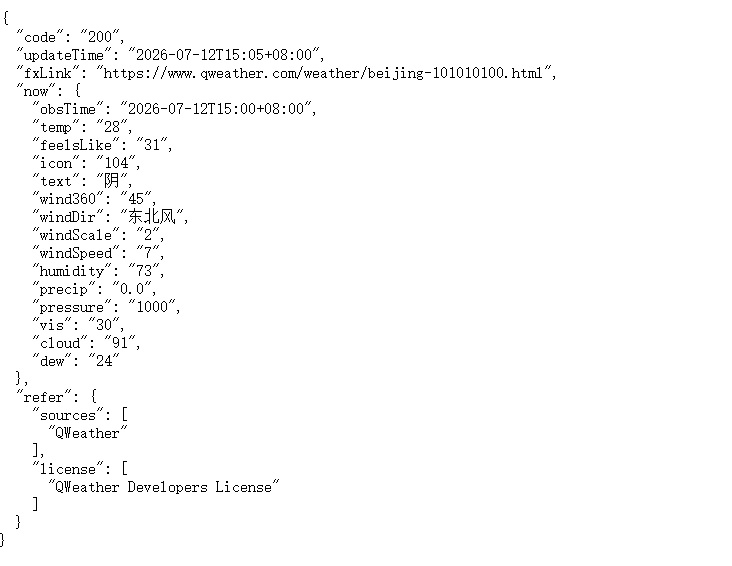
在浏览器中输入下面语句测试
https://pn6apytfxe.re.qweatherapi.com/v7/weather/now?location=101010100&key=你自己的API key
可见下图
完整的c#代码如下:
using System;
using System.Collections.Generic;
using System.ComponentModel;
using System.Data;
using System.Drawing;
using System.Linq;
using System.Text;
using System.Threading.Tasks;
using System.Windows.Forms;

//using System;
using System.Net.Http;
using System.Text.Json;    //Install-Package System.Text.Json
//using System.Threading.Tasks;


namespace WindowsFormsApp1
{


    public partial class Form1 : Form
    {

        // 请替换为你的和风天气 API Key
        private const string API_KEY = "输入你自己的API KEY";
        // 免费版使用 devapi
        private const string BASE_URL = "https://输入你自己的***.qweatherapi.com";

                                              //pn6apytfxe.re.qweatherapi.com


        public Form1()
        {
            InitializeComponent();
            // 绑定按钮点击事件
            btnGetWeather.Click += async (sender, e) => await GetWeatherAsync();
        }

        private void Form1_Load(object sender, EventArgs e)
        {

        }

        private void Button1_Click(object sender, EventArgs e)
        {

        }
        private async Task GetWeatherAsync()
        {
            string cityName = txtCity.Text.Trim();
            if (string.IsNullOrEmpty(cityName))
            {
                MessageBox.Show("请输入城市名称");
                return;
            }

            // 禁用按钮,防止重复点击
            btnGetWeather.Enabled = false;
            rtbResult.Clear();
            rtbResult.AppendText("正在获取天气...\n");

            try
            {

                // string locationId = "101010100";  //北京  调试用

                // 第一步:根据城市名获取城市ID(和风天气的 location ID)
                //label1.Text =  cityName;


                string locationId = await GetCityIdAsync(cityName);

                 if (string.IsNullOrEmpty(locationId))
                 {
                     rtbResult.AppendText("未找到该城市,请检查输入。\n");
                     return;
                 }


                // 第二步:获取实时天气
                var nowWeather = await GetNowWeatherAsync(locationId);
                if (nowWeather != null)
                {
                    rtbResult.AppendText($"=== 实时天气 ===\n");
                    rtbResult.AppendText($"温度:{nowWeather.Temp}°C\n");
                    rtbResult.AppendText($"天气:{nowWeather.Text}\n");
                    rtbResult.AppendText($"体感温度:{nowWeather.FeelsLike}°C\n");
                    rtbResult.AppendText($"风向:{nowWeather.WindDir}\n");
                    rtbResult.AppendText($"风速:{nowWeather.WindSpeed} km/h\n");
                    rtbResult.AppendText($"湿度:{nowWeather.Humidity}%\n");
                    rtbResult.AppendText($"更新时间:{nowWeather.LastUpdate}\n");
                }

                // 可选:获取未来3天预报
                /*
                var forecast = await GetForecastAsync(locationId);
                if ((forecast != null) && (forecast.Count() > 0))
                {
                    rtbResult.AppendText("\n=== 未来三天预报 ===\n");
                    foreach (var day in forecast)
                    {
                        rtbResult.AppendText($"{day.Date} 白天:{day.TextDay},夜间:{day.TextNight},{day.TempMin}~{day.TempMax}°C\n");
                    }
                }
                */
            }
            catch (Exception ex)
            {
                MessageBox.Show($"发生错误:{ex.Message}", "错误", MessageBoxButtons.OK, MessageBoxIcon.Error);
            }
            finally
            {
                btnGetWeather.Enabled = true;
            }
        }

        // 根据城市名获取城市ID(使用和风天气的地理API)

        private async Task<string> GetCityIdAsync(string cityName)
        {
            // 创建 HttpClientHandler 实例
            HttpClientHandler handler = new HttpClientHandler();
            // 设置自动解压 gzip 和 deflate
            handler.AutomaticDecompression = System.Net.DecompressionMethods.GZip | System.Net.DecompressionMethods.Deflate;

            // 使用静态 HttpClient 实例(推荐复用)
            HttpClient _httpClient = new HttpClient(handler);

            string url = $"{BASE_URL}/geo/v2/city/lookup?location={Uri.EscapeDataString(cityName)}&key={API_KEY}";
            var response = await _httpClient.GetAsync(url);
            response.EnsureSuccessStatusCode();
            string json = await response.Content.ReadAsStringAsync();
            var doc = JsonDocument.Parse(json);
            var root = doc.RootElement;
            if (root.TryGetProperty("code", out var code) && code.GetString() == "200")
            {
                var locations = root.GetProperty("location");
                if (locations.GetArrayLength() > 0)
                {
                    return locations[0].GetProperty("id").GetString();
                }
            }

            return null;

        }


        // 获取实时天气
        private async Task<NowWeather> GetNowWeatherAsync(string locationId)
        {

            // 创建 HttpClientHandler 实例
              HttpClientHandler handler = new HttpClientHandler();
              // 设置自动解压 gzip 和 deflate
              handler.AutomaticDecompression = System.Net.DecompressionMethods.GZip | System.Net.DecompressionMethods.Deflate;

              // 使用静态 HttpClient 实例(推荐复用)
              HttpClient _httpClient = new HttpClient(handler);


         string url = $"{BASE_URL}/v7/weather/now?location={locationId}&key={API_KEY}";
       // string url = $"https://pn6apytfxe.re.qweatherapi.com/v7/weather/now?location=101010100&key=b184e76042e041acb1157b986ebaee93";

            // 设置请求头,告诉服务器我们发送的是 gzip 压缩的数据

            //_httpClient.DefaultRequestHeaders.AcceptEncoding.Add(new System.Net.Http.Headers.StringWithQualityHeaderValue("UTF-8")); // 可以添加其他编码类型


            var response = await _httpClient.GetAsync(url);
            response.EnsureSuccessStatusCode();


            string json = await response.Content.ReadAsStringAsync();


            label1.Text = "获取网络天气成功";

            var doc = JsonDocument.Parse(json);


            var root = doc.RootElement;
            if (root.TryGetProperty("code", out var code) && code.GetString() == "200")
            {
                var now = root.GetProperty("now");
                var update = root.GetProperty("updateTime").GetString();
                return new NowWeather
                {
                    Temp = now.GetProperty("temp").GetString(),
                    Text = now.GetProperty("text").GetString(),
                    FeelsLike = now.GetProperty("feelsLike").GetString(),
                    WindDir = now.GetProperty("windDir").GetString(),
                    WindSpeed = now.GetProperty("windSpeed").GetString(),
                    Humidity = now.GetProperty("humidity").GetString(),
                    LastUpdate = update
                };
            }

            return null;
        }

        // 获取未来3天预报(7天预报也可,但3天更简洁)
        /*
        private async Task<List<DailyForecast>> GetForecastAsync(string locationId)
        {
            string url = $"{BASE_URL}/v7/weather/3d?location={locationId}&key={API_KEY}";
            var response = await _httpClient.GetAsync(url);
            response.EnsureSuccessStatusCode();
            string json = await response.Content.ReadAsStringAsync();
            var doc = JsonDocument.Parse(json);
            var root = doc.RootElement;
            if (root.TryGetProperty("code", out var code) && code.GetString() == "200")
            {
                var daily = root.GetProperty("daily");
                var list = new List<DailyForecast>();
                foreach (var item in daily.EnumerateArray())
                {
                    list.Add(new DailyForecast
                    {
                        Date = item.GetProperty("fxDate").GetString(),
                        TextDay = item.GetProperty("textDay").GetString(),
                        TextNight = item.GetProperty("textNight").GetString(),
                        TempMax = item.GetProperty("tempMax").GetString(),
                        TempMin = item.GetProperty("tempMin").GetString()
                    });
                }
                return list;
            }
            return null;
        }
            */
    }


    // 辅助类(也可以定义在Form1.cs内部)


    public class NowWeather
    {
        public string Temp { get; set; }
        public string Text { get; set; }
        public string FeelsLike { get; set; }
        public string WindDir { get; set; }
        public string WindSpeed { get; set; }
        public string Humidity { get; set; }
        public string LastUpdate { get; set; }
    }

    public class DailyForecast
    {
        public string Date { get; set; }
        public string TextDay { get; set; }
        public string TextNight { get; set; }
        public string TempMax { get; set; }
        public string TempMin { get; set; }
    }

}