目录
一.导出模块
本节编写将大模型写好的小说导出为markdown文件或者word文件的功能模块。
uv add python-docx
在核心代码文件夹src下创建exporter.py文件,仍让用cline编写,提示词如下:
@/src/exporter.py 创建导出模块:把生成好的整本小说写成文件。
输入是一本 " 已经填好各章正文 " 的大纲对象。需要两种导出:
- Markdown :书名做大标题,下面是梗概和各章(每章一个 标题 + 正文),拼成一个 .md 文件。
- Word ( .docx ):书名、梗概,每章一个标题并按章分页。
Word 生成库要等到真正用它的函数里才导入 ------ 这样没装它的 时候,Markdown 导出照样能跑。
输出目录不存在要自动建。
这时候可以新建一个对话,因为这个模块和之前的模块直接联系性不大,所以新建一个模块还省token。
python
from pathlib import Path

from src.schema import Outline


def export_markdown(outline: Outline, output_dir: str | Path = ".") -> Path:
    """将整本小说导出为 Markdown 文件。

    Args:
        outline: 已填好各章正文的大纲对象。
        output_dir: 输出目录,不存在时自动创建。

    Returns:
        生成的 .md 文件路径。
    """
    output_path = Path(output_dir)
    output_path.mkdir(parents=True, exist_ok=True)

    lines: list[str] = []

    # 书名(大标题)
    lines.append(f"# {outline.title}")
    lines.append("")

    # 梗概
    if outline.summary:
        lines.append(outline.summary)
        lines.append("")

    # 各章
    for chapter in outline.chapters:
        lines.append(f"## 第{chapter.index}章 {chapter.title}")
        lines.append("")
        if chapter.content:
            lines.append(chapter.content)
        lines.append("")

    text = "\n".join(lines)
    file_path = output_path / f"{outline.title}.md"
    file_path.write_text(text, encoding="utf-8")
    return file_path


def export_docx(outline: Outline, output_dir: str | Path = ".") -> Path:
    """将整本小说导出为 Word (.docx) 文件。

    注意:此函数依赖 python-docx 库,仅在调用时导入。

    Args:
        outline: 已填好各章正文的大纲对象。
        output_dir: 输出目录,不存在时自动创建。

    Returns:
        生成的 .docx 文件路径。
    """
    from docx import Document
    from docx.enum.text import WD_ALIGN_PARAGRAPH

    output_path = Path(output_dir)
    output_path.mkdir(parents=True, exist_ok=True)

    doc = Document()

    # --- 封面:书名 ---
    title_para = doc.add_heading(outline.title, level=0)
    title_para.alignment = WD_ALIGN_PARAGRAPH.CENTER

    # --- 梗概 ---
    if outline.summary:
        doc.add_paragraph(outline.summary)

    # --- 各章 ---
    for i, chapter in enumerate(outline.chapters):
        # 每章另起一页(跳过第一章,因为已在封面页之后)
        if i > 0:
            doc.add_page_break()

        doc.add_heading(f"第{chapter.index}章 {chapter.title}", level=1)
        doc.add_paragraph(chapter.content)

    file_path = output_path / f"{outline.title}.docx"
    doc.save(str(file_path))
    return file_path
二.pipeline流程
本节负责将之前写的几个功能模块串联起来。
所有零件 (schema/config/prompts/llm_client/exporter )就绪,组装主线。
和之前同样的流程,创建pipeline.py文件,输入提示词。
@/src/pipeline.py 创建编排模块,把整个流程串起来:先规划出大纲,再逐章扩写成正文,最后导出成书。
这是对外的主入口,接收主题和章节数。
三件事:
- 生成大纲:调 LLM 拿结构化大纲,校验它合不合法;不 合法就降温再试一次。
- 扩写单章:调 LLM ,把 " 全书摘要、本章大纲、上一章的 结尾" 一起带进去, 好让这章和前后连贯。
- 主流程:生成大纲 → 循环每一章扩写(每写完一章,记下它的结尾,留给下一章衔接)
- 导出。某一章写失败不要让整本书崩掉,记下来最后报 告。过程用 print 提示进度。
规划和大纲扩写都写成普通函数就行,不要搞成类。
python
"""编排模块------对外主入口,把整个流程串起来。

流程:
    生成大纲 → 逐章扩写 → 导出成书。
某一章写失败不会让整本书崩掉,记下来最后报告。
"""

from __future__ import annotations

import json
from typing import Any

from src import config
from src.exporter import export_markdown
from src.llm_client import (
    LLMConnectionError,
    LLMJSONError,
    chat,
    chat_json,
)
from src.prompts import CHAPTER_SYSTEM, OUTLINE_SYSTEM, chapter_user, outline_user
from src.schema import Chapter, Outline


# ============================================================
# 1. 生成大纲
# ============================================================


def generate_outline(theme: str, chapter_count: int) -> Outline:
    """生成小说大纲,并在失败时降温重试一次。

    步骤:
        1. 用 `chat_json` 调 LLM 获取结构化大纲(含 JSON 自修正)。
        2. 用 Pydantic 校验字段合法性(章节数是否匹配、字段是否完整等)。
        3. 校验失败 → 降温(temperature * 0.8),改用 `chat` + 手动解析重试一次。
        4. 两次都失败则向外抛出异常。

    参数:
        theme: 小说主题
        chapter_count: 期望的章节数量

    返回:
        校验通过的 Outline 对象。

    异常:
        LLMConnectionError: 网络/服务端错误且重试耗尽。
        LLMJSONError:       JSON 解析失败(自修正后仍失败)。
        ValueError:         降温重试后仍校验失败(字段残缺/章节数不匹配等)。
    """
    # ── 第一次尝试:用 chat_json(自带一次 JSON 自修正) ────────────
    try:
        raw_dict: dict[str, Any] = chat_json(
            prompt=outline_user(theme, chapter_count),
            system=OUTLINE_SYSTEM,
            temperature=config.outline_temperature,
        )
        outline = Outline.model_validate(raw_dict)
        _validate_chapter_count(outline, chapter_count)
        return outline

    except (LLMConnectionError, LLMJSONError):
        # 调用/JSON 层面的失败不值得降温重试(已内部重试过),继续往外抛
        raise

    except Exception as first_err:
        # Pydantic 校验失败 或 章节数不匹配 → 降温重试一次
        pass

    # ── 第二次尝试:降温,手动解析 ────────────────────────────────────
    lower_temp = config.outline_temperature * 0.8
    raw_text = chat(
        prompt=outline_user(theme, chapter_count),
        system=OUTLINE_SYSTEM,
        temperature=lower_temp,
    )
    try:
        cleaned = _extract_json(raw_text)
        raw_dict = json.loads(cleaned)
        outline = Outline.model_validate(raw_dict)
        _validate_chapter_count(outline, chapter_count)
        return outline

    except Exception as second_err:
        raise ValueError(
            f"大纲生成失败(降温重试后仍校验不通过)\n"
            f"第一次错误:{first_err}\n"
            f"第二次错误:{second_err}"
        ) from second_err


def _validate_chapter_count(outline: Outline, expected: int) -> None:
    """校验章节数量是否匹配。"""
    actual = len(outline.chapters)
    if actual != expected:
        raise ValueError(
            f"章节数量不匹配:期望 {expected} 章,实际返回 {actual} 章"
        )


def _extract_json(raw: str) -> str:
    """从 LLM 返回文本中提取 JSON 部分(适配 chat 返回的纯文本)。

    处理 ```json 代码块标记、前后缀文字等。
    """
    import re

    text = raw.strip()
    # 尝试找 ```json ... ```
    match = re.search(r"```(?:json)?\s*([\s\S]*?)```", text)
    if match:
        return match.group(1).strip()
    # 没有代码块标记,直接找第一个 { 和最后一个 }
    start = text.find("{")
    end = text.rfind("}")
    if start != -1 and end != -1 and end > start:
        return text[start : end + 1]
    return text


# ============================================================
# 2. 扩写单章
# ============================================================


def expand_chapter(
    outline: Outline,
    chapter_index: int,
    prev_ending: str = "",
) -> str:
    """扩写指定章节的正文。

    参数:
        outline:       全书大纲(含各章 outline 信息)
        chapter_index: 章节序号(1-based,即第几章)
        prev_ending:   上一章结尾文本(用于衔接,首章传空字符串)

    返回:
        本章的完整正文(Markdown 格式文本)。

    异常:
        LLMConnectionError: 网络/服务端错误且重试耗尽。
        ValueError:          chapters 中找不到对应索引的章节。
    """
    # 找到对应章节(outline.chapters 是 0-based list)
    try:
        chapter: Chapter = outline.chapters[chapter_index - 1]
    except IndexError:
        raise ValueError(
            f"章节索引 {chapter_index} 超出范围(共 {len(outline.chapters)} 章)"
        )

    prompt = chapter_user(
        book_title=outline.title,
        book_summary=outline.summary,
        chapter_title=chapter.title,
        chapter_outline=chapter.outline,
        chapter_clues=chapter.clues,
        prev_ending=prev_ending,
    )

    content = chat(
        prompt=prompt,
        system=CHAPTER_SYSTEM,
        temperature=config.chapter_temperature,
    )
    return content


# ============================================================
# 3. 主流程
# ============================================================


def run_pipeline(
    theme: str,
    chapter_count: int,
    output_dir: str = "output",
) -> None:
    """主编排入口:生成大纲 → 逐章扩写 → 导出成书。

    参数:
        theme:         小说主题
        chapter_count: 章节数量
        output_dir:    导出目录(默认为 "output")

    过程提示全部用 print 输出。
    """
    print(f"🎯 开始生成大纲......(主题:{theme},共 {chapter_count} 章)")

    # ── 1. 生成大纲 ───────────────────────────────────────────────
    outline = generate_outline(theme, chapter_count)
    print(f"✅ 大纲生成完成:{outline.title}(共 {len(outline.chapters)} 章)")

    # ── 2. 逐章扩写 ───────────────────────────────────────────────
    prev_ending: str = ""
    failed_chapters: list[int] = []

    for chapter in outline.chapters:
        print(f"\n✍️  正在扩写第 {chapter.index} 章:{chapter.title}......")
        try:
            content = expand_chapter(outline, chapter.index, prev_ending)
            chapter.content = content

            # 记录本章结尾(取末尾 200 字,用于下一章衔接)
            tail_len = 200
            prev_ending = content[-tail_len:] if len(content) >= tail_len else content

            print(
                f"✅ 第 {chapter.index} 章扩写完成({len(content)} 字符)"
            )
        except Exception as e:
            print(f"❌ 第 {chapter.index} 章扩写失败:{e}")
            failed_chapters.append(chapter.index)
            # 失败时不更新 prev_ending,下一章沿用上一章的结尾

    # ── 3. 汇总报告 ───────────────────────────────────────────────
    print()
    if failed_chapters:
        failed_str = ", ".join(str(i) for i in failed_chapters)
        print(f"⚠️  有 {len(failed_chapters)} 章扩写失败:第 {failed_str} 章")
    else:
        print(f"🎉 所有 {chapter_count} 章扩写完成!")

    # ── 4. 导出 ───────────────────────────────────────────────────
    print("📄 正在导出 Markdown......")
    export_path = export_markdown(outline, output_dir)
    print(f"✅ 导出完成:{export_path}")
行文至此,虽然整个小项目还没做完,但已经感受到时代猛然变迁了,这AI提升效率简直是从蒸汽时代跨越电气时代直接来到了信息时代,NB。
三.程序入口
在main文件里编写,先安装click包,uv add click
提示词如下:
创建命令行入口(放项目根目录)。用户通过它启动生成。
要接收:小说主题(必填)、要写几章、导出什么格式(Markdown / Word / 都要)、输出放哪。
把这些传给编排模块的主入口。出了错要给用户一句清楚的人话报错,而不是甩一栈 traceback 。
用 click 做这个 CLI 。
AI生成代码如下:
python
"""小说生成器 CLI ------ 用户通过它启动整个生成流程。"""

import click

from src.pipeline import run_pipeline


@click.command()
@click.argument("theme", type=str)
@click.option(
    "--chapters",
    "-c",
    default=5,
    show_default=True,
    help="要写多少章",
)
@click.option(
    "--format",
    "-f",
    type=click.Choice(["markdown", "word", "both"], case_sensitive=False),
    default="markdown",
    show_default=True,
    help="导出格式",
)
@click.option(
    "--output",
    "-o",
    default="output",
    show_default=True,
    help="输出目录",
)
def main(theme: str, chapters: int, format: str, output: str) -> None:
    """用 AI 自动生成一本小说。

    THEME 是小说主题,必填。例如:\b

        novel "修仙:我在凡间开了家烧烤摊"

    详见:https://github.com/your-repo/novel
    """
    # 将用户选的格式转成内部使用的列表
    format_map = {
        "markdown": ["markdown"],
        "word": ["docx"],
        "both": ["markdown", "docx"],
    }
    formats = format_map[format]

    try:
        run_pipeline(
            theme=theme,
            chapter_count=chapters,
            output_dir=output,
            formats=formats,
        )
    except Exception as exc:
        raise click.ClickException(
            f"生成失败:{exc}"
        )


if __name__ == "__main__":
    main()
然后按照AI给出的执行命令进行程序测试即可。
例如:
python main.py -c 4 -f word "重生之董事长给我打工"
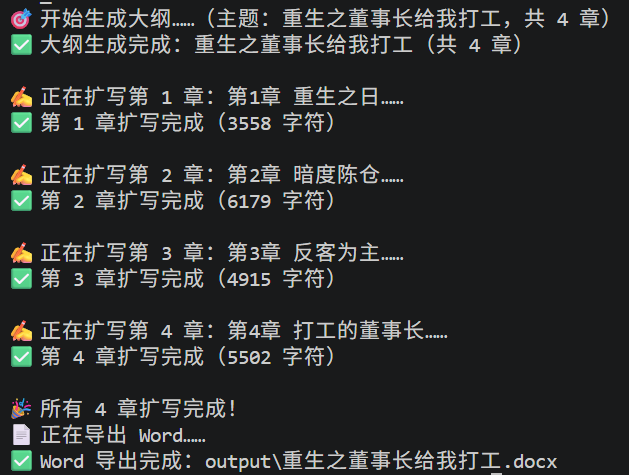
最后不得不感叹,现在AI发展如此之快,不知道再发展几年,互联网行业会不会开始一定程度上进行员工优化呢?
不是我不明白,是世界变化快~